Page 165 of 276
163
jumper_en_Chap08_Aide-rapide_ed01-2015
tOWInG
t
owing the vehicle
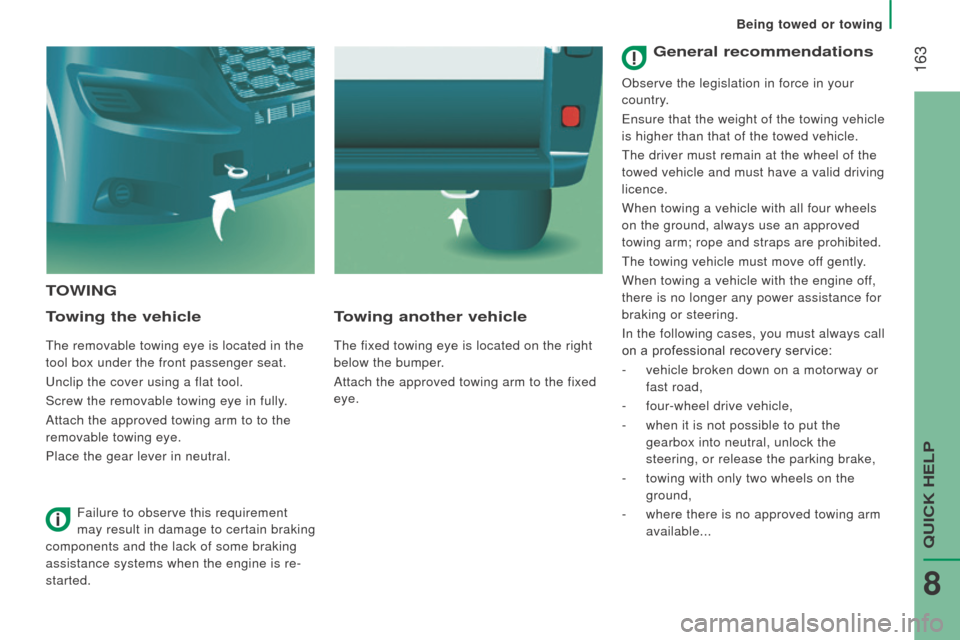
The removable towing eye is located in the
tool box under the front passenger seat.
Unclip the cover using a flat tool.
Screw the removable towing eye in fully.
Attach the approved towing arm to to the
removable towing eye.
Place the gear lever in neutral.
towing another vehicle
The fixed towing eye is located on the right
below the bumper.
Attach the approved towing arm to the fixed
eye.
Failure to observe this requirement
may result in damage to certain braking
components and the lack of some braking
assistance systems when the engine is re-
started.
General recommendations
observe the legislation in force in your
country .
Ensure that the weight of the towing vehicle
is higher than that of the towed vehicle.
The driver must remain at the wheel of the
towed vehicle and must have a valid driving
licence.
When towing a vehicle with all four wheels
on the ground, always use an approved
towing arm; rope and straps are prohibited.
The towing vehicle must move off gently.
When towing a vehicle with the engine off,
there is no longer any power assistance for
braking or steering.
i
n the following cases, you must always call
on a professional recovery service:
-
vehicle broken down on a motorway or
fast road,
-
four-wheel drive vehicle,
-
when it is not possible to put the
gearbox into neutral, unlock the
steering, or release the parking brake,
-
towing with only two wheels on the
ground,
-
where there is no approved towing arm
available...
Being towed or towing
QUiCK HELP
8
Page 188 of 276

186
jumper_en_Chap10a_Autoradio-Fiat-tactile-1_ed01-2015
Steering mounted controls
Pause / restore the CD, USB/iPod,
Bluetooth® sources.
Mute / restore sound from the radio.
Switch the microphone off / on during
a telephone call.
Switch voice recognition on.
in
terrupt a voice message to start a
new voice command.
i
nterrupt voice recognition.
Push up or down: increase or
decrease the volume for voice
announcements and music sources,
hands-free and speaking texts. Accept an incoming call.
Accept a second incoming call and
put the current call on hold.
Switch on voice recognition for the
telephone function.
in
terrupt a voice message to issue
another voice command.
i
nterrupt voice recognition. Radio, push up or down: select the
next / previous station.
Radio, hold up or down: sweep
frequencies up / down until the button
is released.
Media, push up or down: select the
next / previous track.
Media, hold up or down: fast for ward
/
b
ack until the button is released.
rej
ect the incoming call.
End the call in progress.
Touch Screen Audio - Telematic System
Page 193 of 276
191
jumper_en_Chap10a_Autoradio-Fiat-tactile-1_ed01-2015
Level 1Level 2 Level 3co mment
rAd
IO
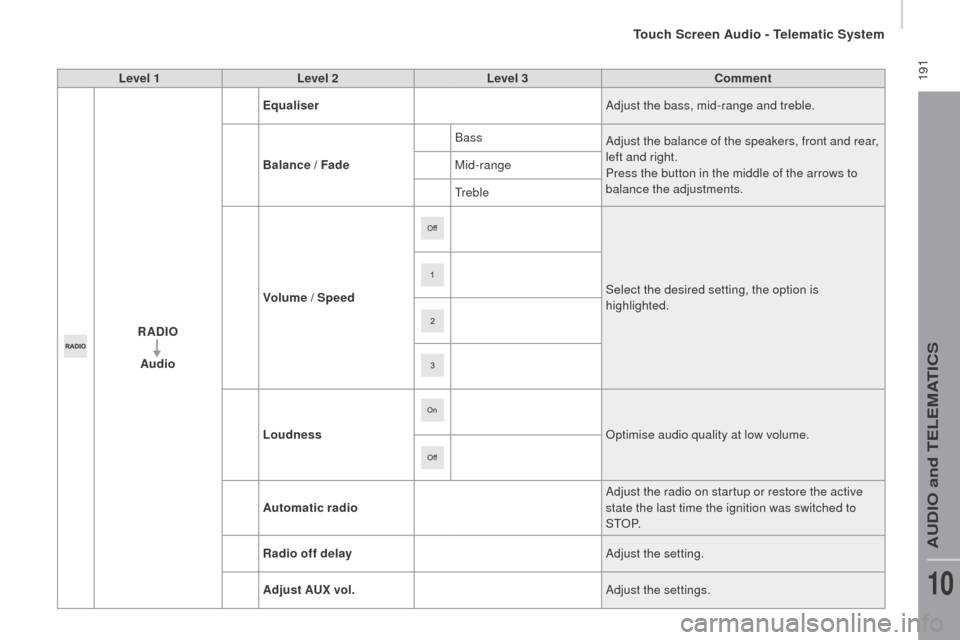
Audio Equaliser
Adjust the bass, mid-range and treble.
Balance / Fade Bass
Adjust the balance of the speakers, front and rear,
left and right.
Press the button in the middle of the arrows to
balance the adjustments.
Mid-range
Treble
Volume / Speed Select the desired setting, the option is
highlighted.
Loudness
op
timise audio quality at low volume.
Automatic radio Adjust the radio on startup or restore the active
state the last time the ignition was switched to
S T
oP.
ra
dio off delay Adjust the setting.
Adjust A
u
x vol. Adjust the settings.
Touch Screen Audio - Telematic System
AUDio and TELEMATiCS
10
Page 197 of 276
195
jumper_en_Chap10a_Autoradio-Fiat-tactile-1_ed01-2015
Level 1Level 2 Level 3co mment
ME d
I
A Briefly press the buttons to play the previous/next
track.
Press and hold the buttons for fast for ward or
back in the track selected.
ME
d
I
A
n
avigate
cur
rently playing
na
vigate and select tracks on the active device.
The selection possibilities depend on the device
connected or the type of CD inserted.
Artists
Albums
Genres
tr
a c k s
Playlists
Audio books
Podcasts
ME
d
I
A
Source
cdS
elect the desired audio source from those
available or insert a device intended for this
purpose, the system starts playing the source
automatically.
A
ux
u
SB
Bluetooth Sources connected
Pair a Bluetooth audio device.
Add device
Tel. connect.
ME
d
I
A
Info Information
Display information on the track playing.
Touch Screen Audio - Telematic System
AUDio and TELEMATiCS
10
Page 199 of 276
197
jumper_en_Chap10a_Autoradio-Fiat-tactile-1_ed01-2015
Level 1Level 2 Level 3co mment
ME d
I
A
ra
ndom Press the button to play the tracks on the CD,
USB, iPod or Bluetooth
device in random order.
ME
d
I
A
rep
eat Press the button to activate this function.
ME
d
I
A
Audio Equaliser
Adjust the bass, mid-range and treble.
Balance / Fade Bass
Adjust the balance of the speakers, front and rear,
left and right.
Press the button in the middle of the arrows to
balance the adjustments.
Mid-range
Treble
Volume / Speed Select the desired setting, the option is
highlighted.
Loudness
op
timise audio quality at low volume.
Automatic radio Adjust the radio on startup or restore the active
state the last time the ignition was switched to
S T
oP.
ra
dio off delay Adjust the setting.
Adjust A
u
x vol. Adjust the setting.
Touch Screen Audio - Telematic System
AUDio and TELEMATiCS
10
Page 200 of 276

198
jumper_en_Chap10a_Autoradio-Fiat-tactile-1_ed01-2015
uSB player
The system builds playlists (in temporary
memory), an operation which can take from
a few seconds to several minutes at the first
connection.
re
duce the number of non-music files and the
number of folders to reduce the waiting time.
The playlists are updated every time the
ignition is switched off or connection of a USB
memory stick. However, the audio system
memorises these lists and if they are not
modified, the loading time will be shorter.
in
sert a USB memory stick or connect a
peripheral device to the USB port in the central
storage space, provided for transferring data to
the system, using a suitable cable
(not supplied).
Auxiliary socket (Au x)
Connect the portable device (MP3 player…) to
the auxiliary Jack socket using an audio cable
(not supplied).
Located on the centre console, this port is used
only for powering and recharging the portable
device connected.
uSB port
First adjust the volume on your portable device
(to a high level). Then adjust the volume of your
audio system.
Control is via the portable device.
The functions of the device connected to the
"AUX" socket are controlled directly from the
device itself: changing track / folder / playlist or
starting/ending/pausing play using the audio
system control panel or steering mounted
controls is therefore not possible.
Do not leave the cable of your portable device
connected to the AUX socket when not in use,
to avoid possible noises from the speakers.
Touch Screen Audio - Telematic System
Page 202 of 276

200
jumper_en_Chap10a_Autoradio-Fiat-tactile-1_ed01-2015
Bluetooth® audio streaming
Streaming allows audio files on your telephone
to be played via the vehicle's speakers.Press "ME
d
I
A".
if t
here is an active media source,
press the " Source" button.
Select the " Bluetooth" media source
then press the " Add device" button.
Switch on Bluetooth on the device.
Some Bluetooth devices do not allow
scanning of tracks and information on
the telephone against the categories
present in the system.
if t
he procedure fails, deactivate Bluetooth and
then activate it again on your device.
Select for the name of the device and when
requested by the audio system, enter the P
i
n
number displayed in the screen of the system
or confirm in the device the P
i
n displayed.When the pairing procedure has completed, a
screen page appears:
-
r
eply "Yes" to the question, the Bluetooth
audio device will be saved as favourite (the
device will have priority over other devices
paired subsequently).
-
r
eply "
no"
, priority will be determined
according to the order of connection. the
last device connected will have the highest
priority.
During pairing, a screen page is displayed
showing the progress in the operation.
if n
o peripheral device has yet been paired with
the system, a special page is displayed in the
screen.
Select "Yes" to start the pairing procedure, and
so search for the name of the system in the
device.
Touch Screen Audio - Telematic System
Page 203 of 276
201
jumper_en_Chap10a_Autoradio-Fiat-tactile-1_ed01-2015
The version of software in the audio
system may not be compatible with the
generation of your Apple
® p l aye r.
connecting Apple® players
Connect the Apple® player to the USB port
using a suitable cable (not supplied).
Play starts automatically.
Control is via the audio system. The classifications available are those
of the portable device connected
(artists / albums / genres / tracks /
playlists / audio books / podcasts).
The default classification used is by
artist. To modify the classification used,
return to the first level of the menu
then select the desired classification
(playlists for example) and confirm
to go down through the menu to the
desired track.
Touch Screen Audio - Telematic System
AUDio and TELEMATiCS
10