Page 148 of 276

146
jumper_en_Chap08_Aide-rapide_ed01-2015
FusesA (amps) Allocation
12 7.5
r
ight-hand dipped headlamp
13 7.5Left-hand dipped headlamp
31 5Engine compartment control unit relay - Dashboard control unit relay (i\
gnition switch +)
32 7.5Cabin lighting (battery +)
33 7.5Battery check sensor on Stop & Start version (battery +)
34 7.5Minibus interior lighting - Hazard warning lamps
36 10Audio system - Air conditioning controls - Alarm - Tachograph - Battery cut-off control unit - Additional
heating programmer (battery +)
37 7.5Brake lamp switch - Third brake lamp -
i nstrument panel (ignition +)
38 20Central door locking (battery +)
42 5ABS control unit and sensor - AS
r sensor - DSC sensor - Brake lamp switch
43 20Windscreen wiper motor (ignition switch +)
47 20Driver's electric window motor
48 20Passenger's electric window motor
49 5Parking sensors control unit - Audio system - Steering mounted controls - Centre and side switch panels\
-
Auxiliary switch panel - Battery cut-off control unit (ignition switch +)
50 7.5Airbags and pre-tensioners control unit
51 5Tachograph - Power steering control unit - Air conditioning -
r eversing lamps - Water in Diesel sensor -
Air
flow sensor (ignition switch +)
53 7.5
i
nstrument panel (battery +)
89 -
n
ot used
90 7.5Left-hand main beam
91 7.5
r
ight-hand main beam
92 7.5Left-hand front foglamp
93 7.5
r
ight-hand front foglamp
Failed fuse
Page 150 of 276
148
jumper_en_Chap08_Aide-rapide_ed01-2015
Fuses in the engine
compartment
remove the nuts and tilt the box to access
the fuses.
r
efit the cover carefully after checking or
replacing fuses. Fuses
A (amps) Allocation
1 40ABS pump supply
2 50Diesel pre-heat unit
3 30
i
gnition switch - Starter motor
4 40Fuel heater
5 20/50Cabin ventilation with additional programmable heating
(battery +)
6 40/60Cabin fan maximum speed (battery +)
7 40/50/60 Cabin fan minimum speed (battery +)
8 40Cabin fan assembly (ignition switch +)
9 15
r
ear 12 V socket (battery +)
10 15Horn
11 -
n
ot used
14 15Front 12 V socket (battery +)
15 15Cigarette lighter (battery +)
16 -n
ot used
17 -
n
ot used
18 7.5Engine management control unit (battery +)
19 7.5Air conditioning compressor
20 30Screenwash/headlamp wash pump
21 15Fuel pump supply
22 -
n
ot used
23 30ABS electrovalves
24 7.5Auxiliary switch panel - Door mirror controls and folding
(ignition switch +)
30 15Door mirror heating
Failed fuse
Page 158 of 276

156
jumper_en_Chap08_Aide-rapide_ed01-2015
Parking the vehicle
Where possible, park the vehicle on level,
stable and non-slippery ground.
Apply the parking brake, switch off the
ignition and engage first gear.
Wear a high visibility vest and position the
warning triangle on the road.
You must ensure that the occupants get out
of the vehicle and wait in a safe location.
tools
These are stowed in a box located under the
front passenger seat.
-
T
urn the button a quarter of a turn then
pull the box.
-
After use, press the button then turn it a
quarter of a turn to secure the box.
A.
Long socket.
B.
Bar.
c
. Jack.
d
. Wheelbrace.
E.
Screwdriver (handle and bits).
F.
r emovable towing eye.
cHAnGInG A WHEELPneumatic suspension
i
f you vehicle is fitted with this system, you
must first activate vehicle lifting mode.
Press the two controls simultaneously for at
least 5 seconds; their indicator lamps come
on.
This mode is deactivated automatically after
changing a wheel, once the speed of the
vehicle has exceeded 3 mph (5 km/h).
The jack and the tool kit are specific to
your vehicle. Do not use them for other
purposes.
n
ever go underneath a vehicle supported
only by a jack (use an axle stand).
Puncture
Page 193 of 276
191
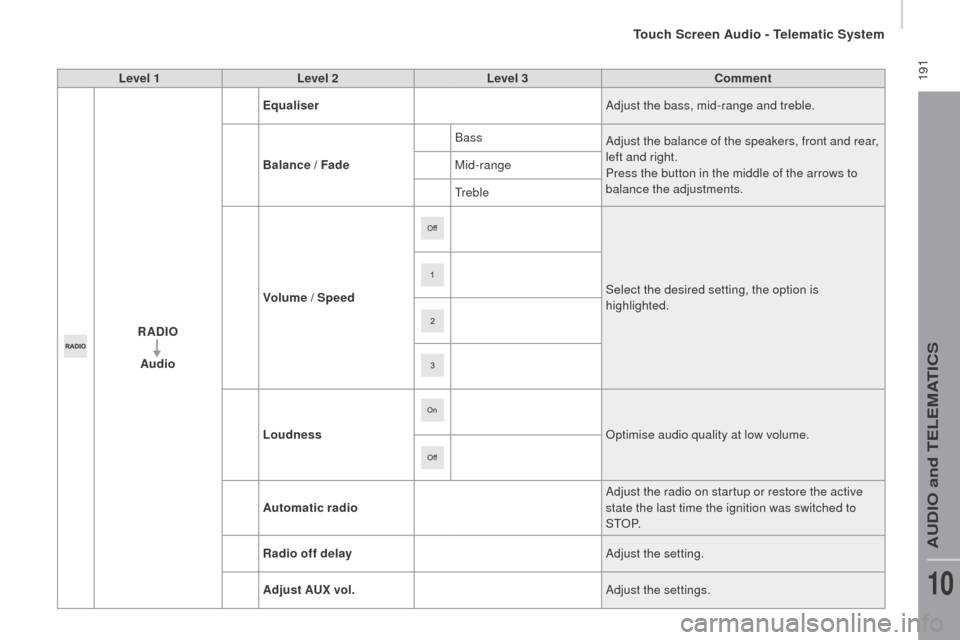
jumper_en_Chap10a_Autoradio-Fiat-tactile-1_ed01-2015
Level 1Level 2 Level 3co mment
rAd
IO
Audio Equaliser
Adjust the bass, mid-range and treble.
Balance / Fade Bass
Adjust the balance of the speakers, front and rear,
left and right.
Press the button in the middle of the arrows to
balance the adjustments.
Mid-range
Treble
Volume / Speed Select the desired setting, the option is
highlighted.
Loudness
op
timise audio quality at low volume.
Automatic radio Adjust the radio on startup or restore the active
state the last time the ignition was switched to
S T
oP.
ra
dio off delay Adjust the setting.
Adjust A
u
x vol. Adjust the settings.
Touch Screen Audio - Telematic System
AUDio and TELEMATiCS
10
Page 199 of 276
197
jumper_en_Chap10a_Autoradio-Fiat-tactile-1_ed01-2015
Level 1Level 2 Level 3co mment
ME d
I
A
ra
ndom Press the button to play the tracks on the CD,
USB, iPod or Bluetooth
device in random order.
ME
d
I
A
rep
eat Press the button to activate this function.
ME
d
I
A
Audio Equaliser
Adjust the bass, mid-range and treble.
Balance / Fade Bass
Adjust the balance of the speakers, front and rear,
left and right.
Press the button in the middle of the arrows to
balance the adjustments.
Mid-range
Treble
Volume / Speed Select the desired setting, the option is
highlighted.
Loudness
op
timise audio quality at low volume.
Automatic radio Adjust the radio on startup or restore the active
state the last time the ignition was switched to
S T
oP.
ra
dio off delay Adjust the setting.
Adjust A
u
x vol. Adjust the setting.
Touch Screen Audio - Telematic System
AUDio and TELEMATiCS
10
Page 200 of 276

198
jumper_en_Chap10a_Autoradio-Fiat-tactile-1_ed01-2015
uSB player
The system builds playlists (in temporary
memory), an operation which can take from
a few seconds to several minutes at the first
connection.
re
duce the number of non-music files and the
number of folders to reduce the waiting time.
The playlists are updated every time the
ignition is switched off or connection of a USB
memory stick. However, the audio system
memorises these lists and if they are not
modified, the loading time will be shorter.
in
sert a USB memory stick or connect a
peripheral device to the USB port in the central
storage space, provided for transferring data to
the system, using a suitable cable
(not supplied).
Auxiliary socket (Au x)
Connect the portable device (MP3 player…) to
the auxiliary Jack socket using an audio cable
(not supplied).
Located on the centre console, this port is used
only for powering and recharging the portable
device connected.
uSB port
First adjust the volume on your portable device
(to a high level). Then adjust the volume of your
audio system.
Control is via the portable device.
The functions of the device connected to the
"AUX" socket are controlled directly from the
device itself: changing track / folder / playlist or
starting/ending/pausing play using the audio
system control panel or steering mounted
controls is therefore not possible.
Do not leave the cable of your portable device
connected to the AUX socket when not in use,
to avoid possible noises from the speakers.
Touch Screen Audio - Telematic System
Page 210 of 276

208
jumper_en_Chap10a_Autoradio-Fiat-tactile-1_ed01-2015
Pairing a Bluetooth®
telephone
For reasons of safety and because they
require prolonged attention on the part
of the driver, the operations for pairing
a Bluetooth mobile telephone to the
hands-free system of the audio system
must be carried out with the vehicle
stationary .
Switch on the Bluetooth function of your
telephone and ensure that it is "visible to all"
(telephone configuration).
Select "Yes" to start the pairing procedure,
and search for the name of the system in the
telephone (otherwise selecting "
no
", the main
Telephone screen page is displayed). When the pairing procedure has
finished successfully, a screen page
appears:
-
r
eply "Yes" to the question, the
mobile phone is saved as the
favourite (this telephone will have
priority over other telephones
paired subsequently).
-
i
f no other device has been
paired, the system considers
the first device paired to be the
favourite.
When pairing, a screen page is displayed
showing progress in the operation.
The services available depend on the network,
the SiM c
ard and the compatibility of the
Bluetooth device used. Check the instructions
for your telephone and with your service
provider for the services to which you have
access.
Select the name of the system and, depending
on the telephone, using the telephone's
keypad, enter the P
i
n displayed in the screen
of the system or confirm in the telephone the
P
i
n
displayed. Press "
PHO
nE".if n
o telephone has yet been paired
in the system, a special page is
displayed in the screen.
if t
he operation fails, we recommend
switching the Bluetooth function of
your telephone off and then on again.
For telephones not set as favourite, the
order of priority is determined in the
order of connection. The last telephone
connected has the highest priority. The profiles compatible with the system are:
H F P,
o
P
P, P B A P, A 2 D P, A V
rC
P, M A P.
When you return to your vehicle, the last
telephone connected reconnects automatically,
within around 30 seconds of switching on the
ignition (with Bluetooth switched on).
To modify the automatic connection profile,
select the telephone in the list then select the
desired setting.
Automatic reconnection
When the ignition is switched on, the telephone
connected when the ignition was last switched
off reconnects automatically, if this connection
mode had been set during the pairing
procedure (see previous pages).
Connection is conformed by the display of a
message and the name of the telephone.
Touch Screen Audio - Telematic System
Page 221 of 276

219
jumper_en_Chap10a_Autoradio-Fiat-tactile-1_ed01-2015
Level 1Level 2 Level 3co mment
Settings Audio Equaliser
Adjust the bass, mid-range and treble.
Balance / Fade Bass
Adjust the balance of the speakers, front and rear,
left and right.
Press the button in the middle of the arrows to
balance the adjustments.
Mid-range
Treble
Volume / Speed Select the desired setting, the option is
highlighted.
Loudness
op
timise audio quality at low volume.
Automatic radio Adjust the radio on startup or restore the active
state the last time the ignition was switched to
S T
oP.
ra
dio off delay Adjust the setting.
Set A
u
x vol. Adjust the settings.
Settings
te
lephone /
Bluetooth
te
l. connected Connect
Start the connection to the selected Bluetooth
peripheral device.
Delete device Delete the selected peripheral device.
Save favourites Save the selected peripheral device in favourites.
Te x t s
o
nA
djust the settings.
Download
Add device Add a new peripheral device.
co
nnect audio Connect a device in audio only.
Touch Screen Audio - Telematic System
AUDio and TELEMATiCS
10