11
1
8
9
10
41 Audio and Telematics
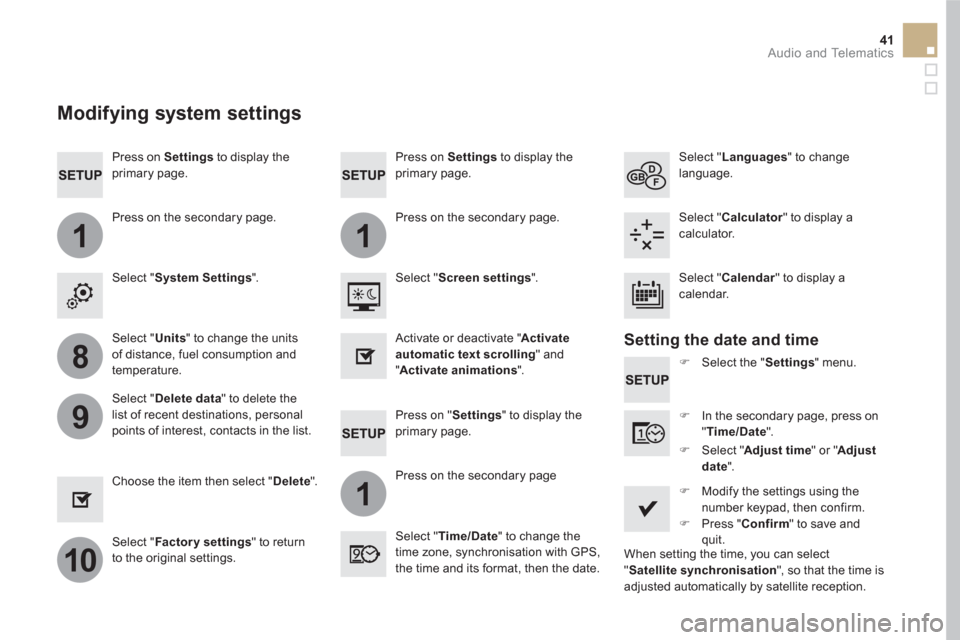
Press on Settings
to display the
primary page.
Press on "Settings" to display the
primary page.
Press on Settings
to display the
primary page.
Press on the secondary page.
Press on the secondary page
Press on the secondary page.
Select " System Settings
".
Select " Time/Date
" to change the
time zone, synchronisation with GPS,
the time and its format, then the date.
Select " Screen settings
".
Select " Units
" to change the units
of distance, fuel consumption and
temperature.
Select " Languages
" to change
language.
)
Select the " Settings
" menu.
Activate or deactivate " Activate
automatic text scrolling
" and
" Activate animations
".
Select " Delete data
" to delete the
list of recent destinations, personal
points of interest, contacts in the list.
Select " Calculator
" to display a
calculator.
)
In the secondary page, press on
" Time/Date
".
Choose the item then select " Delete
".
Select " Calendar
" to display a
calendar.
)
Modify the settings using the
number keypad, then confirm.
)
Press " Confirm
" to save and
quit.
)
Select " Adjust time
" or " Adjust
date
".
Select " Factor y settings
" to return
to the original settings.
Modifying system settings
Setting the date and time
When setting the time, you can select
" Satellite synchronisation
", so that the time is
adjusted automatically by satellite reception.
1
9
10
1
1
14
15
16
17
12
11
13
77 Audio and Telematics
Level 1
Level 2
Level 3
Comments
Settings
Secondary page
Screen
configuration
Animation
Activate or deactivate settings.
Brightness
Adjust the level of brightness.
Confirm
Save the settings.
Settings
Secondary page
System
settings
Units
Distance and fuel
consumption
Set the units used for distance, fuel consumption
and temperature.
Te m p e r a t u r e
Factor y settings
Reinitialize Return to the factory settings.
System info
View View the versions of the different modules
(system, mapping, risk areas) installed in the
system as well as the updates available.
Confirm
Save the settings.
Settings
Secondary page
Languages
All
Select the language then confirm.
Europe
Asia
America
Confirm
Having selected the language, save the setting.
111
11
12
13
9
101
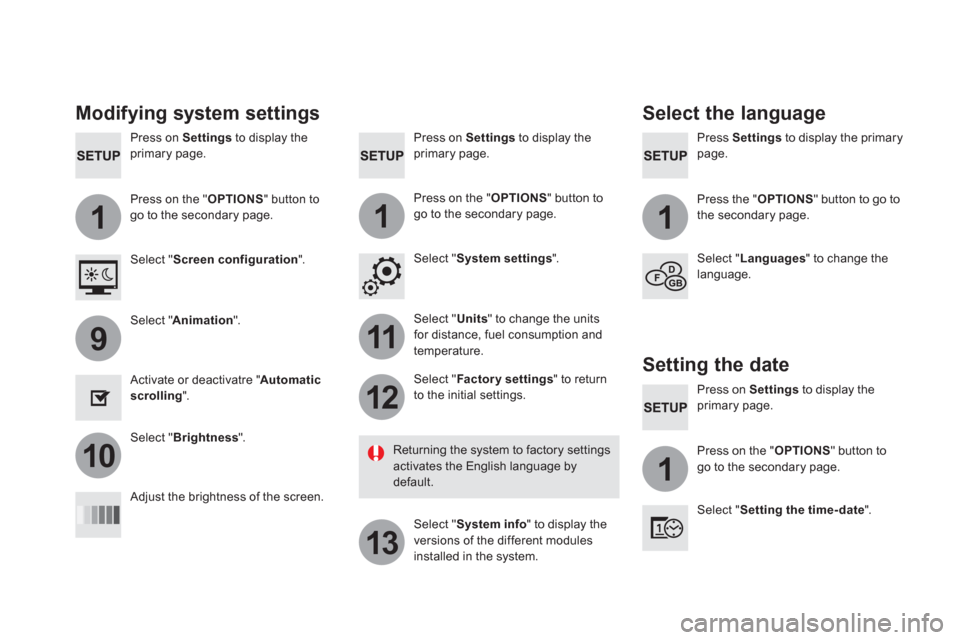
Press on Settings
to display the
primary page.
Press Settings
to display the primary
page.
Press on Settings
to display the
primary page.
Press on the " OPTIONS
" button to
go to the secondary page.
Press the " OPTIONS
" button to go to
the secondary page.
Press on the " OPTIONS
" button to
go to the secondary page.
Select " System settings
".
Select " Screen configuration
".
Select " Units
" to change the units
for distance, fuel consumption and
temperature.
Select " Languages
" to change the
language.
Activate or deactivatre " Automatic
scrolling
".
Adjust the brightness of the screen.
Select " Factor y settings
" to return
to the initial settings.
Select " System info
" to display the
versions of the different modules
installed in the system.
Modifying system settings
Returning the system to factory settings
activates the English language by
default.
Select " Animation
".
Select " Brightness
".
Select the language
Press on Settings
to display the
primary page.
Press on the " OPTIONS
" button to
go to the secondary page.
Select " Setting the time- date
".
Setting the date