Page 10 of 436

DS4_en_Chap00b_vue-ensemble_ed03-2015
Exterior
Keyless Entry and Starting 6 6-72
Remote control
6
0 - 65, 72
-
o
pening / closing
-
b
ack-up control
-
battery
Alarm
7
5-78 Lighting controls
1
28 -132
Headlamp adjustment
1
34
Guide-me-home lighting
1
31, 132
Welcome lighting
1
33
Directional lighting systems
1
35 -136
Changing bulbs
2
44-249
-
f
ront lamps
-
f
ront foglamps
-
si
de repeaters
Wiper controls
1
37-141
Changing a wiper blade
2
64 Door mirrors
9
3 -94
Blind spot sensors
2
13 -215
Doors
7
3 -74, 81
Keyless Entry and Starting
6
6-72
-
o
pening / closing
-
b
ack-up control
Child lock
1
62
Electric windows
7
9 - 80
Fuel tank
2
79 -281
Misfuel prevention
2
82
Accessories
274-275
Roof bars
2
65
Braking assistance
1
68 -169
Trajectory control
1
69 -170
Tyre under-inflation detection
20
6-207
Tyre pressures
2
06, 234, 315
Snow chains
2
43
Boot
6
1, 66, 82- 83
Reversing camera
2
26
Temporary puncture
repair kit
2
30 -234
Changing a wheel
2
35 -242
-
tools
-
r
emoving / refitting
AdBlue additive, topping up
2
94-300, 301-303
Changing bulbs
2
50-252
-
r
ear lamps
-
3
rd brake lamp
-
n
umber plate lamp
Parking sensors
2
24-225
Towbar
1
85, 268
Quickly detachable towball
2
69 -273
Towing
2
66-267
Page 12 of 436

DS4_en_Chap00b_vue-ensemble_ed03-2015
Instruments and controls
Instrument panels 18 -20
Warning lamps 2 1-34
Indicators
35
-38
Manual test
3
9
Setting buttons
4
0 - 42
-
t
rip distance recorder
-
dashboard lighting dimmer / black panel- customisation of dials and screens
Adjusting headlamps
1
34
Door mirrors
9
3 -94
Electric windows
7
9 - 80
Dashboard fuses
2
53 -256
Opening the bonnet
2
84 Monochrome screen
4
3-46
Seat belt / front passenger airbag warning lamp display
1
72-173, 177
Reversing camera 2 26
Manual gearbox
1
99
Automatic gearbox
20
0-203
Parking brake
1
92-197, 198
Rear view mirror
9
5
Courtesy lamps
1
42
Ventilation
9
6-98
Manual air conditioning
9
9 -100, 105
Digital air conditioning
1
01-104, 105
Demisting / Defrosting the rear screen
1
06
Audio system
3
91- 418
Setting the date / time
4
6
Touch screen tablet
4
7-51, 321-390
Setting the date / time
5
1
Interior mood lighting
1
43
Ignition switch / Steering lock / Starting with the key
1
86 -188
Steering lock / Starting with the START/STOP button
1
86, 189 -191
Page 27 of 436

25
DS4_en_Chap01_controle-de-marche_ed03-2015
Servicetemporarily,
accompanied by a
message. One or more minor faults for
which there is no specific
warning lamp have been
detected. Identify the cause of the fault using the message displayed
in the screen.
You can deal with some problems yourself, such as a door
open or the start of saturation of the particle filter
(as soon as the traffic conditions allow, regenerate the
filter by driving at a speed of at least 40 mph (60 km/h),
until the warning lamp goes off).
For any other problems, such as a fault with the tyre under
inflation detection system, contact a CITROËN dealer or a
qualified workshop.
fixed, accompanied by
a message. One or more major faults for which
there is no specific warning lamp
have been detected. Identify the cause of the fault using the message displayed
in the screen; you must then contact a CITROËN dealer or
a qualified workshop.
fixed, associated with the
flashing and then fixed
display of the service
indicator spanner.The servicing interval has been
exceeded.
Only on BlueHDi Diesel versions.
Your vehicle must be serviced as soon as possible.
Warning
/indicator lampis on Cause Action/Observations
Particle filter
(
d
iesel) fixed, accompanied
by an audible signal
message on the risk of
blockage of the particle
f i l t e r. This indicates that the particle
filter is starting to become
saturated.
As soon as driving conditions allow, regenerate the filter
by driving at a speed of at least 35 mph (60 km/h) until the
warning lamp goes off.
fixed, accompanied by
an audible signal and
and a message that the
particle filter additive
level is too low. This indicates the low level of the
additive reservoir.
Have the reservoir topped up as soon as possible by a
CITROËN dealer or a qualified workshop.
Monitoring
Page 42 of 436
DS4_en_Chap01_controle-de-marche_ed03-2015
The total and trip distances are displayed for
thirty seconds when the ignition is switched off,
when the driver's door is opened and when the
vehicle is locked or unlocked.
distance recorders
Total distance recorderTrip distance recorder
Measures the distance travelled since it was
last reset to zero by the driver.
F
W
ith the ignition on, press and hold this
button until zeros appear.
Measures the total distance travelled by the
vehicle since its first registration.
Page 47 of 436
45
DS4_en_Chap01_controle-de-marche_ed03-2015
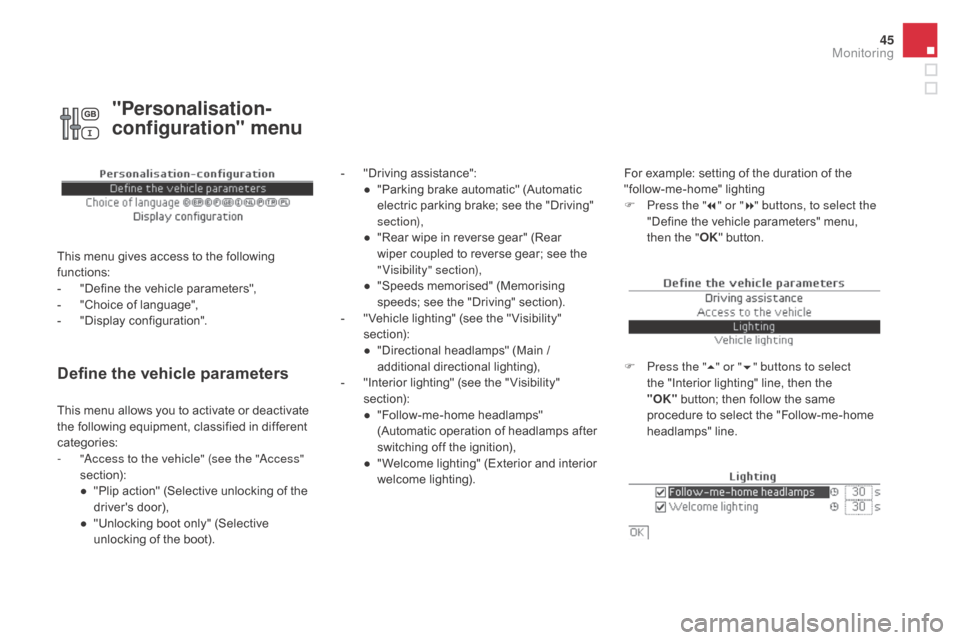
Define the vehicle parameters
- "Driving assistance":● " Parking brake automatic" (Automatic
electric parking brake; see the "Driving"
section),
●
"
Rear wipe in reverse gear" (Rear
wiper coupled to reverse gear; see the
"Visibility" section),
●
"
Speeds memorised" (Memorising
speeds; see the "Driving" section).
-
"
Vehicle lighting" (see the " Visibility"
section):
●
"
Directional headlamps" (Main /
additional directional lighting),
-
"
Interior lighting" (see the " Visibility"
section):
●
"
Follow-me-home headlamps"
(Automatic operation of headlamps after
switching off the ignition),
●
"
Welcome lighting" (Exterior and interior
welcome lighting). For example: setting of the duration of the
"follow-me-home" lighting
F
P
ress the "7" or " 8" buttons, to select the
"Define the vehicle parameters" menu,
then the " OK" button.
F
P
ress the "5" or " 6" buttons to select
the "Interior lighting" line, then the
"OK"
button; then follow the same
procedure to select the "Follow-me-home
headlamps" line.
This menu allows you to activate or deactivate
the following equipment, classified in different
categories:
-
"
Access to the vehicle" (see the "Access"
section):
●
"
Plip action" (Selective unlocking of the
driver's door),
●
"
Unlocking boot only" (Selective
unlocking of the boot).
"Personalisation-
configuration" menu
This menu gives access to the following
functions:
-
"
Define the vehicle parameters",
-
"
Choice of language",
-
"
Display configuration".
Monitoring
Page 51 of 436
49
DS4_en_Chap01_controle-de-marche_ed03-2015
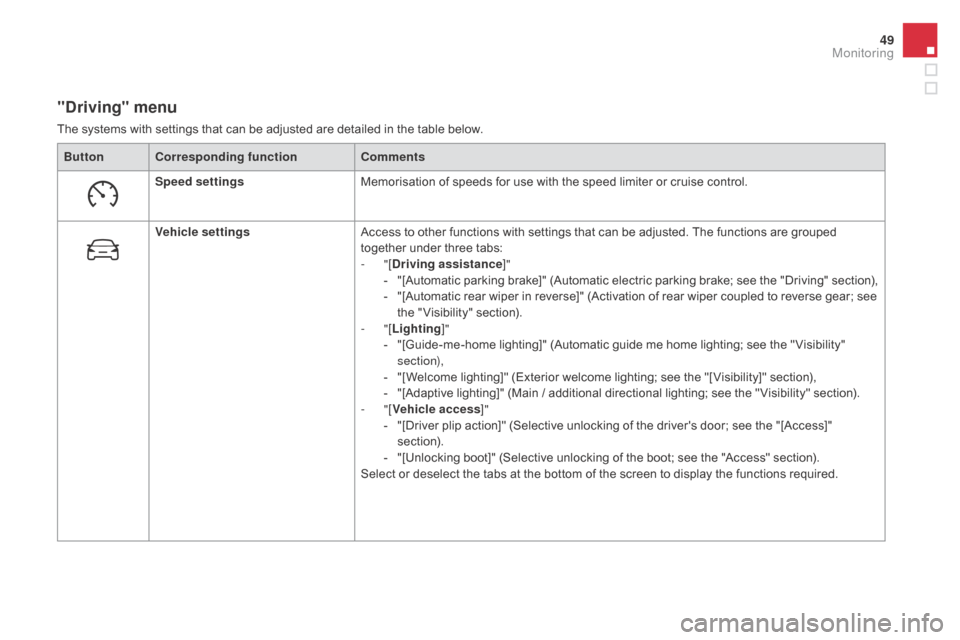
"driving" menu
The systems with settings that can be adjusted are detailed in the table below.Button Corresponding function Comments
Speed settings Memorisation of speeds for use with the speed limiter or cruise control.
Vehicle settings Access to other functions with settings that can be adjusted. The functions are grouped
together under three tabs:
-
"[
dr
iving assistance]"
-
"
[Automatic parking brake]" (Automatic electric parking brake; see the "Driving" section),
-
"
[Automatic rear wiper in reverse]" (Activation of rear wiper coupled to reverse gear; see
the " Visibility" section).
-
"[Lighting ]"
-
"
[Guide-me-home lighting]" (Automatic guide me home lighting; see the " Visibility"
section),
-
"
[Welcome lighting]" (Exterior welcome lighting; see the "[ Visibility]" section),
-
"
[Adaptive lighting]" (Main / additional directional lighting; see the " Visibility" section).
-
"[Vehicle access ]"
-
"
[Driver plip action]" (Selective unlocking of the driver's door; see the "[Access]"
section).
-
"
[Unlocking boot]" (Selective unlocking of the boot; see the "Access" section).
Select or deselect the tabs at the bottom of the screen to display the functions required.
Monitoring
Page 62 of 436
DS4_en_Chap02_ouvertures_ed03-2015
Remote control keySystem which permits central unlocking or locking of the vehicle using the door lock or from a distance. It is also used to locate and start the vehicle,
as well as providing protection against theft.
Unlocking the vehicle
Unfolding the key
F Press this button to unfold the key.
Complete unlocking using
the remote control
Selective unlocking using
the remote control
F Press the open padlock to unlock the vehicle completely.
F
P
ress the open padlock once to
unlock the driver's door only.
F
P
ress the open padlock again to unlock the
other doors and the boot.
Opening the windows using
the remote control
F Maintain the press on the open padlock until the desired position
is obtained. The windows stop as
soon as you release the button.
The complete or selective door
unlocking parameter is set via the
vehicle configuration menu.
Page 63 of 436
61
DS4_en_Chap02_ouvertures_ed03-2015
Unlocking using the key
F Turn the key for wards in the driver's door lock to unlock the vehicle completely.
Selective unlocking of the boot
F Press the central button on the remote control to unlock the
boot. The doors remain locked.
If selective unlocking of the boot is deactivated,
pressing this button also unlocks the doors.
Don't forget to lock the boot again by
pressing the closed padlock button.
The direction indicators flash for a
few
seconds.
The spotlamps in the door mirrors
come on.
Depending on version, the door mirrors
unfold, the welcome lighting comes on,
the alarm is deactivated. The complete or selective boot
unlocking parameter is set via the
vehicle configuration menu.
Selective unlocking of the boot is
activated by default.
Access


