2016 Citroen C4 PICASSO iat
[x] Cancel search: iatPage 77 of 527

75
C4-Picasso-II_en_Chap03_ergonomie-confort_ed01-2016
Front seats
Manual adjustments
Forwards-backwards
F Raise the control bar and slide the seat for wards or backwards.
When the seat is in the desired position, push
it
for wards and backwards without raising the
c
ontrol bar to check that it has latched.
Driver's seat backrest angle
F Turn the knob to adjust the seat backrest.
As
a
safety
measure,
seat
adjustments
should only be done when stationary.
Driver's seat height
F Pull the control upwards to raise or push
it downwards to lower, as many times as
necessary,
to obtain the desired position.
Seat
consisting
of
a
seat
cushion,
a
seat
backrest
and
a
head
restraint
which
can
all
be
adjusted
to
adapt your position for ease of driving and comfort.
Before
moving
the
seat
backwards,
ensure
that
there
is
nothing
that
might
prevent
the
full
travel
of the seat, so as to avoid the risk of jamming
t
he
seat
caused
by
the
presence
of
objects
on
the
floor
behind
the
seat
or
rear
passengers.
If
the
seat jams, stop the movement immediately.
3
Ease of use and comfort
Page 78 of 527
76
C4-Picasso-II_en_Chap03_ergonomie-confort_ed01-2016
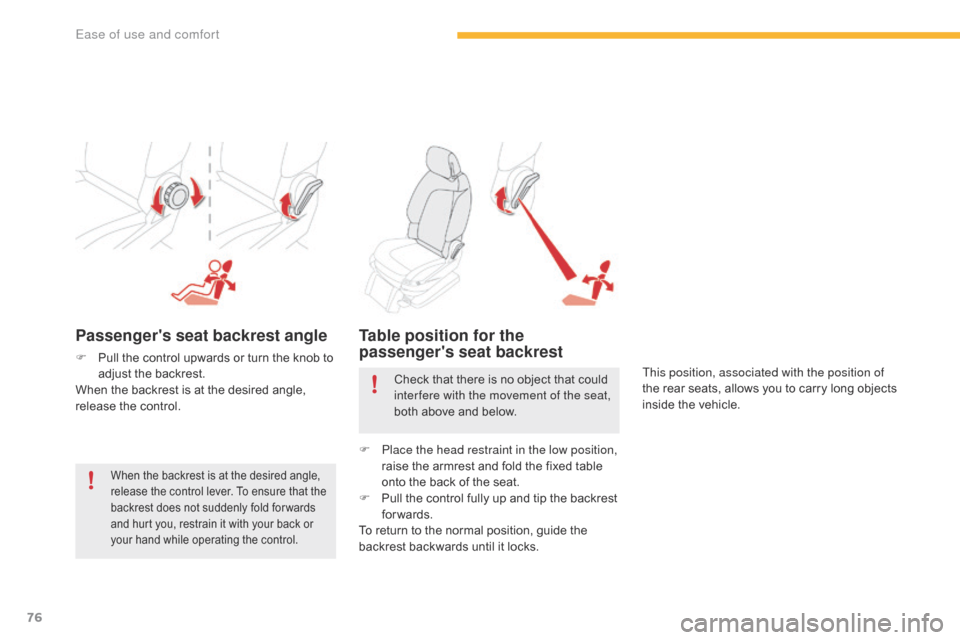
Passenger's seat backrest angle
F Pull the control upwards or turn the knob to a
djust the backrest.
When
the backrest is at the desired angle,
r
elease the control.
Table position for the
passenger's seat backrest
This position, associated with the position of
the rear seats, allows you to carry long objects
i
nside the vehicle.
When the backrest is at the desired angle, release the control lever. To ensure that the
b
ackrest does not suddenly fold for wards
a
nd hurt you, restrain it with your back or
y
our hand while operating the control.
Check that there is no object that could inter fere with the movement of the seat,
both
above and below.
F
P
lace the head restraint in the low position,
raise
the armrest and fold the fixed table
o
nto the back of the seat.
F
P
ull the control fully up and tip the backrest
fo
rwards.
To
return to the normal position, guide the
b
ackrest backwards until it locks.
Ease of use and comfort
Page 79 of 527

77
C4-Picasso-II_en_Chap03_ergonomie-confort_ed01-2016
Front seats
Electric adjustments
Forwards-backwards
(driver's seat)
F Push the control for wards or rear wards to slide the seat.
Seat backrest angle
F Tilt the control for wards or rear wards to adjust the angle of the seat backrest.
Seat cushion height and angle
F Operate the rear part of the control upwards or downwards to obtain the
desired
h
eight.
F
O
perate the front part of the control
upwards or downwards to obtain the
desired
a
ngle.
To avoid discharging the battery, carry out these adjustments with the engine running.
Before moving the seat backwards, ensure that there is nothing that might prevent the full travel of the seat, so as to avoid the risk of jamming the seat caused by the presence of objects on the floor behind the seat or rear passengers. If the seat jams, stop the movement immediately.
3
Ease of use and comfort
Page 83 of 527

81
C4-Picasso-II_en_Chap03_ergonomie-confort_ed01-2016
Heated seats control
F Use the adjustment wheel to switch on and s
elect the level of heating required:
0 :
Off.
1 :
Low.
2 :
Medium.
3 :
High.
With
the engine running, the front seats can be
h
eated
s
eparately.
Before
operating
the
leg
rest,
ensure
t
hat
nothing
could
inter fere
with
its
m
ovement.Electric passenger seat
F Push the control for wards or backwards to u
nfold or fold away the leg rest.
The movement stops when you release the
control.
Front armrest
Height adjustment
F Fully lower the armrest.
F R aise it to the required position (low,
intermediate
or high).
F
O
nce in the high position, lift to release it
a
nd return it to the low position.
Comfort system for the driver and front
passenger.
3
Ease of use and comfort
Page 101 of 527

99
C4-Picasso-II_en_Chap03_ergonomie-confort_ed01-2016
In cold weather with the engine cold, the air flow is increased gradually until
t
he system has warmed up, in order
to limit the delivery of cold air into the
passenger
c
ompartment.
On
entering the vehicle, if the interior
t
emperature is much colder or warmer
than
the comfort value setting, there
i
s no need to alter the value displayed
in
order to reach more quickly the
r
equired level of comfort. The system
c
ompensates automatically and
corrects the temperature difference as
quickly
as possible.
This
setting is associated with AUTO mode
o
nly.
However, on deactivation of AUTO mode,
t
he
last setting remains on.
Changing the setting does not reactivate AUTO
m
ode
if deactivated.
When the indicator lamp in the button is on, the
air
conditioning
system
operates
automatically:
t
he
system
manages
the
temperature,
air
f
low
and
air
distribution
in
the
passenger
c
ompartment
in
an
optimum
way
according
to
t
he
comfort
level
you
have
selected.
You
can
always
choose
to
modify
a
setting
m
anually.
In
this
case
the
indicator
lamp
in
the
b
utton
is
off.
F
P
ress
this
button
again
to
activate
the
a
utomatic
comfort
programme
again.
F
P
ress this button to activate or
deactivate the automatic mode of
the
air
conditioning
system.
Automatic comfort
programme
To change the current setting, press the button t
o display the different modes in turn:
"SOFT":
provides soft and quiet operation by
l
imiting air flow.
"NORMAL":
offers the best compromise
b
etween a comfortable temperature and quiet
operation
(default setting).
"FAST":
provides strong and effective air flow.
It is possible to modulate the intensity of the
automatic
comfort
programme
by
choosing
one
o
f
three
mode
settings
offered
in
a
secondary
p
age
of
the
Air conditioning
menu.
F
P
ress
this
button
to
go
to
the
s
econdary
pag
e.
3
Ease of use and comfort
Page 104 of 527

102
C4-Picasso-II_en_Chap03_ergonomie-confort_ed01-2016
Front demist -
defrost
F Press this button to demist or defrost the windscreen and side
windows
as quickly as possible.
T
he indicator lamp in the button
comes
on.
With
Stop & Start, when demisting has
b
een activated, the STOP mode is not
available.
The
system automatically manages the air
c
onditioning (depending on version), air
f
low
and
air intake, and provides optimum
d
istribution towards the windscreen and side
windows.
F
T
o
switch it off press this button again or
a
djust the setting for air flow or distribution.
T
he
indicator lamp goes off.
Rear screen demist -
defrost
Switching on
Switching off
F Press this button to demist /
defrost the rear screen and
(depending
on version) the door
m
irrors.
The demisting/defrosting switches off automatically to prevent an excessive consumption of current.
The rear screen demist - defrost
can only operate when the engine is
r
unning.
Switch
off the heating of the rear screen
a
nd door mirrors as soon as you judge it
p
ossible, as reducing the consumption
o
f electrical current reduces fuel
consumption.
F
I
t is possible to stop the
demisting/defrosting
o
peration
b
efore it is switched off
automatically
by
pressing
the
bu
tton
ag
ain.
The indicator lamp associated with the button
goes
off.
The indicator lamp associated with the button comes on.
Ease of use and comfort
Page 127 of 527

125
C4-Picasso-II_en_Chap04_conduite_ed01-2016
Starting-switching off the engine with the electronic key
F Place the gear selector lever at P or N
for vehicles with an automatic gearbox or
n
eutral with a manual gearbox.
F
I
nsert the electronic key in the reader.
F
P
ress the brake pedal for vehicles with an
a
utomatic gearbox, or fully declutch for
v
ehicles with a manual gearbox.
Starting the engine
For Diesel vehicles, in
temperatures below zero the
engine
will not start until the
p
reheater warning lamp has
g
one off.
If
one
of
the
starting
conditions
is
not
m
et,
a
reminder
message
appears
in
t
he
instrument
panel
screen.
In
some
c
ircumstances, it is necessary to
turn
the
steering
wheel
slightly
while
p
ressing
the
"START/STOP"
button
t
o
assist
unlocking
of
the
steering;
a
message
warns
you
when
this
is
ne
eded. F
B
riefly press the "
START/STOP"
button.
T
he
steering
column
unlocks
and
t
he
engine
starts
more
or
less
i
mmediately (see the advice for
Diesel
v
ersions). If
this
warning lamp comes on after
p
ressing "START/STOP", you should
h
old
the
brake or clutch pedal down
u
ntil
the
warning lamp goes off and
d
o
not
press the START/STOP button
ag
ain.
4
Driving
Page 144 of 527

142
C4-Picasso-II_en_Chap04_conduite_ed01-2016
F Check that the symbol displayed in the i
nstrument panel agrees with the position
o
f the selector.
F
P
rogressively release the brake pedal.
F
I
f the parking brake is released, the vehicle
m
oves off.
I
f the parking brake is applied and
a
utomatic operation is activated, accelerate
away.
Never
press the accelerator and brake
p
edals at the same time. Braking and
a
cceleration should be done only with
the
right foot. Pressing both pedals
t
ogether risks damaging the gearbox.
If
the brake does not release
a
utomatically, check that the front doors
a
re correctly closed. Never leave children unsupervised in
the
vehicle when the engine is running.
When
carrying out a maintenance
o
peration with the engine running,
a
pply
t
he parking brake and select position P. Never select position P or R unless the
vehicle is at a complete stop with the
brake
a
pplied.
When
you want to engage reverse,
t
o avoid jolts, do not accelerate
i
mmediately after engaging R.
Changing
in
to
p
osition
R
is
accompanied
by an audible signal.
Never select position N
when driving.
I
f position N is engaged in error when
m
oving, allow the engine to idle, then
e
ngage position D to accelerate.
When
the engine is running at idle,
b
rakes released, if position R, D or M is
selected, the vehicle will move even if
the
accelerator is not pressed.
Driving