2016 Citroen C4 PICASSO Fuel
[x] Cancel search: FuelPage 21 of 527

19
C4-Picasso-II_en_Chap01_instruments-bord_ed01-2016
You can modify the appearance of the
instrument panel, by choosing:
-
a c
olour scheme,
-
a
display mode.
Choosing the language
This depends on the setting in the touch screen tablet.
Certain
languages are not available for the type 2
i
nstrument panel; English is selected by default.Each mode corresponds to the type of
information
displayed in the configurable area.
Personalisation of the type 2 instrument panel
Choice of display mode
- "Dials":
permanent display of the trip c
omputer and rev counter.
Display zones
Whatever the display mode or colour scheme
chosen, the instrument panel contains:
-
a
fixed display zone A
w
ith:
●
t
he speedometer,
●
t
he warning lamps,
●
t
he fuel gauge,
●
t
he various repeated information and
a
lert
m
essages.
-
a
configurable display zone B.
Most
of the warning lamps do not have a fixed
p
osition.
The
warning and indicator lamps are displayed
f
rom left to right in order of importance.
For certain functions that have indicator lamps
for
both on and off, there is just one dedicated
lo
cation.
Choosing the colour scheme
To modify it, with the vehicle stationary:
F s elect the " Configuration " menu of the
touch screen tablet,
F
s
elect " Instrument panel perso ",
F
c
hoose a colour scheme,
F
c
onfirm.
The
system restarts to take account of the
m
odifications to the touch screen tablet and the
instrument
pan
el.
1
Instruments
Page 34 of 527

32
C4-Picasso-II_en_Chap01_instruments-bord_ed01-2016
Low fuel levelfixed, accompanied by a
n audible signal and
a
message. When it first comes on there remains
approximately 6 litres of fuel
in the
tank.
You
are then using the fuel reserve.You
must refuel as soon as possible to avoid running o
ut of fuel.
Until
sufficient fuel is added, this warning lamp will
c
ome on every time the ignition is switched on,
a
ccompanied by an audible signal and a message.
This audible signal and message are repeated with increasing frequency as the fuel level drops towards "0".
Fuel tank capacity: approximately 57 litres (petrol) or 55 litres (Diesel).
Never continue to drive until you run out of fuel as
this
could damage the emission control and injection
s
ystems.
Warning / indicator lamp
StateCause Action / Observations
Seat belt(s)
not fastened /
unfastened fixed
or
flashing
a
ccompanied by an
audible
s
ignal. A seat belt has not been fastened or
has
been
unfastened. Pull
the strap then insert the tongue in the buckle.
Airbags on
temporarily. This
warning
lamp
comes
on
for
a
f
ew seconds when you turn on the
ignition,
then
goes
off.
This warning lamp should go off when the engine is started.
I f it does not go off, contact a CITROËN dealer or a qualified
w
orkshop.
fixed. One of the airbag or seat belt p
retensioner systems has a fault.Have
them checked by a CITROËN dealer or a q
ualified w orkshop.
Passenger
airbag system flashing.
The
passenger airbag system has a
f
ault. Do
not have a passenger seated in the front
p
assenger
sea
t.
Have
it checked by a CITROËN dealer or a qualified
w
orkshop.
Instruments
Page 50 of 527
48
C4-Picasso-II_en_Chap01_instruments-bord_ed01-2016
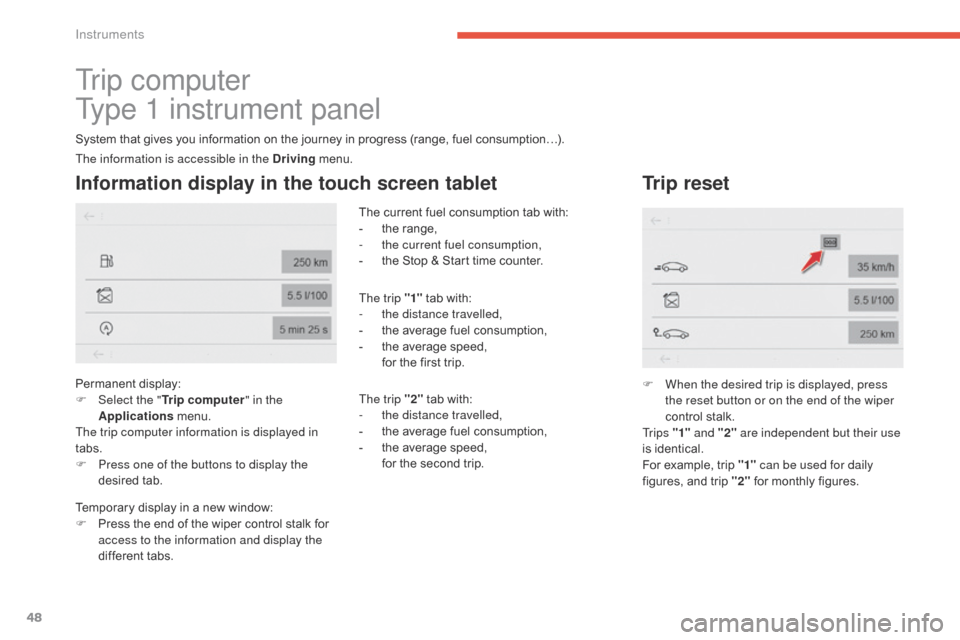
Tr i p c o m p u t e r
Type 1 instrument panel
System that gives you information on the journey in progress (range, fuel consumption…).
Information display in the touch screen tablet
Permanent display:
F Sel ect the " Trip computer " in the
Applications
menu.
The trip computer information is displayed in
tabs.
F
P
ress one of the buttons to display the
desired
t
ab. The
current fuel consumption tab with:
-
t
he range,
-
t
he current fuel consumption,
-
t
he Stop & Start time counter.
The trip "1"
tab with:
-
t
he distance travelled,
-
t
he average fuel consumption,
-
t
he average speed,
f
or the first trip.
The trip "2" tab with:
-
t
he distance travelled,
-
t
he average fuel consumption,
-
t
he average speed,
f
or the second trip.
Trip reset
F When the desired trip is displayed, press the reset button or on the end of the wiper
control
stalk.
Tr i p s "1" and "2" are independent but their use
is
identical.
For
example, trip "1" can be used for daily
figures,
and trip "2"
for monthly figures.
The information is accessible in the Driving
menu.
Temporary
display
in
a
new
window:
F
P
ress
the
end
of
the
wiper
control
stalk
for
a
ccess to the information and display the
different
tabs.
Instruments
Page 51 of 527

49
C4-Picasso-II_en_Chap01_instruments-bord_ed01-2016
Tr i p c o m p u t e r
Type 2 instrument panel
Information display in the instrument panel
F Press the button on the end of the wiper control stalk to display the various tabs in
succession. -
T
he current information tab with:
●
t
he range,
●
t
he current fuel consumption,
●
t
he Stop & Start time counter.
- Trip
"1"
w
ith:
●
t
he average speed,
●
t
he average fuel consumption,
● t he distance travelled, f
or the first trip.
-
Trip "2"
w
ith:
●
t
he average speed,
●
t
he average fuel consumption,
●
t
he distance travelled,
f
or the second trip.
Trip reset
F When the trip required is displayed, press the control for more than two seconds
or use the left hand thumbwheel of the
steering
mounted controls.
Tr i p s "1" and "2" are independent but their use
is
identical.
For
example, trip "1" can be used for daily
figures,
and trip "2"
for monthly figures.
For
all
other
display
modes,
pressing
the
end
o
f
the
wiper
stalk
displays
this
information
in
a
n
ew
window.
The display of trip computer information is
permanent when you select the "Dials" or
"Personal"
display
mode.
1
Instruments
Page 52 of 527

50
C4-Picasso-II_en_Chap01_instruments-bord_ed01-2016
Tr i p c o m p u t e r
Range
(miles or km)
T he distance which can still be
travelled
with the fuel remaining in
t
he tank (related to the average fuel
c
onsumption over the last few miles
(kilometres)
t
ravelled).
This
value may vary following a change
i
n
the style of driving or the relief,
r
esulting in a significant change in the
c
urrent fuel consumption.
When
the
range falls below 20 miles (30 km),
d
ashes
are displayed. After filling with at least
5
litres
of
fuel, the range is recalculated and is
d
isplayed
when it exceeds 60 miles (100 km).
If dashes are displayed continuously
while
driving in place of the digits,
c
ontact a CITROËN dealer or a
qualified
w
orkshop. This function is only displayed from
20 mph
(30 km/h).
Current fuel consumption
(mpg or l/100 km or km/l)
C alculated over the last few seconds.
Average fuel consumption
(mpg or l/100 km or km/l)
C alculated since the last trip reset.
Average speed
(mph or km/h)
C alculated since the last trip reset.
Distance travelled
(miles or km)
C alculated since the last trip reset.
Stop & Start time counter
(minutes / seconds or hours / minutes)
I
f your vehicle is fitted with Stop & Start, a time
counter calculates the time spent in STOP
mode
during a journey.
It
resets
to zero every time the ignition is
s
witched
on.
A few definitions
Instruments
Page 104 of 527

102
C4-Picasso-II_en_Chap03_ergonomie-confort_ed01-2016
Front demist -
defrost
F Press this button to demist or defrost the windscreen and side
windows
as quickly as possible.
T
he indicator lamp in the button
comes
on.
With
Stop & Start, when demisting has
b
een activated, the STOP mode is not
available.
The
system automatically manages the air
c
onditioning (depending on version), air
f
low
and
air intake, and provides optimum
d
istribution towards the windscreen and side
windows.
F
T
o
switch it off press this button again or
a
djust the setting for air flow or distribution.
T
he
indicator lamp goes off.
Rear screen demist -
defrost
Switching on
Switching off
F Press this button to demist /
defrost the rear screen and
(depending
on version) the door
m
irrors.
The demisting/defrosting switches off automatically to prevent an excessive consumption of current.
The rear screen demist - defrost
can only operate when the engine is
r
unning.
Switch
off the heating of the rear screen
a
nd door mirrors as soon as you judge it
p
ossible, as reducing the consumption
o
f electrical current reduces fuel
consumption.
F
I
t is possible to stop the
demisting/defrosting
o
peration
b
efore it is switched off
automatically
by
pressing
the
bu
tton
ag
ain.
The indicator lamp associated with the button
goes
off.
The indicator lamp associated with the button comes on.
Ease of use and comfort
Page 145 of 527

143
C4-Picasso-II_en_Chap04_conduite_ed01-2016
Invalid value in manual operationThis symbol is displayed if a gear is
n
ot engaged correctly (gear selector
b
etween two positions).
You
can
temporarily
take
control
of
gear
c
hanges
using
the
"
+" and " -"
steering
mounted
c
ontrol
paddles.
If
the
engine
speed
allows,
the
i
nstruction
to
change
gear
is
acted
on.
This function allows you to anticipate certain
situations
s
uch
a
s
ov
ertaking
a
nother
v
ehicle
o
r
a
pproaching
a
bend.
After a few moments with no action on the
control
paddles,
the
gearbox
manages
the
g
ears
automatically
again.
Temporary manual control of the
gears
Manual mode
D and the gear engaged are displayed in the in strument pan el.
The
gearbox operates in auto-active
m
ode, without any action from the driver. It
c
ontinuously selects the most appropriate gear
a
ccording to the following conditions:
-
o
ptimisation of fuel consumption,
-
d
riving style,
-
r
elief of the road,
-
v
ehicle load.
Automated mode
F Select position D .
For
maximum acceleration, without touching
t
he
gear
selector, press the accelerator fully
d
own
(kick down). The gearbox changes down
a
utomatically and maintains the gear selected
u
ntil
the
maximum engine speed is reached.
When
braking, the gearbox changes down
a
utomatically for more effective engine braking.
When
you take your foot off the accelerator
p
edal
suddenly, the gearbox does not change
u
p,
so
as
to improve safety. F
Sel ect position M.
F
U
se the "+" and " -"
steering mounted
c
ontrol paddles to change gear.
The
gears engaged are displayed successively
i
n the instrument panel.
When stationary or at very low speed, the
gearbox
automatically engages 1st
g
e a r.
In manual mode, it is not necessary to release
the
accelerator pedal when changing gear.
The
change from one gear to another is only
e
ffected if the conditions of vehicle speed and
engine
speed allow; other wise the automatic
l
aws of operation are imposed temporarily.
If
the engine speed is too high or too low,
t
he display of the gear selected flashes for a
f
ew seconds, then the new gear engaged is
d
isplayed.It
is possible to change mode at any
t
ime, by moving the gear selector
f
rom D to M or the other way round.
4
Driving
Page 147 of 527

145
C4-Picasso-II_en_Chap04_conduite_ed01-2016
Depending on the driving situation and your vehicle's equipment, the system may advise
y
ou to skip one or more gears.
You
can follow this instruction without going
t
hrough the intermediate gears..
Gear shift indicator
System which reduces fuel consumption by recommending the most suitable gear. T he system adapts its gear change
r
ecommendation according to the
d
riving conditions (gradient, load, ...)
a
nd the demands of the driver (power,
acceleration,
braking, ...).
The
system never suggests:
-
e
ngaging first gear,
-
enga
ging
r
everse
g
ear.
The information appears in the instrument
panel
in the form of an arrow.
On
vehicles with manual gearbox, the arrow
m
ay be accompanied by the recommended
g e a r.
The gear engagement recommendations
must not be considered compulsory.
This is because the configuration of the
road, traffic density and safety remain
impor tant factors in the choice of the best
g e a r.
The
gear shift indicator system does not
r
eplace the need for vigilance on the part of the
d
river.
With
an automatic gearbox, the system is only active in manual mode.
On
BlueHDi Diesel 135 and 150 versions with
m
anual gearbox, in certain driving conditions
t
he system may suggest changing into neutral
s
o that the engine can go into standby (STOP
m
ode with Stop & Start). In this case, N is
displayed
in the instrument panel.Example:
This
function cannot be deactivated.
-
Y
ou are in third gear.
-
Y
ou press the accelerator pedal.
-
T
he system may suggest that you engage
a
higher gear.
4
Driving