Page 236 of 308
234
Menus
Media
Air conditioning
Driving assistance
Navigation
Select an audio source, a radio station, display pho tographs.
Control
of
the
settings
for
temperature
and
air
f
low. Access
to
the
trip
computer.
Activate,
deactivate,
adjust
settings
for
certain
v
ehicle
functions.
Enter
navigation
settings
and
choose
a
d
estination. (Depending
o
n
e
quipment)
Audio and Telematics
Page 237 of 308
235
Telephone
Configuration Connected services
Connect a telephone by Bluetooth®.
Adjust
the
audio
settings
(balance,
a
mbience...),
the
brightness
of
the
instruments
a
nd
controls,
the
display
settings
(language,
u
nits,
date,
time...)
and
access
the
interactive
h
elp
for
the
main
vehicle
systems
and
warning
lam
ps. CITROËN MULTICITY CONNECT
Connect to an applications portal to facilitate,
make
safe
and
personalise
journeys
by
means
o
f
a
connection
key
available
on
subscription
f
rom
a
CITROËN
dealer.
(Depending
o
n
e
quipment)
.
Audio and Telematics
Page 238 of 308
236
Media
Level 1Level 2
List of FM stations
Preset
"Media"
Primary page
Audio and Telematics
Page 239 of 308
237
Level 1Level 2 Comments
Media
List List of FM stations
Press
on a radio station to select it.
Media
Source FM Radio
Select
change of source
DAB Radio
AM Radio
USB
iPod
Bluetooth
AUX
Media
Preset Press
on an empty location to "Preset" (save) to it.
.
Audio and Telematics
Page 240 of 308
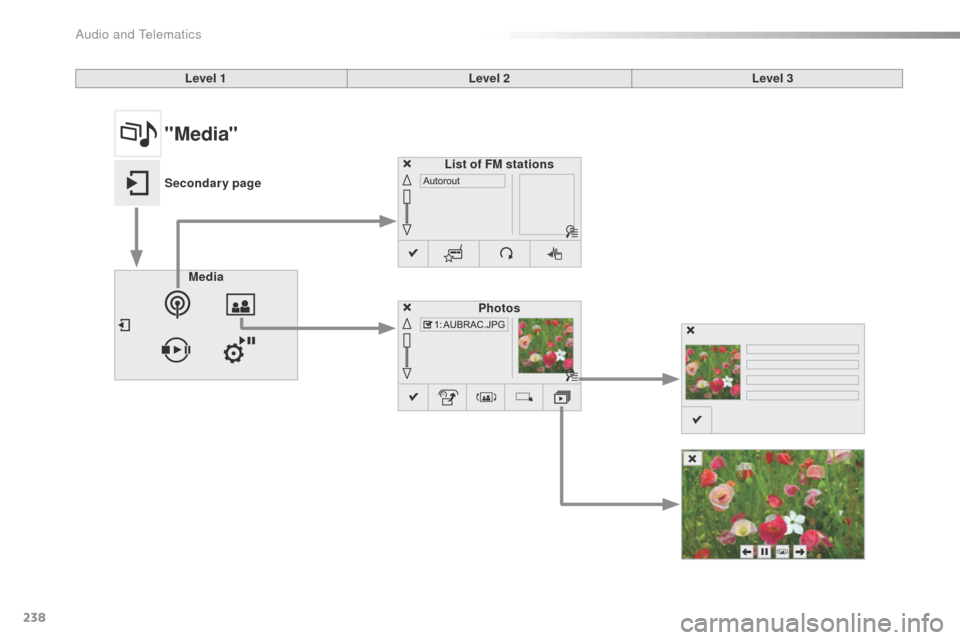
238
Level 1Level 2Level 3
Media Photos
List of FM stations
"Media"
Secondary page
Audio and Telematics
Page 241 of 308
239
Level 1Level 2 Level 3 Comments
Media
Secondary page Radio list Save
Press
a radio station to select it.
Update list Update
the list of stations received.
Frequency Enter
the desired radio frequency.
Confirm Save
the settings.
Media
Secondary page Photos Page selection
Display
the selected photo full screen.
Rotate Rotate
the photo 90°.
Select all Select
all the photos in the list.
Press
again to deselect.
Slideshow Previous
pho
to.Display
the photos in sequence, full screen.
Pause
/ Play.
Next
photo.
Confirm Save
the settings.
.
Audio and Telematics
Page 242 of 308
240
Level 1Level 2Level 3
Media Settings Settings
Settings
"Media"
Secondary page
Audio and Telematics
Page 243 of 308
241
Level 1Level 2 Level 3 Comments
Media
Secondary page Media list Presentation
of the last media used.
Media
Secondary page Settings Media
Settings Shuffle
(all tracks)Choose
the play settings.
Shuffle
(current album)
Repeat
Aux.
a
mplification
Radio
Settings RDS options
Activate
or deactivate the options.
DAB/FM
station tracking
Display
Radio Text
Digital
radio slideshow
d
isplay
Announcements Settings Traffic
announcements (TA)Activate
or deactivate the options.
Weather
Sport - Programmes info
Alert settings
Confirm Save
the settings.
.
Audio and Telematics