2016 Citroen C1 RHD phone
[x] Cancel search: phonePage 239 of 268

237
Menu itemSignificance /
Corresponding action
Incoming
c
alls Incoming
c
alls.
List
Audio Display
the list of registered audio
d
evices.
List Phone Display
the list of registered
t
elephones.
Missed
calls Missed
calls.
No entry No
data available.
No history No
history available.
Not
c
onnected Not
c
onnected.
Outgoing
calls Outgoing
calls.
Overwrite all Replace
all.
Pairing Connect
a device by Bluetooth.
Menu item
Significance /
Corresponding action
Device
n
ame Name
of
the
system.
DAB Digital
r
adio.
Dial
by
number Enter
a
telephone
number.
Disconnect Disconnect
your
telephone.
Display
S
etting Activate
or
deactivate
automatic
d
isplay
of
connections.
Enter
new
passkey Enter
a
new
password.
FM
AF
On/Off Activate
or
deactivate
FM
AF
m
ode.
FM List Display
the
list
of
FM
stations.
FM
TA
On/Off Activate
or
deactivate
FM
TA
m
ode
-
alert
messages.
HF
Sound
Setting High
frequency
sound
setting.
.
Audio and Telematics
Page 240 of 268

238
Menu itemSignificance /
Corresponding action
Passkey Change
the password.
Phonebook Phone
directory.
Radio Display
radio mode.
Region
Code Activate
or deactivate RDS mode.
Reset Reset
se
ttings.
Reset all Reset
all.
Ringtone Choose
a ringtone
Ringtone
volume Adjust
the ringtone volume.
Searching Searching...
Select Select. Menu item
Significance /
Corresponding action
Setup Settings.
Skip Go
to the next step.
Sound
S
ettingDisplay
t
he
s
ound
se
ttings.
Speed
d
ialsSpeed
d
ialling.
TA Traffic
a
nnouncements.
TEL Display the list of telephone
settings.
Transfer history Transfer
the calls history.
Treble Adjust
the treble level.
Update Update
the list.
Updating Updating...
Audio and Telematics
Page 248 of 268

246
Audio streamingConnecting Apple® players
Streaming allows audio files on your telephone t
o be played via the vehicle's speakers.
You
can also view, activate or deactivate
s
ystem settings related to the Bluetooth
f
unction. Select "Bluetooth", then "
Pairing".
Press on " MENU"
to display the list.
Turn
the knob to select "Bluetooth",
p
ress to display the list.
Once
connected for streaming, the
t
elephone is considered as a media
s
ource.
If
play does not start automatically, it
m
ay be necessary to start audio play
f
rom the telephone. Connect the Apple
® player to the USB port
using
a
suitable
cable (not supplied).
Play
starts
automatically.
Control
is
via
the
audio system.
The classifications available are those of the
portable
device
connected (artists / albums /
g
enres
/
tracks
/
playlists / audio books /
p
odcasts).
The
default
classification used is by artist. To
m
odify
the
classification used, return to the
f
irst
level
of
the
menu then select the desired
c
lassification
(playlists for example) and
c
onfirm
to
go
down
through the menu to the
de
sired
t
rack.
The
version
of
software in the audio system
m
ay
not
be
compatible with the generation of
y
our Apple
® player.
C
onnect
the
telephone:
see
the
"
Telephone "
section.
The
system
accepts
USB
mass
storage
d
evices
o
r
A
pple
® players via the USB ports. T
he
adaptor
cable is not supplied.
Control
of
the
peripheral device is with the
a
udio
system
controls.
Other
peripherals, not recognised on
c
onnection,
must
be connected to the auxiliary
s
ocket
using
a
Jack cable (not supplied).
The
system
can
alternatively read files via the
Bl
uetooth
® system and the USB port.
I
t
is
recommended that the USB cable
f
or
the portable device is used.
Audio and Telematics
Page 249 of 268

247
Telephone
Pairing a Bluetooth® telephone
As a safety measure and because they require prolonged attention on the part
o
f the driver, the operations for pairing
t
he Bluetooth mobile telephone to the
h
ands-free system of the audio system
m
ust be carried out with the vehicle
stationary .
Switch on the Bluetooth function of your
telephone
and ensure that it is "visible to all"
(
telephone
c
onfiguration). If
the operation fails, we recommend
s
witching the Bluetooth function of your
t
elephone off and then on again.
*
If your telephone is fully compatible.
Information
on progress is displayed during the
ope
ration.
Once
the procedure has been successfully
c
ompleted, a list appears with the "TEL "
option.
You
can then enter the settings for each of
th
ese
f
unctions*.
Using
the telephone's keypad, enter the PIN
d
isplayed in the screen of the system or
c
onfirm in the telephone the PIN displayed.
Press on "
MENU"
to display the list.
Turn
the knob to select "Bluetooth ",
press
to display the list.
Turn
the knob to select "Pairing ",
press
to display the system name
a
nd code. Press on "
MENU"
to display the list.
Turn
the knob to select "TEL ", press
to
display the list.Turn
the knob to select "
Add
contacts ",
press to confirm.
Turn
the knob to select
"P
honebook",
press to confirm.Turn
the knob to select "Overwrite
all ",
press to confirm.
Select " YES"
to save the settings.
You
can quit at any time by pressing
t
his button.
Press
this button to navigate through
t
he telephone menu.
.
Audio and Telematics
Page 250 of 268

248
Receiving a callList of telephone menus
An incoming call is announced by a ring and a s
uperimposed display in the screen.
Press this button to accept the
incoming
c
all. Press on MENU
, turn the knob to select "
TEL ", then press to display the list and move t
hrough the menus using this knob.
To
reject or end a call, press this
b
utton.
Press
this button to navigate in the
t
elephone
me
nu.
Making a call
Ending a call
Select "Phonebook " to go to your c
ontacts, then navigate using the
k
nob.
To
dial a number, select "Enter a
phone num "
in the list. Level 1 Level 2
Level 3Corresponding action
TEL Phonebook Add contacts
Add a contact.
Add SD
Associate a button with a contact.
Delete call history Delete the history of calls.
Delete contact Delete a contact in the directory.
Delete
pho
nebookDelete
the directory.
HF
Sound
S
ettingCall
volumeAdjust
the volume for calls.
Ringtone
volumeAdjust
the ringtone volume.
Ringtone Choose
the ringtone.
Tr a n s f e r
history Overwrite all
Replace
all.
Audio and Telematics
Page 251 of 268
249
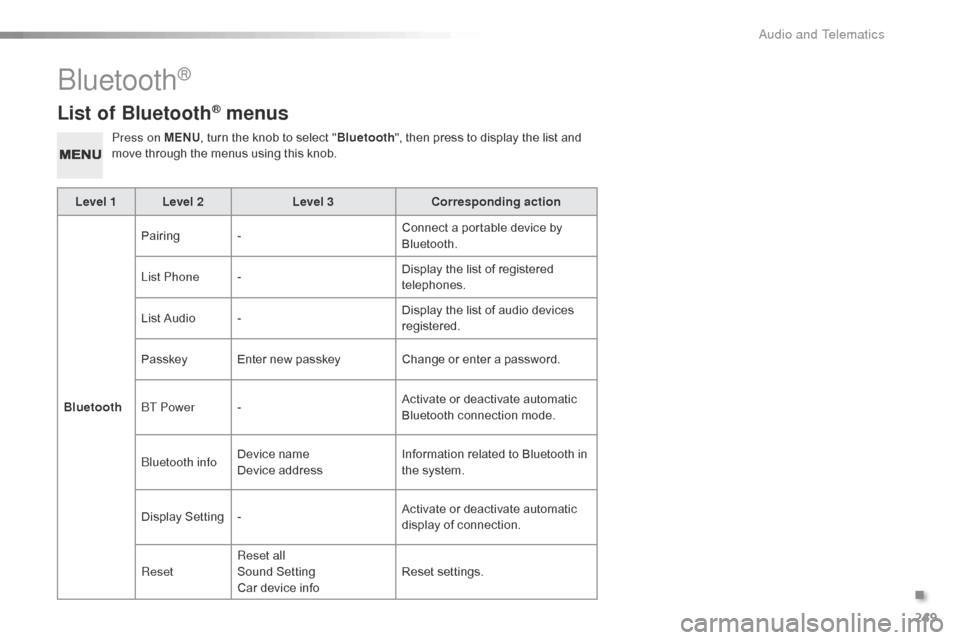
List of Bluetooth® menus
Press on MENU, turn the knob to select "Bluetooth ", then press to display the list and m
ove through the menus using this knob.
Level 1 Level 2 Level 3Corresponding action
Bluetooth Pairing
- Connect
a portable device by
Bl
uetooth.
List Phone - Display
the list of registered
t
elephones.
List
Audio - Display
the list of audio devices
re
gistered.
Passkey Enter
new passkeyChange
or enter a password.
BT Power - Activate
or deactivate automatic
B
luetooth connection mode.
Bluetooth info Device
n
ame
Device
addressInformation
related to Bluetooth in
t
he system.
Display
S
etting- Activate
or deactivate automatic
d
isplay of connection.
Reset Reset all
Sound
S
etting
Car
device infoReset
se
ttings.
Bluetooth®
.
Audio and Telematics
Page 253 of 268

251
The following table groups together the answers to the most frequently asked questions concerning your audio system.
Frequently asked questions
Telephone, Bluetooth®
QUESTIONANSWER SOLUTION
I
cannot connect my
B
luetooth
t
elephone. The
telephone's Bluetooth function may be switched off or the
t
elephone may not be visible. -
C
heck that your telephone's Bluetooth
f
unction is switched on.
-
C
heck in the telephone settings that it is
"
visible to all".
The
Bluetooth telephone is not compatible with the system.You
can check the compatibility of your
t
elephone at www.citroen.co.uk (services).
The
volume of the
t
elephone
c
onnected
i
n
Bluetooth mode is
ina
udible. The
volume depends both on the system and on the telephone. Increase the volume of the audio system, to
m
aximum if required, and increase the volume of
t
he telephone if necessary.
The
ambient noise level has an influence on the quality of
t
elephone
c
ommunication. Reduce
the ambient noise level (close the
w
indows, reduce the booster fan speed, slow
d
own,
...
).
Contacts are not shown in
alphabetical
o
rder. Some
telephones offer display options. Depending on the settings
c
hosen, contacts can be transferred in a specific order.Modify
the display setting in the telephone
d
i r e c to r y.
The
system does
n
ot
receive SMS text
m
essages. The
Bluetooth mode on your telephone does not permit sending
S
MS text messages to the system.
.
Audio and Telematics
Page 257 of 268
255
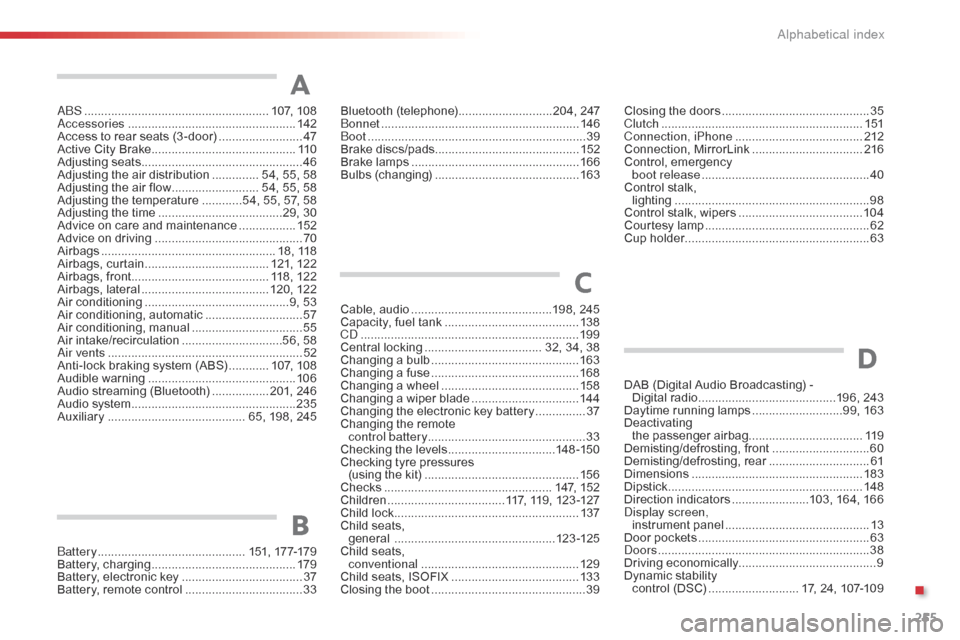
ABS .......................................................107, 10 8
Accessories .............................. ....................142
Access
to rear seats (3 -door)
.........................47
A
ctive City Brake
........................................... 11
0
Adjusting
s
eats
................................................ 46
A
djusting the air distribution
.............. 5
4, 55, 58
Adjusting
the air flow
.......................... 5
4, 55, 58
Adjusting
the temperature
............5
4, 55, 57, 58
Adjusting
the time
.....................................2
9, 30
Advice
on care and maintenance
.................15
2
Advice
on driving
..............................
..............70
Airbags
...............
..................................... 18,
1
18
Airbags,
c
urtain
..................................... 12
1,
12
2
Airbags,
front......................................... 118, 122
Airbags,
la
teral
...................................... 12
0,
12
2
Air
c
onditioning
...............................
............9, 53
Air
conditioning, automatic
.............................57
A
ir
c
onditioning,
m
anual
................................. 55
A
ir
in
take/recirculation
..............................5
6, 58
Air vents
..............................
............................52
Anti-lock
braking system (ABS)
............10
7,
10
8
Audible
w
arning
............................................ 10
6
Audio
streaming (Bluetooth)
................. 2
01, 246
Audio
system
...............................
..................235
Auxiliary
......................................... 6
5, 198, 245Cable,
audio
..........................................1
98, 245
Capacity,
fuel tank
..............................
..........13 8
CD
..............................
...................................19 9
Central
locking
................................... 3
2, 34, 38
Changing
a bu
lb
............................................16
3
Changing
a f
use
............................................16
8
Changing
a wheel
...............................
..........15 8
Changing
a wiper blade
................................14
4
Changing
the electronic key battery
...............37
C
hanging the remote
control battery ............................................... 33
Checking
the levels
................................1
4 8 -15 0
Checking
tyre pressures
(using
the kit)
..............................
................15 6
Checks
...............
...................................147,
15
2
Children
...............................
....117, 119, 123 -127
Child
lock
...............................
........................137
Child
seats,
general
................
................................123 -125
Child
seats,
conventional
............................................... 12
9
Child
seats, ISOFIX
......................................13
3
Closing
the boot
...............................
...............39
A
C
Closing the doors ............................... .............35
Clutch ............................................................ 1
51
Connection, iPhone
...................................... 2
12
Connection,
M
irrorLink
................................. 2
16
Control,
em
ergency
b
oot release
...............................
...................40
Control
stalk,
lighting
..............................
............................98
Control
stalk, wipers
..................................... 10
4
Courtesy
lamp
...............................
..................62
Cup
holder
...............................
........................63
Bluetooth (
telephone) ............................2
04,
247
Bonnet ...............
............................................ 146
Boot
........
......................................................... 39
Brake
d
iscs/pads ........................................... 152
Brake
lamps
...............................
................... 166
Bulbs
(
changing)
...............................
............ 163
Battery
...............................
............. 151,
17
7-179
Battery,
c
harging
...............................
............ 179
Battery,
electronic
key
.................................... 37
B
attery,
remote
control
................................... 33
B
DAB (Digital Audio Broadcasting) -
D igital r adio .........................................1 96, 243
Daytime
running lamps
...........................9
9, 163
Deactivating
t
he
p
assenger
a
irbag.................................. 11 9
Demisting/defrosting,
f
ront
.............................60
D
emisting/defrosting,
r
ear
..............................61
D
imensions
..............................
.....................183
Dipstick
................
.......................................... 148
Direction
i
ndicators
.......................1
03, 164, 166
Display screen, instrument
pan
el
...............................
............13
Door
pockets
................................................... 63
D
oors
..............................................................
.38
Driving
e
conomically ......................................... 9
Dynamic
s
tability
c
ontrol (DSC)
........................... 1
7, 24, 107-109
D
.
Alphabetical index