Page 291 of 620
one or more of your tires is significantly under-inflated.
Accordingly, when the low tire pressure telltale illumi-
nates, you should stop and check your tires as soon as
possible and inflate them to the proper pressure. Driving
on a significantly under-inflated tire causes the tire to
overheat and can lead to tire failure. Under-inflation also
reduces fuel efficiency and tire tread life, and may affect
the vehicle’s handling and stopping ability.
Please note that the TPMS is not a substitute for proper
tire maintenance, and it is the driver ’s responsibility to
maintain correct tire pressure, even if under-inflation has
not reached the level to trigger illumination of the TPMS
low tire pressure telltale.
Your vehicle has also been equipped with a TPMS
malfunction indicator to indicate when the system is notoperating properly. The TPMS malfunction indicator is
combined with the low tire pressure telltale. When the
system detects a malfunction, the telltale will flash for
approximately one minute and then remain continuously
illuminated. This sequence will continue upon subse-
quent vehicle start-ups as long as the malfunction exists.
When the malfunction indicator is illuminated, the sys-
tem may not be able to detect or signal low tire pressure
as intended. TPMS malfunctions may occur for a variety
of reasons, including the installation of replacement or
alternate tires or wheels on the vehicle that prevent the
TPMS from functioning properly. Always check the
TPMS malfunction telltale after replacing one or more
tires or wheels on your vehicle, to ensure that the
replacement or alternate tires and wheels allow the TPMS
to continue to function properly.
4
UNDERSTANDING YOUR INSTRUMENT PANEL 289
Page 311 of 620
•Lane Sense On
• When LaneSense is activated, the display will read
“LaneSense On.”
Refer to “LaneSense — If Equipped” in “Understanding
The Features Of Your Vehicle” for further information.
Fuel Economy
Push and release the UPorDOWNarrow button
until the Fuel Economy Menu item is displayed in the
DID.
• Two submenu pages one with Current value (instan-
taneous calculation of the fuel economy) displayed
and one without the Current Value displayed (toggle
left or right to select one):
– Current Fuel Economy (MPG, L/100 km, or km/l)
– Range To Empty (miles or km)
– Average Fuel Economy (MPG, L/100 km, or km/l) – The Max and Min values will correspond to the
particular engine requirements
• Lower end of gauge will be displayed in an amber
color and turn green as Fuel Economy improves.
• Hold the OKbutton to reset average fuel economy
information.
Trip Info
Push and release the UPorDOWNarrow button
until the Trip Menu item is displayed in the EVIC.
Toggle the LEFT
orRIGHTarrow button to
select Trip A or Trip B. The Trip information will
display the following:
• Distance – Shows the total distance (mi or km) traveled
for Trip A or Trip B since the last reset.
4
UNDERSTANDING YOUR INSTRUMENT PANEL 309
Page 320 of 620
Theme�button on the touchscreen, then select the desired
theme option button until a check-mark appears showing
that the setting has been selected.
• Set Language
When in this display, you may select one of multiple
languages (English / Français / Español) for all display
nomenclature, including the trip functions and the navi-
gation system (if equipped). Press the “Set Language”
button on the touchscreen, then press the desired lan-
guage button on the touchscreen until a check-mark
appears next to the language, showing that setting has
been selected.
• Touchscreen Beep
When in this display, you may turn on or shut off the
sound heard when a touchscreen button (button on the
touchscreen) is pressed. Press the “Touchscreen Beep” button on the touchscreen until a check-mark appears
next to the setting, showing that setting has been se-
lected.
•
Control Screen Time-Out — If Equipped
When this feature is selected, the Controls Screen will
stay open for five seconds before the screen times out.
With the feature deselected, the screen will stay open
until it is manually closed. Press the “Control Screen
Time-Out” button on the touchscreen until a check-mark
appears next to the setting, showing that setting has been
selected.
• Navigation Turn-By-Turn In Cluster — If Equipped
When this feature is selected, the turn-by-turn directions
will appear in the Driver Information Display (DID) as
318 UNDERSTANDING YOUR INSTRUMENT PANEL
Page 321 of 620
the vehicle approaches a designated turn within a pro-
grammed route. To make your selection, press the “Navi-
gation Turn-By-Turn In Cluster” button on the touch-
screen, until a check-mark appears next to the setting,
showing that setting has been selected.
Units
After pressing the “Units” button on the touchscreen you
may select each unit of measure independently displayed
in the Driver Information Display (DID), and navigation
system (if equipped). The following selectable units of
measure are listed below:
•Speed
Select from: “MPH” or “km/h.”
• Distance
Select from: “mi” or “km.” •
Fuel Consumption
Select from: “MPG” (US), “MPG” (UK), “L/100 km” or
“km/L.”
• Pressure
Select from: “psi,” “kPa,” or “bar.”
• Temperature
Select from: “°C,” or “°F.”
Voice
After pressing the “Voice” button on the touchscreen the
following settings will be available:
• Voice Response Length
When in this display, you may change the Voice Re-
sponse Length settings. To change the Voice Response
Length, press the “Brief” or “Detailed” button on the
4
UNDERSTANDING YOUR INSTRUMENT PANEL 319
Page 359 of 620
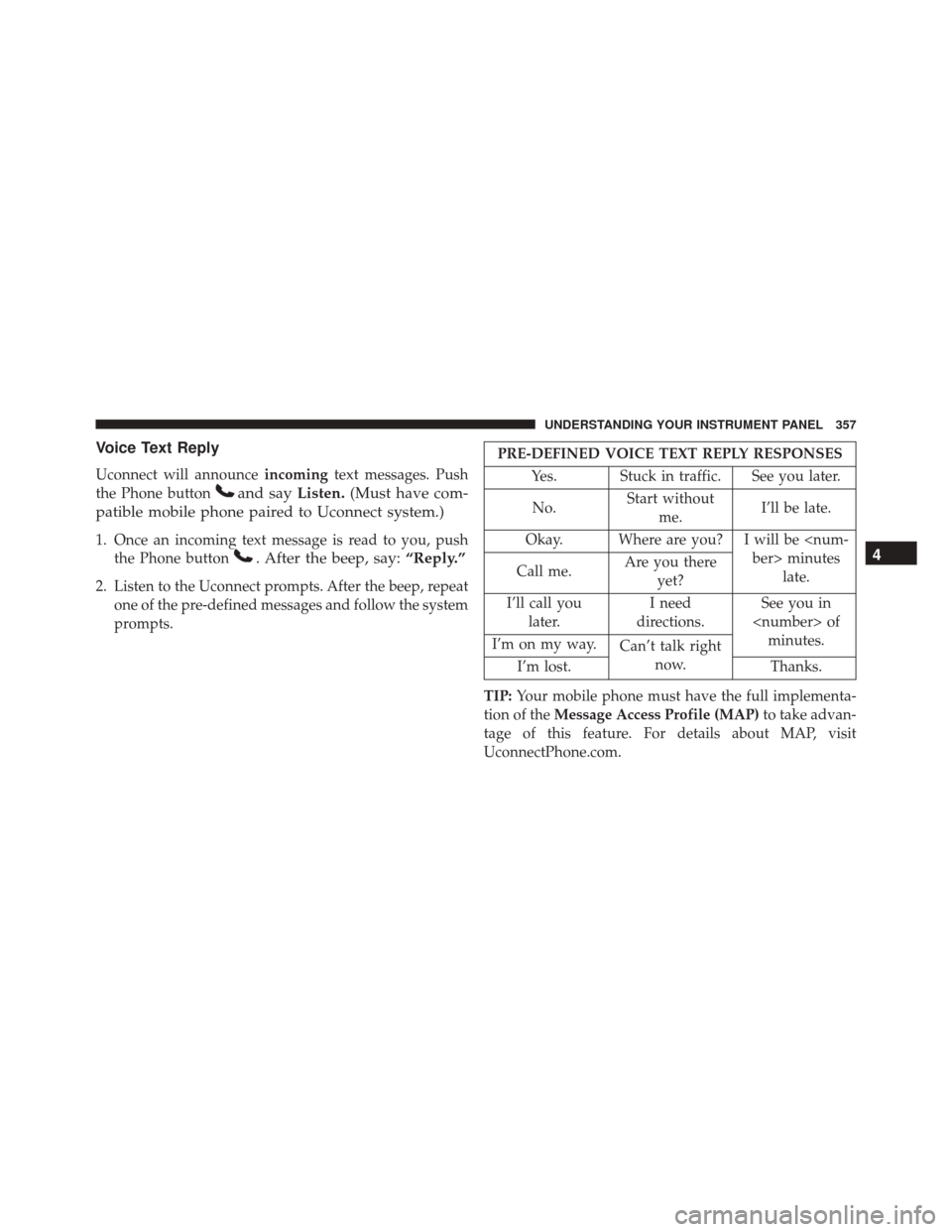
Voice Text Reply
Uconnect will announceincomingtext messages. Push
the Phone button
and say Listen.(Must have com-
patible mobile phone paired to Uconnect system.)
1. Once an incoming text message is read to you, push the Phone button
. After the beep, say: “Reply.”
2. Listen to the Uconnect prompts. After the beep, repeat
one of the pre-defined messages and follow the system
prompts.
PRE-DEFINED VOICE TEXT REPLY RESPONSES
Yes. Stuck in traffic. See you later.
No. Start without
me. I’ll be late.
Okay. Where are you? I will be minuteslate.
Call me. Are you there
yet?
I’ll call you later. I need
directions. See you in
of minutes.
I’m on my way. Can’t talk right
now.
I’m lost. Thanks.
TIP: Your mobile phone must have the full implementa-
tion of the Message Access Profile (MAP) to take advan-
tage of this feature. For details about MAP, visit
UconnectPhone.com.
4
UNDERSTANDING YOUR INSTRUMENT PANEL 357
Page 371 of 620
Automatic reply messages can be:
•“I am driving right now, I will get back to you shortly.”
• Create a custom auto reply message up to 160 charac-
ters.
NOTE: Only the first 25 characters can been seen on the
touchscreen while typing a custom message.
While in Do Not Disturb, Conference Call can be selected
so you can still place a second call without being inter-
rupted by incoming calls.
NOTE:
• Reply with text message is not compatible with iP-
hones.
• Auto reply with text message is only available on
phones that supporting Bluetooth MAP.General Information
This device complies with FCC rules Part 15 and Industry
Canada RSS-210. Operation is subject to the following
two conditions:
1. This device may not cause harmful interference.
2. This device must accept any interference that may be received including interference that may cause unde-
sired operation.
NOTE:
•
The transmitter has been tested and it complies with FCC
and IC rules. Changes or modifications not expressly
approved by the party responsible for compliance could
void the user ’s authority to operate the device.
• The term IC before the certification/registration num-
ber only signifies that Industry Canada technical speci-
fications were met.
4
UNDERSTANDING YOUR INSTRUMENT PANEL 369
Page 387 of 620
Standard Gear Selector
The standard transmission gear selector has PARK, RE-
VERSE, NEUTRAL, DRIVE, and LOW shift positions.
Using the LOW position manually downshifts the trans-
mission to a lower gear based on vehicle speed.Premium Gear Selector With AutoStick
The premium transmission gear selector provides PARK,
REVERSE, NEUTRAL, DRIVE, and SPORT shift posi-
tions. Manual shifts can be made using the AutoStick
shift control (shift paddles mounted on the steering
wheel). Pressing the shift paddles (-/+) while in the
DRIVE or SPORT position will manually select the trans-
mission gear, and will display the current gear in the
instrument cluster as 1, 2, 3, etc. Refer to “AutoStick” in
this section for further information.
Gear Ranges
DO NOT race the engine when shifting from PARK or
NEUTRAL into another gear range.
NOTE:
After selecting any gear range, wait a moment to
allow the selected gear to engage before accelerating.
This is especially important when the engine is cold.
Gear Selector
5
STARTING AND OPERATING 385
Page 390 of 620
The following indicator should be used to ensure that
you have engaged the transmission into the PARK posi-
tion:
•With brake pedal released, look at the transmission
gear position display and verify that it indicates the
PARK position (P).
REVERSE (R)
This range is for moving the vehicle backward. Shift into
REVERSE only after the vehicle has come to a complete
stop.
NEUTRAL (N)
Use this range when the vehicle is standing for prolonged
periods with the engine running. Apply the parking
brake and shift the transmission into PARK if you must
leave the vehicle.WARNING!
Do not coast in NEUTRAL and never turn off the
ignition to coast down a hill. These are unsafe
practices that limit your response to changing traffic
or road conditions. You might lose control of the
vehicle and have a collision.
CAUTION!
Towing the vehicle, coasting, or driving for any other
reason with the transmission in NEUTRAL can cause
severe transmission damage. Refer to “Recreational
Towing” in “Starting And Operating” and “Towing A
Disabled Vehicle” in “What To Do In Emergencies”
for further information.
388 STARTING AND OPERATING