Page 132 of 620
WARNING!
The Blind Spot Monitoring (BSM) system is only an
aid to help detect objects in the blind spot zones. The
BSM system is not designed to detect pedestrians,
(Continued)
WARNING!(Continued)
bicyclists, or animals. Even if your vehicle is
equipped with the BSM system, always check your
vehicle’s mirrors, glance over your shoulder, and use
your turn signal before changing lanes. Failure to do
so can result in serious injury or death.
Rear Cross Path
The Rear Cross Path (RCP) feature is intended to aid the
driver when backing out of parking spaces where the
vision of oncoming vehicles may be blocked. Proceed
slowly and cautiously out of the parking space until the
rear end of the vehicle is exposed. The RCP system will
then have a clear view of the cross traffic and if an
oncoming vehicle is detected, will alert the driver.
Opposing Traffic
130 UNDERSTANDING THE FEATURES OF YOUR VEHICLE
Page 134 of 620

Modes Of Operation
Three selectable modes of operation are available in the
Uconnect System. Refer to “Uconnect Settings/Customer
Programmable Features” in “Understanding Your Instru-
ment Panel” for further information.
Blind Spot Alert Lights Only
When operating in Blind Spot Alert mode, the BSM
system will provide a visual alert in the appropriate side
view mirror based on a detected object. However, when
the system is operating in Rear Cross Path mode, the
system will respond with both visual and audible alerts
when a detected object is present. Whenever an audible
alert is requested, the radio volume is reduced.
Blind Spot Alert Lights/Chime
When operating in Blind Spot Alert Lights/Chime mode,
the BSM system will provide a visual alert in the appro-
priate side view mirror based on a detected object. If theturn signal is then activated, and it corresponds to an
alert present on that side of the vehicle, an audible chime
will also be sounded. Whenever a turn signal and de-
tected object are present on the same side at the same
time, both the visual and audio alerts will be issued. In
addition to the audible alert the radio (if on) volume will
be reduced.
NOTE:
•
Whenever an audible alert is requested by the BSM
system, the radio volume is reduced.
• If the hazard flashers are on, the system will request
the appropriate visual alert only.
When the system is in RCP, the system shall respond with
both visual and audible alerts when a detected object is
present. Whenever an audible alert is requested, the radio
volume is reduced. Turn/hazard signal status is ignored;
the RCP state always requests the chime.
132 UNDERSTANDING THE FEATURES OF YOUR VEHICLE
Page 198 of 620
indicate when conditions temporarily limit system per-
formance. This most often occurs at times of poor visibil-
ity, such as in snow or heavy rain and fog. The ACC
system may also become temporarily blinded due to
obstructions, such as mud, dirt, or ice on windshield and
fog on the inside of glass. In these cases, the DID will
display “ACC/FCW Limited Functionality Clean Front
Windshield” and the system will have degraded perfor-
mance.
The “ACC/FCW Limited Functionality Clean Front
Windshield” message can sometimes be displayed while
driving in adverse weather conditions. The ACC/FCW
system will recover after the vehicle has left these areas.
Under rare conditions, when the camera is not tracking
any vehicles or objects in its path this warning may
temporarily occur.
If weather conditions are not a factor, the driver should
examine the windshield and the camera located on theback side of the inside rear view mirror. They may
require cleaning or removal of an obstruction.
When the condition that created limited functionality is
no longer present, the system will return to full function-
ality.
NOTE:
If the “ACC/FCW Limited Functionality Clean
Front Windshield” message occurs frequently (e.g. more
than once on every trip) without any snow, rain, mud, or
other obstruction, have the windshield and forward
facing camera inspected at your authorized dealer.
Service ACC/FCW Warning
If the system turns off, and the DID displays “ACC/FCW
Unavailable Service Required” or “Cruise/FCW Unavail-
able Service Required”, there may be an internal system
fault or a temporary malfunction that limits ACC func-
tionality. Although the vehicle is still drivable under
normal conditions, ACC will be temporarily unavailable.
196 UNDERSTANDING THE FEATURES OF YOUR VEHICLE
Page 326 of 620
default volume setting is MEDIUM. To make your selec-
tion, press the “Rear ParkSense Vol.” button on the
touchscreen, until a check-mark appears next to setting,
indicating that the setting had been selected. ParkSense
will retain its last known configuration state through
ignition cycles.
•Tilt Side Mirrors In Reverse
When this feature is selected, the exterior sideview
mirrors will tilt downward when the ignition is in the
RUN position and the transmission shift lever is in the
REVERSE position. The mirrors will move back to their
previous position when the transmission is shifted out of
REVERSE. To make your selection, press the “Tilt Side
Mirrors in Reverse” button on the touchscreen, until a
check-mark appears next to setting, indicating that the
setting had been selected. •
Blind Spot Alert — If Equipped
When this feature is selected, the Blind Spot Alert feature
Provides alerts, visual and/or audible, to indicate objects
in your blind spot. The Blind Spot Alert feature can be
activated in “Lights” mode. When this mode is selected,
the Blind Spot Monitor (BSM) system is activated and
will only show a visual alert in the exterior mirrors.
When “Lights & Chime” mode is activated, the Blind
Spot Monitor (BSM) will show a visual alert in the
exterior mirrors as well as an audible alert when the turn
signal is on. When “Off” is selected, the Blind Spot
Monitor (BSM) system is deactivated. To change the
Blind Spot Alert status, press the “Off,” “Lights” or
“Lights & Chime” button on the touchscreen.
324 UNDERSTANDING YOUR INSTRUMENT PANEL
Page 354 of 620
3. Speak clearly at a normal pace and volume whilefacing straight ahead. The microphone is positioned
on the rearview mirror and aimed at the driver.
4. Each time you give a Voice Command, you must first push either the VR or Phone button, wait until after
the beep, then say your Voice Command.
5. You can interrupt the help message or system prompts by pushing the VR or Phone button and saying a Voice
Command from current category.
Uconnect Voice Command Buttons
1 — Push To Initiate Or To Answer A Phone Call, Send Or Re-
ceive A Text
2 — For All Radios: Push To Begin Radio Or Media functions. For
8.4A/8.4AN Only: Push To Begin Navigation, Apps And Climate
Functions.
3 — Push To End Call
352 UNDERSTANDING YOUR INSTRUMENT PANEL
Page 364 of 620
Vehicle Health Alert
Your vehicle will send you an email alert if it senses a
problem under the hood with one of your vehicles key
systems. For further information go to the Mopar Owner
Connect website moparownerconnect.com.
Register (8.4A/8.4AN)
To unlock the full potential of Uconnect Access in your
vehicle, you first need to register with Uconnect Access.
1. Push the ASSIST button on your rearview mirror.2. Press the “Uconnect Care” button on the touchscreen.
3. A helpful Uconnect Care Agent will register yourvehicle and handle all of the details.
Assist Button
362 UNDERSTANDING YOUR INSTRUMENT PANEL
Page 547 of 620
cleaner. Use caution when cleaning the inside rear win-
dow equipped with electric defrosters or windows
equipped with radio antennas. Do not use scrapers or
other sharp instrument that may scratch the elements.
When cleaning the rear view mirror, spray cleaner on the
towel or cloth that you are using. Do not spray cleaner
directly on the mirror.
Cleaning Plastic Instrument Cluster Lenses
The lenses in front of the instruments in this vehicle are
molded in clear plastic. When cleaning the lenses, care
must be taken to avoid scratching the plastic.
1. Clean with a wet soft cloth. A mild soap solution maybe used, but do not use high alcohol content or
abrasive cleaners. If soap is used, wipe clean with a
clean damp cloth.
2. Dry with a soft cloth.
Seat Belt Maintenance
Do not bleach, dye, or clean the belts with chemical
solvents or abrasive cleaners. This will weaken the fabric.
Sun damage can also weaken the fabric.
If the belts need cleaning, use MOPAR Total Clean, a mild
soap solution, or lukewarm water. Do not remove the
belts from the vehicle to wash them. Dry with a soft cloth.
Replace the belts if they appear frayed or worn or if the
buckles do not work properly.
WARNING!
A frayed or torn belt could rip apart in a collision and
leave you with no protection. Inspect the belt system
periodically, checking for cuts, frays, or loose parts.
Damaged parts must be replaced immediately. Do
not disassemble or modify the system. Seat belt
(Continued)
7
MAINTAINING YOUR VEHICLE 545
Page 559 of 620
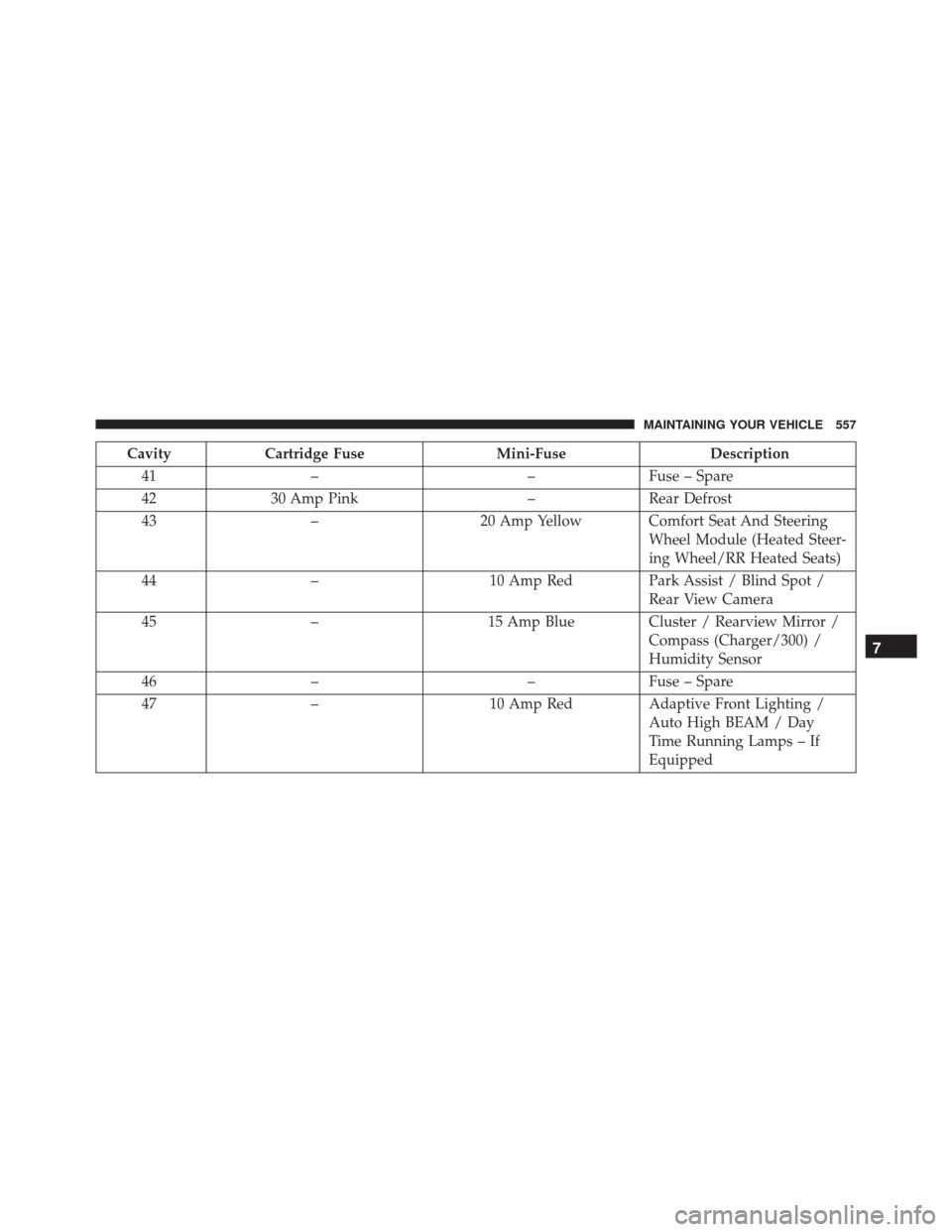
CavityCartridge Fuse Mini-FuseDescription
41 – –Fuse – Spare
42 30 Amp Pink –Rear Defrost
43 – 20 Amp Yellow Comfort Seat And Steering
Wheel Module (Heated Steer-
ing Wheel/RR Heated Seats)
44 – 10 Amp RedPark Assist / Blind Spot /
Rear View Camera
45 – 15 Amp BlueCluster / Rearview Mirror /
Compass (Charger/300) /
Humidity Sensor
46 – –Fuse – Spare
47 – 10 Amp RedAdaptive Front Lighting /
Auto High BEAM / Day
Time Running Lamps – If
Equipped
7
MAINTAINING YOUR VEHICLE 557