Page 206 of 702
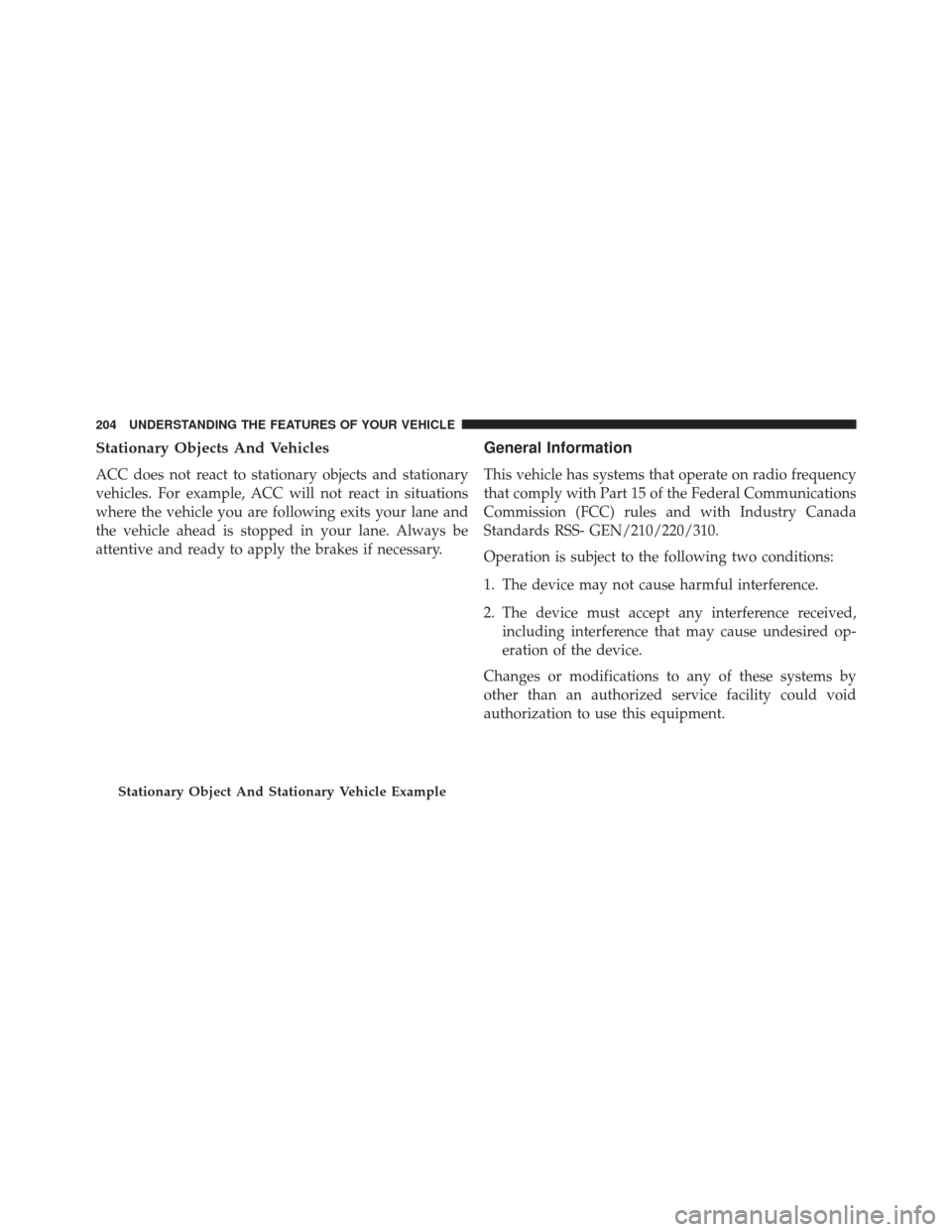
Stationary Objects And Vehicles
ACC does not react to stationary objects and stationary
vehicles. For example, ACC will not react in situations
where the vehicle you are following exits your lane and
the vehicle ahead is stopped in your lane. Always be
attentive and ready to apply the brakes if necessary.
General Information
This vehicle has systems that operate on radio frequency
that comply with Part 15 of the Federal Communications
Commission (FCC) rules and with Industry Canada
Standards RSS- GEN/210/220/310.
Operation is subject to the following two conditions:
1. The device may not cause harmful interference.
2. The device must accept any interference received,including interference that may cause undesired op-
eration of the device.
Changes or modifications to any of these systems by
other than an authorized service facility could void
authorization to use this equipment.
Stationary Object And Stationary Vehicle Example
204 UNDERSTANDING THE FEATURES OF YOUR VEHICLE
Page 227 of 702
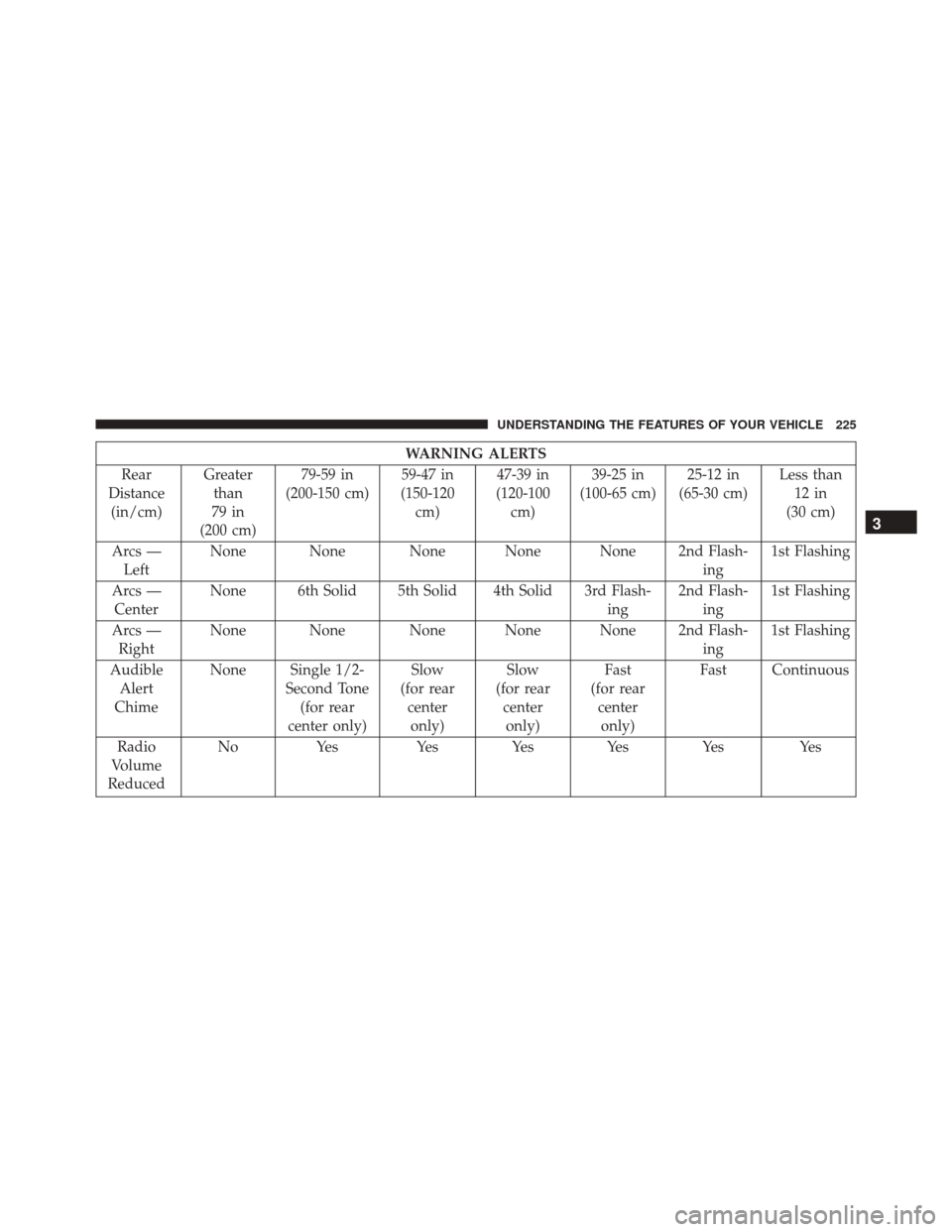
WARNING ALERTS
Rear
Distance (in/cm) Greater
than
79 in
(200 cm) 79-59 in
(200-150 cm) 59-47 in
(150-120 cm) 47-39 in
(120-100 cm) 39-25 in
(100-65 cm) 25-12 in
(65-30 cm) Less than
12 in
(30 cm)
Arcs — Left None None None None None 2nd Flash-
ing1st Flashing
Arcs — Center None 6th Solid 5th Solid 4th Solid 3rd Flash-
ing2nd Flash-
ing 1st Flashing
Arcs — Right None None None None None 2nd Flash-
ing1st Flashing
Audible Alert
Chime None Single 1/2-
Second Tone(for rear
center only) Slow
(for rear centeronly) Slow
(for rear centeronly) Fast
(for rear centeronly) Fast Continuous
Radio
Volume
Reduced No
Yes Yes Yes Yes Yes Yes
3
UNDERSTANDING THE FEATURES OF YOUR VEHICLE 225
Page 228 of 702

NOTE:ParkSense will reduce the volume of the radio, if
on, when the system is sounding an audio tone.
Enabling And Disabling ParkSense
ParkSense can be enabled and disabled with the
ParkSense switch, located on the switch panel below the
Uconnect display. When the ParkSense switch is pushed to disable the
system, the instrument cluster will display the
“PARKSENSE OFF” message for approximately five sec-
onds. Refer to “Electronic Vehicle Information Center
(EVIC) or 7�
Driver Information Display (DID)” for
further information. When the shift lever is moved to
REVERSE and the system is disabled, the EVIC/DID will
display the “PARKSENSE OFF” message for as long as
the vehicle is in REVERSE.
The ParkSense switch LED will be ON when ParkSense is
disabled or requires service. The ParkSense switch LED
will be OFF when the system is enabled. If the ParkSense
switch is pushed, and requires service, the ParkSense
switch LED will blink momentarily, and then the LED
will be ON.
ParkSense Switch
226 UNDERSTANDING THE FEATURES OF YOUR VEHICLE
Page 230 of 702

•Jackhammers, large trucks, and other vibrations could
affect the performance of ParkSense.
• When you turn ParkSense OFF, the instrument cluster
will display “PARKSENSE OFF” Furthermore, once
you turn ParkSense off, it remains off until you turn it
on again, even if you cycle the ignition.
• When you move the shift lever to the REVERSE
position and ParkSense is turned OFF, the EVIC/DID
will display “PARKSENSE OFF” message for as long
as the vehicle is in REVERSE.
• ParkSense, when on, will reduce the volume of the
radio when it is sounding a tone. •
Clean the ParkSense sensors regularly, taking care not
to scratch or damage them. The sensors must not be
covered with ice, snow, slush, mud, dirt or debris.
Failure to do so can result in the system not working
properly. The ParkSense system might not detect an
obstacle behind the fascia/bumper, or it could provide
a false indication that an obstacle is behind the fascia/
bumper.
• Use the ParkSense switch to turn the ParkSense system
OFF if objects such as bicycle carriers, trailer hitches,
etc. are placed within 12 in (30 cm) from the rear
fascia/bumper. Failure to do so can result in the
system misinterpreting a close object as a sensor
problem, causing the “PARKSENSE UNAVAILABLE
SERVICE REQUIRED” message to be displayed in the
EVIC/DID.
228 UNDERSTANDING THE FEATURES OF YOUR VEHICLE
Page 239 of 702
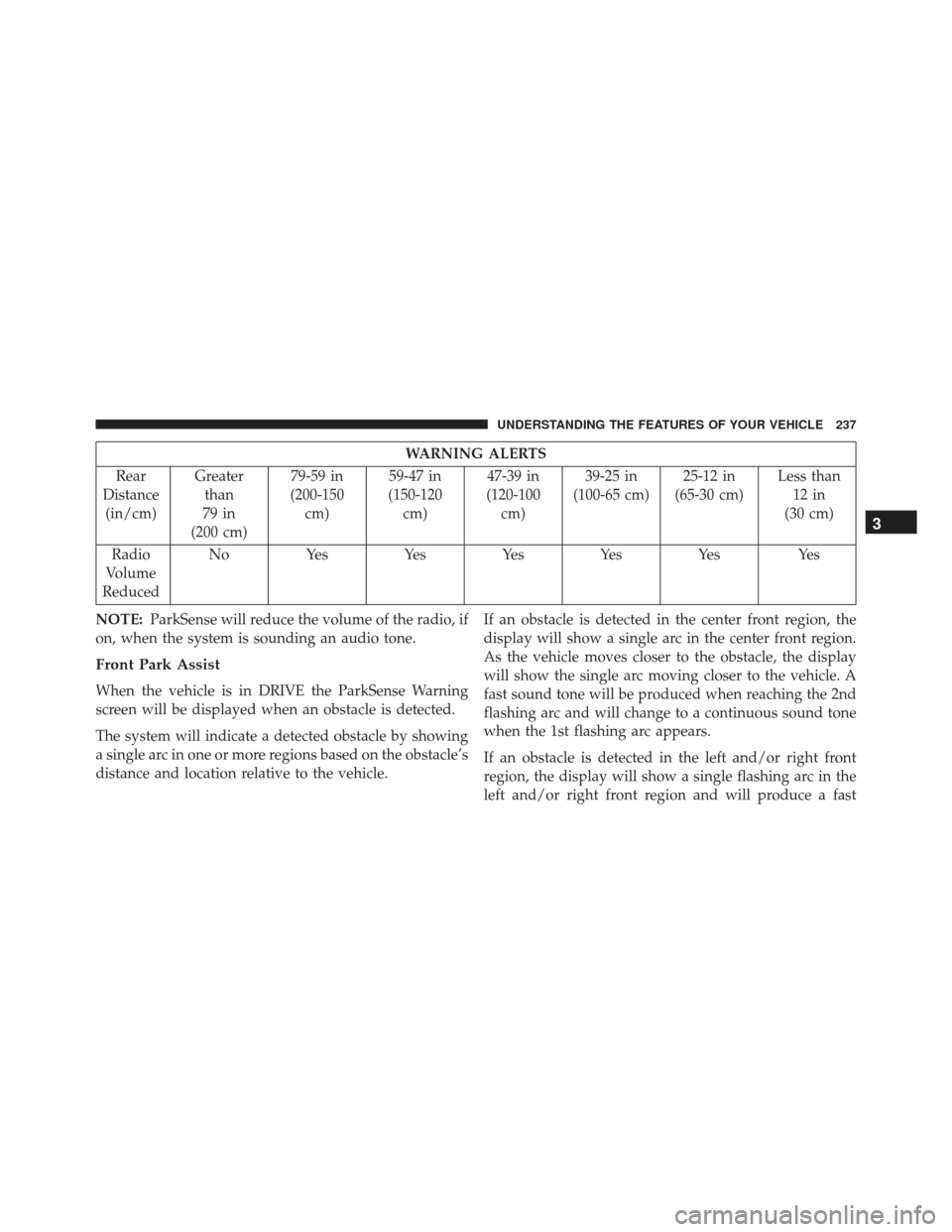
WARNING ALERTS
Rear
Distance (in/cm) Greater
than
79 in
(200 cm) 79-59 in
(200-150 cm) 59-47 in
(150-120 cm) 47-39 in
(120-100 cm) 39-25 in
(100-65 cm) 25-12 in
(65-30 cm) Less than
12 in
(30 cm)
Radio
Volume
Reduced No
Yes YesYesYesYes Yes
NOTE: ParkSense will reduce the volume of the radio, if
on, when the system is sounding an audio tone.
Front Park Assist
When the vehicle is in DRIVE the ParkSense Warning
screen will be displayed when an obstacle is detected.
The system will indicate a detected obstacle by showing
a single arc in one or more regions based on the obstacle’s
distance and location relative to the vehicle. If an obstacle is detected in the center front region, the
display will show a single arc in the center front region.
As the vehicle moves closer to the obstacle, the display
will show the single arc moving closer to the vehicle. A
fast sound tone will be produced when reaching the 2nd
flashing arc and will change to a continuous sound tone
when the 1st flashing arc appears.
If an obstacle is detected in the left and/or right front
region, the display will show a single flashing arc in the
left and/or right front region and will produce a fast
3
UNDERSTANDING THE FEATURES OF YOUR VEHICLE 237
Page 242 of 702
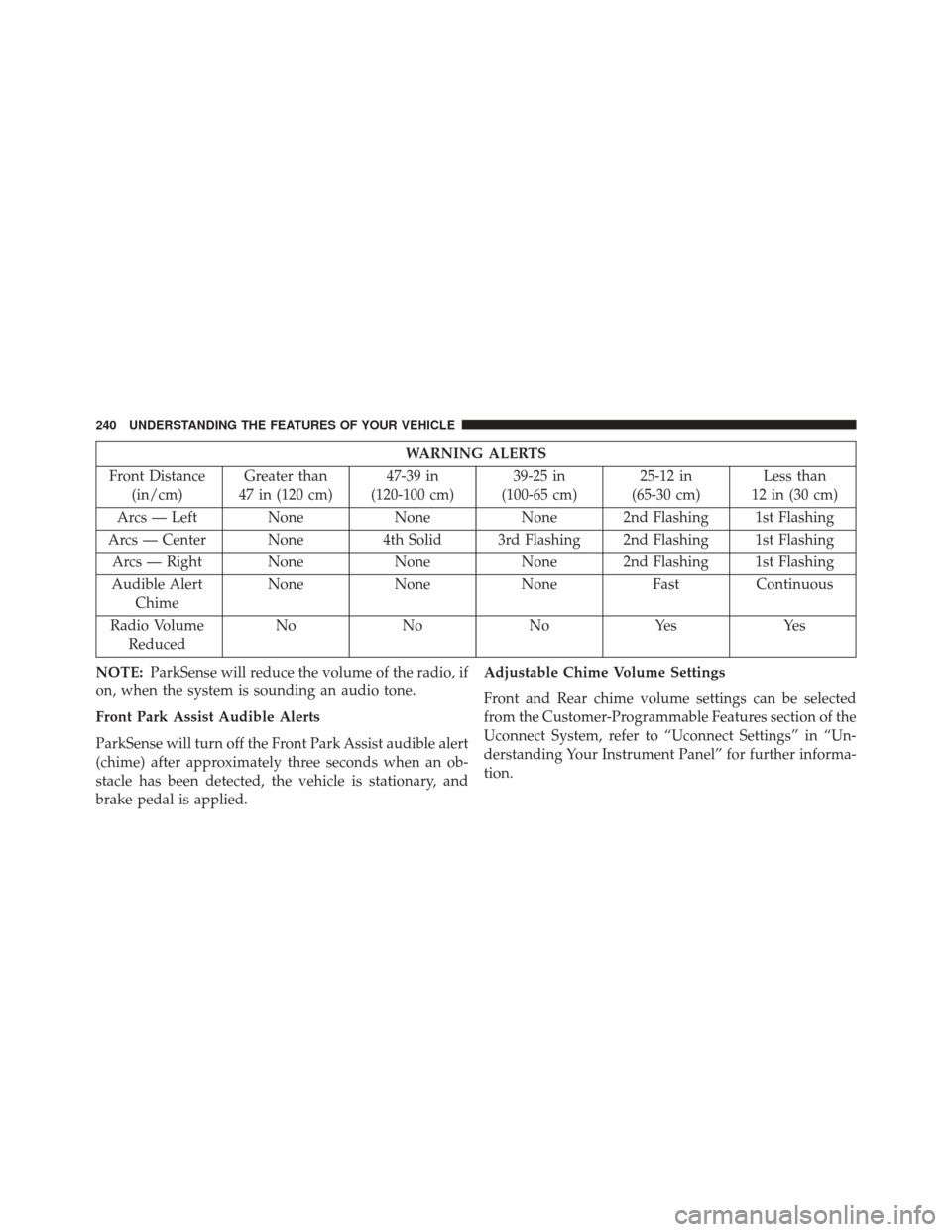
WARNING ALERTS
Front Distance (in/cm) Greater than
47 in (120 cm) 47-39 in
(120-100 cm) 39-25 in
(100-65 cm) 25-12 in
(65-30 cm) Less than
12 in (30 cm)
Arcs — Left None NoneNone 2nd Flashing 1st Flashing
Arcs — Center None 4th Solid 3rd Flashing 2nd Flashing 1st Flashing
Arcs — Right None NoneNone 2nd Flashing 1st Flashing
Audible Alert Chime None
NoneNone FastContinuous
Radio Volume Reduced No
NoNoYes Yes
NOTE: ParkSense will reduce the volume of the radio, if
on, when the system is sounding an audio tone.
Front Park Assist Audible Alerts
ParkSense will turn off the Front Park Assist audible alert
(chime) after approximately three seconds when an ob-
stacle has been detected, the vehicle is stationary, and
brake pedal is applied. Adjustable Chime Volume Settings
Front and Rear chime volume settings can be selected
from the Customer-Programmable Features section of the
Uconnect System, refer to “Uconnect Settings” in “Un-
derstanding Your Instrument Panel” for further informa-
tion.
240 UNDERSTANDING THE FEATURES OF YOUR VEHICLE
Page 246 of 702

•When you move the shift lever to the REVERSE
position and ParkSense is turned off, the instrument
cluster will display “PARKSENSE OFF” for as long as
the vehicle is in REVERSE.
• ParkSense, when on, will reduce the volume of the
radio when it is sounding a tone.
• Clean the ParkSense sensors regularly, taking care not
to scratch or damage them. The sensors must not be
covered with ice, snow, slush, mud, dirt or debris.
Failure to do so can result in the system not working
properly. The ParkSense system might not detect an
obstacle behind or in front of the fascia/bumper, or it
could provide a false indication that an obstacle is
behind or in front of the fascia/bumper.
• Use the ParkSense switch to turn the ParkSense system
off if objects such as bicycle carriers, trailer hitches, etc.
are placed within 12 in (30 cm) from the rear fascia/
bumper. Failure to do so can result in the system misinterpreting a close object as a sensor problem,
causing the “PARKSENSE UNAVAILABLE SERVICE
REQUIRED” message to be displayed in the instru-
ment cluster.
• There may be a delay in the object detection rate if the
object is moving. This will cause the automatic braking
application to be delayed.
CAUTION!
• ParkSense is only a parking aid and it is unable to
recognize every obstacle, including small obstacles.
Parking curbs might be temporarily detected or not
detected at all. Obstacles located above or below
the sensors will not be detected when they are in
close proximity.
(Continued)
244 UNDERSTANDING THE FEATURES OF YOUR VEHICLE
Page 278 of 702
WARNING!(Continued)
•Vehicle exhaust contains carbon monoxide, a dan-
gerous gas. Do not run your vehicle in the garage
while training the transceiver. Exhaust gas can
cause serious injury or death.
NOTE: Only use this transceiver with a garage door
opener that has a “stop and reverse” feature as required
by federal safety standards. This includes most garage
door opener models manufactured after 1982. Do not use
a garage door opener without these safety features. Call
toll-free 1-800-355-3515 or, on the Internet at
HomeLink.com for safety information or assistance.
Before You Begin Programming HomeLink
Be sure that your vehicle is parked outside of the garage
before you begin programming. For more efficient programming and accurate transmis-
sion of the radio-frequency signal it is recommended that
a new battery be placed in the hand-held transmitter of
the device that is being programmed to the HomeLink
system.
To erase the channels place the ignition in the ON/RUN
position and push and hold the two outside HomeLink
buttons (I and III) for up 20 seconds or until the red
indicator flashes.
NOTE:
•
Erasing all channels should only be performed when
programming HomeLink for the first time. Do not
erase channels when programming additional buttons.
• If you have any problems, or require assistance, please
call toll-free 1-800-355-3515 or, on the Internet at
HomeLink.com for information or assistance.
276 UNDERSTANDING THE FEATURES OF YOUR VEHICLE