2016 CHEVROLET SONIC seats
[x] Cancel search: seatsPage 2 of 353

Chevrolet Sonic Owner Manual (GMNA-Localizing-U.S/Canada-9085902) -
2016 - CRC - 5/27/15
ContentsIntroduction . . . . . . . . . . . . . . . . . . . . . . 2
In Brief . . . . . . . . . . . . . . . . . . . . . . . . . . . 5
Keys, Doors, and Windows . . . . . 25
Seats and Restraints . . . . . . . . . . . 43
Storage . . . . . . . . . . . . . . . . . . . . . . . . . 86
Instruments and Controls . . . . . . . 89
Lighting . . . . . . . . . . . . . . . . . . . . . . . 120
Infotainment System . . . . . . . . . . 127
Climate Controls . . . . . . . . . . . . . . 176
Driving and Operating . . . . . . . . . 180
Vehicle Care . . . . . . . . . . . . . . . . . . 219
Service and Maintenance . . . . . 301
Technical Data . . . . . . . . . . . . . . . . 314
Customer Information . . . . . . . . . 318
Reporting Safety Defects . . . . . . 329
OnStar . . . . . . . . . . . . . . . . . . . . . . . . 332
Index . . . . . . . . . . . . . . . . . . . . 342
Page 6 of 353

Chevrolet Sonic Owner Manual (GMNA-Localizing-U.S/Canada-9085902) -
2016 - CRC - 5/27/15
In Brief 5
In Brief
Instrument Panel
Instrument Panel . . . . . . . . . . . . . . . . 6
Initial Drive Information
Initial Drive Information . . . . . . . . . . 8
Remote Keyless Entry (RKE)System . . . . . . . . . . . . . . . . . . . . . . . . 8
Remote Vehicle Start . . . . . . . . . . . 8
Door Locks . . . . . . . . . . . . . . . . . . . . . 9
Liftgate . . . . . . . . . . . . . . . . . . . . . . . . . . 9
Trunk Release . . . . . . . . . . . . . . . . . . 9
Windows . . . . . . . . . . . . . . . . . . . . . . . 10
Seat Adjustment . . . . . . . . . . . . . . . 11
Second Row Seats . . . . . . . . . . . . 12
Head Restraint Adjustment . . . . 12
Safety Belts . . . . . . . . . . . . . . . . . . . . 12
Passenger Sensing System . . . 12
Mirror Adjustment . . . . . . . . . . . . . . 13
Steering Wheel Adjustment . . . . 13
Interior Lighting . . . . . . . . . . . . . . . . 14
Exterior Lighting . . . . . . . . . . . . . . . 14
Windshield Wiper/Washer . . . . . . 15
Climate Controls . . . . . . . . . . . . . . . 15
Transmission . . . . . . . . . . . . . . . . . . 16
Starting the Engine . . . . . . . . . . . . 17
Vehicle Features
Radio(s) . . . . . . . . . . . . . . . . . . . . . . . 18
Satellite Radio . . . . . . . . . . . . . . . . . 19
Portable Audio Devices . . . . . . . . 19
Bluetooth
®. . . . . . . . . . . . . . . . . . . . . 19
Steering Wheel Controls . . . . . . . 20
Cruise Control . . . . . . . . . . . . . . . . . 20
Driver Information
Center (DIC) . . . . . . . . . . . . . . . . . 21
Forward Collision Alert (FCA) System . . . . . . . . . . . . . . . . . . . . . . . 21
Lane Departure Warning (LDW) . . . . . . . . . . . . . . . 21
Rear Vision Camera (RVC) . . . . 21
Power Outlets . . . . . . . . . . . . . . . . . 22
Sunroof . . . . . . . . . . . . . . . . . . . . . . . . 22
Performance and Maintenance
Traction Control/Electronic Stability Control . . . . . . . . . . . . . . 23
Tire Pressure Monitor . . . . . . . . . . 23
Engine Oil Life System . . . . . . . . 23
Driving for Better Fuel Economy . . . . . . . . . . . . . . . . . . . . . 24
Roadside Assistance Program . . . . . . . . . . . . . . . . . . . . . . 24
Page 12 of 353
Chevrolet Sonic Owner Manual (GMNA-Localizing-U.S/Canada-9085902) -
2016 - CRC - 5/27/15
In Brief 11
Seat Adjustment
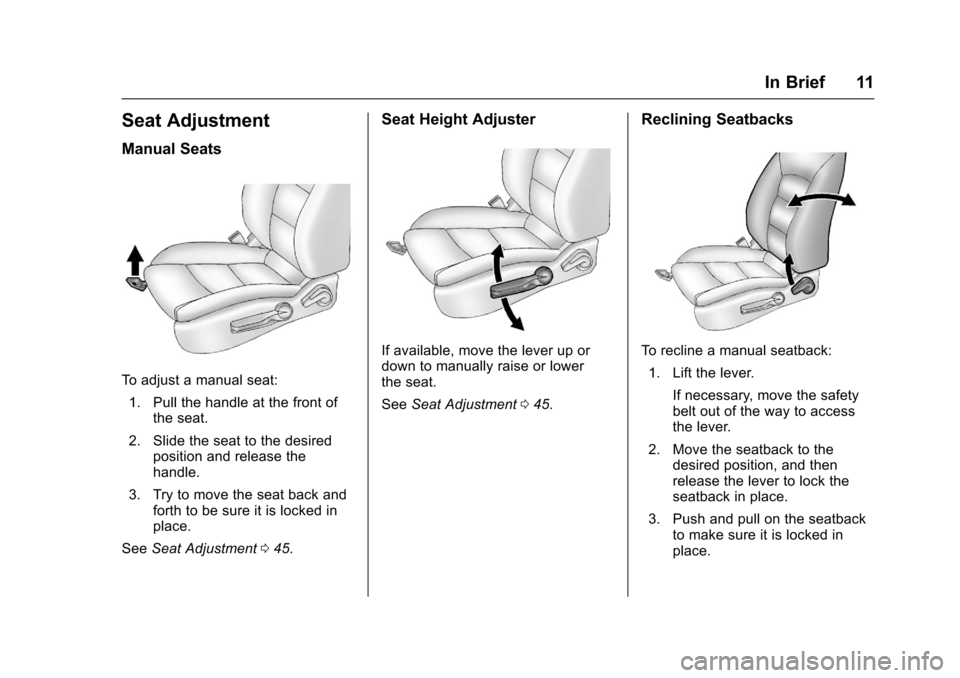
Manual Seats
To adjust a manual seat:1. Pull the handle at the front of the seat.
2. Slide the seat to the desired position and release the
handle.
3. Try to move the seat back and forth to be sure it is locked in
place.
See Seat Adjustment 045.
Seat Height Adjuster
If available, move the lever up or
down to manually raise or lower
the seat.
See Seat Adjustment 045.
Reclining Seatbacks
To recline a manual seatback:
1. Lift the lever.
If necessary, move the safety
belt out of the way to access
the lever.
2. Move the seatback to the desired position, and then
release the lever to lock the
seatback in place.
3. Push and pull on the seatback to make sure it is locked in
place.
Page 13 of 353
Chevrolet Sonic Owner Manual (GMNA-Localizing-U.S/Canada-9085902) -
2016 - CRC - 5/27/15
12 In Brief
To return the seatback to the upright
position:1. Lift the lever fully without applying pressure to the
seatback, and the seatback will
return to the upright position.
2. Push and pull on the seatback to make sure it is locked.
See Reclining Seatbacks 046.
Second Row Seats
The rear seatbacks can be folded
down to increase cargo space.
See Rear Seats 048.
Head Restraint
Adjustment
Do not drive until the head restraints
for all occupants are installed and
adjusted properly.
To achieve a comfortable seating
position, change the seatback
recline angle as little as necessary
while keeping the seat and the head
restraint height in the proper
position. See
Head Restraints 043 and Seat
Adjustment 045.
Safety Belts
Refer to the following sections for
important information on how to use
safety belts properly:
.
Safety Belts 050.
. How to Wear Safety Belts
Properly 051.
. Lap-Shoulder Belt 052.
. Lower Anchors and Tethers for
Children (LATCH System) 074.
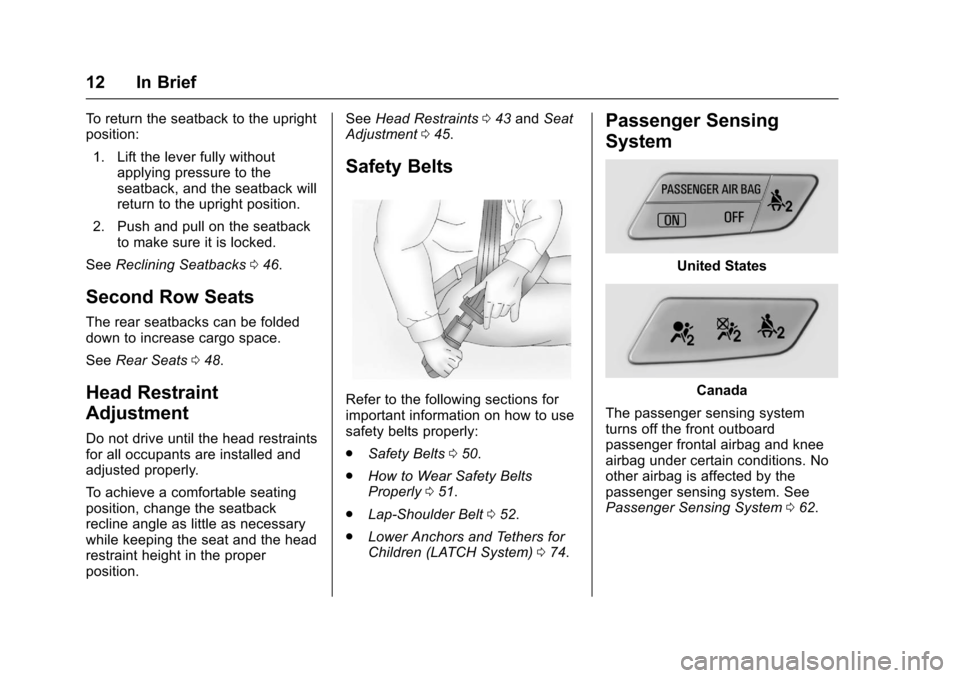
Passenger Sensing
System
United States
Canada
The passenger sensing system
turns off the front outboard
passenger frontal airbag and knee
airbag under certain conditions. No
other airbag is affected by the
passenger sensing system. See
Passenger Sensing System 062.
Page 15 of 353
Chevrolet Sonic Owner Manual (GMNA-Localizing-U.S/Canada-9085902) -
2016 - CRC - 5/27/15
14 In Brief
2. Move the steering wheel up,down, forward, and backward.
3. Pull the lever up to lock the steering wheel in place.
Do not adjust the steering wheel
while driving.
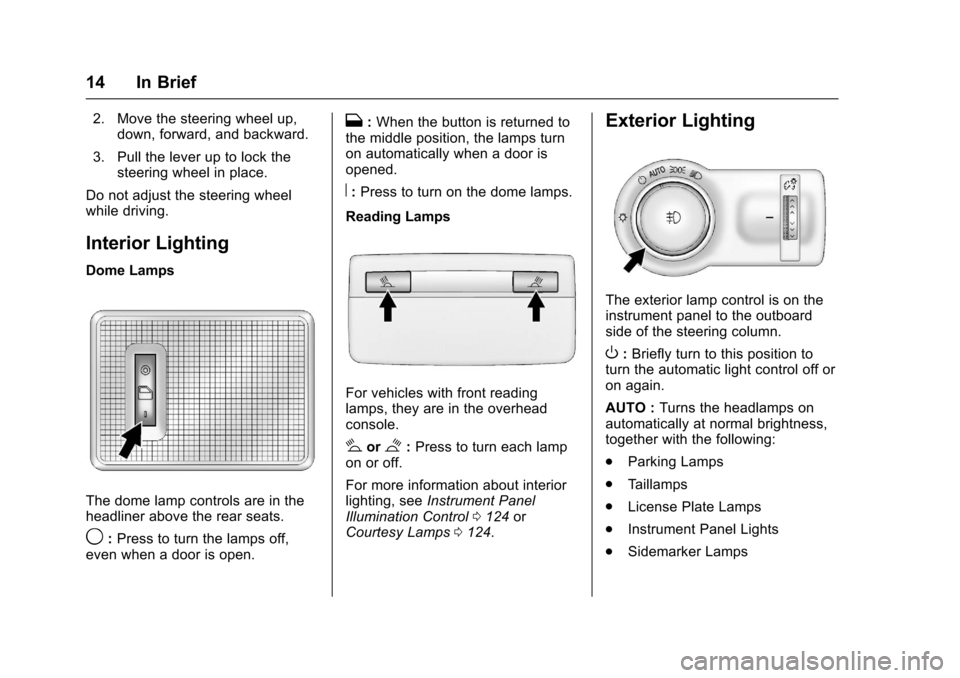
Interior Lighting
Dome Lamps
The dome lamp controls are in the
headliner above the rear seats.
9: Press to turn the lamps off,
even when a door is open.
H: When the button is returned to
the middle position, the lamps turn
on automatically when a door is
opened.
R: Press to turn on the dome lamps.
Reading Lamps
For vehicles with front reading
lamps, they are in the overhead
console.
#or$: Press to turn each lamp
on or off.
For more information about interior
lighting, see Instrument Panel
Illumination Control 0124 or
Courtesy Lamps 0124.
Exterior Lighting
The exterior lamp control is on the
instrument panel to the outboard
side of the steering column.
O:Briefly turn to this position to
turn the automatic light control off or
on again.
AUTO : Turns the headlamps on
automatically at normal brightness,
together with the following:
. Parking Lamps
. Taillamps
. License Plate Lamps
. Instrument Panel Lights
. Sidemarker Lamps
Page 17 of 353
Chevrolet Sonic Owner Manual (GMNA-Localizing-U.S/Canada-9085902) -
2016 - CRC - 5/27/15
16 In Brief
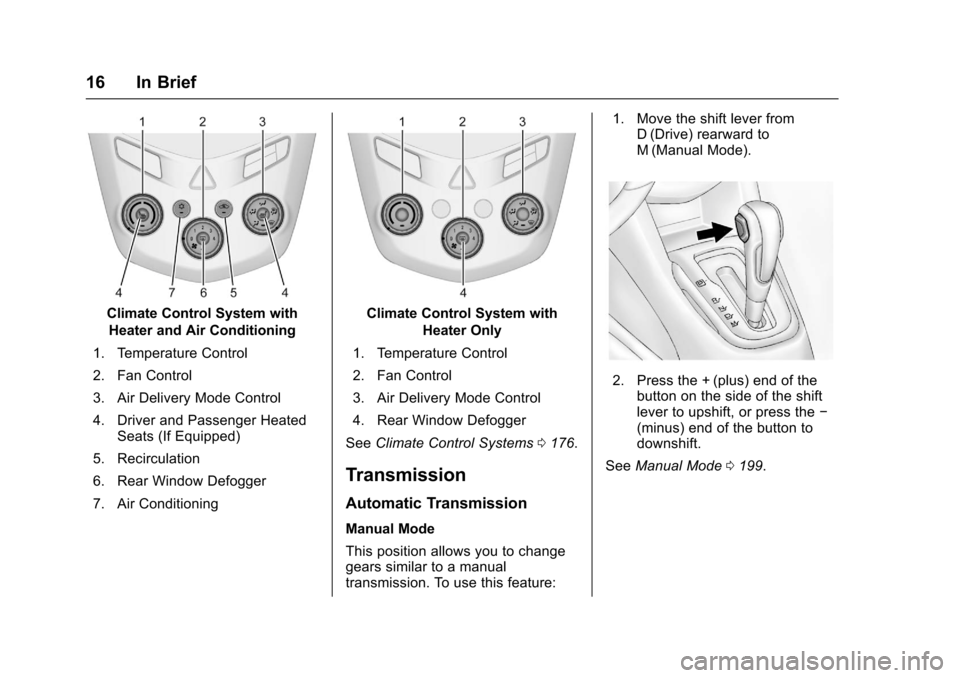
Climate Control System withHeater and Air Conditioning
1. Temperature Control
2. Fan Control
3. Air Delivery Mode Control
4. Driver and Passenger Heated Seats (If Equipped)
5. Recirculation
6. Rear Window Defogger
7. Air ConditioningClimate Control System with Heater Only
1. Temperature Control
2. Fan Control
3. Air Delivery Mode Control
4. Rear Window Defogger
See Climate Control Systems 0176.
Transmission
Automatic Transmission
Manual Mode
This position allows you to change
gears similar to a manual
transmission. To use this feature: 1. Move the shift lever from
D (Drive) rearward to
M (Manual Mode).
2. Press the + (plus) end of the
button on the side of the shift
lever to upshift, or press the −
(minus) end of the button to
downshift.
See Manual Mode 0199.
Page 30 of 353

Chevrolet Sonic Owner Manual (GMNA-Localizing-U.S/Canada-9085902) -
2016 - CRC - 5/27/15
Keys, Doors, and Windows 29
3. Wait 10 minutes until thesecurity light turns off.
4. Turn the ignition to LOCK/OFF.
5. Repeat Steps 2–4 two more times. After the third time, turn
to ON/RUN; the key is learned
and all previously known keys
will no longer work with the
vehicle.
Remaining keys can be learned by
following the procedure in
“Programming with a Recognized
Transmitter.”
Battery Replacement
The battery is not rechargeable. To
replace the battery:
Caution
When replacing the battery, do
not touch any of the circuitry on
the transmitter. Static from your
body could damage the
transmitter.
1. Press the button on the transmitter to extend the key. 2. Remove the battery cover by
prying with a finger.
3. Remove the old battery.
4. Insert the new battery, positive side facing up. Replace with a
CR2032 or equivalent battery.
5. Snap the battery cover back on to the transmitter.
Remote Vehicle Start
If equipped, this feature allows the
engine to be started from outside
the vehicle.
/(Remote Vehicle Start) : This
button will be on the RKE
transmitter if the vehicle has remote
start.
The climate control system will use
the previous settings during a
remote start. The rear defog may
come on during remote start based
on cold ambient conditions. The
rear fog indicator light does not
come on during remote start.
If the vehicle has heated seats, they
may come on during a remote start.
See Heated Front Seats 047. Laws in some local communities
may restrict the use of remote
starters. For example, some laws
require a person using remote start
to have the vehicle in view. Check
local regulations for any
requirements.
Other conditions can affect the
performance of the transmitter. See
Remote Keyless Entry (RKE)
System
027.
Starting the Vehicle
To start the engine using the remote
start feature:
1. Press and releaseQ.
2. Immediately after completing Step 1, press and hold
/for at
least four seconds or until the
turn signal lamps flash. The
turn signal lamps flashing
confirms the request to remote
start the vehicle has been
received.
Page 44 of 353
Chevrolet Sonic Owner Manual (GMNA-Localizing-U.S/Canada-9085902) -
2016 - CRC - 5/27/15
Seats and Restraints 43
Seats and
Restraints
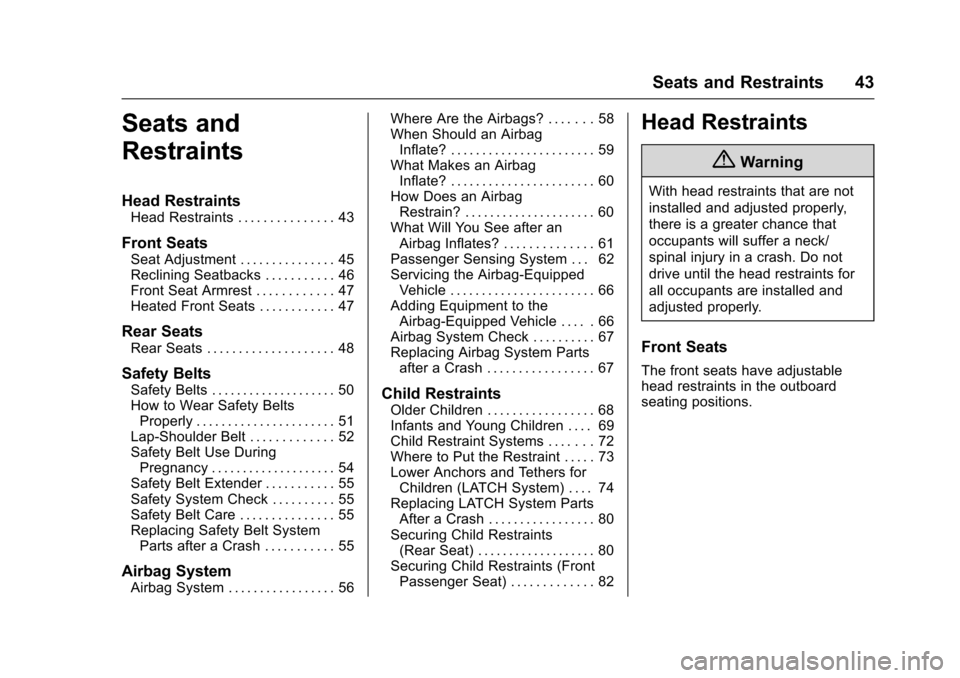
Head Restraints
Head Restraints . . . . . . . . . . . . . . . 43
Front Seats
Seat Adjustment . . . . . . . . . . . . . . . 45
Reclining Seatbacks . . . . . . . . . . . 46
Front Seat Armrest . . . . . . . . . . . . 47
Heated Front Seats . . . . . . . . . . . . 47
Rear Seats
Rear Seats . . . . . . . . . . . . . . . . . . . . 48
Safety Belts
Safety Belts . . . . . . . . . . . . . . . . . . . . 50
How to Wear Safety BeltsProperly . . . . . . . . . . . . . . . . . . . . . . 51
Lap-Shoulder Belt . . . . . . . . . . . . . 52
Safety Belt Use During Pregnancy . . . . . . . . . . . . . . . . . . . . 54
Safety Belt Extender . . . . . . . . . . . 55
Safety System Check . . . . . . . . . . 55
Safety Belt Care . . . . . . . . . . . . . . . 55
Replacing Safety Belt System Parts after a Crash . . . . . . . . . . . 55
Airbag System
Airbag System . . . . . . . . . . . . . . . . . 56 Where Are the Airbags? . . . . . . . 58
When Should an Airbag
Inflate? . . . . . . . . . . . . . . . . . . . . . . . 59
What Makes an Airbag Inflate? . . . . . . . . . . . . . . . . . . . . . . . 60
How Does an Airbag Restrain? . . . . . . . . . . . . . . . . . . . . . 60
What Will You See after an Airbag Inflates? . . . . . . . . . . . . . . 61
Passenger Sensing System . . . 62
Servicing the Airbag-Equipped Vehicle . . . . . . . . . . . . . . . . . . . . . . . 66
Adding Equipment to the Airbag-Equipped Vehicle . . . . . 66
Airbag System Check . . . . . . . . . . 67
Replacing Airbag System Parts after a Crash . . . . . . . . . . . . . . . . . 67
Child Restraints
Older Children . . . . . . . . . . . . . . . . . 68
Infants and Young Children . . . . 69
Child Restraint Systems . . . . . . . 72
Where to Put the Restraint . . . . . 73
Lower Anchors and Tethers forChildren (LATCH System) . . . . 74
Replacing LATCH System Parts After a Crash . . . . . . . . . . . . . . . . . 80
Securing Child Restraints (Rear Seat) . . . . . . . . . . . . . . . . . . . 80
Securing Child Restraints (Front Passenger Seat) . . . . . . . . . . . . . 82
Head Restraints
{Warning
With head restraints that are not
installed and adjusted properly,
there is a greater chance that
occupants will suffer a neck/
spinal injury in a crash. Do not
drive until the head restraints for
all occupants are installed and
adjusted properly.
Front Seats
The front seats have adjustable
head restraints in the outboard
seating positions.