2016 CHEVROLET IMPALA ECO mode
[x] Cancel search: ECO modePage 144 of 377
Chevrolet Impala Owner Manual (GMNA-Localizing-U.S/Canada-9086448) -
2016 - CRC - 5/20/15
Instruments and Controls 143
Select Off, On with Horn
Chirp, or On.
Remote Left in Vehicle Alert
This feature sounds an alert when
the RKE transmitter is left in the
vehicle.
Select Off or On.
Bluetooth
Select and the following may
display:
.Pair New Device
. Device Management
. Ringtones
. Voice Mail Numbers
Pair New Device
Select to pair a new device. See
“Pairing” underBluetooth
(Overview) 0168 orBluetooth
(Infotainment Controls - Base
Radio) 0170 orBluetooth (Voice
Recognition - Base Radio) 0174 or
“Pairing” under“Bluetooth” in the
infotainment manual. Device Management
Select to connect to a different
phone source, disconnect a phone,
or delete a phone.
Ringtones
Press to change the ring tone for
the specific phone. The phone does
not need to be connected to change
the ring.
Voice Mail Numbers
This feature displays the voice mail
number for all connected phones.
To change the voice mail number,
select EDIT or press the EDIT
button. Type a new number, then
select SAVE or press the SAVE
button.
Voice
Select and the following may
display:
.
Prompt Length
. Audio Feedback Speed
Prompt Length
This feature adjusts the voice
prompt length. Select Short or Long.
Audio Feedback Speed
This feature adjusts the audio
feedback speed.
Select Slow, Medium, or Fast.
Display
Select and the following may
display:
.
Mode
. Calibrate Touchscreen
. Turn Display Off
Mode
Select to change the display screen
for day or night driving.
Select Auto, Day, or Night.
Calibrate Touchscreen
Select to calibrate the touchscreen,
then follow the prompts.
Turn Display Off
Select to turn the display off. Press
anywhere on the display area or any
faceplate button to turn the
display on.
Page 146 of 377
Chevrolet Impala Owner Manual (GMNA-Localizing-U.S/Canada-9086448) -
2016 - CRC - 5/20/15
Instruments and Controls 145
instructions refer to a garage door
opener, but can be used for other
devices.
Do not use the Universal Remote
system with any garage door opener
that does not have the stop and
reverse feature. This includes any
garage door opener model
manufactured before April 1, 1982.
Read these instructions completely
before programming the Universal
Remote system. It may help to have
another person assist with the
programming process.
Keep the original hand-held
transmitter for use in other vehicles
as well as for future programming.
Erase the programming when
vehicle ownership is terminated.
See“Erasing Universal Remote
System Buttons” later in this
section.
To program a garage door opener,
park outside directly in line with and
facing the garage door opener
receiver. Clear all people and
objects near the garage door. Make sure the hand-held transmitter
has a new battery for quick and
accurate transmission of the
radio-frequency signal.
Programming the Universal
Remote System
For questions or help programming
the Universal Remote system, call
1-800-355-3515 or see
www.homelink.com.
Programming involves
time-sensitive actions, and may time
out causing the procedure to be
repeated.
To program up to three devices:
1. Hold the end of the hand-held transmitter about 3 to 8 cm (1
to 3 in) away from the
Universal Remote system
buttons with the indicator light
in view. The hand-held
transmitter was supplied by the
manufacturer of the garage
door opener receiver.
2. At the same time, press and hold both the hand-held
transmitter button and one of
the three Universal Remote system buttons to be used to
operate the garage door. Do
not release either button until
the indicator light changes from
a slow to a rapid flash. Then
release both buttons.
Some garage door openers
may require substitution of
Step 2 with the procedure
under
“Radio Signals for
Canada and Some Gate
Operators” later in this section.
3. Press and hold the newly programmed Universal Remote
system button for five seconds
while watching the indicator
light and garage door
activation.
.If the indicator light stays on
continuously or the garage
door moves when the
button is pressed, then
programming is complete.
There is no need to
complete Steps 4–6.
. If the indicator light does
not come on or the garage
door does not move, a
second button press may
Page 166 of 377

Chevrolet Impala Owner Manual (GMNA-Localizing-U.S/Canada-9086448) -
2016 - CRC - 5/20/15
Infotainment System 165
While the USB source is active, use
the icons on the screen to operate
USB function:
t(Seek Previous/Fast Reverse):
. Press to seek to the beginning of
the current or previous track.
If the track has been playing for
less than five seconds, it seeks
to the previous track. If longer
than five seconds, the current
track starts from the beginning.
. Press and hold to fast reverse
through a track. Release the
button to return to playing
speed. Elapsed time displays.
u(Seek Next/Fast Forward):
. Press to seek to the next track.
. Press and hold to fast forward
through a track. Release the
button to return to playing
speed. Elapsed time displays.
j/r(Pause/Play): Press to pause.
Press again to resume.
Z(Shuffle): PressZto play the
songs in random order. Press again
to turn off. USB Menu
Press the MENU knob to display the
USB menu and the following may
display:
Browse :
Select to display the files
and folders on the USB device.
Tone Settings : Select to adjust
Bass, Midrange, Treble, Balance,
Fade, and EQ (Equalizer). See
“Tone Settings” underAM-FM Radio
0 161.
Auto Volume : If equipped, this
feature adjusts the volume based on
the vehicle speed. Select the level
between off, low, medium-low,
medium, medium-high, and high.
Press
qBACK to go to the
previous menu.
EQ (Equalizer) Settings :
If equipped, this feature adjusts the
pre-defined EQ Modes. See “EQ
(Equalizer) Settings” inAM-FM
Radio 0161.
DSP Modes : If equipped, this
feature adjusts the DSP Modes.
See “DSP Modes” inAM-FM Radio
0 161.
Playing from an iPod®
This feature supports the following
iPod models:
.
iPod nano
®(1st, 2nd, 3rd, and
4th generation)
. iPod with video (5.0 and 5.5
generation).
. iPod classic
®(6th generation)
. iPod touch
®(1st and 2nd
generation)
There may be problems with
operation and function in the
following situations:
. When connecting an iPod on
which a more recent version of
the firmware is installed than is
supported by the infotainment
system.
. When connecting an iPod on
which firmware from other
providers is installed.
To connect and control an iPod: 1. Connect one end of the standard iPod USB cable to the
iPod's dock connector.
Page 169 of 377
Chevrolet Impala Owner Manual (GMNA-Localizing-U.S/Canada-9086448) -
2016 - CRC - 5/20/15
168 Infotainment System
Connect a 3.5 mm (1/8 in) cable
from the auxiliary device to the
auxiliary input jack.
If an auxiliary device has already
been connected, but a different
source is currently active, press the
MEDIA faceplate button repeatedly
to scroll through all of the available
audio source screens, until the AUX
source screen is shown.
Playing from the AUX Jack
An auxiliary device is played
through the audio system and
controlled through the device itself.
AUX Menu
Press the MENU knob to display the
AUX menu and the following may
display:
Tone Settings :Select to adjust
Bass, Midrange, Treble, Balance,
Fade, and EQ (Equalizer). See
“Tone Settings” underAM-FM Radio
0 161. Auto Volume :
If equipped, this
feature adjusts the volume based on
the vehicle speed. Select the level
between off, low, medium-low,
medium, medium-high, and high.
Press
qBACK to go to the
previous menu.
DSP : If equipped, this feature
adjusts the pre-defined settings.
See “DSP” inAM-FM Radio 0161.
EQ (Equalizer) : If equipped, this
feature adjusts the pre-defined
equalizer settings. See “EQ
(Equalizer)” inAM-FM Radio 0161.
Phone
Bluetooth (Overview)
Instructions for using the cell phone
may differ between infotainment
systems. For vehicles with an
uplevel radio, see the infotainment
manual.
Bluetooth-capable systems can
interact with many cell phones,
allowing:
.
Placement and receipt of calls in
a hands-free mode.
. Sharing of the cell phone’s
address book or contact list with
the vehicle.
To minimize driver distraction,
before driving, and with the vehicle
parked:
. Become familiar with the
features of the cell phone.
Organize the phone book and
contact lists clearly and delete
duplicate or rarely used entries.
If possible, program speed dial
or other shortcuts.
Page 171 of 377

Chevrolet Impala Owner Manual (GMNA-Localizing-U.S/Canada-9086448) -
2016 - CRC - 5/20/15
170 Infotainment System
Noise :The system may not
recognize voice commands if there
is too much background noise, such
as noise from open windows or loud
talking inside the vehicle.
When to Speak : A tone sounds to
indicate that the system is ready for
a voice command. Wait for the tone
and then speak.
How to Speak : Speak clearly in a
calm and natural voice.
Audio System
When using the Bluetooth system,
sound comes through the vehicle's
front audio system speakers and
overrides the audio system. Use the
Oknob during a call to change the
volume level. The system maintains
a minimum volume level.
Bluetooth Audio Quality
Turn off the Echo and Noise
cancellation feature on your phone,
if supported, for the best hands-free
performance.
See www.gm.com/bluetooth.
Other Information
The Bluetooth®word mark and
logos are owned by the Bluetooth®
SIG, Inc. and any use of such marks
by General Motors is under license.
Other trademarks and trade names
are those of their respective owners.
Bluetooth (Infotainment
Controls - Base Radio)
For information about how to
navigate the menu system using the
infotainment controls, see Overview
0 157.
Switching to Handset or
Hands-Free Mode
To switch between handset mode
and hands-free mode, use the
OnStar command, “transfer call.”
Pairing
A Bluetooth-enabled cell phone
must be paired to the Bluetooth
system and then connected to the
vehicle before it can be used. See
your cell phone manufacturer's user
guide for Bluetooth functions before
pairing the cell phone. If a Bluetooth phone is not connected, calls can
be made using OnStar Hands-Free
Calling, if available. See
OnStar
Overview 0355, if equipped.
Pairing Information
. Up to five cell phones can be
paired to the Bluetooth system.
. The pairing process is disabled
when the vehicle is moving.
. Pairing only needs to be
completed once per phone,
unless the pairing information on
the cell phone changes or the
cell phone is deleted from the
system.
. Only one paired cell phone can
be connected to the Bluetooth
system at a time.
. If multiple paired cell phones are
within range of the system, the
system connects to the first
available paired cell phone in the
order that they were newly
paired to the system. To connect
to a different paired phone, see
“Connecting to a Different
Phone” later in this section.
Page 182 of 377

Chevrolet Impala Owner Manual (GMNA-Localizing-U.S/Canada-9086448) -
2016 - CRC - 5/20/15
Climate Controls 181
Climate Controls
Climate Control Systems
Climate Control Systems . . . . . 181
Dual Automatic ClimateControl System . . . . . . . . . . . . . 184
Air Vents
Air Vents . . . . . . . . . . . . . . . . . . . . . 188
Maintenance
Passenger Compartment AirFilter . . . . . . . . . . . . . . . . . . . . . . . . 189
Service . . . . . . . . . . . . . . . . . . . . . . . 189
Climate Control Systems
The heating, cooling, and ventilation for the vehicle can be controlled with
this system.
1. Fan Control
2. Air Conditioning or Comfort/
Eco Air Conditioning (Stop/
Start Only)
3. Air Delivery Modes
4. Defrost
5. TEMP (Temperature Control)
6. Rear Window Defogger
7. Recirculation Climate Control Influence on Stop/
Start Operation and Fuel Economy
(If Equipped)
The climate control system is
dependent upon other vehicle
systems for heat and power input.
Certain climate control settings can
lead to higher fuel usage and/or
fewer auto stops.
The following are climate control
settings that use more fuel:
Page 183 of 377
Chevrolet Impala Owner Manual (GMNA-Localizing-U.S/Canada-9086448) -
2016 - CRC - 5/20/15
182 Climate Controls
.Comfort air conditioning mode.
. Defrost mode.
. Extreme temperature settings,
such as 15 °C (60 °F) or 32 °C
(90 °F).
. High fan speed settings.
To help reduce fuel usage:
. Use the full automatic control as
described under “Automatic
Operation.”
. Use eco air conditioning, instead
of the comfort air conditioning.
. Select a temperature setting that
is higher in hot weather and
lower in cold weather.
. Turn off the air conditioning
when it is not needed.
. Only use defrost when needed
to clear the windows.
Fan Control : Turn the knob
clockwise or counterclockwise to
increase or decrease the fan speed.
Temperature Control : Turn the
knob clockwise or counterclockwise
to increase or decrease the
temperature setting. Air Delivery Modes :
PressY,\,
[, or-to change the direction of
the airflow. An indicator light comes
on in the selected mode button.
Y(Vent) : Air is directed to the
instrument panel outlets.
\(Bi-Level) : Air is directed to the
instrument panel outlets and the
floor outlets.
[(Floor) : Air is directed to the
floor outlets.
-(Defog) : Air is directed to the
windshield and floor outlets to clear
the windows of fog or moisture.
0(Defrost) : Press to clear the
windshield of fog or frost more
quickly. Air is directed to the
windshield and side window outlets.
For best results, clear all snow and
ice from the windshield before
defrosting.
A/C (Air Conditioning) (For
Non-Stop/Start Vehicles) : Press
to turn the air conditioning on or off.
If the fan is turned off, the air
conditioner will not run and the
indicator light may turn off. A/C (Comfort/Eco Air
Conditioning) (For Stop/Start
Vehicles) :
Press to cycle between
the off, eco, and comfort air
conditioning modes. The indicator
will be lit in comfort and eco modes
and turns off when there is no A/C
function. If the fan is turned off, the
air conditioner will not run and the
indicator light may turn off.
For comfort a/c, press A/C. The
indicator will turn amber.
For eco a/c, press A/C again. The
indicator will turn green. This setting
balances fuel economy and air
conditioning comfort. In warm
weather conditions, auto stops may
occur more frequently and the
vehicle interior may be warmer as
compared to the comfort air
conditioning setting. This setting
allows higher humidity inside the
vehicle and window fogging before
the engine restarts.
Pressing the
0button during an
auto stop may restart the engine to
prevent window fogging. To reach
comfort levels quickly during an
Page 185 of 377
Chevrolet Impala Owner Manual (GMNA-Localizing-U.S/Canada-9086448) -
2016 - CRC - 5/20/15
184 Climate Controls
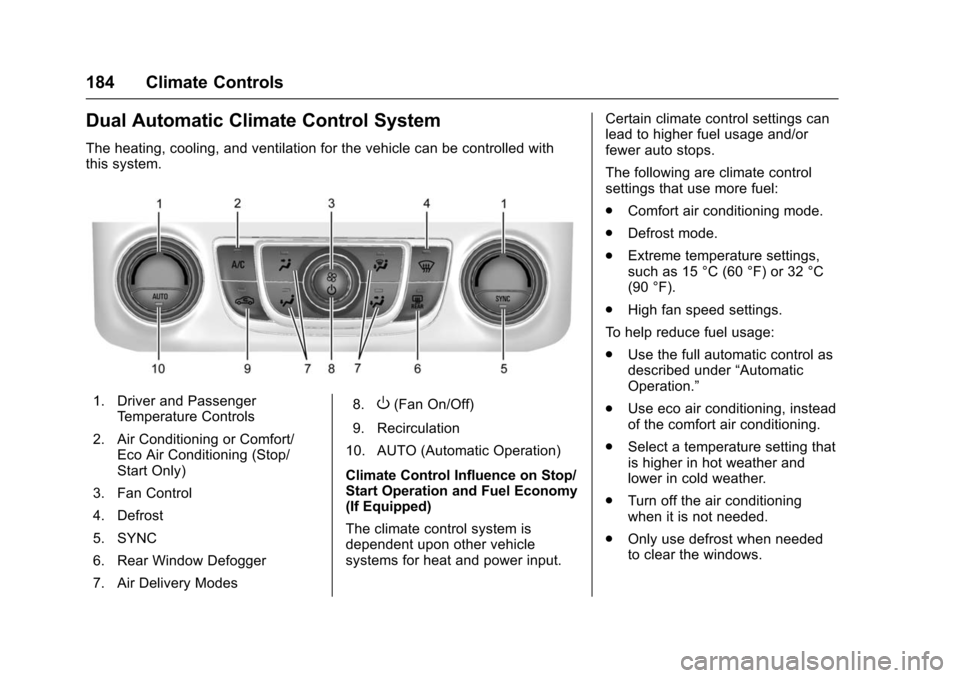
Dual Automatic Climate Control System
The heating, cooling, and ventilation for the vehicle can be controlled with
this system.
1. Driver and PassengerTemperature Controls
2. Air Conditioning or Comfort/ Eco Air Conditioning (Stop/
Start Only)
3. Fan Control
4. Defrost
5. SYNC
6. Rear Window Defogger
7. Air Delivery Modes 8.O(Fan On/Off)
9. Recirculation
10. AUTO (Automatic Operation)
Climate Control Influence on Stop/
Start Operation and Fuel Economy
(If Equipped)
The climate control system is
dependent upon other vehicle
systems for heat and power input. Certain climate control settings can
lead to higher fuel usage and/or
fewer auto stops.
The following are climate control
settings that use more fuel:
.
Comfort air conditioning mode.
. Defrost mode.
. Extreme temperature settings,
such as 15 °C (60 °F) or 32 °C
(90 °F).
. High fan speed settings.
To help reduce fuel usage:
. Use the full automatic control as
described under “Automatic
Operation.”
. Use eco air conditioning, instead
of the comfort air conditioning.
. Select a temperature setting that
is higher in hot weather and
lower in cold weather.
. Turn off the air conditioning
when it is not needed.
. Only use defrost when needed
to clear the windows.