Page 90 of 324
Chevrolet Equinox Owner Manual (GMNA-Localizing-U.S./Canada/Mexico-
9234773) - 2016 - crc - 9/3/15
Storage 89
Storage
Storage Compartments
Storage Compartments . . . . . . . . 89
Glove Box . . . . . . . . . . . . . . . . . . . . . 89
Cupholders . . . . . . . . . . . . . . . . . . . . 89
Center Console Storage . . . . . . . 89
Additional Storage Features
Cargo Cover . . . . . . . . . . . . . . . . . . . 90
Cargo Tie-Downs . . . . . . . . . . . . . . 90
Convenience Net . . . . . . . . . . . . . . 90
Roof Rack System
Roof Rack System . . . . . . . . . . . . . 90
Storage
Compartments
{Warning
Do not store heavy or sharp
objects in storage compartments.
In a crash, these objects may
cause the cover to open and
could result in injury.
Glove Box
Open the glove box by lifting up on
the lever.
Cupholders
Two cupholders are in the center
console. Cupholders may be located
in the second row seat armrest. To
access, pull the armrest down.
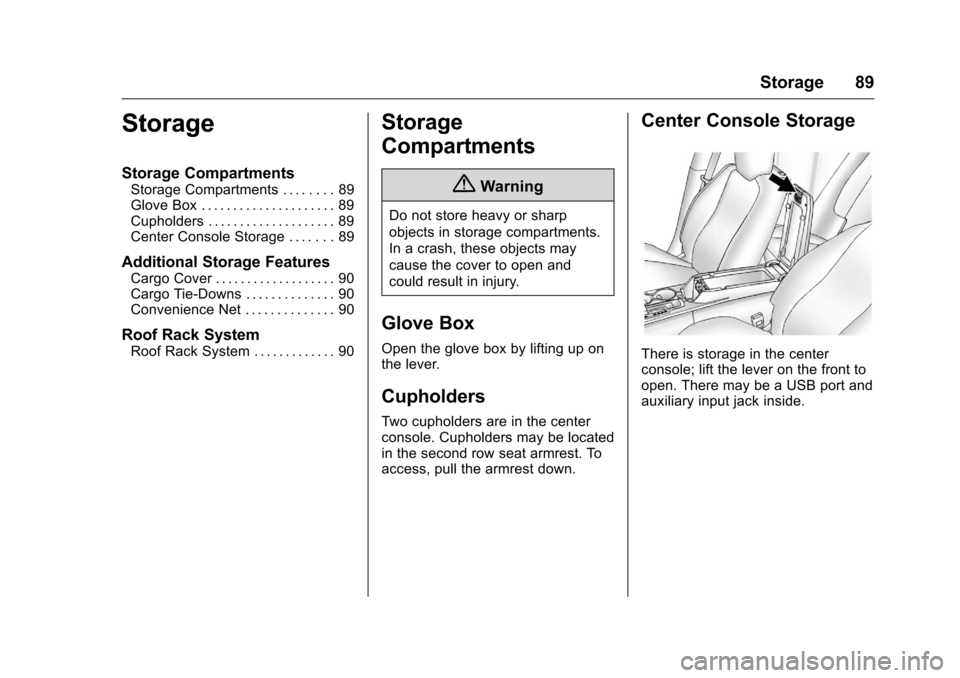
Center Console Storage
There is storage in the center
console; lift the lever on the front to
open. There may be a USB port and
auxiliary input jack inside.
Page 122 of 324
Chevrolet Equinox Owner Manual (GMNA-Localizing-U.S./Canada/Mexico-
9234773) - 2016 - crc - 9/3/15
Instruments and Controls 121
.XM Categories
. Software Versions Menu
Auto Volume
This feature adjusts the volume to
minimize the effects of unwanted
background noise that can result
from changing road surfaces, driving
speeds, or open windows. This
feature works best at lower volume
settings where background noise is
typically louder than the sound
system volume.
Select Off, Low, Medium, or High.
Gracenote Options
Select and the following may
display:
. Normalization
Normalization
This feature improves voice
recognition and media groupings.
See “USB,” “Auxiliary Devices,” and
“Bluetooth Audio” in the infotainment
manual.
Select to enable or disable. XM Channel Art
This feature turns the XM Audio
page background on the XM
Channel display on and off.
Select to enable or disable.
Max Startup Volume
This feature sets the maximum
startup volume. If the vehicle is
started and the volume is greater
than this level, the volume is
adjusted to this level.
Select + or
−to increase or
decrease the volume.
Number of Favorite Pages
Select to set the number of favorites
to display.
Select the desired number.
RDS Options
Select and the following may
display:
. RDS
. Text Scroll Freeze
. RDS Text RDS
Select to turn RDS on or off. See
“Radio Data System (RDS)”
in the
infotainment manual.
Text Scroll Freeze
When on, this allows the RDS Text
to scroll across the radio screen.
Select to enable or disable.
RDS Text
When on, this allows the RDS
information from the station to be
displayed.
Select to enable or disable.
XM Categories
This allows which available XM
Categories are used and displayed.
Select to enable or disable available
categories.
Software Versions Menu
Select to display information about
the system and update software if
available.
Page 229 of 324
Chevrolet Equinox Owner Manual (GMNA-Localizing-U.S./Canada/Mexico-
9234773) - 2016 - crc - 9/3/15
228 Vehicle Care
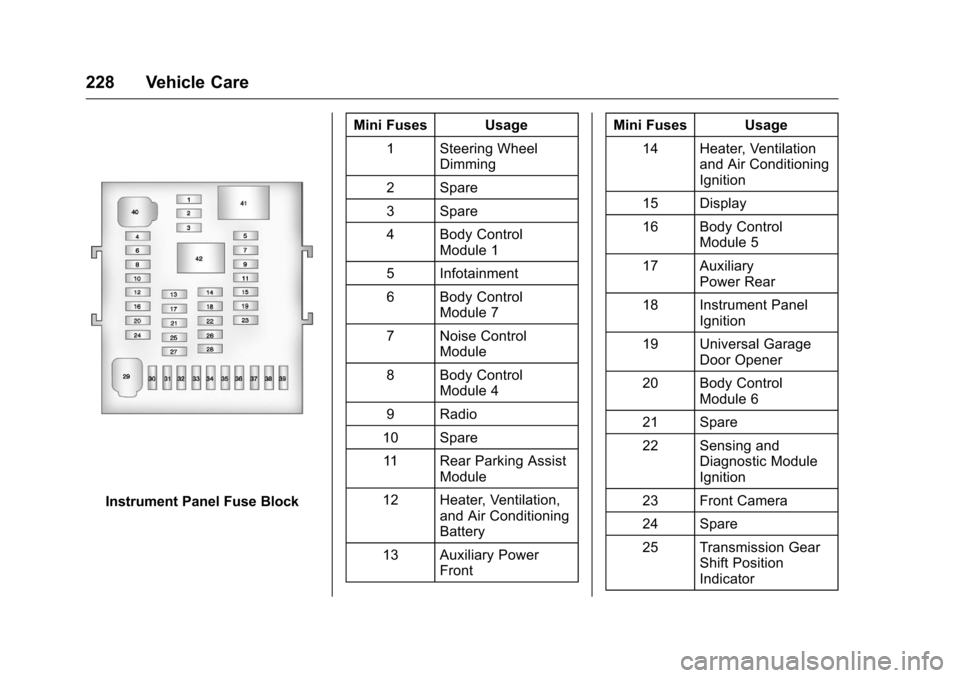
Instrument Panel Fuse BlockMini Fuses Usage
1 Steering Wheel Dimming
2 Spare
3 Spare
4 Body Control Module 1
5 Infotainment
6 Body Control Module 7
7 Noise Control Module
8 Body Control Module 4
9 Radio
10 Spare 11 Rear Parking Assist Module
12 Heater, Ventilation, and Air Conditioning
Battery
13 Auxiliary Power Front Mini Fuses Usage
14 Heater, Ventilation and Air Conditioning
Ignition
15 Display
16 Body Control Module 5
17 Auxiliary Power Rear
18 Instrument Panel Ignition
19 Universal Garage Door Opener
20 Body Control Module 6
21 Spare
22 Sensing and Diagnostic Module
Ignition
23 Front Camera
24 Spare
25 Transmission Gear Shift Position
Indicator