2016 CHEVROLET EQUINOX key
[x] Cancel search: keyPage 43 of 324
Chevrolet Equinox Owner Manual (GMNA-Localizing-U.S./Canada/Mexico-
9234773) - 2016 - crc - 9/3/15
42 Keys, Doors, and Windows
sunshade automatically opens
with the sunroof, but must be
closed manually.
. Press and hold the rear of the
passenger side switch to vent
the sunroof. Press and hold the
front of the switch to close.
Express-open/Express-close
Press and release the front or rear
of the driver side switch to
express-open or express-close the
sunroof.
Automatic Reversal System
The sunroof is equipped with an
automatic reversal system that is
only active when the sunroof is
being operated in express mode.
If an object is in the path of the
sunroof while it is express-closing,
the reversal system will detect the
object and stop. In the event of
closing difficulties like frost or other
conditions, it is possible to override
the reversal system. To override the
reversal system, close in manual
mode. To stop the movement,
release the switch.
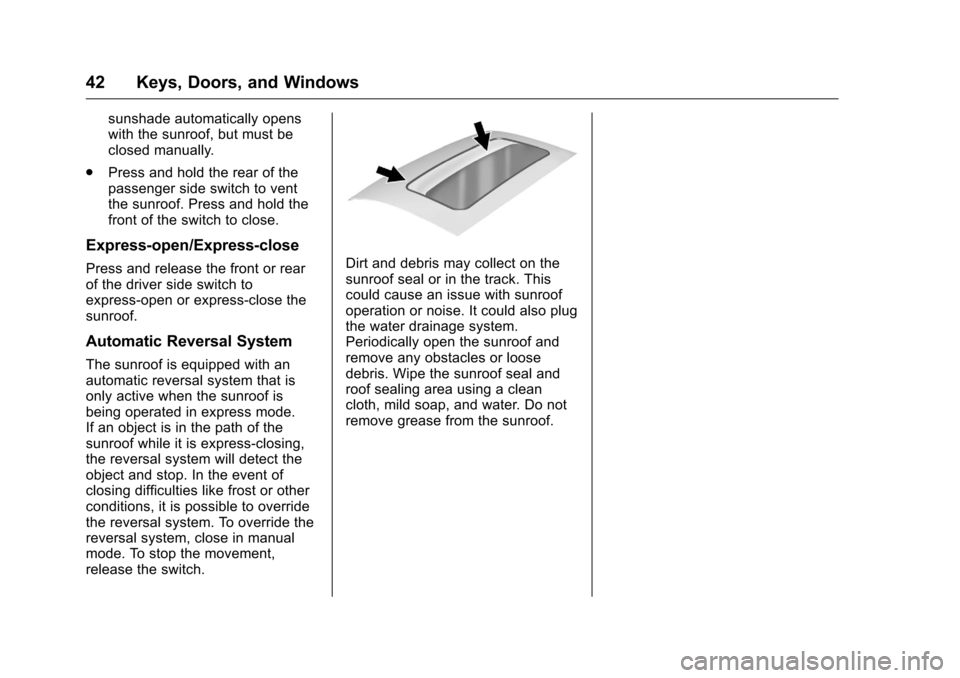
Dirt and debris may collect on the
sunroof seal or in the track. This
could cause an issue with sunroof
operation or noise. It could also plug
the water drainage system.
Periodically open the sunroof and
remove any obstacles or loose
debris. Wipe the sunroof seal and
roof sealing area using a clean
cloth, mild soap, and water. Do not
remove grease from the sunroof.
Page 49 of 324
Chevrolet Equinox Owner Manual (GMNA-Localizing-U.S./Canada/Mexico-
9234773) - 2016 - crc - 9/3/15
48 Seats and Restraints
2. Push and pull on the seatbackto make sure it is locked.
Power Reclining Seatbacks
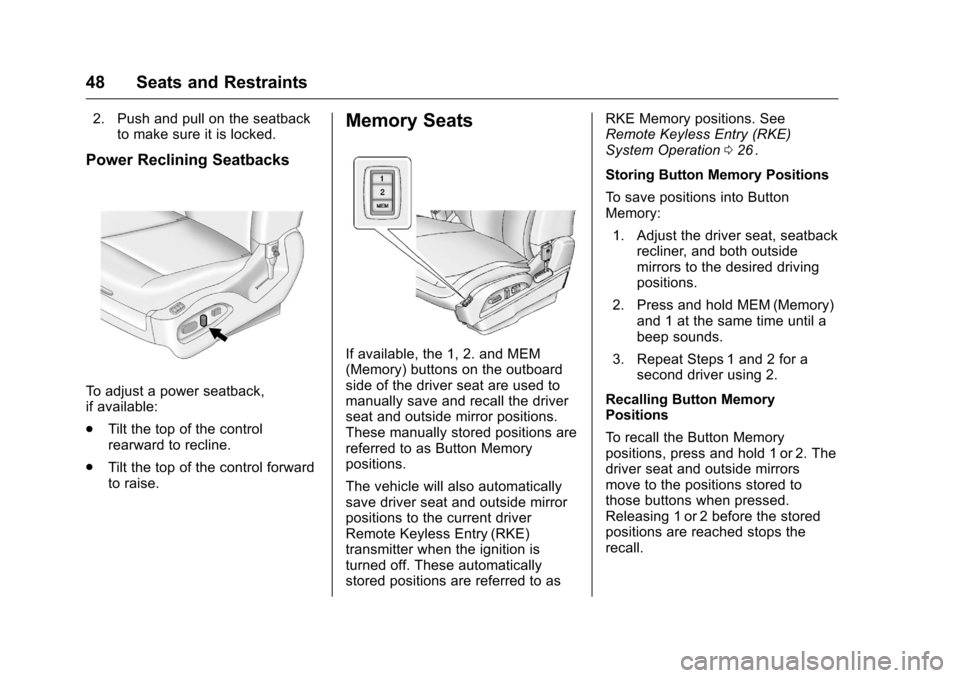
To adjust a power seatback,
if available:
.Tilt the top of the control
rearward to recline.
. Tilt the top of the control forward
to raise.
Memory Seats
If available, the 1, 2. and MEM
(Memory) buttons on the outboard
side of the driver seat are used to
manually save and recall the driver
seat and outside mirror positions.
These manually stored positions are
referred to as Button Memory
positions.
The vehicle will also automatically
save driver seat and outside mirror
positions to the current driver
Remote Keyless Entry (RKE)
transmitter when the ignition is
turned off. These automatically
stored positions are referred to as RKE Memory positions. See
Remote Keyless Entry (RKE)
System Operation
026
ii.
Storing Button Memory Positions
To save positions into Button
Memory: 1. Adjust the driver seat, seatback recliner, and both outside
mirrors to the desired driving
positions.
2. Press and hold MEM (Memory) and 1 at the same time until a
beep sounds.
3. Repeat Steps 1 and 2 for a second driver using 2.
Recalling Button Memory
Positions
To recall the Button Memory
positions, press and hold 1 or 2. The
driver seat and outside mirrors
move to the positions stored to
those buttons when pressed.
Releasing 1 or 2 before the stored
positions are reached stops the
recall.
Page 59 of 324
Chevrolet Equinox Owner Manual (GMNA-Localizing-U.S./Canada/Mexico-
9234773) - 2016 - crc - 9/3/15
58 Seats and Restraints
the guide back into its storage
pocket located on the side of the
seatback.
Safety Belt Use During
Pregnancy
Safety belts work for everyone,
including pregnant women. Like all
occupants, they are more likely to
be seriously injured if they do not
wear safety belts.
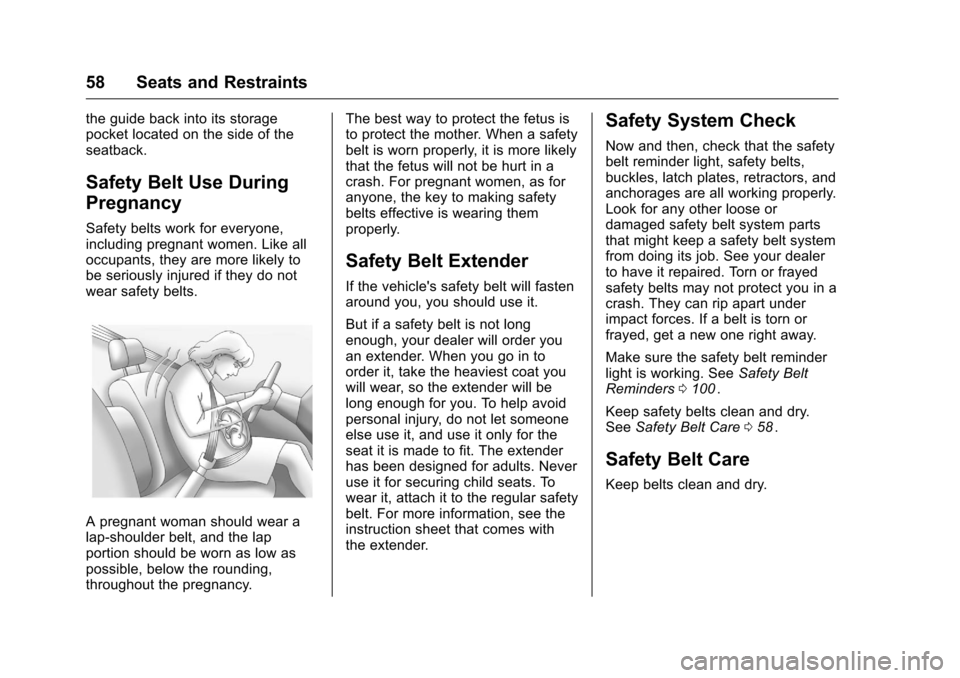
A pregnant woman should wear a
lap-shoulder belt, and the lap
portion should be worn as low as
possible, below the rounding,
throughout the pregnancy.The best way to protect the fetus is
to protect the mother. When a safety
belt is worn properly, it is more likely
that the fetus will not be hurt in a
crash. For pregnant women, as for
anyone, the key to making safety
belts effective is wearing them
properly.
Safety Belt Extender
If the vehicle's safety belt will fasten
around you, you should use it.
But if a safety belt is not long
enough, your dealer will order you
an extender. When you go in to
order it, take the heaviest coat you
will wear, so the extender will be
long enough for you. To help avoid
personal injury, do not let someone
else use it, and use it only for the
seat it is made to fit. The extender
has been designed for adults. Never
use it for securing child seats. To
wear it, attach it to the regular safety
belt. For more information, see the
instruction sheet that comes with
the extender.
Safety System Check
Now and then, check that the safety
belt reminder light, safety belts,
buckles, latch plates, retractors, and
anchorages are all working properly.
Look for any other loose or
damaged safety belt system parts
that might keep a safety belt system
from doing its job. See your dealer
to have it repaired. Torn or frayed
safety belts may not protect you in a
crash. They can rip apart under
impact forces. If a belt is torn or
frayed, get a new one right away.
Make sure the safety belt reminder
light is working. See
Safety Belt
Reminders 0100
ii.
Keep safety belts clean and dry.
See Safety Belt Care 058
ii.
Safety Belt Care
Keep belts clean and dry.
Page 93 of 324
Chevrolet Equinox Owner Manual (GMNA-Localizing-U.S./Canada/Mexico-
9234773) - 2016 - crc - 9/3/15
92 Instruments and Controls
Instruments and
Controls
Controls
Steering Wheel Adjustment . . . . 93
Steering Wheel Controls . . . . . . . 93
Horn . . . . . . . . . . . . . . . . . . . . . . . . . . . 93
Windshield Wiper/Washer . . . . . . 93
Rear Window Wiper/Washer . . . 94
Compass . . . . . . . . . . . . . . . . . . . . . . 95
Clock . . . . . . . . . . . . . . . . . . . . . . . . . . 95
Power Outlets . . . . . . . . . . . . . . . . . 96
Warning Lights, Gauges, and
Indicators
Warning Lights, Gauges, andIndicators . . . . . . . . . . . . . . . . . . . . 97
Instrument Cluster . . . . . . . . . . . . . 98
Speedometer . . . . . . . . . . . . . . . . . . 99
Odometer . . . . . . . . . . . . . . . . . . . . . . 99
Tachometer . . . . . . . . . . . . . . . . . . . . 99
Fuel Gauge . . . . . . . . . . . . . . . . . . . . 99
Engine Coolant Temperature Gauge . . . . . . . . . . . . . . . . . . . . . . 100
Safety Belt Reminders . . . . . . . . 100
Airbag Readiness Light . . . . . . . 101
Passenger Airbag Status Indicator . . . . . . . . . . . . . . . . . . . . 101
Charging System Light . . . . . . . 102 Malfunction Indicator Lamp
(Check Engine Light) . . . . . . . . 103
Brake System Warning Light . . . . . . . . . . . . . . . . . . . . . . . . 105
Antilock Brake System (ABS)
Warning Light . . . . . . . . . . . . . . . 105
Lane Departure Warning (LDW) Light . . . . . . . . . . . . . . . . . 106
Forward Collision Alert (FCA) Warning Light . . . . . . . . . . . . . . . 106
Vehicle Ahead Indicator . . . . . . 106
Traction Off Light . . . . . . . . . . . . . 106
StabiliTrak
®OFF Light . . . . . . . . 107
Traction Control System (TCS)/ StabiliTrak
®Light . . . . . . . . . . . 107
Tire Pressure Light . . . . . . . . . . . 107
Engine Oil Pressure Light . . . . 108
Fuel Economy Light . . . . . . . . . . 108
Low Fuel Warning Light . . . . . . 109
Security Light . . . . . . . . . . . . . . . . . 109
High-Beam On Light . . . . . . . . . . 109
Front Fog Lamp Light . . . . . . . . . 109
Lamps On Reminder . . . . . . . . . . 110
Cruise Control Light . . . . . . . . . . 110
Information Displays
Driver Information Center (DIC) . . . . . . . . . . . . . . . . 110
Vehicle Messages
Vehicle Messages . . . . . . . . . . . . 113 Battery Voltage and Charging
Messages . . . . . . . . . . . . . . . . . . . 113
Brake System Messages . . . . . 114
Compass Messages . . . . . . . . . . 114
Cruise Control Messages . . . . . 114
Door Ajar Messages . . . . . . . . . . 114
Engine Cooling System Messages . . . . . . . . . . . . . . . . . . . 114
Engine Oil Messages . . . . . . . . . 115
Engine Power Messages . . . . . 115
Fuel System Messages . . . . . . . 116
Key and Lock Messages . . . . . . 116
Object Detection System Messages . . . . . . . . . . . . . . . . . . . 116
Ride Control System Messages . . . . . . . . . . . . . . . . . . . 117
Airbag System Messages . . . . . 118
Security Messages . . . . . . . . . . . 118
Service Vehicle Messages . . . . 118
Tire Messages . . . . . . . . . . . . . . . . 118
Transmission Messages . . . . . . 119
Vehicle Reminder Messages . . . . . . . . . . . . . . . . . . . 119
Vehicle Personalization
Vehicle Personalization . . . . . . . 120
Page 117 of 324

Chevrolet Equinox Owner Manual (GMNA-Localizing-U.S./Canada/Mexico-
9234773) - 2016 - crc - 9/3/15
116 Instruments and Controls
to your destination. The
performance may be reduced the
next time the vehicle is driven. The
vehicle may be driven at a reduced
speed while this message is on, but
maximum acceleration and speed
may be reduced. Anytime this
message stays on, the vehicle
should be taken to your dealer for
service as soon as possible.
Fuel System Messages
ECO MODE ON
On some models, this message
displays when the Fuel Economy
Mode has been turned on by
pressing the eco button near the
shift lever. SeeFuel Economy Mode
0 169
ii.
FUEL LEVEL LOW
This message displays when the
vehicle is low on fuel. Refuel as
soon as possible.
TIGHTEN GAS CAP
This message may display when the
fuel cap is not on tight. Tighten the
fuel cap.
Key and Lock Messages
REPLACE BATTERY IN
REMOTE KEY
This message displays when the
battery in the Remote Keyless Entry
(RKE) transmitter needs to be
replaced.
Object Detection System
Messages
FORWARD COLLISION
ALERT OFF
If your vehicle has the Forward
Collision Alert (FCA) system, this
message may display if the FCA
system cannot activate due to a
temporary condition. See Forward
Collision Alert (FCA) System 0180
ii.
FRONT CAMERA BLOCKED,
CLEAN WINDSHIELD
This message displays when the
Lane Departure Warning (LDW) and
Forward Collision Alert (FCA)
systems are disabled because the
camera view is blocked and cannot
operate properly. It may also activate during heavy rain or due to
road spray. To clean the system,
clean the outside of the windshield
area in front of the LDW/FCA
camera sensor.
LANE DEPARTURE SYSTEM
UNAVAILABLE
If your vehicle has the Lane
Departure Warning (LDW) system,
this message may display if the
LDW system cannot activate due to
a temporary condition. See
Lane
Departure Warning (LDW) 0184
iifor
more information.
PARK ASSIST OFF
This message displays when the
park assist system has been turned
off or when there is a temporary
condition causing the system to be
disabled. See Parking Assist 0178
ii.
SERVICE SIDE DETECTION
SYSTEM
If this message appears, both SBZA
displays will remain on indicating
there is a problem with the SBZA
system. If these displays remain on
Page 120 of 324
Chevrolet Equinox Owner Manual (GMNA-Localizing-U.S./Canada/Mexico-
9234773) - 2016 - crc - 9/3/15
Instruments and Controls 119
This message also displays LEFT
FRONT, RIGHT FRONT, LEFT
REAR, or RIGHT REAR to indicate
the location of the low tire.
The low tire pressure warning light
will also come on. SeeTire
Pressure Light 0107
ii.
If a tire pressure message appears
on the DIC, stop as soon as
possible. Inflate the tires by adding
air until the tire pressure is equal to
the values shown on the Tire and
Loading Information label. See Tires
0 229
ii,Vehicle Load Limits 0156ii,
and Tire Pressure 0237ii.
More than one tire pressure
message can appear at a time. The
DIC also shows the tire pressure
values. See Driver Information
Center (DIC) 0110
ii.
Transmission Messages
SERVICE TRANSMISSION
This message displays if there is a
problem with the transmission. See
your dealer.
SHIFT TO PARK
This message displays when the
transmission needs to be shifted to
P (Park). This may appear when
attempting to remove the key from
the ignition or from the vehicle if the
vehicle is not in P (Park).
TRANSMISSION HOT —IDLE
ENGINE
This message displays and a chime
sounds if the transmission fluid in
the vehicle gets hot. Driving with the
transmission fluid temperature high
can cause damage to the vehicle.
Stop the vehicle and let it idle to
allow the transmission to cool. This
message clears when the fluid
temperature reaches a safe level.
Vehicle Reminder
Messages
ICE POSSIBLE DRIVE
WITH CARE
This message is displayed when ice
conditions are possible.
TURN WIPER CONTROL TO
INTERMITTENT FIRST
This message is displayed when
attempting to adjust the intermittent
wiper speed without intermittent
selected on the wiper control. See
Windshield Wiper/Washer 093
ii.
Page 135 of 324
Chevrolet Equinox Owner Manual (GMNA-Localizing-U.S./Canada/Mexico-
9234773) - 2016 - crc - 9/3/15
134 Lighting
The dome lamps can also be turned
on and off by pressing the buttons
next to the lamps.
Reading Lamps
The reading lamps are located on
the overhead console. These lamps
come on automatically when any
door is opened.
For manual operation, press the
button next to each lamp to turn it
on or off.
Lighting Features
Entry Lighting
The dome lamp, cargo lamp, and
foot lamp inside the vehicle come
on when any door is opened, if the
dome lamp is in the door position. In
addition, these lamps come on
when the Remote Keyless Entry
(RKE) unlock button is pressed.
They stay on for 20 seconds or until
a door is opened. After the door is
opened and then closed, the light
remains on for 20 seconds, or until
the ignition is turned to ON/RUN.
This feature can be changed. See
“Vehicle Locator Lights”under
Vehicle Personalization 0120
ii.
Exit Lighting
Some exterior lamps and interior
lamps come on at night, or in areas
with limited lighting, when the key is
removed from the ignition. The
dome lamp comes on after the
ignition is changed to the OFF
position. The exterior lamps and dome lamp remain on for a set
amount of time, then automatically
turn off.
The exterior lamps turn off
immediately by turning the exterior
lamp control off.
This feature can be changed. See
Vehicle Personalization
0120
ii.
Battery Load
Management
The vehicle has Electric Power
Management (EPM) that estimates
the battery's temperature and state
of charge. It then adjusts the voltage
for best performance and extended
life of the battery.
When the battery's state of charge
is low, the voltage is raised slightly
to quickly bring the charge back up.
When the state of charge is high,
the voltage is lowered slightly to
prevent overcharging. If the vehicle
has a voltmeter gauge or a voltage
display on the Driver Information
Center (DIC), you may see the
Page 149 of 324
Chevrolet Equinox Owner Manual (GMNA-Localizing-U.S./Canada/Mexico-
9234773) - 2016 - crc - 9/3/15
148 Driving and Operating
3. Turn the steering wheel to gostraight down the roadway.
Loss of Control
Skidding
There are three types of skids that
correspond to the vehicle's three
control systems:
.Braking Skid —wheels are not
rolling.
. Steering or Cornering Skid —
too much speed or steering in a
curve causes tires to slip and
lose cornering force.
. Acceleration Skid —too much
throttle causes the driving
wheels to spin.
Defensive drivers avoid most skids
by taking reasonable care suited to
existing conditions, and by not
overdriving those conditions. But
skids are always possible.
If the vehicle starts to slide, follow
these suggestions:
. Ease your foot off the
accelerator pedal and steer the
way you want the vehicle to go. The vehicle may straighten out.
Be ready for a second skid if it
occurs.
. Slow down and adjust your
driving according to weather
conditions. Stopping distance
can be longer and vehicle
control can be affected when
traction is reduced by water,
snow, ice, gravel, or other
material on the road. Learn to
recognize warning clues —such
as enough water, ice, or packed
snow on the road to make a
mirrored surface —and slow
down when you have any doubt.
. Try to avoid sudden steering,
acceleration, or braking,
including reducing vehicle speed
by shifting to a lower gear. Any
sudden changes could cause
the tires to slide.
Remember: Antilock brakes help
avoid only the braking skid.
Off-Road Driving
All-wheel-drive vehicles can be
used for off-road driving. Vehicles
without all-wheel drive and vehicles not equipped with All Terrain (AT) or
On-Off Road (OOR) tires must not
be driven off-road except on a level,
solid surface. To contact the tire
manufacturer for more information
about the original equipment tires,
see the Limited Warranty and
Owner Assistance Information
manual.
Controlling the vehicle is the key to
successful off-road driving. One of
the best ways to control the vehicle
is to control the speed.
{Warning
When driving off-road, bouncing
and quick changes in direction
can easily throw you out of
position. This could cause you to
lose control and crash. You and
your passengers should always
wear safety belts.
Before Driving Off-Road
.
Have all necessary maintenance
and service work completed.