2016 CADILLAC ATS transmission
[x] Cancel search: transmissionPage 119 of 348

Cadillac ATS/ATS-V Owner Manual (GMNA-Localizing-MidEast-9369639) -
2016 - crc - 12/9/15
118 Instruments and Controls
The charging system light comes on
briefly when the ignition is turned
on, but the engine is not running, as
a check to show the light is working.
It should go out when the engine is
started.
If the light stays on, or comes on
while driving, there may be a
problem with the electrical charging
system. Have it checked by your
dealer. Driving while this light is on
could drain the battery.
When this light comes on, or is
flashing, the Driver Information
Center (DIC) also displays a
message.
SeeBattery Voltage and Charging
Messages 0132.
If a short distance must be driven
with the light on, be sure to turn off
all accessories, such as the radio
and air conditioner.Malfunction Indicator
Lamp (Check Engine
Light)
This light is part of the vehicle’s
emission control on-board
diagnostic system. If this light is on
while the engine is running, a
malfunction has been detected and
the vehicle may require service. The
light should come on to show that it
is working when the ignition is in
Service Only Mode. See Ignition
Positions 0191.
Malfunctions are often indicated by
the system before any problem is
noticeable. Being aware of the light
and seeking service promptly when
it comes on may prevent damage.
Caution
If the vehicle is driven continually
with this light on, the emission
control system may not work as
well, the fuel economy may be
lower, and the vehicle may not
run smoothly. This could lead to
costly repairs that might not be
covered by the vehicle warranty.
Caution
Modifications to the engine,
transmission, exhaust, intake,
or fuel system, or the use of
replacement tires that do not
meet the original tire
specifications, can cause this light
to come on. This could lead to
costly repairs not covered by the
vehicle warranty. This could also
affect the vehicle’s ability to pass
an Emissions Inspection/
Maintenance test. See
Accessories and
Modifications 0245.
Page 132 of 348

Cadillac ATS/ATS-V Owner Manual (GMNA-Localizing-MidEast-9369639) -
2016 - crc - 12/9/15
Instruments and Controls 131
Performance View :This display
gives the speedometer reading (in
English or metric units), rpm
reading, transmission positions, and
gear shift indicator.
Care of the HUD
Clean the inside of the windshield to
remove any dirt or film that could
reduce the sharpness or clarity of
the HUD image.
Clean the HUD lens with a soft cloth
sprayed with glass cleaner. Wipe
the lens gently, then dry it.
HUD Troubleshooting
Check that:
. Nothing is covering the
HUD lens.
. HUD brightness setting is not
too dim or too bright. .
HUD is adjusted to the proper
height.
. Polarized sunglasses are
not worn.
. Windshield and HUD lens are
clean.
If the HUD image is not correct,
contact your dealer.
The windshield is part of the HUD
system. See Windshield
Replacement 0271.
Vehicle Messages
Messages displayed on the DIC
indicate the status of the vehicle or
some action that may be needed to
correct a condition. Multiple
messages may display one after the
other.
The messages that do not require
immediate action can be
acknowledged and cleared by
pressing SEL. The messages that
require immediate action cannot be
cleared until that action is
performed. All messages should be
taken seriously and clearing the
messages does not correct the
problem.
The following are some of the
vehicle messages that may be
displayed depending on the vehicle
content.
Page 142 of 348

Cadillac ATS/ATS-V Owner Manual (GMNA-Localizing-MidEast-9369639) -
2016 - crc - 12/9/15
Instruments and Controls 141
More than one tire pressure
message can appear at a time. The
DIC also shows the tire pressure
values. SeeDriver Information
Center (DIC) 0126.
Transmission Messages
SERVICE TRANSMISSION
This message displays if there is a
problem with the transmission. See
your dealer.
SHIFT DENIED
This message displays when using
the Driver Shift Control (DSC) and
attempting to shift to a gear not
appropriate for the vehicle speed
and engine revolutions per
minute (rpm). See Manual
Mode 0200.
SHIFT TO PARK
This message displays when the
transmission needs to be shifted to
P (Park). This may appear when
turning the ignition off if the vehicle
is not in P (Park).
TRANSMISSION HOT —IDLE
ENGINE
This message displays and a chime
sounds if the transmission fluid in
the vehicle gets hot. Driving with the
transmission fluid temperature high
can cause damage to the vehicle.
Stop the vehicle and let it idle to
allow the transmission to cool. This
message clears when the fluid
temperature reaches a safe level.
Vehicle Reminder
Messages
ICE POSSIBLE DRIVE
WITH CARE
This message displays when ice
conditions are possible.
Vehicle Speed Messages
SPEED LIMIT EXCEEDED
This message is displayed when the
vehicle speed is greater than the set
speed. See “Speed Warning” under
Driver Information Center
(DIC) 0126.
VEHICLE OVERSPEED
This message displays when the
vehicle speed exceeds 120 km/h
(75 mph).
Washer Fluid Messages
WASHER FLUID LOW ADD
FLUID
This message may display when the
washer fluid level is low. Fill the
windshield washer reservoir as soon
as possible. See Engine
Compartment Overview 0247 for
the location of the windshield
washer reservoir. Also, see Washer
Fluid 0266.
Page 155 of 348
Cadillac ATS/ATS-V Owner Manual (GMNA-Localizing-MidEast-9369639) -
2016 - crc - 12/9/15
154 Lighting
Adaptive Forward
Lighting (AFL)
On vehicles with the AFL system,
the headlamps pivot horizontally to
provide greater road illumination
while turning. To enable AFL, set
the exterior lamp control on the turn
signal lever to the AUTO position.
Moving the control out of the AUTO
position will deactivate the system.
AFL will operate when the vehicle
speed is greater than 3 km/h
(2 mph). AFL will not operate when
the transmission is in R (Reverse).
AFL is not immediately operable
after starting the vehicle; driving a
short distance is required to
calibrate the AFL. SeeExterior
Lamp Controls 0150.
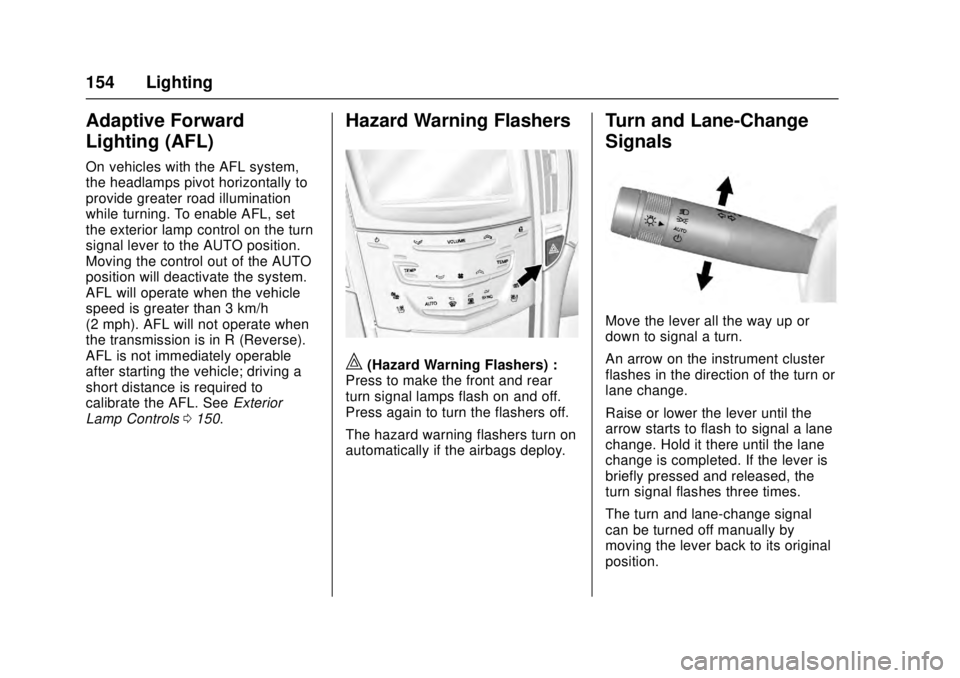
Hazard Warning Flashers
|(Hazard Warning Flashers) :
Press to make the front and rear
turn signal lamps flash on and off.
Press again to turn the flashers off.
The hazard warning flashers turn on
automatically if the airbags deploy.
Turn and Lane-Change
Signals
Move the lever all the way up or
down to signal a turn.
An arrow on the instrument cluster
flashes in the direction of the turn or
lane change.
Raise or lower the lever until the
arrow starts to flash to signal a lane
change. Hold it there until the lane
change is completed. If the lever is
briefly pressed and released, the
turn signal flashes three times.
The turn and lane-change signal
can be turned off manually by
moving the lever back to its original
position.
Page 162 of 348

Cadillac ATS/ATS-V Owner Manual (GMNA-Localizing-MidEast-9369639) -
2016 - crc - 12/9/15
Infotainment System 161
.Track
. Performance Timing
No Overlay:
No vehicle data displays on top of
the recorded video. Vehicle data is
still available with the video when
accessed in the toolbox software.
Sport:
Displays these vehicle metrics:
. Vehicle Speed: Up to three digits
are displayed in km/h or MPH
depending on vehicle settings.
. Engine Rotations Per Minute
(RPMs): The vertical line and
triangle show current RPMs. As
the RPMs increase, the green
backfill follows. .
Transmission State (Current
Gear): Automatic transmissions
display PRDN. D can change to
D1, D2, etc. When an automatic
transmission is in manual shift
mode, the display will change to
M1, M2, etc.
. Lateral G-Force Graphic: Left
and Right G-Forces are
displayed. The graphic fills to the
left or the right depending on the
measure value. The measured
G-Force displays as a number at
the top of the graphic.
Track:
Displays these vehicle metrics:
. Vehicle Speed: Same as Sport. .
GPS Tracking Map: Shows the
vehicle’s current position relative
to a known route.
. Engine Rotations Per Minute
(RPMs): The vertical line and
triangle indicate current RPMs.
As the RPMs increase, the
orange backfill follows.
. Transmission State (Current
Gear): Same as Sport.
. Friction Bubble Graphic: Lateral
and longitudinal G-Forces are
displayed as a dot within a
bubble. A red dot displays when
the vehicle starts braking and
turns green when the vehicle
accelerates. The dot is white
when the vehicle is not moving.
A white dot is the default.
. Brake and Throttle Graphic:
Displays the percentage value of
brake and throttle pedal position
from 0–100%.
. Steering Angle: The graphic fills
from the center to the left or right
depending on the direction of
Page 163 of 348

Cadillac ATS/ATS-V Owner Manual (GMNA-Localizing-MidEast-9369639) -
2016 - crc - 12/9/15
162 Infotainment System
steering. The numerical steering
angle displays below the
graphic.
. StabiliTrak Active Indicator: The
graphic only displays if the
active handling systems are
activated.
. Performance Traction
Management (PTM) Mode:
Displays the current PTM mode.
The options are Wet, Dry, Sport
1, Sport 2, or Race.
. Current Lap Time: Displays the
elapsed lap time if the finish line
is defined and the vehicle has
crossed the defined finish line at
least once.
Performance Timing:Displays these vehicle metrics:
. Vehicle Speed: Same as Sport.
. Engine Rotations Per Minute
(RPMs): Same as Sport.
. Transmission State (Current
Gear): Same as Sport.
. 0–100 km/h (0–60 mph), 0–
200 km/h (0–100 mph), 400 m
(1/4 mi), and 0–200–0 km/h (0–
100–0 mph): The timer starts
recording as soon as the vehicle
accelerates. As the vehicle
passes each speed and distance
milestone, it is displayed on the
overlay.
. Throttle Position: Displays
the percentage of throttle applied
from 0–100%.
. StabiliTrak Active Indicator: The
graphic only displays if the
active handling systems are
activated.
Naming Convention
The recorded video file name is
stored as the recorded date and the
length of the recording. If the recorded session was
recorded while the system was in
Valet Mode, the file name will
display the mode, date, and length
of time.
Settings
Touch the Settings button from the
PDR menu to display settings.
Page 176 of 348

Cadillac ATS/ATS-V Owner Manual (GMNA-Localizing-MidEast-9369639) -
2016 - crc - 12/9/15
Driving and Operating 175
Driving and
Operating
Driving Information
Distracted Driving . . . . . . . . . . . . 176
Defensive Driving . . . . . . . . . . . . . 177
Control of a Vehicle . . . . . . . . . . . 177
Braking . . . . . . . . . . . . . . . . . . . . . . . 177
Steering . . . . . . . . . . . . . . . . . . . . . . 177
Off-Road Recovery . . . . . . . . . . . 178
Loss of Control . . . . . . . . . . . . . . . 179
Track Events and CompetitiveDriving . . . . . . . . . . . . . . . . . . . . . . 179
Driving on Wet Roads . . . . . . . . 184
Hill and Mountain Roads . . . . . 184
Winter Driving . . . . . . . . . . . . . . . . 185
If the Vehicle Is Stuck . . . . . . . . 186
Vehicle Load Limits . . . . . . . . . . . 187
Starting and Operating
New Vehicle Break-In . . . . . . . . . 190
Carbon Fiber . . . . . . . . . . . . . . . . . 191
Ignition Positions . . . . . . . . . . . . . 191
Starting the Engine . . . . . . . . . . . 193
Retained Accessory Power (RAP) . . . . . . . . . . . . . . . . 195
Shifting Into Park . . . . . . . . . . . . . 195
Shifting out of Park . . . . . . . . . . . 196 Parking over Things
That Burn . . . . . . . . . . . . . . . . . . . 196
Engine Exhaust
Engine Exhaust . . . . . . . . . . . . . . 197
Running the Vehicle WhileParked . . . . . . . . . . . . . . . . . . . . . . 197
Automatic Transmission
Automatic Transmission . . . . . . 198
Manual Mode . . . . . . . . . . . . . . . . . 200
Brakes
Antilock BrakeSystem (ABS) . . . . . . . . . . . . . . . 201
Parking Brake (Manual) . . . . . . 202
Parking Brake (Electric) . . . . . . 203
Brake Assist . . . . . . . . . . . . . . . . . . 204
Hill Start Assist (HSA) . . . . . . . . 204
Ride Control Systems
Traction Control/Electronic Stability Control . . . . . . . . . . . . . 205
Driver Mode Control . . . . . . . . . . 207
Competitive Driving Mode (LF4 and V-Series Only) . . . . 208
Limited-Slip Rear Axle (Except LF4 and V-Series) . . . . . . . . . . . 211
Limited-Slip Rear Axle (LF4 and V-Series Only) . . . . . 211
Cruise Control
Cruise Control . . . . . . . . . . . . . . . . 211
Adaptive Cruise Control . . . . . . 214
Driver Assistance Systems
Driver Assistance Systems . . . 221
Assistance Systems forParking or Backing . . . . . . . . . . 222
Assistance Systems for Driving . . . . . . . . . . . . . . . . . . . . . . 226
Forward Collision Alert (FCA) System . . . . . . . . . . . . . . . . . . . . . . 226
Front Automatic Braking (FAB) System . . . . . . . . . . . . . . . . . . . . . . 229
Side Blind Zone Alert (SBZA) . . . . . . . . . . . . . . . . 230
Lane Change Alert (LCA) . . . . . 230
Lane Departure Warning (LDW) . . . . . . . . . . . . . 232
Lane Keep Assist (LKA) . . . . . . 232
Fuel
Fuel . . . . . . . . . . . . . . . . . . . . . . . . . . 234
Fuel Additives . . . . . . . . . . . . . . . . 235
Filling the Tank . . . . . . . . . . . . . . . 235
Filling a Portable Fuel Container . . . . . . . . . . . . . . . . . . . 238
Page 185 of 348
Cadillac ATS/ATS-V Owner Manual (GMNA-Localizing-MidEast-9369639) -
2016 - crc - 12/9/15
184 Driving and Operating
Driving on Wet Roads
Rain and wet roads can reduce
vehicle traction and affect your
ability to stop and accelerate.
Always drive slower in these types
of driving conditions and avoid
driving through large puddles and
deep-standing or flowing water.
{Warning
Wet brakes can cause crashes.
They might not work as well in a
quick stop and could cause
pulling to one side. You could
lose control of the vehicle.
After driving through a large
puddle of water or a car/vehicle
wash, lightly apply the brake
pedal until the brakes work
normally.
Flowing or rushing water creates
strong forces. Driving through
flowing water could cause the
vehicle to be carried away. If this
happens, you and other vehicle(Continued)
Warning (Continued)
occupants could drown. Do not
ignore police warnings and be
very cautious about trying to drive
through flowing water.
Hydroplaning
Hydroplaning is dangerous. Water
can build up under the vehicle's
tires so they actually ride on the
water. This can happen if the road is
wet enough and you are going fast
enough. When the vehicle is
hydroplaning, it has little or no
contact with the road.
There is no hard and fast rule about
hydroplaning. The best advice is to
slow down when the road is wet.
Other Rainy Weather Tips
Besides slowing down, other wet
weather driving tips include:
.Allow extra following distance.
. Pass with caution.
. Keep windshield wiping
equipment in good shape. .
Keep the windshield washer fluid
reservoir filled.
. Have good tires with proper
tread depth. See Tires0283.
. Turn off cruise control.
Hill and Mountain Roads
Driving on steep hills or through
mountains is different than driving
on flat or rolling terrain. Tips include:
.Keep the vehicle serviced and in
good shape.
. Check all fluid levels and brakes,
tires, cooling system, and
transmission.
. Shift to a lower gear when going
down steep or long hills.
{Warning
Using the brakes to slow the
vehicle on a long downhill slope
can cause brake overheating, can
reduce brake performance, and
could result in a loss of braking.
(Continued)