2016 BUICK VERANO lock
[x] Cancel search: lockPage 128 of 355

Buick Verano Owner Manual (GMNA-Localizing-U.S./Canada/Mexico-
9085356) - 2016 - crc - 10/19/15
Instruments and Controls 127
Auto Rear Defog
When on, this feature turns on the
rear defogger at vehicle start when
the interior temperature is cold and
fog is likely. The auto rear defog
function can be disabled by
pressing
1. When off, the feature
can be turned on by pressing
1.
See “Rear Window Defogger” under
Dual Automatic Climate Control
System 0170.
Select On or Off.
Comfort and Convenience
Select and the following may
display:
. Chime Volume
Chime Volume
This allows the selection of the
chime volume level.
Select Normal or High.
Collision Detection Systems
Select and the following may
display:
. Park Assist .
Side Blind Zone Alert
Park Assist
This allows the Parking Assist
feature to be turned on or off.
Select On or Off.
Side Blind Zone Alert
This allows the Side Blind Zone
Alert feature to be turned on or off.
Select On or Off.
Lighting
Select and the following may
display:
. Vehicle Locator Lights
. Exit Lighting
Vehicle Locator Lights
This allows the vehicle locator lights
to be turned on or off.
Select On or Off.
Exit Lighting
This allows the selection of how
long the exterior lamps stay on
when leaving the vehicle when it is
dark outside. Select Off, 30 Seconds, 1 Minute,
or 2 Minutes.
Power Door Locks
Select and depending on the radio
the following may display:
.
Open Door Anti Lock Out
. Unlocked Door Anti Lock Out
. Auto Door Unlock
. Delayed Door Lock
Open Door Anti Lock Out or
Unlocked Door Anti Lock Out
When on, this feature will keep the
driver door from locking until the
door is closed. If this feature is
turned on, the Delayed Door Lock
menu will not be available.
Select to enable or disable.
Auto Door Unlock
This allows selection of which doors
will automatically unlock when the
vehicle is shifted into P (Park).
Select All Doors, Driver Door,
or OFF.
Page 129 of 355

Buick Verano Owner Manual (GMNA-Localizing-U.S./Canada/Mexico-
9085356) - 2016 - crc - 10/19/15
128 Instruments and Controls
Delayed Door Lock
When on, this feature will delay the
locking of the doors. SeeDelayed
Locking 035.
Select to enable or disable.
Remote Lock/Unlock/Start
Select and depending on the radio
the following may display:
. Remote Unlock Feedback
. Remote Unlock Light Feedback
. Remote Lock Feedback
. Remote Door Unlock
. Passive Door Unlock
. Passive Door Lock
. Remote Left in Vehicle Alert
Remote Unlock Feedback or
Remote Unlock Light Feedback
When on, the exterior lamps will
flash when unlocking the vehicle
with the RKE transmitter.
Depending on the radio, select
Flash Lights or OFF, or select to
enable or disable. Remote Lock Feedback
This allows selection of what
feedback is provided when
unlocking the vehicle with the RKE
transmitter.
Select Lights and Horn, Lights Only,
Horn Only, or Off.
Remote Door Unlock
This allows selection of which doors
will unlock on the first press of
Kon
the RKE transmitter.
Select Driver Door or All Doors.
If Driver Door is selected, all doors
will unlock on the second press
of
Kwithin five seconds of the prior
press.
Passive Door Unlock
This allows the selection of what
doors will unlock when using the
button on the driver door to unlock
the vehicle.
Select All Doors or Driver Door. Passive Door Lock
This allows passive locking to be
turned on or off and selects
feedback. See
Remote Keyless
Entry (RKE) System Operation 027.
Select Off, On with Horn
Chirp, or On.
Remote Left in Vehicle Alert
This feature sounds an alert when
the RKE transmitter is left in the
vehicle.
Select Off or On.
Return to Factory Settings?
This returns all of the vehicle
personalization settings to the
factory settings.
Select Yes or No.
Page 142 of 355
Buick Verano Owner Manual (GMNA-Localizing-U.S./Canada/Mexico-
9085356) - 2016 - crc - 10/19/15
Infotainment System 141
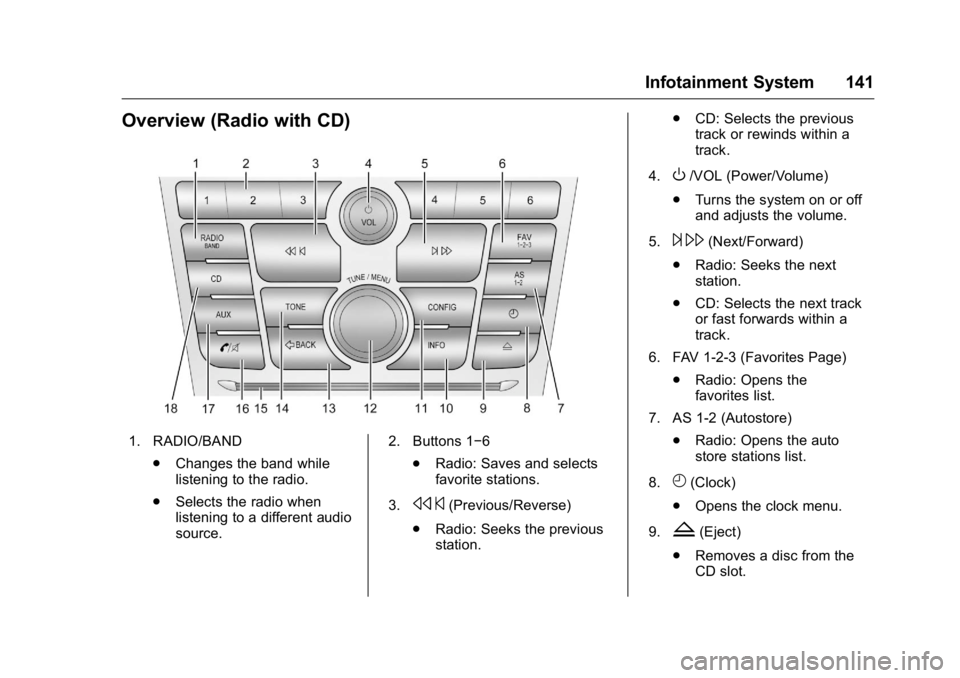
Overview (Radio with CD)
1. RADIO/BAND.Changes the band while
listening to the radio.
. Selects the radio when
listening to a different audio
source. 2. Buttons 1−6
.Radio: Saves and selects
favorite stations.
3.
s ©(Previous/Reverse)
. Radio: Seeks the previous
station. .
CD: Selects the previous
track or rewinds within a
track.
4.
O/VOL (Power/Volume)
. Turns the system on or off
and adjusts the volume.
5.
¨ \(Next/Forward)
. Radio: Seeks the next
station.
. CD: Selects the next track
or fast forwards within a
track.
6. FAV 1-2-3 (Favorites Page) .Radio: Opens the
favorites list.
7. AS 1-2 (Autostore) .Radio: Opens the auto
store stations list.
8.
H(Clock)
. Opens the clock menu.
9.
Z(Eject)
. Removes a disc from the
CD slot.
Page 168 of 355

Buick Verano Owner Manual (GMNA-Localizing-U.S./Canada/Mexico-
9085356) - 2016 - crc - 10/19/15
Infotainment System 167
Manufactured under license from
Dolby Laboratories. Dolby and the
double-D symbol are trademarks of
Dolby Laboratories.
“Made for iPod and iPhone”means
that an electronic accessory has
been designed to connect
specifically to iPod and has been
certified by the developer to meet
Apple performance standards.
iPod is a trademark of Apple
Computer, Inc., registered in the
U.S. and other countries. iPod, iPod classic, iPod nano, and
iPod touch are trademarks of Apple
Inc., registered in the U.S. and other
countries.
Fees and Taxes: Subscription fee,
taxes, one time activation fee, and
other fees may apply. Subscription
fee is consumer only. All fees and
programming subject to change.
Subscriptions subject to Customer
Agreement available at
www.siriusxm.com. SiriusXM
®
service only available in the
48 contiguous United States and
Canada.
In Canada: Some deterioration of
service may occur in extreme
northern latitudes. This is beyond
the control of SiriusXM
®Satellite
Radio. Explicit Language Notice: Channels
with frequent explicit language are
indicated with an
“XL”preceding the
channel name. Channel blocking is
available for SiriusXM Satellite
Radio receivers by notifying
SiriusXM:
. USA Customers —Visit
www.siriusxm.com or call
1-866-635-2349.
. Canadian Customers —Visit
www.xmradio.ca or call
1-877-209-0079.
It is prohibited to copy, decompile,
disassemble, reverse engineer,
hack, manipulate, or otherwise
make available any technology or
software incorporated in receivers
compatible with the SiriusXM
®
Satellite Radio System or that
support the SiriusXM website, the
Online Service or any of its content.
Furthermore, the AMBER voice
compression software included in
this product is protected by
intellectual property rights including
patent rights, copyrights, and trade
secrets of Digital Voice
Systems, Inc.
Page 173 of 355

Buick Verano Owner Manual (GMNA-Localizing-U.S./Canada/Mexico-
9085356) - 2016 - crc - 10/19/15
172 Climate Controls
#(Air Conditioning) :Press to
turn the automatic air conditioning
on or off. If the fan is turned off or
the outside temperature falls below
freezing, the air conditioning
compressor will not run.
Press AUTO to return to automatic
operation and the air conditioner
runs as needed. When the indicator
light is on, the air conditioner runs
automatically to cool the air inside
the vehicle or to dry the air needed
to defog the windshield faster.
h(Recirculation) : Press to turn
on recirculation. An indicator light
comes on. Air is recirculated to
quickly cool the inside of the vehicle
or reduce entry of outside air and
odors.
Auto Defog : The climate control
system may have a sensor to
automatically detect high humidity
inside the vehicle. When high
humidity is detected, the climate
control system may adjust to
outside air supply and turn on the
air conditioner. If the climate control
system does not detect possible
window fogging, it returns to normal operation. To turn Auto Defog off or
on, see "Climate and Air Quality"
under
Vehicle
Personalization 0123.
Rear Window Defogger
=(Rear Window Defogger) :
Press to turn the rear window
defogger on or off. An indicator light
on the button comes on to show that
the rear window defogger is on.
The defogger only works when the
ignition is in ON/RUN. The defogger
turns off if the ignition is in the ACC/
ACCESSORY or LOCK/OFF
position.
The rear window defogger can be
set to automatic operation; see
“Climate and Air Quality” under
Vehicle Personalization 0123.
When auto rear defog is selected,
the rear window defogger turns on
automatically when the interior
temperature is cold and the outside
temperature is about 4 °C (40 °F)
and below. The auto rear defogger
turns off automatically after about
10 minutes. At higher speeds, the
rear window defogger may stay on
continuously. For vehicles with heated outside
rearview mirrors, they turn on when
the rear window defogger button is
on and help to clear fog or frost from
the surface of the mirrors. See
Heated Mirrors
043.
Caution
Do not try to clear frost or other
material from the inside of the
front windshield and rear window
with a razor blade or anything
else that is sharp. This may
damage the rear window
defogger grid and affect the
radio's ability to pick up stations
clearly. The repairs would not be
covered by the vehicle warranty.
MorL(Heated Seats, If
Equipped) : Press to turn the
heated seats on or off. See Heated
Front Seats 053.
((Heated Steering Wheel, If
Equipped) : Press to turn the
heated steering wheel on or off. See
Heated Steering Wheel 098.
Page 176 of 355

Buick Verano Owner Manual (GMNA-Localizing-U.S./Canada/Mexico-
9085356) - 2016 - crc - 10/19/15
Driving and Operating 175
Driving and
Operating
Driving Information
Distracted Driving . . . . . . . . . . . . 176
Defensive Driving . . . . . . . . . . . . . 176
Drunk Driving . . . . . . . . . . . . . . . . . 176
Control of a Vehicle . . . . . . . . . . . 177
Braking . . . . . . . . . . . . . . . . . . . . . . . 177
Steering . . . . . . . . . . . . . . . . . . . . . . 177
Off-Road Recovery . . . . . . . . . . . 178
Loss of Control . . . . . . . . . . . . . . . 178
Driving on Wet Roads . . . . . . . . 179
Hill and Mountain Roads . . . . . 180
Winter Driving . . . . . . . . . . . . . . . . 180
If the Vehicle Is Stuck . . . . . . . . 182
Vehicle Load Limits . . . . . . . . . . . 182
Starting and Operating
New Vehicle Break-In . . . . . . . . . 186
Ignition Positions (KeylessAccess) . . . . . . . . . . . . . . . . . . . . . 186
Ignition Positions (Key Access) . . . . . . . . . . . . . . . . . . . . . 188
Starting the Engine . . . . . . . . . . . 190
Engine Heater . . . . . . . . . . . . . . . . 191
Retained Accessory Power (RAP) . . . . . . . . . . . . . . . . 192
Shifting Into Park . . . . . . . . . . . . . 193 Shifting out of Park . . . . . . . . . . . 194
Parking . . . . . . . . . . . . . . . . . . . . . . . 194
Parking over Things
That Burn . . . . . . . . . . . . . . . . . . . 194
Engine Exhaust
Engine Exhaust . . . . . . . . . . . . . . 195
Running the Vehicle WhileParked . . . . . . . . . . . . . . . . . . . . . . 195
Automatic Transmission
Automatic Transmission . . . . . . 196
Manual Mode . . . . . . . . . . . . . . . . . 198
Manual Transmission
Manual Transmission . . . . . . . . . 199
Brakes
Antilock BrakeSystem (ABS) . . . . . . . . . . . . . . . 201
Parking Brake . . . . . . . . . . . . . . . . 201
Brake Assist . . . . . . . . . . . . . . . . . . 203
Hill Start Assist (HSA) . . . . . . . . 203
Ride Control Systems
Traction Control/Electronic Stability Control . . . . . . . . . . . . . 204
Cruise Control
Cruise Control . . . . . . . . . . . . . . . . 206
Driver Assistance Systems
Rear Vision Camera (RVC) . . . 208 Parking Assist . . . . . . . . . . . . . . . . 211
Forward Collision Alert (FCA)
System . . . . . . . . . . . . . . . . . . . . . . 212
Side Blind Zone Alert (SBZA) . . . . . . . . . . . . . . . . 214
Lane Departure Warning (LDW) . . . . . . . . . . . . . 216
Fuel
Fuel . . . . . . . . . . . . . . . . . . . . . . . . . . 217
California FuelRequirements . . . . . . . . . . . . . . . 218
Fuels in Foreign Countries . . . 218
Fuel Additives . . . . . . . . . . . . . . . . 218
Filling the Tank . . . . . . . . . . . . . . . 219
Filling a Portable Fuel Container . . . . . . . . . . . . . . . . . . . 220
Trailer Towing
General Towing
Information . . . . . . . . . . . . . . . . . . 221
Driving Characteristics and Towing Tips . . . . . . . . . . . . . . . . . 221
Trailer Towing (2.0L Engine) . . . . . . . . . . . . . . . . . . . . . 224
Trailer Towing (Except 2.0L Engine) . . . . . . . . . . . . . . . . . . . . . 224
Towing Equipment . . . . . . . . . . . . 225
Conversions and Add-Ons
Add-On Electrical Equipment . . . . . . . . . . . . . . . . . . 226
Page 179 of 355

Buick Verano Owner Manual (GMNA-Localizing-U.S./Canada/Mexico-
9085356) - 2016 - crc - 10/19/15
178 Driving and Operating
Curve Tips
.Take curves at a reasonable
speed.
. Reduce speed before entering a
curve.
. Maintain a reasonable steady
speed through the curve.
. Wait until the vehicle is out of
the curve before accelerating
gently into the straightaway.
Steering in Emergencies
.There are some situations when
steering around a problem may
be more effective than braking.
. Holding both sides of the
steering wheel allows you to turn
180 degrees without removing
a hand.
. The Antilock Brake System
(ABS) allows steering while
braking.
Off-Road Recovery
The vehicle's right wheels can drop
off the edge of a road onto the
shoulder while driving. Follow
these tips:
1. Ease off the accelerator and then, if there is nothing in the
way, steer the vehicle so that it
straddles the edge of the
pavement.
2. Turn the steering wheel about one-eighth of a turn, until the
right front tire contacts the
pavement edge. 3. Turn the steering wheel to go
straight down the roadway.
Loss of Control
Skidding
There are three types of skids that
correspond to the vehicle's three
control systems:
.Braking Skid —wheels are not
rolling.
. Steering or Cornering Skid —
too much speed or steering in a
curve causes tires to slip and
lose cornering force.
. Acceleration Skid —too much
throttle causes the driving
wheels to spin.
Defensive drivers avoid most skids
by taking reasonable care suited to
existing conditions, and by not
overdriving those conditions. But
skids are always possible.
If the vehicle starts to slide, follow
these suggestions:
. Ease your foot off the
accelerator pedal and steer the
way you want the vehicle to go.
Page 180 of 355

Buick Verano Owner Manual (GMNA-Localizing-U.S./Canada/Mexico-
9085356) - 2016 - crc - 10/19/15
Driving and Operating 179
The vehicle may straighten out.
Be ready for a second skid if it
occurs.
. Slow down and adjust your
driving according to weather
conditions. Stopping distance
can be longer and vehicle
control can be affected when
traction is reduced by water,
snow, ice, gravel, or other
material on the road. Learn to
recognize warning clues —such
as enough water, ice, or packed
snow on the road to make a
mirrored surface —and slow
down when you have any doubt.
. Try to avoid sudden steering,
acceleration, or braking,
including reducing vehicle speed
by shifting to a lower gear. Any
sudden changes could cause
the tires to slide.
Remember: Antilock brakes help
avoid only the braking skid.Driving on Wet Roads
Rain and wet roads can reduce
vehicle traction and affect your
ability to stop and accelerate.
Always drive slower in these types
of driving conditions and avoid
driving through large puddles and
deep-standing or flowing water.
{Warning
Wet brakes can cause crashes.
They might not work as well in a
quick stop and could cause
pulling to one side. You could
lose control of the vehicle.
After driving through a large
puddle of water or a car/vehicle
wash, lightly apply the brake
pedal until the brakes work
normally.
Flowing or rushing water creates
strong forces. Driving through
flowing water could cause the
vehicle to be carried away. If this
happens, you and other vehicle (Continued)
Warning (Continued)
occupants could drown. Do not
ignore police warnings and be
very cautious about trying to drive
through flowing water.
Hydroplaning
Hydroplaning is dangerous. Water
can build up under the vehicle's
tires so they actually ride on the
water. This can happen if the road is
wet enough and you are going fast
enough. When the vehicle is
hydroplaning, it has little or no
contact with the road.
There is no hard and fast rule about
hydroplaning. The best advice is to
slow down when the road is wet.
Other Rainy Weather Tips
Besides slowing down, other wet
weather driving tips include:
.Allow extra following distance.
. Pass with caution.
. Keep windshield wiping
equipment in good shape.