2016 BUICK ENVISION Filter
[x] Cancel search: FilterPage 24 of 432

Buick Envision Owner Manual (GMNA-Localizing-U.S./Canada/Mexico-
8534310) - 2016 - crc - 2/29/16
In Brief 23
Performance and
Maintenance
Traction Control/
Electronic Stability
Control
The Traction Control System (TCS)
limits wheel spin. The system is on
when the vehicle is started.
The StabiliTrak system assists with
directional control of the vehicle in
difficult driving conditions. The
system is on when the vehicle is
started.
.To turn off TCS, press and
release
gon the center console.
The traction off light
i
illuminates in the instrument
cluster.
. Press and release
gagain to
turn TCS back on. The traction
off light
iin the instrument
cluster will turn off. .
To turn off both TCS and
StabiliTrak, press and hold
g
until the traction off lightiand
StabiliTrak OFF light
g
illuminate in the instrument
cluster.
. Press and release
gagain to
turn on both systems. The
traction off light
iand
StabiliTrak OFF light
gin the
instrument cluster will turn off.
See Traction Control/Electronic
Stability Control 0273.
Tire Pressure Monitor
This vehicle may have a Tire
Pressure Monitor System (TPMS).
The low tire pressure warning light
alerts to a significant loss in
pressure of one of the vehicle's tires. If the warning light comes on,
stop as soon as possible and inflate
the tires to the recommended
pressure shown on the Tire and
Loading Information label. See
Vehicle Load Limits
0255. The
warning light will remain on until the
tire pressure is corrected.
The low tire pressure warning light
may come on in cool weather when
the vehicle is first started, and then
turn off as the vehicle is driven. This
may be an early indicator that the
tire pressures are getting low and
the tires need to be inflated to the
proper pressure.
The TPMS does not replace normal
monthly tire maintenance. Maintain
the correct tire pressures.
See Tire Pressure Monitor
System 0347.
Engine Oil Life System
The engine oil life system calculates
engine oil life based on vehicle use
and displays the CHANGE ENGINE
OIL SOON message when it is time
to change the engine oil and filter.
Page 192 of 432

Buick Envision Owner Manual (GMNA-Localizing-U.S./Canada/Mexico-
8534310) - 2016 - crc - 2/29/16
Infotainment System 191
Traffic Routing Preferences
The system can be configured as to
how it reacts when receiving traffic
information. Touch Traffic Routing
Preferences to access the Traffic
Routing menu.
When this setting is OFF, the
system will never take traffic
conditions into account when
creating routes. In addition, the two
options below are grayed out. If one
of the grayed-out options is
touched, it automatically turns the
traffic avoidance feature ON and
performs the desired selection.
The two options, Ask Me Before
Avoiding and Automatically Avoid
Traffic will adjust the system as
follows:.
If the Automatically Avoid Traffic
list item is touched, the system
will automatically adjust the
route based on traffic without
notifying the driver.
. If the Ask Me Before Avoiding
list item is touched, the system
will always use Alerts to show
when there is an incident and
allow it to be avoided by
touching the avoid button.
If the Traffic list item is touched from
the Map Menu and Traffic is not
available because the SiriusXM
subscription is not valid, a pop-up
will display with information on how
to reactivate the subscription along
with the SiriusXM radio ID. Traffic Types
Touch to access the Traffic
Types menu.
The system can be configured to
filter out certain types of traffic
events. If a particular type has been
turned off, the system does not
display it on the map, and does not
alert the driver.
Display Places of Interest Icons
Places of Interest (POI) icons can
be displayed on the map using
this view.
Page 207 of 432
Buick Envision Owner Manual (GMNA-Localizing-U.S./Canada/Mexico-
8534310) - 2016 - crc - 2/29/16
206 Infotainment System
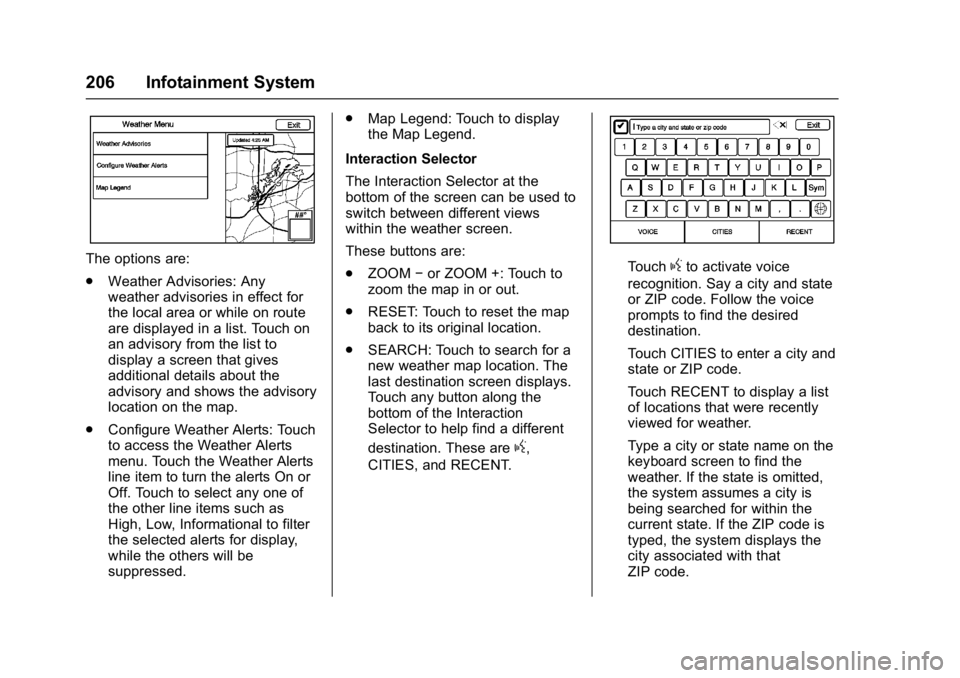
The options are:
.Weather Advisories: Any
weather advisories in effect for
the local area or while on route
are displayed in a list. Touch on
an advisory from the list to
display a screen that gives
additional details about the
advisory and shows the advisory
location on the map.
. Configure Weather Alerts: Touch
to access the Weather Alerts
menu. Touch the Weather Alerts
line item to turn the alerts On or
Off. Touch to select any one of
the other line items such as
High, Low, Informational to filter
the selected alerts for display,
while the others will be
suppressed. .
Map Legend: Touch to display
the Map Legend.
Interaction Selector
The Interaction Selector at the
bottom of the screen can be used to
switch between different views
within the weather screen.
These buttons are:
. ZOOM −or ZOOM +: Touch to
zoom the map in or out.
. RESET: Touch to reset the map
back to its original location.
. SEARCH: Touch to search for a
new weather map location. The
last destination screen displays.
Touch any button along the
bottom of the Interaction
Selector to help find a different
destination. These are
g,
CITIES, and RECENT.
Touchgto activate voice
recognition. Say a city and state
or ZIP code. Follow the voice
prompts to find the desired
destination.
Touch CITIES to enter a city and
state or ZIP code.
Touch RECENT to display a list
of locations that were recently
viewed for weather.
Type a city or state name on the
keyboard screen to find the
weather. If the state is omitted,
the system assumes a city is
being searched for within the
current state. If the ZIP code is
typed, the system displays the
city associated with that
ZIP code.
Page 241 of 432

Buick Envision Owner Manual (GMNA-Localizing-U.S./Canada/Mexico-
8534310) - 2016 - crc - 2/29/16
240 Climate Controls
Climate Controls
Climate Control Systems
Dual Automatic ClimateControl System . . . . . . . . . . . . . 240
Rear Climate Control System . . . . . . . . . . . . . . . . . . . . . . 243
Air Vents
Air Vents . . . . . . . . . . . . . . . . . . . . . 244
Maintenance
Passenger Compartment AirFilter . . . . . . . . . . . . . . . . . . . . . . . . 245
Climate Control Systems
Dual Automatic Climate Control System
The heating, cooling, and ventilation for the vehicle can be controlled with
this system.
1. Driver and Passenger
Temperature Controls
2. Heated and Cooled Front Seats (If Equipped) 3. Defrost
4. Air Delivery Mode Controls
5. Fan Control
Page 246 of 432

Buick Envision Owner Manual (GMNA-Localizing-U.S./Canada/Mexico-
8534310) - 2016 - crc - 2/29/16
Climate Controls 245
.Keep the path under all seats
clear of objects to help circulate
the air inside the vehicle more
effectively.
. Use of non-GM approved hood
deflectors can adversely affect
the performance of the system.Maintenance
Passenger Compartment
Air Filter
The filter removes dust, pollen, and
other airborne irritants from outside
air that is pulled into the vehicle.
The filter should be replaced as part
of routine scheduled maintenance;
see Maintenance Schedule 0382.
To find out what type of filter to use,
see Maintenance Replacement
Parts 0391.
1. Open the glove box.
2. Remove the glove box
rear wall.
3. Disconnect the glove box door damper string from the glove
box door assembly. A pen or
pencil may be inserted through
the end of the damper string to
prevent the string from slipping
inside the housing assembly.
4. Squeeze both sides of the glove box bin inward to lower
beyond the stops.
Page 247 of 432

Buick Envision Owner Manual (GMNA-Localizing-U.S./Canada/Mexico-
8534310) - 2016 - crc - 2/29/16
246 Climate Controls
5. Release the latches on eitherside of the service door. Open
the service door and remove
the old filter.
6. Install the new air filter.
7. Close the service door completely.
8. Reverse the steps to reinstall the glove box.
See your dealer if additional
assistance is needed.
Page 310 of 432

Buick Envision Owner Manual (GMNA-Localizing-U.S./Canada/Mexico-
8534310) - 2016 - crc - 2/29/16
Vehicle Care 309
Vehicle Care
General Information
General Information . . . . . . . . . . 310
California Proposition65 Warning . . . . . . . . . . . . . . . . . 310
California Perchlorate Materials Requirements . . . . . 310
Accessories and Modifications . . . . . . . . . . . . . . . . 310
Vehicle Checks
Doing Your OwnService Work . . . . . . . . . . . . . . . . 311
Hood . . . . . . . . . . . . . . . . . . . . . . . . . 312
Engine Compartment Overview . . . . . . . . . . . . . . . . . . . . 313
Engine Oil . . . . . . . . . . . . . . . . . . . . 314
Engine Oil Life System . . . . . . . 316
Automatic Transmission Fluid . . . . . . . . . . . . . . . . . . . . . . . . 317
Engine Air Cleaner/Filter . . . . . . 318
Cooling System . . . . . . . . . . . . . . 319
Engine Coolant . . . . . . . . . . . . . . . 320
Engine Overheating . . . . . . . . . . 323
Washer Fluid . . . . . . . . . . . . . . . . . 324
Brakes . . . . . . . . . . . . . . . . . . . . . . . 325
Brake Fluid . . . . . . . . . . . . . . . . . . . 325
Battery - North America . . . . . . 326
All-Wheel Drive . . . . . . . . . . . . . . . 328 Starter Switch Check . . . . . . . . . 328
Automatic Transmission Shift
Lock Control Function
Check . . . . . . . . . . . . . . . . . . . . . . . 328
Park Brake and P (Park)
Mechanism Check . . . . . . . . . . 328
Wiper Blade Replacement . . . . 329
Windshield Replacement . . . . . 330
Headlamp Aiming
Headlamp Aiming . . . . . . . . . . . . 331
Bulb Replacement
Bulb Replacement . . . . . . . . . . . . 331
Halogen Bulbs . . . . . . . . . . . . . . . . 331
High Intensity Discharge (HID) Lighting . . . . . . . . . . . . . . . . . . . . . 331
License Plate Lamp . . . . . . . . . . 332
Replacement Bulbs . . . . . . . . . . . 332
Electrical System
Electrical System Overload . . . 333
Fuses and Circuit Breakers . . . 333
Engine Compartment Fuse Block . . . . . . . . . . . . . . . . . . . . . . . . 334
Instrument Panel Fuse Block . . . . . . . . . . . . . . . . . . . . . . . . 336
Rear Compartment Fuse Block . . . . . . . . . . . . . . . . . . . . . . . . 337
Wheels and Tires
Tires . . . . . . . . . . . . . . . . . . . . . . . . . . 338 All-Season Tires . . . . . . . . . . . . . . 339
Winter Tires . . . . . . . . . . . . . . . . . . 339
Summer Tires . . . . . . . . . . . . . . . . 340
Tire Sidewall Labeling . . . . . . . . 340
Tire Designations . . . . . . . . . . . . . 342
Tire Terminology and
Definitions . . . . . . . . . . . . . . . . . . 343
Tire Pressure . . . . . . . . . . . . . . . . . 346
Tire Pressure Monitor System . . . . . . . . . . . . . . . . . . . . . . 347
Tire Pressure Monitor Operation . . . . . . . . . . . . . . . . . . . 348
Tire Inspection . . . . . . . . . . . . . . . . 351
Tire Rotation . . . . . . . . . . . . . . . . . 351
When It Is Time for New Tires . . . . . . . . . . . . . . . . . . . . . . . . 352
Buying New Tires . . . . . . . . . . . . . 353
Different Size Tires and Wheels . . . . . . . . . . . . . . . . . . . . . . 354
Uniform Tire Quality Grading . . . . . . . . . . . . . . . . . . . . . 355
Wheel Alignment and Tire Balance . . . . . . . . . . . . . . . . . . . . . 356
Wheel Replacement . . . . . . . . . . 356
Tire Chains . . . . . . . . . . . . . . . . . . . 357
If a Tire Goes Flat . . . . . . . . . . . . 357
Tire Changing . . . . . . . . . . . . . . . . 359
Compact Spare Tire . . . . . . . . . . 364
Page 315 of 432

Buick Envision Owner Manual (GMNA-Localizing-U.S./Canada/Mexico-
8534310) - 2016 - crc - 2/29/16
314 Vehicle Care
1.Engine Air Cleaner/Filter 0318.
2. Engine Duct.
3. Engine Oil Fill Cap. See Engine Oil 0314.
4. Engine Oil Dipstick. See Engine Oil 0314.
5. Engine Cover.
6. Brake Fluid Reservoir. See Brake Fluid 0325.
7. Engine Coolant Surge Tank and Pressure Cap. See Engine
Coolant 0320.
8. Battery - North America 0326.
9. Windshield Washer Fluid Reservoir. See Washer
Fluid 0324.
10. Engine Compartment Fuse
Block 0334.
Engine Oil
To ensure proper engine
performance and long life, careful
attention must be paid to engine oil.
Following these simple, but
important steps will help protect
your investment: .
Use engine oil approved to the
proper specification and of the
proper viscosity grade. See
“Selecting the Right Engine Oil”
in this section.
. Check the engine oil level
regularly and maintain the
proper oil level. See “Checking
Engine Oil” and“When to Add
Engine Oil” in this section.
. Change the engine oil at the
appropriate time. See Engine Oil
Life System 0316.
. Always dispose of engine oil
properly. See “What to Do with
Used Oil” in this section.
Checking Engine Oil
It is a good idea to check the engine
oil level at each fuel fill. In order to
get an accurate reading, the vehicle
must be on level ground. The
engine oil dipstick handle is a loop.
SeeEngine Compartment Overview
0 313 for the location of the engine
oil dipstick.
1. If the engine has been running recently, turn off the engine and
allow several minutes for the oil to drain back into the oil pan.
Checking the oil level too soon
after engine shutoff will not
provide an accurate oil level
reading.
{Warning
The engine oil dipstick handle
may be hot; it could burn you.
Use a towel or glove to touch the
dipstick handle.
2. Pull out the dipstick and wipe it with a clean paper towel or
cloth, then push it back in all
the way. Remove it again,
keeping the tip down, and
check the level.