2016 BMW X5M start stop button
[x] Cancel search: start stop buttonPage 122 of 255
▷Pedestrians outside of the detection range.▷Pedestrians having a body size less than
32 in/80 cm.
Functional limitations
The system may not be fully functional or may
not be available in the following situations:
The system may not be fully functional in the
following situations:
▷In heavy fog, rain, sprayed water or snow‐
fall.▷In tight curves.▷If the driving stability control systems are
deactivated, e.g. DSC OFF.▷If the field of view of the camera or the front
windshield are dirty or covered.▷Up to 10 seconds after the start of the en‐
gine, via the Start/Stop button.▷During calibration of the camera immedi‐
ately after vehicle delivery.▷If there are constant blinding effects be‐
cause of oncoming light, e. g., from the sun
low in the sky.▷When it is dark outside.
Night Vision with Pedestrian
and Animal Detection
The concept Night Vision with pedestrian and animal detec‐
tion is a night vision system.
An infrared camera scans the area in front of
the vehicle and issues a warning if it detects
pedestrians and animals on the street. Warm
objects that are similar in shape to human be‐
ings or animals are detected by the system. If necessary, the heat image can be displayed on
the Control Display.
Heat image
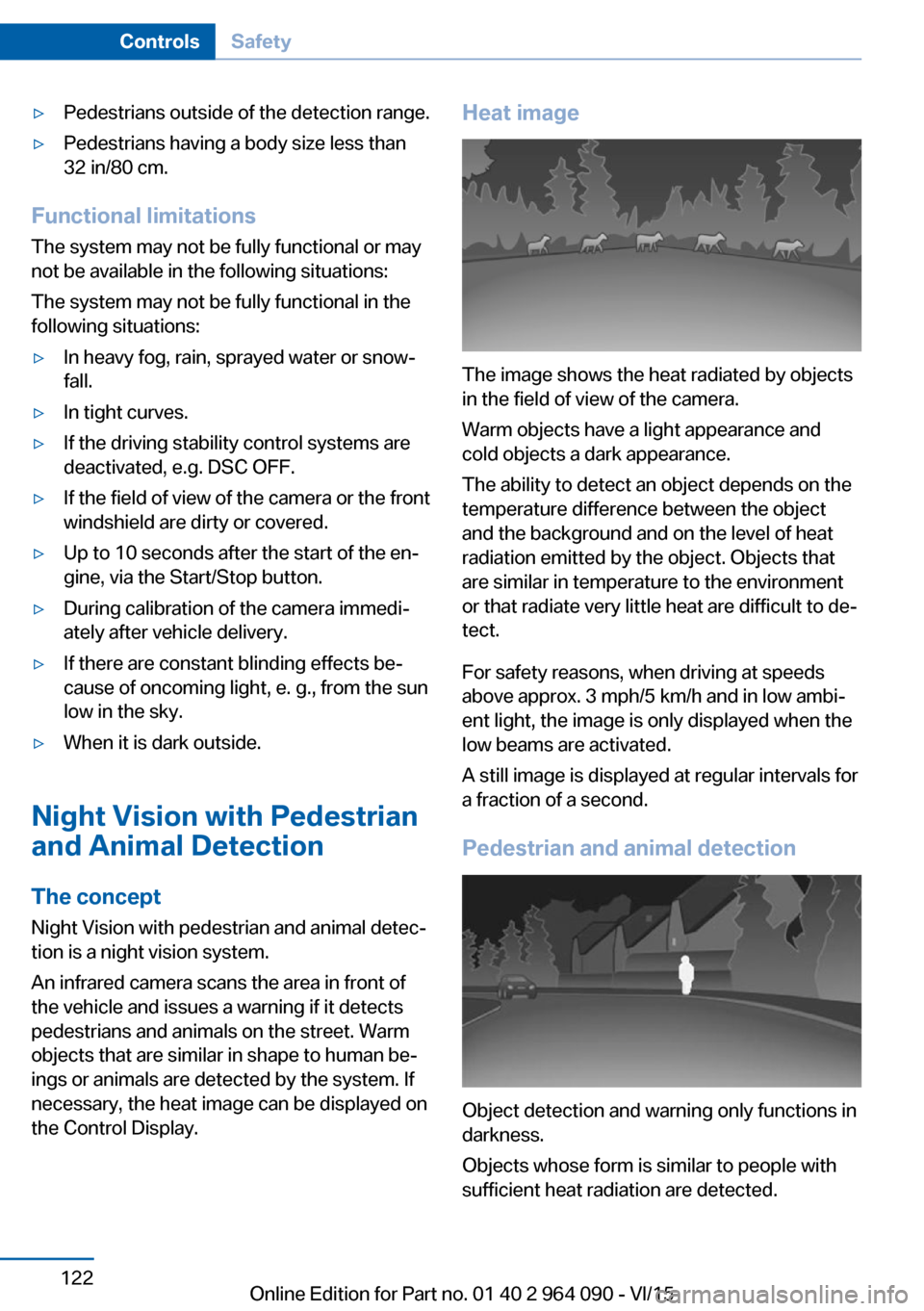
The image shows the heat radiated by objects
in the field of view of the camera.
Warm objects have a light appearance and
cold objects a dark appearance.
The ability to detect an object depends on the
temperature difference between the object
and the background and on the level of heat
radiation emitted by the object. Objects that
are similar in temperature to the environment
or that radiate very little heat are difficult to de‐
tect.
For safety reasons, when driving at speeds
above approx. 3 mph/5 km/h and in low ambi‐
ent light, the image is only displayed when the
low beams are activated.
A still image is displayed at regular intervals for
a fraction of a second.
Pedestrian and animal detection
Object detection and warning only functions in
darkness.
Objects whose form is similar to people with
sufficient heat radiation are detected.
Seite 122ControlsSafety122
Online Edition for Part no. 01 40 2 964 090 - VI/15
Page 152 of 255

CAUTION
The parking assistant can steer the vehi‐
cle over or onto curbs. There is risk of property
damage. Watch traffic closely and actively in‐
terfere in the respective situations.◀
An engine that has been switched off by the
Auto Start Stop function is restarted automati‐
cally when the parking assistant is activated.
Overview
Button in the vehicle
Parking assistant
Ultrasound sensors
The ultrasound sensors for measuring parking
spaces are located on the side of the vehicle.
To ensure full functionality:
▷Keep the sensors clean and free of ice.▷When using high-pressure washers, do not
spray the sensors for long periods and
maintain a distance of at least 12 in/30 cm.▷Do not put stickers over sensors.Requirements
For measuring parking spaces▷Maximum speed while driving forward ap‐
prox. 22 mph/35 km/h.▷Maximum distance to row of parked vehi‐
cles: 5 ft/1.5 m.
Suitable parking space
▷Gap between two objects with a minimum
length of approx. 5 ft/1.5 m.▷Min. length of gap between two objects:
your vehicle's length plus approx.
4 ft/1.2 m.▷Minimum depth: approx. 5 ft/1.5 m.
Regarding the parking procedure
▷Doors and tailgate closed.▷Parking brake released.▷Driver's safety belt fastened.
Switching on/off
Switching on with the button Press button.
The LED lights up.
The current status of the parking space search
is indicated on the Control Display.
Parking assistant is activated automatically.
Switching on with the reverse gear
Shift into reverse.
The current status of the parking space search
is indicated on the Control Display.
To activate:
"Parking Assistant"
Switch off
The system can be deactivated as follows:
▷Press button.Seite 152ControlsDriving comfort152
Online Edition for Part no. 01 40 2 964 090 - VI/15
Page 168 of 255
The highest cooling power is active when
two LEDs are lit.
If the cooler was switched on the last time the
ignition was switched on, it will likewise be
switched on the next time the ignition is
switched on.
Switch off
Press button repeatedly until the LEDs go out.
Removing
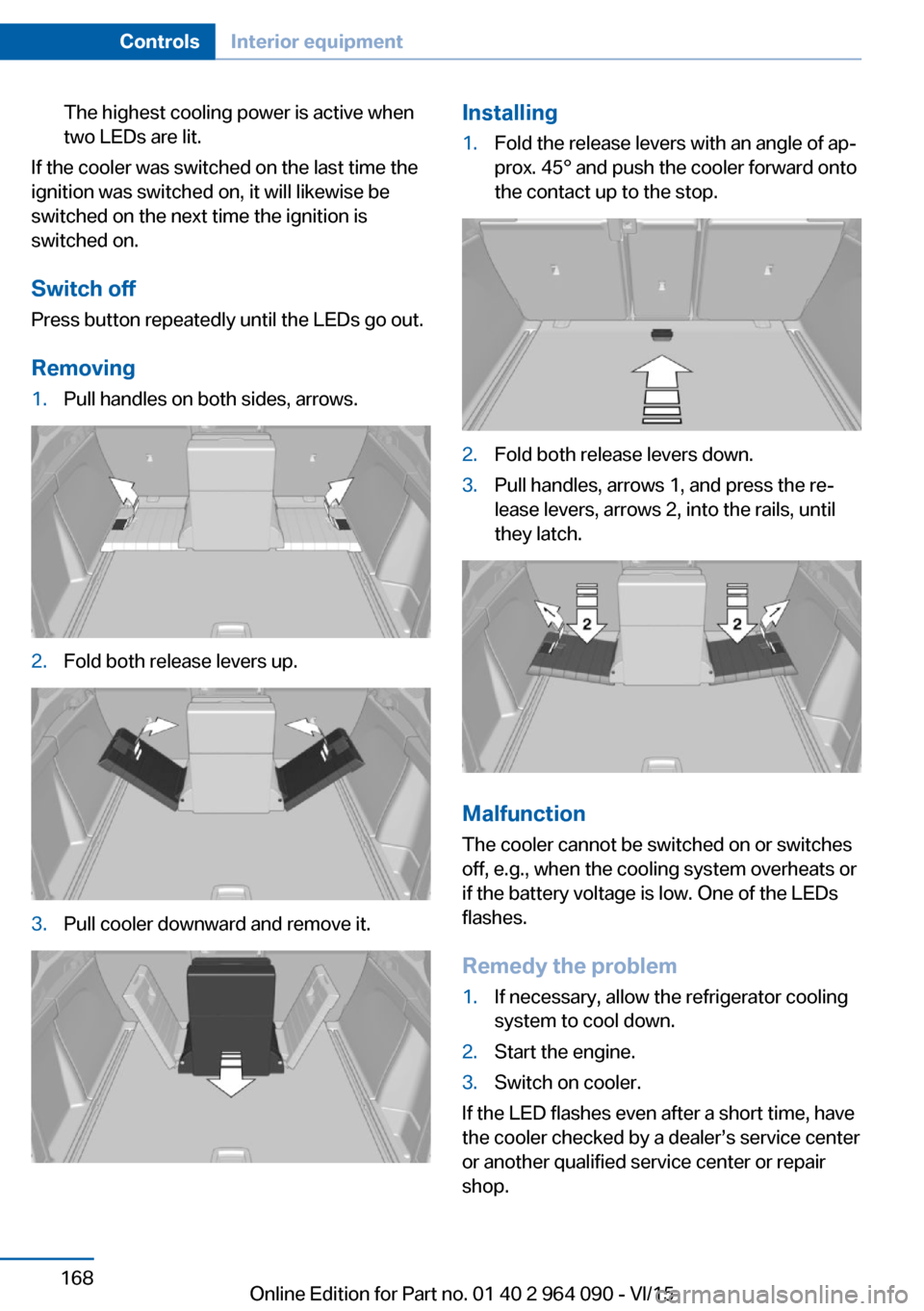
1.Pull handles on both sides, arrows.2.Fold both release levers up.3.Pull cooler downward and remove it.Installing1.Fold the release levers with an angle of ap‐
prox. 45° and push the cooler forward onto
the contact up to the stop.2.Fold both release levers down.3.Pull handles, arrows 1, and press the re‐
lease levers, arrows 2, into the rails, until
they latch.
Malfunction
The cooler cannot be switched on or switches
off, e.g., when the cooling system overheats or
if the battery voltage is low. One of the LEDs
flashes.
Remedy the problem
1.If necessary, allow the refrigerator cooling
system to cool down.2.Start the engine.3.Switch on cooler.
If the LED flashes even after a short time, have
the cooler checked by a dealer’s service center
or another qualified service center or repair
shop.
Seite 168ControlsInterior equipment168
Online Edition for Part no. 01 40 2 964 090 - VI/15
Page 198 of 255
FuelVehicle features and optionsThis chapter describes all standard, country-
specific and optional features offered with the
series. It also describes features that are not
necessarily available in your car, e. g., due to
the selected options or country versions. This
also applies to safety-related functions and
systems. The respectively applicable country
provisions must be observed when using the
respective features and systems.
Fuel recommendation General information
Depending on the region, many gas stations
sell fuel that has been customized to winter or
summer conditions. Fuel that is available in
winter helps make a cold start easier, e.g.
Information CAUTION
Even fuels that conform to the specifica‐
tions can be of low quality. This may cause en‐
gine problems, for instance poor engine start-
up behavior, poor handling and/or poor
performance. There is risk of property damage.
In case of engine problems, switch gas sta‐
tions or use a brand name fuel with a higher
octane rating.◀
Gasoline For the best fuel efficiency, the gasoline
should be sulfur-free or very low in sulfur con‐
tent.
Fuels that are marked on the gas pump as con‐
taining metal must not be used.CAUTION
Even small amounts of wrong fuel or
wrong fuel additives can damage the fuel sys‐
tem and the engine. Furthermore, the catalytic
converter is permanently damaged. There is
risk of property damage. Do not refuel or add
the following in the case of gasoline engines:▷Leaded gasoline.▷Metallic additives, e.g. manganese or iron.
Do not press the Start/Stop button after refuel‐
ing the wrong fuel. Contact a dealer’s service
center or another qualified service center or re‐
pair shop.◀
Fuels with a maximum ethanol content of
10 %, i. e., E10, may be used for refueling.
Ethanol should satisfy the following quality
standards:
US: ASTM 4806–xx
CAN: CGSB-3.511–xx
xx: comply with the current standard in each
case.
CAUTION
Wrong fuels can damage the fuel system
and the engine. There is risk of property dam‐
age. Do not use a fuel with a higher ethanol
percentage than recommended or one with
other types of alcohol, e.g. M5 to M100.◀
Recommended fuel grade
BMW recommends AKI 93.
Minimum fuel grade
BMW recommends AKI 91.
CAUTION
Fuel that does not comply with the mini‐
mum quality can compromise engine function
or cause engine damage. There is risk of prop‐
Seite 198MobilityFuel198
Online Edition for Part no. 01 40 2 964 090 - VI/15
Page 234 of 255
Before driving into a car wash
In order to ensure that the vehicle can roll in a
car wash, take the following steps:1.Drive into the car wash.2.Engage selector lever position N.3.Deactivating Automatic Hold, refer to
page 75.4.Release the parking brake.5.Switch the engine off.
In this way, the ignition remains switched
on, and a Check-Control message is dis‐
played.
CAUTION
Selector lever position P is automati‐
cally engaged when the ignition is
switched off. There is risk of property dam‐
age. Do not switch ignition off in car
washes.◀
The vehicle cannot be locked from the outside
when in selector lever position N. A signal
sounds when an attempt is made to lock the
vehicle.
To start the engine:
1.Depress the brake pedal.2.Press the Start/Stop button.
Pressing the Start/Stop button without step‐
ping on the brake turns the ignition off.
Transmission position
Transmission position P is engaged automati‐
cally:
▷When the ignition is switched off.▷After approx. 15 minutes.
Headlights
▷Do not rub dry and do not use abrasive or
acidic cleansers.▷Soak areas that have been dirtied e. g.,
from insects, with shampoo and wash off
with water.▷Thaw ice with de-icing spray; do not use an
ice scraper.
After washing the vehicle
After washing the vehicle, apply the brakes
briefly to dry them; otherwise, braking action
can be reduced and corrosion of the brake
discs can occur.
Completely remove all residues on the win‐
dows, to minimize loss of visibility due to
smearing and to reduce wiper noises and
wiper blade wear.
Vehicle care
Car care products The manufacturer of your vehicle recommends
using car care and cleaning products from
BMW.
WARNING
Cleansers can contain substances that
are dangerous and harmful to your health.
There is risk of injuries. When cleaning the in‐
terior, open the doors or windows. Only use
products intended for cleaning vehicles. Fol‐
low the instructions on the container.◀
Vehicle paint
Regular care contributes to driving safety and
value retention. Environmental influences in
areas with elevated air pollution or natural con‐
taminants, such as tree resin or pollen can af‐
fect the vehicle's paintwork. Tailor the fre‐
quency and extent of your car care to these
influences.
Aggressive substances such as spilled fuel, oil,
grease or bird droppings, must be removed im‐
mediately to prevent the finish from being al‐
tered or discolored.
Leather care
Remove dust from the leather often, using a
cloth or vacuum cleaner.
Seite 234MobilityCare234
Online Edition for Part no. 01 40 2 964 090 - VI/15
Page 244 of 255

Everything from A to Z
IndexA ABS, Antilock Brake Sys‐ tem 132
Acceleration Assistant, refer to Launch Control 84
Accessories and parts 7
Activated-charcoal filter 158
Active Blind Spot Detec‐ tion 127
Active Protection 130
Active seat ventilation, front 55
Adaptive brake lights, see Brake force display 129
Adaptive Light Control 106
Additives, oil 215
Adjustments, seats/head re‐ straints 53
After washing vehicle 234
Airbags 109
Airbags, indicator/warning light 110
Air circulation, refer to Recir‐ culated-air mode 157
Air, dehumidifying, see Cool‐ ing function 156
Air distribution, manual 157
Air flow, automatic climate control 157
Air outlets, see ventila‐ tion 158
Air pressure, tires 200
Alarm system 47
Alarm, unintentional 48
All around the center con‐ sole 16
All around the roofliner 17
All around the steering wheel 14 All-season tires, see Winter
tires 205
All-wheel-drive 136
Alternating-code hand-held transmitter 163
Alternative oil types 215
Ambient light 108
Animal detection, see Night Vision 122
Antifreeze, washer fluid 80
Antilock Brake System, ABS 132
Anti-slip control, see DSC 134
Approved axle load 241
Arrival time 98
Ashtray 164
Ashtray, front 164
Ashtray, rear 165
Assistance when driving off 132
Assist system, see Intelligent Safety 116
Attentiveness assistant 130
AUTO H button 74
AUTO H button, refer to Au‐ tomatic Hold 74
AUTO intensity 156
Automatic car wash 233
Automatic climate con‐ trol 155
Automatic Curb Monitor 61
Automatic deactivation, Front-seat passenger air‐
bags 111
Automatic headlight con‐ trol 105
Automatic Hold 74
Automatic locking 46
Automatic recirculated-air control 157 Automatic Soft Closing,
doors 40
Automatic tailgate 40
Automatic transmission 80
AUTO program, automatic cli‐ mate control 156
AUTO program, intensity 156
Auto Start/Stop function 71
Average fuel consumption 97
Average speed 98
Axle loads, weights 241
B Backrest curvature, see Lum‐ bar support 54
Backrest, seats 53
Backrest, width 55
Bad road trips 186
Band-aids, see First-aid kit 229
Bar for tow-starting/ towing 231
Battery replacement, vehicle battery 226
Battery replacement, vehicle remote control 35
Battery, vehicle 225
Belts, safety belts 56
Beverage holder, cu‐ pholder 176
Blinds, sun protection 50
BMW Assist, see user's manual for Navigation, En‐
tertainment and Communi‐
cation
BMW Driver’s Guide App 6
BMW Homepage 6
BMW Internet page 6
BMW maintenance sys‐ tem 218 Seite 244ReferenceEverything from A to Z244
Online Edition for Part no. 01 40 2 964 090 - VI/15
Page 245 of 255

BMW M technology 182
Bottle holder, see Cu‐ pholder 176
Brake assistant 132
Brake discs, break-in 184
Brake force display 129
Brake lights, adaptive 129
Brake lights, brake force dis‐ play 129
Brake pads, break-in 184
Braking, hints 185
Breakdown assistance 228
Break-in 184
Brightness of Control Dis‐ play 100
Bulb replacement 221
Bulb replacement, front 222
Bulb replacement, rear 223
Bulbs and lights 221
Button, Start/Stop 69
Bypassing, see Jump-start‐ ing 229
C
California Proposition 65 Warning 8
Calling up mirror adjust‐ ment 46
Calling up seat adjust‐ ment 46
Calling up steering wheel ad‐ justment 46
Camera lenses, care 236
Camera, rearview cam‐ era 145
Camera, Side View 150
Camera, Top View 148
Can holder, see Cu‐ pholder 176
Car battery 225
Car care products 234
Care, displays 236
Care, vehicle 234
Cargo 188
Cargo area 169, 171 Cargo area, enlarg‐
ing 169 , 171
Cargo area partition net 170
Cargo area, storage compart‐ ments 177
Cargo cover 169, 171
Cargo, securing 189
Cargo straps, securing cargo 189
Car key, see Remote con‐ trol 34
Carpet, care 236
Car wash 233
Catalytic converter, see Hot exhaust system 185
CBS Condition Based Serv‐ ice 218
CD/Multimedia, see user's manual for Navigation, En‐
tertainment and Communi‐
cation
Center armrest 174
Center console 16
Central locking system 40
Central screen, see Control Display 18
Changes, technical, see Own Safety 7
Changing parts 220
Changing wheels 223
Changing wheels/tires 204
Chassis number, see vehicle identification number 10
Check Control 87
Checking the engine oil level electronically 213
Checking the oil level elec‐ tronically 213
Children, seating position 64
Children, transporting safely 64
Child restraint fixing sys‐ tem 64
Child restraint fixing system LATCH 66 Child restraint fixing systems,
mounting 65
Child safety locks 68
Child seat, mounting 65
Child seats 64
Chrome parts, care 235
Cigarette lighter 165
Cleaning displays 236
Climate control 155
Clock 91
Closing/opening via door lock 39
Closing/opening with remote control 37
Closing the tailgate with no- touch activation 44
Clothes hooks 177
Cockpit 14
Combination switch, refer to Wiper system 77
Combination switch, see Turn signals 76
Comfort Access 43
Compact wheel, see Emer‐ gency wheel 224
Compartments in the doors 174
Compass 98
Compound brake 182
Compressor 206
Condensation on win‐ dows 158
Condensation under the vehi‐ cle 186
Condition Based Service CBS 218
Confirmation signal 46
ConnectedDrive, see user's manual for Navigation, En‐
tertainment and Communi‐
cation
ConnectedDrive Services
Connecting electrical devi‐ ces 166
Control Display 18
Control Display, settings 99 Seite 245Everything from A to ZReference245
Online Edition for Part no. 01 40 2 964 090 - VI/15
Page 250 of 255
Operating concept, iDrive 18
Optional equipment, standard equipment 7
Outside air, refer to Auto‐ matic recirculated-air con‐
trol 157
Overheating of engine, see Coolant temperature 91
Own Safety 7
P Paint, vehicle 234
Panoramic glass sunroof 50
Parallel parking assistant 151
Park Distance Control PDC 142
Parked-car ventilation 160
Parked vehicle, condensa‐ tion 186
Parking aid, see PDC 142
Parking assistant 151
Parking brake 73
Parking lights 104
Parking with Automatic Hold 74
Parts and accessories 7
Passenger side mirror, tilting downward 61
Pathway lines, rearview cam‐ era 146
PDC Park Distance Con‐ trol 142
Pedestrian detection, see Night Vision 122
Pedestrian warning with city braking function 120
Personal Profile 35
Personal Profile, exporting profiles 36
Pinch protection system, glass sunroof 51
Pinch protection system, win‐ dows 49
Plastic, care 235
Power failure 226 Power sunroof, glass 50
Power windows 48
Prescribed engine oil types 215
Pressure, tire air pres‐ sure 200
Pressure warning FTM, tires 115
Preventing Auto Start Stop 72
Profile, see Personal Pro‐ file 35
Programmable memory but‐ tons, iDrive 24
Protective function, glass sunroof 51
Protective function, win‐ dows 49
Push-and-turn switch, see Controller 19
R Radiator fluid 216
Radio-operated key, see Re‐ mote control 34
Radio ready state 69
Radio, see user's manual for Navigation, Entertainment
and Communication
Rain sensor 78
Rear automatic climate con‐ trol 159
Rear center armrest 175
Rear cooler 167
Rear drink holder 176
Rear lights 223
Rear seats 56
Rearview camera 145
Rearview mirror 61
Rear window defroster 158
Recirculated-air mode 157
Recommended fuel grade 198
Recommended tire brands 205 Refueling 196
Remaining range 92
Remote control/key 34
Remote control, malfunc‐ tion 39
Remote control, univer‐ sal 162
Replacement fuse 226
Replacing parts 220
Replacing wheels/tires 204
Reporting safety malfunc‐ tions 10
RES button, see Cruise con‐ trol 140
Reserve warning, see Range 92
Reset, Tire Pressure Monitor TPM 113
Residual heat, automatic cli‐ mate control 157
Retaining straps, securing cargo 189
Retreaded tires 205
Roadside parking lights 105
Roller sunblinds 50
RON recommended fuel grade 198
Roofliner 17
Roof load capacity 241
Roof-mounted luggage rack 190
Rope for tow-starting/ towing 231
Rubber components, care 235
S Safe braking 185
Safety belt reminder for driv‐ er's seat and front passen‐
ger seat 57
Safety belts 56
Safety belts, care 236
Safety Package, see Active Protection 130 Seite 250ReferenceEverything from A to Z250
Online Edition for Part no. 01 40 2 964 090 - VI/15