2016 BMW X1 windshield
[x] Cancel search: windshieldPage 132 of 242

Cornering
If the desired speed is too high for a curve, the
speed is reduced slightly, although curves can‐
not be anticipated in advance. Therefore, drive
into a curve at an appropriate speed.
In tight curves the system offers only restricted
detection where a vehicle ahead of you might
be detected late or not at all.
When you approach a curve the system may
briefly report vehicles in the next lane due to
the bend of the curve. If the system deceler‐
ates you may compensate it by briefly acceler‐
ating. After releasing the gas pedal the system
is reactivated and controls speed independ‐
ently.
Driving away
In some situations, the vehicle cannot drive off
automatically; for example:
▷On steep inclines.▷From behind bumps in the road.
In these cases, press on the accelerator pedal.
Weather
In the event of unfavorable weather and light conditions, e. g. if there is rain, snowfall, slush,
fog or glare, this may result in poorer recogni‐
tion of vehicles as well as short-term interrup‐
tions for vehicles that are already detected. Drive attentively, and react to the current trafficsituation. If necessary, intervene actively, e.g.
by braking, steering or evading.
Malfunction
A Check Control message is displayed if the
system fails or was automatically deactivated.
The system may not be fully functional in the
following situations:▷When an object was not correctly de‐
tected.▷In heavy fog, rain, sprayed water or snow‐
fall.▷In tight curves.▷If the field of view of the camera or the front
windshield are dirty or covered.▷When driving toward bright lights.▷Up to 20 seconds after the start of the en‐
gine, via the Start/Stop button.▷During calibration of the camera immedi‐
ately after vehicle delivery.
Cruise control
The concept The system maintains a preset speed via the
buttons on the steering wheel. The system
brakes on downhill gradients if engine braking
is insufficient.
General information
Depending on the driving settings, the features
of the cruise control can change in certain
areas.
Seite 132ControlsDriving comfort132
Online Edition for Part no. 01 40 2 964 303 - VI/15
Page 145 of 242

Switch offPress and hold the left button until the
control switches off.
Temperature Turn the ring to set the desired
temperature.
Cooling function
The car's interior can only be cooled with the
engine running.
Press button.
The air will be cooled and dehumidi‐
fied and, depending on the temperature set‐ ting, warmed again.
Depending on the weather, the windshield and
side windows may fog up briefly when the en‐
gine is started.
The air conditioner produces condensation
water, refer to page 171, that will exit from be‐
low the car.
Recirculated-air mode You may respond to unpleasant odors or pollu‐
tants in the immediate environment by tempo‐
rarily suspending the supply of outside air. The
system then recirculates the air currently
within the vehicle.
Press button repeatedly to select an
operating mode:▷LED off: outside air flows in continuously.▷LED on, recirculated-air mode: the supply
of outside air into the vehicle is perma‐
nently blocked.
Recirculated air mode switches off automati‐
cally at low external temperatures after a cer‐
tain amount of time in order to avoid window
fogging.
With constant recirculated-air mode, the air
quality in the car's interior deteriorates and the
fogging of the windows increases.
If the windows fog over, switch off recircu‐
lated-air mode and increase the air flow, if
needed.
Air flow, manual Press the left or right side of the but‐
ton: decrease or increase air flow.
The intensity is indicated through LEDs. The
highest level is active when seven LEDs are lit.
The air flow from the air conditioner may be re‐
duced automatically to save battery power.
Manual air distribution Turn the wheel to select the de‐
sired program or the desired in‐ termediate setting.▷ Windows.▷ Upper body region.▷ Footwell.▷ Windows, upper body region, and foot‐
well.
Defrosts windows and removes
condensation
Direct the air distribution toward windows, in‐
crease the air flow and temperature, and, if
needed, use the cooling function.
Rear window defroster Press button.
The rear window defroster switches
off automatically after a certain period of time.
For permanent activation, press the button for
longer than 3 seconds. To deactivate, press
the button again.
Seite 145Climate controlControls145
Online Edition for Part no. 01 40 2 964 303 - VI/15
Page 147 of 242

Switch offPress button.
Temperature Turn the ring to set the desired
temperature.
The selected temperature is shown on the dis‐
play of the automatic climate control.
The automatic climate control reaches this
temperature as quickly as possible, if needed
by increasing the cooling or heating output,
and then keeps it constant.
Do not rapidly switch between different tem‐
perature settings. Otherwise, the automatic cli‐
mate control will not have sufficient time to ad‐
just the set temperature.
Cooling function The car's interior can only be cooled with the
engine running.
Press button.
The air will be cooled and dehumidi‐
fied and, depending on the temperature set‐ ting, warmed again.
Depending on the weather, the windshield and
side windows may fog up briefly when the en‐
gine is started.
The cooling function is switched on automati‐
cally with the AUTO program.
When using the automatic climate control,
condensation water, refer to page 171, devel‐
ops that exits underneath the vehicle.
Maximum cooling Press button.The system is set to the lowest temperature,
optimum air flow and air circulation mode.
Air flows out of the vents to the upper body re‐
gion. The vents need to be open for this.
The function is available above an external
temperature of approx. 32 ℉/0 ℃ and with the
engine running.
Adjust air flow with the program active.
AUTO program Press button.
Air flow, air distribution and tempera‐
ture are controlled automatically.
Depending on the selected temperature,
AUTO intensity program and outside influen‐
ces, the air is directed to the windshield, side
windows, upper body, and into the footwell.
The cooling function, refer to page 147, is
switched on automatically with the AUTO pro‐
gram.
At the same time, a condensation sensor con‐
trols the program so as to prevent window
condensation as much as possible.
Intensity of the AUTO program
With the AUTO program activated, the auto‐
matic intensity control can be changed.
Press the left or right side of the but‐
ton: decrease or increase the inten‐
sity.
The selected intensity is shown on the display
of the automatic climate control.
Automatic recirculated-air control/
recirculated-air mode
You may respond to unpleasant odors or pollu‐
tants in the immediate environment by tempo‐
rarily suspending the supply of outside air. The
system then recirculates the air currently
within the vehicle.Seite 147Climate controlControls147
Online Edition for Part no. 01 40 2 964 303 - VI/15
Page 148 of 242

Press button repeatedly to select an
operating mode:▷LEDs off: outside air flows in continuously.▷Left LED on, automatic recirculated-air
control: a sensor detects pollutants in the
outside air and shuts off automatically.▷Right LED on, recirculated-air mode: the
supply of outside air into the vehicle is per‐
manently blocked.
Recirculated air mode switches off automati‐
cally at low external temperatures after a cer‐
tain amount of time in order to avoid window
fogging.
With constant recirculated-air mode, the air
quality in the car's interior deteriorates and the
fogging of the windows increases.
If the windows are fogged over, switch off the
recirculated-air mode and press the AUTO
button to utilize the condensation sensor.
Make sure that air can flow to the windshield.
Air flow, manual To manually adjust air flow turn off AUTO pro‐
gram first.
Press the left or right side of the but‐
ton: decrease or increase air flow.
The selected air flow is shown on the display of
the automatic climate control.
The air flow of the automatic climate control
may be reduced automatically to save battery
power.
Manual air distribution Press button repeatedly to select a
program:
▷Upper body region and footwell.▷Footwell.▷Windows and footwell.▷Windows▷Windows and upper body region.▷Upper body region.▷Windows, upper body region, and footwell.
If the windows are fogged over, press the
AUTO button to utilize the condensation sen‐
sor.
SYNC program Press button.
The current setting of the temperature
on the driver's side is transferred to the front
passenger side.
The program is switched off if the setting on
the front passenger side is changed.
Defrosts windows and removes
condensation
Press button.
Ice and condensation are quickly re‐
moved from the windshield and the front side
windows.
For this purpose, point the side vents onto the
side windows as needed.
Adjust air flow with the program active.
If the windows are fogged over, you can also
switch on the cooling function or press the
AUTO button to utilize the condensation sen‐
sor.
Rear window defroster Press button.
The rear window defroster switches
off automatically after a certain period of time.
For permanent activation, press the button for
longer than 3 seconds. To deactivate, press
the button again.
Microfilter/activated-charcoal filter In external and recirculated air mode the mi‐crofilter/activated charcoal filter filters dust,
pollen, and gaseous pollutants out of the air.
Seite 148ControlsClimate control148
Online Edition for Part no. 01 40 2 964 303 - VI/15
Page 198 of 242

CAUTION
Folded-away wipers can be jammed
when the hood is opened. There is risk of
property damage. Make sure that the wipers
with the wiper blades mounted are folded
down onto the windshield before opening the
hood.◀
WARNING
There are protruding parts, e.g. lock
hook, on the inside of the hood. There is risk of
injuries. If the hood is open, pay attention to
protruding parts and keep these areas clear.◀
WARNING
An incorrectly locked hood can open
while driving and restrict visibility. There is risk
of an accident. Stop immediately and correctly
close the hood.◀
WARNING
Body parts can be jammed on opening
and closing the hood. There is risk of injuries.
Make sure that the area of movement of the
hood is clear during opening and closing.◀
Opening the hood1.Pull lever, arrow 1.
Hood is unlocked.2.After the lever is released, pull the lever
again, arrow 2.
Hood can be opened.Indicator/warning lights
When the hood is unlocked, a Check Control
message is displayed.
Closing the hood1.Let the hood fall from approx. 16 in/40 cm
height, arrow 1.
The hood must audibly engage on both
sides.2.If necessary, apply even pressure in the
area of the hood latches, arrows 2, to com‐
pletely secure the hood again.Seite 198MobilityEngine compartment198
Online Edition for Part no. 01 40 2 964 303 - VI/15
Page 206 of 242
Replacing componentsVehicle features and optionsThis chapter describes all standard, country-
specific and optional features offered with the
series. It also describes features that are not
necessarily available in your car, e. g., due to
the selected options or country versions. This
also applies to safety-related functions and
systems. The respectively applicable country
provisions must be observed when using the
respective features and systems.
Onboard vehicle tool kit
The onboard vehicle tool kit is located under
the cargo floor panel.
Wiper blade replacement Information CAUTION
If the wiper arm falls onto the windshield
without the wiper blades installed, the wind‐
shield can be damaged. There is risk of prop‐
erty damage. Secure the wiper arm when re‐
placing the wiper blades and do not fold down
the wipers without the wiper blades installed.◀
Replacing the front wiper blades1.To change the wiper blades, fold up, refer
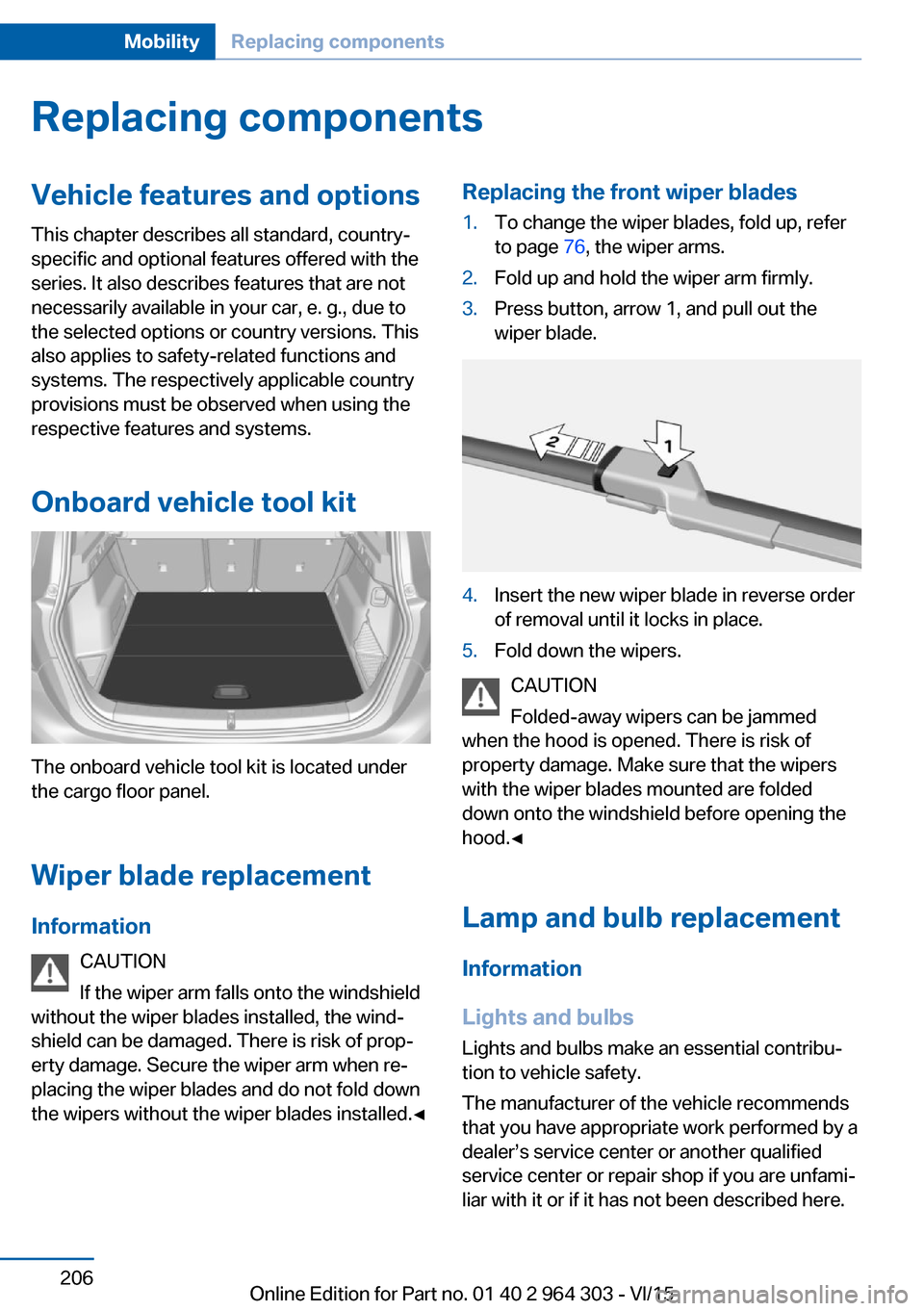
to page 76, the wiper arms.2.Fold up and hold the wiper arm firmly.3.Press button, arrow 1, and pull out the
wiper blade.4.Insert the new wiper blade in reverse order
of removal until it locks in place.5.Fold down the wipers.
CAUTION
Folded-away wipers can be jammed
when the hood is opened. There is risk of
property damage. Make sure that the wipers
with the wiper blades mounted are folded
down onto the windshield before opening the
hood.◀
Lamp and bulb replacement Information
Lights and bulbs
Lights and bulbs make an essential contribu‐
tion to vehicle safety.
The manufacturer of the vehicle recommends
that you have appropriate work performed by a
dealer’s service center or another qualified
service center or repair shop if you are unfami‐
liar with it or if it has not been described here.
Seite 206MobilityReplacing components206
Online Edition for Part no. 01 40 2 964 303 - VI/15
Page 222 of 242

CareVehicle features and optionsThis chapter describes all standard, country-
specific and optional features offered with the
series. It also describes features that are not
necessarily available in your car, e. g., due to
the selected options or country versions. This
also applies to safety-related functions and
systems. The respectively applicable country
provisions must be observed when using the
respective features and systems.
Car washes General information
Regularly remove foreign objects such as
leaves in the area below the windshield when
the hood is raised.
Wash your vehicle frequently, particularly in
winter. Intense soiling and road salt can dam‐
age the vehicle.
Steam blaster and high-pressure
washer
Information CAUTION
When cleaning with high-pressure wash‐
ers, components can be damaged due to the
pressure or temperatures being too high.
There is risk of property damage. Maintain suf‐
ficient distance and do not spray too long con‐
tinuously. Follow the user's manual for the
high-pressure washer.◀
Distances and temperature▷Maximum temperature: 140 ℉/60 ℃.▷Minimum distance from sensors, cameras,
seals: 12 in/30 cm.▷Minimum distance from glass sunroof:
31.5 inches/80 cm.
Automatic car washes
Information
▷Give preference to cloth car washes or
those that use soft brushes in order to
avoid paint damage.▷Make sure that the wheels and tires are not
damaged by the transport mechanisms.▷Fold in the exterior mirrors; otherwise, they
may be damaged, depending on the width
of the vehicle.▷Deactivate the rain sensor, refer to
page 75, to avoid unintentional wiper acti‐
vation.▷In some cases, an unintentional alarm can
be triggered by the interior motion sensor
of the alarm system. Follow the instruc‐
tions on avoiding an unintentional alarm,
refer to page 47.
CAUTION
Too high guide rails in car washes can
damage body parts. There is risk of property
damage. Avoid car washes with guide rails
higher than 4 in/10 cm.◀
Before driving into a car wash In order to ensure that the vehicle can roll in a
car wash, take the following steps:
Steptronic transmission:
1.Drive into the car wash.2.Engage selector lever position N.3.Make sure that the parking brake is re‐
leased.4.Switch the engine off.Seite 222MobilityCare222
Online Edition for Part no. 01 40 2 964 303 - VI/15
Page 240 of 242
Triple turn signal activa‐tion 73
Trip odometer 86
Trip on-board computer 92
Trip recorder, see Trip odom‐ eter 86
Turning circle lines, rearview camera 139
Turn signal, bulb replace‐ ment 208, 209
Turn signals, operation 73
Turn signals, rear, bulb re‐ placement 211
U
Unintentional alarm 47
Units of measurement 94
Universal remote control 151
Unlock button, Steptronic transmission 78
Unlocking/locking via door lock 39
Unlocking/locking with re‐ mote control 37
Unlocking, settings 45
Unpaved roads, cross-coun‐ try trips 168
Updates made after the edito‐ rial deadline 7
Upholstery care 223
USB interface 156
V
Vanity mirror 155
Variable sport steering 123
Vehicle battery 215
Vehicle battery, replac‐ ing 215
Vehicle, break-in 168
Vehicle care 223
Vehicle features and op‐ tions 7
Vehicle identification num‐ ber 10 Vehicle jack 213
Vehicle paint 223
Vehicle storage 225
Vehicle wash 222
Ventilation 149
Ventilation, refer to Parked- car ventilation 149
VIN, see vehicle identification number 10
Voice activation system 26
W Warning and indicator lamps, see Check Control 82
Warning displays, see Check Control 82
Warning messages, see Check Control 82
Warning triangle 218
Warranty 7
Washer fluid 76
Washer nozzles, wind‐ shield 76
Washer system 74
Washing, vehicle 222
Water on roads 169
Weights 229
Welcome lamps during un‐ locking 37
Welcome lights 98
Wheel cleaner 224
Wheels, changing 190
Wheels, everything on wheels and tires 186
Wheels, Flat Tire Monitor FTM 109
Wheels, Tire Pressure Moni‐ tor TPM 105
Window defroster, rear 145, 148
Windows, powered 48
Windshield washer fluid 76
Windshield washer noz‐ zles 76 Windshield washer sys‐
tem 74
Windshield wiper, see wiper system 74
Winter storage, care 225
Winter tires, suitable tires 191
Winter tires, tread 190
Wiper 74
Wiper blades, replacing 206
Wiper fluid 76
Wiper, fold-out position 76
Wiper system 74
Wood, care 224
Word match concept, naviga‐ tion 25
Wrench, see Onboard vehicle tool kit 206
X
xDrive 122 Seite 240ReferenceEverything from A to Z240
Online Edition for Part no. 01 40 2 964 303 - VI/15