2016 BMW M4 mirror
[x] Cancel search: mirrorPage 117 of 228

▷On returning to the correct lane.▷With strong braking.▷On indicating.
System limits
The function can be restricted, for example in
the following situations:
▷In thick fog and heavy rain or snow.▷With missing, worn, poorly visible, merg‐
ing/separating or ambiguous boundary
lines, for example in areas where there are
road works.▷If boundary lines are covered by snow, ice,
dirt or water.▷On sharp bends or narrow roads.▷If the boundary lines are not white.▷If boundary lines are obscured.▷If the vehicle is moving too close to the ve‐
hicle ahead.▷With bright oncoming light.▷When the windscreen in front of the rear-
view mirror is covered with condensation,
dirt, stickers, labels, etc.▷During the calibration process of the cam‐
era immediately after the vehicle is sup‐
plied.Lane change warning
Principle
Two radar sensors in the rear bumper monitor
the area behind and beside the vehicle as of
approx. 20 km/h, approx.12 mph.
In some equipment configurations, the radar
sensors are active from approximately
50 km/h, approximately 30 mph.
The system indicates when vehicles are in the
blind spot, arrow 1, or are approaching from
the rear on an adjacent lane, arrow 2.
The light in the exterior mirror housing illumi‐
nates at a dimmed level.
Before changing lanes with the turn indicator
switched on, the system issues a warning the
above situations.
The light in the exterior mirror housing flashes
and the steering wheel vibrates.
Notes WARNING
The system does not take your personal
responsibility from you when you are estimat‐
ing the visibility conditions and traffic situation.
Danger of accidents. Adapt driving style to the
driving conditions. Observe the traffic situation
and intervene actively if the situation warrants
it.◀
Seite 117SecurityControls117
Online Edition for Part no. 01 40 2 964 013 - VI/15
Page 118 of 228

Overview
Button in the vehicle
Lane change warning
Radar sensors
The radar sensors are located in the rear
bumper.
Switching on/off Press the button.
▷On: LED is illuminated.▷Off: LED turns off.
The setting is stored for the currently used
profile.
Display
Light in the exterior mirror housing
Information level
The dimmed light in the exterior mirror housing
indicates when vehicles are in the blind spot or
are approaching from the rear.
Warning
If the turn indicator is set while a vehicle is in
the critical area, the steering wheel vibrates
briefly and the light in the exterior mirror hous‐
ing flashes brightly.
The warning is terminated when indicating is
completed or the other vehicle has left the crit‐
ical area.
Brief flashA brief flash of the light when unlocking the ve‐
hicle is used as a self-test of the system.
System limits
The function can be restricted in the following
situations:
▷If the speed of the approaching vehicle is
very much higher than that of your own
speed.▷In thick fog and heavy rain or snow.▷On sharp bends or narrow roads.▷If the bumper is soiled, iced-over or a
sticker is attached to it.
A Check Control message is displayed in the
event of limited functionality.
Seite 118ControlsSecurity118
Online Edition for Part no. 01 40 2 964 013 - VI/15
Page 137 of 228
Cleaning camera lenses, see page 211.
Switching on/off Switching on/off manually Press the button.
Automatic switching off when moving
forwards
The system switches off when a certain dis‐
tance or speed is exceeded.
Switch the system back on if necessary.
Display
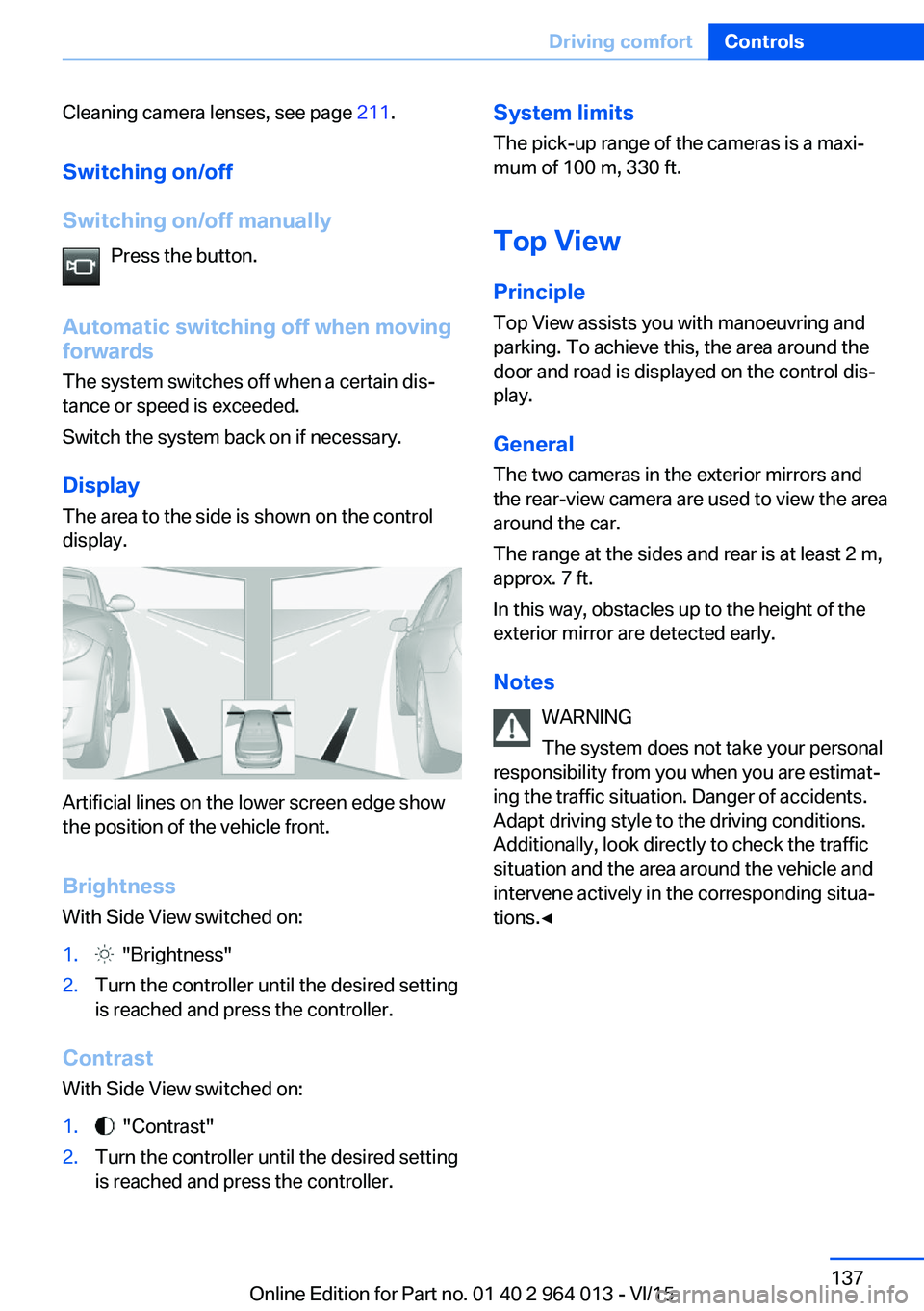
The area to the side is shown on the control
display.
Artificial lines on the lower screen edge show
the position of the vehicle front.
Brightness
With Side View switched on:
1. "Brightness"2.Turn the controller until the desired setting
is reached and press the controller.
Contrast
With Side View switched on:
1. "Contrast"2.Turn the controller until the desired setting
is reached and press the controller.System limits
The pick-up range of the cameras is a maxi‐
mum of 100 m, 330 ft.
Top View
Principle Top View assists you with manoeuvring and
parking. To achieve this, the area around the
door and road is displayed on the control dis‐
play.
General
The two cameras in the exterior mirrors and
the rear-view camera are used to view the area
around the car.
The range at the sides and rear is at least 2 m,
approx. 7 ft.
In this way, obstacles up to the height of the
exterior mirror are detected early.
Notes WARNING
The system does not take your personal
responsibility from you when you are estimat‐
ing the traffic situation. Danger of accidents.
Adapt driving style to the driving conditions.
Additionally, look directly to check the traffic
situation and the area around the vehicle and
intervene actively in the corresponding situa‐
tions.◀Seite 137Driving comfortControls137
Online Edition for Part no. 01 40 2 964 013 - VI/15
Page 138 of 228
Overview
Button in the vehicle
Top View
Cameras
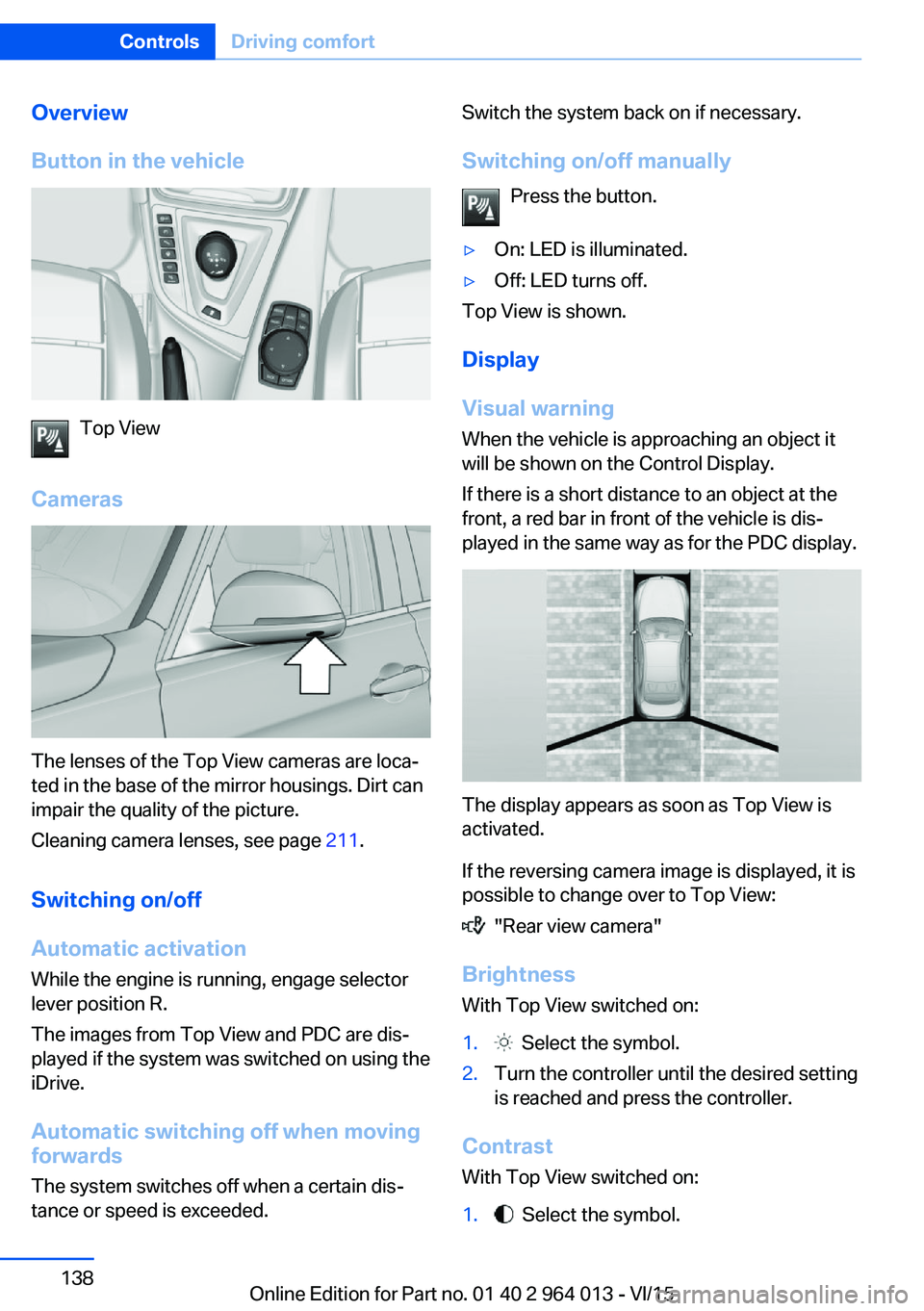
The lenses of the Top View cameras are loca‐
ted in the base of the mirror housings. Dirt can
impair the quality of the picture.
Cleaning camera lenses, see page 211.
Switching on/off Automatic activation While the engine is running, engage selector
lever position R.
The images from Top View and PDC are dis‐
played if the system was switched on using the
iDrive.
Automatic switching off when movingforwards
The system switches off when a certain dis‐
tance or speed is exceeded.
Switch the system back on if necessary.
Switching on/off manually Press the button.▷On: LED is illuminated.▷Off: LED turns off.
Top View is shown.
Display
Visual warning
When the vehicle is approaching an object it
will be shown on the Control Display.
If there is a short distance to an object at the
front, a red bar in front of the vehicle is dis‐
played in the same way as for the PDC display.
The display appears as soon as Top View is
activated.
If the reversing camera image is displayed, it is
possible to change over to Top View:
"Rear view camera"
Brightness
With Top View switched on:
1. Select the symbol.2.Turn the controller until the desired setting
is reached and press the controller.
Contrast
With Top View switched on:
1. Select the symbol.Seite 138ControlsDriving comfort138
Online Edition for Part no. 01 40 2 964 013 - VI/15
Page 139 of 228

2.Turn the controller until the desired setting
is reached and press the controller.
Displaying the turning circle and
driving lane line
▷The static red turning circle line indicates
the space requirement to the side with full
steering angle.▷The variable green driving lane line helps to
estimate the actual space requirement to
the side.
The lane line depends on the engaged
gear and the current steering angle. The
lane line is continuously adjusted by the
steering wheel movement.
"Parking guidance lines"
The turning circle and driving lane lines are
displayed.
System limits
Top View cannot be used in the following sit‐
uations:
▷With a door open.▷With the boot lid open.▷With an exterior mirror folded in.▷In poor light conditions.
In some of these situations a Check Control
message is displayed.
Park Assistant
Principle
The system supports you when parking in par‐
allel to the road.
Ultrasonic sensors measure parking spaces on
both sides of the vehicle.
The park assistant calculates the ideal parking
line and takes over steering during the process
of parking.
When parking up, also follow the visual and au‐
dible information and notes of the PDC, the
Park Assistant and the rear-view camera, and
respond accordingly.
The park assistant incorporates Park Distance
Control, PDC, see page 131.
Notes WARNING
The system does not take your personal
responsibility from you when you are estimat‐
ing the traffic situation. Due to limits of the sys‐
tem, it cannot respond independently in a rea‐
sonable way in all traffic conditions. Danger of
accidents. Adapt driving style to the driving
conditions. Observe the traffic situation and in‐
tervene actively if the situation warrants it.◀
ATTENTION
The Park Assistant may steer across
curbs or up onto curbs. Danger of damage to
property. Observe the traffic situation and in‐
tervene actively if the situation warrants it.◀
An engine stopped by the Auto Start Stop
function is automatically started by activating
the Park Assistant.Seite 139Driving comfortControls139
Online Edition for Part no. 01 40 2 964 013 - VI/15
Page 149 of 228
Interior equipmentVehicle equipmentThis chapter describes all standard, national
and special equipment provided in the model
series. Equipment not available in the vehicle is
therefore also described, for example the se‐
lected special equipment or national version.
This also applies to safety-relevant functions
and systems. Comply with the relevant na‐
tional regulations when using the correspond‐
ing functions and systems.
Sun visor Glare protection Fold the sun visor downwards or upwards.
Vanity mirror
A vanity mirror is situated in the sun visor be‐
hind a cover. The mirror light switches on
when the cover is opened.
Ashtray/lighter Ashtray
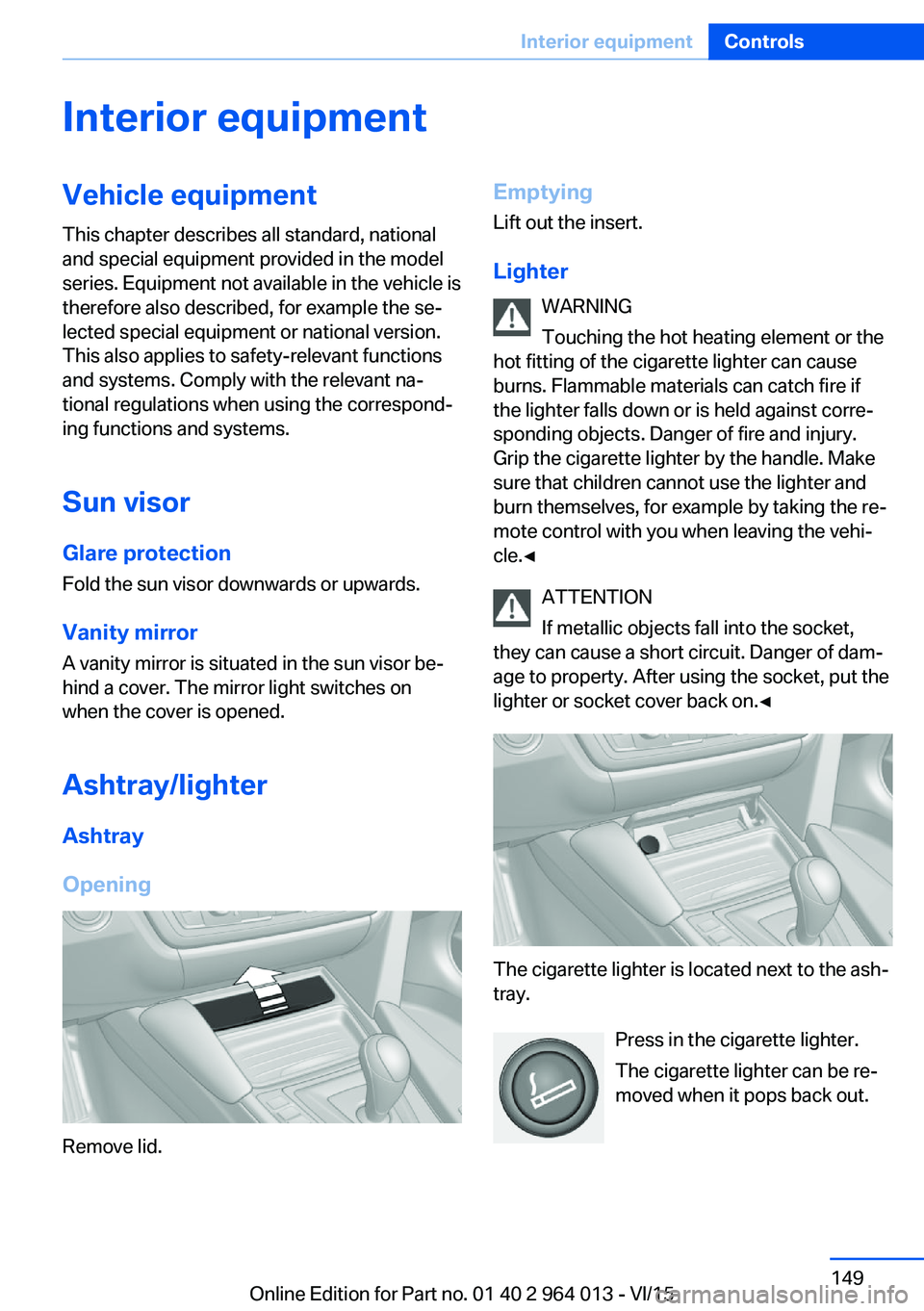
Opening
Remove lid.
Emptying Lift out the insert.
Lighter WARNING
Touching the hot heating element or the
hot fitting of the cigarette lighter can cause
burns. Flammable materials can catch fire if
the lighter falls down or is held against corre‐
sponding objects. Danger of fire and injury.
Grip the cigarette lighter by the handle. Make
sure that children cannot use the lighter and
burn themselves, for example by taking the re‐ mote control with you when leaving the vehi‐
cle.◀
ATTENTION
If metallic objects fall into the socket,
they can cause a short circuit. Danger of dam‐
age to property. After using the socket, put the
lighter or socket cover back on.◀
The cigarette lighter is located next to the ash‐
tray.
Press in the cigarette lighter.
The cigarette lighter can be re‐
moved when it pops back out.
Seite 149Interior equipmentControls149
Online Edition for Part no. 01 40 2 964 013 - VI/15
Page 168 of 228

Saving fuelVehicle equipmentThis chapter describes all standard, national
and special equipment provided in the model
series. Equipment not available in the vehicle is
therefore also described, for example the se‐
lected special equipment or national version.
This also applies to safety-relevant functions
and systems. Comply with the relevant na‐
tional regulations when using the correspond‐
ing functions and systems.
General
Your vehicle contains wide-ranging technolo‐
gies for reducing consumption and emission
levels.
Fuel consumption depends on various factors.
A number of measures, such as a moderate
driving style and regular maintenance, can in‐
fluence fuel consumption and reduce burden
on environment.
Removing transported load that is not required
Extra weight increases fuel consumption.
Removing add-on parts after use
Remove auxiliary mirrors, roof racks and rear-
mounted racks after use.
Add-on parts on the vehicle interfere with its
aerodynamic performance and inflate fuel con‐
sumption.Closing windows and the
glass roof
An opened glass roof or opened window in‐
creases the drag coefficient and thus reduces
the range.
Tyres General Tyres can have differing effects on fuel con‐
sumption. For example, fuel consumption can
be affected by tyre size.
Checking tyre pressures regularly Check and, if necessary, correct tyre inflation
pressures at least twice a month and before
setting off on a longer journey.
Insufficient tyre inflation pressure enlarges the
rolling resistance and thus increases fuel con‐
sumption and tyre wear.
Setting off immediately Do not warm up the engine with the vehicle at
a standstill; it is preferable to set off straight
away, driving at moderate engine speeds.
This brings the cold engine to operating tem‐
perature as quickly as possible.
Driving with foresight
Avoid accelerating and braking unnecessarily.
Keep an appropriate distance from the preced‐
ing vehicle.
Anticipating the road situation and adopting a
smooth driving style will reduce fuel consump‐
tion.Seite 168Driving hintsSaving fuel168
Online Edition for Part no. 01 40 2 964 013 - VI/15
Page 196 of 228
In the event of a defect, contact the Service
Centre.
Turn indicator in exterior mirror Turn indicators in the exterior mirrors are de‐
signed in the LED technology. Contact a Serv‐
ice Partner or a qualified specialist workshop in
the case of a defect.
Rear lights, replacing the bulbs
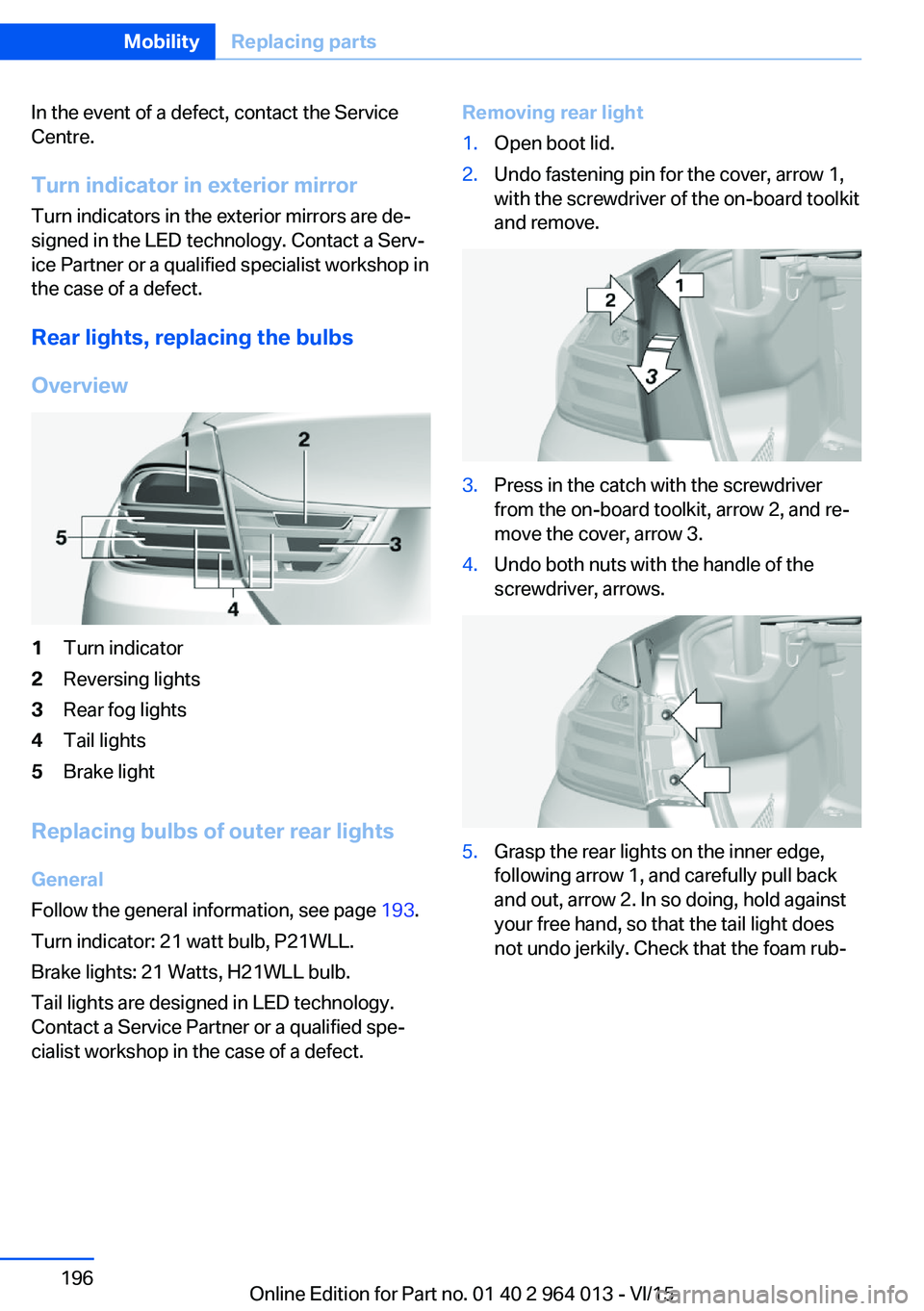
Overview1Turn indicator2Reversing lights3Rear fog lights4Tail lights5Brake light
Replacing bulbs of outer rear lights
General
Follow the general information, see page 193.
Turn indicator: 21 watt bulb, P21WLL.
Brake lights: 21 Watts, H21WLL bulb.
Tail lights are designed in LED technology.
Contact a Service Partner or a qualified spe‐
cialist workshop in the case of a defect.
Removing rear light1.Open boot lid.2.Undo fastening pin for the cover, arrow 1,
with the screwdriver of the on-board toolkit
and remove.3.Press in the catch with the screwdriver
from the on-board toolkit, arrow 2, and re‐
move the cover, arrow 3.4.Undo both nuts with the handle of the
screwdriver, arrows.5.Grasp the rear lights on the inner edge,
following arrow 1, and carefully pull back
and out, arrow 2. In so doing, hold against
your free hand, so that the tail light does
not undo jerkily. Check that the foam rub‐Seite 196MobilityReplacing parts196
Online Edition for Part no. 01 40 2 964 013 - VI/15