2016 BMW M4 remote control
[x] Cancel search: remote controlPage 49 of 228
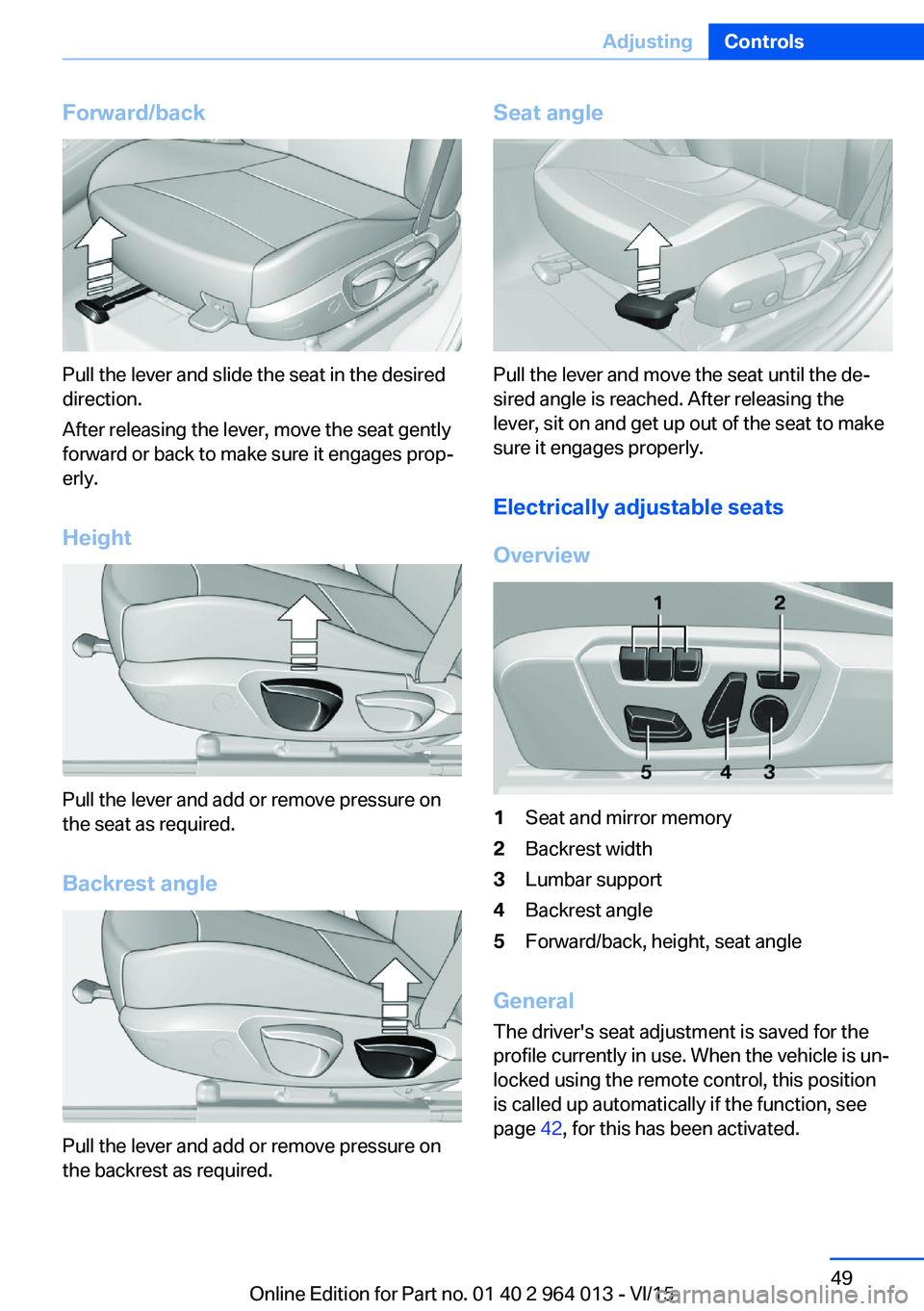
Forward/back
Pull the lever and slide the seat in the desired
direction.
After releasing the lever, move the seat gently
forward or back to make sure it engages prop‐
erly.
Height
Pull the lever and add or remove pressure on
the seat as required.
Backrest angle
Pull the lever and add or remove pressure on
the backrest as required.
Seat angle
Pull the lever and move the seat until the de‐
sired angle is reached. After releasing the
lever, sit on and get up out of the seat to make
sure it engages properly.
Electrically adjustable seats
Overview
1Seat and mirror memory2Backrest width3Lumbar support4Backrest angle5Forward/back, height, seat angle
General The driver's seat adjustment is saved for the
profile currently in use. When the vehicle is un‐
locked using the remote control, this position is called up automatically if the function, see
page 42, for this has been activated.
Seite 49AdjustingControls49
Online Edition for Part no. 01 40 2 964 013 - VI/15
Page 55 of 228

Saving1.Switch on ignition.2.Set desired position.3.Press button briefly. LED in button
is illuminated.4.Press the desired button 1 or 2 while the
LED is lit. LED turns off.
If SET button was pressed inadvertently:
Press the button again.
LED turns off.
Recalling
General
There are two possibilities of calling up the
memory function:
▷Comfort function, see page 55.▷Safety function, see page 55.
Convenience function
1.Open the driver's door.2.Switch ignition off if necessary.3.Briefly press button 1 or 2 as desired.
The relevant seat adjustment is done automat‐
ically.
The process is cancelled if a seat adjustment
switch or one of the buttons is pressed.
Safety function
1.Close the driver’s door or switch the igni‐
tion on.2.Keep button 1 or 2 pressed as desired until
the adjustment procedure has been con‐
cluded.
Calling up has been disabled
After a short time, calling up saved seat posi‐
tions is disabled to prevent the battery from
being discharged.
To reactivate calling up:
▷Open and close a door or the boot lid.▷Press a button on the remote control.▷Press the start/stop button.
Mirrors
Exterior mirrors
General Depending on the equipment, the mirror set‐
ting is saved for the profile currently in use.
When the vehicle is unlocked using the remote
control, this position is called up automatically
if the setting for this has been enabled.
Note WARNING
Objects reflected in the mirrors are
closer than they appear. The distance to road
users behind the vehicle could be incorrectly
estimated, for example when changing lane.
Danger of accidents. Look over your shoulder
to estimate the distance from following traf‐
fic.◀
Overview
1Adjusting 562Left/right, automatic parking function3Folding in and out 56Seite 55AdjustingControls55
Online Edition for Part no. 01 40 2 964 013 - VI/15
Page 58 of 228

Carrying children in safetyVehicle equipmentThis chapter describes all standard, national
and special equipment provided in the model
series. Equipment not available in the vehicle is
therefore also described, for example the se‐lected special equipment or national version.
This also applies to safety-relevant functions
and systems. Comply with the relevant na‐
tional regulations when using the correspond‐
ing functions and systems.
Important considerations
Note
WARNING
Unsupervised children or animals in the
vehicle can set the vehicle in motion and en‐
danger themselves or other road users, for ex‐
ample by the following actions:▷Pressing the start/stop button.▷Releasing the parking brake.▷Opening and closing doors or windows.▷Setting the selector lever to neutral.▷Operating vehicle equipment.
Risk of accident or injury. Do not leave children
or animals unsupervised in the vehicle. When
leaving the vehicle, take the remote control
with you and lock it.◀
Not for Australia/New Zealand: Suitable seats
Information about which child seats can be
used on the seats in question, if the child seatsare attached with a seat belt — according to
ECE-R 16 standard: GroupWeight of childApproximate
ageFront pas‐
senger's seatRear seats,
outer – b)Rear seat,
middle0Up to 10 kgUp
to 9 monthsUUX0+Up to 13 kgUp
to 18 monthsUUXI9 – 18 kgUp to 4 yearsUUXII15 – 25 kgUp to 7 yearsUUXSeite 58ControlsCarrying children in safety58
Online Edition for Part no. 01 40 2 964 013 - VI/15
Page 67 of 228

Stopping the engine
Notes WARNING
Unsupervised children or animals in the
vehicle can set the vehicle in motion and en‐
danger themselves or other road users, for ex‐
ample by the following actions:▷Pressing the start/stop button.▷Releasing the parking brake.▷Opening and closing doors or windows.▷Setting the selector lever to neutral.▷Operating vehicle equipment.
Risk of accident or injury. Do not leave children
or animals unsupervised in the vehicle. When
leaving the vehicle, take the remote control
with you and lock it.◀
WARNING
An unsecured vehicle can start moving
and rolling away. Danger of accidents. Before
leaving the vehicle, secure it to prevent rolling
away.
Observe the following to ensure that the vehi‐
cle is secured against rolling away:
▷Engage the parking brake.▷Turn the front wheels into the direction of
the kerb on upward or downward gradi‐
ents.▷Additionally secure the vehicle on upward
or downward gradients, e.g. using a
wedge.◀
Before entering the car wash
So that the vehicle can roll into the vehicle
wash, follow the information on washing in au‐
tomatic vehicle washes, see page 208.
M double clutch transmission
Stopping the engine
1.Brake the vehicle until it comes to a stop.2.Press the start/stop button.
The engine is switched off.
The radio ready state is switched on.3.Apply the parking brake.
Manual gearbox
Stopping the engine
1.Press the Start/Stop button when the vehi‐
cle is at standstill.2.Engage first gear or reverse.3.Apply the parking brake.
Auto Start Stop function
Principle The Auto Start Stop function helps you to save
fuel. by stopping the engine when stationary,
for example, in a traffic jam or at traffic lights.
The ignition remains switched on. For driving
off, the engine starts automatically.
Automatic operation
After each time the engine is started using the
start/stop button, the Auto Start Stop function
is ready to operate.
The function is activated from 5 km/h,
3 mph3 mph, km/h.
Stopping the engine The engine is automatically shut down whenstationary under the following conditions:
M double clutch transmission:
▷Selector lever in selector lever position D.▷Brake pedal remains depressed while the
vehicle is at a standstill.▷Driver's seat belt buckled or driver's door
closed.
Manual gearbox:
▷Transmission in neutral and clutch pedal
not pressed.Seite 67DrivingControls67
Online Edition for Part no. 01 40 2 964 013 - VI/15
Page 87 of 228

SymbolsDescriptionM engine dynamics control, see
page 78.Adaptive M chassis, see
page 126.Servotronic, see page 127.
Activating display
1."Settings"2."Instr. cluster display"3.If applicable, "M driving dynamics syst."
The drive dynamics systems display is
active.
Display current consumption, see
page 86, and energy recovery, see
page 86.
Service requirements
Principle The distance to be driven or time to the next
maintenance is displayed briefly after switch‐ ing on the ignition briefly in the instrument
cluster.
The current service requirements can be read
by a service advisor from the remote control.
Display
Detailed information on service
requirements
More detailed information on the scope of
maintenance can be displayed on the Control
Display.
1."Vehicle information"2."Vehicle status"3. "Service requirements"Essential maintenance routines and any
statutory inspections required are dis‐
played.4.Select an entry to display more detailed in‐
formation.
Symbols
Sym‐
bolsDescriptionNo servicing is currently needed.Maintenance or an inspection re‐
quired by law is due soon.Servicing is overdue.
Entering deadlines
Enter deadlines for prescribed statutory in‐
spections.
Ensure that the date and time of the vehicle
are set correctly.
On the Control Display:
1."Vehicle information"2."Vehicle status"3. "Service requirements"4."§ vehicle inspection"5."Date:"6.Adjust the settings.7.Confirm.
The date input is saved.
Automatic Service notification Data on the service status or on statutory in‐
spections for the vehicle are transmitted to the
Service Partner automatically when a service
or inspection is imminent.
It can be checked when the Service Partner
was notified.
Seite 87DisplaysControls87
Online Edition for Part no. 01 40 2 964 013 - VI/15
Page 106 of 228
Not for Australia/New Zealand: Key
switch for front passenger airbags
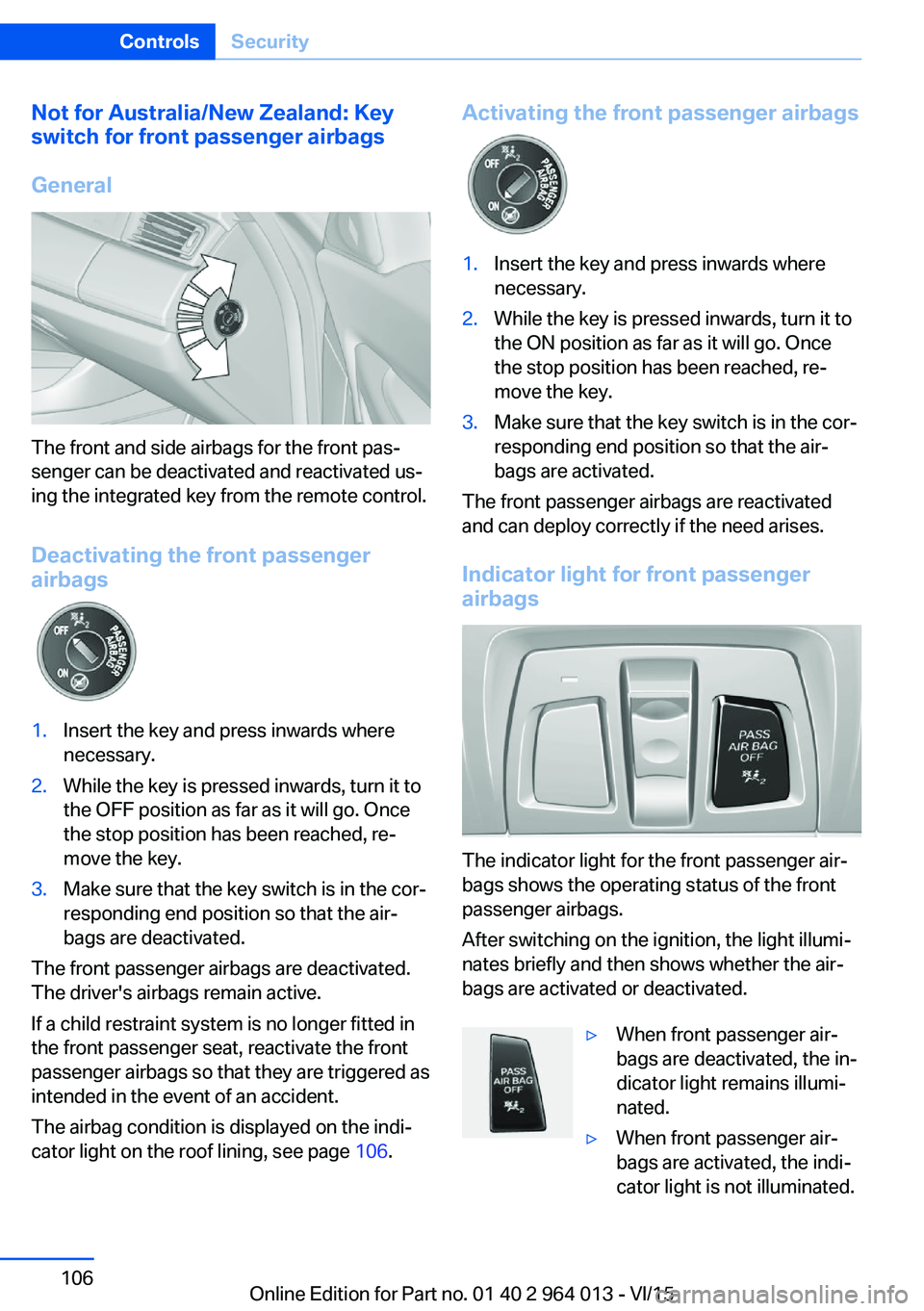
General
The front and side airbags for the front pas‐
senger can be deactivated and reactivated us‐
ing the integrated key from the remote control.
Deactivating the front passenger
airbags
1.Insert the key and press inwards where
necessary.2.While the key is pressed inwards, turn it to
the OFF position as far as it will go. Once
the stop position has been reached, re‐
move the key.3.Make sure that the key switch is in the cor‐
responding end position so that the air‐
bags are deactivated.
The front passenger airbags are deactivated.
The driver's airbags remain active.
If a child restraint system is no longer fitted in
the front passenger seat, reactivate the front
passenger airbags so that they are triggered as
intended in the event of an accident.
The airbag condition is displayed on the indi‐
cator light on the roof lining, see page 106.
Activating the front passenger airbags1.Insert the key and press inwards where
necessary.2.While the key is pressed inwards, turn it to
the ON position as far as it will go. Once
the stop position has been reached, re‐
move the key.3.Make sure that the key switch is in the cor‐
responding end position so that the air‐
bags are activated.
The front passenger airbags are reactivated
and can deploy correctly if the need arises.
Indicator light for front passenger airbags
The indicator light for the front passenger air‐
bags shows the operating status of the front
passenger airbags.
After switching on the ignition, the light illumi‐
nates briefly and then shows whether the air‐
bags are activated or deactivated.
▷When front passenger air‐
bags are deactivated, the in‐
dicator light remains illumi‐
nated.▷When front passenger air‐
bags are activated, the indi‐
cator light is not illuminated.Seite 106ControlsSecurity106
Online Edition for Part no. 01 40 2 964 013 - VI/15
Page 155 of 228
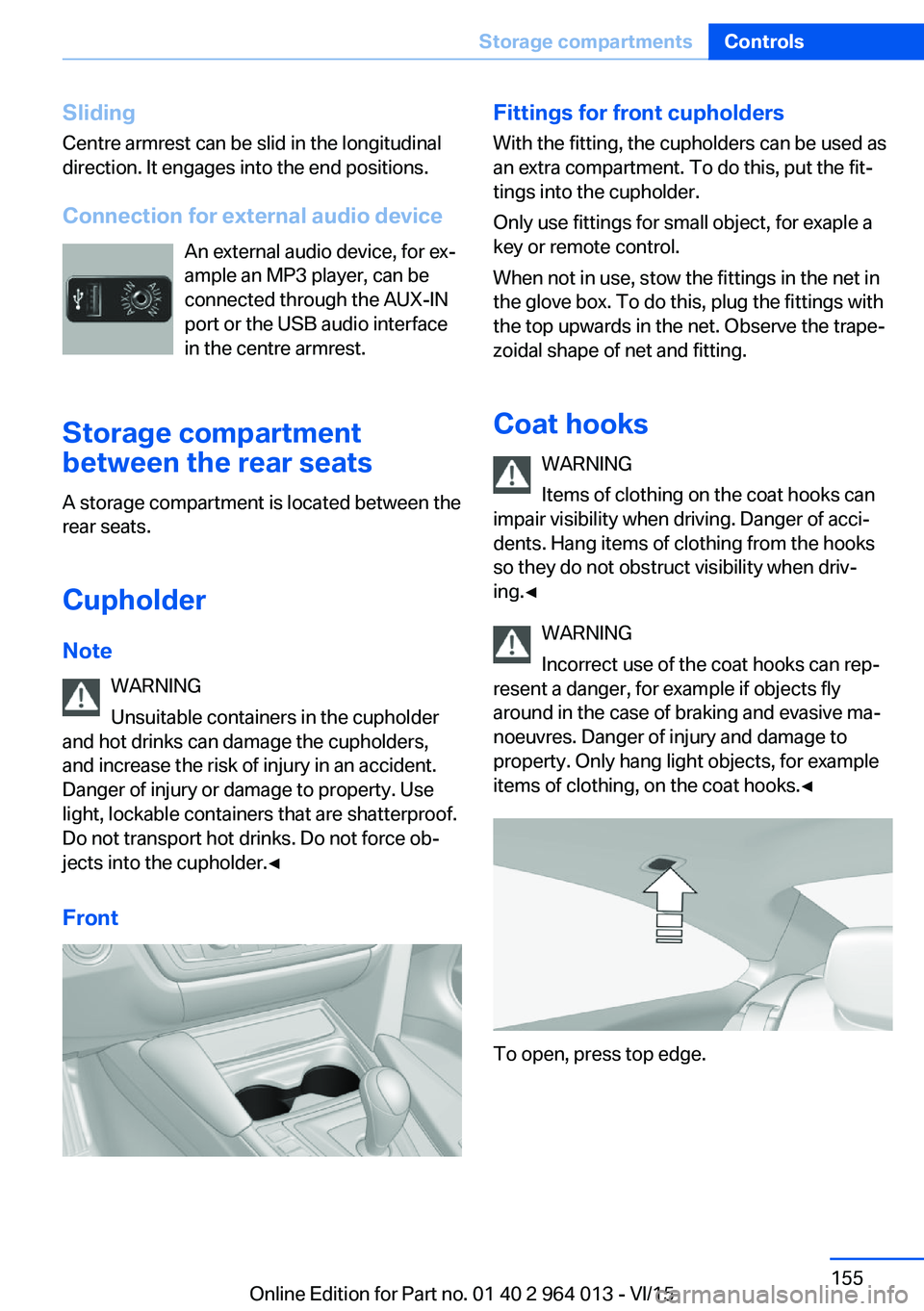
SlidingCentre armrest can be slid in the longitudinal
direction. It engages into the end positions.
Connection for external audio device An external audio device, for ex‐
ample an MP3 player, can be
connected through the AUX-IN
port or the USB audio interface
in the centre armrest.
Storage compartment
between the rear seats
A storage compartment is located between the
rear seats.
Cupholder
Note WARNING
Unsuitable containers in the cupholder
and hot drinks can damage the cupholders,
and increase the risk of injury in an accident.
Danger of injury or damage to property. Use
light, lockable containers that are shatterproof.
Do not transport hot drinks. Do not force ob‐
jects into the cupholder.◀
FrontFittings for front cupholders
With the fitting, the cupholders can be used as
an extra compartment. To do this, put the fit‐
tings into the cupholder.
Only use fittings for small object, for exaple a
key or remote control.
When not in use, stow the fittings in the net in
the glove box. To do this, plug the fittings with
the top upwards in the net. Observe the trape‐
zoidal shape of net and fitting.
Coat hooks WARNING
Items of clothing on the coat hooks can
impair visibility when driving. Danger of acci‐
dents. Hang items of clothing from the hooks
so they do not obstruct visibility when driv‐
ing.◀
WARNING
Incorrect use of the coat hooks can rep‐
resent a danger, for example if objects fly
around in the case of braking and evasive ma‐
noeuvres. Danger of injury and damage to
property. Only hang light objects, for example items of clothing, on the coat hooks.◀
To open, press top edge.
Seite 155Storage compartmentsControls155
Online Edition for Part no. 01 40 2 964 013 - VI/15
Page 191 of 228

MaintenanceVehicle equipment
This chapter describes all standard, national
and special equipment provided in the model
series. Equipment not available in the vehicle is
therefore also described, for example the se‐
lected special equipment or national version.
This also applies to safety-relevant functions
and systems. Comply with the relevant na‐
tional regulations when using the correspond‐
ing functions and systems.
BMW Maintenance System
The maintenance system points out the nec‐
essary maintenance measures and so sup‐
ports in maintaining the road and operational
safety of the vehicle.
Scopes and intervals may vary depending on
national version. Replacement work, spare
parts, operating materials and wear material
are calculated separately. Further information
is available from a Service Partner or a qualified
specialist workshop.
Condition Based Service,
CBS
Sensors and advanced algorithms monitor the
conditions in which your vehicle is used. Con‐
dition Based Service uses this information to
calculate the maintenance requirements.
The system thus enables adaptation of the
scope of maintenance to the individual usage
profile.
Detailed information on service requirements,
see page 87, can be displayed at the Control
Display.Service data in the remote control
Information on maintenance requirements is
continually saved in the remote control. The Service Partner or a qualified specialist work‐
shop can read out this data and suggest an op‐
timised maintenance scope for your vehicle.
This is why you should hand over the remote
control that was last used for driving to your
service advisor with the vehicle.
Periods out of use
Immobilisation periods with the vehicle battery
disconnected are not taken into account.
Updating the time-dependent maintenance
scope such as brake fluid and any engine oil
and microfilter or activated carbon filter can be
done by a Service Partner or a qualified spe‐
cialist workshop.
Service history Have maintenance and repair carried out by a
Service Partner or a qualified specialist work‐
shop.
The maintenance work carried out is entered in
the proof of maintenance and the vehicle data.
The entries are, just like a service booklet, evi‐
dence of regular maintenance.
If an entry is made in the electronic service his‐
tory of the vehicle, service-relevant data is not
only saved in the vehicle but also on the central
IT systems of BMW AG, Munich.
The data entered in the electronic service his‐
tory can also be viewed by the new vehicle
owner after a change of vehicle owner. In addi‐
tion, all Service Partners and other authorised
and qualified specialist workshops can view
the data entered in the electronic service his‐
tory.Seite 191MaintenanceMobility191
Online Edition for Part no. 01 40 2 964 013 - VI/15