2016 BMW M4 change time
[x] Cancel search: change timePage 146 of 228

Automatic air recirculation control,
AUC/recirculated-air mode
If the air outside the vehicle has an unpleasant
odour or contains pollutants, the supply to the
interior of the vehicle can be shut off. The air
inside the vehicle is then recirculated.
Press button repeatedly to call up an
operating mode:▷LEDs off: ambient air is constantly entering
the car.▷Left-hand LED on, AUC mode: a sensor
detects pollutants in the outside air and
shuts it out automatically.▷Right-hand LED on, recirculated-air mode:
the ambient air supply is permanently shut
off.
The recirculated-air mode automatically
switches off at low outside temperatures after
a given time, to avoid condensation.
Continuous recirculated-air mode deteriorates
the air quality in the interior and condensation
on the windows increases.
If there is condensation on the window, switch
off recirculated-air mode and press the AUTO
button to use the condensation sensor. Ensure
that air can flow towards the windscreen.
Adjusting the air flow manually To be able to adjust the air flow manually, first
switch off the AUTO program.
Pressing the button on the left or right
reduces or increases the air flow.
The selected air flow is shown on the display
for automatic air conditioning.
In order to protect the battery the air flow rate
of the automatic air conditioning is reduced, if
necessary.
Adjusting the air distribution manually Press button repeatedly to select a
program:
▷Upper body area.▷Upper body area and footwell.▷Footwell.▷Windows and footwell: only on the driver's
side.▷Windows, upper body area and footwell:
only on the driver's side.
If there is condensation on the window, press
the AUTO button in order to use the conden‐
sation sensor.
Defrosting windows and removing
condensation
Press the button.
This removes ice and condensation
quickly from the windscreen and the front side
windows.
To do this, point the side nozzles at the side
windows if necessary.
The air flow can be adapted when the program
is active.
If there is condensation on the window, switch
on the cooling function as well or press the AUTO button to use the condensation sensor.
Heated rear window Press the button.
The heated rear window is switched
off automatically after a certain period of time.
Microfilter/activated charcoal filter
In outside and recirculated-air mode, the mi‐
crofilter/activated carbon filter filters dust, pol‐ len and harmful gases from the air.
This filter should be changed during mainte‐
nance on your vehicle, see page 191.
Seite 146ControlsClimate146
Online Edition for Part no. 01 40 2 964 013 - VI/15
Page 147 of 228
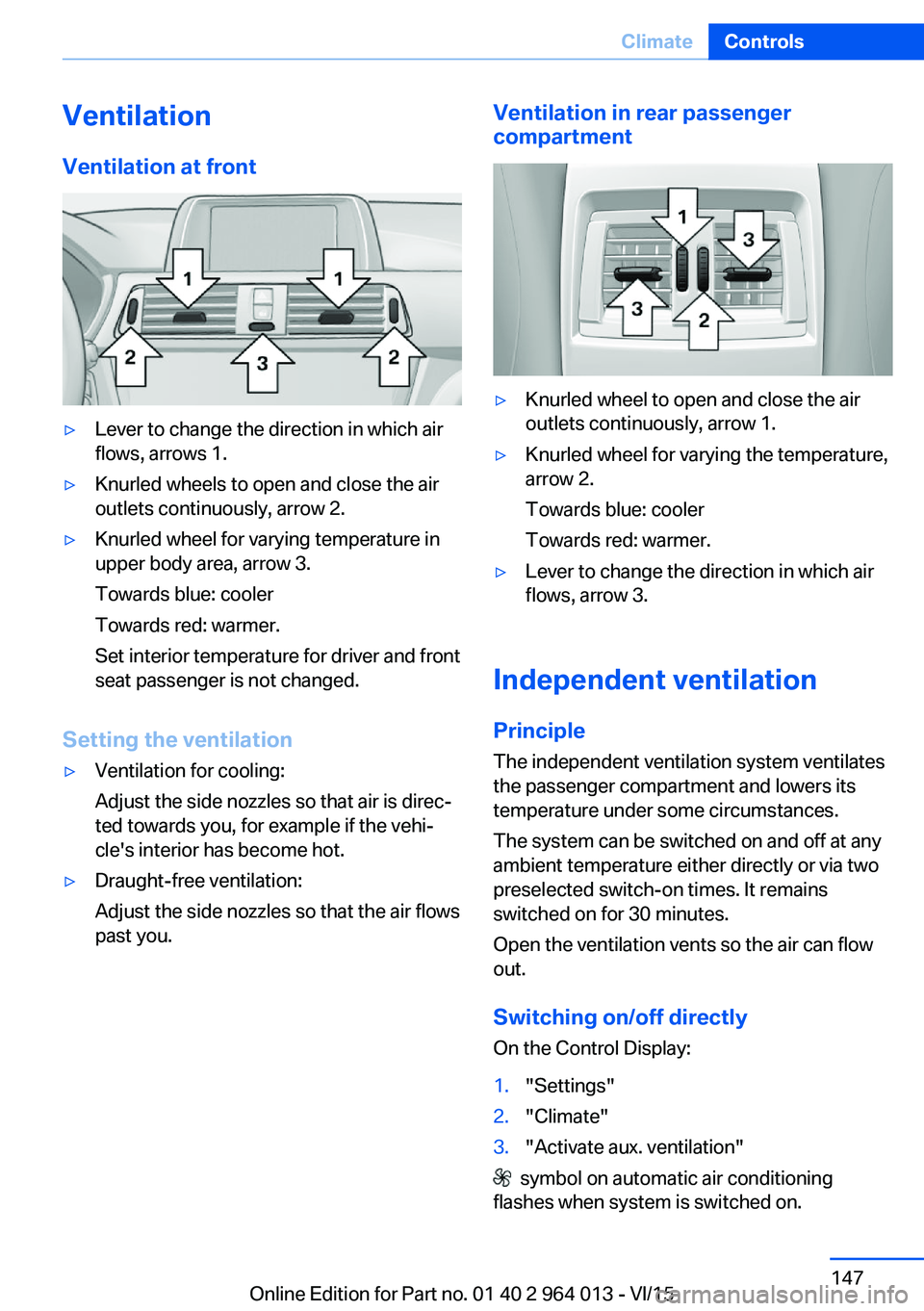
VentilationVentilation at front▷Lever to change the direction in which air
flows, arrows 1.▷Knurled wheels to open and close the air
outlets continuously, arrow 2.▷Knurled wheel for varying temperature in
upper body area, arrow 3.
Towards blue: cooler
Towards red: warmer.
Set interior temperature for driver and front
seat passenger is not changed.
Setting the ventilation
▷Ventilation for cooling:
Adjust the side nozzles so that air is direc‐
ted towards you, for example if the vehi‐
cle's interior has become hot.▷Draught-free ventilation:
Adjust the side nozzles so that the air flows
past you.Ventilation in rear passenger
compartment▷Knurled wheel to open and close the air
outlets continuously, arrow 1.▷Knurled wheel for varying the temperature,
arrow 2.
Towards blue: cooler
Towards red: warmer.▷Lever to change the direction in which air
flows, arrow 3.
Independent ventilation
Principle The independent ventilation system ventilates
the passenger compartment and lowers its
temperature under some circumstances.
The system can be switched on and off at any
ambient temperature either directly or via two
preselected switch-on times. It remains
switched on for 30 minutes.
Open the ventilation vents so the air can flow
out.
Switching on/off directly
On the Control Display:
1."Settings"2."Climate"3."Activate aux. ventilation"
symbol on automatic air conditioning
flashes when system is switched on.
Seite 147ClimateControls147
Online Edition for Part no. 01 40 2 964 013 - VI/15
Page 187 of 228
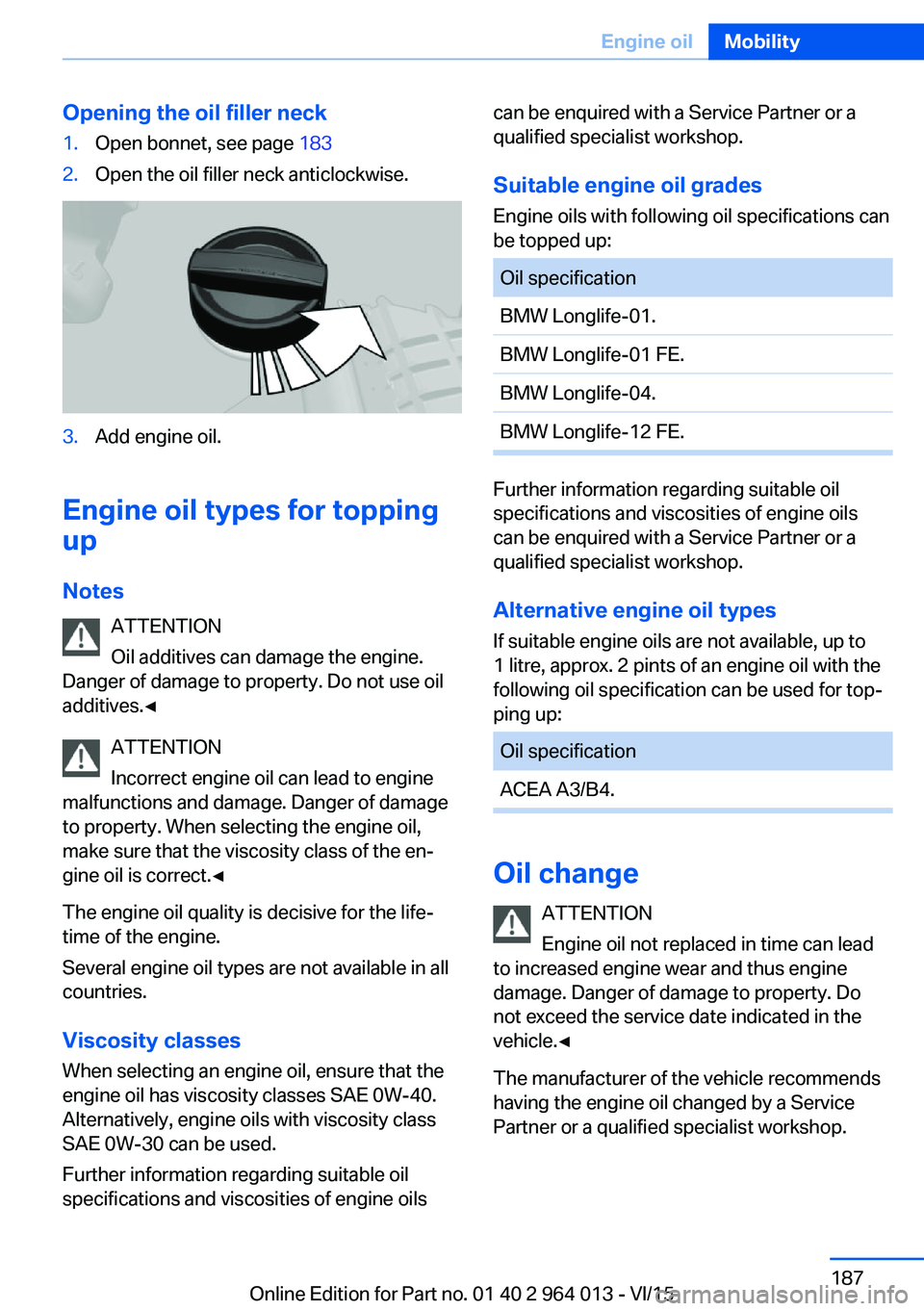
Opening the oil filler neck1.Open bonnet, see page 1832.Open the oil filler neck anticlockwise.3.Add engine oil.
Engine oil types for topping
up
Notes ATTENTION
Oil additives can damage the engine.
Danger of damage to property. Do not use oil
additives.◀
ATTENTION
Incorrect engine oil can lead to engine
malfunctions and damage. Danger of damage
to property. When selecting the engine oil,
make sure that the viscosity class of the en‐
gine oil is correct.◀
The engine oil quality is decisive for the life‐
time of the engine.
Several engine oil types are not available in all
countries.
Viscosity classes When selecting an engine oil, ensure that the
engine oil has viscosity classes SAE 0W-40.
Alternatively, engine oils with viscosity class
SAE 0W-30 can be used.
Further information regarding suitable oil
specifications and viscosities of engine oils
can be enquired with a Service Partner or a
qualified specialist workshop.
Suitable engine oil grades
Engine oils with following oil specifications can
be topped up:Oil specificationBMW Longlife-01.BMW Longlife-01 FE.BMW Longlife-04.BMW Longlife-12 FE.
Further information regarding suitable oil
specifications and viscosities of engine oils
can be enquired with a Service Partner or a
qualified specialist workshop.
Alternative engine oil types If suitable engine oils are not available, up to
1 litre, approx. 2 pints of an engine oil with the
following oil specification can be used for top‐
ping up:
Oil specificationACEA A3/B4.
Oil change
ATTENTION
Engine oil not replaced in time can lead
to increased engine wear and thus engine
damage. Danger of damage to property. Do
not exceed the service date indicated in the
vehicle.◀
The manufacturer of the vehicle recommends
having the engine oil changed by a Service
Partner or a qualified specialist workshop.
Seite 187Engine oilMobility187
Online Edition for Part no. 01 40 2 964 013 - VI/15
Page 191 of 228

MaintenanceVehicle equipment
This chapter describes all standard, national
and special equipment provided in the model
series. Equipment not available in the vehicle is
therefore also described, for example the se‐
lected special equipment or national version.
This also applies to safety-relevant functions
and systems. Comply with the relevant na‐
tional regulations when using the correspond‐
ing functions and systems.
BMW Maintenance System
The maintenance system points out the nec‐
essary maintenance measures and so sup‐
ports in maintaining the road and operational
safety of the vehicle.
Scopes and intervals may vary depending on
national version. Replacement work, spare
parts, operating materials and wear material
are calculated separately. Further information
is available from a Service Partner or a qualified
specialist workshop.
Condition Based Service,
CBS
Sensors and advanced algorithms monitor the
conditions in which your vehicle is used. Con‐
dition Based Service uses this information to
calculate the maintenance requirements.
The system thus enables adaptation of the
scope of maintenance to the individual usage
profile.
Detailed information on service requirements,
see page 87, can be displayed at the Control
Display.Service data in the remote control
Information on maintenance requirements is
continually saved in the remote control. The Service Partner or a qualified specialist work‐
shop can read out this data and suggest an op‐
timised maintenance scope for your vehicle.
This is why you should hand over the remote
control that was last used for driving to your
service advisor with the vehicle.
Periods out of use
Immobilisation periods with the vehicle battery
disconnected are not taken into account.
Updating the time-dependent maintenance
scope such as brake fluid and any engine oil
and microfilter or activated carbon filter can be
done by a Service Partner or a qualified spe‐
cialist workshop.
Service history Have maintenance and repair carried out by a
Service Partner or a qualified specialist work‐
shop.
The maintenance work carried out is entered in
the proof of maintenance and the vehicle data.
The entries are, just like a service booklet, evi‐
dence of regular maintenance.
If an entry is made in the electronic service his‐
tory of the vehicle, service-relevant data is not
only saved in the vehicle but also on the central
IT systems of BMW AG, Munich.
The data entered in the electronic service his‐
tory can also be viewed by the new vehicle
owner after a change of vehicle owner. In addi‐
tion, all Service Partners and other authorised
and qualified specialist workshops can view
the data entered in the electronic service his‐
tory.Seite 191MaintenanceMobility191
Online Edition for Part no. 01 40 2 964 013 - VI/15
Page 219 of 228

Breakdown, wheelchange 199
Brightness of the Control Dis‐ play 94
Bulb change, rear 196
Bulb change, xenon head‐ light 194
Buttons on the steering wheel 12
Button, start/stop 65
C
Camera, rear-view cam‐ era 134
Camera, Side View 136
Camera, Top View 138
Carbon ceramic brakes M 160
Car care 209
Care, displays 211
Care products 209
Care, vehicle 209
Car jack 199
Car key, see Remote con‐ trol 32
Carpet, care 211
Carrying children safely 58
Car washes 208
Catalytic converter, see Hot exhaust system 163
CBS, Condition Based Serv‐ ice 191
Central key, see Remote con‐ trol 32
Central locking system 38
Central screen, see Control Display 16
Centre armrest 154
Centre console 14
Ceramic brakes 160
Changes, technical, see Your own safety 7
Changing bulb, rear 196
Charcoal canister 146
Chassis, electronic 126 Chassis number, see Vehicle
identification number 9
Check control 80
Checking the oil level elec‐ tronically 185
Child's seats 58
Children, carrying 58
Child restraints 58
Child seat classes, ISOFIX 61
Child seat mounting 59
Child seat mountings, ISO‐ FIX 61
Chrome parts, care 210
Cigarette lighter 149
Cleaning displays 211
Clock 85
Closing/opening using door lock 37
Closing/opening with remote control 35
Coat hooks 155
Cockpit 12
Comfort Access 39
Comfort closing with the re‐ mote control 36
Comfort opening with the re‐ mote control 36
Compound brakes 160
Compressor 178
Computer, see on-board computer 90
Condensate under the vehi‐ cle 165
Condensation on win‐ dows 146
Condition Based Service, CBS 191
Confirmation signals 42
ConnectedDrive 6
ConnectedDrive services 6
Connecting electrical applian‐ ces 150
Contactless opening of boot lid 40
Control Display 16
Control display, settings 93 Controller 17
Control systems, driving sta‐ bility 123
Coolant 189
Coolant temperature 84
Cooling effect, maximum 145
Cooling function 145
Cooling system 189
Cornering light 100
Corrosion of brake discs 164
Courtesy light when unlock‐ ing 35
Courtesy light with the vehi‐ cle locked 36
Cruise Control 129
Cupholder 155
Current fuel consumption 86
D
Damage, tyres 176
Damper control 126
Data, technical 214
Date 85
Daytime driving lights 100
Deactivation, airbags 106
Defrosting, see Defrosting windows 146
Defrosting windows 146
Defrost, see Defrosting win‐ dows 146
Deleting personal data 23
Differential lock 126
Digital clock 85
Digital speed 85
Digital speedometer 85
Dimensions 214
Dimmable exterior mirrors 56
Dimming rear-view mirror 56
Dipping headlights, see High- beam assistance 100
Display in windscreen 94
Display lighting, see Instru‐ ment lighting 102
Displays, cleaning 211 Seite 219Everything from A to ZReference219
Online Edition for Part no. 01 40 2 964 013 - VI/15
Page 223 of 228

Mounting child restraints 59
M Technology 160
Multifunction steering wheel, buttons 12
Multimedia 6
M View, Head-Up Display 95
N Navigation 6
Neutral cleaner, see rim cleaner 210
New wheels and tyres 177
No Passing Information 88
Notes 6
Nylon ropes for tow-starting/ towing 206
O OBD, see on-board diagnosis, OBD 192
Obstacle marking, rear-view camera 135
Octane number, see Petrol grade 174
Odometer 84
Office 6
Oil 185
Oil additives 187
Oil change 187
Oil change interval, service requirement 87
Oil filler neck 186
Oil grades, alternative 187
Oil grades, suitable 187
Old battery, disposing 200
On-board computer 90
On-board diagnosis, OBD 192
On-board monitor, see Con‐ trol Display 16
On-board toolkit 193
Opening/closing using door lock 37
Opening and closing 32 Opening and closing, without
remote control 37
Opening and closing with re‐ mote control 35
Operating menus, iDrive 16
Operating principle, iDrive 16
Outside air, see AUC 146
Outside temperature dis‐ play 84
Outside temperature warn‐ ing 84
Overheating of the engine, see Coolant temperature 84
P Paintwork, vehicle 209
Park assistant 139
Park Distance Control PDC 131
Parked vehicle, conden‐ sate 165
Parking aid, see PDC 131
Parking assistant 139
Parking brake 69
Parking lights 99
Part replacement 193
Parts and accessories 8
Passenger's mirror, tilting down 56
PDC Park Distance Con‐ trol 131
Personal data, delete 23
Personal Profile 33
Personal profile, export pro‐ file 34
Personal profile, import pro‐ file 35
Person warning with city braking function 113
Petrol 174
Petrol grade 174
Place for children 58
Plasters, see First-aid kit 203
Plastic, care 210
Pockets in the doors 154 Power failure 200
Power windows 43
Pressure check, tyres 107
Pressure, tyres 175
Pressure warning RPA, tyres 109
Preventing Auto Start Stop 69
Profiles, Personal Profile 33
Protection function, glass Roof 46
Protection function, win‐ dows 44
Puncture, runflat indicator RPA 109
R Radio 6
Radio-control key, see Re‐ mote control 32
Radio ready state 65
Radio signals 163
Rain sensor 71
Range 85
Rear backrests, folding, see Through-loading sys‐
tem 151
Rear fog lights 102
Rear lights 196
Rear-view camera 133
Rear-view mirror, automatic- dim 56
Recirculated-air mode 146
Recirculating air filter 146
Recirculation, see Recircula‐ ted-air mode 146
Recommended tyre makes 177
Recycling 192
Refuelling 172
Remaining distance 85
Remedying flat tyres 178
Remote control/key 32
Remote control, malfunc‐ tion 37 Seite 223Everything from A to ZReference223
Online Edition for Part no. 01 40 2 964 013 - VI/15
Page 225 of 228

Starting assistance, seeDSC 124
Starting, see Engine start 66
Starting the engine 66
Starting the engine, starting assistance 203
Status control display, tyres 107
Status information, iDrive 21
Status of the Owner's Handbook 7
Steering support 127
Steering wheel, adjusting 57
Steering wheel heating 57
Stopping the engine 67
Storage compartments 153
Storage options 153
Storage, tyres 178
Storage, vehicle 211
Suitable engine oil grades 187
Summer tyres, tread 176
Sunblinds, sun guard 45
Sun visor 149
Supplementary text mes‐ sage 83
Surround view 133
Switches, see Driving area 12
Switching off the engine 67
Switch-on times, independ‐ ent ventilation 148
Symbols 6
Symbols in the status field 21
Symbols used 6
System states of the driving dynamics 86
T
Tailgate opening 38
Tail lights 199
Tank display 84
Technical changes, see Your own safety 7
Technical data 214
Technology, BMW M 160 Telephone 6
Temperature, automatic air conditioning 145
Temperature display, outside temperature 84
Temperature, engine oil 84
Tensioning bands, securing load 166
Text message, supplemen‐ tary 83
Thiefproof wheel studs 199
Thread for towing eye 207
Through-loading system 151
Tilt alarm sensor 43
Tilting down, passenger's mirror 56
Tool 193
Topping up engine oil 186
Top View 137
Total weight 215
Total weight, permitted 215
Touchpad 19
Tourist function, see Left- hand/right-hand traffic 102
Tow eye, see Towing eye 206
Towing 204
Towing eye 206
Towing truck 205
Tow-starting 204
TPM Tyre Pressure Moni‐ tor 107
Tread, tyres 176
Trip distance recorder 84
Triple turn signal 70
Turn indicator rear, changing bulb 196
Turn indicators, operation 70
Turning circle 214
Turning circle lines, rear-view camera 135
Tyre damage 176
Tyre pressure monitoring, see RPA 109
Tyre Pressure Monitor TPM 107 Tyre pressures 175
Tyre replacement 177
Tyre sealant 178
Tyres, everything about wheels and tyres 175
Tyre tread 176
U
Units of measure 94
Unloaded weight 215
Unlocking/locking using door lock 37
Unlocking/locking with re‐ mote control 35
Unlocking, settings 41
Updates after going to press 7
Upholstery care 210
USB interface 150
V Vanity mirror 149
Vehicle battery 199
Vehicle battery, chang‐ ing 199
Vehicle equipment 7
Vehicle for tow-starting/ towing 205
Vehicle identification num‐ ber 9
Vehicle paintwork 209
Vehicle, running in 162
Ventilation 147
Ventilation, see Independent ventilation 147
VIN, see Vehicle identification number 9
Voice control system 25
W Wading 163
Warning indicators, see Check control 80 Seite 225Everything from A to ZReference225
Online Edition for Part no. 01 40 2 964 013 - VI/15