2016 BMW M4 COUPE battery change
[x] Cancel search: battery changePage 6 of 228

Addendum
thereof: “BMW recommends that you have
the maintenance carried out by your service
center.”
10. At page 172, under the heading “Tire infla-
tion specifications,” the sentence begin-
ning, “Tire inflation pressure specifications
apply to approved tire sizes …” should be
disregarded.
11. At page 176, under the heading: “Mount-
ing,” the paragraph beginning, “Have
mounting and balancing …” should be dis-
regarded and the following text should be
read in lieu thereof: “BMW recommends
that you have mounting and balancing per-
formed by your service center or a tire
mounting specialist.”
12. At page 176, under the heading: “Approved
wheels and tires,” the term “Approved”
should be disregarded and in lieu thereof,
the term “Recommended” should be read
in its place. In addition, the text of that sec-
tion should be disregarded and the follow-
ing text should be read in lieu thereof:
The manufacturer of your vehicle strongly
suggests that you use wheels and tires that
have been recommended by the vehicle
manufacturer for your vehicle type; other-
wise, for example, despite having the same
official size ratings, variations can lead to
body contact and with it, the risk of severe
accidents.
The manufacturer of your vehicle does not
evaluate non-recommended wheels and
tires to determine if they are suitable for use
on your vehicle.
13. At page 180, under the heading: “Snow
Chains,” the text should be disregarded and
the following text should be read in lieu
thereof:
Only certain types of fine-link snow chains
have been tested by the manufacturer of
your vehicle and are determined by the
manufacturer of your vehicle to be road safe
and are recommended by the manufacturer
of your vehicle.
Information about recommended snow
chains is available from a service center.
14. At page 181, under the heading “Hood,” the
sentence beginning, “If you are unfamiliar”
should be disregarded.
15. At page 185, under the heading: “Engine oil
change,” the text should be disregarded
and in lieu thereof should be read as follows:
BMW recommends that you have the oil
changed at your BMW dealer's service cen-
ter or at another service center that has
trained personnel that can perform the work
in accordance with BMW specifications.
16. At page 188, under the heading: “Service
and Warranty Information Booklet for US
models and Warranty and Service Guide
Booklet for Canadian models,” the second
paragraph should be disregarded and the
following text read in lieu thereof:
The manufacturer of your vehicle recom-
mends that you have maintenance and
repair performed by your BMW dealer's ser-
vice center or another service center or
repair shop that employs trained personnel
that can perform maintenance and repair
work on your vehicle in accordance with
BMW specifications. The manufacturer of
your vehicle recommends that you maintain
records of all maintenance and repair work
performed on your vehicle.
17. At page 191, where it reads: “Do not per-
form work/bulb replacement on xenon
headlights,” that text should be disregarded
and in lieu thereof the following text should
be read: “Xenon headlight work or replace-
ment can cause serious and fatal injuries.”
In the text that follows, where it reads:
“[h]ave any work on the xenon lighting
system … ,” the following words should be
read as preceding that passage: “It is
strongly suggested that you …”
18. At page 196, under the “Battery replace-
ment” section, the text should be disre-
garded and in lieu thereof the following text
should be read:
Online Edition for Part no. 01 40 2 960 786 - II/15
Page 39 of 228

Replacing the battery1.Remove integrated key from remote con‐
trol.2.Push in the catch with the key, arrow 1.3.Remove the cover of the battery compart‐
ment, arrow 2.4.Insert a battery of the same type with the
positive side facing up.5.Press the cover closed.
Take the used battery to a recycling
center or to your service center.
New remote controls New remote controls are available from the
service center.
Loss of the remote controls Lost remote controls can be disabled by your
service center.
Emergency detection of remote
control
It is possible to switch on the ignition or start
the engine in situations such as the following:
▷Interference of radio transmission to re‐
mote control by external sources e.g., by
radio masts.▷Empty battery in remote control.▷Interference from radio transmissions
through mobile devices in close proximity
to remote control.▷Interference of radio transmission by
charger while charging items such as mo‐
bile devices in the vehicle.
A Check Control message is displayed if an at‐
tempt is made to switch on the ignition or start
the engine.
Starting the engine with emergency
detection of the remote control
M double-clutch transmission: if a correspond‐
ing Check Control message appears, hold the
remote control, as shown, against the marked
area on the steering column and press the
Start/Stop button within 10 seconds while
pressing the brake.
Manual transmission: if a corresponding Check
Control message appears, hold the remote
control, as shown, against the marked area on
the steering column and press the Start/Stop
button within 10 seconds while pressing the
clutch pedal.
If the remote control is not recognized: slightly
change the height position of the remote con‐
trol and repeat the procedure.
Personal Profile
The concept Personal Profile provides three profiles, using
which personal vehicle settings can be stored.
Every remote control has one of these profiles
assigned.
If the vehicle is unlocked using a remote con‐
trol, the assigned personal profile will be acti‐
Seite 35Opening and closingControls35
Online Edition for Part no. 01 40 2 960 786 - II/15
Page 46 of 228

Locking
Touch the surface on the door handle of the
driver's or front passenger door, arrow, with
your finger for approx. 1 second without grasp‐
ing the door handle.
This corresponds with pressing the button on
the remote control.
To save battery power, ensure that the ignition
and all electronic systems and/or power con‐
sumers are turned off before locking the vehi‐
cle.
Convenient closing Monitor closing
Monitor closing to ensure that no one
becomes trapped.◀
Touch the surface on the door handle of the
driver's or front passenger door, arrow, with
your finger and hold it there without grasping
the door handle.
This corresponds to pressing and holding
the remote control button.
In addition to locking, the windows and the
glass sunroof close and the exterior mirrors
fold in.
Separately unlocking the trunk lid Press button on the exterior of the trunk lid.
This corresponds to pressing
the re‐
mote control button.
The situation of the doors does not change.
Do not place the remote control in the
cargo area
Take the remote control with you and do not
leave it in the cargo area; otherwise, the re‐
mote control is locked inside the vehicle when
the trunk lid is closed.◀
Opening trunk lid with no-touch activation
The trunk lid can be opened with no-touch ac‐
tivation using the remote control you are carry‐
ing. Two sensors detect a forward-directed
foot motion in the center of the area at the rear
of the car and the trunk lid opens.
Foot movement to be carried out Do not touch vehicle
With the foot motion, make sure there is
steady stance and do not touch the vehicle; otherwise, there is a danger of injury, e. g. from
hot exhaust system parts.◀
1.Place in the center behind the vehicle,
about an arm's length from the vehicle rear.2.Move a foot in the direction of travel as far
under the vehicle as possible and immedi‐
ately pull it back. With this movement, theSeite 42ControlsOpening and closing42
Online Edition for Part no. 01 40 2 960 786 - II/15
Page 48 of 228

▷"Tailgate + door(s)"
The trunk lid is opened and the doors
are unlocked.
Confirmation signals from the vehicle
The settings are saved in the active profile, re‐
fer to page 35.
1."Settings"2."Doors/key"3.Deactivate or activate the desired confir‐
mation signals.▷"Acoustic sig. lock/unlock"▷"Flash when lock/unlock"
Automatic locking
The settings are saved in the active profile, re‐fer to page 35.
1."Settings"2."Doors/key"3.Select the desired function:▷"Lock if no door is opened"
The vehicle locks automatically after a
short period of time if no door is
opened.▷"Lock after start driving"
The vehicle locks automatically after
you drive off.
Retrieving the seat and mirror settings
The driver's seat and exterior mirror positions
used last are stored for the remote control cur‐
rently in use.
When the vehicle is unlocked, these positions
are automatically retrieved if this function was
activated.
Pinch hazard when moving back the seat
If this function is used, first make sure
that the footwell behind the driver's seat is
empty. Otherwise, people might get injured or
objects damaged when the seat is moved
back.◀
The adjustment procedure is interrupted:▷When a seat position switch is pressed.▷When a button of the seat and mirror mem‐
ory is pressed.
Activating the setting
1."Settings"2."Doors/key"3."Last seat position autom."
Alarm system
The conceptWhen the vehicle is locked, the vehicle alarm
system responds to:
▷Opening a door, the hood or the trunk lid.▷Movements in the interior.▷Changes in the vehicle tilt, e. g., during at‐
tempts at stealing a wheel or when towing
the car.▷Disconnected battery voltage.
The alarm system briefly signals tampering:
▷By sounding an acoustic alarm.▷By switching on the hazard warning sys‐
tem.▷By flashing the daytime running lights.
Arming and disarming the alarm
system
When you unlock or lock the vehicle, either
with the remote control or via the Comfort Ac‐
cess, the alarm system is disarmed or armed at
the same time.
Door lock and armed alarm systemThe alarm system is triggered when the door is
opened, when the vehicle is unlocked via the
door lock.
Seite 44ControlsOpening and closing44
Online Edition for Part no. 01 40 2 960 786 - II/15
Page 59 of 228
Calling up of a seat position
deactivated
After a brief period, calling up stored seat posi‐
tions is deactivated to save battery power.
To reactivate calling up of a seat position:▷Open and close the door or trunk lid.▷Press a button on the remote control.▷Press the Start/Stop button.
Mirrors
Exterior mirrors
General information The mirror on the passenger side is more
curved than the driver's side mirror.
Depending on the vehicle equipment, the mir‐
ror setting is stored for the profile currently in
use. When the vehicle is unlocked via the re‐
mote control, the position is automatically re‐
trieved if this function is active.
Note Estimating distances correctly
Objects reflected in the mirror are closer
than they appear. Do not estimate the distance
to the traffic behind you based on what you
see in the mirror, as this will increase your risk
of an accident.◀
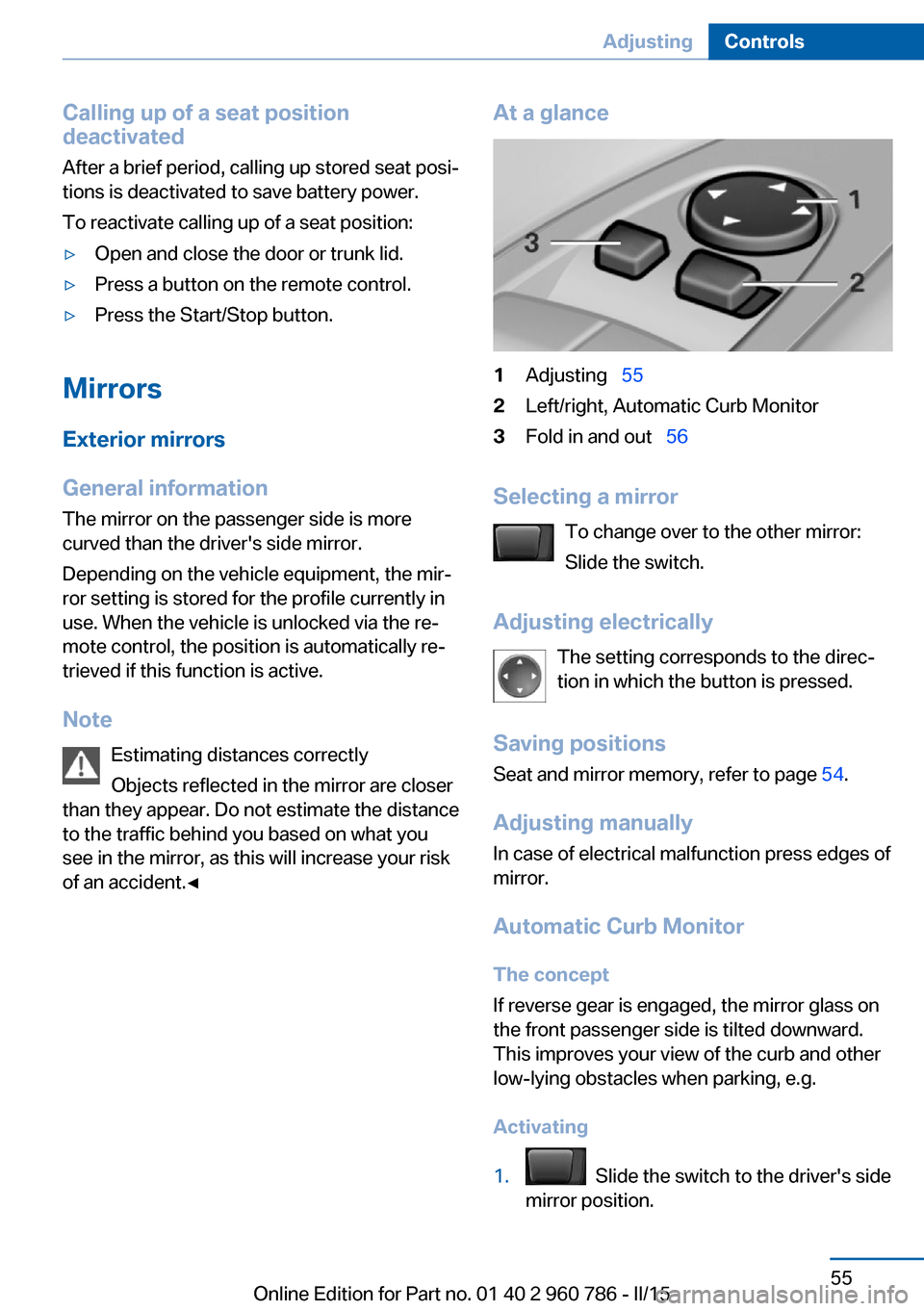
At a glance1Adjusting 552Left/right, Automatic Curb Monitor3Fold in and out 56
Selecting a mirror
To change over to the other mirror:
Slide the switch.
Adjusting electrically The setting corresponds to the direc‐
tion in which the button is pressed.
Saving positions
Seat and mirror memory, refer to page 54.
Adjusting manually
In case of electrical malfunction press edges of
mirror.
Automatic Curb MonitorThe concept
If reverse gear is engaged, the mirror glass on
the front passenger side is tilted downward.
This improves your view of the curb and other
low-lying obstacles when parking, e.g.
Activating
1. Slide the switch to the driver's side
mirror position.
Seite 55AdjustingControls55
Online Edition for Part no. 01 40 2 960 786 - II/15
Page 69 of 228

▷The engine is not yet at operating temper‐
ature.▷The wheels are at a sharp angle or the
steering wheel is being turned.▷After driving in reverse.▷Fogging of the windows when the auto‐
matic climate control is switched on.▷Vehicle battery is heavily discharged.▷At higher elevations.▷The engine compartment lid is unlocked.▷The parking assistant is activated.▷Stop-and-go traffic.▷Use of fuel with high ethanol content.
Starting the engine
The engine starts automatically under the fol‐
lowing conditions:
▷M double-clutch transmission:
By releasing the brake pedal.▷Manual transmission:
The clutch pedal is pressed.
After the engine starts, accelerate as usual.
Safety mode
After the engine switches off automatically, it
will not start again automatically if any one of
the following conditions are met.
▷The driver's safety belt is unbuckled and
the driver's door is open.▷The hood was unlocked.
Some indicator lights light up for a varied
length of time.
The engine can only be started via the Start/
Stop button.
Functional limitations
Even if driving off was not intended, the deacti‐
vated engine starts up automatically in the fol‐
lowing situations:
▷Excessive warming of the car's interior
when the cooling function is switched on.▷The steering wheel is turned.▷Double-clutch transmission: Change from
selector lever position D to N, R or D/S.▷M double-clutch transmission: Accelerat‐
ing while simultaneously applying the
brake.▷The vehicle begins rolling.▷Fogging of the windows when the auto‐
matic climate control is switched on.▷Vehicle battery is heavily discharged.▷Excessive cooling of the car's interior when
the heating is switched on.▷Low brake vacuum pressure; this can oc‐
cur, e.g., if the brake pedal is depressed a
number of times in succession.
Preventing an automatic engine stop with aM double-clutch transmission
The concept To make it possible to drive off very quickly,
such as at an intersection, the automatic en‐
gine stop can be actively prevented.
Preventing an engine stop using the
brake pedal
The engine stop can be actively prevented
within one second after the vehicle comes to a
standstill.
▷Immediately after the vehicle comes to a
standstill, briefly press the brake pedal
forcefully.▷Then press the brake pedal with normal
braking force.Seite 65DrivingControls65
Online Edition for Part no. 01 40 2 960 786 - II/15
Page 219 of 228

Brightness of Control Dis‐play 90
Bulb replacement 190
Bulb replacement, front 191
Bulb replacement, LED head‐ lights 192
Bulb replacement, rear 193
Bulb replacement, xenon headlights 191
Bulbs and lights 190
Button, Start/Stop 62
Bypassing, refer to Jump- starting 200
C
California Proposition 65 Warning 7
Camera lenses, care 208
Camera, rearview cam‐ era 125
Camera, Side View 127
Camera, Top View 129
Can holder, refer to Cuphold‐ ers 149
Car battery 196
Carbon ceramic brake M 154
Car care products 206
Care, displays 208
Care, vehicle 206
Cargo 160
Cargo area, enlarging 145
Cargo area, storage compart‐ ments 149
Cargo, securing 161
Cargo straps, securing cargo 161
Car key, refer to Remote con‐ trol 34
Carpet, care 208
Car wash 205
Catalytic converter, refer to Hot exhaust system 157
CBS Condition Based Serv‐ ice 188 CD/Multimedia, see user's
manual for Navigation, En‐
tertainment and Communi‐
cation
Center armrest 148
Center console 16
Central locking system 39
Central screen, refer to Con‐ trol Display 18
Ceramic brake 154
Changes, technical, refer to Safety 7
Changing parts 190
Changing wheels 195
Changing wheels/tires 176
Chassis, electronic 117
Chassis number, see vehicle identification number 9
Check Control 77
Checking the engine oil level electronically 183
Checking the oil level elec‐ tronically 183
Children, seating position 58
Children, transporting safely 58
Child restraint fixing sys‐ tem 58
Child restraint fixing system LATCH 60
Child restraint fixing systems, mounting 58
Child seat, mounting 58
Child seats 58
Chrome parts, care 207
Cigarette lighter 143
Cleaning displays 208
Climate control 134
Clock 81
Closing/opening via door lock 39
Closing/opening with remote control 37
Clothes hooks 149
Cockpit 14 Combination reel, refer to
Turn signals 67
Combination switch, refer to Wiper system 67
Comfort Access 41
Compartments in the doors 148
Compass 141
Compound brake 154
Compressor 177
Computer, refer to On-board computer 86
Condensation on win‐ dows 136
Condensation under the vehi‐ cle 158
Condition Based Service CBS 188
Confirmation signal 44
ConnectedDrive, see user's manual for Navigation, En‐
tertainment and Communi‐
cation
ConnectedDrive Services
Connecting electrical devi‐ ces 143
Control Display 18
Control Display, settings 89
Controller 18, 19
Control systems, driving sta‐ bility 114
Convenient opening with the remote control 37
Coolant 186
Coolant temperature 81
Cooling function 135
Cooling, maximum 135
Cooling system 186
Cornering light 94
Corrosion on brake discs 158
Cosmetic mirror 143
Courtesy lamps during un‐ locking 37
Courtesy lamps with the vehi‐ cle locked 38
Cruise control 120 Seite 215Everything from A to ZReference215
Online Edition for Part no. 01 40 2 960 786 - II/15
Page 220 of 228

Cruising range 82
Cupholders 149
Current fuel consumption 82
D
Damage, tires 175
Damping control 117
Data, technical 212
Date 81
Daytime running lights 94
Defrosting, refer to Windows, defrosting 136
Dehumidifying, air 135
Deleting personal data 25
Deletion of personal data 25
Destination distance 87
Differential lock 117
Digital clock 81
Digital compass 141
Digital speed 81
Digital tachometer 81
Dimensions 212
Dimmable exterior mirrors 56
Dimmable interior rearview mirror 56
Direction indicator, refer to Turn signals 67
Display EfficientDynamics 83
Display, electronic, instru‐ ment cluster 76
Display in windshield 90
Display lighting, refer to In‐ strument lighting 96
Displays, cleaning 208
Disposal, coolant 187
Disposal, vehicle battery 197
Distance control, refer to PDC 122
Distance to destination 87
Divided screen view, split screen 23
Door lock 39
Door lock, refer to Remote control 34 Double-clutch transmis‐
sion 70
Drivelogic 72
Drive mode 71
Drive-off assistant 118
Drive-off assistant, refer to DSC 115
Driver assistance, refer to In‐ telligent Safety 104
Driving Assistant, refer to In‐ telligent Safety 104
Driving Dynamics Control 74
Driving instructions, break- in 156
Driving notes, general 157
Driving on racetracks 155
Driving program, refer to Drivelogic 72
Driving stability control sys‐ tems 114
Driving tips 157
DSC Dynamic Stability Con‐ trol 115
Dynamic driving systems 83
Dynamic driving, system states 83
Dynamic Stability Control DSC 115
E EfficientDynamics 83
Electronic displays, instru‐ ment cluster 76
Electronic oil measure‐ ment 183
Electronic Stability Program ESP, refer to DSC 115
Emergency detection, remote control 35
Emergency release, fuel filler flap 168
Emergency Request 199
Emergency start function, en‐ gine start 35 Emergency unlocking, trunk
lid 41
Energy Control 82
Energy recovery 82
Engine, automatic Start/Stop function 64
Engine, automatic switch- off 64
Engine compartment 181
Engine compartment, work‐ ing in 181
Engine coolant 186
Engine oil 183
Engine oil, adding 184
Engine oil additives 185
Engine oil change 185
Engine oil filler neck 184
Engine oil temperature 80
Engine oil types, alterna‐ tive 185
Engine oil types, ap‐ proved 185
Engine start during malfunc‐ tion 35
Engine start, jump-start‐ ing 200
Engine start, refer to Starting the engine 63
Engine stop 63
Engine temperature 80
Entering a car wash 205
Equipment, interior 139
Error displays, see Check Control 77
ESP Electronic Stability Pro‐ gram, refer to DSC 115
Exchanging wheels/tires 176
Exhaust system 157
Exterior mirror, automatic dimming feature 56
Exterior mirrors 55
External start 200
External temperature dis‐ play 81
External temperature warn‐ ing 81 Seite 216ReferenceEverything from A to Z216
Online Edition for Part no. 01 40 2 960 786 - II/15