2016 BMW M4 CONVERTIBLE Seat
[x] Cancel search: SeatPage 21 of 226
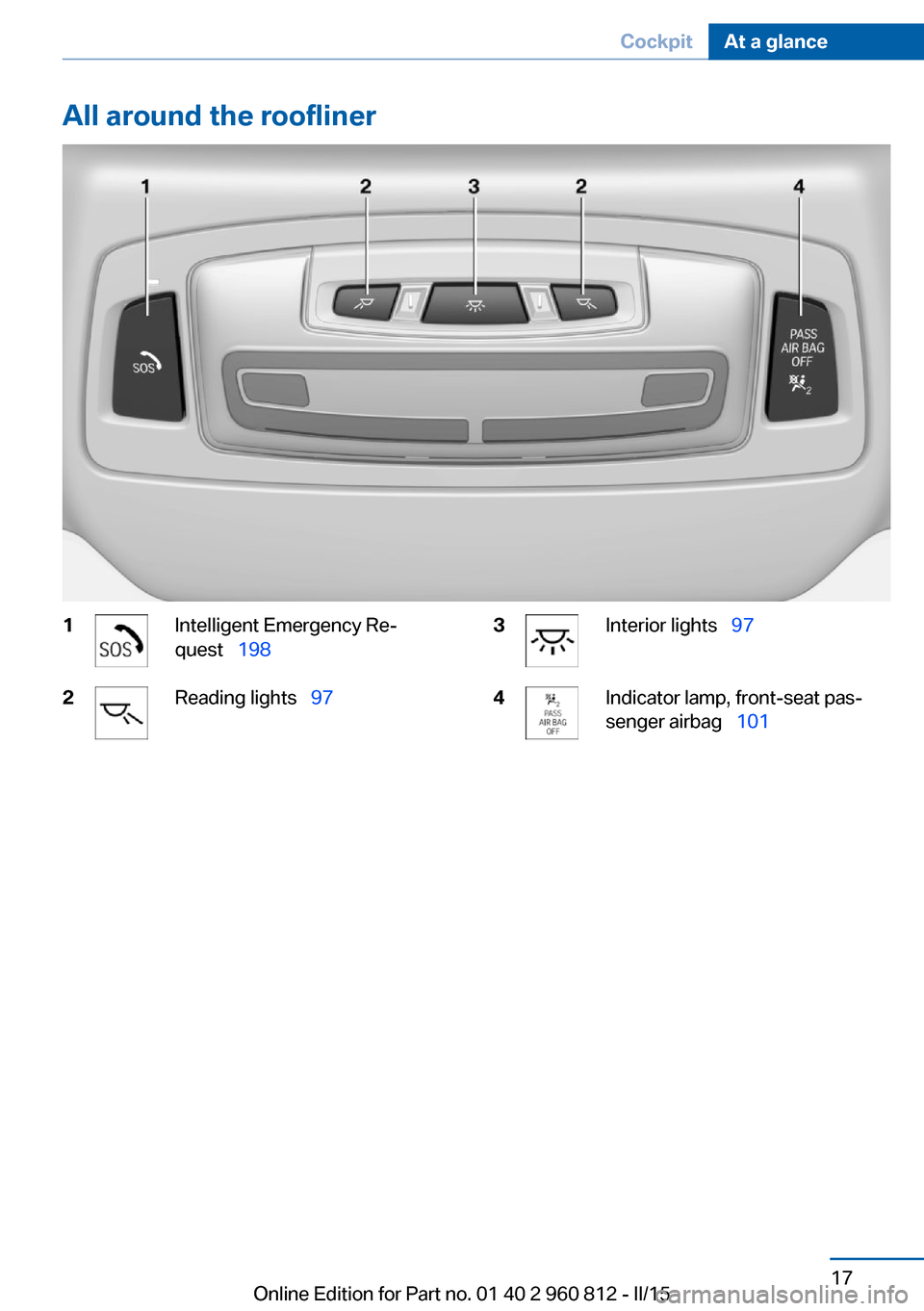
All around the roofliner1Intelligent Emergency Re‐
quest 1982Reading lights 973Interior lights 974Indicator lamp, front-seat pas‐
senger airbag 101Seite 17CockpitAt a glance17
Online Edition for Part no. 01 40 2 960 812 - II/15
Page 40 of 226

vated. All settings stored in the profile are au‐
tomatically applied.
If several drivers use their own remote control,
the vehicle will adjust the personal settings
during unlocking. These settings are also re‐
stored, if the vehicle has been used in the
meantime by a person with a different remote
control.
Changes to the settings are automatically
saved in the personal profile.
Three personal profiles and a guest profile can
be created.
Adjusting
The settings for the following systems and
functions are saved in the active profile. The
scope of storable settings is country- and
equipment-dependable.▷Unlocking and locking.▷Lights.▷Climate control.▷Radio.▷Instrument cluster.▷Programmable memory buttons.▷Volumes, tone.▷Control Display.▷Navigation.▷Park Distance Control PDC.▷Rearview camera▷Side View.▷Head-up Display.▷M Drive: configurations.▷Driver's seat position, exterior mirror posi‐
tion, steering wheel position.▷Cruise control.▷Intelligent Safety.▷Active Blind Spot Detection.Profile management
Opening profiles Regardless of the remote control in use a dif‐
ferent profile may be activated.1."Settings"2."Profiles"3.Select a profile.▷All settings stored in the called-up profile
are automatically applied.▷The called-up profile is assigned to the re‐
mote control being used at the time.▷If the profile is already assigned to a differ‐
ent remote control, this profile will apply to
both remote controls. It cannot be differen‐
tiated anymore between the settings for
the two remote controls.
Renaming profiles
A personal name can be assigned to every pro‐
file to avoid confusion between the profiles.
1."Settings"2."Profiles"3."Options"4."Rename current profile"
Resetting profiles
The settings of the active profile are reset to
their default values.
1."Settings"2."Profiles"3."Options"4."Reset current profile"
Exporting profiles
Most settings of the active profile can be ex‐
ported.
This can be helpful for securing and retrieving
personal settings, before delivering the vehicle
to a workshop, e.g. Profiles can be taken to an‐
Seite 36ControlsOpening and closing36
Online Edition for Part no. 01 40 2 960 812 - II/15
Page 47 of 226

▷Interference of the radio connection from
mobile phones or other electronic devices
in direct proximity.
Do not transport the remote control together
with metal objects or electronic devices.
In the case of a malfunction, unlock and lock
the vehicle using the buttons of the remote
control or using the integrated key, refer to
page 39.
Adjusting
Unlocking The settings are saved in the active profile, re‐
fer to page 35.
Doors
1."Settings"2."Doors/key"3. Select the symbol.4.Select the desired function:▷"Driver's door only"
Only the driver's door and the fuel filler
flap are unlocked. Pressing again un‐
locks the entire vehicle.▷"All doors"
The entire vehicle is unlocked.
Trunk lid
Depending on optional features and country
version, this setting is not offered in some
cases.
1."Settings"2."Doors/key"3. Select the symbol.4.Select the desired function:▷"Tailgate"
The trunk lid unlocks.▷"Tailgate + door(s)"The trunk lid and the doors are un‐
locked.
Confirmation signals from the vehicle
The settings are saved in the active profile, re‐
fer to page 35.
1."Settings"2."Doors/key"3.Deactivate or activate the desired confir‐
mation signals.▷"Acoustic sig. lock/unlock"▷"Flash when lock/unlock"
Automatic locking
The settings are saved in the active profile, re‐fer to page 35.
1."Settings"2."Doors/key"3.Select the desired function:▷"Lock if no door is opened"
The vehicle locks automatically after a
short period of time if no door is
opened.▷"Lock after start driving"
The vehicle locks automatically after
you drive off.
Retrieving the seat and mirror settings
The driver's seat and exterior mirror positions
used last are stored for the remote control cur‐
rently in use.
When the vehicle is unlocked, these positions
are automatically retrieved if this function was
activated.
Pinch hazard when moving back the seat
If this function is used, first make sure
that the footwell behind the driver's seat is
empty. Otherwise, people might get injured or
objects damaged when the seat is moved
back.◀
Seite 43Opening and closingControls43
Online Edition for Part no. 01 40 2 960 812 - II/15
Page 48 of 226

The adjustment procedure is interrupted:▷When a seat position switch is pressed.▷When a button of the seat and mirror mem‐
ory is pressed.
Activating the setting
1."Settings"2."Doors/key"3."Last seat position autom."
Alarm system
The conceptWhen the vehicle is locked, the vehicle alarm
system responds to:
▷Opening a door, the hood or the trunk lid.▷Movements in the interior.▷Changes in the vehicle tilt, e. g., during at‐
tempts at stealing a wheel or when towing
the car.▷Disconnected battery voltage.
The alarm system briefly signals tampering:
▷By sounding an acoustic alarm.▷By switching on the hazard warning sys‐
tem.▷By flashing the daytime running lights.
Arming and disarming the alarm
system
When you unlock or lock the vehicle, either
with the remote control or via the Comfort Ac‐
cess, the alarm system is disarmed or armed at
the same time.
Door lock and armed alarm systemThe alarm system is triggered when the door is
opened, when the vehicle is unlocked via the
door lock.
Trunk lid and armed alarm system
The trunk lid can be opened even when the
alarm system is armed.
After the trunk lid is closed, it is locked and
monitored again when the doors are locked.
The hazard warning system flashes once.
Panic mode
You can trigger the alarm system if you find
yourself in a dangerous situation.
Press button on the remote control for
at least 3 seconds.
To switch off the alarm: press any button.
Indicator lamp on the interior rearview
mirror▷The indicator lamp flashes briefly every
2 seconds:
The system is armed.▷The indicator lamp flashes after locking:
The doors, hood or trunk lid is not closed
properly, but the rest of the vehicle is se‐
cured.
After 10 seconds, the indicator lamp
flashes continuously. Interior motion sen‐
sor and tilt alarm sensor are not active.
When the still open access is closed, inte‐
rior motion sensor and tilt alarm sensor will
be switched on.▷The indicator lamp goes out after unlock‐
ing:
The vehicle has not been tampered with.Seite 44ControlsOpening and closing44
Online Edition for Part no. 01 40 2 960 812 - II/15
Page 49 of 226

▷The indicator lamp flashes after unlocking
until the engine ignition is switched on, but
no longer than approx. 5 minutes:
An alarm has been triggered.
Tilt alarm sensor The tilt of the vehicle is monitored.
The alarm system responds in situations such
as attempts to steal a wheel or when the car is
towed.
Interior motion sensor The interior is monitored to the height of the
seats. The alarm system is armed together
with the interior motion sensor even when the
hardtop is open. Falling objects such as leaves
can trigger the alarm unintentionally.
Avoiding unintentional alarms
The tilt alarm sensor and interior motion sen‐
sor can be switched off together, such as in
the following situations:
▷In automatic car washes.▷In duplex garages.▷During transport on trains carrying vehi‐
cles, at sea or on a trailer.▷With animals in the vehicle.
Switching off the tilt alarm sensor and
interior motion sensor
Press the remote control button again
within 10 seconds as soon as the vehicle
is locked.
The indicator lamp lights up for approx. 2 sec‐
onds and then continues to flash.
The tilt alarm sensor and interior motion sen‐
sor are turned off, until the vehicle is locked again.
Switching off the alarm
▷Unlock vehicle with the remote control or
switch on the ignition, if needed throughemergency detection of remote control, re‐
fer to page 35.▷With Comfort Access: if you are carrying
the remote control on your person, grasp
the driver side or front passenger side door
handle completely.
Power windows
Hint Take the remote control with you
Take the remote control with you when
leaving the vehicle so that children, e.g., can‐
not operate the power windows and injure
themselves.◀
Opening individually
▷ Press the button to the resistance
point.
The window opens while the switch is held.▷ Press the switch beyond the resist‐
ance point.
The window opens automatically. Pressing
the switch again stopse the motion.
See also: Convenient opening, refer to
page 37, via remote control.
Opening together
▷ Press the button to the resistance
point.
Seite 45Opening and closingControls45
Online Edition for Part no. 01 40 2 960 812 - II/15
Page 53 of 226

with the hardtop or hardtop well storage cover
unlocked can result in damage.◀
The hardtop movement is interrupted if the
reel is released. The sequence can be contin‐
ued in the desired direction using the reel.
Convenient operation from outside
When equipped with Comfort Access, the
hardtop can also be operated from outside.▷Convenient opening with remote opera‐
tion, refer to page 37.▷Convenient closing with the remote con‐
trol, refer to page 38.
Cargo area partition
Fold down trunk partition in the back so that
the hardtop can be opened.
Fold down trunk partition in the front in order
to enlarge the trunk capacity when the hardtop
is closed.
Wind deflector
The concept The wind deflector reduces the air movement
in the vehicle interior when driving with the
hardtop down.
Installation1.Unlock the rear seat backrest on the left or
right side, arrow 1, and fold forward, ar‐
row 2.2.Push transport lock, arrow up.
Remove wind deflector.
Fold the rear seat backrest rearward.3.Fully extend the wind deflector.4.Insert wind deflector from one side of the
vehicle with the pins in the correspondingSeite 49Opening and closingControls49
Online Edition for Part no. 01 40 2 960 812 - II/15
Page 54 of 226
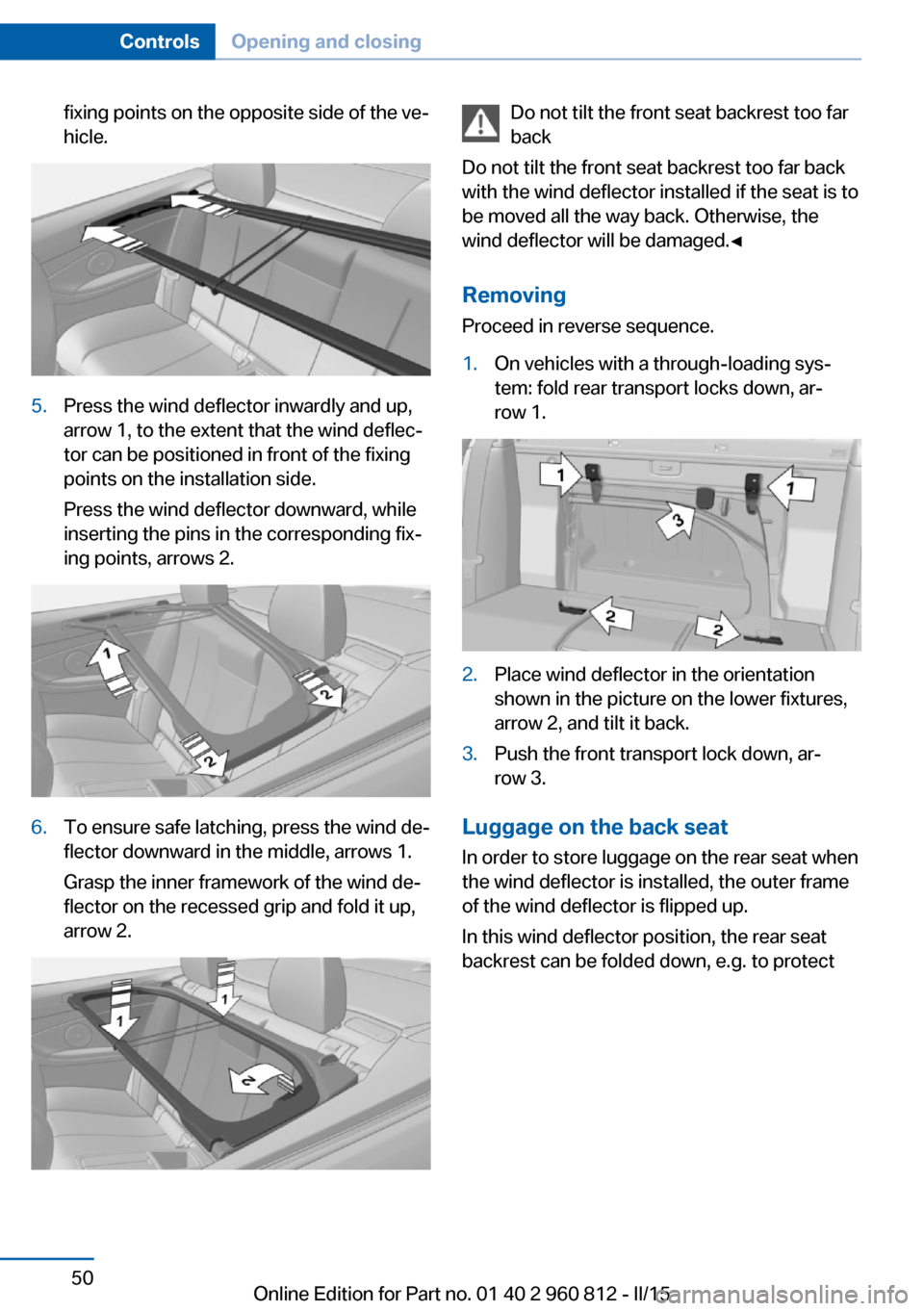
fixing points on the opposite side of the ve‐
hicle.5.Press the wind deflector inwardly and up,
arrow 1, to the extent that the wind deflec‐
tor can be positioned in front of the fixing
points on the installation side.
Press the wind deflector downward, while
inserting the pins in the corresponding fix‐
ing points, arrows 2.6.To ensure safe latching, press the wind de‐
flector downward in the middle, arrows 1.
Grasp the inner framework of the wind de‐
flector on the recessed grip and fold it up,
arrow 2.Do not tilt the front seat backrest too far
back
Do not tilt the front seat backrest too far back
with the wind deflector installed if the seat is to
be moved all the way back. Otherwise, the
wind deflector will be damaged.◀
RemovingProceed in reverse sequence.1.On vehicles with a through-loading sys‐
tem: fold rear transport locks down, ar‐
row 1.2.Place wind deflector in the orientation
shown in the picture on the lower fixtures,
arrow 2, and tilt it back.3.Push the front transport lock down, ar‐
row 3.
Luggage on the back seat
In order to store luggage on the rear seat when
the wind deflector is installed, the outer frame
of the wind deflector is flipped up.
In this wind deflector position, the rear seat
backrest can be folded down, e.g. to protect
Seite 50ControlsOpening and closing50
Online Edition for Part no. 01 40 2 960 812 - II/15
Page 55 of 226

the upholstery against damage caused by
pieces of luggage.1.Turn the release lever 90°, arrow 1, and
fold the outer frame forward, arrow 2.2.Place luggage on the rear seat. Make sure
that the luggage does not project past the
fixing points for the wind deflector.3.Fold wind deflector back and align it with
the fixing point on the opposite side of the
vehicle.
Turn release lever back by 45° in order to
extend the opposing pin.4.Align wind deflector with the fixing point on
the installation side and turn back the re‐
lease lever another 45° in order to extend
the second pin.Seite 51Opening and closingControls51
Online Edition for Part no. 01 40 2 960 812 - II/15