2016 BMW 7 SERIES Rse
[x] Cancel search: RsePage 132 of 314
High-beam AssistantThe concept
The high-beam Assistant detects other traffic
participants early on and automatically
switches the high beams on or off depending
on the traffic situation. The assistant ensures
that the high beams are activated whenever
the traffic situation allows. In the low speed
range, the high beams are not switched on by
the system.
General information
The system responds to light from oncoming
traffic and traffic driving ahead of you, and to
adequate illumination, e.g., in towns and cities.
The driver can intervene at any time and switch
the high beams on and off as usual.
Depending on the version of the system in the
vehicle, the high beams may not switch off for
oncoming vehicles, but may only be dimmed in
the areas that blind oncoming traffic. In this
case, the blue indicator light will stay on.
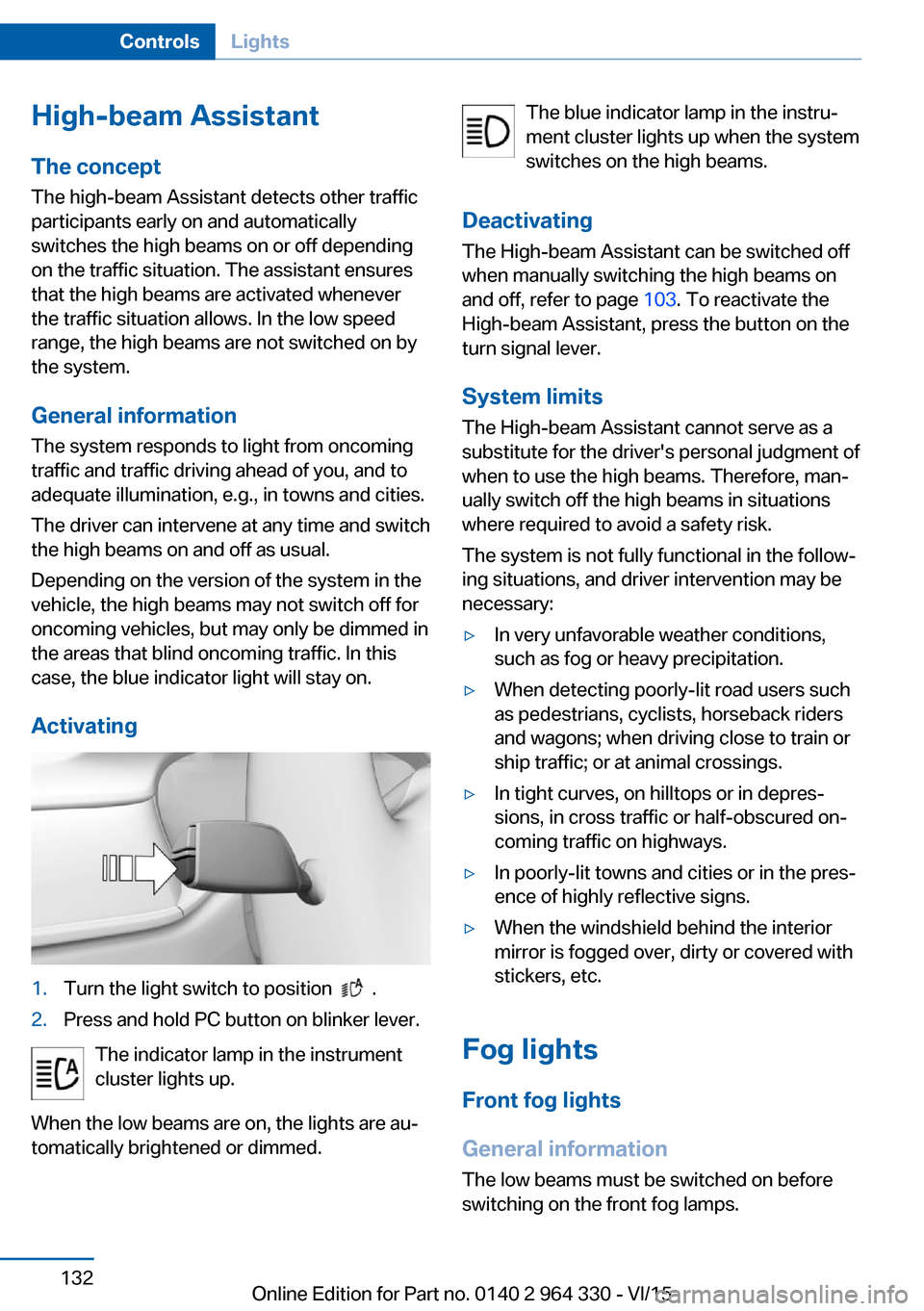
Activating1.Turn the light switch to position .2.Press and hold PC button on blinker lever.
The indicator lamp in the instrument
cluster lights up.
When the low beams are on, the lights are au‐
tomatically brightened or dimmed.
The blue indicator lamp in the instru‐
ment cluster lights up when the system
switches on the high beams.
Deactivating The High-beam Assistant can be switched off
when manually switching the high beams on
and off, refer to page 103. To reactivate the
High-beam Assistant, press the button on the
turn signal lever.
System limits The High-beam Assistant cannot serve as a
substitute for the driver's personal judgment of
when to use the high beams. Therefore, man‐
ually switch off the high beams in situations
where required to avoid a safety risk.
The system is not fully functional in the follow‐
ing situations, and driver intervention may be
necessary:▷In very unfavorable weather conditions,
such as fog or heavy precipitation.▷When detecting poorly-lit road users such
as pedestrians, cyclists, horseback riders
and wagons; when driving close to train or
ship traffic; or at animal crossings.▷In tight curves, on hilltops or in depres‐
sions, in cross traffic or half-obscured on‐
coming traffic on highways.▷In poorly-lit towns and cities or in the pres‐
ence of highly reflective signs.▷When the windshield behind the interior
mirror is fogged over, dirty or covered with
stickers, etc.
Fog lights
Front fog lights
General information
The low beams must be switched on before
switching on the front fog lamps.
Seite 132ControlsLights132
Online Edition for Part no. 0140 2 964 330 - VI/15
Page 143 of 314

SymbolMeasureSymbol lights up red: prewarning.
Brake and increase distance.Symbol flashes red and an acoustic
signal sounds: acute warning.
You are requested to intervene by
braking or make an evasive maneu‐
ver.
Prewarning
This warning is issued, e.g., when there is the
impending danger of a collision or the distance
to the vehicle ahead is too small.
The driver must intervene actively when there
is a prewarning.
Acute warning with braking function
Acute warning in displayed in case of the immi‐
nent danger of a collision when the vehicle ap‐
proaches another object at a relatively high dif‐
ferential speed.
The driver must intervene actively when there
is an acute warning. If necessary, the driver is
assisted by an automatic braking intervention
in a possible risk of collision.
Acute warnings can also be triggered without
previous forewarning.
Brake intervention, City braking
function
The warning prompts the driver himself/herself
to react. During a warning, the maximum brak‐
ing force is used when the brake is actuated.
Premise is sufficiently quick and hard stepping
on the brake pedal.
The system can additionally assist possibly
with automatic braking intervention if there is
risk of a collision.
At low speeds the vehicle can be decelerated
to a complete stop.
The braking intervention takes place up to ap‐
prox. 50 mph/80 km/h.
The braking intervention is executed only if
DSC Dynamic Stability Control is switched on.
The braking intervention can be interrupted by
stepping on the accelerator pedal or by ac‐
tively moving the steering wheel.
Object detection can be restricted. Limitations
of the detection range and functional restric‐
tions are to be considered.
With radar sensor and Active CruiseControl: braking intervention
The warning prompts the driver himself/herself
to react. During a warning, the maximum brak‐
ing force is used when the brake is actuated.
Premise is sufficiently quick and hard stepping
on the brake pedal.
The system can assist with automatic braking
intervention if there is risk of a collision.
The intervention can bring the vehicle to a
complete stop.
The braking intervention is executed only if
DSC Dynamic Stability Control is switched on.
Above approx. 130 mph/210 km/h the braking
intervention occurs as a brief braking pressure.
No automatic delay occurs.
The braking intervention can be interrupted by
stepping on the accelerator pedal or by ac‐
tively moving the steering wheel.
Object detection can be restricted. Limitations
of the detection range and functional restric‐
tions are to be considered.
System limits
Detection range
The system's detection potential is limited.
Thus a system reaction might not come or
might come late.
E. g. the following situations may not be de‐
tected:Seite 143SafetyControls143
Online Edition for Part no. 0140 2 964 330 - VI/15
Page 146 of 314

Some Intelligent Safety systems cannot be in‐
dividually switched off.
Press and hold this button:
All Intelligent Safety systems are
turned off.Press
buttonStatusButton lights up green: all Intelli‐
gent Safety systems are
switched on.Button lights up orange: some In‐
telligent Safety systems are
switched off or settings for the
sub-functions were changed.Button does not light up: all Intel‐
ligent Safety systems are
switched off.
Warning with braking function
Display
If a collision with a person detected in this way
is imminent, a warning symbol appears on the
instrument cluster and in the Head-up Display.
The red symbol is displayed and a sig‐
nal sounds.
Intervene immediately by braking or make an
evasive maneuver.
Braking intervention
The warning prompts the driver himself/herself
to react. During a warning, the maximum brak‐
ing force is used when the brake is actuated.
Premise for the brake booster is sufficiently
quick and hard stepping on the brake pedal.
The system can additionally assist with braking
intervention if there is risk of a collision.
At low speeds the vehicle can be decelerated
to a complete stop.
The braking intervention is executed only if
DSC Dynamic Stability Control is switched on.
The braking intervention can be interrupted by
stepping on the accelerator pedal or by ac‐
tively moving the steering wheel.
Object detection can be restricted. Limitations
of the detection range and functional restric‐
tions are to be considered.
System limits
Detection range
The detection potential of the camera is lim‐
ited.
Thus a warning might not be issued or be is‐
sued late.
E. g. the following situations may not be de‐
tected:▷Partially covered pedestrians.▷Pedestrians that are not detected as such
because of the viewing angle or contour.▷Pedestrians outside of the detection range.▷Pedestrians having a body size less than
32 in/80 cm.
Functional limitations
The system may not be fully functional or may
not be available in the following situations:
▷In heavy fog, rain, sprayed water or snow‐
fall.▷In tight curves.▷If the driving stability control systems are
deactivated, e.g. DSC OFF.▷If the field of view of the camera or the front
windshield are dirty or covered.▷Up to 10 seconds after the start of the en‐
gine, via the Start/Stop button.▷During calibration of the camera immedi‐
ately after vehicle delivery.Seite 146ControlsSafety146
Online Edition for Part no. 0140 2 964 330 - VI/15
Page 159 of 314

This device complies with part 15 of the FCC
Rules. Operation is subject to the following
two conditions:▷This device may not cause harmful inter‐
ference, and▷this device must accept any interference
received, including interference that may
cause undesired operation.
Any unauthorized modifications or changes to
these devices could void the user's authority to
operate this equipment.
Rear collision prevention
The concept
Two radar sensors in the rear bumper monitor
the area behind the vehicle.
If a vehicle approaches from the rear at a cer‐
tain speed, the system responds as follows:
▷Active Protection: if a collision seems to be
unavoidable, PreCrash functions are trig‐
gered.
The system is automatically active after every
driving-off.
The system is deactivated in the following sit‐
uations:
▷If reverse gear is engaged▷If the trailer power socket is in use, e.g.
during operation with trailer or bicycle rackInformation
WARNING
The system does not relieve from the
personal responsibility to correctly assess visi‐
bility and traffic situation. There is risk of an ac‐
cident. Adjust the driving style to the traffic
conditions. Watch traffic closely and actively
interfere in the respective situations.◀
Overview
Radar sensors
The radar sensors are located in the rear
bumper.
Always keep the bumper in the area of the ra‐
dar sensors clean and unobstructed.
System limits
The system may not be fully functional in the
following situations:
▷When a vehicle is approaching at a speed
much faster than your own.▷In heavy fog, rain or snowfall.▷In tight curves or on narrow lanes.▷If the bumper is dirty or iced up, or covered
with stickers.
For US owners only
The transmitter and receiver units comply with
part 15 of the FCC/Federal Communication
Commission regulations. Operation is gov‐
erned by the following:
FCC ID:
Seite 159SafetyControls159
Online Edition for Part no. 0140 2 964 330 - VI/15
Page 163 of 314

Driving stability control systemsVehicle features and optionsThis chapter describes all standard, country-
specific and optional features offered with the
series. It also describes features that are not
necessarily available in your car, e. g., due to
the selected options or country versions. This
also applies to safety-related functions and
systems. The respectively applicable country
provisions must be observed when using the
respective features and systems.
Anti-lock Braking System
ABS
ABS prevents locking of the wheels during
braking.
The vehicle contains its steering power even
during full brake applications, thus increasing
active safety.
ABS is operational every time you start the en‐
gine.
Brake assistant When you apply the brakes rapidly, this system
automatically produces the greatest possible
braking force boost. It reduces the braking dis‐
tance to a minimum during emergency stop.
This system utilizes all of the benefits provided
by ABS.
Do not reduce the pressure on the brake pedal
for the duration of the emergency stop.
Adaptive brake assistant In combination with the Active Cruise Control,
this system ensures that the brakes respond
even more rapidly when braking in critical sit‐
uations.Drive-off assistant
This system supports driving off on inclines.
The parking brake is not required.1.Hold the vehicle in place with the foot
brake.2.Release the foot brake and drive off with‐
out delay.
After the foot brake is released, the vehicle is
held in place for approx. 2 seconds.
The possible holding duration amounts to
2 minutes.
Depending on the vehicle load or when a trailer
is used, the vehicle may roll back slightly.
DSC Dynamic Stability
Control
The concept DSC prevents traction loss in the power
wheels when driving off and accelerating.
DSC also recognizes unstable vehicle condi‐
tions such as fishtailing or nose-diving. Within
the physical limits DSC helps to keep the vehi‐
cle on a steady course by reducing engine
speed and by applying brakes to the individual
wheels.
Information
Adapt your driving style to the situation, for an
appropriate driving style is always the respon‐
sibility of the driver.
The laws of physics cannot be repealed, not
even with DSC.
Therefore, do not reduce the additional safety
margin by driving in a risky manner.
Seite 163Driving stability control systemsControls163
Online Edition for Part no. 0140 2 964 330 - VI/15
Page 182 of 314

Switching on/off manuallyPress button.▷On: the LED lights up.▷Off: the LED goes out.
The rearview camera image is displayed when
the reverse gear is engaged by pressing the
button.
Display
Signal tones When approaching an object, an intermittent
sound indicates the position of the object. E. g.
if an object is detected to the left rear of the
vehicle, a signal tone sounds from the left rear
speaker.
The shorter the distance to the object, the
shorter the intervals.
If the distance to a detected object is less than
approx. 10 in/25 cm, a continuous tone is
sounded.
If there are objects in front of and behind the
vehicle at the same time, with a distance
smaller than approx. 10 in/25 cm, an alternat‐
ing constant tone will sound.
The interval tone and constant tone are
switched off if the selector lever position P is
engaged.
The interval tone is switched off after a short
time when the vehicle is stationary.
Volume
The ratio of the PDC signal tone volume to the
entertainment volume can be adjusted.
About iDrive:
1."My Vehicle"2."System settings"3."Tone"4."Volume settings"5."PDC"6.Set the desired value.
The setting is stored for the drive profile cur‐
rently used.
Visual warning
The approach of the vehicle to an object is
shown on the Control Display. Objects that are
farther away are already displayed on the Con‐
trol Display before a signal sounds.
The display appears as soon as PDC is acti‐
vated.
The range of the sensors is represented in the
colors green, yellow and red.
Pathway lines are faded in for better estimation
of the required space.
When the image of the rearview camera is dis‐
played, the switch can be made to PDC or to a
different view with obstacle markings as
needed:
"Rear view camera"
Cross traffic warning, refer to page 197: de‐
pending on the equipment, it is warned in the
PDC display against vehicles approaching in
the front or rear from the side.
With parking assistant: emergency
braking function, Active PDC
The concept The emergency braking function of PDC ini‐
tiates an emergency braking in case of acute
risk of collision. Due to system limits, a colli‐
Seite 182ControlsDriver assistance systems182
Online Edition for Part no. 0140 2 964 330 - VI/15
Page 185 of 314

Overview
Button in the vehicle
Rearview camera
Camera
The camera lens is located in the handle of the
tailgate.
The image quality may be impaired by dirt.
Clean the camera lens, refer to page 294.
Switching on/off
Switching on automatically With the engine running, engage lever in posi‐
tion P R.
Automatic deactivation during forward travel
The system switches off when a certain driving
distance or speed is exceeded.
Switch the system back on if needed.
Switching on/off manually
Press button.▷On: the LED lights up.▷Off: the LED goes out.
The PDC is shown on the Control Display.
The rearview camera image is displayed when
the reverse gear is engaged by pressing the
button.
Switching the view via iDrive With PDC activated:
"Rear view camera"
The rearview camera image is displayed.
Display on the Control Display
Functional requirement
▷The rearview camera is switched on.▷The trunk lid is fully closed.
Assistance functions
Activate/deactivate assistance
functions
More than one assistance function can be ac‐
tive at the same time.
▷ "Parking aid lines"
Pathway lines and turning radius lines are
displayed, refer to page 186.▷ "Obstacle marking"
Spatially-shaped markings are displayed,
refer to page 186.Seite 185Driver assistance systemsControls185
Online Edition for Part no. 0140 2 964 330 - VI/15
Page 186 of 314

Parking aid linesPathway lines
Pathway lines help you to estimate the space
required when parking and maneuvering on
level roads.
Pathway lines depend on the current steering
angle and are continuously adjusted to the
steering wheel movements.
Turning circle lines
Turning circle lines can only be superimposed
on the rearview camera image together with
pathway lines.
Turning circle lines show the course of the
smallest possible turning radius on a level
road.
Only one turning radius line is displayed after
the steering wheel is turned past a certain an‐
gle.
Parking using pathway and turning radius
lines1.Position the vehicle so that the red turning
radius line leads to within the limits of the
parking space.2.Turn the steering wheel to the point where
the green pathway line covers the corre‐
sponding turning radius line.
Obstacle marking
Obstacles behind the vehicle are detected by
the PDC sensors.
Obstacle markings can be faded into the image
of the rearview camera.
Their colored margins of the obstacle mark‐
ings match the markings of the PDC.
Setting brightness and contrast via
iDrive
With the rearview camera switched on:
1.Move the controller to the left.2.▷ "Brightness"▷ "Contrast"3.Set the desired value.
System limits
Deactivated camera If the camera is deactivated, e.g. if the tailgate
is open, the camera image is displayed
hatched in gray.
Seite 186ControlsDriver assistance systems186
Online Edition for Part no. 0140 2 964 330 - VI/15