2016 AUDI TT ROADSTER radio
[x] Cancel search: radioPage 199 of 306

Downloaded from www.Manualslib.com manuals search engine 0
N
,.....
N
......
0
,.....
Vl
CX) &,
WARNING
- Mobile devices, tablet and laptop computers
and devices of a similar weight can only be
operated safely when the vehicle is station
ary. Like any loose object, they can be cata
pulted through the vehicle in an accident
and cause serious injuries. Always make sure
that such devices are securely stowed while
you are driving.
- No Wi-Fi devices may be used in the areas
around the airbags while the vehicle is being
driven. Please also observe the safety warn
ings in the chapter on¢ page 235.
CD CAUTION
Please always observe the information ¢(Din
Wi-Fi hotspot on page 166.
ijj) Note
- Depending on the Internet connection and
network load, playback of the on line media
services may be interrupted.
- Whether online media and Internet radio
can be used depends on the availability of
services provided by third parties.
- AUDI AG only enables you to access online
media services via the MMI system and ac
cepts no responsibility for the content of
online media services.
- Please always note the information in the
chapter ¢ page 167, Notes on Audi connect.
- Depending on the mobile device you are us
ing, you may experience interruptions in
media playback when using the Audi MMI
connect app. To avoid interruptions, keep
the Audi MMI connect app running in the
foreground and do not lock the screen on
your mobile device.
- Audi dealerships will be able to provide you
with further information on online media. Media
Multimedia connections
USB adapters for Audi music interface or
USB charging socket
Depending on the vehicle equipment, you may be
able to connect your mobile devices (e.g. smart
phones, MP3 players) to the Audi music interface
or the USB charging socket using the special USB
adapters.
@-Fig. 171 Audi USB adapters
@ USB adapter for devices with micro USB con
nector
@ USB adapter for devices with Apple Lightning
connector
@ USB adapter for devices with Apple dock con
nector
The USB adapters are available from Audi dealers
or specialist retailers.
Depending on the vehicle equipment, you may be
able to connect your mobile devices to the MMI
using the USB adapters.
Applies to: vehicles with Audi music interface
-Audi music interface: See¢ page 198.
Applies to: vehicles with AUX input/USB charging socket
- AUX input/USB charging socket: See
¢page 199.
CD CAUTION
Please handle the USB adapters with care.
Make sure the cable does not become pinched
or trapped.
197
Page 202 of 306

Downloaded from www.Manualslib.com manuals search engine Media
- To disconnect mobile devices with Apple dock
connector: With the release tabs®
¢ page 197, Fig. 171 pressed, detach the Apple
dock connector from the Apple device.
A WARNING
Today's driving conditions require your full at
tention. As the driver, you have full responsi
bility for the safety of the vehicle and other
road users. Never use mobile devices while
the vehicle is moving -risk of accident!
CD CAUTION
- To avoid damaging the connection on the
Audi music interface, please take care when
unplugging the connector from the AUX in
put or the USB charging socket.
- Very
high or very low temperatures (a com
mon occurrence in a car's interior) can cause
damage to mobile devices and/or impair
their performance. Please do not leave your
mobile devices in the vehicle when the tem
perature is very high or very low.
({D Note
-When you switch off the ignition, the USB
ports will continue to be supplied with pow
er as long as the energy management sys
tem does not intervene.
- USB charging sockets marked
I CHARGE
ONL vi
cannot transfer data and
are intended for charging only.
- Do not use any additional USB extension ca
bles or adapters when connecting mobile
devices which must be connected to the USB
charging socket®¢ Fig. 173 via a USB
adapter (¢ page 197); this could cause per
formance issues.
- The AUX adapter cable is available from
Audi dealers or specialist retailers.
- USB hubs are not supported.
- Please refer to the operating instructions of
your mobile device for important informa
tion on its operation.
- It
cannot be guaranteed that all mobile de
vices will function without any problems.
200 -
Using a mobile device with the engine
switched off will drain the vehicle's battery.
-Audi recommends setting the volume of a
mobile device connected to the AUX input to
about 70 % of maximum.
Playing media
Calling up media
You can start and operate various types of media
via the MMI control console.
Fig. 174 Illustration: Possible sources in the media menu
Fig. 175 Illustration: Possible sources in the media menu
Important: A media source must contain audio/
video* files ¢page 192.
... Press
the I
ME
DIA !
button. Press the left control
button repeatedly until the source overview is
displayed.
... Select
and confirm the desired source. Or:
Press the I
MEDI Ai
button repeatedly until the
desired source is selected.
You can select the following sources in the Media
menu, depending on the vehicle equipment:
Switch to radio: The radio menu will be opened
¢page 185.
(D Jukebox* ................... .
@ DVD/CD drive* .............. .
®
@ SD
card reader
Audi music interface* ......... . 193
192,193 192
198 �
Page 203 of 306

Downloaded from www.Manualslib.com manuals search engine 0
N
,.....
N e.g.
iPod, USB stick
® External audio player
e.g. an MP3 player connected to
the AUX input
® Bluetooth audio player*
0
® Wi-Fi
audio player* .......... .
Online media* and Internet radio* 199
194
195
196
-To play audio/video files: Select a source in the
Media menu> category (e.g. artist > album >
track/title).
- To access the next level up in the structure of
folders: Press the I
B A
CK !
button. Or: Select and
confirm Go up.
- To select the previous/next track/title/chap
ter 1
)
: Briefly press the ON/OFF button on the
MMI control console to the Left/right (l
-To rewind/fast forward audio/video files:
Move and hold the ON/OFF button to the Left/
rig ht (l
- To pause/resume playback: Briefly press the
ON/OFF button on the MMI control console.
@ Note
- You can scroll rapidly through Long Lists by
turning the rotary pushbutton quickly. The
scrolling speed depends on the number of
entries in the List.
- If the Traffic announcements ¢ page 186
or DAB announcements* function is switch
ed on, playback is interrupted for announce
ments. You can cancel an announcement
while it is being played by briefly pressing
the ON/OFF button on the MMI control con
sole.
- For safety reasons, the video picture is not
available while the vehicle is moving. While
you are driving, only the sound is played.
8 l}May not be possible during playback (depends on the
,.....
� DVD). Media
Media centre
Several categories for selecting audio/video*
files are available in the media centre.
Fig. 176 Example: Categories for a USB stick
Fig. 177 Example: Categories for a USB stick
"" Press the I MEDI
A! button. Press the Left control
button repeatedly until the source overview is
displayed. Select and confirm the desired
source.
CD Active source
The active source is highlighted. The symbol for
the active source (!) may change depending on
the device connected or the online media* or In
ternet radio* service in use. The device name may
be displayed (e.g. MyPhone). A USB stick connec
ted via the Audi music interface* is shown as an
example¢ Fig. 176.
Depending on the active source, you can select
audio/video* files from the following categories
and copy them into the playlist:
@Favourites The category Favourites appears if at Least one
item has been stored as a favourite. Refer to
¢page 203, Favourites.
l)IJ,,
201
Page 210 of 306
Downloaded from www.Manualslib.com manuals search engine Media
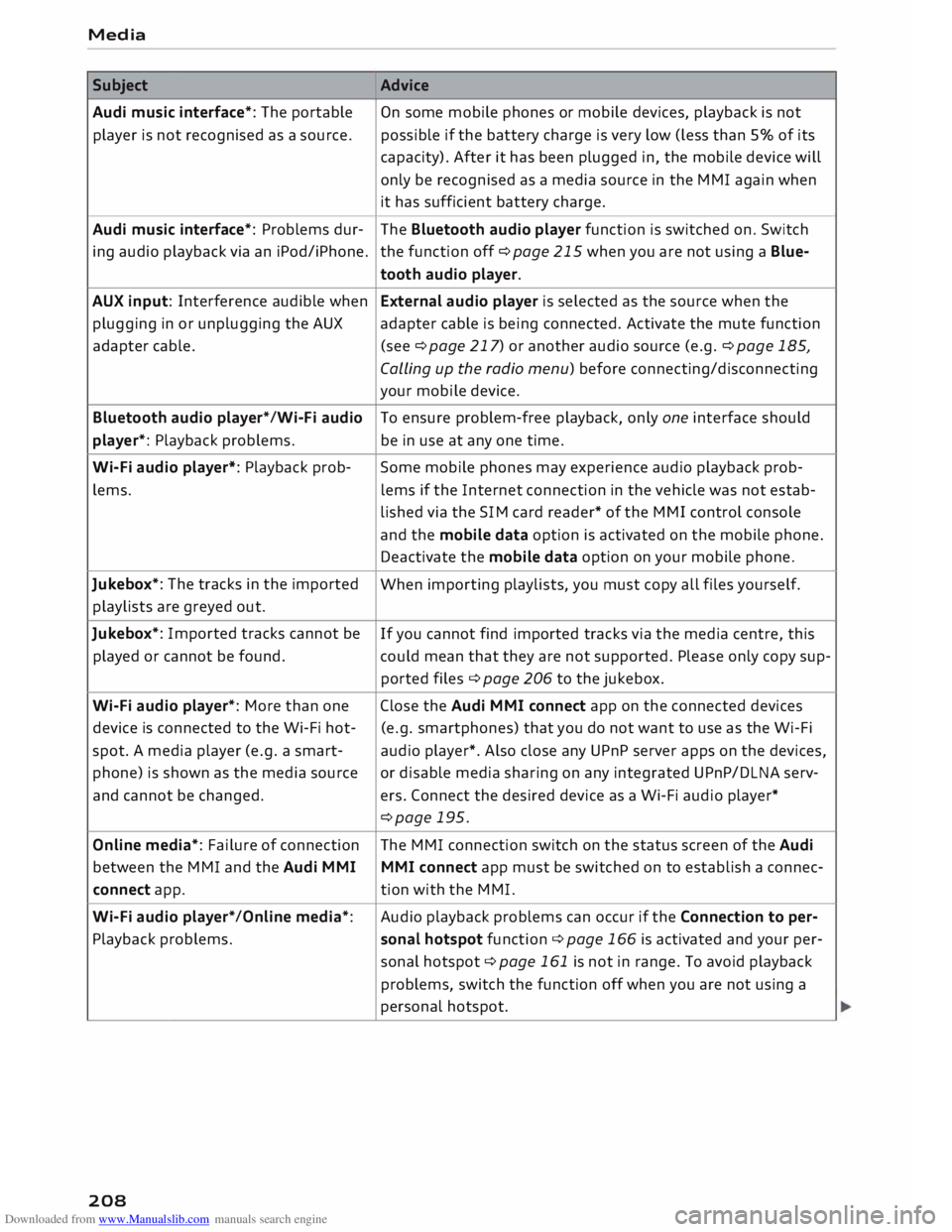
Subject Advice
Audi music interface*: The portable
On some mobile phones or mobile devices, playback is not
player is not recognised as a source. possible
if the battery charge is very low (less than 5% of its
capacity). After it has been plugged in, the mobile device will
only be recognised as a media source in the MMI again when
it has sufficient battery charge.
Audi music interface*: Problems dur-
The Bluetooth audio player function is switched on. Switch
ing audio playback via an iPod/iPhone. the function off ¢page 215 when you are not using a Blue-
tooth audio player.
AUX input: Interference audible when External audio player is selected as the source when the
plugging in or unplugging the AUX adapter cable is being connected. Activate the mute function
adapter cable. (see ¢page 217) or another audio source (e.g. ¢page 185,
Calling up the radio menu) before connecting/disconnecting
your mobile device.
Bluetooth audio player*/Wi-Fi audio
To ensure problem-free playback, only one interface should
player*: Playback problems. be in use at any one time.
Wi-Fi audio player*: Playback prob-
Some mobile phones may experience audio playback prob-
lems. lems
if the Internet connection in the vehicle was not estab-
lished via the SIM card reader* of the MMI control console
and the mobile data option is activated on the mobile phone.
Deactivate the mobile data option on your mobile phone.
Jukebox*: The tracks in the imported
When importing playlists, you must copy all files yourself.
playlists are greyed out.
Jukebox*: Imported tracks cannot be
If you cannot find imported tracks via the media centre, this
played or cannot be found. could mean that they are not supported. Please only copy sup-
ported files¢ page 206 to the jukebox.
Wi-Fi audio player*: More than one Close the Audi MMI connect app on the connected devices
device is connected to the Wi-Fi hot- (e.g.
smartphones) that you do not want to use as the Wi-Fi
spot. A media player (e.g. a smart-
audio player*. Also close any UPnP server apps on the devices,
phone) is shown as the media source
or disable media sharing on any integrated UPnP/DLNA serv-
and cannot be changed. ers. Connect the desired device as a Wi-Fi audio player*
¢page 195.
Online media*: Failure of connection The MMI connection switch on the status screen of the Audi
between the MMI and the Audi MMI
MMI connect app must be switched on to establish a connec-
connect app. tion
with the MMI.
Wi-Fi audio player* /Online media*: Audio
playback problems can occur if the Connection to per-
Playback problems. sonal
hotspot function¢ page 166 is activated and your per-
sonal hotspot ¢ page 161 is not in range. To avoid playback
problems, switch the function off when you are not using a
personal hotspot.
208
Page 215 of 306

Downloaded from www.Manualslib.com manuals search engine 0
N
,.....
N
......
0
,.....
Vl
CX) -
spoken: The reminder signal is spoken by the
system.
Reminder signal volume: You can adjust the vol
ume of the reminder signal by turning the rotary
pushbutton.
Switch off pop-up: This function is switched off
at the factory. When this function is switched on
� , the messages about the charging status of
the mobile phone in the Audi phone box* on the
infotainment display will not appear. The re
minder not to forget the mobile phone when
leaving the vehicle will also be switched off.
Usage tips
Your MMI displays usage tips when this function
is switched on�
. They will appear less often as
time goes by. You can switch the usage tips off at
any time.
Speech dialogue system
Applies to: vehicles with speech dialogue system
Command display: The MMI displays possible
voice commands in the corresponding menu
when this function is switched on�
. You can
switch this function off at any time.
Short dialogue: When this function is switched
on �
, the spoken cues are shortened. You can
switch this function off at any time.
Speech dialogue system volume: You can adjust
the volume of the spoken cues by turning the ro
tary pushbutton.
Individual speech training (only possible when
the vehicle is stationary): You can use the individ
ual speech training to adapt the speech dialogue
system to your voice or pronunciation so that the
speech dialogue system can then better recog
nise what you are saying. The individual speech
training prompts you to repeat 20 spoken phra
ses that consist of certain commands and blocks
of digits. If you would like to delete the stored
speech training setup, you can use the function
Reset individual speech training.
Factory settings
You can reset the following functions to the fac
tory settings: System
settings
- Sound settings
- Radio
- Media settings
-Jukebox*
- Directory*
- Telephone*
- Bluetooth and Wi-Fi*
- Navigation settings*
- Navigation and online memory*
- Speech dialogue system*
- Message settings*
-Apps*
- Usage tips
-Audi connect*
You can select the desired options individually or
mark Select all entries. Select and confirm Re
store factory settings.
ijj) Note
- Please note that not only settings will be
deleted when you do this; saved data may
also be erased.
- If you set Navigation and on line memory*
or Audi connect* to the factory settings, the
system will restart after approx. 20 sec
onds. During the restart, the infotainment
display
will
be black for a few minutes.
- Please note that the speech dialogue sys
tem* is not available as a factory option for
Cabriolet models without a seat belt micro
phone.
Connection manager
Introduction
The connection manager gives you an overview
of your connected devices and their connection
status.
.., Select: I MENU I button > Settings > left control
button > MMI settings > Connection manager.
.., Select and confirm a menu option.
If a mobile device has already been connected
and you then select and confirm the correspond
ing menu item, the device's name and connection
mode is displayed under this menu item.
...,.
213
Page 262 of 306

Downloaded from www.Manualslib.com manuals search engine Wheels
Tyre pressure
monitoring system
General notes
Applies to: vehicles with tyre pressure monitoring system
The tyre pressure monitoring system keeps a
check on the tyre pressures of the four road
wheels while you are driving.
The system uses sensors to measure tempera
tures and pressures in the tyres. The sensors
transmit the data to the control unit by radio.
The tyre pressure monitoring system displays the
current pressures and temperatures of the tyres
on the infotainment system while the vehicle is
moving ¢ page 260. In addition, it compares the
current tyre pressures with the stored tyre pres
sures and warns you if it detects a discrepancy
¢page 261.
The system cannot check if the stored tyre pres
sures correspond to the recommended tyre pres
sures for your vehicle. You must store the new
tyre pressures ¢ page 261:
- after every adjustment to the tyre pressures,
e.g. after changing the laden weight of your ve
hicle,
- after changing a wheel, or
- when using wheels with new wheel sensors.
.&_ WARNING
- The tyre pressure monitoring system helps
the driver to monitor the tyre pressures.
However, it is always the driver's responsi
bility to ensure that the tyres are at the cor
rect pressure.
- Never re-adjust the tyre inflation pressure
when the tyre is hot. This can cause serious
damage to the tyre or even a blow-out,
which could result in an accident.
- Under-inflated tyres flex more than they
should. This causes them to overheat. This
can cause tread separation and tyre blow
out, which could result in an accident.
- The tyre pressure monitoring system cannot
warn you of tyre damage or defects that
could lead, for example, to a tyre blow-out.
Perform a regular visual check of your tyres.
260 (I))
Note
- The sensors and valves do not have to be de
tached or changed round when fitting new
tyres. Only the valve core needs to be re
placed, and if necessary the valve and the
electronic components in the wheel. Please
contact a qualified workshop if you have any
questions.
-After using the tyre repair kit, the tyre pres
sure monitoring system may malfunction.
Have the sensors renewed by a qualified
workshop.
Displaying tyre pressures and temperatures
Applies to: vehicles with tyre pressure monitoring system
Important: The vehicle must be moving.
.. Select the following on the infotainment sys
tem: !MENU! button> Servicing & checks >
Tyre pressure loss indicator > Display tyre
pressures.
The current tyre pressures are displayed in green,
yellow or red on the infotainment system:
- Green: The tyre pressure is roughly the same as
the reference value.
- Yellow: The tyre pressure is too low compared
with the reference value.
- Red: The tyre pressure is much too low com-
pared with the reference value.
The reference value is the last stored tyre pres
sure value ¢ page 261.
Bear in mind that the tyre inflation pressure is al
so influenced by the temperature of the tyre. The
tyre heats up while the vehicle is being driven
and the tyre pressure will rise accordingly.
.&_ WARNING
Please observe the important safety informa-
tion and notes ¢ page 260.
�
Page 264 of 306

Downloaded from www.Manualslib.com manuals search engine Wheels
A WARNING
Please observe the important safety informa
tion and notes <=> page 260.
Possible malfunctions
Applies to: vehicles with tyre pressure monitoring system
If the tyre pressure monitoring system is inoper
ative, the indicator lamp mm will appear in the
instrument cluster display together with the
message Tyre pressure: fault. See owner's man
ual.
If the indicator lamp mm appears after you have
switched on the ignition or while you are driving
and the indicator lamp[I] flashes for approxi
mately one minute and then remains lit, there is
a fault in the system. This fault can have the fol
lowing causes:
- If the display appears at the end of the initiali
sation process, this means that the system can
not detect the wheel sensors required to moni
tor the pressures. This can happen if one or
more of the tyres fitted does not have a sensor
or the sensors are incompatible.
- One of the wheel sensors or another compo
nent may not be working.
- Snow chains interfere with the signals trans
mitted by the sensors and can prevent the sys
tem from functioning properly.
- The tyre pressure monitoring system may be in
operative due to radio interference.
- Radio systems operating on the same frequen
cy, such as radio headphones or two-way radios
inside the vehicle, produce strong electromag
netic fields which cause temporary interfer
ence.
The indicator lamp mm and the message will
disappear as soon as the tyre pressure monitor
ing system is available again. If the fault persists
and the indicator lamp mm stays on, you should
drive to a qualified workshop and have the fault
rectified.
262
Page 273 of 306

Downloaded from www.Manualslib.com manuals search engine 0
N
,.....
N
......
0
,.....
Vl
CX) should
only be used as a temporary meas
ure.
- Do not allow the sealant to come into con
tact with your eyes, skin or clothing.
- If you do come into contact with the sealant
immediately rinse the eyes or skin affected
with clean water.
- Make sure you do not breathe in the fumes.
- If you accidentally swallow tyre sealant, im-
mediately rinse your mouth thoroughly and
drink a large amount of water. Do not in
duce vomiting. Immediately contact a doc
tor.
- Change clothing immediately if it becomes
soiled with the tyre sealant.
- If any allergic reactions should occur get
medical help immediately.
- Keep the sealant away from children.
(©) Note
- If sealant should leak out, leave it to dry.
When it has dried, you can pull it off like a
piece of foil.
- Observe the expiry date stated on the seal
ing compound can. Have the sealing com
pound exchanged by a qualified workshop.
- Interference to the radio reception may oc
cur when using the compressor*.
- Please observe the relevant regulations.
Tyre repairs
Applies to: vehicles with tyre repair kit
Fig. 228 Components of the tyre repair kit <.O
a,
N
0
> Mobility
Fig. 229 Connecting the tyre repair kit
Important: The tyre repair kit must be at hand
and ready for use ¢ page 2 70.
Setting up the tyre repair kit N
a,
N
0
>
� Open
the flap @on the compressor ¢ Fig. 228.
� Pull the connector © and the compressor hose
® including the pressure gauge out of the
housing.
� Screw the compressor hose® onto the flange
@ of the tyre sealant can@.
� Place
the tyre sealant can (flange facing down)
into the opening @ on the flap of the compres
sor.
� Unscrew the dust cap from the valve of the
damaged tyre.
� Screw the filler hose@ onto the valve 0
c:::>Fig. 229.
� Insert the connector ©¢ Fig. 228 into a socket
in the vehicle.
� Switch on the ignition.
Inflating the tyre
� Move the switch@ ¢ Fig. 229 on the compres
sor to position I.
� Pump the tyre up to 2.0 to 2.5 bar and monitor
the pressure shown on the pressure gauge.
� If the tyre pressure remains lower than the val
ue specified above, remove the filler hose and
drive 10 metres forwards or backwards at a low
speed so that the sealant can spread evenly in
the tyre. Now pump the tyre up again ¢ _A .
.&_ WARNING
- Please observe the manufacturers' safety
notes on the compressor and the instruc
tions supplied with the tyre sealant can.
271