2016 AUDI TT ROADSTER reset
[x] Cancel search: resetPage 219 of 306
Downloaded from www.Manualslib.com manuals search engine 0
N
,.....
N
......
0
,.....
Vl
CX) Note
- The On-board Handbook is not available in
all countries. Your Audi dealer will be able
to provide you with more detailed informa
tion.
- Switch off the ignition while you are instal
ling/updating the On-board Handbook.
- Please note that the On-board Handbook is
not a substitute for the printed Owner's
Manual.
Sound settings
You can adjust the sound and volume of the MMI
individually. The settings depend on the equip
ment fitted in your vehicle.
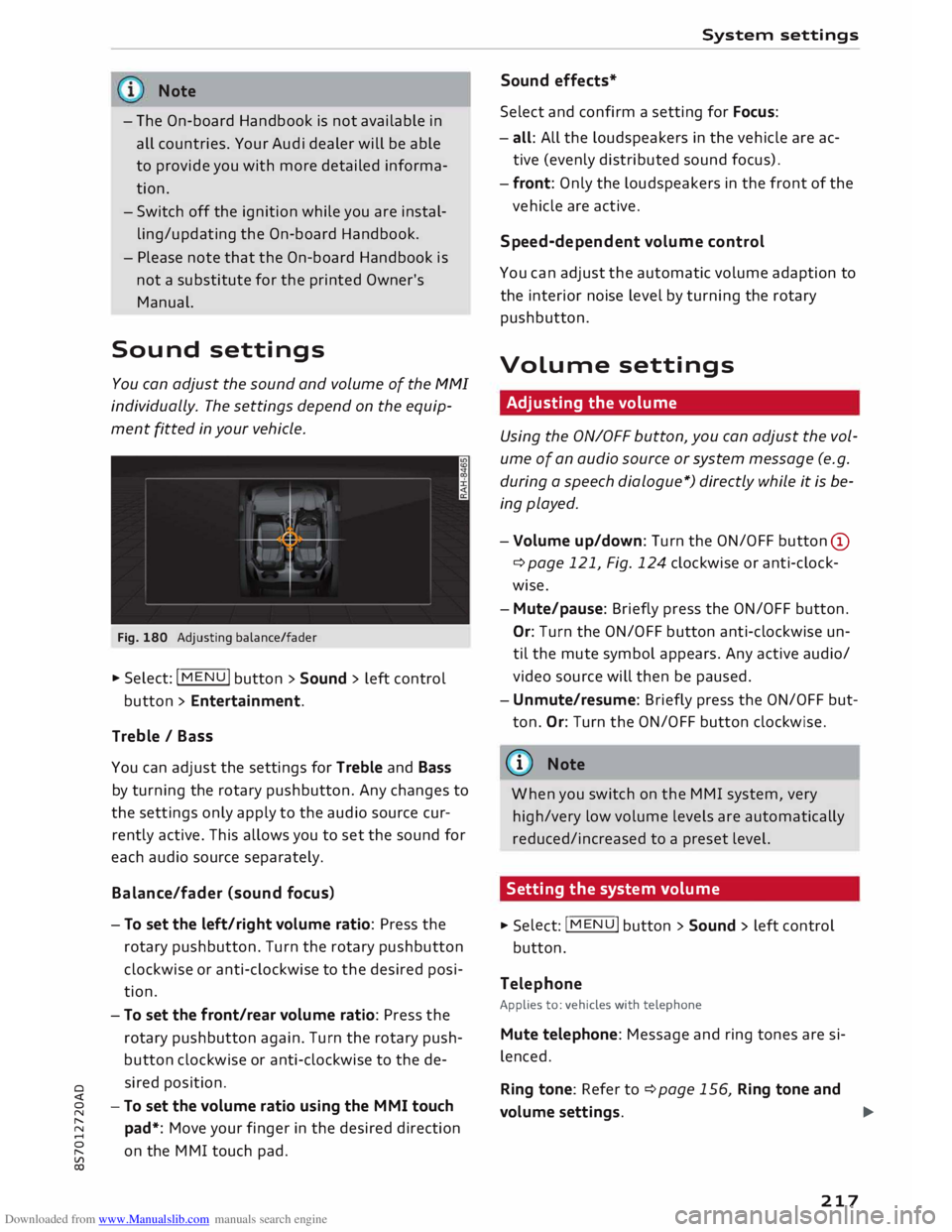
Fig. 180 Adjusting balance/fader
� Select: IM
E
N
u I button > Sound > left control
button > Entertainment.
Treble / Bass
You can adjust the settings for Treble and Bass
by turning the rotary pushbutton. Any changes to
the settings only apply to the audio source cur
rently active. This allows you to set the sound for
each audio source separately.
Bala nce/fader (sound focus)
- To set the left/right volume ratio: Press the
rotary pushbutton. Turn the rotary pushbutton
clockwise or anti-clockwise to the desired posi
tion.
- To set the front/rear volume ratio: Press the
rotary pushbutton again. Turn the rotary push
button clockwise or anti-clockwise to the de
sired position.
-To set the volume ratio using the MMI touch
pad*: Move your finger in the desired direction
on the MMI touch pad. System
settings
Sound effects*
Select and confirm a setting for Focus:
- all: All the loudspeakers in the vehicle are ac
tive (evenly distributed sound focus).
- front: Only the loudspeakers in the front of the
vehicle are active.
Speed-d ependent volume control
You can adjust the automatic volume adaption to
the interior noise level by turning the rotary
pushbutton.
Volume settings
Adjusting the volume
Using the ON/OFF button, you can adjust the vol
ume of an audio source or system message (e.g.
during a speech dialogue*) directly while it is be
ing played.
- Volume up/down: Turn the ON/OFF button (D
¢ page 121, Fig. 124 clockwise or anti-clock
wise.
- Mute/pause: Briefly press the ON/OFF button.
Or: Turn the ON/OFF button anti-clockwise un
til the mute symbol appears. Any active audio/
video source will then be paused.
- Unmute/resume: Briefly press the ON/OFF but
ton. Or: Turn the ON/OFF button clockwise.
{a)) Note
When you switch on the MMI system, very
high/very low volume levels are automatically
reduced/increased to a preset level.
Setting the system volume � Sele
ct:
IMENU! button > Sound > left control
button.
Telephone
Applies to: vehicles with telephone
Mute telephone: Message and ring tones are si
lenced.
Ring tone: Refer to ¢page 156, Ring tone and
volume settings.
..,.
217
Page 220 of 306

Downloaded from www.Manualslib.com manuals search engine System
settings
Ring tone volume: You can adjust the volume of
the ring tone currently selected by turning the ro
tary pushbutton.
Message volume: You can adjust the volume of
the tone informing you of a new text message by
turning the rotary pushbutton.
Microphone input Level: You can adjust the vol
ume during a call by turning the rotary pushbut
ton.
Navigation
Applies to: vehicles with navigation system
Voice guidance: Refer to ¢ page 177, Voice guid
ance.
Voice guidance during calls: Refer to
¢ page 177, Voice guidance.
Volume of spoken cues: You can adjust the vol
ume of the spoken cues while route guidance is
active by turning the rotary pushbutton.
Entertainment fader: This option allows the vol
ume of the current audio source to be temporari
ly reduced when the parking aid is active or while
a navigation cue is being played.
Announ cements
Traffic announcements: Refer to¢ page 186.
DAB announcements*: Refer to¢ page 186.
Volume of announcements: You can adjust the
volume of traffic announcements by turning the
rotary pushbutton.
Speech dialogue system
Applies to: vehicles with speech dialogue system
Short dialogue: This option can be switched on/
off. When it is activated, the spoken cues played
by the system are shortened.
Speech dialogue system volume: You can adjust
the volume of the spoken cues by turning the ro
tary pushbutton.
Parking aid*
Turn the rotary pushbutton to adjust the volume
of the beeps.
- To adjust the front volume: Select and confirm
high, medium or Low.
218 -
To adjust the rear volume: Select and confirm
high, medium or Low.
MMI touch volume*
You can adjust the volume of the M MI touch*
spoken cues by turning the rotary pushbutton.
Audi heartbeat
You can adjust the volume of the Audi heartbeat
by turning the rotary pushbutton.
� Note
Please note that the speech dialogue system*
is not available as a factory option for Cabrio
let models without a seat belt microphone.
Restarting the MMI
system (Reset)
Fig. 181 Combination of buttons for restart
.,. Briefly press the rotary pushbutton and simul
taneously press the two rocker switches up
wards¢ Fig. 181.
Notes on software
licences
Information on the MMI system's software and
its Licence conditions
- Select: I MENU
I button
>Settings > left control
button > System maintenance > Version infor
mation.
- Or: On the Internet at www.audi.com/softwar
einfo.
Information on the instrument cluster's soft
ware and its Licence conditions
Page 221 of 306

Downloaded from www.Manualslib.com manuals search engine 0
N
,.....
N
......
0
,.....
Vl
CX) Press
the reset button I o.o I� page 24, Fig. 12
twice in the first five seconds after switching on
the ignition. System
settings
219
Page 255 of 306

Downloaded from www.Manualslib.com manuals search engine 0
N
,.....
N
......
0
,.....
Vl
CX) You
cannot check the service interval on a new
vehicle until it has been driven for about 500 km.
Qualified workshops reset the service interval af
ter the oil is changed. The distance to the next oil
change is initially displayed based on the driving
profile prior to the oil change. Your own personal
driving profile is used subsequently to calculate
the remaining distance. Frequent cold starts or
short trips place extra demands on the engine oil
with the result that the oil has to be changed
more often.
Resetting the display
Your qualified workshop resets the service inter
val display after each service.
It is very important that you reset the oil change
display if you change the oil yourself. The next oil
change will be due after a fixed service interval.
To reset the display, select the following on the
infotainment system: !MENU! button> Car > left
control button > Servicing & checks > Service in
tervals > Reset oil change interval.
CD CAUTION
- Do not reset the oil change interval display
unless you have changed the oil.
- Keeping to the correct service intervals is
most important for the service life and re
sidual value of the vehicle (and especially
for the life of the engine). Services must al
ways be carried out promptly, even if the
mileage is low. Checking
and topping up fluids
253
Page 286 of 306

Downloaded from www.Manualslib.com manuals search engine Fuses
and bulbs
No. Electrical
equipment
F37 Cornering
light (left side) / LED headlight
(left side)
F38 Engine control unit, ESC control unit
F39 Door,
passenger's side (e.g. electric win-
dows)
F40 Cigarette lighter, electrical sockets
F41 SCR relay and delivery unit
F42 Central locking system
F43 On-board computer
F45 Electrically adjustable seat (driver's side)
F46 Neck heating, driver's side (Roadster)
F49 Starter, clutch sensor
F53 Rear window heating
The seats with electric adjustment* are protected
by circuit breakers. These reset automatically af
ter a few seconds when the overload has been
corrected.
Fuses on left side of engine compartment
Fig. 250 Engine compartment: Fuse layout
No. Electrical
equipment
Fl ESC control unit
F2 ESC control unit
284 M
r--
0
> 00
ID No.
Electrical
equipment
F3 Engine control unit
Engine components, engine cooling, sup-
F4 plementary
heater relay coils (1+2), secon-
dary air pump relay
FS Engine components, tank system
F6 Brake light sensor
F7 Engine components
F8 Lambda probe
F9 Engine components,
exhaust flap, control
unit for automatic glow period
FlO Fuel injectors, fuel control unit
Fll Supplementary heater heating rod 2
F12 Supplementary heater heating rod 3
F13 Automatic gearbox control unit
F14 Ignition coils (5-cyl.)
FlS Horn
F16 Ignition coil
F17 ESC control unit, engine control unit
F18 Terminal 30 (reference voltage)
F19 Windscreen wipers
F20 Horn
F22 Terminal 50, diagnostics
F23 Starter
F24 Supplementary heater heating rod 1
F31 Engine components (5-cyl.)
F32 LED headlights
F33 Gearbox oil pump
Bulbs Note
Your vehicle is fitted with maintenance-free
headlights and rear lights. If a bulb does need to
be changed, however, please contact an Audi
dealer or qualified workshop.
Page 301 of 306

Downloaded from www.Manualslib.com manuals search engine 0
N
,.....
N
......
0
,.....
Vl
CX) Reset
see Restart (MMI) . . . . . . . . . . . . . . . . . . .
218
Reset button (trip recorder) . . . . . . . . . . . . . . 24
Restart (MMI) . . . . . . . . . . . . . . . . . . . . . . . . 218
Rev counter . . . . . . . . . . . . . . . . . . . . . . . . 10, 24
Reverse gear (automatic gearbox) . . . . . . . . . 77
Reversing camera
see Parking aids . . . . . . . . . . . . . . . . . 104, 106
Rewind (audio/video
file) . . . . . . . . . . . . . . . 200
Rims ............................... 257
Ring tone settings . . . . . . . . . . . . . . . . . . . .
156
Roaming see Data connection . . . . . . . . . . . . . . . . . .
166
Roof load . . . . . . . . . . . . . . . . . . . . . . . . . . . .
288
Rotary pushbutton with joystick function . .
126
Route criteria . . . . . . . . . . . . . . . . . . . . . . . .
176
Route guidance
see Navigation . . . . . . . . . . . . . . . . . . . . . . 169
Running in
New brake pads . . . . . . . . . . . . . . . . . . . . . 115
New engine . . . . . . . . . . . . . . . . . . . . . . . . . 66
New tyres . . . . . . . . . . . . . . . . . . . . . . . . . . 254
s
Safe driving . . . . . . . . . . . . . . . . . . . . . . . . . . 220
Safelock mechanism . . . . . . . . . . . . . . . . . 27, 32
Safety Airbag system . . . . . . . . . . . . . . . . . . . . . .
235
Child seats . . . . . . . . . . . . . . . . . . . . . . . . .
223
Correct sitting position . . . . . . . . . . . . . . . 221
Luggage . . . . . . . . . . . . . . . . . . . . . . . . . . . 227
Pedal area . . . . . . . . . . . . . . . . . . . . . . . . . . 226
Seat belts . . . . . . . . . . . . . . . . . . . . . . . . . . 230
Telephone . . . . . . . . . . . . . . . . . . . . . . . . . .
141
Safety features . . . . . . . . . . . . . . . . . . . . . . .
220
Safety systems (warning lamp) . . . . . . . . . . . 16
Saving fuel
Recuperation . . . . . . . . . . . . . . . . . . . . . . . .
25
Screen see Audi virtual cockpit (instrument
cluster) . . . . . . . . . . . . . . . . . . . . . . . . . . 21,
23
Screwdriver . . . . . . . . . . . . . . . . . . . . . . . . . . 270
SD card readers . . . . . . . . . . . . . . . . . . . . . . .
192
SDS see Speech dialogue system . . . . . . . . . . . 132
Search areas (special destination) . . . . . . . . 172 Index
Search function . . . . . . . . . . . . . . . . . . . . . . .
129
Media ............................. 202
Navigation . . . . . . . . . . . . . . . . . . . . . . . . . 170
Radio . . . . . . . . . . . . . . . . . . . . . . . . . . . . .
185
Telephone . . . . . . . . . . . . . . . . . . . . . . . . . .
154
Seat belt microphone . . . . . . . . . . . . . . . . . .
157
Seat belts . . . . . . . . . . . . . . . . . . . . . . . . . . .
230
Adjusting seat belts . . . . . . . . . . . . . . . . . .
233
Belt tensioners . . . . . . . . . . . . . . . . . . . . . .
234
Cleaning . . . . . . . . . . . . . . . . . . . . . . . . . . .
265
During pregnancy. . . . . . . . . . . . . . . . . . . . 233
Putting on . . . . . . . . . . . . . . . . . . . . . . . . . 232
Securing child seats . . . . . . . . . . . . . . . . . . 226
Taking off . . . . . . . . . . . . . . . . . . . . . . . . . . 234
Warning lamp . . . . . . . . . . . . . . . . . . . . . . .
15
Seat heating . . . . . . . . . . . . . . . . . . . . . . . . . .
63
Seats Adjusting . . . . . . . . . . . . . . . . . . . . . . . . . . .
54
Bucket seat adjustment . . . . . . . . . . . . . . . .
55
Correct sitting position . . . . . . . . . . . . . . . 221
Selection menu . . . . . . . . . . . 21, 123, 126, 127
Multi-function steering wheel. . . . . . . . . . . 23
Selective wheel torque control . . . . . . . . . . 113
Selector lever (automatic gearbox)
Manual release . . . . . . . . . . . . . . . . . . . .
84, 85
Positions . . . . . . . . . . . . . . . . . . . . . . . . . . . . 77
Self-help . . . . . . . . . . . . . . . . . . . . . . . . . . . . 269
Serial number (IMEi) . . . . . . . . . . . . . . . . . .
156
Service interval display.. . . . . . . . . . . . . . . .
252
Service intervals . . . . . . . . . . . . . . . . . . . . . . 247
Service position
see Wiper blades, changing . . . . . . . . . . . .
51
Settings Directory . . . . . . . . . . . . . . . . . . . . . . . . . . .
156
Map............................... 180
Media ............................. 203
Navigation .. . . . . . . . . . . . . . . . . . . . . . . . 176
Radio . . . . . . . . . . . . . . . . . . . . . . . . . . . . . 188
System . . . . . . . . . . . . . . . . . . . . . . . . . . . . 212
Telephone . . . . . . . . . . . . . . . . . . . . . . . . . .
155
Shift light display . . . . . . . . . . . . . . . . . . . . . . 24
Shuffle see Random playback . . . . . . . . . . . . . . . .
203
Side assist . . . . . . . . . . . . . . . . . . . . . . . . . . . .
97
Adjusting brightness . . . . . . . . . . . . . . . . . .
99
Area covered by sensors . . . . . . . . . . . . . . .
98
299
Page 303 of 306

Downloaded from www.Manualslib.com manuals search engine 0
N
,.....
N
....
0
,.....
Vl
CX) Switching
character sets (MMI touch) . . . . .
124
Switching off engine . . . . . . . . . . . . . . . . . . . . 69
Switching on ignition . . . . . . . . . . . . . . . . . . .
68
Symbols ............................ 130
Navigation ......................... 178
Traffic . . . . . . . . . . . . . . . . . . . . . . . . . 182, 183
see also Warning lamps . . . . . . . . . . . . . . . 11
System settings (MMI) . . . . . . . . . . . . . . . . .
212
System update (MMI) . . . . . . . . . . . . . . . . . .
216
System volume 217
T
Tailgate see Boot lid . . . . . . . . . . . . . . . . . . . . . . . . . . 33
Technical data . . . . . . . . . . . . . . . . . . . . . . . .
287
Telephone . . . . . . . . . . . . . . . . . . . . . . . . . . .
141
Audi phone box . . . . . . . . . . . . . . . . . . . . .
146
Connecting . . . . . . . . . . . . . . . . . . . . . . . . .
142
Dialling a number . . . . . . . . . . . . . . . . . . .
147
Options during a call . . . . . . . . . . . . . . . . .
148
Settings . . . . . . . . . . . . . . . . . . . . . . . . . . .
155
SIM card . . . . . . . . . . . . . . . . . . . . . . . . . . .
144
Telephone mode . . . . . . . . . . . . . . . . . . . . . .
155
Temperature display
Coolant . . . . . . . . . . . . . . . . . . . . . . . . . . . . .
10
Outside temperature . . . . . . . . . . . . . . . . . .
20
Temperature setting (air conditioner) . . . 61, 62
Tethering . . . . . . . . . . . . . . . . . . . . . . . . . . .
161
Text messages . . . . . . . . . . . . . . . . . . . 136, 150
Tightening torque (wheel bolts) . . . . . . . . .
275
Time ............................... 212
tiptronic (automatic gearbox) . . . . . . . . . . . . 81
TMC/TMCpro see Traffic information . . . . . . . . . . . . . . .
182
Tools . . . . . . . . . . . . . . . . . . . . . . . . . . . . . . .
270
Torque Engine . . . . . . . . . . . . . . . . . . . . . . . . . . . . .
289
Torque (wheel bolts) . . . . . . . . . . . . . . . . . .
275
Touch pad
see MMI touch 124
Tow-away protection . . . . . . . . . . . . . . . . . . . 32
Tow-starting
Towing 278
Trailer weights . . . . . . . . . . . . . . . . . . . . . . 288
Towing away . . . . . . . . . . . . . . . . . . . . . . . . . 278 Index
TPMS Tyre pressure monitoring system . . . . . . .
260
Warning lamp . . . . . . . . . . . . . . . . . . . . . .
262
TPMS (tyre pressure loss indicator) . . . . . . . 258
Traction control system . . . . . . . . . . . . . . . . 113
Traffic announcements
see Traffic programme (TP) . . . . . . . . . . . .
186
Traffic avoidance . . . . . . . . . . . . . . . . . . . . .
176
Traffic information . . . . . . . . . . . . . . . . 182, 183
Traffic programme (TP) . . . . . . . . . . . . . . . .
186
Traffic reports . . . . . . . . . . . . . . . . . . . . . . . . 179
Traffic sign recognition
see Camera-based traffic sign recognition . 90
Treble (sound) . . . . . . . . . . . . . . . . . . . . . . . 217
Trip recorder, resetting . . . . . . . . . . . . . . . . .
24
Turn signals . . . . . . . . . . . . . . . . . . . . . . . . . .
45
Type plate . . . . . . . . . . . . . . . . . . . . . . . . . . . 287
Tyres ........................... 254, 270
Changing . . . . . . . . . . . . . . . . . . . . . . . . . . 272
Directional tread . . . . . . . . . . . . . . . . . . . . 275
Four-wheel drive . . . . . . . . . . . . . . . . . . . .
116
Inflation pressure . . . . . . . . . . . . . . . . . . .
256
Low-profile tyres . . . . . . . . . . . . . . . . . . . .
2 58
Repair kit . . . . . . . . . . . . . . . . . . . . . . . . . . 270
Service life
255
Tyre pressure loss indicator. . . . . . . . . . . . 258
Tyre pressure monitoring system . . . . . . . 260
Wear indicator . . . . . . . . . . . . . . . . . . . . . .
255
u
Unlocking/locking By remote control . . . . . . . . . . . . . . . . . . . . 29
With the central locking switch . . . . . . . . .
31
With the convenience key . . . . . . . . . . . . . . 30
With the key . . . . . . . . . . . . . . . . . . . . . . . . . 32
USB charging socket . . . . . . . . . . . . . . . . . . . 199
USB stick
see Audi music interface . . . . . . . . . . 197,
198
V Vehicle Raising . . . . . . . . . . . . . . . . . . . . . . . . . . . . 274
Taking out of service . . . . . . . . . . . . . . . . .
268
Vehicle battery
see Battery . . . . . . . . . . . . . . . . . . . . . . . . .
250
301