2016 AUDI TT COUPE warning lights
[x] Cancel search: warning lightsPage 66 of 322
Downloaded from www.Manualslib.com manuals search engine Automatic transmission
Automatic transmission
S tronic
Introduction
Your vehicle is equipped with an electronically
controlled DSG transmission called S tronic. Two
independent clutches transfer the power be
tween the engine and transmission. It allows the
vehicle to accelerate without a noticeable inter
ruption in traction.
The transmission upshifts or downshifts auto
matically. The driving style continuously influen
ces the selection of the driving program.
When a moderate driving style is used, the
transmission selects the most economical driving
mode. The transmission upshifts at a lower RPM
and downshifts at a higher RPM to improve fuel
efficiency.
The
transmi ssion switches to a sporty mode after
a kick-down or when the driver uses a sporty
driving style
characterized by quick accelerator
pedal movements, heavy acceleration, frequent
changes in speed and traveling at the maximum
speed.
If desired, the driver can also select the gears
manually (tiptronic mode).
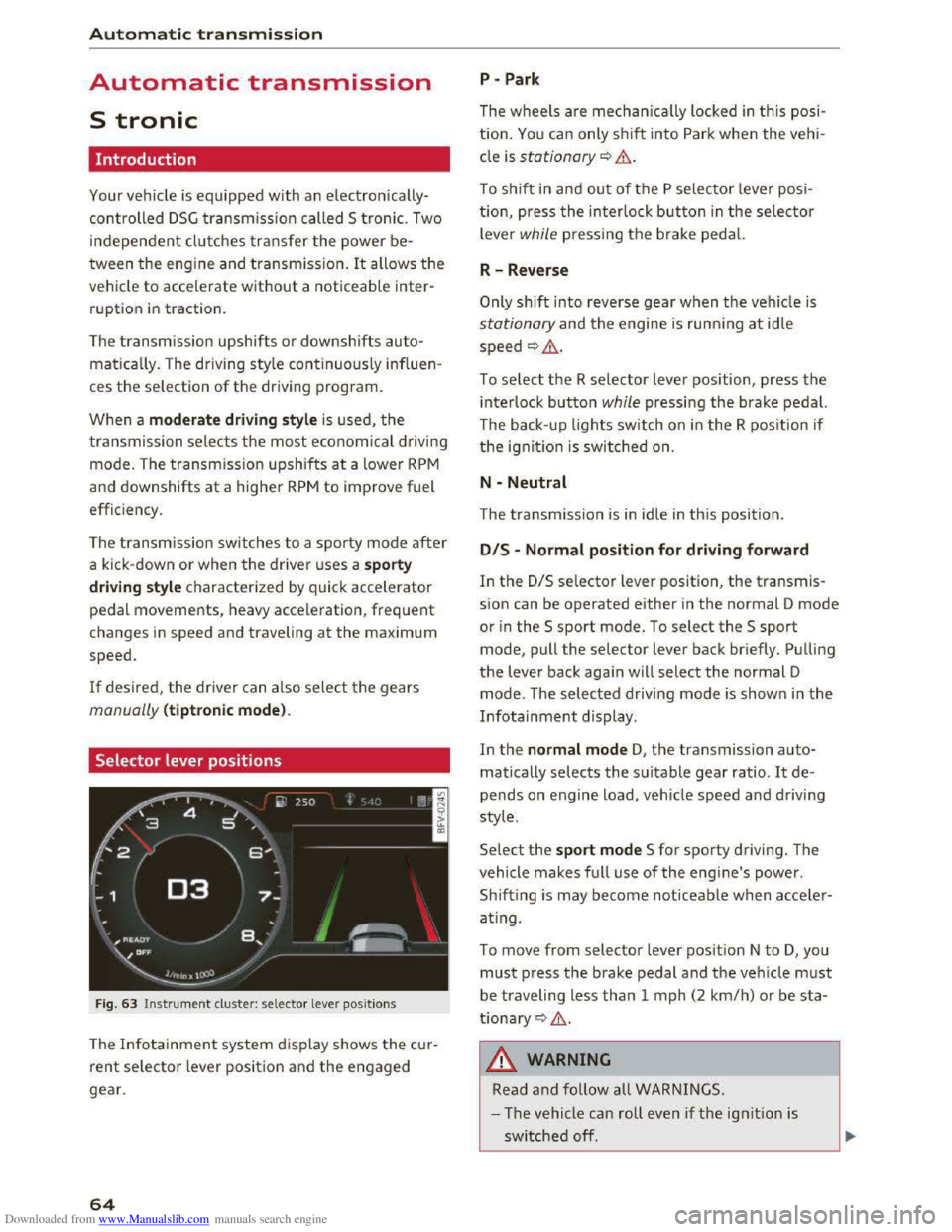
Selector lever positions
Fig. 63 Instrument cluster: selector lever positions
The Infotainment system d isplay shows the cur
rent selector lever position and the engaged
gear.
64
P -Park
The wheels are mechanica lly locked in this posi
tion. You can only shift into Park when the vehi
cle is stationary¢&.
To shift in and out of the P selector lever posi
tion, press the interlock button in the selector
lever while pressing the brake pedal.
R-Reverse
Only shift into reverse gear when the vehicle is
stationary and the engine is running at idle
speed ¢,6.
To select the R selector lever position, press the
interlock button while pressing the brake pedal.
The back- up
lights switch on in the R position if
the ignition is switched on.
N -Neutral
The transmission is in idle in this position.
DIS -Normal position for driving forward
In the D/S selector lever position, the transmis
sion can be operated either in the normal D mode
or in the S sport mode. To select the S sport
mode, pull the selector lever back briefly. Pulling
the lever back again will select the normal D
mode. The selected driving mode is shown in the
Infotainment display.
In
the normal mode D, the transmission auto
matically selects the suitable gear ratio. It de
pends on engine load, vehicle speed and driving
style.
Select the sport mode S for sporty driving. The
vehicle
makes full use of the engine's power.
Sh i
fting is may become noticeable when acce ler
ating.
To move from selector lever position N to D, you
must press the brake pedal and the vehicle must
be traveling less than 1 mph (2 km/h) or be sta
tionary ¢,6.
A WARNING
Read and follow all WARNINGS.
- The vehicle can roll
even if the ignition is
switched off.
Page 68 of 322

Downloaded from www.Manualslib.com manuals search engine Automatic t ra nsmission
Interlock button
The interlock button in the selector lever handle
prevents you from moving the selector lever in
advertently while in some selector lever posi
tions. The positions that require the lock button
to be pressed are marked in color in the illustra
tion c::> fig. 64.
A WARNING
Read and follow all WARNINGS . c::> .&. in Selec
tor lever positions on page
64.
(!') Tips
-If the selector lever does not engage, there
is a malfunction. The engine is disabled to
prevent the vehicle from driving off unin
tentionally. To allow the selector lever to
engage agai n , proceed as follows :
- Briefly
press the brake pedal.
-If the vehicle does not move forward or in
reverse even though a drive position is se
lected, proceed as follows:
-
>Ifthe vehicle does not move in the desired
direction, the system may not have engaged
the drive position correctly . Press the brake
pedal and select the drive position again.
-
>If the veh icle sti ll does not move in the de
s ired direction, there is a system malfunc
tion. See an authorized Audi dealer or au
thorized Audi Service Facility for assistance
to have the system checked.
Driving tips
The transmission shifts up and down automati
cally when
in the driving gears.
Fig. 65 Sect io n of the cente r conso le: selecto r lever wit h
i nte rlock bu
tton
66
The engine will only be able start when the selec
tor lever is in the P or N positions. At low temper
atures (below 14 °F (-10 °C)), the engine can only
be
started when the selector lever is in the P po
s i
tion.
Starting from a stop
... Press and hold the brake pedal.
... Press and hold the interlock button in these
lector lever handle, select the desired selector
lever position such as D c::> page 64 and release
the lock button .
... Wait a moment until the transmission shifts.
You will notice a slight movement when the
gear engages.
... Release the brake pedal and press the accelera
tor pedal c::> .& ..
Stopping temporaril y
.,. Keep the vehicle stationary using the braking
pedal, for example at traffic lights.
.,. Do not press the accelerat o r pedal when doing
t his .
.,. To preven t the vehicle from ro llin g when you
start driving, set the parking brake when stop
ping on steep inclines c::> ,&..
... The parking brake will release automatically
and the vehicle will start moving once you press
the accelerator pedal.
Stopping/par king
If the selector lever is not in the P position when
you open the driver's door, the vehicle could roll.
In vehicles with a convenience key*, t he message:
S h ift to P, otherwise veh icle can roll awa y.
Door s can be locked only in
P appears. You will
also hear a warning tone .
... Press and hold the b rake pedal c::> ,&. .
... Set the park ing brake .
... Select the P selector lever position.
Stopping on an incl in e
... Always press the brake pedal to ho ld the vehi
cle
in p lace and prevent it from "rolling back"
c::> ,&.. Do not try to prevent the vehicle from
"rolling back" when a gear is engaged by in
creasing the engine speed c::>(D.
Page 75 of 322

Downloaded from www.Manualslib.com manuals search engine The speed is kept constant by modifying engine
power or through an active brake intervention.
A WARNING
-Always pay attention to the traffic around
you when the cruise control is in operation.
You are always responsible for your speed
and the distance between your vehicle and
other vehicles.
- For
reasons of safety, cruise control should
not be used in the city, in stop-and-go traf
fic, on winding roads and when road condi
tions are poor (such as ice, fog, gravel,
heavy rain
and hydroplaning) -you could
have
an accident.
- Switch
the cruise control off temporarily
when driving in turning lanes, highway exits
or in construction zones.
-Please note that unconsciously "resting"
your foot on the accelerator pedal prevents
the cruise control from braking. This is due
to the control system being overridden by
the driver's acceleration.
-If a brake system malfunction such as over
heating occurs when the cruise control sys
tem is switched on, the braking function in
the system may be switched off. The rest of
the cruise control system functions remain
active as long as the (1!;(1)~14 (USA models) I
B (Canada models) indicator light is on.
@ Tips
The brake lights illuminate as soon as the
brakes apply automatically.
Changing speed
Applies to: vehicles with cruise control system
.. To increase/decrease the speed in xx mph (1
km/h) increments, briefly tap the lever up/
down in the 0 10 ¢ page 72, fig. 70 direction
to the first level.
.. To increase/decrease the speed in xx mph (10
km/h) increments, briefly tap the lever up/
down in the 010 ¢page 72, fig. 70 direction
to the second level.
Assist
.. To increase or decrease the speed quickly, hold
the lever in the 0 I 0 direction until the de
sired speed is reached.
Overriding the speed
Applies to: vehicles with cruise control system
You can press the accelerator pedal down to in
crease your speed, for example if you want to
pass someone. The speed you saved earlier will
resume as soon as you let off of the accelerator
pedal.
However, if you are exceeding the stored speed
by a considerable amount for a long time, the
cruise control system will temporarily switch off.
The
lij;lil~14 (USA model s) !Iii (Canada models) in
dicator light in the instrument cluster turns off
and the stored speed is maintained.
Preselecting the speed
Applies to: vehicles with cruise control system
You can pre-select your desired speed while the
vehicle is not moving.
.. Switch on the ignition .
.. Pull the lever into position@¢ page 72,
fig. 70.
.. To increase or decrease the speed, tap the lever
in the 010 direction.
This
function makes i t possible, for example, to
save the speed you want before driving on the
highway. Once on the exp ressway, activate the
cruise control by pulling the lever into position
@.
Switching off
Applies to: vehicles with cruise control system
Temporary deactivation
.. Step on the brake pedal, or
.. Press the lever in direction @ (not locked into
place) 9page 72, fig. 70 .
Switching off completely
.. Press the lever into position @(clicked into
place), or
.. switch the ignition off.
73
Page 77 of 322

Downloaded from www.Manualslib.com manuals search engine Switching on and off
Applies to: vehicles with Audi active lane assist
F ig.
71 Turn signal lever: button for active lane assist
Fig. 72 Windshield : camera window for active lane assist
... Press the¢ fig. 71 button to switch the system
on and off. The . or rl1 indicator light in the
instrument cluster turns on or off.
Indicator lights
• Ready: the indicator light turns on when the
system is ready for use. The system can now be
operated.
rl1 Not ready: the indicator light turns on if the
system is switched on but is inoperable. This may
be
due to the following reasons:
- There
is no lane boundary line.
-
The relevant lane marker lines are not detected
(for example, markings in a construction zone
or because they
are obstructed by snow, dirt,
water or lighting).
- The vehicle
speed is below the activation speed
of approximately 40 mph (65 km/h) (the speed
may vary depending on your country).
- The lane
is narrower than approximately 8 ft
(2.5 m) or wider than approximately 18 ft
(5.5 m).
- The curve
is too narrow.
Assist
-The driver's hands are not on the steering
wheel.
{!) Tips
- Make sure the camera's field of view
¢fig. 72 is not obstructed by stickers or
anything else. For information on cleaning,
refer
to ¢ page 2 70.
- Market-specific: in certain countries: if the
system is switched on, it will remain opera
ble each time the ignition is switched on.
Indicator in Infotainment display
Applies to: vehicles with Audi active lane assist
Fig.
73 Instrument clu ster: active lane assist is switched
on and providing warnings
You can call up the active lane assist display us
ing the buttons in the multifunction steering
wheel ¢page 19 .
Green Li ne(s) Active lane assist is activated
and ready to provide warnings.
Red line(s) Active lane assist warns you
(left or right) before leav ing a lane
¢ fig. 73 .
In addit ion, the steering wheel
vibrates lightly.
Gray line(s)
lane assist is activated, but not
ready to give warning
Messages in Infotainment display
If the active lane assist switches off automatical
ly, the indicator light in the display turns off and
one of the following messages appears:
Audi active lane assist: currently unavailable.
Camera view restricted. See owner's manual
This message appears if the camera is unable to
detect the lines. This could happen if: ..,.
75
Page 90 of 322

Downloaded from www.Manualslib.com manuals search engine Intelligent Technology
its integrated systems cannot always pre
vent collisions -there is still a risk of acci
dents!
-Press the accelerator pedal carefully when
accelerating on even, slippery surfaces such
as ice and snow. The drive wheels can spin
even when these control systems are instal-
Switching on and off
led and this can affect driving stability and
increase the risk of a collision.
@ Tips
-ABS and ASR only function correctly when
all four wheels are equipped with identical
tires. Different tire sizes can lead to a reduc
tion in engine power.
-You may hear noises when the systems de
scribed are working.
ESC turns on automatically when you start the engine .
Fig. 88 Upper center console,~ OFF button
function of the ESC is limited or switched off. The
amount of stabilization control will differ de
pending on the level.
The following
examples are unusual situations
where it may make sense to switch sport mode
on in order to allow the wheels to spin:
- Rock i
ng the vehicle to free it when it is stuck
-Dr iving in deep snow or on loose ground
-Driving with snow chains
The ESC is designed to function in levels. Depend
ing
on the level that is selected, the stabilization
Sport mode on
Behavior The ESC and ASR stabiliza-
tion functions are lim ited
~&.
Operation Press the I.$ OFFI button
briefly .
Indicator II turns on.
lights
Driver
mes-Stabilization control (ESC):
sages sport.
Warning! Reduced
stability
A WARNING
You should only switch sport mode on or
switch ESC/ ASR off if your driving abilities
and road conditions permit.
88
ESC/ASR off Sport mode off or ESC/ ASR
on
The stabilization function is The full stabilization func-
not available ¢ &. ESC and tion of the ESC and ASR is
ASR are switched off. available again.
Press and hold the I.$ OFFI Press the I.$ OFFI button
button longer than 3 sec-again.
onds.
II and lfif1U~* turn on. II turns off or II and
lfil•l~~* turns on.
Stabilization control (ESC): Stabilization control
off. Warning! Reduced
sta-(ESC): on
bility
- I
-The stabilization function is limited when
sport mode is switched on. The driving
wheels could spin and the vehicle could
swerve, especially on slick or slippery road
surfaces.
Page 94 of 322

Downloaded from www.Manualslib.com manuals search engine Intelligent Technology
Automatic mode (normal operation)
-Automatic extension: the rear spoiler will auto
matically extend when speeds exceed approxi
mately 75 mph (120 km/h)
-Automatic retraction: the rear spoiler will auto
matically retract when speeds decrease to un
der approximately 50 mph (80 km/h).
Manual mode
-Extending manually: briefly tap the~ fig. 89
button to fully extend the rear spoiler.
- Retracting manually:
when driving at speeds
below approximately 10 mph (20 km/h), press
and hold the button to retract the rear spoiler.
When at speeds between 10 mph (20 km/h)
and 75 mph (120 km/h), the rear spoiler will
completely retract when you tap the button.
Indicator lights
Ii) I. Rear spoiler: malfunction!
The
rear spoiler may not have extended due to a
malfunction.
This could change the veh icle's driv
ing characteristics
at high speeds. Do not drive
faster than 85 mph (140 km/h). Drive to an au
thorized Audi dealer or authorized Audi Service
Facility
immediately to have the malfunction cor
rected. The color
of the indicator light depends
on the vehicle speed.
..&. WARNING
-
Driving at higher speeds without the rear
spoiler deployed can impair handling charac
teristics, making
the vehicle harder to con
trol.
- Always
make sure that the spoiler is de
ployed when driving at
speeds ove r 85 mph
(140 km/h). If the rear spoiler warning/indi
cator light in the instrument cluster comes
on, the rear spoiler may not have deployed.
- Never drive
at speeds higher than 85 mph
(140 km/h) ifthe spoiler is not deployed.
Have
the spoiler inspected as soon as possi
ble by an
authorized Audi dealer or qualified
workshop.
- Always obey
speed limits and other traffic
laws.
92
..&. WARNING
Improper operation of the rear spoiler can
cause crushing injuries.
-Always make sure that nobody, especially
children, is
in the way when the rear spoiler
is deployed or retracted.
«J:) Note
-Never push on the vehicle on the rear spoil
er. This could
cause damage.
- To
prevent damage to the rear spoiler do
not lean or place anything on it.
-
-Only operate the rear spoiler manually when
the luggage compartment lid is close and
the rear spoiler moving parts are not
blocked. Otherwise, damage could occur.
(D Tips
Clean the rear spoiler compartment every 2 to
3 months. To function correctly, the rear
spoiler must be free of ice, snow and leaves.
Energy management
The starting ability is optimized
The energy management system manages the
electrical energy distribution
and optimizes the
availability
of electrical energy for starting the
engine.
When a vehicle with a conventiona l energy sys
tem is not driven for a long time, the battery is
drained by equipment (for example the immobil
izer). In
certain circumstances, there could may
not be enough energy to start the engine.
Your vehicle
is equipped with an intelligent ener
gy
management system for distributing electrici
ty. T his sign ificant
ly improves the starting ability
and increases the battery life.
The
energy management system Is made up of
battery diagnosis, Idling current management
and dynamic energy management.
Battery diagnosis
The battery diagnosis determines the battery
charge level. The sensors determine the battery Ill>
Page 133 of 322

Downloaded from www.Manualslib.com manuals search engine ..... N
Navigation
Opening navigation
Applies to: veh icles with navigation system
Nav igation
The navigation system directs you to your destination, around traffic incidents and on alternative
routes, if desired.
Fig. 114 Example image: Enter destination menu
•Select: INAV/MAPI button.
After opening
the Navigation menu, the Enter
d
est ina tion menu ¢ fig. 114 appears in the Info
tainment system display with the following infor
mation:
CD Input field for free text search¢ page 132
@ Home address r:!;> page 133
® Last destinations¢ page 132
@ Stored favorites C>page 133
If you have connected a cell phone with the MMI,
your directory contacts w ill also be listed if they
have navigation data assigned to them.
Your favorites@) and directory contacts are only
displayed
in the Ente r de stination menu when
you have entered one or more letters using the
input field.
M ap pre view
- Se lect an entry from the list.
When selecting an entry from the list, the corre
spondi ng destination will always be shown to you
as a map preview®~ fig. 114.
Switching between the destination entry and
the map
- Press the INAV/MAPI button repeatedly until
the map is displayed . Or: select the left control
button > Swit ch to map .
_&.WARNING
-The demands of traffic require your ful l at
tention. Read and follow the guidelines pro
vided in r:!;>page 95.
-Obey a ll traffic laws when driving.
- The r
oute calculated by the navigation sys-
tem is a recommendation fo r reaching your
destination. Obey traffic lights, stopping re
s trictions, one-way streets, lane change re
strictions, etc.
CD Note
-If the driving directions conflict with traffi c
laws, obey
the traffic laws.
- Adjust th e
volume of th e navigation system
so signals from outside the vehicle, such as
police
and fire siren s, can be heard cle arly at
all times.
@ Tips
-Snow and obstru ct ions on the G PS antenna
or interference caused by trees and large
- 1
131
Page 173 of 322

Downloaded from www.Manualslib.com manuals search engine ...... N
> u. CX> ...... u:>
"' ...... u:> ......
Safe driving
Basics
Safe driving habits
Please remember -safety first!
This chapter contains important information,
tips, instructions and warnings that you need to
read and observe for your own safety, the safety
of your passengers and others. We have summar
ized here what you need to know about safety
belts, airbags, child restraints as well as child
safety. Your safety is for us priority number 1. Al
ways observe the information and warnings in
this section -for your own safety as well as that
of your passengers.
The information in this section applies to all
model versions of your vehicle. Some of the fea
tures described in this sections may be standard
equipment on some models, or may be optional
equipment on others. If you are not sure, ask
your authorized Audi dealer.
A WARNING
---Always make sure that you follow the in-
structions and heed the WARNINGS in this
Manual. It is in your interest and in the in
terest of your passengers.
-Always keep the complete Owner's Litera
ture in your Audi when you lend or sell your
vehicle so that this important information
will always be available to the driver and
passengers.
-Always keep the Owner's literature handy so
that you can find it easily if you have ques
tions.
Safety equipment
The safety features are part of the occupant re
straint
system and work together to help reduce
the risk
of injury in a wide variety of accident sit
uations.
Your safety and the safety of your passengers
should not be left to chance. Advances in tech
nology have made a variety of features available
to help reduce the risk of injury in an accident .
Safe driving
The following is a list of just a few of the safety
features in your Audi:
-
sophisticated safety belts for driver and all pas-
senger seating positions,
-
safety belt pretensioners,
-safety belt force limiters for the front seats,
-front airbags,
- knee airbags for the front seats*
-side airbags in the front seats,
-side curtain airbags with ejection mitigation
features,
-special LATCH anchorages for child restraints,
-adjustable steering column.
These indiv idual safety features, can work to
gether as a system to he lp protect you and your
passengers in a wide range of accidents. These
features cannot work as a system if they are not
always correctly adjusted and correctly used.
Safety is everybody's responsibility!
Important things to do before driving
Safety is everybody's job! Vehicle and occupant
safety always depends on the informed and care
ful driver.
For your safety and the safety of your passen
gers, before driving always:
... Make sure that all lights and signals are operat
ing correctly .
... Make sure that the tire pressure is correct.
... Make sure that all windows are clean and afford
good vis ibility to the outside.
... Secure all luggage and other items carefu lly
c::> page 176, c::> page 48.
... Make sure that nothing can interfere with the
pedals .
... Adjust front seat and mirrors correctly for your
height.
... Make sure to use the right child restraint cor
rectly
to protect chi Id ren Q page 212, Child
safety.
... Sit properly in your seat and make sure that
your passengers do the same Q page 44, Seats
and storage. ..,.
171