2016 AUDI TT COUPE checking oil
[x] Cancel search: checking oilPage 245 of 322

Downloaded from www.Manualslib.com manuals search engine ...... N
> u. CX> ...... u:>
"' ...... u:> ......
Read and follow the WARNINGS before check
ing anything
in the engine compartment
Qpage236.
Checking the engine coolant level
""Park your vehicle on a level surface.
"" switch the ignition off.
.. Read the coolant level on the coolant expansion
tank
Q page 238, fig. 184. The coolant level
must be between the markings when the en
gine
in cold. When the engine is warm it can be
slightly above
the upper marking.
Adding coolant
Requirement: there must be a res idual amount of
coo l
ant in the expans io n tank c:?(i) .
""Let the engine cool down.
.. Place a cloth over the coolant expansion tank
cap and unscrew
the cap counterclockwise
c:?,8..
""Add coolant mixed in the correct ratio
i:?page 242 up to the upper marking.
""Make sure that the fluid level remains stable.
Add more coolant if necessary.
"" Close the cap securely .
A coolant loss suggests a leak. Immediately drive
your vehicle
to an authorized Audi dealer or au
thorized
Audi Service Facility and have the cool
ing system inspected.
If the cooling system is not
leaking, a loss can come from
the coolant boiling
through overheating and being pushed
out of the
cooling system.
.&. WARNING
-The cooling system is pressurized and can be-
come very hot.
To reduce the risk of burns
from hot coolant:
-
Do not open the coolant expansion tank cap
w ith
the engine hot. There is a risk of burns .
- Stop
the engine and allow it to cool.
-
Protect your face, hands and arms from es-
caping coolant and
steam by covering the
coolant tank cap with a large, thick cloth.
- Turn
the coolant tank cap counterclockwise
slowly and keep light pressure on
the cap.
-
To reduce the risk of burns, do not allow any
antifreeze or coolant to dr
ip onto the ex-
Checking and Filling
ha ust system or hot engine components.
The ethylene glycol in engine coolant can
catch fire under certain circumstances.
- The coolant additive and the coolant can be
dangerous to your health.
For this reason,
keep
the coolant in the original container
away from children. There is a
risk of poi
soning.
-When working in the engine compartment,
remember
that the radiator fan can switch
on even if
the ignition is switched off, which
increases
the risk of personal injury.
CD Note
Do not add coolant if the expans ion tank is
empty . Air could enter the cooling system and
damage
the eng ine. If this is the case, do not
continu e driving. See an authorized
Audi dea l
er or authorized
Audi Service Facility for assis
tance.
Radiator fan
The radiator fan switches on automatically by it
self.
An auxiliary electric radiator fan switches on and
off depending on coolant temperature and other
vehicle operating conditions.
After you switch
the engine off, the auxiliary fan
can continue running for
up to 10 minutes -even
with
the ignit ion off. It can even switch on again
later by itself c:? & . if
- the temperature of
the engine coolant rises due
to
the heat build-up from the engine in the en
gine compartment, or
-
the engi ne compartment heats up because the
vehicle is parked in intense sunlight.
.&. WARNING
-To reduce the risk of personal injury never
touch
the radiator fan.
- The auxiliary electric fan
is temperature
controlled and can switch on suddenly even
when
the engine is not running.
243
Page 246 of 322
Downloaded from www.Manualslib.com manuals search engine Checking and Filling
-The auxiliary radiator fan switches on auto
matically when the engine coolant reaches a
certain temperature and will continue to run
until the coolant temperature drops.
Brake fluid
Checking brake fluid level
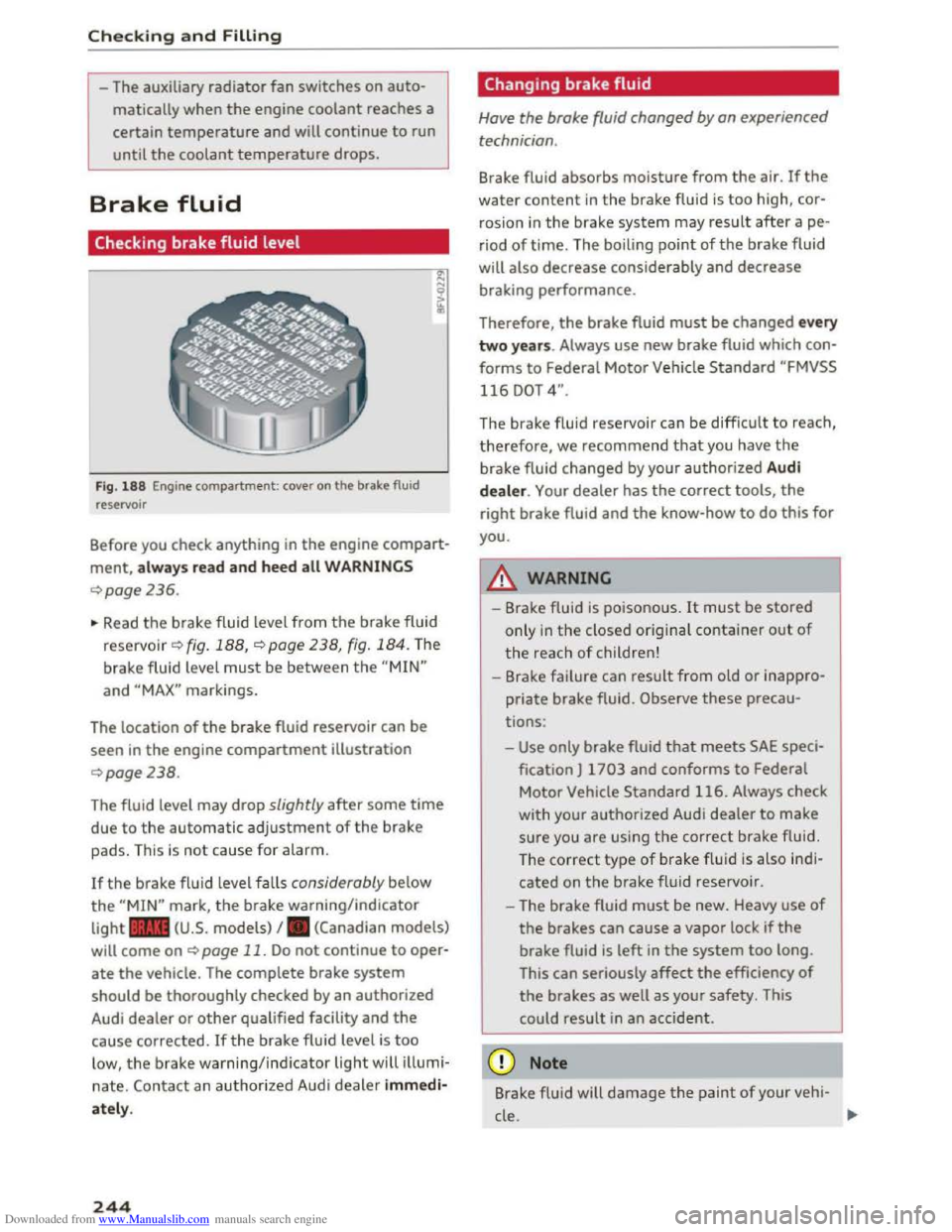
Fig. 188 Engine compartment: cover on the brake fluid
reservoir
Before you check anything in the engine compart
ment, always read and heed all WARNINGS
¢page 236.
~ Read the brake fluid level from the brake fluid
reservo ir ¢ fig. 188, ¢page 238, fig. 184. The
brake fluid level must be between the "MIN"
and "MAX" markings.
The location
of the brake fluid reservoir can be
seen in the engine compartment illustration
¢page238.
The fluid level may drop slightly after some time
due to the automatic adjustment of the brake
pads. This is not cause for alarm.
If the brake fluid level falls considerably below
the "MIN" mark, the brake warning/indicator
light .. (U.S. models) I. (Canadian models)
will come on ¢ page 11. Do not continue to oper
ate the vehicle. The complete brake system
should be thoroughly checked by an authorized
Audi dealer or other qualified facility and the
cause corrected. Ifthe brake fluid level is too
low, the brake warning/indicator light will illumi
nate. Contact an authorized Audi dealer immedi
ately.
244
Changing brake fluid
Have the brake fluid changed by an experienced
technician .
Brake fluid absorbs moisture from the air. If the
water content in the brake fluid is too high, cor
rosion in
the brake system may result after ape
riod of time. The boiling point of the brake fluid
will
also decrease considerably and decrease
braking performance.
Therefore, the brake fluid must be changed every
two years. Always use new brake fluid which con
forms to Federal Motor Vehicle Standard "FMVSS
116 DOT 4".
The brake fluid reservoir can be difficult to reach,
therefore, we recommend that you have the
brake fluid changed by your authorized Audi
dealer. Your dealer has the correct tools, the
right brake fluid and the know-how to do this for
you.
8._ WARNING
- Brake fluid is poisonous. It must be stored
only in the closed original container out of
the reach of children!
-Brake failure can result from old or inappro
priate brake fluid. Observe these precau
tions:
-Use only brake fluid that meets SAE speci
fication
J 1703 and conforms to Federal
Motor Vehicle Standard 116. Always check
with
your authorized Audi dealer to make
sure you are using the correct brake fluid.
The
correct type of brake f lui d is also ind i
cated on the brake fluid reservoir .
- The
brake fluid must be new. Heavy use of
the brakes can cause a vapor lock if the
brake fluid is left in the system too long.
This
can seriously affect the efficiency of
the brakes as well as your safety. This
could
result in an accident.
CD Note
Brake flu id will damage the paint of your veh i-
cle .
JIJ.
Page 251 of 322

Downloaded from www.Manualslib.com manuals search engine ..... N
G: CX)
.....
"' U"I
.....
"' .....
Service interval display
The service interval display detects when your ve
hicle
is due for service.
Fig . 191 Inst rument cluster display: serv ice in terva l d is
p lay (exa mpl
e)
The service interval display works in two stages:
-Inspection or oil change reminder: after a cer
tain distance driven, a message appears in the
Infotainment system display each time the ig
nition is switched on
or off¢ fig. 191. The re
main ing
distance or time is displayed briefly.
-Inspection or oil change due: if your vehicle
has reached an inspection or oil change interval
or both intervals at the same time, the mes
sage Inspection due! or Oil chang e due! or Oil
cha nge and inspection due! appears briefly af
ter switching the ignition on/off.
Check ing s ervice intervals
You can check the remaining distance or time un
til the next oil change or next inspection. Select
in the Infotainment system: the IMENUI button>
Vehicle > left control button > Ser vice & checks >
Service intervals .
@ Note
-Follow ing the service intervals is critical to
maintaining the service life and value of
your vehicle, especially the engine. Even if
the mileage on the vehicle is low, do not ex
ceed
the time for the next service.
- Calcu l
ating the time to the next o il change
is interrupted when the vehi cle battery is
disco n
nected. If the vehicle is not driven for
a long period
of time, check the mainte
nance schedule so that you can follow th e
maintenance intervals .
Checking and Filling
249
Page 308 of 322

Downloaded from www.Manualslib.com manuals search engine Index
Emergency release
Selector
Lever . . . . . . . . . . . . . . . . . . . . . . . . 71
Emergency starting . . . . . . . . . . . . . . . . . . .
288
E nergy management . . . . . . . . . . . . . . . . . . . 92
Engine
Coolant . . . . . . . . . . . . . . . . . . . . . . . . . . . . 242
Starting . . . . . . . . . . . . . . . . . . . . . . . . . 58, 60
Starting with jumper cables . . . . . . . . . . . 288
Stopping . . . . . . . . . . . . . . . . . . . . . . . . . . . . 59
Engine compartment
Closing the hood . . . . . . . . . . . . . . . . . . . . 237
Opening the hood . . . . . . . . . . . . . . . . . . . 237
Overview . . . . . . . . . . . . . . . . . . . . . . . . . . . 238
Safety precautions . . . . . . . . . . . . . . . . . . . 236
Engine control (indicator light) . . . . . . . . . . . 15
Engine coolant . . . . . . . . . . . . . . . . . . . . . . . 242
Radiator fan . . . . . . . . . . . . . . . . . . . . . . . . 243
E ngine
oil . . . . . . . . . . . . . . . . . . . . . . . . . . . 239
adding . . . . . . . . . . . . . . . . . . . . . . . . . . . . 240
Changing . . . . . . . . . . . . . . . . . . . . . . . . . . 241
Checking
the oil level . . . . . . . . . . . . . . . . . 240
Consumption . . . . . . . . . . . . . . . . . . . . . . . 240
Indicator light . . . . . . . . . . . . . . . . . . . . . . . 13
Oil consumption . . . . . . . . . . . . . . . . . . . . . 239
Specification and viscos ity . . . . . . . . . . . . . 239
Engine speed limitation (indicator light) . . . 15
Entering a destination . . . . . . . . . . . . . . . . . 131
Geocoordinates . . . . . . . . . . . . . . . . . . . . .
135
Last destination . . . . . . . . . . . . . . . . . . . . . 132
Stopover . . . . . . . . . . . . . . . . . . . . . . . . . . . 135
Voice recognition system . . . . . . . . . . . . . 107
Entering destination
Point
of interest . . . . . . . . . . . . . . . . . . . . . 134
Entering letters (speller) . . . . . . . . . . . . . . . . 99
Entering numbers/symbols (speller) . . . . . . . 99
Entertainment volume . . . . . . . . . . . . . . . . . 169
Environment
Catalytic converter . . . . . . . . . . . . . . . . . . .
235
Disposing of your vehicle battery . . . . . . . 248
Proper disposal of drained brake fluid . . . 244
Proper disposal of drained engine oil . . . . 241
Unleaded gasoline . . . . . . . . . . . . . . . . . . . 231
What should I do with an old battery? . . . 248
Exporting/importing (contacts)..... .. .. . 118
Exterior lighting . . . . . . . . . . . . . . . . . . . . . . . 36
306
Exterior mirrors
Adjusting . . . . . . . . . . . . . . . . . . . . . . . . . . .
39
Dimming ........ .. .................. 40
Heating . . . . . . . . . . . . . . . . . . . . . . . . . . . . . 39
Exterior temperature display . . . . . . . . . . . . . 19
External speech dialog system . . . . . . . . . . 109
F
Facebook (Audi connect) 124
Factory settings . . . . . . . . . . . . . . . . . . . . . . 166
Fader (sound) . . . . . . . . . . . . . . . . . . . . . . . . 169
Fastening
Booster seats . . . . . . . . . . . . . . . . . . . . . . . 221
Convertible child safety seats . . . . . . . . . .
219
Infant seats . . . . . . . . . . . . . . . . . . . . . . . . 218
Fast forwarding/rewinding (audio/video
file) . . . . . . . . . . . . . . . . . . . . . . . . . . . . . . . . 159
Fast forwarding (audio/video file) . . . . . . . . 159
Fast route . . . . . . . . . . . . . . . . . . . . . . . . . . . 138
Favorite
Editing
Storing
Favorites
137
137
Media . . . . . . . . . . . . . . . . . . . . . . . . . . . . . 161
Navigation . . . . . . . . . . . . . . . . . . . . . . . . . 133
Telephone......... ................. 114
File formats (med ia drives) . . . . . . . . . . . . . 157
Flight information (Audi connect) . . . . . . . . 123
Floormats ........ .. ................. 175
Fog lights/rear fog light(s) . . . . . . . . . . . . . . 36
Folding
the rear seats. . . . . . . . . . . . . . . . . . . SO
Foot pedals . . . . . . . . . . . . . . . . . . . . . . . . . . 175
Footwell lighting . . . . . . . . . . . . . . . . . . . . . . 38
For
the sake of the environment
Environmentally-friendly driving . . . . . . . . 57
Fueling . . . . . . . . . . . . . . . . . . . . . . . . . . . . 233
Leaks......... .. .. .. .. ............. 237
Roof rack ....... .. .. ................ 49
Free text search . . . . . . . . . . . . . . . . . . . . . . 102
Directory...... .. .. ................. 117
Media . . . . . . . . . . . . . . . . . . . . . . . . . . . . . 161
Navigation . . . . . . . . . . . . . . . . . . . . . . . . .
132
Frequency band . . . . . . . . . . . . . . . . . . 145, 146
Front airbags
Description . . . . . . . . . . . . . . . . . . . . . . . . .
192
How they work . . . . . . . . . . . . . . . . . . . . . . 197