2016 AUDI S6 instrument cluster
[x] Cancel search: instrument clusterPage 106 of 294

Night vision assist
Display in the instrument cluster/head-up
display*
If there are pedestrians or wild animals in an
area in front of your vehicle that is classified as
critical, the system will direct your attention to
this :
- Pedestrians or wild animals are highlighted in
red and the corresponding symbol. or.
turns on
¢fig. 111.
-There is also a tone.
The area class ified as crit ica l is based on the vehi
cle speed and the steering wheel angle . Pedes
trian and wild animal warning encourages you to
pay more attention.
If the n ight vision assist image is replaced by an
other display (such as the on-board computer),
the red indicator light . or. will appear if
there is a pedestrian or wild animal warning
¢ fig. 112 .
If the head-up display* is switched on and the
night vision assist content is activated, • or.
will appear in the head-up display*.
Marking light*
To direct the driver's at tention to a pedest rian,
the head lights can flash on the pedestrian three
times in a row when there is a pedestrian warn
ing .
This happens at speeds above approx imately
35 mph (60 km/h) when you are traveling out
side of well-lit areas and when flashing the head lights will not create glare for a vehicle detected
in the oncoming lane . The marker light* is con
trolled by the high beam assist*
c;, page 45, High
beam assist.
The marking light is not used for wi ld animals.
104
General information
Applies to vehicles: with night vision assist
Fig. 113 Front of the vehicle: night vision camera
The following situations may affect the function
of the night vision assist system:
- Poor visibility such as snow, rain, fog or heavy
spray
- Dirty lens on the night vision assist camera
Make sure the night vision assist camera
¢fig. 113 is not covered by sticke rs, deposits or
any other obstructions because that can affect
the camera function. For information on clean
ing, refer to
c;, page 203.
Pedestrian and wild anima l detect ion depends on
the difference in temperature between the per
son/wild animal and the background area . Pedes
trians/wild animals may not be detected if the
difference is too small. Pedestrian and wild ani mal marking and the marker light* are deactivat
ed at temperatures above approximately 77 °F
(25 °() and when it is light outside . When the
night vision assistant image is selected in the in
strument cluster display, the
II symbol appears
i n the upper right.
.&_ WARNING
Pay attention to traffic and the area around
your vehicle when night vision assist is switch
ed on . As the driver, you are always responsi
ble for assessing the traffic situat ion.
- Night vision assist can only warn about peo
ple and wild animals located within the visu
al range of the infrared camera. The visual
range corresponds to the image in the in
strument cluster display .
-
Page 107 of 294
.... N
0 CJ '
-Night vision assist may not detect people or
wild animals and mark them if
- they are not in an upright position, for ex
ample if they are sitting or lying down
and/or
- the silhouette in the display appears in
complete or interrupted, for example be
cause the person is partially covered by a
vehicle or an animal by tall grass. This could increase the risk of an accident.
- Never try to swerve around animals if doing
so will endanger you or other road users, be
cause this increases the risk of an accident.
(D Tips
- Even though the system evaluates the
shape and heat given off by all detected ob
j ects, there are limits to the system. There
may be false warnings.
- For technical reasons, the image pauses in
split second intervals.
Switching on/off
Applies to vehicles: with night vision ass ist
Fig. 114 Area around the light switc h: nigh t vis ion assist
b u tto n
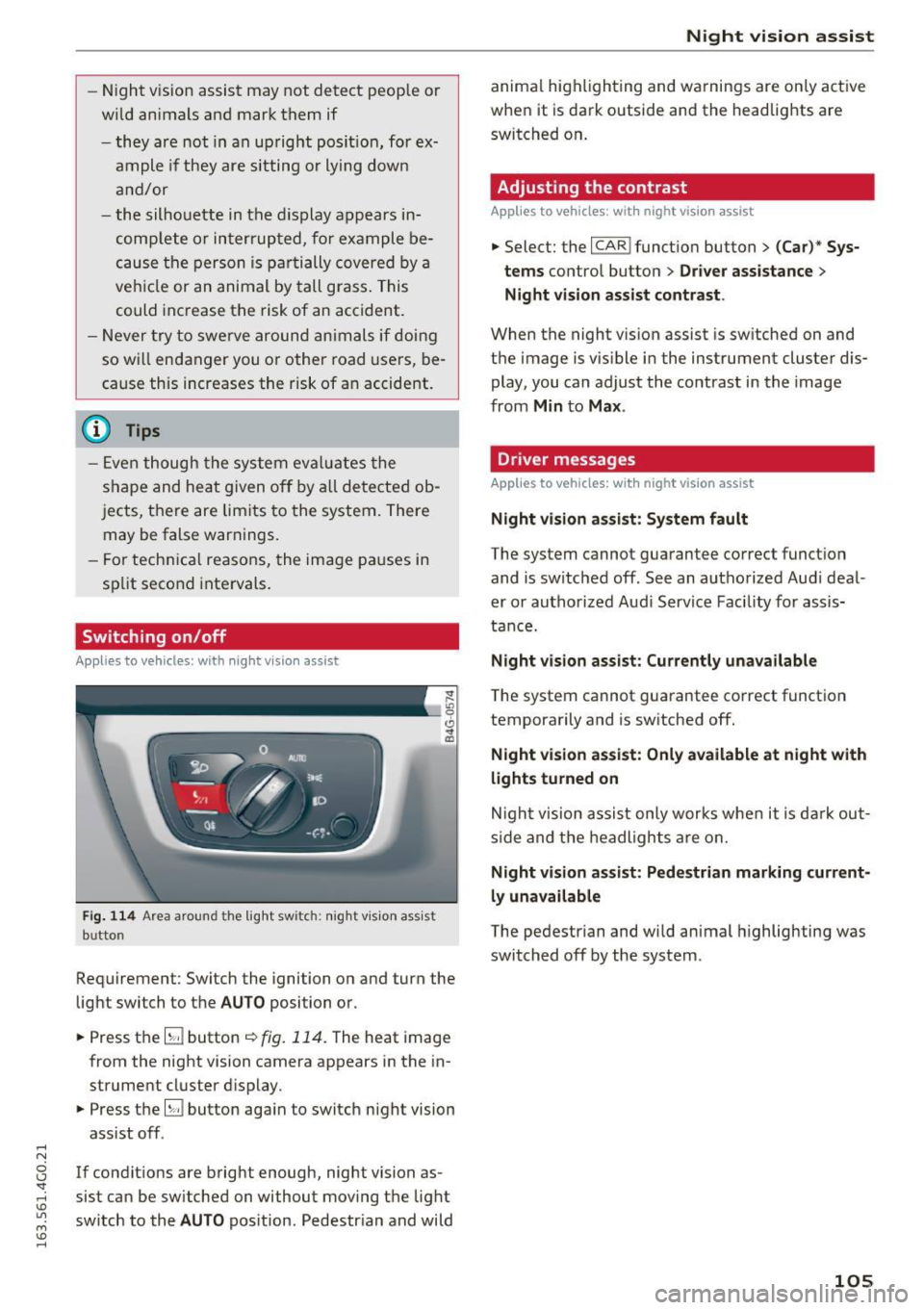
Requirement : Switch the ignition on and turn the
light switch to the
AUTO position or .
.,. Press th e
lliJ button ~ fig. 114. The heat image
from the night vision camera appears in the in
strument cluster display .
.,. Press the
lliJ button aga in to switch night vision
assist off .
If condit ions are bright enough, night vision as
sist can be sw itched on without moving the light
switch to the
AUTO position. Pedestrian and wild
Night vision assist
animal highlighting and warnings are only active
when it is dark outside and the headlights are
switched on .
Adjusting the contrast
Applies to vehicles: wit h night vision assist
.,. Select: the I CARI function button > (Car)* Sys
tems
contro l button > Driver assistance >
Night vision assist contrast .
When the night vision assist is sw itched on and
the image is visible in the instrument cluster dis
play, you can adjust the contrast in the image
from
Min to Max .
Driver messages
Applies to vehicles: with night vision assist
Night vision assist: System fault
The system cannot guarantee correct function
and is switched off . See an authorized Audi deal
er or authorized Audi Service Facility for assis
tance.
Night vision assist: Currently unavailable
The system cannot guarantee correct function
temporarily and is switched off.
Night vision assist: Only available at night with
lights turned on
Night vision assist only works when it is dark out
side and the headlights are on.
Night vision assist: Pedestrian marking current
ly unavailable
The pedestrian and wild animal highlighting was
switched off by the system .
105
Page 108 of 294
Automatic transmission
Automatic transmission S tronic, tiptronic
Introduction
The automatic transmission is controlled elec
tronically. The transmission upshifts or down
shifts automatically depending on which drive
program is selected.
When a
moderate driving style is used, the
transmission selects the most economical driving
mode. The transmission upshifts at a lower RPM
and downshifts at a higher RPM to improve fuel
efficiency.
The transmission switches to a sporty mode after
a kick-down or when the driver uses a
sporty
driving style
characterized by quick accelerator
pedal movements, heavy acceleration, frequent
changes in speed and traveling at the maximum
speed.
If desired , th e driver can also select the gears
manually (tiptronic mode) 9 page 110.
Various automatic transmissions may be instal
led, depending on the model:
S tronic transmission
The S tronic is a dual-clutch transmission. Power
is transferred using two clutches that work inde
pendently from one another. They replace the
torque converter used in conventional automatic
transmissions and allow the vehicle to accelerate
without a noticeable interruption in traction.
tiptronic transmission
In the tiptronic transmission, power is transfer
red by a torque converter.
106
Selector lever positions
Fig. 115 Display in the instrument cluster: selector lever
position
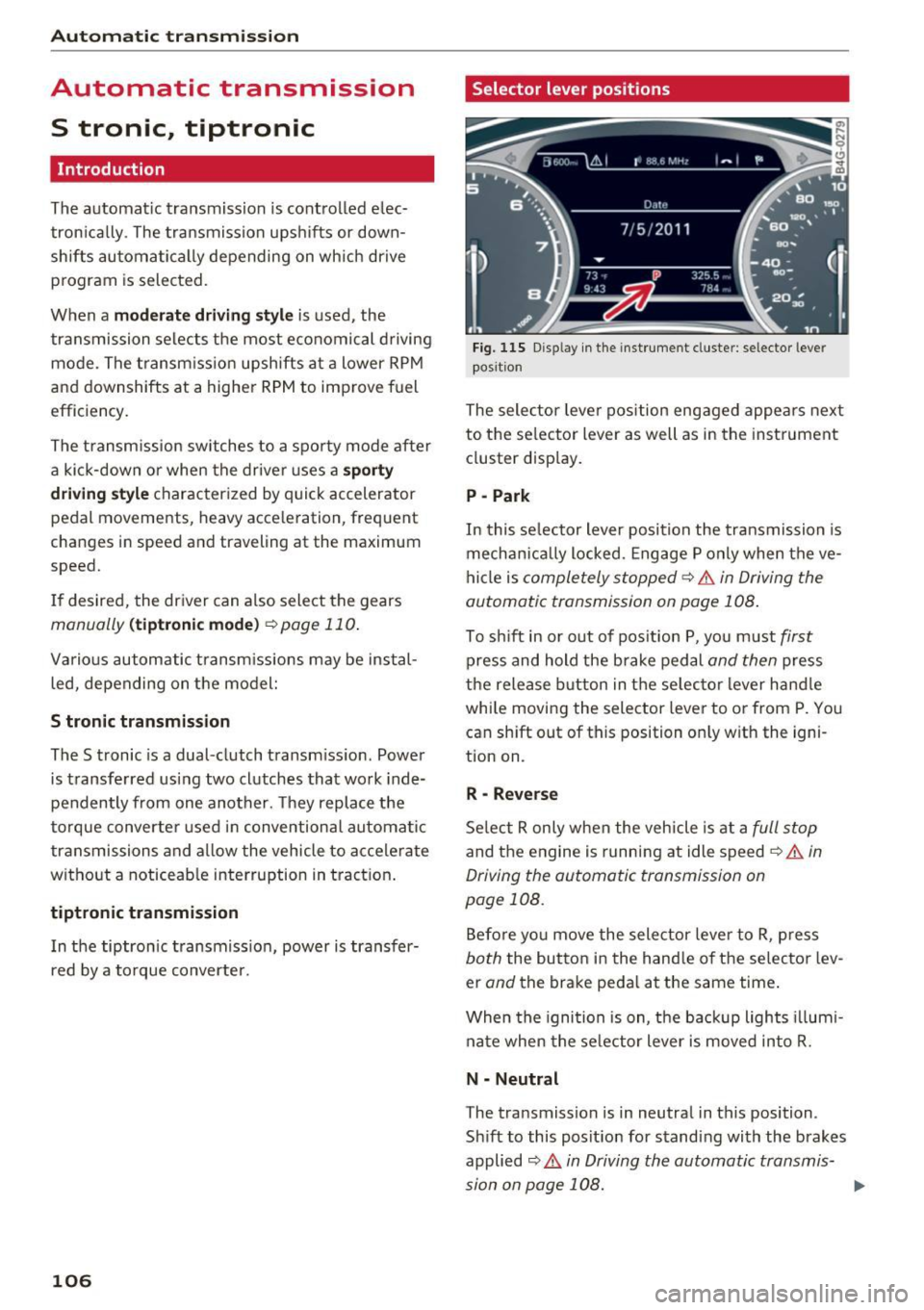
The selector lever position engaged appears next
to the selector lever as well as in the instrument
cluster display.
P -Park
In this selector lever position the transmission is
mechanically locked. Engage P only when the ve
hicle is
completely stopped¢&. in Driving the
automatic transmission on page 108.
To shift in or out of position P, you must first
press and hold the brake pedal and then press
the release button in the selector lever handle
while moving the selector lever to or from P. You
can shift out of this position only with the igni
tion on.
R -Reverse
Select R only when the vehicle is at a full stop
and the engine is running at idle speed¢&. in
Driving the automatic transmission on
page 108.
Before you move the selector lever to R, press
both the button in the handle of the selector lev
er
and the brake pedal at the same time.
When the ignition is on, the backup lights illumi
nate when the selector lever is moved into R.
N -Neutral
The transmission is in neutral in this position.
Shift to this position for standing with the brakes
applied
9 A in Driving the automatic transmis
sion on page 108.
...
Page 109 of 294
.... N
0 CJ '
When the vehicle is stationary or at speeds below 1 mph (2 km/h), you must always app ly the foot
brake before and while moving the lever out of N.
DIS -Normal position for driving forward
In the D/S position, the transmission can be op
e rated either in the no rmal mode Dor in the
sport mode S. To select the sport mode S, pull
the selector lever back briefly. Pu lling the lever
back again will select the normal mode D . The in
strument cluster display shows the selected driv
ing mode .
In the
normal mode D, the transmission auto
matica lly selects the suitable gear ratio. It de
pends on engine load, vehicle speed and driving
style .
Select the
sport mode S for sporty driving. The
vehicle makes full use of the engine's power.
Shifting may become noticeable when accelerat
ing.
When the vehicle is stationary or at speeds below 1 mph (2 km/h), you must always app ly the foot
brake before and while moving the lever to D/S
out of N.
A WARNING
Read and follow all WARNINGS¢&. in Driv
ing the automatic transmission on
page 108.
(D Note
Coasting downhill w ith the transm iss ion in N
and the engine not running will result in dam
age to the automatic transmission and poss i
bly the catalytic converter.
@ Tips
-Audi drive select: you can adjust the sporty sh ift characteristics in the
Dynamic driving
mode.Sw ill appea r in the instrument clus
ter display instead of D.
- If you accidentally select N while driving,
take your foot off the accelerator pedal im
mediately and wait for the engine to slow
down to idle before selecting 0/5.
Automatic transmission
-If there is a power failure, the selector lever
wi ll not move out of the P position. The
emergency re lease can be used if t his hap
pens
¢ page 112.
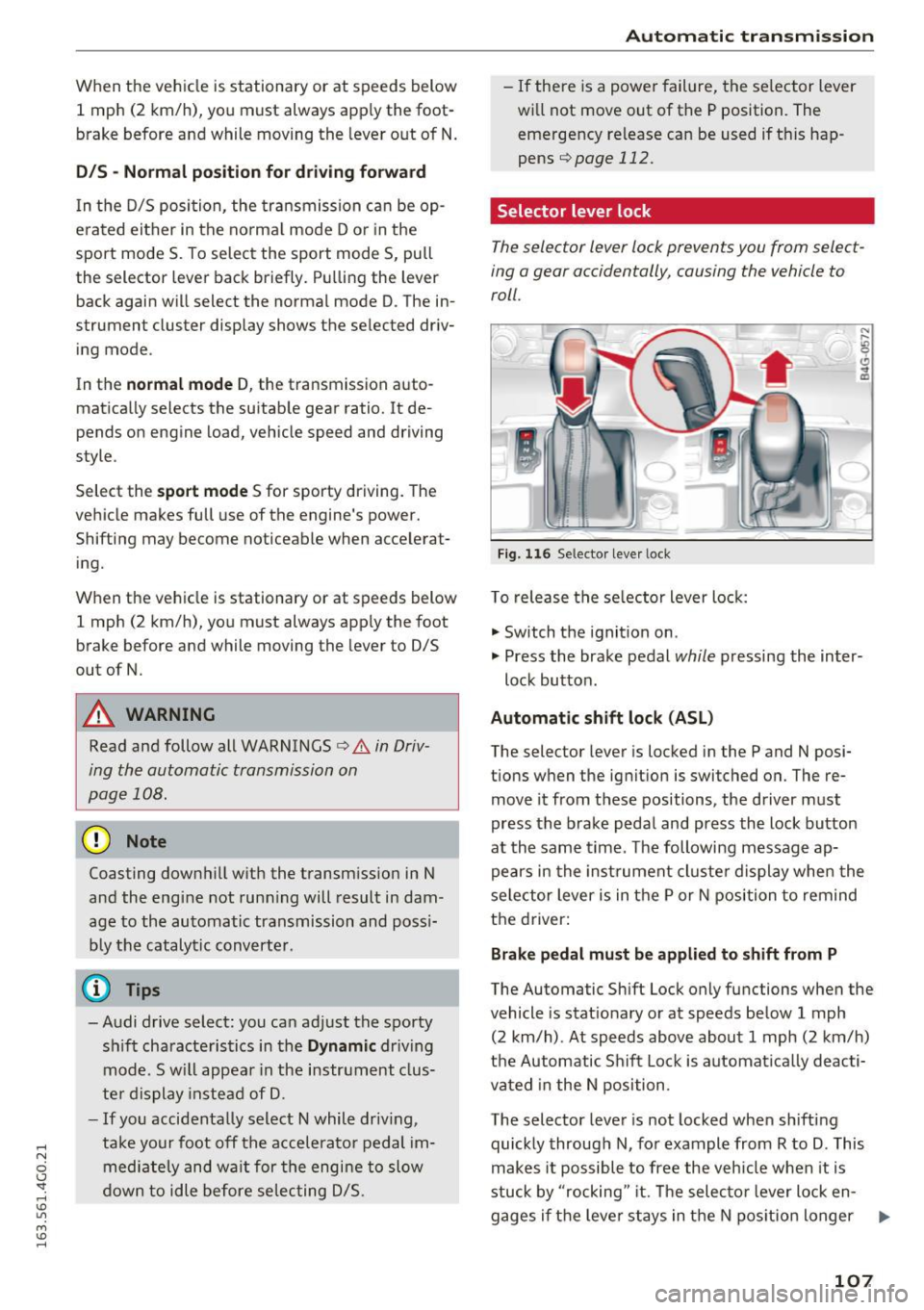
Selector lever lock
The selector lever lock prevents you from select
ing a gear accidentally, causing the vehicle to
roll.
)
Fig . 11 6 Selector lever lock
To release the se lector lever lock:
" Switch the ignition on.
" Press the brake pedal
while pressing the inter-
lock button .
Automatic shift lock (ASL)
The selector lever is locked in the P and N posi
tions when the ignition is switched on. The re
move it from t hese positions, the driver must
press the brake pedal and press the lock button
at the same time. The following message ap
pears in the instrument cluster display when the
selector lever is in the P or N position to remind
the driver:
Brake pedal must be applied to shift from P
The Automatic Shift Lock only functions when the
vehicle is stat ionary or at speeds below 1 mph
(2 km/h) . At speeds above about 1 mph (2 km/h)
the Automatic Shift Lock is automatically deacti
vated in the N position .
The selector lever is not locked when shift ing
quickly through N, for example from R to D. This
makes it possible to free the vehicle when it is
stuck by "rocking" it. Th e selector lever lock en-
gages if the leve r stays in the N position longer ...
107
Page 112 of 294

Automatic transmission
Manual shift program
Using the manual shift program you can man
ually select gears .
)
r
Fig. 117 Center console: shifting the gears manually
Fig. 118 Steering whee l: Shift paddles•
Gear selection with selector lever
The tiptronic mode can be selected eith er with
the vehicle stationary or on the
move.
• Push the selector lever to the right from D/S.
An M appears in the instrument cluster display
as soon as the transmission has shifted.
• To upshift, push the selector lever forward to
the plus position
G) ¢ fig. 117 .
• To downshift, push the lever to the minus posi-
tion
0 .
Gear selection with shift paddles*
The shift paddles are activated when the selector
lever is in D/S or the tiptronic manual shift pro
gram.
• To upshift , touch the shift padd le on the right
G)¢fig. 118.
• To downshift, touch the shift paddle on the left
0.
The transmission automatically shifts up or down
before critical engine speed is reached .
110
The transmission only allows manual shifting
when the engine speed is within the permitted
range.
(D Tips
- When you shift into the next lower gear, the
transmiss ion will downshift on ly when there
is no possibility of over-rewing the engine .
- When the kick-down comes on, the trans
mission will shift down to a lower gear, de
pending on vehicle and engine speeds.
- Tiptronic is inoperative when the transmis
sion is in the fail-safe mode.
Kick-down
Kick-down enables maximum acceleration.
When you press the accelerator pedal down be
yond the resistan ce point, the automatic tra ns
mission downshifts into a lower gear, depending
on vehicle speed and engine RPM. It shifts up in
to the next higher gear once the maximum speci
fied engine RPM is reached.
A WARNING
Please note that the whee ls could spin on
slick or slippery roads when kick-down is ac
tive.
Launch control program
App lies to vehicles: with S t ronic
The launch control program provides the best
possible acceleration when starting from a stop .
Requirement: The engine must be at operating
temperature and the steering wheel must not be
turned.
• Deactivate the Start-Stop-System *¢
page 81 .
The LED in the !CA.l "'! button turns on.
• With the engine running, press the
~,~-0-F F~I but
ton briefly¢
page 188. The II indicator light
turns on and the message
Stabilization control
(ESC): Off. Warning! Reduced stability
ap
pears in the instrument cluster display.
• Pull the selector leve r back out of the D/S posi
tion briefly to select the S position or se lect the .,..
Page 152 of 294

Airbag system
-An Advanced Airbag with gas generator and
control valve for the driver inside the steering
wheel hub.
- An Advanced Airbag with gas generator and
control valve inside the instrument panel for
the front passenger.
- A capacitive passenger detection system under
neath the front passenger seat cover. This sys
tem measures the electrical capacitance of the
person in the seat. The information registered
is sent continuously to the electronic control
unit to regulate deployment of the front Ad
vanced Airbag on the passenger side.
- An airbag monitoring system and indicator
light in the instrument cluster~
page 153.
-A sensor in each front seat registers the dis
tance between the respective seat and the
steering wheel or instrument panel. The infor
mation registered is sent continuously to the
electronic control unit to regulate deployment
of the front Advanced Airbags.
- The
PASSENGER AIR BAG OFF light comes on
and stays on in the center of the instrument
panel
~ pag e 154, fig. 159 and tells you when
the front Advanced Airbag on the passenger side has been turned
off.
- A sensor in the safety belt latch for the driver
and for the front seat passenger that senses
whether that safety b elt is latched or not and
transmits this information to the electronic control unit.
A WARNING
Damage to the front passenger seat can pre
vent the front airbag from working properly .
- Improper repair or disassembly of the front
passenger and driver seat will prevent the
Advanced Airbag System from functioning properly.
- Repairs to the front passenger seat must be
performed by qualified and properly trained
workshop personnel.
- Never remove the front passenger or driver
seat from the vehicle.
- Never remove the upholstery from the front
passenger seat.
- Never disassemble or remove parts from the
seat or disconnect wires from it.
150
- Never carry sharp objects in your pockets or
put them on the seat. The capacitive pas
senger detection mat in the front passenger
seat will not function properly if it is punc
tured .
- Never carry things on your lap or carry ob
jects on the front passenger seat . Such ob
jects can influence the capacitance regis
tered by the capacitive passenger detection
system, so that incorrect information is pro
vided to the airbag control unit.
- Never store items under the front passenger
seat . Parts of the Advanced Airbag System
under the passenger seat could be dam
aged, preventing them and the airbag sys
tem from working properly.
- Never place seat covers or replacement up
holstery that have not been specifically ap
proved by Audi on the front seats.
- Seat covers can prevent the Advanced Air
bag System from recognizing child re
straints or occupants on the front passenger
seat and prevent the side airbag in the seat
backrest from deploying properly.
- If a seat heater has been retrofitted or oth
erwise added to the front passenger seat,
never install any child restraint system on
this seat.
- Never use cushions, pillows, blankets, or
similar items on the front passenger seat.
The additional layers prevent the capacitive
passenger detection system from accurately
measuring the capacitance of the child safe
ty seat and/or the person on the seat and
thus keep the Advanced Airbag System from
working properly.
- Never place or use any electrical device
(such as a laptop, CD player, electronic
games device , power inverter or seat heater
for child seats) on the front passenger seat
if the device is connected to the 12-volt
socket or the cigarette lighter socket. Such
devices can influence the capacitance regis
tered by the capacitive passenger detection
system, so that incorrect information is pro
vided to the airbag control unit.
- If you must use a child restraint on the front
passenger seat and the child restraint
~
Page 214 of 294

Fuel and Refueling
case, try turning the nozzle before inserting
it in the fuel fi ller neck, use a different fue l
pump or see your authorized Audi dea ler or
authorized repair facility for ass istance.
- The fuel filler flap of your vehicle is not
locked when you lock the vehicle from the
inside.
Fuel filler door emergency release
If the central locking system is faulty, the fuel
filler door can be unlocked manually.
F ig. 180 Right side t rim in the luggage compartme nt: re ·
m ov ing the trim
Fig. 181 Luggage co mpa rtment: Fue l filler door emergen
cy release
Removing the side trim
• To remove the right side trim, first remove the
retainer from the mounts @¢
fig. 180.
• Turn both locking mechanisms 90° to the left
usi ng a coin or a similar object and remove the
locking mechanisms.
• Tilt the retainer upward and pull the trim out.
Lay the trim down on its side, because there is
an electrical wire for the socket * on the back.
212
Fuel filler door emergency release
• Loosen the strap from its bracket and pull on it
r:!.>fig. 181 ¢(2) . You can now open the fuel fill
er door as usual ¢
page 210.
(D Note
Only pull on the loop until you feel resistance .
You wi ll not hear it release . Otherwise you
could damage the emergency release mecha nism.
Selective catalytic reduction
General information
Applies to vehicles: with selective catalytic reduction
In vehicles with selective catalytic reduction, a
urea solution (AdBlue) is injected into the ex
haust system before a nitrogen oxide catalytic
converter to reduce nitrogen emissions.
The Ad Blue is carried in a separate tank in the ve
hicle. The AdBlue usage accounts for approxi
mately 0.5% to 2.5% of the diesel fuel that is
used.
When a message about refilling the AdBlue ap
pears in the instrument cluster display, you must
refill the Ad Blue yourself or have it refilled by an
authorized Audi dealer or authorized Audi Service
Facility
r:!.>page 213 .
{!) Tips
-The instrument cluster display ind icates the
distance remaining that can be driven
¢ page 213. If the AdBlue tank is com
pletely empty, the engine will not start
again after the ign ition is switched off.
- Ad Blue is required by law to operate th is ve
hicle.
Page 215 of 294

... N
0 CJ '
Messages in the instrument cluster display
Applies to vehicles: with selective catalytic reduction
The display indicates if the Ad Blue level is low or
if there is a system malfunction .
AdBlue le vel low
You will be informed if the Ad Blue in the tank
drops below a certa in level.
Plea se refill Ad Blue. Range 1500 mi (2400 km )
This message appears whe n there is only eno ugh
Ad B lue lef t to d rive the distance indicated in the
d river i nformation system. Fill the AdBl ue.
AdBlue ,0 Refill AdBlue! No re start in 600 mi
( 1000 km )! See owner 's manual
This message appea rs when there is only eno ugh
Ad Blue left to drive the distance indicated in the
driver info rmation system . Fill the Ad Blue . Ot her
wise the eng ine will not sta rt aga in if you s top it
once the d ist anc e in dicate d ha s been d riven. Yo u
can also check t he remai ning dis tan ce in the on
board com puter* .
Refill Ad Blue! No restart! See own-
er's manual
This message appears whe n the AdBlue ta nk is
empty. F ill the AdB lue. Otherwise you will not be
ab le to s tart the engine aga in once yo u stop it.
The AdBlue must be refilled when t he amount in
the tank has reached the minimum level
q page 213, Filling Ad Blue.
Incorrect filling /system malfunction
A message appears if the AdBlue tank was filled
with a fluid other than AdBlue and the system
has detected that the tan k was fi lled incor rect ly,
or if there is a system malfunction .
Ad Blue -I' Ad Blue: System fault! No restart in
600 mi (1000 km ). See owner's manual.
This message appears when it is only poss ible to
drive the d istance indicated in the dr iver informa
tion system. Drive to the nearest authorized Audi
dealer or authorized Audi Serv ice Facility to have
the ma lfunction co rrected. Otherwise the engine
w ill not start agai n if you stop it once the d is
tance ind icated has been driven .
Fuel and Refueling
AdBlue: System fault No re start!
See owner's manual
T his mess age app ea rs if the sy stem ha s detec ted
t h at the t ank was fi lled incor rec tly or tha t there
is a ma lf u nction . Drive immediate ly to the near
est authorized A udi dealer or authorized A udi
Se rvice Facility to have the ma lf u nction co rrect
ed. Ot herwise you wi ll not be able to start the en
gine again once you stop it .
Filling AdBlue
Applies to vehicles: with selective catalytic reduction
Fig. 182 Right rear vehicle side: removing the Ad Bl ue cap
The Ad Blue filler t ube is located near the d iesel
filler t ube. Add at least 1.5 gallons (5.7 lite rs) of
AdBl ue. This is the min imum amount required to
ensure the system detects the refilling and to
sta rt the eng ine . You can add a maxim um of ap
prox imately 4 . 5 gallons ( 17 li ters) .
Requirement: The request to add Ad Blue must
appear in the instrument cluster display.
.. Switch th e ignition off .
.. Open the tank door
q page 210.
.. Tu rn the ta nk cap counterclockw ise w it h the l ug
w rench from the veh icle tool k it to remove it
qfig. 182.
.,. Fill the Ad Blue with the bottle ~ page 214 or
t he ca nister ~
page 21 4.
.&_ WARNING
Ad Bl ue can ir rit a te the s kin, eyes an d respir a
tory sy stem.
If there is co nta ct wi th t he f lu id ,
f lus h imme diate ly w ith plenty of water . Con-
su lt a p hys ician if necessary .
IJII>
213