2016 AUDI RS7 SPORTBACK change wheel
[x] Cancel search: change wheelPage 238 of 282

Wheels
Your vehicle has also been equipped with a TPMS
malfunction indicator to indicate when the sys
tem is not operat ing properly . The TPMS mal
function indicator is combined with the low tire pressure telltale. When the system detects a
malfunction, the telltale will flash for approxi
mately one minute and then remain cont inuously
illum inated . This sequence will continue upon
subsequent veh icle start-ups as long as the ma l
function ex ists .
When the malfunct io n indicator is illuminated,
the system may not be able to detect or signal low tire pressu re as intended . TP MS ma lfunctions
may occur for a variety of reasons, including the
installation of replacement or alternate ti res or
wheels on the vehicle that prevent the TPMS
from functioning properly. A lways check the
TPMS malfunction telltale after replacing one or
more tires or wheels on your vehicle to ensure
t hat the replacement or alternate tires and
wheels allow the TPMS to continue to function
properly.
Description
The tire pressure monitoring system monitors
the pressure in the four tires when driving .
The system uses sensors that measure the tem
perature and pressure in the tires. The data is
sent from these sensors to the control module by
radio frequency .
The tire pressure monitoring system shows the current pressures and temperatures of the tires in the Infotainment system
c.>page 236. It also
compares the current t ire pressures with the
stored tire pressures and gives a warning in the
driver information system if the tire pressure is
d ifferent from what is stored¢
page 237.
The system does not detect if the stored t i re
pressures match the recommended tire pres
sures. You must resave the tire pressures
c.> page 23 7:
-every time the tir e pressures change, for exam
ple when the load in the vehicle changes,
- after replac ing a tire, or
- if wheels with new wheel sensors are used .
236
A WARNING ,_
- The tire pressure monitoring system ass ists
the dr iver in monitoring tire pressures. The
driver is responsible for having the tires in
flated to the correct pressure.
- Do not change the t ire pressure when the
temperature of the tire is high . This could
result in serious damage to the tire and
even cause the tire to burst, increasing the
ris k of an accident.
- A tire with low pressure flexes more. This
heats the tire up too much. This could cause
the tread to separate and even cause the
tire to burst, increasing the risk of an acci
dent .
- The tire pressure monitoring system does
not warn about damage or defects in the
tire construction that could cause the tire to burst, for example. Inspect your t ires regu
larly.
@ Tips
- If tires are replaced, the sensors/va lves do
not need to be removed or replaced. Just re
placed the va lve stem and, if necessary, the
valve and the wheel electronics. If you have
questions, see your authorized Audi dealer
or authorized Audi Service Facility.
- An incorrect display or a malfunction in the
tire pressure monitoring system can occur
after using the tire mobility kit. Have the
sensors rep laced by an authorized Audi
dealer or authorized Audi Service Facility.
Display tire pressures/temperatures
Requirement: the ignition must be switched off.
.,. Select: the
I CARI funct ion button > Car systems
> Service & control > Tire pressure monitor >
Display tire pre ssure .
The current tire pressures are shown in green and
yellow numbers in the Infotainment system:
-green: the current tire pressure and the spec i
fied tire pressure are approx imately the same .
-yellow: the current tire pressure is too low
compared to the spec ified t ire pressure .
Page 239 of 282

The specified tire pressure is the last tire pres
sure that was stored
¢ page 2 3 7 .
Note that the tire p ressure also depends on the
temperature of the t ire . Every 10 °C increase in
tire temperature results in the tire pressure in
creasing by approximate ly 0 .1 bar. The tire pres
sure increases as the eng ine becomes warmer
while driving.
A WARNING
Read and follow the important information
and notes <=>
page 236.
@ Tips
The tire pressure or temperature are not dis played in adaptation mode. Dashes ··.·· are
shown in place of the pressure and tempera
ture .
(D Tire pressure loss
Fig. 194 Display : indic ato r light with a message
If the [IJ indicator light turns on, the pressure in
at least one t ire is too low or new sensors were
not adapted :
rt] indicator lights turns on after turning the
ignition on
The tire pressure is too low compared to the
specified pressure.
"' Check and store the tire pressure{s) the next
time it is possible<=>
page 237.
rt] indicator light turns on while driving
Wheels with new senso rs were not adapted or
the tire pressure has reached a critical leve l com
pared to the specified pressure.
Wheels
"' Avoid unnecessary steering and braking maneu-
vers .
"' Adapt your dr iving sty le to the situation .
"' Stop as soon as possible and check the tire(s).
"' If it is possib le to continue driving, see an au-
thorized Audi dealer or authorized A udi Service
Facility immediately and have your tire(s) re
pa ired or rep laced.
A WARNING
Read and follow the important i nformation
and notes
¢page 236.
Storing new tire pressures
Correctly stored tire pressure specifications are
necessary for reliable tire pressure monitoring.
"' Check the tire pressures in all wheels .
..
"'Cor rect the tire pressure if necessa ry. Refer to
the tire pressure label for the re commended
t ire pressure for your vehicle
c> page 228,
-
fig. 193 . Only correct the pressure in tires
whose temperature is approximately the same
as the ambient temperature. If the tempera
ture of the tire is higher than ambient tempera
ture, the tire pressure must be increased ap
proximately 0 .2 bar above the value on the
sticker .
"' Switch the ignition on .
"' Select:
!CAR ! function button> Car systems>
Tire pressure monitor > Store tire pressures .
After storing, the tire pressure monitoring sys
tem measures the current tire pressures and
stores them as the new specified pressures .
"'If the changed tire pressures are not displayed
in the Infotainment system, drive the vehicle
for approximately 10 minutes so that the sen
sor signal from the wheels is received again .
During this adaptation phase, ··.·· is displayed
for the pressure and temperature and the tire
pressure monitoring system is only partially
available .
It only prov ides a warning if one or
more tire pressures is below the minimum per
mitted spec ified pressu re. If this is the case, the
[IJ indic ator light appea rs with a message . ""
237
Page 245 of 282
Replacing wheels
Before changing a wheel
Observe the following precautions for your own
and your passenger's safety when changing a
wheel.
.,. After you experience a tire failure, pull the car
well away from moving traffic and try to reach
level ground before you stop¢.,&..
.. All passengers should
leave the car and move
to a safe location (for instance, beh ind the
guardrail)¢ .,&. .
.,. Engage the
parking brake to prevent your vehi
cle from rolling unintentionally¢ .,&..
.. Move
selector lever to position P ¢ .,&. .
.. Take the
jack out of the luggage compartment
c:>page 239.
A WARNING
You or your passengers could be injured while
chang ing a wheel if you do not follow these
safety precautions:
- If you have a flat tire, move a safe distance
off the road. Turn off the engine, turn the
eme rgency flashers on and use other warn
ing devices to alert other motorists.
- Make sure that passengers wait in a safe
place away from the vehicle and well away
from the road and traffic.
- To help prevent the vehicle from moving
sudden ly and possibly slipping off the jack,
always fully set the parking brake and block
the wheel diagonally opposite the wheel be
ing changed . When one front wheel is lifted
off the ground, placing the Automatic
Transmission in P (Park) will
not prevent the
vehicle from moving.
- Before you change a wheel, be sure the
ground is level and firm. If necessary, use a
sturdy board under the jack.
- Always store the veh icle tool k it, the jack
and the replaced tire in the luggage com
partment
c> page 124.
(D Note
If you are changing the whee l on a steep in
cline, use a rock or similar object to b lock the
Emergency assistance
opposite wheel to prevent the vehicle from
moving.
(D Tips
- Before changing the wheel, you must acti
vate the jacking mode, so that the automat
ic controls for the Adaptive Air Suspension*
do not make it more difficu lt to lift the vehi
cle with the jack
c> page 245.
- Obey all laws .
Changing a wheel
When you change a wheel, follow the sequence
described below step-by-step and in exactly thot
order .
1. Activate the vehicle jack mode* c> page 245.
2. Remove the
wheel bolt caps*. For more de
tails see also
¢ page 244, Wheels with
wheel bolt caps.
3. Loosen the wheel bolts c:> page 244.
4. Locate the proper mounting point for the
jack and align the jack below that point
~page 245.
5. Raise the car with the jack c:> page 245.
6. Remove the
wheel with the flat tire and then
install the other whee l¢
page 246.
7. Tighten all whee l bolts lightly.
8.
Lower the vehicle with the jack.
9. Use the wheel bolt wrench and
firmly tighten
all wheel bolts
c> page 244.
10. Replace the
wheel bolt caps*.
11. Deact ivate the vehicle jack mode* in the
MMI:
I CARI funct ion button> (C ar )* systems
contro l butto n > Servicing & checks > Air
susp.: jack mode >
Off.
The vehicle jack mode* switches off automat ical
ly at speeds above 6 mph (10 km/h) .
A WARNING
-
Always read and follow all WARNINGS and in-
formation
¢ .&. in Raising the vehicle on
page
245 and ¢ page 247.
243
Page 246 of 282

Emerg ency assis ta nce
After changing a wheel
A wheel change is not complete without the do
ing the following.
• Always store the vehicle tool kit, the jack* and
the replaced tire in the luggage compartment
<=>page 124.
• As soon as possible, have the tightenin g tor
qu es
on all whee l bolts checked with a torque
wrench. The correct tightening torque is 90 ft lb (120 Nm).
• Have the flat tire
replac ed as soon as possible.
(D Tips
- If yo u notice that the whee l bolts are cor
roded and difficu lt to turn wh ile changing a
tire, they should be replaced before you
check the tightening torque.
- Drive at reduced speed until you have the
tightening torques checked .
- After changing a w heel, the tire pressure in
a ll four tires must be checked/corrected and
the tire pressure monitoring indicator must be stored in the MMI
c> page 23 7.
Wheels with wheel bolt caps
A ppl ies to: ve hicles w ith whee l bolts w it h ea ps
The caps must be removed first from the wheel
bolts before the bolts can be unscrewed .
Fig. 201 Chang ing a wheel : removing the whee l bo lt caps
Removing
• Push the
pla stic clip (provided with the veh icle
tool kit) over the wheel bolt cap unt il the inner
retainers on the clip align wit h the edge of the
cover.
244
• Remove the cap with t he pla stic clip (vehicle
tool kit)
c> fig. 201.
Refitt ing
• Place t he caps over the wheel bolts and push
them back on.
The caps are to protect and keep the wheel bo lts
clean.
Loosening and tightening the wheel bolts
The wheel bolts must be loosened before raising
the vehicle .
Fig. 202 Chang ing a whee l: loosening the wheel bolts
Lo ose ning
• Slide the
w hee l w ren ch onto the wheel bo lt as
far as it will go.
• Take tight hold of the
end of the wrench hand le
and turn the wheel bolts
count er-clo ckwis e
about one single turn in the direction of arrow
¢fig. 202.
Tightening
• Slide the wheel wrench onto the wheel bo lt as
far as it will go.
• Take tight hold of the
end of the wrench handle
and turn each wheel bolt
clockwis e until it is
seated .
_&. WARNING
- Do not use force or hurry when changing a
wheel -you can cause the veh icle to slip off
the jack and cause serious persona l injuries.
- Do not loosen the wheel bo lts more than
one turn
before you raise the veh icle w ith
the jack. -You r is k an injury.
Page 247 of 282
@ Tips
-Never use the hexagonal socket in the han
dle of the screwdriver to loosen or tighten
the wheel bo lts .
- If a whee l bolt is very tight, you may find it
easier to loosen by carefully pushing down
on the end of the wheel bolt wrench with
one foot only . As you do so, hold on to the
car to keep your balance and take care not
to s lip.
Raising the vehicle
The vehicle must be li~ed with the jack first be
fore the wheel can be removed .
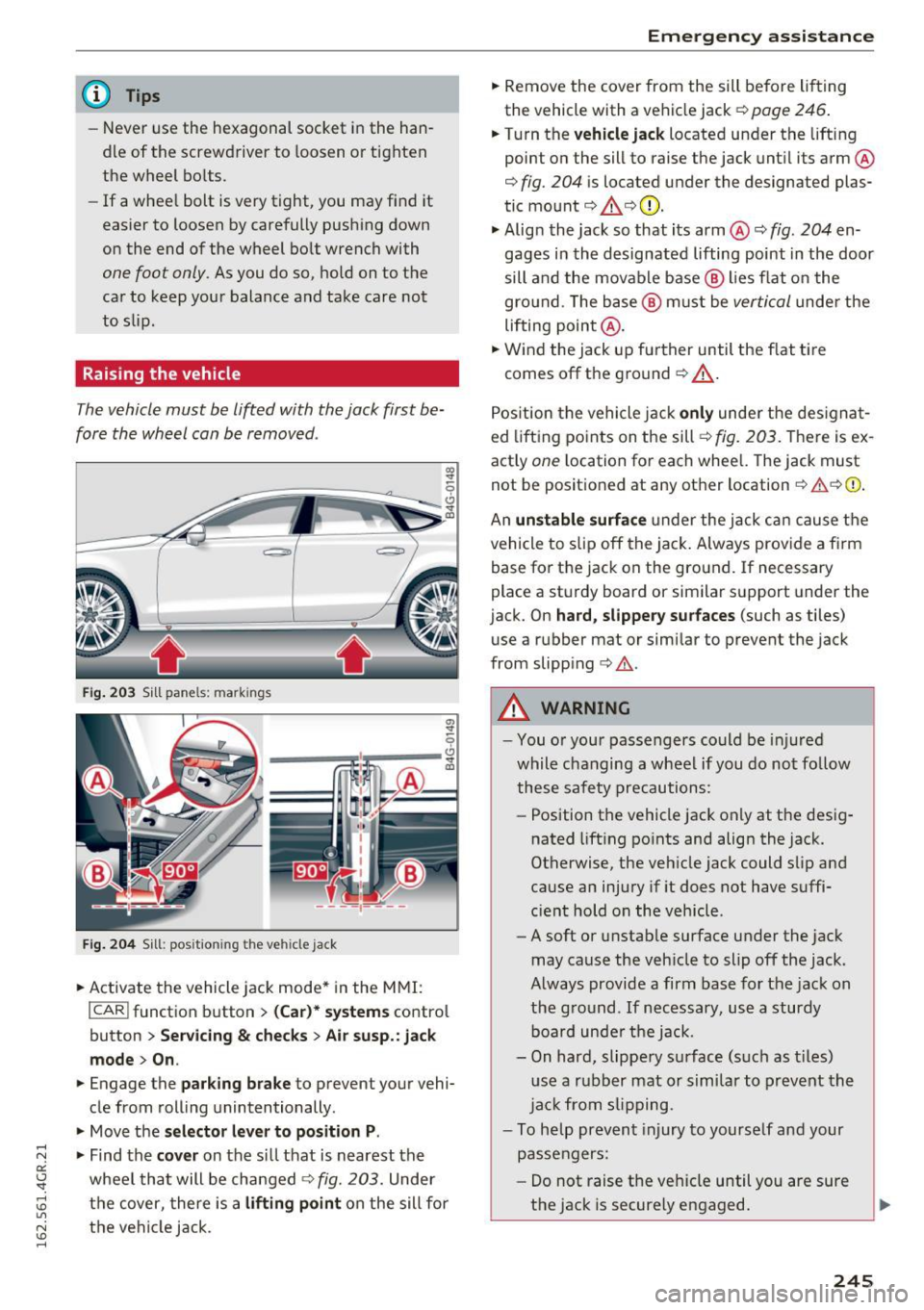
Fig. 203 S ill pane ls: markin gs
a,
"' ~ 9
---~,.----~ a,
Fig . 204 S ill : posit io ning th e vehi cle ja ck
.. Activate the vehicle jack mode* in the MMI:
I CAR ! function button > (C ar)* sys tems contro l
button
> Serv icing & checks> Air s usp. : jac k
mod e> On.
.. Engage the par king br ake to preven t your vehi
cle from roll ing unintentionally .
.. Move the
selector lever t o position P .
.... N .,. Find the cover on the si ll that is nearest the a::
~ wheel that will be changed¢ fig. 203. Under
~ the cover, there is a liftin g point on the sill for U"I
~ the vehicle jack .
......
Em ergen cy a ssis tanc e
.. Remove the cover from the sill before lift ing
the vehicle with a vehicle jack¢
page 246 .
.. Turn the vehicle ja ck located under the lifting
point on the sill to raise the jack unt il its arm ®
¢
fig. 204 is located under the designated plas
tic mount ¢
.&,¢(D .
.. Alig n the jack so that its arm@¢ fig. 204 en
gages in the designated lifting point in the door
sill and the movable base @ lies flat o n the
gro und . The base @ must be
vertical unde r the
lifting point @ .
.. Wind the jack up further until the f lat tire
comes off the ground¢_&. .
Pos ition the vehicle jack
only under the des igna t
ed lift ing points on the sill
¢ fig. 203. There is ex
actly
one l ocation for each whee l. The jack must
not be posit ioned at any other location¢ & ¢0 .
An
un stable surfa ce under the jack can cause the
vehicle to slip off the jack . Always provide a f irm
base for the jack on the ground. If necessary
place a sturdy board o r similar support under the
jack. On
ha rd, slipper y surfa ce s (such as tiles)
use a rubbe r mat or similar to prevent the jack
from slipping ¢& .
A WARNING
-You o r your passengers could be inj ured
while changing a wheel if you do not fo llow
these safety precautions :
- Position the vehicle jack only at the des ig
nated lift ing po ints and align the jack.
Otherwise, the vehicle jack could slip and
cause an injury if it does not have suffi
c ient hold on the vehicle .
- A soft or unstable surface under the jack
may cause the veh icle to slip off the jack .
Always provide a firm base for the jack on
the g round . If necessary, use a sturdy
boa rd unde r the jack.
- On hard, slippery surface (s uch as t iles)
u se a rubber mat or sim ilar to prevent the
ja ck from s lipping.
- To help prevent injury to yourse lf and your
passengers:
- Do not raise the vehicle until you are sure
the jack is securely engaged.
245
Page 248 of 282

Emergency assistance
-Passengers must not remain in the vehicle
when it is jacked up.
- Make sure that passengers wait in a safe
place away from the vehicle and well away
from the road and traffic.
- Make sure jack posit ion is correct, adjust
as necessary and then continue to raise
the jack.
- Changes in temperature or load can affect
the height of the vehicle.
(D Note
Do not lift the vehicle by the sill. Position the
vehicle jack only at the designated lifting
points on the sill. Otherwise, your vehicle will
be damaged.
@ Tips
The vehicle jack mode* switches off automati
cally at speeds
above 6 mph (10 km/h).
Removing and installing the sill extension
cover
Applies to: vehicles w ith sil l extension
Fig. 205 Sill: removing the cover
.,. Pull the cover down to remove it. c:> fig. 205
.,. To install the cover, insert i t in the mount and
press it upward until it clicks into place. The
cover must be flush with the surface of the sill
extension .
1
> A pp lies to vehicles wit h c eramic brake ro tor s*: Use a sec
on d alig nment pin* (sto re d in th e spare w hee l w ell mold
in g) fo r the lower hole, foll ow in g t he descrip tion for the
firs t alig nm ent pin.
246
@ Tips
Some models may also have a cover for the
rear vehicle lift point.
Taking the wheel off/installing a wheel
Follow these instructions step -by-step for chang
ing the wheel.
Fig. 206 Changing a wheel : using the sc rewdr iver han d le
(wi th t he blade re m oved) to turn the bol ts
Fig. 207 Changing a wh eel: alignment pin in side the t op
ho le
After you have loosened all wheel bolts and
raised the vehicle off the ground,
remove and re
place the wheel as follows:
Removing the wheel
.,. Use the hexagonal socket in the screwdriver
handle
to completely remove the topmost
wheel bolt and set it aside on a
clean surface
c::> fig. 206.
.,. Sc rew the threaded end of the alignment pin
from the tool kit hand-t ight into the empty bolt
hole
¢ fig . 2011>. .,.
Page 249 of 282

~ Then remove the other wheel bolts as described above.
~ Takeoff the wheel leaving the a lignment pin in
the bolt ho le ¢ (D.
Putting on th e oth er w heel
~ Lift the whee l and carefully slide it over the
alignment pin to guide it in place ¢(D.
~ Use the hexagonal socket in the screwdriver
handle to screw in and tighten all whee l bolts
sligh tly.
~ Remove the alignment pin and insert and tight
en the remaining wheel bolt slightly like the
rest .
~ Turn the jack handle counter-clockwise to lower
the vehicle until the jack is fu lly re leased.
~ Use the wheel bolt wrench to tighten all wheel
bolts firmly ¢
page 244 . Tighten them cross
wise,
from one bolt to the (approximately) op
posite one, to keep the whee l centered .
When removing or installing the whee l, the
rim could hit the brake rotor/ceramic brake
rotor* and damage the rotor. Work carefully
and have a second person help you.
(D Tips
Never use the hexagonal socket in the handle
of the screwdriver to loosen or tighten the
wheel bo lts.
- Pu ll the reversible blade from the screwdriv
er before you use the hexagonal socket in
the handle to turn the wheel bo lts.
- When mounting tires w ith
u nidirectio nal
tre ad design
make sure the tread pattern is
po inted the r ight way ¢
page 247.
-The wheel bolts should be clean and easy to
turn . Check for d irt and corrosion on the
mating surfaces of both the wheel and the
hub . Remove all dirt from these surfaces be
fo re remo unt ing the wheel.
Em ergenc y ass is tanc e
Tires with unidirectional tread design
Tires with unidirectional tread design must be
mounted with their tread pattern pointed in the
right direction .
Using a repl acement t ire w ith a tread pattern
intend ed for use in a sp ecific direction
When using a rep lacement tire with a tread pat
tern intended for use in a spec ific d irection ,
please note the follow ing:
- The direction of rotation is marked by an arrow
on the side of the tire .
- If the replacement tire has to be installed in
the incorrect direction, use the replacement tire only temporarily s ince the t ire w ill not be
ab le to achieve its optimum perfo rmance char
acter istics with rega rd to aquap lan ing, no ise
and wear.
- We recommend that you pay pa rt icu lar atten
tion to th is fact d uring wet weather and that
you adjust your speed to match road cond i
tions .
- Rep lace the flat tire w ith a new one and have it
installed on your veh icle as soon as possib le to
restore the hand ling advantages of a unidirec
tional tire.
Notes on wheel changing
Please read the information ¢ page 225, New
tires or wheels
if you a re go ing to u se a replace
ment t ire wh ich is different from the t ires on
you r vehicle .
After you change a tire:
- Check the tire pre ssure on the r epl acement
tire immed iatel y afte r in st a llat ion .
- Have th e whe el bolt tight ening torqu e
c hecked with a torque w rench as s oon as pos
s ible b y your authorized Audi de aler o r a
qualified ser vice st ation.
- With steel and allo y wheel rim s, the wheel
bolt s are co rr ectl y ti ghtened at a torque of 90
ft lb
( 1 20 Nm) .
-If you notice that the wheel bolts are corroded
and diffi cult to turn while changing a ti re ,
the y should be r eplaced before you chec k the
tightening torque. ..,.
247
Page 258 of 282

Emergency situations
pulled out when towing the vehicle and that
could cause an accident.
Rear towing loop
I
0 ~ • -- cc
Fig. 216 Rear bumper: cover
0
Fig. 217 Rear bumper : in stall ing the towing loop
The th readed opening is located in the bumper
on the right rear side.
"' Remove the tow ing loop from the vehicle tool
kit
~page 239.
"'Press the cap inward with brief, forceful pres
sure
¢ fig. 216 . The cap will loosen from the
bumper.
"' Tighten the towing loop in the threaded open
ing until it stops
c,, fig. 217 and then tighten it
with a wheel wrench .
"' After using, place the towing loop back in the
vehicle tool kit.
_& WARNING
If the towing loop is not tightened until it
stops when insta lling, the threads may be
pulled out when towing the vehicle and that
cou ld cause an accident .
256
-
Loading the vehicle onto a flat bed truck
Fig. 218 Vehicle on flat bed tru ck
Front hook up
"' Align the vehicle with the centerline of the car
carrier ramp.
"' Attach the winch hook to the front towline eye
previously installed .
Rear hook up
"' Align the vehicle with the centerline of the car
carrier ramp.
"' Attach the winch hook to the rear towline eye
previously installed .
@ Tips
Check carefully to make sure the hook-up is
secure before moving the car up the flatbed
truck ramp.
Vehicle transport
Whenever you have your vehicle transported, be
sure to note the following:
(D Note
Mount the tie-down chains/cables over the
running surface (circumfe rence) of the tires.
Never secure the vehicle by the axle, the sus
pension struts or the front or rear towline
eye. For technical reasons, the pressure in the
suspension struts may change during the
transport and this will adversely affect vehicle
handling.