2016 AUDI Q3 light
[x] Cancel search: lightPage 193 of 252

Wheels
Wheels and Tires
General information
.,.Check your tires regularly for
damage (punctures, cuts, cracks
and bulges). Remove foreign ob
jects from the tire tread.
.,. If driving over curbs or similar
obstacles, drive slowly and ap
proach the curb at an angle.
.,.Have faulty tires or rims re
placed immediately.
"'Protect your tires from oil,
grease and fuel.
.,.M ark tires before removing
them so that the same running
direction can be maintained if
they are reinstalled.
"'Lay tires flat when storing and
store them in a cool, dry location
with as little exposure to light as
possible.
(D Note
-Please note that summer and
winter tires are designed for
the conditions that are typical in those seasons. Audi recom
mends using winter tires dur
ing the winter months. Low
temperatures significantly de crease the elasticity of summ
er tires, which affects traction
Wheels
and braking ability. If summer
tires are used in very cold
temperatures, cracks can form
on the tread bars, resulting in
permanent tire damage that
can cause loud driving noise
and unbalanced tires.
-Burnished, polished or
chromed rims must not be
used in winter driving condi
tions. The surface of the rims
does not have sufficient corro
sion protection for this and
could be permanently dam aged by road salt or similar
substances.
Tire designations
Fig. 156 T ir e designations on the side -
wall Ill>
191
Page 211 of 252

.... N
c:i :::J CX)
.... I.Cl U"I
N I.Cl ......
also reduces fuel efficiency and tire tread life,
and may affect the vehicle's handling and stop
ping ability.
Please note that the TPMS is not a substitute for
proper tire maintenance, and it is the driver's re
sponsibility to maintain correct tire pressure,
even if under-inflation has not reached the level
to trigger illumination of the TPMS low tire pres
sure telltale.
Your vehicle has also been equipped with a TPMS
malfunction indicator to indicate when the sys
tem is not operating properly. The TPMS mal
function indicator is combined with the low tire
pressure telltale. When the system detects a
malfunct ion, the telltale will flash for approxi
mately one minute and then remain continuous ly
illuminated. This sequence will continue upon
subsequent vehicle start-ups as long as the mal
function exists.
When the malfunction indicator is illuminated,
the system may not be ab le to detect or signal
low tire pressure as intended . TPM S malfunctions
may occur for a variety of reasons, including the
installation of replacement or alternate tires or
wheels on the vehicle that prevent the TPMS
from functioning properly . Always check the
TPMS malfunction telltale after replacing one or
more tires or wheels on your vehicle to ensure
that the replacement or alternate tires and
wheels allow the TPMS to continue to function
properly.
Wheels
If the Tire Pressure Monitoring System
indicator appears
Applies to vehicles : wi th tire pressure mo nito rin g sys te m
The tire pressure indicator in the instrument
cluster informs you if the tire pressure is too low
or if there is a system malfunction.
Fig. 160 Instrument cluster : indicator lig ht with message
Using the ABS sensors, the tire pressure monitor
ing system compares the tire tread circumfer
ence and vibration characterist ics of the ind ividu
al tires. If the pressure changes in one or more
t ire s, this is indicated in the instrument cluster
display with an indicator light
[I] and a message.
If only one tire is affected, the location of that
ti re will be indicated.
The tire pressures must be stored in the Infotain
ment system again each time the pressures
change (switching between partial and full load
pressure) or after changing or replacing a tire on
your vehicle ~
page 210. The tire pressure moni
toring system on ly monitors the tire pressure you
have stored. Refer to the tire pressure label for
the recommended tire pressure for your vehicle
¢ page 201, fig . 159.
Tire tread c ircumference and vibration character
istics can change and cause a tire pressure warn
ing if :
- the tire pressure in one or more tires is too low.
- the tir e has str uctural damage.
- the tir e was replaced or the tire pressure was
changed and it was not stored¢
page 210.
-the spare tire* is installed .
Indicator lights
[I] Loss of pressure in at least one tire¢,& .
Check the tires and replace or repair if necessary . ..,
209
Page 212 of 252

Wheels
Chec k/co rrec t the p ress ures o f all four tires and
sto re the pressure a gain in the Infotainment sys
tem
¢ page 210.
mm (Ti re Pressure Moni to ring System) Tire
pressure: S ystem malfunction !.
Ifm:im appears
after switc hing the ignition on or whi le driving
and the
RI] i ndicator light in the instrument cl us
ter blinks for approximate ly one minute and then
stays on, there is system malfunction. Try to
store the correct tire pressures¢
page 210 . If
the ind icator light does tur n off or turns on again
after a short period of t ime, dr ive to you r auth or
ized A udi dealer o r autho riz ed Aud i Service Faci li
ty immedia tely to have the malfunct ion corre ct
ed .
A WARNING
- If the ti re pressu re indicator appears in the
display, reduce your speed immediate ly and
avoid any hard steering or braking maneu
vers. Stop as soon as possib le and check the
t ires and t heir pressu re.
- The driver is responsib le for maintaining the
correct tire pressure. You must check the
t ire pressure regu larly .
- Under certain conditions (such as a sporty
dr iv ing style, winter cond itions o r unpaved
roads), the tire pressure mo nitoring system
indicator may be delayed.
- Do not use r un-flat tires on your vehicle. Us
ing them when not permitted can lead to
vehicle damage or accidents.
(D Tips
- The t ire pressure monitoring system can al
so stop work ing when there is an ESC mal
funct io n.
- Using snow chains may result in a system
malfunction.
- The t ires with the identification "AO" or
"RO" ¢
page 198 have been matched with
your Audi tire pressure monitoring system .
W e recommend that you use these t ires.
210
· Storing tire pressures
Applies to vehicles: with tire pressure mo nitoring system
If the tire pressure changes or a tire is replaced,
it must be confirmed in the Infotainment sys
tem .
.,. Make sure before stor ing that the t ire pressures
of all four tires mee t the specified values and
are adap ted to the load ¢
page 201 .
.,. Sw itch the ignit io n on .
.,. Sele ct: the
I CARI f u nct ion bu tton > (Car) sys
tems *
control b utt on > Servicing & c heck s >
Tire pressure monitoring .
(D Tips
Do not s to re t he tire pressures if snow ch ains
a re ins talled .
Page 216 of 252

Emerg enc y assis ta nc e
emergency flashers on and use other
warning dev ices to alert other motorists.
- Make sure that passengers wait in a safe
place away from the vehicle and well away
from the road and traffic.
- To help prevent the vehicle from moving
sudden ly and possibly slipp ing off the jack,
always fully set the parking brake and block
the wheel diagonally oppos ite the wheel be
ing changed with the folding chocks or oth
er objects. When one front wheel is lifted
off t he g ro u nd, plac ing the Automatic
T ransmission in "P" (Park) will
not prevent
the vehicle from moving.
- Before you change a wheel, be su re the
ground is level and firm. If necessary, use a
stu rdy board under the jack.
- Always store the veh icle tool k it, the jack
and the replaced tire in the luggage com
partment
r=> page 100.
(D Note
If you are cha nging the wheel on a steep in
cline, use the folding choc k
r=> page 212 to
block the oppos ite wheel to preven t the vehi
cle from moving .
(D Tips
Obey all laws.
Changing a wheel
When you change a wheel, follow the sequence
described below step-by-step and in exactly that
order.
1. Remove the dec orati ve w heel co ver* or the
wh eel bolt cap s*. For more deta ils see also
r=> page 215.
2. Loosen the wh eel b olt s r=> page 215 .
3. Locate the proper mounting point for the
jack and align the jack below that point
r=> page 216.
4. Lift the car with the jack r=> page 216.
S. Remove the wheel with th e fla t ti re and then
i nstall the
s p are t ire r=> page 217.
6. Tighten all wheel bo lts lightly .
7 .
Lower the veh icle w ith the jack.
214
8 . Use the whee l bolt wrench and firml y tighten
all wheel bo lts in a crisscross pattern
r=> page 215.
9. Replace the deco rative whee l co ver* or the
wheel bolt c aps* .
A WARNING
Always read and follow all WARNINGS and in
formation
r=> .&. in Raising the vehicle on
page 216
and r=> page 218.
After changing a wheel
A wheel change is not complete without the do
ing the following .
.,. Always store the vehicle too l kit, the jack* and
the replaced tire in the luggage compartment
¢ page 100 .
.,. Check the tire pres su re of the spare t ire as soon
as poss ible .
.,. As soon as possib le, have the
tigh tening tor
que s
on a ll wheel bolts checked with a torque
wrench. The correct tightening torque is
105 ft
lbs.
(140 Nm) .
.,. Have the flat tire
re pl ac ed as soon as poss ib le .
(D Tips
- If you notice that the wheel bo lts a re cor
roded and difficult to turn while changing a
t ire, they shou ld be replaced before you
check the t ightening torque.
- Drive at reduced speed until you have the
t ightening torques checked .
Page 218 of 252

Emerg ency assis ta nce
Raising the vehicle
The vehicle must be li~ed with the jack first be
fore the wheel can be removed .
Fig. 168 Sill panels : mark in gs
Fig. 169 Sill : pos itio nin g th e ve hicle jack
The location of the jack point is indicated by an
indentation on the underside of the vehicle
¢ fig. 168 .
,.. Activate the parking brake to prevent the vehi
cle from rolling unintentionally .
,.. Move the selector lever to the P position.
,.. Find the
m arki ng (imprint) on the sill that is
nearest the wheel that will be changed
c> fig . 168. Behind the marking, there is a li ft
i ng po int
on the sill for the vehicle jack.
,.. Turn the
veh icl e jack located under the lifting
point on the s ill to ra ise the jack until the jaw
c> fig . 169 @cove rs the no tch on the vehicle
c> ,&. ¢0.
,.. Align the vehicle jack so the jaw @covers the
notch and the base plate @ is flat on the floor .
The base plate @ must be
vertical under the
lifting point @.
,.. Install the rod on the vehicle jack : Insert the
rod into the opening on the handwheel. Turn
the rod left or right to secure it .
216
,.. Continue raising the jack with the rod until the
wheel lifts off the ground slight ly.
Position the vehicle jack
only under the designat
ed lifting points on the sill
c> fig. 168. T here is ex
actly
one l ocation fo r each wheel. The jack must
not be positioned at any other location
c> ,1. ¢(D .
So ft gr ound under the jack can cause the ve hicle
to slip off the jack . Always p lace the jack on firm
ground. Use a flat, stab le support if necessary .
Use a non-slip surface such as a rubber mat on a
s lipp ery s urface such as tile.
A WARNING -
-You or your passengers could be injured
while changing a wheel if you do not follow
these safety precautions:
- Position the vehicle jack only at the des ig
nated lifting points and align the jack .
Otherwise, the vehicle jack could slip and
cause an injury if it does not have suffi
cient hold on the vehicle.
- Use only the jack* supplied w ith your veh i
cle to raise the vehicle . If you use a jack
from a different vehicle, your vehicle may
slip off the jack - risk of injury!
- Do not use the jack* supplied with your ve
hicle to raise other vehicles, as these may
slip off the jack - risk of injury!
- A soft or unstab le surface under the jack
may cause the vehicle to slip off the jack.
Always provide a firm base for the jack on
the gro und .
If necessary, use a sturdy
board unde r the jack.
- On hard, slippery surface (such as t iles)
use a rubber mat or similar to prevent the
jac k from slipp ing .
- To help prevent injury to yourself and your
passengers:
- Do not raise the vehicle until you are sure
the jack is securely engaged.
- Passengers must not rema in in the vehicle
when it is jacked up.
- Make sure that passengers wait in a safe
place away from the vehicle and well away
from the road and traffic . .,_
Page 219 of 252
.... N
c:i ::J CX)
.... I.Cl U"I
N I.Cl ......
-Make sure jack posit ion is correct , adjust
as necessary and then cont inue to raise
the jack.
- If work has to be done under the vehicle,
ensure that it is safely supported on su ita
ble stands -risk of injury!
- Never start the engine when the vehicle is
on the jack -risk of accident!
CD Note
Do not lift the vehicle by the sill. Position the
vehicle jack on ly at the designated lifting
points on the sill. Otherwise, your vehicle will
be damaged.
Taking the wheel off/installing the spare
tire
F ollow these instructions step-by-step for chang
ing the wheel .
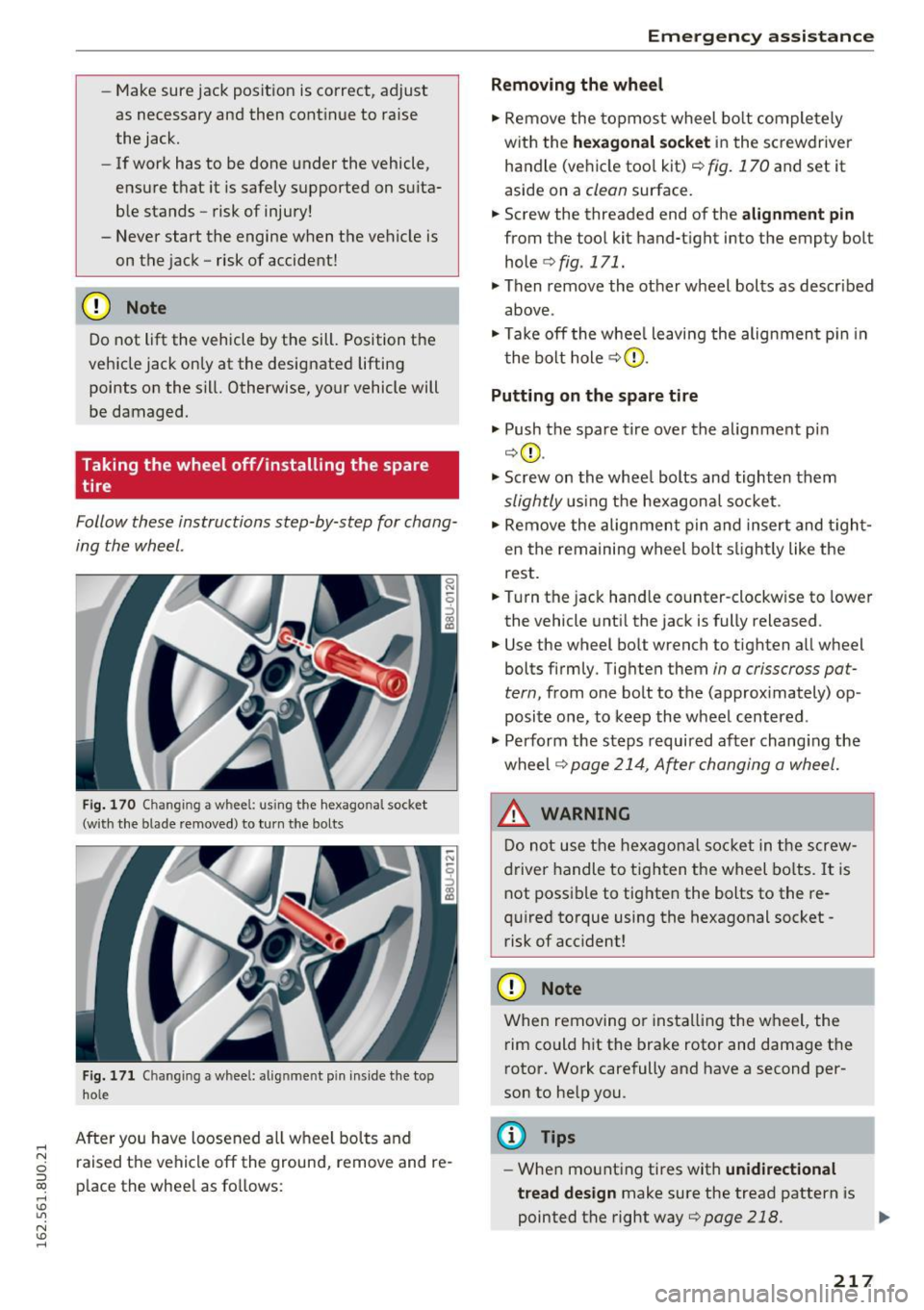
Fig. 170 C hangin g a w heel: using th e hexagonal s oc ket
(w it h the blade removed ) to turn t he bolt s
Fig. 171 Chan gin g a w hee l: a lig nm ent pin in side the to p
h ol e
After you have loosened all wheel bolts and
raised the vehicle off the ground, remove and re
p lace the whee l as follows:
Em ergen cy a ssis tanc e
Removing the whe el
"' Remove the topmost wheel bolt completely
with the
he xagona l s oc ket in the screwdriver
handle (vehicle too l kit)
c::> fig. 170 and set it
aside on a
clean surface.
.. Screw the threaded end of the
alignment pin
from the tool kit hand-tight into the empty bolt
hole
c::> fig . 171.
"' Then remove the other wheel bolts as described
above .
"' Take off the whee l leaving the alignment p in in
the bolt hole
c::> G) .
Putting on the spare tire
"' Push the spare tire over the alignment pi n
c::>(D .
"' Screw on the whee l bolts and tighten them
slightly u sing the hexagona l socket .
"' Remove the alignment pin and insert and t ight
en the remaining wheel bo lt s lightly like the
rest .
.. Turn the jack hand le count er-clockw ise to lower
the vehicle unti l the jack is fully released .
.. Use the wheel bo lt wrench to tighten all wheel
bolts firmly . Tighten them
in a crisscross pa t
tern,
from one bolt to the (approx imately) op
posite one, to keep the wheel centered .
"' Perform the steps required after chang ing the
wheel
c::> page 214, A~er changing a wheel.
_& WARNING
Do not use the hexagon al soc ket in the screw
driver handle to tighten the wheel bo lts. It is
not possible to tighten the bolts to the re
qu ired torque using the hexagonal socket -
risk of acc ident!
CD Note
When removing or installing the wheel, the
rim could h it the brake rotor and damage t he
rotor. Work carefully and have a second per
son to he lp you.
@ Tips
- When mounting tires with un idirectional
tread de sign
make sure the tread pattern is
pointed the right way
c::> page 218 . 1JJ,,
217
Page 221 of 252

.... N
c:i ::J CX)
.... I.Cl U"I
N I.Cl ......
Fuses and bulbs
Fuses
Replacing fuses
A fuse that has blown will have metal strips that
have burned through .
Fig. 172 Driver's side of the cockpit: fol ding the storage
co mpartme nt dow n
Fig. 173 Engine compartment: removing the fuse pane l
cover
The fuses are located in the driver's side footwell
beh ind th e storage compartment and in the en
gin e compartment .
Preparations
.. Switch the ign ition and all electr ical equipment
off.
.. Check the following table to see which fuse be-
longs to the equipment .
Fuses behind the storage compartment
.. Open the storage compartment .
.. Press the left and right retainers inward and
fold the compartm ent all the way down
¢fig . 172 .
Fuses in the engine compartment
.. Open the hood ¢ page 177.
Fuses and bulbs
.. To release the fuse panel cover, slide both slid
in g reta iners at the left and right forward
¢fig. 173 .
.. Remove the fuse panel cover.
Replacing fuses
The clamp is located below the fuses behind the
storage compartm ent (driver's side) .
.. Fold th is compartment all the way down and
remove the clamp from the holder .
.. Remove the colored plastic clip from the fuse
panel, if necessary . You can dispose of the plas
tic clip .
.. Remove the fuse using the clamp .
.. Replace the blown fuse only with an identical
new one .
.. Insta ll the cover.
Fuse color identification
Color Current rating
in amps
Black 1
Pu rple 3
Light brown 5
Brown 7.5
Red 10
Blue 15
Yellow 20
Whi te or transparent 25
green 30
orange 40
A WARNING
Do not repair fuses and never replace a blown
fuse with one that has a higher amp rat ing .
This can cause damage to the electr ical sys
tem and a fire.
(D Note
If a new fuse burns out again shortly after you
have installed it, have the electrical system
checked as soon as poss ible by an authorized
Audi dealer or authorized Audi Service Facili
ty .
219
Page 222 of 252

Fuses and bulbs
(D Tips
- The following table does not list fuse loca
tions that are not used.
- Some of the equipment listed in the follow
ing tables applies only to certain model ver
sions or certain optional equipment.
Cockpit fuse assignment
The fuse number is stamped into the plastic be
low or above each fuse.
No. Equipment
1 LED headlight (left)
2 LED headlight ( right)
5 LED headlight (left)
6 LED headlight (right)
7 Steering lock
8 Convenience access
9
Airbag control module, AIRBAG OFF indi-
cator light
12 Transmission control module
Air quality sensor for climate contro l sys-
tern, heated w indow washer nozzles,~
button, reverse light button<®>, oil level
13 sensor, climate control system, seat occu-
pant detection system, seat heating , but-
tons in the center console, automatic dim-
ming mirror
Engine control module, transmission con-
trol module, quattro control module,
14
brake lights, electromechanica l steering,
Gateway cont rol module, trailer hitch con-
trol module, ESC contro l module, light
switch, damping control module
Headlight range control module, instru-
ment illuminat ion, headl ights (left, right),
15 diagnostic connector, headlight range con-
trol module, crankcase housing heater, air
flow sensor, socket relay, DC/DC converter
16 Park ing system
17 Parking system rearview camera
18 TV tuner
19 E ngine starter control, DC/DC converter
220
No . Equipment
20
ESC contro l module, climate/heating con-
tro l, special functions interface
21 Selecto r mechanism power supply
22 Interior monitoring
© button, front interior lighting buttons,
23 diagnostic connector, light switch, light/
rain sensor, humidity sensor
25 Headlight power supply
26 Rear window wiper
27 Starter system
28 Infotainment
29
Supply for the park ing system rearv iew
camera and TV tuner
30 Infotainment
31 Infotainment
32 Instrument cluster
33 A utomat ic dimming rearview mirror
36
Cigarette lighter, cockpit/ luggage com-
partment socket
37 Cockpit/rear socket
38 Transmission control module
40 Trailer hitch control module
41 Trailer hitch control module
42 Trailer hitch control module
44 Rear window defogger
45
Electromechanical parking brake control
module
46 Trailer hitch control module
47 quattro control module
48 Aut omat ic lu ggage compartment lid con-
tro l module
so Fan
51
Electromechanical parking brake control
module
52 BCM
53 Fr ont seat heating
54 Panorama roof
55 Sun shade on the panorama roof
56 Adaptive dampers control module