2016 AUDI A4 parking
[x] Cancel search: parkingPage 120 of 278

Parking System
-You can change the volume and pitch of the
signals as well as the display ¢
page 120.
-What appears in the display is time-de
layed.
Reverse Parking
Applies to veh icles: with park ing system (rear, with rear view
camera)
Parking mode 1 can be used when parking in a
garage or parking space .
Fig. 134 MMI Di spla y: Aiming at a pa rk in g spot
Fig. 135 MM I Di splay: Alig ning the ve hicle
.-Switch the MMI on and select the reverse gear .
.- Turn the steering wheel until the orange orien
tation lines(!) appear in the parking spot
¢
fig. 134. Use the markings @to h elp you es
timat e the distance from an obstacl e. Each
marking corresponds to 3 ft (1 m). The blue
area represents an ex tension of the vehicle 's
outline by approximately 16
ft (5 m) to the
rear .
.- While driving in reverse gear, adjust the steer
ing wheel angle to fit the parking space with
the aid of the orange orientation lines
~ CD. @
marks the rear bumper. You should stop driving
in reverse as soon as and no later than when
118
the red orientation line@ abuts an object
¢ ,&. !
A WARNING
-The rear view camera does not show the en
tire area behind the vehicle
¢ page 116,
fig . 132.
Watch out especially for small chil
dren and animals. The rear view camera can
not always detect them, posing risk of an
accident!
- Please note that objects not touching the
ground can appear to be further away than
they really are (for example, the bumper of
a parked vehicle, a trailer hitch, or the rear
of a truck). In this case, you should not use
the help lines to help with parking, which
poses danger of an accident!
(D Note
- Low obstacles already signaled by a warning
can disappear from the system's detection
range as they are approached and will not
continue to be signaled. Objects such as
barrier chains, trailer draw bars, thin paint
ed vertical poles or fences may not be de
tected by the system , posing risk of dam
age .
- In the MMI display, the direction of travel of
the vehicle rear is represented depending on
the steering wheel angle. The vehicle front
swings out more than the vehicle rear .
Maintain plenty of distance from an obsta
cle so that your outside mirror or a corner of
your vehicle does not collide with any obsta
cles -danger of accident!
Page 121 of 278
.... N
0
""' CX)
.... I.Cl U"I
.... I.Cl ....
Parallel Parking
Applies to vehicles: with parking system (rear, wit h rear view
camera)
Use parking mode 2 to help you pork on the edge
of a street.
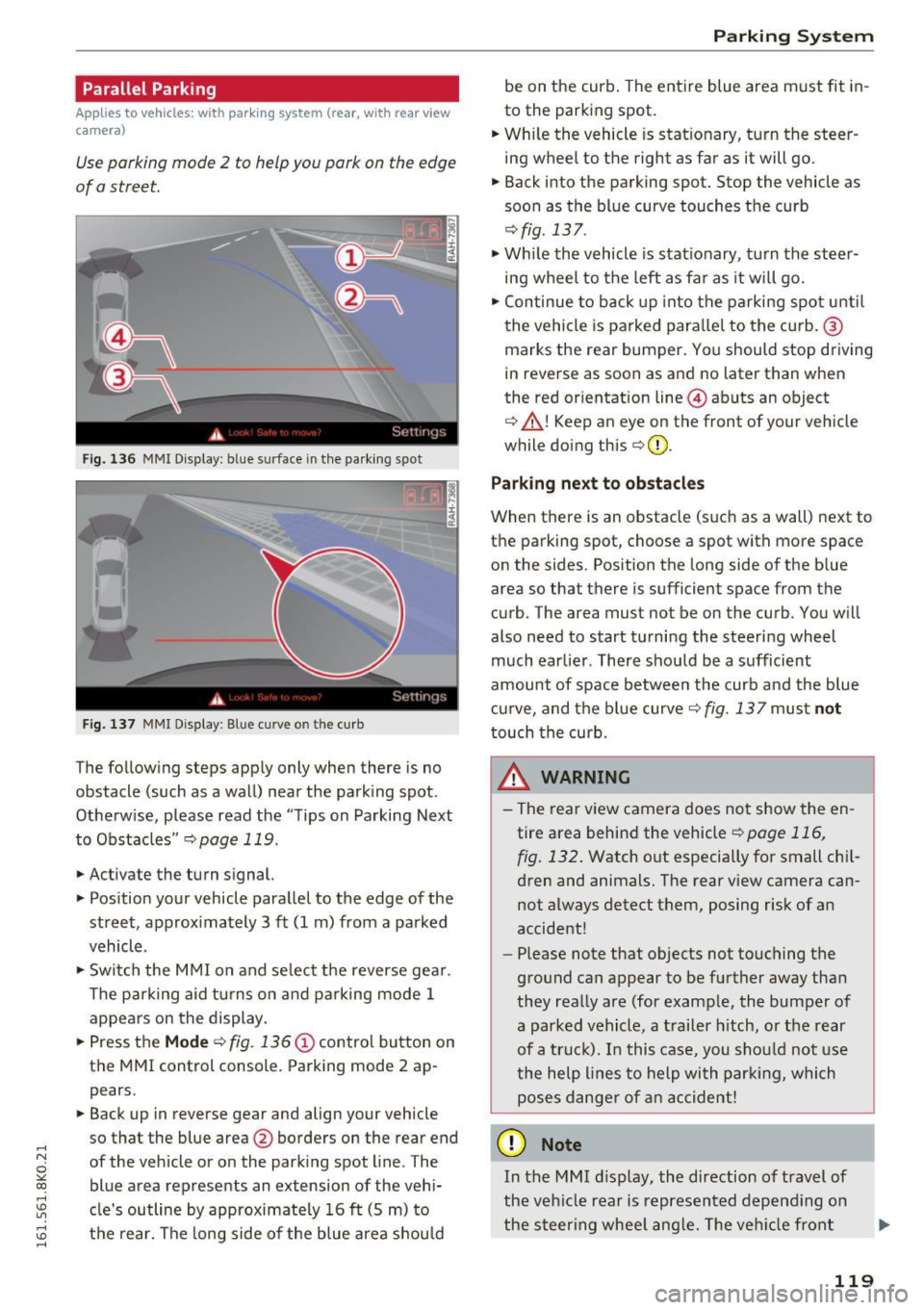
Fig. 136 MMI Display: b lue s urface in the parking spo t
Fig. 137 MMI D isplay : B lue cu rve o n th e curb
The following steps app ly only when there is no
obstacle (such as a wall) near the parking spot .
Otherw ise, please read the "T ips on Parking Next
to Obstacles"
¢ page 119.
.,. Activate the turn s ignal.
.,. Pos ition your vehicle parallel to the edge of the
street, approx imately 3
ft (1 m) from a parked
vehicle .
.,. Switch the MMI on and se lect the reverse gea r.
The pa rking aid tu rns on and parking mode 1
appears on the display.
.,. Press the
Mode c:::;, fig. 136 (D control button on
the MMI control console. Parking mode 2 ap pears.
.,. Back up in reverse gear and align your vehicle
so that the blue area @borders on the rear end
of the vehicle or on the park ing spot line . The
blue area represents an extension of the veh i
cle's outline by approximately 16
ft (5 m) to
the rear. The long side of the b lue area s hou ld
Parking S ystem
be on the curb . The entire blue area must fit in
to the parking spot.
.,. Wh ile the vehicle is stationary, turn the steer
ing wheel to the right as far as it will go.
.,. Back into the parking spot. Stop the vehicle as
soon as the blue curve touches the curb
c:::;,fig. 137 .
.,. Wh ile the vehicle is stat ionary, turn the steer
ing wheel to the left as far as it will go .
.,. Continue to back up into the parking spo t unt il
the vehicle is parked para llel to the curb. @
marks the rear bumper. You should stop driving
in reverse as soon as and no later than when
the red or ientation line @abuts an object
c:::;, &_ ! Keep an eye on the front of your vehicle
while doing this
c:::;, (I) _
Parking n ext to ob stacles
When there is an obstacle (s uch as a wall) next to
the parking spot, choose a spot with mo re space
on the sides . Position the long side of the b lue
area so that there is sufficient space from the
curb . The area must not be on the curb . You w ill
also need to start turning the steering wheel
much earlie r. There should be a sufficient
amount of space between the curb a nd the blue
c ur ve, and the b lue curve
c:::;, fig. 137 mus t not
touch the curb.
A WARNING
- The rear view camera does not show the en
tire area behind the vehicle
c:::;,page 116,
fig. 132 .
Watch out especially for small chi l
dren and animals. The rear view camera can
not always detect them, posing r isk of an
accident!
- Please note that objects not touching the
ground can appear to be further away than
they rea lly are (for examp le, the bumper of
a parked vehicle, a t railer hitch, o r th e rear
of a tr uck). In this case, you shou ld not use
the help lines to help wi th par kin g, which
poses dange r of an accident!
(D Note
In the MMI d isplay, the direction of travel of
the veh icle rear is represented depend ing on
the steer ing whee l ang le. The ve hicle front
119
Page 122 of 278

Parking System
swings out more than the vehicle rear. Main
tain plenty of distance from an obstacle so
that your outside mirror or a corner of your
vehicle does not collide with any obstacles -
danger of accident!
(D Tips
The left or right orientation lines and surfaces
will be displayed, depending on the turn sig
nal being used.
Adjusting the display and warning tones
Applies to vehicles: w ith parking system (rear, with rear view
camera)
The display and warning tones ore adjusted in
the radio or MMI*.
.,. Select: ICARlfunction button> Parking system.
Or
.. Select: ICARI function button> Car systems*
control button > Driver assist > Parking aid.
Display
- Off -when the parking system is switched on,
only audible signals are given.
-On -when the parking system is switched on,
the picture from the rear view camera is dis
played.
Warning tones
- Rear volume -
rear sensor volume
-Rear frequency -rear sensor frequency
-Music volume while parking -when the park-
ing system is switched on, the volume of the
active audio source is lowered.
The newly adjusted value is briefly heard from
the signal generator. The settings are automati
cally stored and assigned to the remote control
key.
A WARNING
- Always make sure that the volume and fre quency of the warning tones is adjusted so
that you can easily hear the acoustic dis
tance signal even if the radio is playing, the
air-conditioner blower is on High or there is
a high level of outside noise.
120
- Check the settings whenever someone else
has driven the vehicle before you.
@ Tips
-The warning tones can also be adjusted di
rectly from the rear view camera image.
Simply press the Settings* control button.
- Changed settings are activated when park
ing assist is switched on again.
Error messages
Applies to vehicles: with parking system (rear, with rear view
camera)
If a warning tone is audible for about five sec
onds when you turn on the ignition, there is a
malfunction in the system. Have the problem
corrected by your authorized Audi dealer .
Keep the sensors in the rear bumper clean and
free from ice so that the acoustic park assist sys
tem can function properly.
Page 194 of 278

Trailer mode
Trailer mode notes
Important to know
Your vehicle handles different ly when tow ing a
tra iler because of the additional weight and dif
ferent weight distr ibution. Safety, performance
and economy w ill great ly depend on how careful
ly you load your trailer and operate your rig.
Before you actua lly tow your trailer, practice
turning, stopping and backing up in an area away
from traffic . Keep practicing until you have be
come completely familiar with the way your vehi
cle-trailer combination behaves and responds.
Backing up is d ifficult and requires practice.
Backing up with a trailer generally requires steer
ing action opposite to that when backing up your
vehicle without a trailer.
Maintain a greater distance between your vehicle
and the one in front of you. You w ill need more
room to stop . To compensate for the trai ler, you
will need a larger than norma l turning radius.
When passing, remembe r that you cannot accel
erate as fast as you normally would because of
the added load. Make sure you have enough room
to pass. After passing, allow plenty of room for
your trai ler before chang ing lanes again.
Avoid jerky starts, sharp turns or rapid lane
changes.
(D Tips
- Do not tow a trailer during the break-in peri
od of you r vehicle.
- If you tow a trailer, your Audi may require
more frequent maintenance due to the ex
tra load~
page 258.
Parking on a slope
Do not pork on a slope with a trailer. If it cannot
be avoided, do so only ofter doing the following:
When parking:
.,. Apply t he foot brake .
.,. Have someone place chocks under both the ve
hicle and the trailer wheels.
192
.. With chocks in place, slowly release the brakes
until the wheel chocks absorb the load.
.. Turn the whee ls towards the curb .
.. App ly the parking brake .
.. Place an automat ic transmission* in P, respec
tively a manual transmission in first or reverse
gear .
When restarting after parking:
.. App ly the foot brake.
.. Start the engine.
.. Move the selector lever to 0/5, respectively a
manual transmission in first gear.
.. Release the parking brake and slowly pull out
and away from the whee l chocks.
.,. Stop and have someone ret rieve the wheel
chocks.
(D Tips
If you move the selector lever of the automat
ic transmission* to P before applying the
parking brake and before blocking the wheels,
you may have to use more force later to move
the lever out of the P position.
Page 206 of 278
Checking and Filling
-To reduce the risk of being burned, never
open the hood if you see or hear steam or
coolant escaping from the engine compart
ment . Wait until no steam or coolant can be
seen or heard before carefully opening the hood.
- Keep children away from the engine com partment.
- Never spill fluids on hot engine compo
nents. They can cause a fire.
- Never touch the radiator fan. The auxiliary
electric fan is temperature controlled and
can switch on suddenly .
- Never open the coolant reservoir cap when
the engine is still warm. The coolant system is pressurized and hot coolant could spray
out.
- Protect your face, hands and arm from
steam or hot engine coolant by placing a
thick rag over the cap when you open the coolant reservoir.
- Do not remove the engine cover under any
circumstances. This increases the risk of
burns.
- If work on the fuel system or the electrical
system is necessary:
- Always disconnect the battery.
- Never smoke or work near heaters or open
flames. Fluids in the engine compartment could start a fire.
- Keep an approved fire extinguisher imme
diately available.
- To avoid electrical shock and personal injury
while the engine is running or being started,
never touch:
- Ignition cables
- Other components of the high voltage
electronic ignition system .
- If you must perform a check or repair with
the engine running:
- First, fully apply the parking brake, move
selector lever of automatic transmission
204
to "P" (Park); put manual transmission in
Neutral.
- Always use extreme caution to prevent
clothing, jewelry, or long hair from get
ting caught in the radiator fan, V-belts or
other moving parts, or from contacting hot parts . Tie back hair before starting,
and do not wear clothing that will hang or
droop into the engine.
- Minimize exposure to emission and chemi
cal hazards
c::> /.1. .
A WARNING
California Proposition 65 Warning:
- Engine exhaust, some of its constituents, and certain vehicle components contain or
emit chemicals known to the State of Cali
fornia to cause cancer and birth defects and
reproductive harm . In addition, certain flu
ids contained in vehicles and certain prod
ucts of component wear contain or emit
chemicals known to the State of California
to cause cancer and birth defects or other
reproductive harm.
- Battery posts, terminals and related acces
sories contain lead and lead compounds,
chemicals known to the State of California
to cause cancer and reproductive harms .
Wash hands after handling.
(D Note
When adding fluids, always make sure that
they are poured into the proper container or
filler opening, otherwise serious damage to
vehicle systems will occur.
@ For the sake of the environment
To detect leaks in time, inspect the vehicle
floor pan from underneath regularly . If you
see spots from oil or other vehicle fluids, have
your vehicle inspected by an authorized Audi
dealer.
Page 242 of 278

Emergency assistance
"'Let the compressor run until the va lue specified
on the tire pressure label is reach ed
¢ page 227, fig. 191 . Switch the compressor
off after running for 12 minutes at the mos t -
danger of overheating!
A WARNING
The compressor and the tire filler hose can become extremely hot while they are running
- danger of burns!
CD Note
Switch the compressor off after running for
12 minutes at the most -danger of overheat
ing! Allow the compressor to cool down for a
few minutes before you use it again.
Replacing wheels
Before changing a wheel
Observe the following precaut ions for your own
and your passenger's safety when changing a
wheel.
"' After you experience a tire failure, pull the car
well away from moving traffic and try to reach
level ground before you stop ¢.&_ .
"' All passengers shou ld
leave the car and move
to a safe location (for instance, behind the
guardrail) ¢.&_ .
"' Engage the
parking brake to prevent your vehi
cle from rolling unintentionally ¢&_ .
"' Sh ift into
1st gear on vehicles w ith manual
transmission, or move the
selector lever to the
P position
on vehicles with automatic transmis
sion .
"' If you are towing a trailer: unhitch the trailer
from your vehicle.
"' Take the
jack¢ page 237 and the spare tire
¢ page 238 out of the luggage compartment .
A WARNING
You or your passengers could be injured wh ile
chang ing a wheel if you do not follow these
safety precautions :
- If you have a flat tire, move a safe distance
off the road . Turn off the engine, turn the
240
emergency flashers on and use other warn
ing devices to alert other motorists.
- Make sure that passengers wait in a safe
place away from the vehicle and well away
from the road and traffic.
- To help prevent the vehicle from moving
suddenly and possibly slipping off the jack,
always fully set the parking brake and block
the wheel diagonally opposite the wheel be ing changed with the folding chocks or oth
er objects . When one front whee l is lifted
off the ground, placing the Automat ic
T ransmission in "P" (Par k) w ill
not prevent
the vehicle from moving.
- Before you change a wheel, be sure the
ground is level and firm . If necessary, use a
sturdy board under the jack.
- Always store the vehicle tool kit, the jack*
and the replaced tire in the luggage com
partment
¢ page 126.
CD Note
If you a re changing the wheel on a steep in
cline, use a rock or similar object to block the
opposite wheel to prevent the vehicle from
moving.
(D Tips
Obey all laws.
Changing a wheel
When you change a wheel, follow the sequence
described below step-by-step and in exactly that
order .
1. Remove the decorative wheel cover* or the
wheel bolt caps* . For more details see also
¢ page 241, Decorative wheel covers or
¢ page 241, Wheels with wheel bolt cops.
2. Loosen the wheel bolts ¢page 242.
3. Locate the proper mounting point for the
jack and align the jack below that point
¢ page 242.
4. Lift the car with the jack¢ page 242.
5. Remove the wheel with the flat tire and then
install the
spare tire ¢page 243.
6. Tighten all whee l bolts lightly .
Page 244 of 278

Emergency assistance
The caps are to protect and keep the whee l bolts
clean.
Loosening and tightening the wheel bolts
The wheel bolts must be loosened before raising
the vehicle.
Fig . 200 Changing a wheel: loosening the wheel bolts
Loosening
• Install the wheel bolt wrench over the wheel
bolt and push it down as far as it will go.
• Take tight hold of the
end of the wrench handle
and turn the wheel bolts
counter-clockwise
about one single tur n in the direction of ar row
¢fig. 200.
Tightening
• Install the wheel bolt wrench over the wheel
bolt and push it down as far as it will go.
• Ta ke tight hold of the
end of the wrench handle
and turn each whee l bolt
clockwise until it is
seated.
_& WARNING
- Do not use force or hurry when changing a
wheel -you can cause the vehicle to slip off
the jack and cause serious personal injuries.
-Do not loosen the whee l bolts more than
one turn
before you raise the vehicle with
the jack. -You risk an injury .
(D Tips
-Never use the hexagonal socket in the han
dle of the screwdriver to loosen o r tighten
the wheel bolts.
- If a whee l bolt is very tight, you may find it
easier to loosen by carefully push ing down
242
on the end of the whee l bolt wrench with
one foot only. As you do so, hold on to the
car to keep your balance and take care not
to slip.
Raising the vehicle
The vehicle must be lifted with the jack first be
fore the wheel can be removed.
Fig. 201 Sill panels: marking s
Fig. 202 Sill: positio ning the vehicle jack
The location of the jack point is indicated by an
i ndentation on the underside of the vehicle
¢fig. 201.
• Activate the parking brake to prevent the vehi
cle from rolling unintentionally.
• Shift into
1st gear on vehicles with manua l
transmission or move the selector lever to the P
position on vehicles with automatic transmis
sion.
• Find the
marking (imp rint) on the sill that is
nearest the wheel that will be changed
¢ fig. 201. Behind the marking, there is a lift
ing point on the sill for the vehicle jack.
• Turn the
vehicle jack located under the lifting
point on the sill to raise the jack until the jaw
¢ fig. 202@covers the notch on the veh icle
¢ ~ ¢©. ~
Page 253 of 278

.... N
0
""' CX)
.... I.Cl U"I
.... I.Cl ....
When jump starting or charging the battery,
never connect the negative ground cable to
the battery negative post because the battery
manager system must be able to detect the
battery's state of charge. Always connect the
negative ground cable to the negat ive ground
post of the battery manager control unit .
Use of jumper cables
Make sure to connect the jumper cable clamps in
exactly the order described below!
Fig. 209 Engine compartment: Connectors for jumper ca
bles an d charger
Fig. 210 Jump starting w ith the battery of another vehicle :
@ booster battery, ® discharged vehicle battery
The procedure described be low for connecting
jumper cables is intended to provide a jump start
for your vehicle.
Vehicle with discharged battery:
.. Turn off lights and accessories, move lever of
automatic transmission to N (Neutral) or P
(Park) and set parking brake .
Connect POSITIVE(+) to POSITIVE(+) (red)
.,. Remove the cover above the jump start connec
t ion .
.,. Open th e cover on the positive pole
¢ fig. 209 .
Emergency situations
1. Connect one end of the red positive cab le on
the
jump start bolt¢ fig. 210 (D (Bolts un
der cover= "positive") of the vehicle to be
started @.
2. Connect the other end to the positive termi-
nal @of the booster battery @.
Connect NEGATIVE (-) to NEGATIVE (- )
(black)
3. Connect one end of the black negative cable
to the negative terminal @ of the booster
battery @.
4. Connect the other end to the
jump start bolt
@(Bolts with hex head= "negative ") of the
vehicle to be started @.
Starting the engine
.. Start the engine of the vehicle with the booster
battery @. Run the eng ine at a moderate
speed .
.,. Start engine w ith discharged vehicle battery @
in the usual manner.
.,. If the engine fails to start: do not keep the
starter cranking for longer than 10 seconds.
Wait for about 30 seconds and then try again .
.. With engine running, remove jumper cables
from both vehicles in the exact
reverse order .
.. Close the cover on the positive pole.
The battery is vented to the outside to prevent
gases from entering the vehicle interior . Make
sure that the jumper clamps are well connected
with their
metal parts in full contact with the
battery term inals .
A WARNING
To avoid ser ious personal injury and damage
to the vehicle, heed all warnings and instruc
tions of the jumper cable manufacturer.
If in
doubt, call for road service.
- Jumper cables must be long enough so that
the vehicles do not touch .
- When connecting jumper cables, make s ure
that they cannot get caug ht in any moving
parts in the engine compartment.
- Do not bend over the batteries -danger of
chemical bu rns!
251