2015 VOLVO V60 storage
[x] Cancel search: storagePage 134 of 414

03 Your driving environment
Transmission
03
132
Geartronic: starting on slippery
surfaces
Selecting 3rd gear in Geartronic’s manual shifting mode can help provide better tractionwhen starting off on slippery surfaces. To doso:
1. Depress the brake pedal and move the gear selector to the side from D toward
+S– .
2. Press the gear selector forward and release it (this selects 2nd gear). Press the selector forward again and release itto select 3rd gear. The optional steeringwheel paddles can also be used; see theprevious section "Geartronic: steeringwheel paddles."
3. Release the brake pedal and press gently on the accelerator pedal.
Shiftlock override
If the vehicle cannot be driven, for example because of a dead battery, the gear selectormust be moved from the P position before
the vehicle can be moved 4
.
Lift away the rubber mat on the floor of the storage compartment behind the cen-ter console to expose the small openingfor overriding the shiftlock system.
Insert the key blade into the opening. Press the key blade down as far as possi-ble and keep it held down.
Move the gear selector from the P posi-
tion. For information on the key blade, see page 64.
All Wheel Drive: AWD 5
Your Volvo can be equipped with permanent All Wheel Drive, which means that power isdistributed automatically between the frontand rear wheels. Under normal driving condi-tions, most of the engine's power is directedto the front wheels. However, if there is anytendency for the front wheels to spin, an elec-tronically controlled coupling distributespower to the wheels that have the best trac-tion.
4
If the battery is dead, the electric parking brake cannot be applied or released. Connect an auxiliary battery if the battery voltage is too low, see page 127.5
Standard on certain models.
Page 244 of 414
05 Comfort and driving pleasure
Passenger compartment convenience
05
242
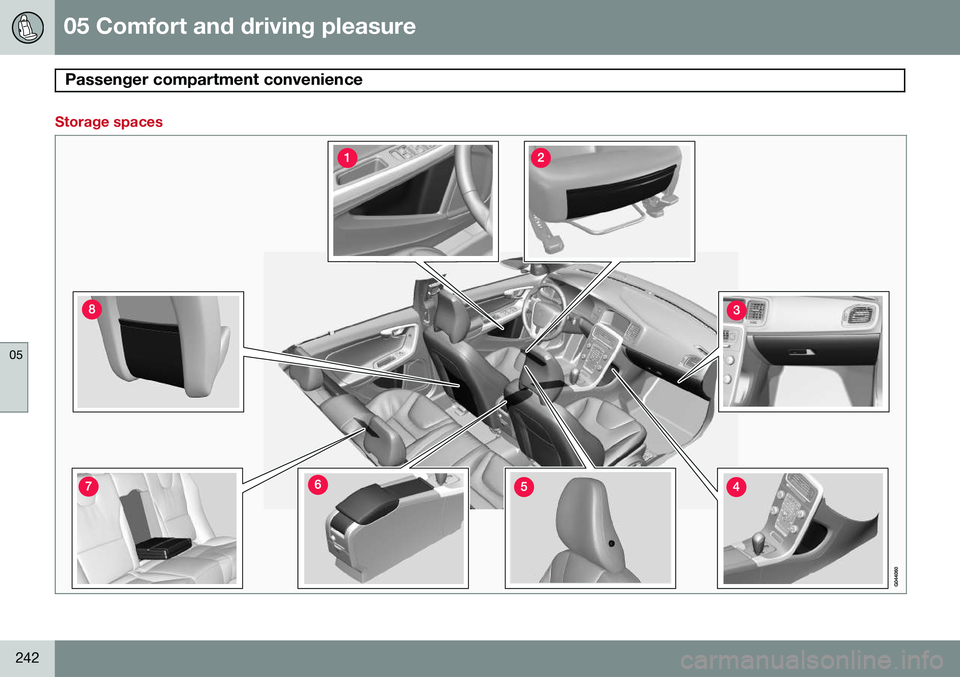
Storage spaces
Page 245 of 414

05 Comfort and driving pleasure
Passenger compartment convenience
05
}}
243
Compartment in door panel
Storage pocket on the front edge of the front seat cushions
Glove compartment
Storage compartment
Jacket holder
Storage compartment, 12-volt socket and AUX input/USB connector
Rear seat cup holders
Storage pocket
Jacket holderThe jacket hanger is located on the inboard side of the front passenger's seat headrestraint. It is only intended for hanging lightgarments.
Tunnel console
Storage compartment (for CDs, etc.) under armrest, AUX input/USB connec-tor.
Includes cup holder for driver and pas- senger, 12-volt socket and a small stor-age compartment.
Glove compartment
The owner's manual and maps can be kept here. There are also holders for pens and fuelcards. The glove compartment can be lockedmanually with the key blade, see page 73.
Page 273 of 414

06 Infotainment
AUX/USB sockets
06
}}
271
Connecting external devices
Sockets for auxiliary devices in the storage com- partment between the front seatsAn auxiliary device, such as an iPod ®
or MP3
player can be connected to the infotainment system via one of the sockets in the centerconsole storage compartment. A device con-nected to the USB socket can be operatedusing the vehicle's infotainment system con-trols. An iPod ®
or an MP3 player with rechargeable
batteries will also be charged if the device is connected to the USB socket (if the vehicle'signition is on or if the engine is running). To connect a device: 1. Press
MEDIA and turn TUNE to select
the desired source (
iPod, USB or AUX).
Press OK/MENU .
> For example, if a USB device has been selected, the text
Connect USB will
be displayed.
2. Connect the device to one of the sockets in the center console storage compart- ment (see the illustration).
The text
Reading USB will be displayed
while the system reads the device's folders. This may take a short time, depending on thefolder structure and the number of files. When this information has been loaded, track information will be displayed and a track canbe selected.
NOTE
• The system supports a number of iPod ®
models produced in 2005 or
later.
• In order to help avoid damage to the USB socket, it will be switched off ifthere is a short circuit or if the con-nected device uses too much current(which can happen if the device doesnot comply with the USB standard).The USB socket will reactivate thenext time the ignition is switched on ifthe problem no longer exists. If theproblem persists, contact a trainedand authorized Volvo service techni-cian.
Media menu selections can be made from the center console or the steering wheel keypad,see page 249 for more information.
Navigating and playing tracks 1Turn
TUNE to access the device's playlist
and to navigate in this list. Press OK/MENU
to either select a sub-folder or confirm achoice and begin playback. Press EXIT to
cancel and exit the playlist or to go back inthe folder structure. Press and hold EXIT to
go to the highest level in the playlist.
1 USB and iPod ®
only
Page 275 of 414
06 Infotainment
AUX/USB sockets
06
273
USB hubA USB hub can be connected to the USB socket, making it possible to connect severalUSB devices at the same time. To select one of the devices, go to the menu
USB menuSelect USB device.
MP3 playerMany MP3 players have a file indexing sys- tem that is not supported by the vehicle'sinfotainment system. In order to use an MP3 player, the system must be set to
USB
Removable device/Mass Storage Device.
iPod®
An iPod ®
receives current and its battery is
charged through the USB cable. The system will only play audio files from an iPod ®
.
NOTE
When an iPod ®
is used as a sound source,
the vehicle's infotainment system has a menu structure similar to the one in the iPod ®
. See the iPod's manual for detailed
information.
Compatible file formats via the USB socket
The following audio and video files are sup- ported by the system when playing a deviceconnected to the USB socket.
Audio formatsmp3, wma, aac, m4a
Video formatsdivx, avi, asf
Page 307 of 414

07 During your trip
Cargo area
07
}}
* Option/accessory, for more information, see Introduction.305
NOTE
On models equipped with this cover, it should be removed before a child seat isattached to the child restraint anchors.
Cargo net*
Storage compartment for the cargo net
Two cassettes containing nylon cargo nets are stored in a compartment under the cargoarea floor.
Attaching the cassette(s)
The two-sections of the net are attached to the rear side of the rear seat backrest. Thecassettes have different widths, and the wid-est section should be mounted on the rightside (seen from the rear of the vehicle).
1. Fold down the rear seat backrests.
2. Align the cassette’s mounting rail above the mounting brackets on the backrest
.
3. Slide the cassette onto the mounting brackets
.
4. Return the backrest to the upright posi- tion.
Using the net(s)
With the backrests uprightThe net is pulled up from the cassette and locks in position after approximately 1minute.
Pull up the right side of the net by grasp- ing its strap.
Insert the net’s rod in the retaining bracket on the right side near the ceilingand press it forward. It will click intoplace.
Extend the left section of the rod and insert it in the bracket on the left side ofthe cargo compartment. Press it forwarduntil it clicks into place.
Page 308 of 414
07 During your trip
Cargo area
07
306
Pull up the left side of the cargo net and secure it on the rod.
NOTE
•The net can be fastened in the same way if the rear seat backrests arefolded down. In this case, use theretaining brackets near the ceiling,above the front seats.
• The front passenger's seat backrestcan also be folded down for carryinglong objects.
Removing the cargo net cassettes1. Retract the net(s) in the reverse order.
2. Fold the entire rear seat backrest down.
3. Slide the cassettes outward until they
release from the mounting brackets.
WARNING
•When not in use, return the cassettes to their storage compartment underthe cargo area floor.
• Objects in the cargo area should besecurely anchored, even if the cargonet is correctly installed and in use.
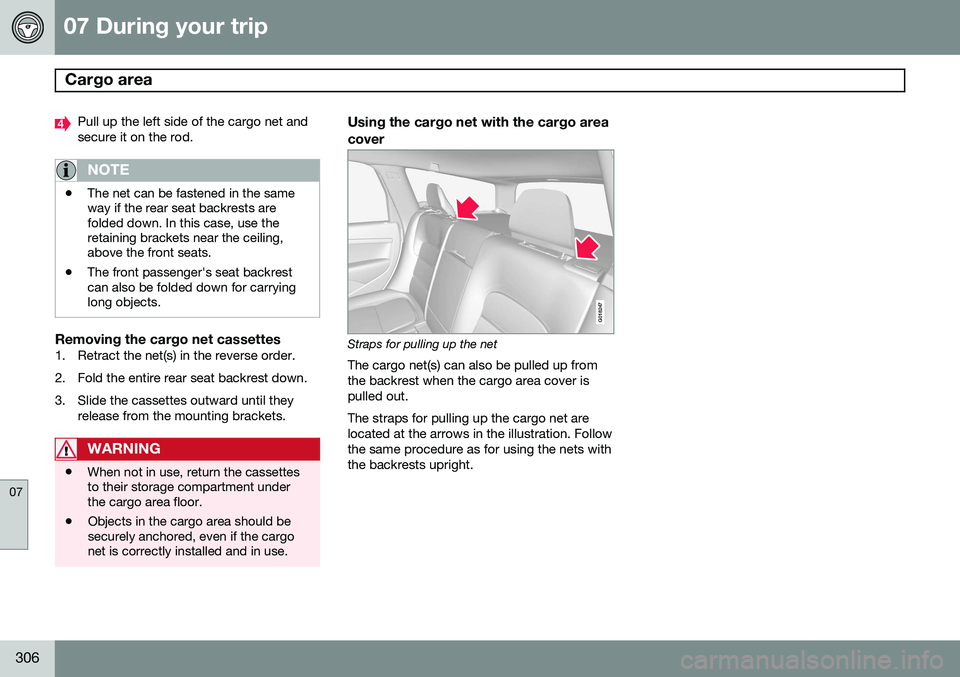
Using the cargo net with the cargo area cover
G018247
Straps for pulling up the net
The cargo net(s) can also be pulled up from the backrest when the cargo area cover ispulled out. The straps for pulling up the cargo net are located at the arrows in the illustration. Followthe same procedure as for using the nets withthe backrests upright.
Page 410 of 414
11 Index
11
408
Remote controlprivate locking...................................... 67
Remote key................................................ 58 approach lighting.................................. 61
immobilizer........................................... 60
key blade.................................. 58, 64, 67
locking the vehicle................................ 61
Personal Car Communicator.......... 61, 63
replacing the battery............................. 65
unlocking the vehicle............................ 61
Remote key/PCC common functions................................ 61
Reporting safety defects............................ 17
Roadside Assistance............................... 400
Road sign information (RSI)..................... 155
Roof loads............................................... 302
S
Safety, occupant........................................ 16
Safety defects, reporting........................... 17Seat belt reminder................................................ 20 Seat belts
Automatic locking retractor/Emer-
gency locking retractor......................... 39
buckling................................................ 18
maintenance......................................... 19
pretensioners........................................ 18
reminder................................................ 19
reminder warning light.......................... 86
securing child restraint systems 43,45, 48
unbuckling............................................ 19
use during pregnancy........................... 21
using..................................................... 18
Seats, front.......................................... 92, 93
Sensus..................................................... 216
Shiftlock....................................................... 9 override............................................... 132
Side door mirrors..................................... 114
Side impact airbags................................... 31
Sign information (RSI).............................. 155SiriusXM ™ satellite radio......................... 261
Snow chains............................................ 328
Snow tires................................................ 328
Spare tire................................................. 329
Spin control............................................. 152 SRS............................................................ 22
Stability system............................... 152, 153
Corner Traction Control (CTC)............ 152
Engine Drag Control (EDC)................. 152
indicator light........................................ 85
Start/Stop (engine function)..................... 139
Starting the engine.................................. 124 remote start........................................ 126
with keyless drive............................... 124
Starting the vehicle after a crash (crash mode).................... 36
Start inhibitor (immobilizer)........................ 60
Steel grid in cargo area............................ 304Steering wheel adjusting............................................... 99
heated................................................. 100
horn....................................................... 99
keypad.................................. 99, 219, 249
Steering wheel paddles............................. 99
Stone chips, touching up......................... 383
Storage spaces........................................ 242
Studded tires........................................... 328
Sunroof (moonroof).................................. 119
Sun shade................................................ 112