Page 7 of 439

As an added safety feature, your vehicle has been equipped with a Tire Pressure Monitoring System (TPMS) that illuminates a low tire pressure telltale when one or more of your tires is significantly underinflated. Accordingly, when the low tire pressure telltale illuminates, you should stop and check your tires as soon as possible, and inflate them to the proper pressure. Driving on a significantly underinflated tire causes the tire to overheat and can lead to tire failure. Underinflation also reduces fuel efficiency and tire tread life, and may affect the vehicle’s handling and stopping ability.
Please note that the TPMS is not a substitute for proper tire maintenance, and it is the driver’s respon-sibility to maintain correct tire pressure, even if underinflation has not reached the level to trigger illumination of the TPMS low tire pressure telltale.
Your vehicle has also been equipped with a TPMS malfunction indicator to indicate when the system is not operating properly. The TPMS malfunction indicator is combined with the low tire pressure telltale. When the system detects a malfunction, the telltale will flash for approximately 1 minute and then remain continuously illuminated. This sequence will continue upon subsequent vehicle start-ups as long as the malfunction exists.
When the malfunction indicator is illuminated, the system may not be able to detect or signal low tire pressure as intended. TPMS malfunctions may occur for a variety of reasons, including the installation of replacement or alternate tires or wheels on the vehicle that prevent the TPMS from functioning properly. Always check the TPMS malfunction telltale after replacing one or more tires or wheels on your vehicle to ensure that the replacement or alternate tires and wheels allow the TPMS to continue to function properly.
Resetting and recalibrating the benchmark tire pressure
Resetting the tire pressures in the Infotainment system resets the benchmark tire pressure used by the TPMS to the current tire pressure in the tires based on the circumference of the tires.
x Switch on the ignition.
x Press the #!2 Infotainment button ⇒ Menu and system settings (SETUP).
x Tap the
Page 18 of 439
The red zone at the end of the scale indicates maximum permissible engine rpm (revolutions per minute) for all gears after the break-in period. Before reaching the red zone, select the next
higher gear or selector lever position D/S, or ease your foot off the accelerator ⇒ .
(3) Displays
(4) Reset, set, and display button
(5) Fuel gauge
(6) Engine coolant temperature display ~
NOTICE
x To help prevent engine damage, always avoid high engine speeds, full throttle acceleration, and heavy engine loads when the engine is cold.
x To help prevent engine damage, the tachometer needle should only enter the red zone (warning zone) briefly.
Upshifting early into the next higher gear saves fuel and reduces engine noise.
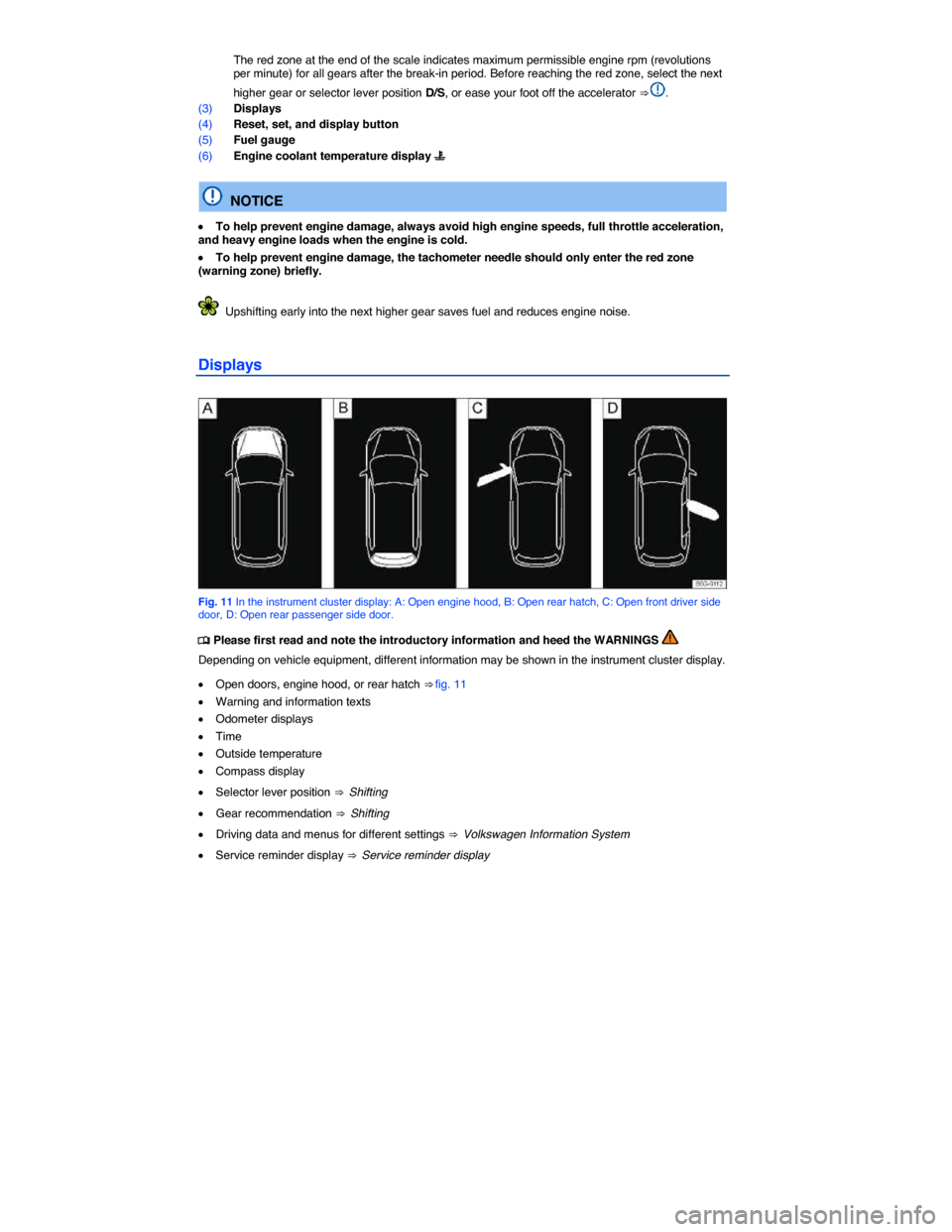
Displays
Fig. 11 In the instrument cluster display: A: Open engine hood, B: Open rear hatch, C: Open front driver side door, D: Open rear passenger side door.
Page 37 of 439
Menu Submenu Setting options See
Multifunction
display (MFD)
– Display or hide the
following data in the
Multifunction display:
– Current fuel con-
sumption
– Average fuel con-
sumption
– Convenience con-
sumers
– Eco tips
– Travel time
– Distance traveled
– Average speed
– Digital speed dis-
play
– Speed warning
– Reset the following
data in the Multifunc-
tion display:
– Driving data for
“Since start” trip
memory
– Driving data for
“Extended period”
trip memory
Time and date – Select and set the
following data:
– Clock time source
(manual, GPS)
– Time
– Daylight savings
time
– Time zone
– Time format (12
hour, 24 hour)
– Date
– Date format
–
Page 38 of 439
Menu Submenu Setting options See
Units – Set the units for the
following:
– Distance
– Speed
– Temperature
– Volume
– Consumption
– Pressure
–
Service – Display the following
data:
– Vehicle identifica-
tion number (VIN)
– Date of next in-
spection service
– Date of next oil
change service
Factory set-
tings
– Reset the following
features:
– All settings
– Parking aids
– Lights
– Mirrors and wipers
– Open and close
– Multifunction dis-
play
–
Page 133 of 439
Coming
Home
Action
Switch off: – Automatically after delay period is over.
– Automatically, if a vehicle door or the rear hatch is still
open about 30 seconds after activation.
– Turn light switch to the / position.
– Switch the ignition on.
Leaving
Home Action
Switch on: – Unlock the vehicle if the light switch is in the !54/ posi-
tion and the low-light sensor registers darkness.
Switch off: – Automatically after preset delay period is over.
– Lock the vehicle.
– Turn the light switch to the / position.
– Switch the ignition on.
The length of time the lights stay on can be adjusted or the feature can be activated and deac-tivated in the Infotainment system by pressing the #!2 button followed by the
Page 416 of 439

WARNING
Changing a wheel, especially on the side of the road, can be dangerous. To help reduce the risk of serious personal injury:
x Always stop the vehicle as soon as it is safe to do so. Move the vehicle a safe distance off the road where it is safe to change the wheel.
x Always make sure that all passengers, especially children, are in a safe place outside the vehicle and away from the vehicle and traffic (such as behind a guard rail).
x Turn on the emergency flashers and set up another warning device about 25 yards (25 meters) behind the vehicle to warn approaching traffic.
x Change a wheel by yourself only if you are familiar with the necessary steps. Otherwise, get expert assistance.
x Always switch the engine off, firmly apply the parking brake, and shift the transmission into Park (P) (automatic transmission) or any gear (manual only) to help prevent the vehicle from moving suddenly and slipping off the jack.
x Always make sure that the ground is level and firm. If necessary, place the jack on a large and sturdy board or on a similar ground support.
x Always block the wheel diagonally opposite the wheel being changed with chocks or other similar things.
x If you are towing a trailer, always unhitch it from your vehicle before starting to change the wheel. Always apply the trailer brakes firmly and make sure the trailer cannot move unin-tentionally.
x Always use proper and undamaged tools when changing a wheel.
x Once a wheel is lifted off the ground, having the transmission in Park (P) or in gear will not prevent sudden vehicle movement.
x Always use a jack that has been approved by the manufacturer for your vehicle. Never use other jacks, even if they have been approved for use on other Volkswagen models.
x To reduce the risk of losing control, crashes, and serious personal injuries, never loosen the screws on rims with threaded rim rings.
x After changing a wheel, have the wheel bolt tightening torque checked with an accurate torque wrench.
x After changing a wheel or tire, reset the Tire Pressure Monitoring System ⇒ Tire Pressure Monitoring System (TPMS).
Preparations for changing a wheel