Page 316 of 540
3166-1. Using the air conditioning system and defogger
YARIS_F_WE_52G04E
Press .
Air outlets and fan speed are automatically adjusted according to
the temperature setting.
Adjust the temperature setting.
To stop the operation, press .
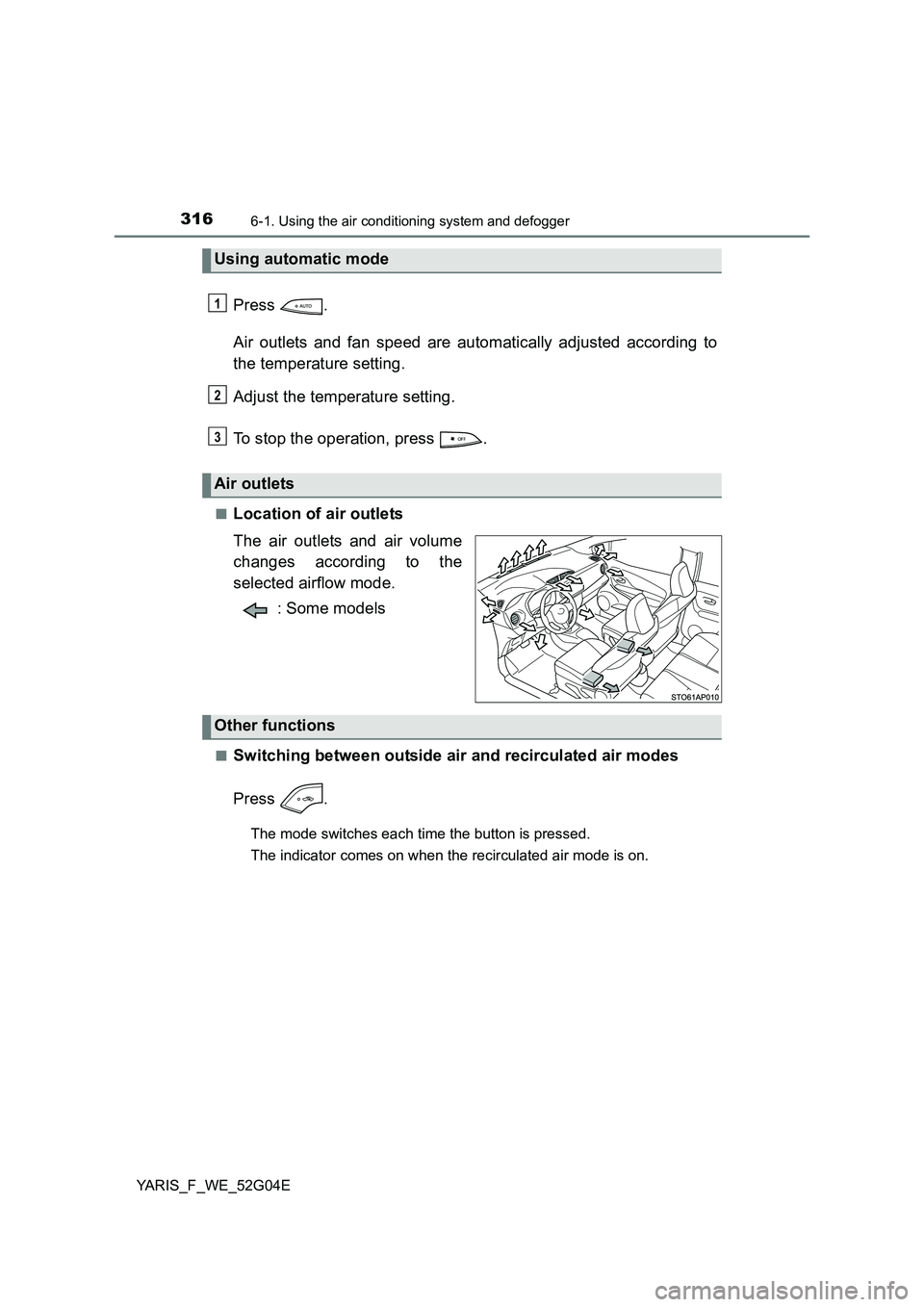
■Location of air outlets
The air outlets and air volume
changes according to the
selected airflow mode.
: Some models
■Switching between outside air and recirculated air modes
Press .
The mode switches each time the button is pressed.
The indicator comes on when the recirculated air mode is on.
Using automatic mode
Air outlets
1
2
3
Other functions
Page 326 of 540
3266-2. Using the interior lights
YARIS_F_WE_52G04E
On
Off
■ Illuminated entry system
Vehicles without a smart entry & start system
The lights automatically turn on/off according to the engine switch position,
whether the doors are locked/unloc ked, and whether the doors are opened/
closed.
Vehicles with a smart entry & start system
The lights automatically turn on/off according to engine switch mode, the
presence of the electronic key, whet her the doors are locked/unlocked, and
whether the doors are opened/closed.
■ To prevent battery from being discharged
● The following lights will go off automatically after 20 minutes:
• Interior/personal lights
• Luggage compartment light
• Footwell lights
● If the engine switch light remain on when the door is not fully closed, the
light will go off automatically after 20 minutes.
■ Customization
Settings (e.g. the time elapsed before lights turn off) can be changed.
(Customizable features P. 515)
Personal lights
1
2
Page 364 of 540

3647-3. Do-it-yourself maintenance
YARIS_F_WE_52G04E
■Engine oil consumption
A certain amount of engine oil will be consumed while driving. In the following
situations, oil consumption may increase, and engine oil may need to be
refilled in between oil maintenance intervals.
● When the engine is new, for example directly after purchasing the vehicle or
after replacing the engine
● If low quality oil or oil of an inappropriate viscosity is used
● When driving at high engine speeds or with a heavy load, when towing
(except for South Africa), or when driving while accelerating or decelerating
frequently
● When leaving the engine idling for a long time, or when driving frequently
through heavy traffic
■ After changing the engine oil (diesel engine only)
The engine oil maintenance data should be reset. Perform the following pro-
cedures:
Switch the display to the trip meter “A” when the engine is running.
( P. 93)
Turn the engine switch to the “LOCK” position (vehicles without a smart
entry & start system) or off (vehicles with a smart entry & start system).
Vehicles without a smart entry & start system:
While pressing the display change button ( P. 93), turn the engine
switch to the “ON” position (do not start the engine because reset mode
will be canceled). Continue to press and hold the button until the trip
meter displays “000000”.
Vehicles with a smart entry & start system:
While pressing the display change button ( P. 93), turn the engine
switch to the IGNITION ON mode (do not start the engine because other-
wise the reset mode will be canceled). Continue to press and hold the
button until the trip meter displays “000000”.
1
2
3
Page 479 of 540

4798-2. Steps to take in an emergency
8
When trouble arises
YARIS_F_WE_52G04E
Touch the Toyota emblem side
of the electronic key to the
engine switch.
The engine switch will turn to IGNI-
TION ON mode.
When the smart entry & start sys-
tem is deactivated in customization
setting, the engine switch will turn
to ACCESSORY mode.
Firmly depress the brake pedal (Multidrive) or clutch pedal (manual
transmission) and check that (green) turns on.
Press the engine switch.
In the event that the engine still cannot be started, contact any autho-
rized Toyota dealer or repairer, or another duly qualified and equipped
professional.
■ Stopping the engine
Shift the shift lever to P (Multidrive) or N (manual transmission) and press the
engine switch as you normally do when stopping the engine.
■ Replacing the key battery
As the above procedure is a temporary measure, it is recommended that the
electronic key battery be replaced immediately when the battery is depleted.
( P. 394)
■ Changing engine switch modes
Release the brake pedal (Multidrive) or clutch pedal (manual transmission)
and press the engine switch in step above.
The engine does not start and modes will be changed each time the switch is
pressed. ( P. 188)
■ When the electronic key does not work properly
Make sure that the smart entry & start system has not been deactivated in the
customization setting. If it is off, turn the function on.
(Customizable features: P. 515)
2
3
4
3
Page 515 of 540

5159-2. Customization
9
Vehicle specifications
YARIS_F_WE_52G04E
Customizable features
Some function settings are changed simultaneously with other func-
tions being customized. Contact any authorized Toyota dealer or
repairer, or another duly qualified and equipped professional for fur-
ther details.
Vehicles with a Navigation/Multimedia system: Settings that can be
changed using the Navigation/Multimedia system
(For further information on customizing settings using the Naviga-
tion/Multimedia system, refer to the “Navigation and multimedia
system Owner’s manual”.)
Settings that can be changed by any authorized Toyota dealer or
repairer, or another duly qualified and equipped professional for fur-
ther details
Definition of symbols: O = Av ailable, — = Not available
Your vehicle includes a variety of electronic features that can be
personalized to suit your preferences. Programming these pref-
erences requires specialized equipment and may be performed
by any authorized Toyota dealer or repairer, or another duly
qualified and equipped professional.
Customizable features
1
2
Page:
< prev 1-8 9-16 17-24