Page 228 of 540
2284-5. Toyota Safety Sense
YARIS_F_WE_52G04E
◆Pre-crash braking
When the system determines that the possibility of a frontal colli-
sion with a vehicle is high, the system warns the driver. If the sys-
tem determines that the possibility of a collision is extremely high,
the brakes are automatically applied to help avoid the collision or
reduce the collision speed.
■Changing the pre-crash warning timing
Each time the PCS switch is
pressed, the warning timing
changes as follows:
Far (operation starts earlier)
Middle (default setting)
Near (operation starts later)
When the PCS switch is
pressed to turn the system on,
the PCS activation indicator will
turn on and the current warning
timing will be displayed on the
multi-information display.
Changing the pre-crash safety system
1
2
3
Page 239 of 540

2394-5. Toyota Safety Sense
4
Driving
YARIS_F_WE_52G04E
● When the lane markers are on a curb etc.
● When lane markers are obscured or partially obscured by sand, dirt, etc.
● When there are shadows on the road running parallel with lane markers, or
if a shadow covers the lane markers
● When driving on a particularly bright road surface, such as concrete
● When driving on a road surface that is bright due to reflected light
● When driving in a location where the light level changes rapidly, such as the
entrance to or exit from a tunnel
● When sunlight or the headlights of oncoming vehicles are shining directly
into the camera lens
● When driving on roads that are branching or merging
● When driving on a road surface that is wet due to rain, previous rainfall,
standing water, etc.
● When the vehicle experiences strong up-and-down motion such as when
driving on an extremely rough road or on a seam in the pavement
● When headlight brightness at nighttime is reduced due to dirt on the lenses,
or when the headlights are misaligned
● When driving on winding roads or roads that are uneven
● When driving on rough or unpaved roads
● When the windshield is dirty, or if raindrops, condensation or ice are adher-
ing to the windshield
● When the heater is blowing to the feet, the upper part of the windshield may
get fogged up and have a negative effect
● When cleaning the inside of the windshield, touching the lens or getting
glass cleaner on the lens may have a negative effect
■ When changing the tires
Depending on the tires used, sufficient performance may not be maintainable.
■ If the LDA indicator comes on in yellow
It may indicate a malfunction in the system. Contact any authorized Toyota
dealer or repairer, or another duly qualified and equipped professional.
Page 246 of 540
2464-6. Using the driving support systems
YARIS_F_WE_52G04E
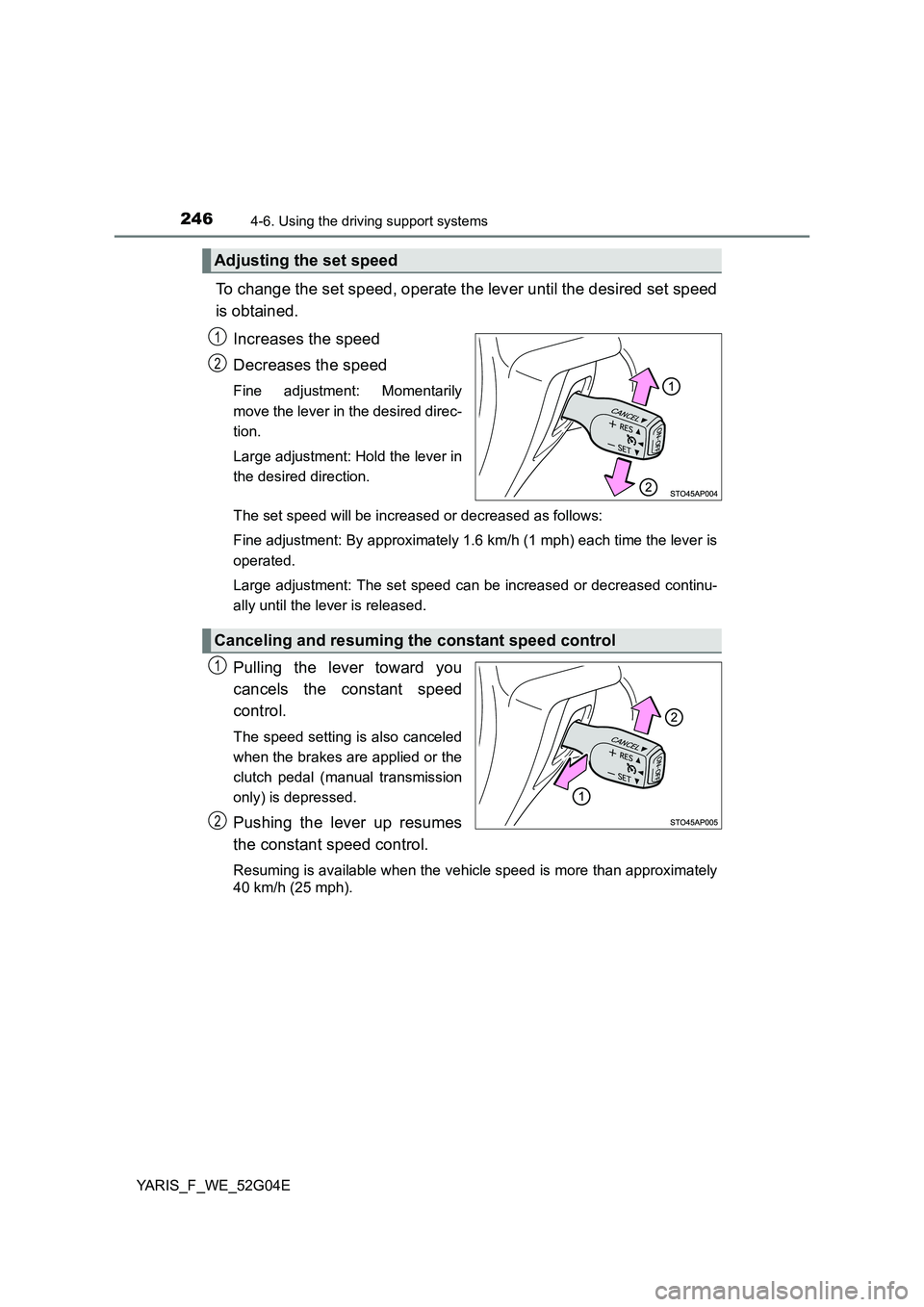
To change the set speed, operate the lever until the desired set speed
is obtained.
Increases the speed
Decreases the speed
Fine adjustment: Momentarily
move the lever in the desired direc-
tion.
Large adjustment: Hold the lever in
the desired direction.
The set speed will be increased or decreased as follows:
Fine adjustment: By approximately 1.6 km/h (1 mph) each time the lever is
operated.
Large adjustment: The set speed can be increased or decreased continu-
ally until the lever is released.
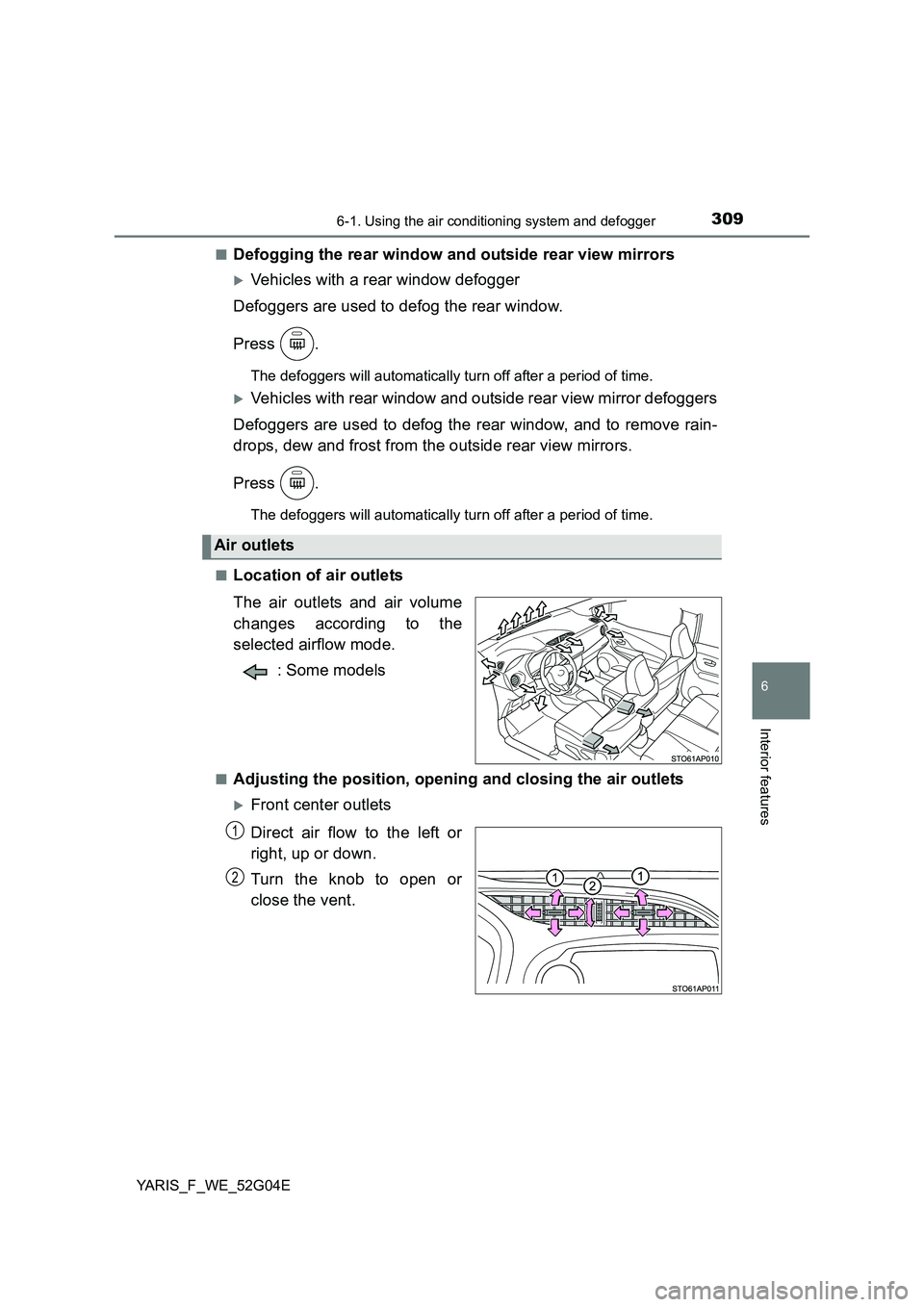
Pulling the lever toward you
cancels the constant speed
control.
The speed setting is also canceled
when the brakes are applied or the
clutch pedal (manual transmission
only) is depressed.
Pushing the lever up resumes
the constant speed control.
Resuming is available when the vehicle speed is more than approximately
40 km/h (25 mph).
Adjusting the set speed
1
2
Canceling and resuming the constant speed control
1
2
Page 250 of 540
2504-6. Using the driving support systems
YARIS_F_WE_52G04E
Accelerate or decelerate the
vehicle to the desired speed,
and push the lever down to set
the speed.
The vehicle speed at the moment
the lever is released becomes the
set speed.
■Speed limiter can be set when
The speed limiter can be set at any vehicle speed. However, if the
speed limiter is set while the vehicle speed is below 30 km/h (18
mph), the speed limiter will be set to 30 km/h (18 mph).
To change the set speed, operate the lever until the desired set speed
is obtained.
Increases the speed
Decreases the speed
Fine adjustment: Momentarily
move the lever in the desired direc-
tion.
Large adjustment: Hold the lever in
the desired direction.
When the set speed is shown in “MPH”
Fine adjustment: By approximately 1.6 km/h (1 mph) each time the
lever is operated.
Large adjustment: By approximately 8 km/h (5 mph) for each 0.75
seconds the lever is held.
When the set speed is shown in “km/h”
Fine adjustment: By approximately 1 km/h (0.6 mph) each time the
lever is operated.
Large adjustment: By approximately 5 km/h (3.1 mph) for each 0.75
seconds the lever is held.
2
Adjusting the set speed
1
2
Page 285 of 540
2855-4. Playing audio CDs and MP3/WMA discs
5
Audio system
YARIS_F_WE_52G04E
■Selecting a folders one at a time
Press “ ” or “” on to select the desired folder.
■Selecting a folder and file from folder list
Press .
The folder list will be displayed.
Turn and press to select a folder and a file.
To return to the previous display, press .
To exit, press .
■Returning to the first folder
Press and hold “ ” on until you hear a beep.
■Selecting files
Turn or press “ ” or “” on to select the desired file.
■Fast-forwarding and reversing files
To fast-forward or reverse, press and hold “ ” or “” on .
■Repeat play
Pressing (RPT) changes modes in the following order:
File repeat Folder repeat* Off.
*: Available except when RDM (random playback) is selected
■Random playback
Pressing (RDM) changes modes in the following order:
Folder random Disc random Off.
Playing back MP3 and WMA discs
1
2
Page 300 of 540
3005-5. Using an external device
YARIS_F_WE_52G04E
■Selecting a folders one at a time
Press “ ” or “” on to select the desired folder.
■Selecting a folder and file from folder list
Press .
The folder list will be displayed.
Turn and press to select a folder and a file.
To return to the previous display, press .
To exit, press .
■Returning to the first folder
Press and hold “ ” on until you hear a beep.
Turn or press “ ” or “” on to select the desired file.
To fast-forward or reverse, press and hold “ ” or “” on .
Pressing (RPT) changes modes in the following order:
File repeat Folder repeat* Off.
*: Available except when RDM (random playback) is selected
Selecting a folder
Selecting files
Fast-forwarding and reversing files
Repeat play
1
2
Page 309 of 540
3096-1. Using the air conditioning system and defogger
6
Interior features
YARIS_F_WE_52G04E
■Defogging the rear window and outside rear view mirrors
Vehicles with a rear window defogger
Defoggers are used to defog the rear window.
Press .
The defoggers will automatically turn off after a period of time.
Vehicles with rear window and outside rear view mirror defoggers
Defoggers are used to defog the rear window, and to remove rain-
drops, dew and frost from the outside rear view mirrors.
Press .
The defoggers will automatically turn off after a period of time.
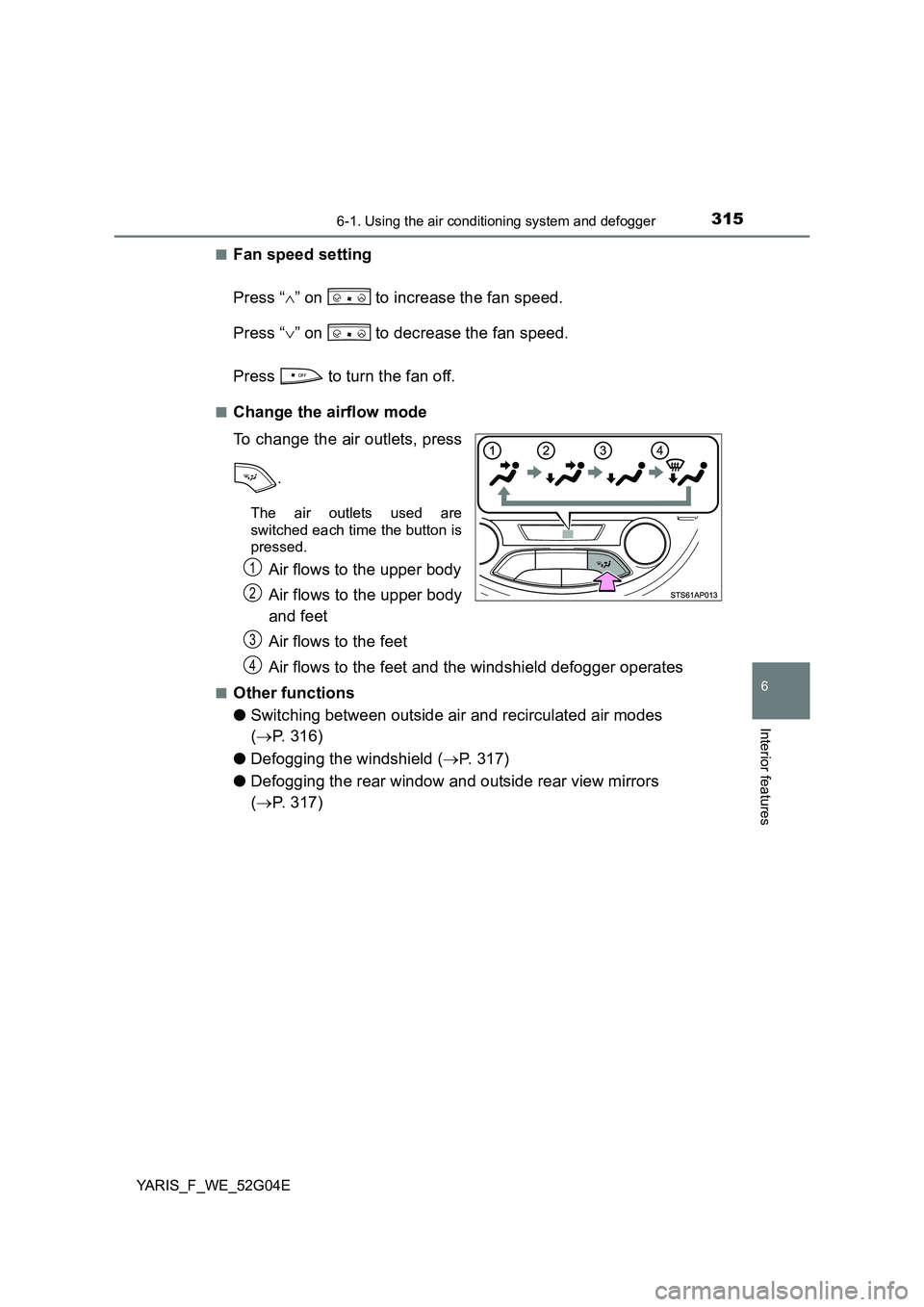
■Location of air outlets
The air outlets and air volume
changes according to the
selected airflow mode.
: Some models
■Adjusting the position, opening and closing the air outlets
Front center outlets
Direct air flow to the left or
right, up or down.
Turn the knob to open or
close the vent.
Air outlets
1
2
Page 315 of 540
3156-1. Using the air conditioning system and defogger
6
Interior features
YARIS_F_WE_52G04E
■Fan speed setting
Press “ ” on to increase the fan speed.
Press “ ” on to decrease the fan speed.
Press to turn the fan off.
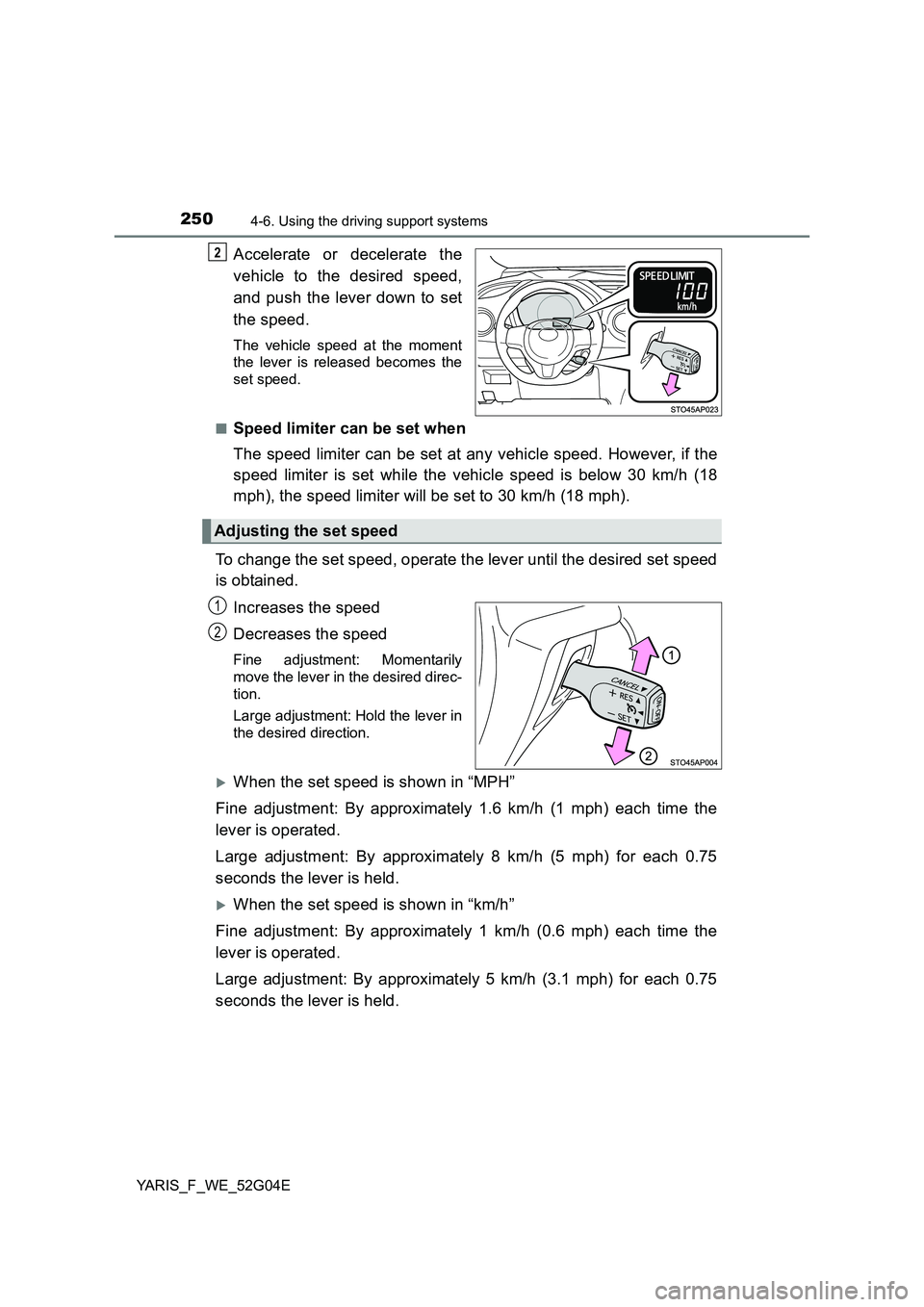
■Change the airflow mode
To change the air outlets, press
.
The air outlets used are
switched each time the button is
pressed.
Air flows to the upper body
Air flows to the upper body
and feet
Air flows to the feet
Air flows to the feet and the windshield defogger operates
■Other functions
● Switching between outside air and recirculated air modes
( P. 316)
● Defogging the windshield (P. 317)
● Defogging the rear window and outside rear view mirrors
( P. 317)
1
2
3
4