Page 46 of 544
46
1-2. Opening, closing and locking the doors
URBAN CRUISER_OM_OM52F47E_(EE)
■ If the smart entry & start system does not operate properly
●Locking and unlocking the doors: Use the mechanical key. ( →P. 484)
● Starting the engine: →P. 485
■ When the electronic key battery is fully depleted
→ P. 398
■ Customization
Settings (e.g. smart entry & start system) can be changed.
(Customizable features →P. 526)
Page 50 of 544
50
1-2. Opening, closing and locking the doors
URBAN CRUISER_OM_OM52F47E_(EE)
Hereby, Tokai Rika Co., Ltd., declares that this Electronic Key,
model B90EA, is in compliance with the essential requirements and
other relevant provisions of Directive 1999/5/EC.
Page 58 of 544
58
1-2. Opening, closing and locking the doors
URBAN CRUISER_OM_OM52F47E_(EE)
■ Operation signals
The emergency flashers flash to indicate that the doors have been locked/
unlocked. (Locked: Once; Unlocked: Twice)
■ Door lock buzzer (vehicles with smart entry & start system)
If a door is not fully closed, a buzzer sounds continuously for 10 seconds if
an attempt to lock the door is made. Fully close the door to stop the buzzer,
and lock the vehicle once more.
■ Alarm (if equipped)
Using the wireless remote control to lo ck the doors will set the alarm system.
■ Key battery depletion
Vehicles without smart entry & start system
If the wireless remote control function does not operate, the battery may be
depleted. Replace the battery when necessary. ( →P. 398)
Vehicles with smart entry & start system
→ P. 4 2
■ Security feature
If a door is not opened within approximately 30 seconds after the vehicle is
unlocked, the security feature automatically locks the vehicle again.
■ If the wireless remote control does not operate properly
●Locking and unlocking the doors: Use the key. ( →P. 484)
● Starting the engine: →P. 485
■ When the electronic key battery is fully depleted (vehicles with smart
entry & start system)
→ P. 398
Page 59 of 544
59
1-2. Opening, closing and locking the doors
1
Before driving
URBAN CRUISER_OM_OM52F47E_(EE)
■
Conditions affecting operation
Vehicles without smart entry & start system
The wireless remote control function may not operate normally in the follow-
ing situations.
●Near a TV tower, radio station, electr ic power plant, airport or other facil-
ity that generates strong radio waves
● When carrying a portable radio, cellular phone or other wireless commu-
nication device
● When the wireless key has come into contact with, or is covered by a
metallic object
● When a wireless key (that emits radio waves) is being used nearby
● When the wireless key has been left near an electrical appliance such as
a personal computer
● When the wireless key battery is depleted
● If window tint with a metallic content or metallic objects are attached to
the rear window
Vehicles with smart entry & start system
→ P. 4 0
■ Customization
Settings (e.g. door lock buzzer) can be changed.
(Customizable features →P. 526)
Page 66 of 544
66
1-2. Opening, closing and locking the doors
URBAN CRUISER_OM_OM52F47E_(EE)
Side doors
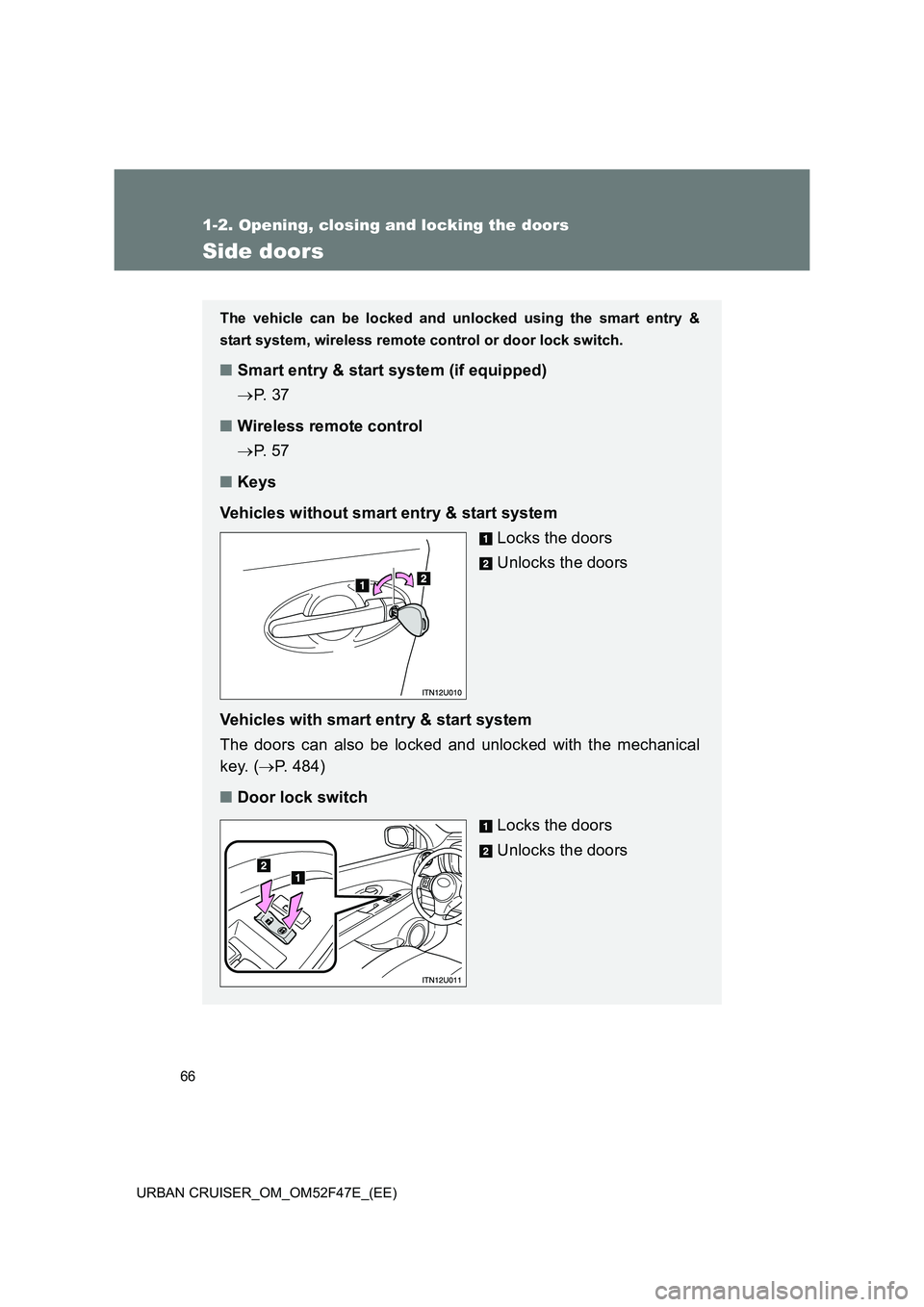
The vehicle can be locked and unlocked using the smart entry &
start system, wireless remote control or door lock switch.
■Smart entry & start system (if equipped)
→P. 3 7
■ Wireless remote control
→P. 5 7
■ Keys
Vehicles without smart entry & start system Locks the doors
Unlocks the doors
Vehicles with smart entry & start system
The doors can also be locked and unlocked with the mechanical
key. ( →P. 484)
■ Door lock switch
Locks the doors
Unlocks the doors
Page 67 of 544
67
1-2. Opening, closing and locking the doors
1
Before driving
URBAN CRUISER_OM_OM52F47E_(EE)
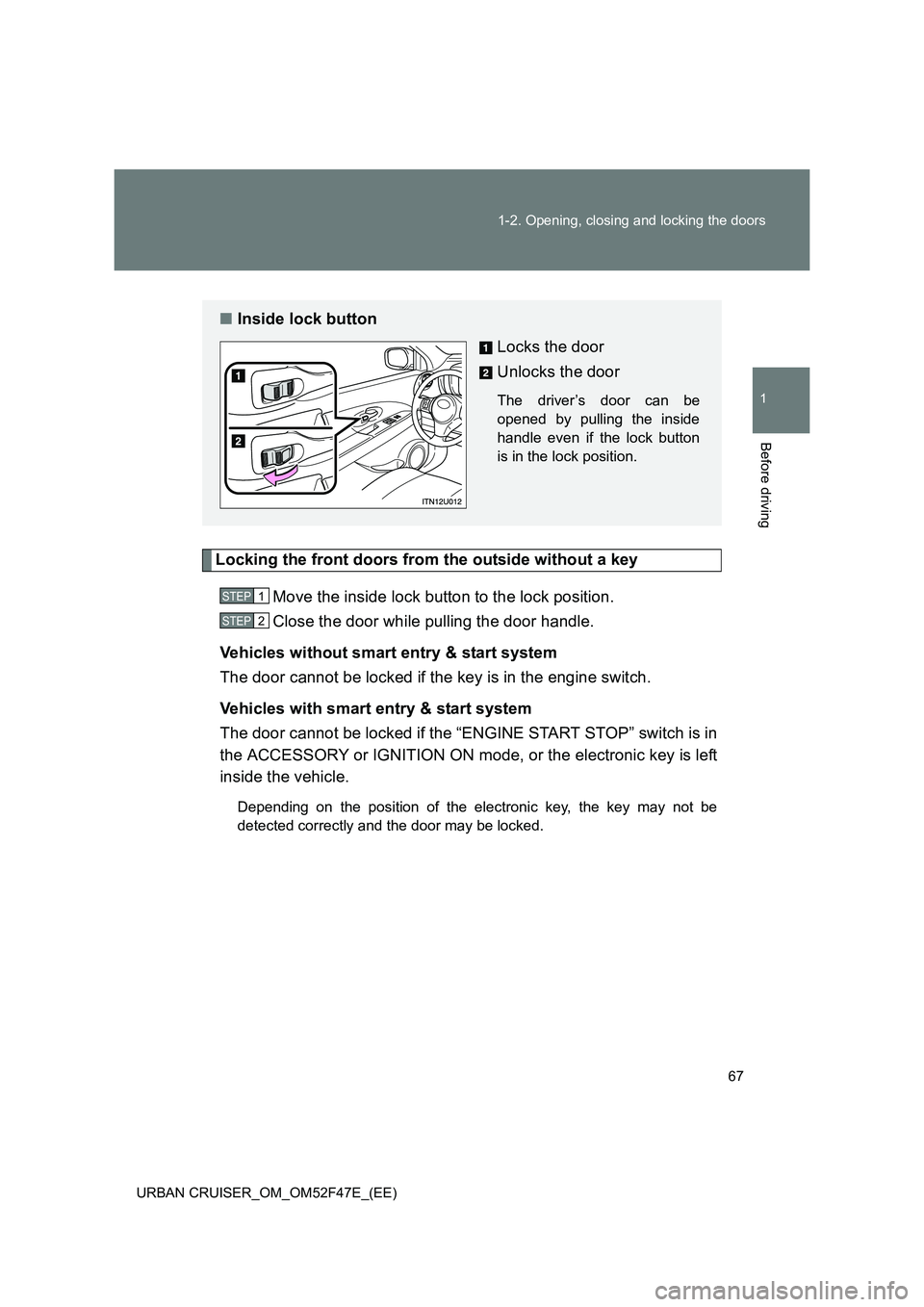
Locking the front doors from the outside without a key
Move the inside lock button to the lock position.
Close the door while pulling the door handle.
Vehicles without smart entry & start system
The door cannot be locked if the key is in the engine switch.
Vehicles with smart entry & start system
The door cannot be locked if the “ENGINE START STOP” switch is in
the ACCESSORY or IGNITION ON mode, or the electronic key is left
inside the vehicle.
Depending on the position of the electronic key, the key may not be
detected correctly and the door may be locked.
■ Inside lock button
Locks the door
Unlocks the door
The driver’s door can be
opened by pulling the inside
handle even if the lock button
is in the lock position.
STEP1
STEP2
Page 68 of 544
68
1-2. Opening, closing and locking the doors
URBAN CRUISER_OM_OM52F47E_(EE)
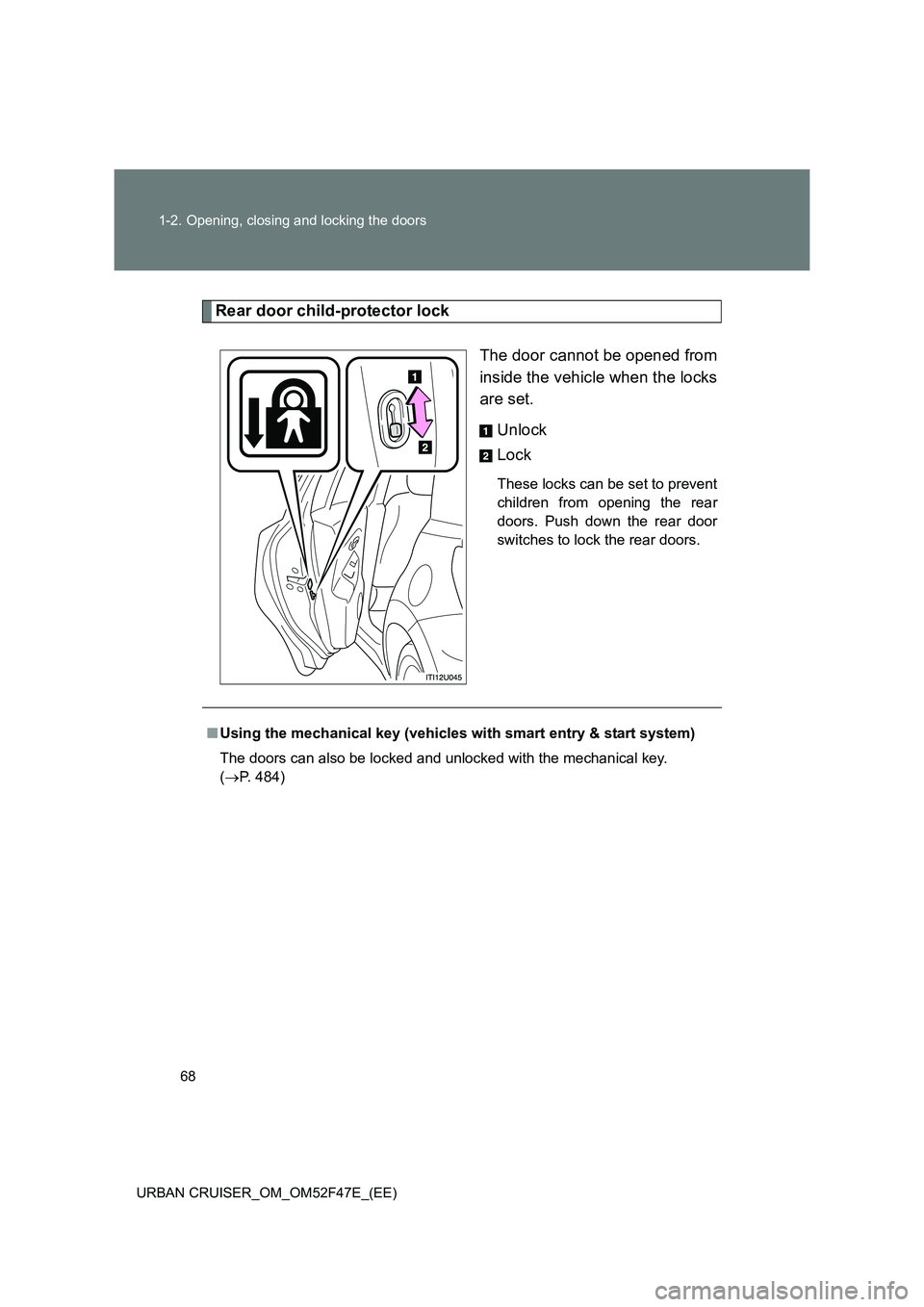
Rear door child-protector lock The door cannot be opened from
inside the vehicle when the locks
are set. Unlock
Lock
These locks can be set to prevent
children from opening the rear
doors. Push down the rear door
switches to lock the rear doors.
■Using the mechanical key (vehicles with smart entry & start system)
The doors can also be locked and unlocked with the mechanical key.
( → P. 484)
Page 78 of 544
78
1-3. Adjustable components (seats, mirrors, steering wheel)
URBAN CRUISER_OM_OM52F47E_(EE)
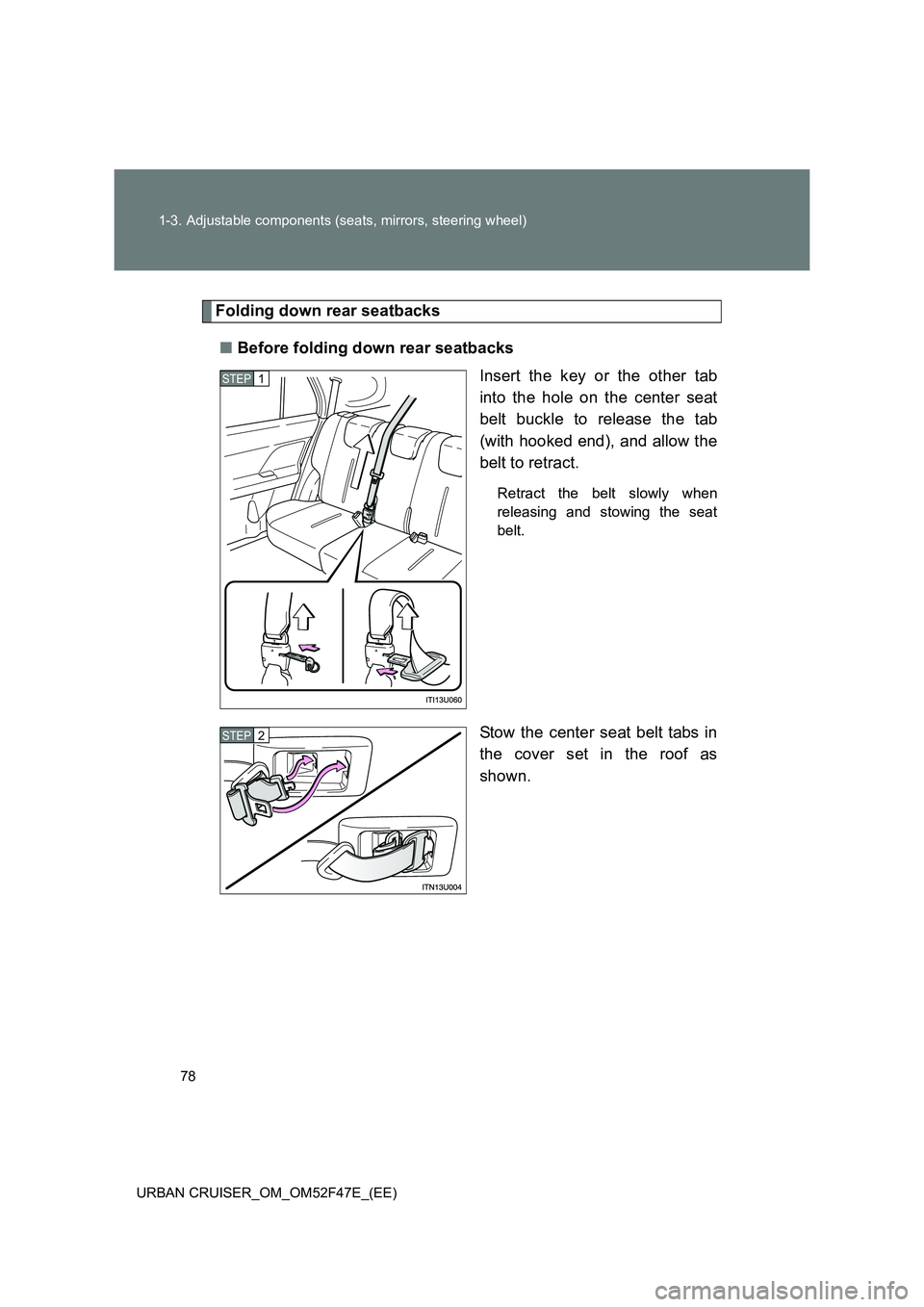
Folding down rear seatbacks ■ Before folding down rear seatbacks
Insert the key or the other tab
into the hole on the center seat
belt buckle to release the tab
(with hooked end), and allow the
belt to retract.
Retract the belt slowly when
releasing and stowing the seat
belt.
Stow the center seat belt tabs in
the cover set in the roof as
shown.
STEP1
STEP2