Page 84 of 576
842. Instrument cluster
Warning lights and indicators
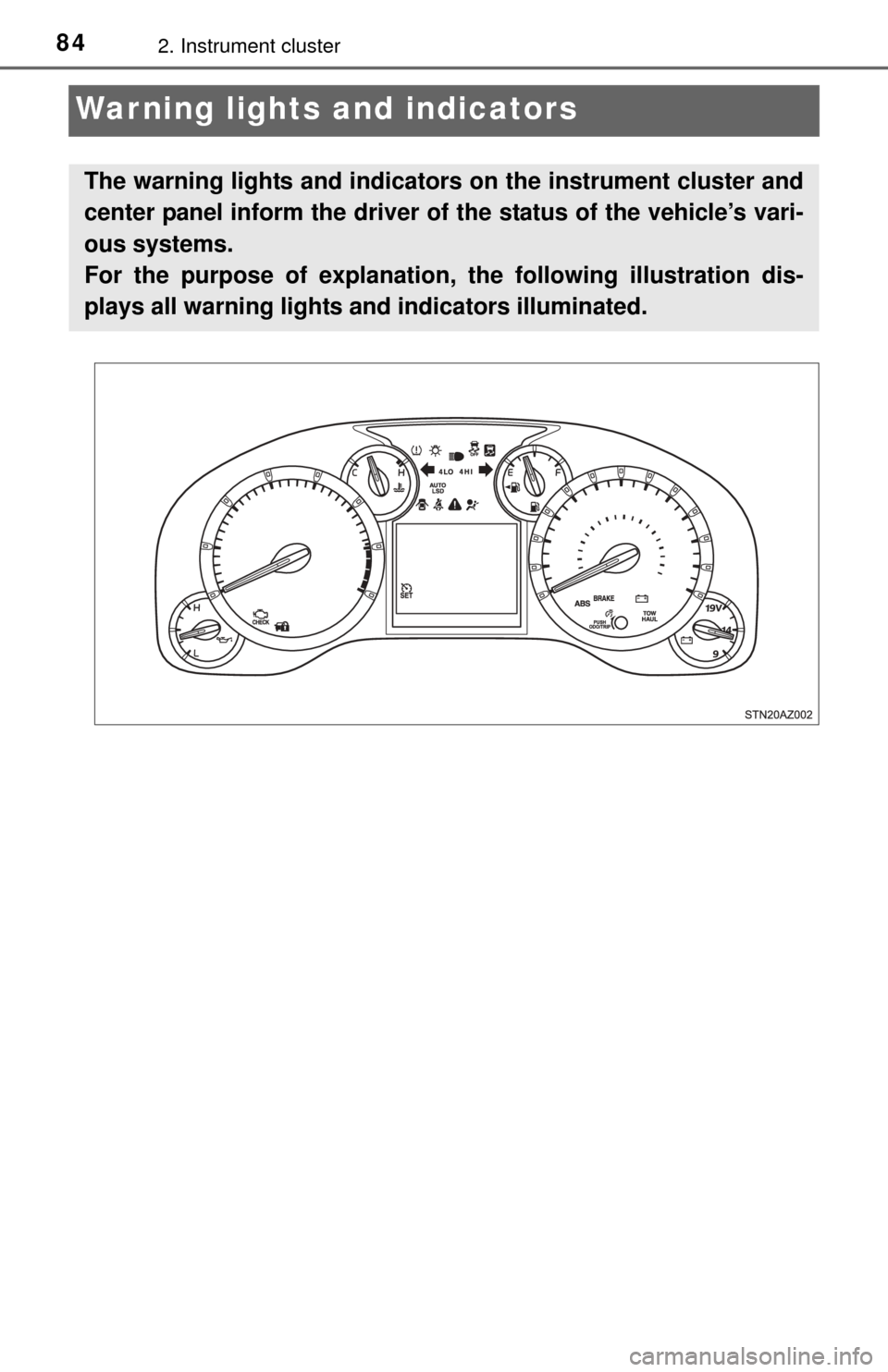
The warning lights and indicators on the instrument cluster and
center panel inform the driver of the status of the vehicle’s vari-
ous systems.
For the purpose of explanation, the following illustration dis-
plays all warning lights a nd indicators illuminated.
Page 85 of 576

852. Instrument cluster
2
Instrument cluster
Warning lights inform the driver of malfunctions in the indicated vehi-
cle’s systems.
*1: These lights turn on when the engine switch is turned to the “ON” position to indicate that a system check is being performed. They will turn off after
the engine is started, or after a few seconds. There may be a malfunction
in a system if the lights do not come on, or if the lights do not turn off. Have
the vehicle inspected by your Toyota dealer for details.
*2: The light comes on to indicate a malfunction.
*3: The light illuminates on the multi-information display.
Warning lights
*1
(U.S.A.)
Brake system warning
light ( P. 465)Open door warning light
(P. 466)
*1
(Canada)
Brake system warning
light ( P. 465)Low fuel level warning
light (P. 466)
*1
Charging system warn-
ing light ( P. 465)Seat belt reminder light
(P. 466)
*1
Malfunction indicator
lamp ( P. 465)
*1
Master warning light
(P. 466)
*1
SRS warning light
(P. 465)
*1Tire pressure warning
light ( P. 467)
*1
(U.S.A.)
ABS warning light
(P. 466)
*1, 2
Slip indicator ( P. 467)
*1
(Canada)
ABS warning light
(P. 466)
*3
(Flashes)
Cruise control indicator
light ( P. 467)
Page 86 of 576
862. Instrument cluster
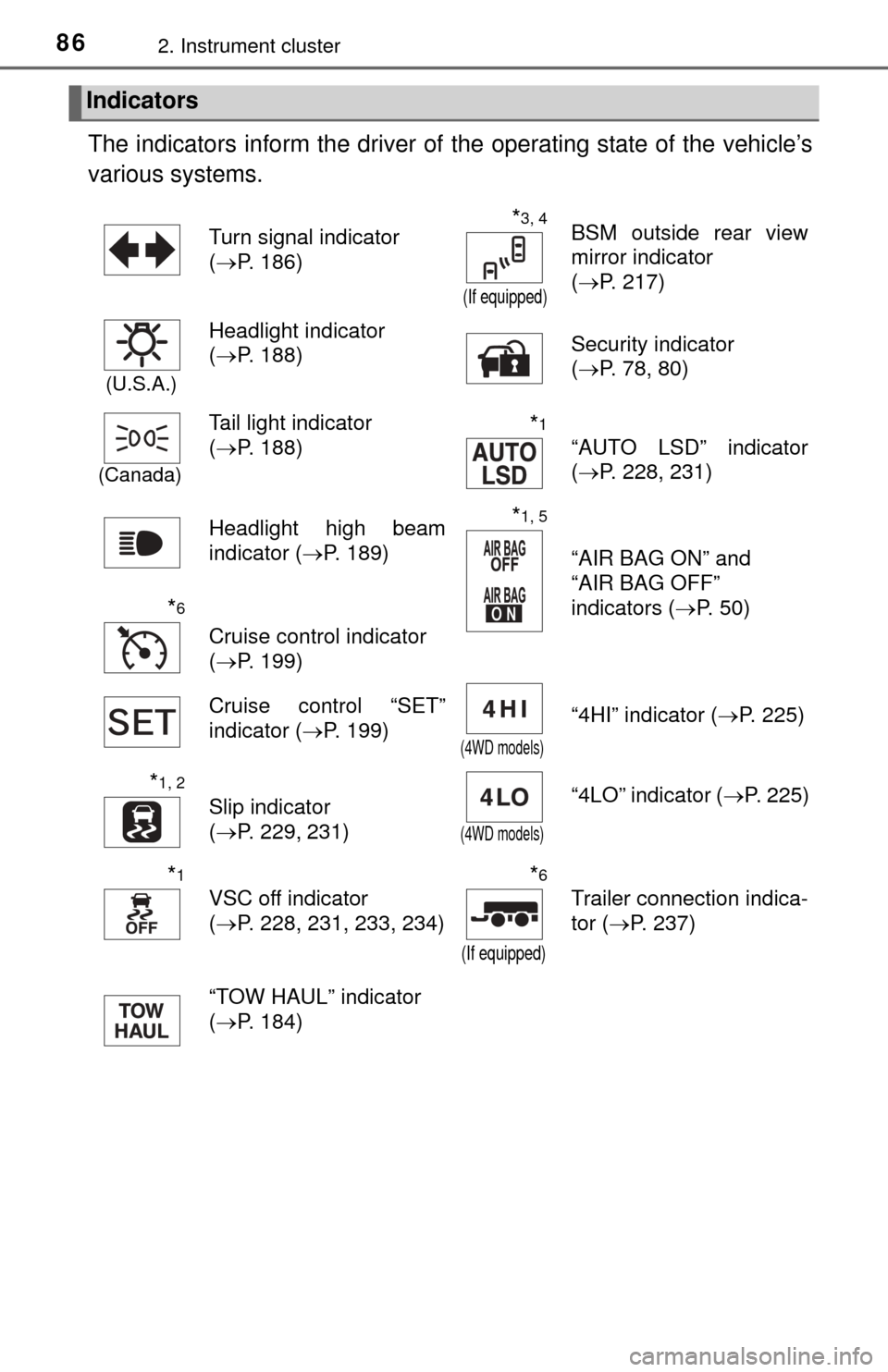
The indicators inform the driver of the operating state of the vehicle’s
various systems.
Indicators
Turn signal indicator
( P. 186)*3, 4
(If equipped)
BSM outside rear view
mirror indicator
(P. 217)
(U.S.A.)
Headlight indicator
(P. 188) Security indicator
(
P. 78, 80)
(Canada)
Tail light indicator
(P. 188)*1
“AUTO LSD” indicator
(P. 228, 231)
Headlight high beam
indicator ( P. 189)
*1, 5
“AIR BAG ON” and
“AIR BAG OFF”
indicators ( P. 50)
*6
Cruise control indicator
(P. 199)
Cruise control “SET”
indicator ( P. 199)
(4WD models)
“4HI” indicator ( P. 225)
*1, 2
Slip indicator
(P. 229, 231)
(4WD models)
“4LO” indicator ( P. 225)
*1
VSC off indicator
(P. 228, 231, 233, 234)
*6
(If equipped)
Trailer connection indica-
tor ( P. 237)
“TOW HAUL” indicator
( P. 184)
Page 87 of 576

872. Instrument cluster
2
Instrument cluster
*1: These lights turn on when the engine switch is turned to the “ON” positionto indicate that a system check is being performed. They will turn off after
the engine is started, or after a few seconds. There may be a malfunction
in a system if the lights do not come on, or if the lights do not turn off. Have
the vehicle inspected by your Toyota dealer for details.
*2: The light flashes to indicate that the system is operating.
*3: In order to confirm operation, the BS M outside rear view mirror indicators
illuminate in the following situations:
• When the engine switch is turned to the “ON” position while the BSM main switch is set to ON.
• When the BSM main switch is set to ON while the engine switch is in the “ON” position.
If the system is functioning correctly, the BSM outside rear view mirror indi-
cators will turn off after a few seconds.
If the BSM outside rear view mirror indicators do not illuminate or do not
turn off, there may be a malfunction with the system.
If this occurs, have the vehicle inspected by your Toyota dealer.
*4: The light illuminates on the outside rear view mirrors.
*5: The light illuminates on the center panel.
*6: The light illuminates on the multi-information display.
CAUTION
■ If a safety system warning light does not come on
Should a safety system light such as the ABS and SRS warning light not
come on when you start the engine, this could mean that these systems are
not available to help protect you in an accident, which could result in death
or serious injury. Have the vehicle inspected by your Toyota dealer immedi-
ately if this occurs.
Page 88 of 576
882. Instrument cluster
Gauges and meters
Tachometer
Displays the engine speed in revolutions per minute
Engine coolant temperature gauge
Displays the engine coolant temperature
Fuel gauge
Displays the quantity of fuel remaining in the tank
Speedometer
Displays the vehicle speed
Vo l t m e t e r
Displays the charge state
“ODO/TRIP” and instrument panel light control button
P. 89, 90
Multi-information display
Presents the driver with a variety of driving-related data (P. 90)
Engine oil pressure gauge
Displays the engine oil pressure
1
2
3
4
5
6
7
8
Page 89 of 576
892. Instrument cluster
2
Instrument cluster
The brightness of the instrument panel lights can be adjusted by turn-
ing the “ODO/TRIP” button.
Darker
Brighter
Instrument panel light control
1
2
NOTICE
■To prevent damage to the engine and its components
● Do not let the indicator needle of the tachometer enter the red zone, which
indicates the maximum engine speed.
● The engine may be overheating if the engine coolant temperature gauge is
in the red zone (H). In this case, immediately stop the vehicle in a safe
place, and check the engine after it has cooled completely. (P. 497)
Page 94 of 576
942. Instrument cluster
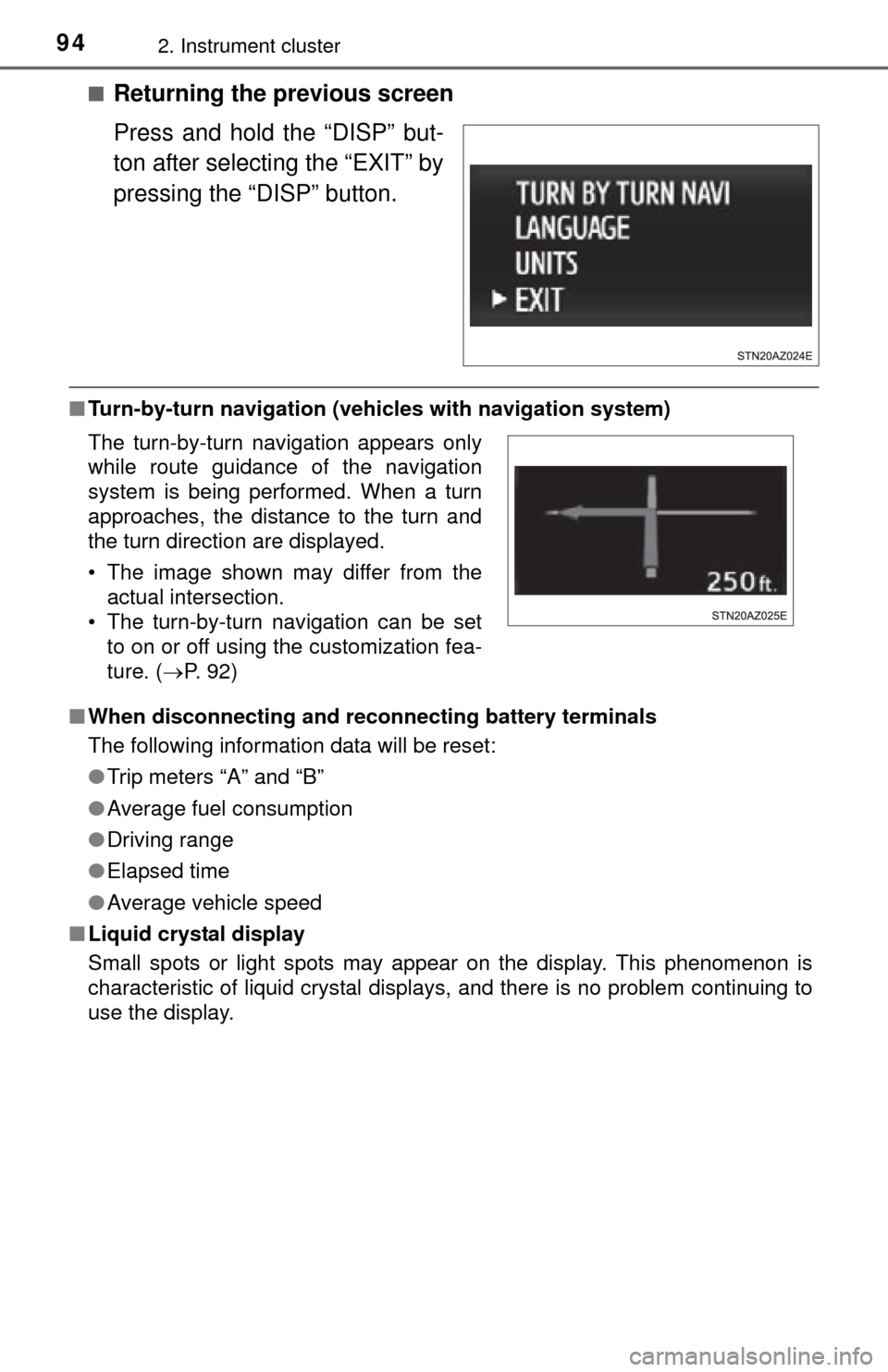
■Returning the previous screen
Press and hold the “DISP” but-
ton after selecting the “EXIT” by
pressing the “DISP” button.
■Turn-by-turn navigation (veh icles with navigation system)
■ When disconnecting and reco nnecting battery terminals
The following information data will be reset:
● Trip meters “A” and “B”
● Average fuel consumption
● Driving range
● Elapsed time
● Average vehicle speed
■ Liquid crystal display
Small spots or light spots may appear on the display. This phenomenon is
characteristic of liquid crystal displays, and there is no problem continuing to
use the display.
The turn-by-turn navigation appears only
while route guidance of the navigation
system is being performed. When a turn
approaches, the distance to the turn and
the turn direction are displayed.
• The image shown may differ from the
actual intersection.
• The turn-by-turn navigation can be set to on or off using the customization fea-
ture. ( P. 92)
Page 101 of 576
1013-2. Opening, closing and locking the doors
3
Operation of each component
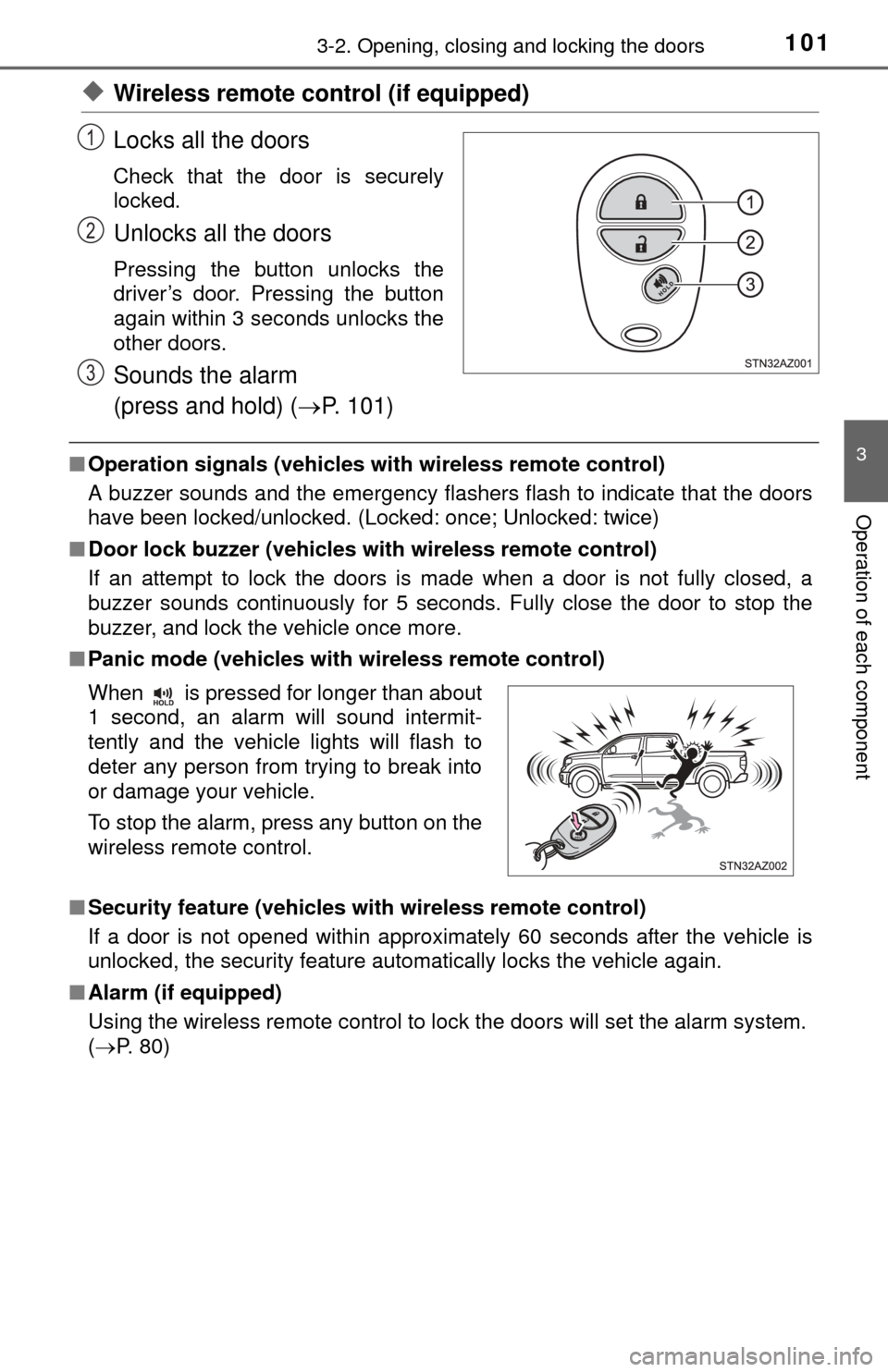
◆Wireless remote control (if equipped)
Locks all the doors
Check that the door is securely
locked.
Unlocks all the doors
Pressing the button unlocks the
driver’s door. Pressing the button
again within 3 seconds unlocks the
other doors.
Sounds the alarm
(press and hold) (P. 101)
■Operation signals (vehicles with wireless remote control)
A buzzer sounds and the emergency flashers flash to indicate that the doors
have been locked/unlocked. (Locked: once; Unlocked: twice)
■ Door lock buzzer (vehicles with wireless remote control)
If an attempt to lock the doors is made when a door is not fully closed, a
buzzer sounds continuously for 5 seconds. Fully close the door to stop the
buzzer, and lock the vehicle once more.
■ Panic mode (vehicles with wireless remote control)
■ Security feature (vehicles with wireless remote control)
If a door is not opened within approximately 60 seconds after the vehicle is
unlocked, the security feature automatically locks the vehicle again.
■ Alarm (if equipped)
Using the wireless remote control to lock the doors will set the alarm system.
(P. 80)
1
2
3
When is pressed for longer than about
1 second, an alarm will sound intermit-
tently and the vehicle lights will flash to
deter any person from trying to break into
or damage your vehicle.
To stop the alarm, press any button on the
wireless remote control.