2015 TOYOTA TUNDRA ESP
[x] Cancel search: ESPPage 148 of 576

1484-1. Before driving
CAUTION
Observe the following precautions.
Failure to do so may result in death or serious injury.
■When starting the vehicle
Always keep your foot on the brake pedal while stopped with the engine
running. This prevents the vehicle from creeping.
■ When driving the vehicle
● Do not drive if you are unfamiliar with the location of the brake and ac\
cel-
erator pedals to avoid depressing the wrong pedal.
• Accidentally depressing the accelerator pedal instead of the brake
pedal will result in sudden acceleration that may lead to an accident.
• When backing up, you may twist your body around, leading to difficulty
in operating the pedals. Make sure to operate the pedals properly.
• Make sure to keep a correct driving posture even when moving the vehicle only slightly. This allows you to depress the brake and accelera-
tor pedals properly.
• Depress the brake pedal using your right foot. Depressing the brake
pedal using your left foot may delay response in an emergency, result-
ing in an accident.
● Do not drive the vehicle over or stop the vehicle near flammable materials.
The exhaust system and exhaust gases can be extremely hot. These hot
parts may cause a fire if there is any flammable material nearby.
● During normal driving, do not turn off the engine. Turning the engine off
while driving will not cause loss of steering or braking control, but the
power assist to these systems will be lost. This will make it more difficult to
steer and brake, so you should pull over and stop the vehicle as soon as it
is safe to do so.
However, in the event of an emergency, such as if it becomes impossible
to stop the vehicle in the normal way: P. 457
● Use engine braking (downshift) to maintain a safe speed when driving
down a steep hill.
Using the brakes continuously may cause the brakes to overheat and lose
effectiveness. ( P. 181)
● Do not adjust the positions of the steering wheel, the seat, or the inside or
outside rear view mirrors while driving.
Doing so may result in a loss of vehicle control.
● Always check that all passengers’ arms, heads or other parts of their body
are not outside the vehicle.
Page 172 of 576

1724-1. Before driving
●Avoid sudden braking as you may skid, resulting in the trailer jack-
knifing and a loss of vehicle contro l. This is especially true on wet or
slippery surfaces.
● Avoid jerky starts or sudden acceleration.
● Avoid jerky steering and sharp turns, and slow down before making
a turn.
● Note that when making a turn, the trailer wheels will be closer than
the vehicle wheels to the inside of the turn. Compensate by making
a wider than normal turning radius.
● Slow down before making a turn, in crosswinds, on wet or slippery
surfaces, etc.
Increasing vehicle speed can destabilize the trailer.
● Take care when passing other vehicles. Passing requires consider-
able distance. After passing a vehicle, do not forget the length of
your trailer, and be sure you hav e plenty of room before changing
lanes.
● To maintain engine braking effici ency and charging system perfor-
mance when using engine braking, do not use the transmission in
D.
Transmission shift range position must be in 4 in the S mode.
● Instability happens more frequently when descending steep or long
downhill grades. Before descending, slow down and downshift. Do
not make sudden downshifts while descending steep or long down-
hill grades.
● Avoid holding the brake pedal down too long or applying the brakes
too frequently. This could cause th e brakes to overheat and result in
reduced braking efficiency.
● Due to the added load of the trailer, your vehicle’s engine may over-
heat on hot days (at temperatures over 85°F [30°C]) when driving
up a long or steep grade. If t he engine coolant temperature gauge
indicates overheating, immediately turn off the air conditioning (if in
use), pull your vehicle off the road and stop in a safe spot.
( P. 497)
Page 176 of 576
1764-1. Before driving
CAUTION
■To avoid accident or injury
● Do not exceed the TWR, unbraked TWR, GCWR, GVWR or GAWR.
● If the gross trailer weight is over 2000 lb. (907 kg), a sway control device
with sufficient capacity is required.
● If the gross trailer weight is over 5000 lb. (2268 kg), a weight distributing
hitch with sufficient capacity is required.
● Adjust the tongue weight within the appropriate range. Place heavier loads
as close to the trailer axle as possible.
● Do not exceed 65 mph (104 km/h), the posted towing speed limit or the
speed limit for your trailer as set forth in your trailer owner’s manual,
whichever is lowest. Slow down sufficiently before making a turn, in cross-
winds, on wet or slippery surface, etc., to help avoid an accident. If you
experience a vehicle-trailer instability from reducing a certain speed, slow
down and make sure you keep your vehicle speed under the speed of
which you experience the instability.
● Do not make jerky, abrupt or sharp turns.
● Do not apply the brakes suddenly as you may skid, resulting in jackknifing
and loss of vehicle control. This is especially true on wet or slippery sur-
faces.
● Do not exceed the trailer hitch assembly weight, gross vehicle weight,
gross axle weight and trailer tongue weight capacities.
● Do not use cruise control when towing.
● Slow down and downshift before descending steep or long downhill
grades. Do not make sudden downshifts while descending steep or long
downhill grades.
● Vehicle-trailer instability is more likely on steep long downhills. Before
descending steep or long downhill grades, slow down and downshift. Do
not make sudden downshifts when descending steep or long downhill
grades. Avoid holding the brake pedal down too long or applying the
brakes too frequently. This could cause the brakes to overheat and result
in reduced braking efficiency.
● Do not tow a trailer when the temporary spare tire is installed on your vehi-
cle.
Page 203 of 576
2034-5. Using the driving support systems
4
Driving
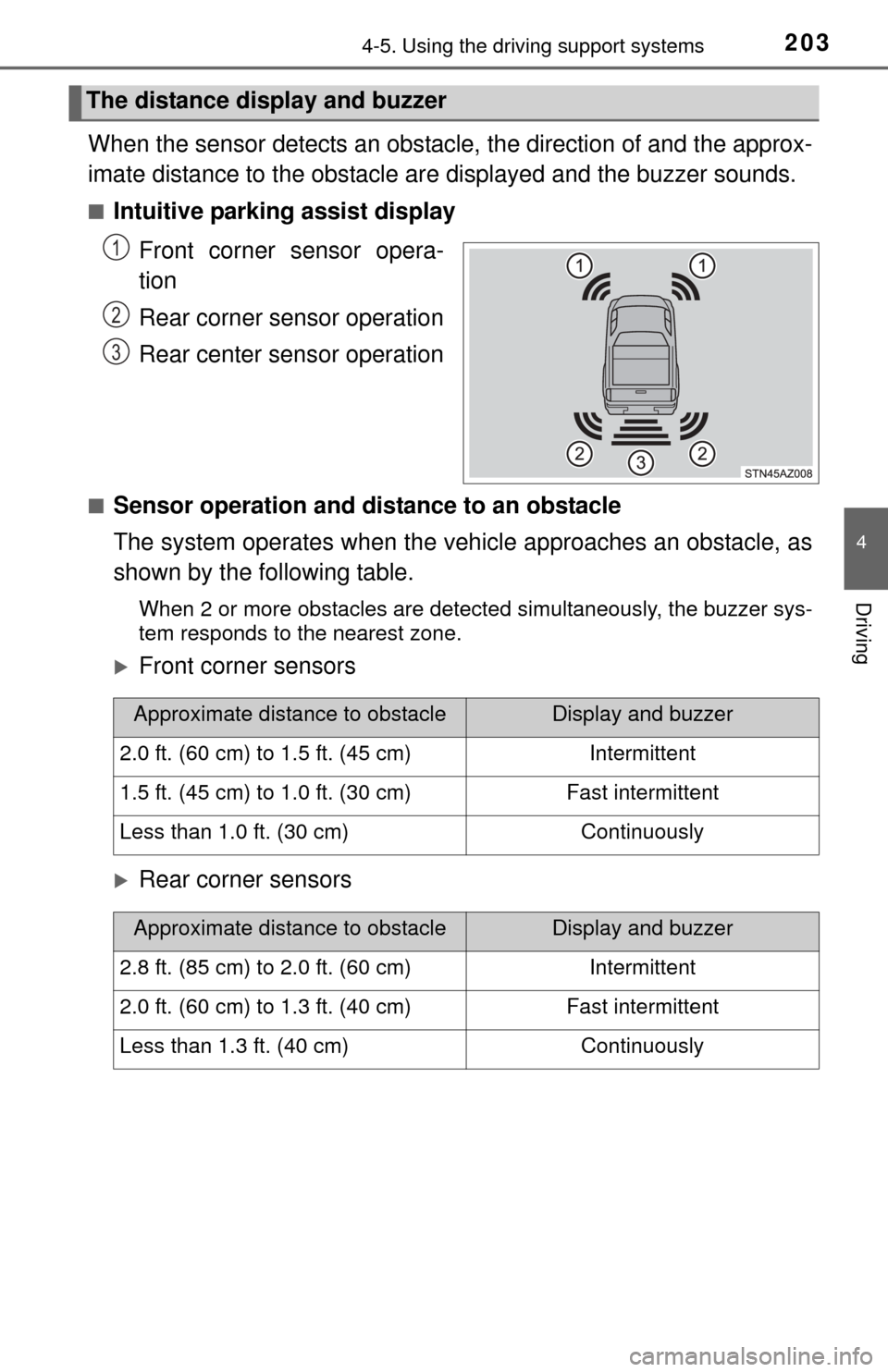
When the sensor detects an obstacle, the direction of and the approx-
imate distance to the obstacle ar e displayed and the buzzer sounds.
■Intuitive parking assist display
Front corner sensor opera-
tion
Rear corner sensor operation
Rear center sensor operation
■Sensor operation and distance to an obstacle
The system operates when the vehicle approaches an obstacle, as
shown by the following table.
When 2 or more obstacles are detected simultaneously, the buzzer sys-
tem responds to the nearest zone.
Front corner sensors
Rear corner sensors
The distance display and buzzer
1
2
3
Approximate distance to obstacleDisplay and buzzer
2.0 ft. (60 cm) to 1.5 ft. (45 cm)Intermittent
1.5 ft. (45 cm) to 1.0 ft. (30 cm)Fast intermittent
Less than 1.0 ft. (30 cm)Continuously
Approximate distance to obstacleDisplay and buzzer
2.8 ft. (85 cm) to 2.0 ft. (60 cm)Intermittent
2.0 ft. (60 cm) to 1.3 ft. (40 cm)Fast intermittent
Less than 1.3 ft. (40 cm)Continuously
Page 206 of 576
2064-5. Using the driving support systems
●The shape of the obstacle may prevent the sensor from detecting it. Pay
particular attention to the following obstacles:
• Wires, fences, ropes, etc.
• Cotton, snow and other materials that absorb sound waves
• Sharply-angled objects
• Low obstacles
• Tall obstacles with upper sections projecting outwards in the direction of
your vehicle
● The following situations may occur during use.
• Depending on the shape of the obstacle and other factors, the detection
distance may shorten, or detection may be impossible.
• Obstacles may not be detected if they are too close to the sensor.
• There will be a short delay between obstacle detection and display. Even at slow speeds, there is a possibility that the obstacle will come within the
sensor’s detection areas before the display is shown and the warning
beep sounds.
• Thin posts or objects lower than the sensor may not be detected for colli- sion when approached, even if they have been detected once.
• It might be difficult to hear beeps due to the volume of audio system or air flow noise of air conditioning system.
■ If the display flashes and a message is displayed
P. 472, 474
■ Certification (Canada only)
This ISM device complies with Canadian ICES-001.
CAUTION
■When using the intuitive parking assist
Observe the following precautions.
Failure to do so may result in the vehicle being unable to be driven safely
and possibly cause an accident.
● Do not use the sensor at speeds in excess of 6 mph (10 km/h).
● The sensors’ detection areas and reaction times are limited. When moving
forward or reversing, check the areas surrounding the vehicle (especially
the sides of the vehicle) for safety, and drive slowly, using the brake to
control the vehicle’s speed.
● Do not install accessories within the sensors’ detection areas.
Page 218 of 576

2184-5. Using the driving support systems
Rear Cross Traffic Alert buzzer (Rear Cross Traffic Alert function
only)
When a vehicle approaching from the right or left rear of the vehicle is
detected, a buzzer sounds from behind the left-hand rear pillar.
■The outside rear view mi rror indicators visibility
When under strong sunlight, the outside rear view mirror indicator may be dif-
ficult to see.
■ Rear Cross Traffic Alert buzzer hearing
Rear Cross Traffic Alert function may be difficult to hear over noises such as
high audio volume.
■ When there is a malfunction in the Blind Spot Monitor system
If a system malfunction is detected due to any of the following reasons,\
warn-
ing messages will be displayed: ( P. 473, 474)
● There is a malfunction with the sensors
● The sensors have become dirty
● The outside temperature is extremely high or low
● The sensor voltage has become abnormal
■ Certification for the B lind Spot Monitor system
For vehicles sold in the U.S.A.
FCC ID: OAYSRR2A
This device complies with part 15 of the FCC Rules. Operation is subject to
the following three conditions:
(1) This device may not cause harmful interference, and
(2) this device must accept any interference received, including interference
that may cause undesired operation.
FCC Warning
Changes or modifications not expressly approved by the party responsible for
compliance could void the user’s authority to operate the equipment.
For vehicles sold in Canada
Applicable law: Canada 310
This device complies with Industry Canada licence-exempt RSS standard(s).
Operation is subject to the following two conditions: (1) this device may not
cause interference, and (2) this device must accept any interference, includ-
ing interference that may cause undesired operation of the device.
Frequency bands: 24.05 – 24.25 GHz
Output power: less than 20 milliwatts
3
Page 219 of 576
2194-5. Using the driving support systems
4
Driving
The Blind Spot Monitor function uses radar sensors to detect vehicles
that are traveling in an adjacent lane in the area that is not reflected in
the outside rear view mirror (the b lind spot), and advises the driver of
the vehicles existence via the out side rear view mirror indicator.
CAUTION
■Handling the radar sensor
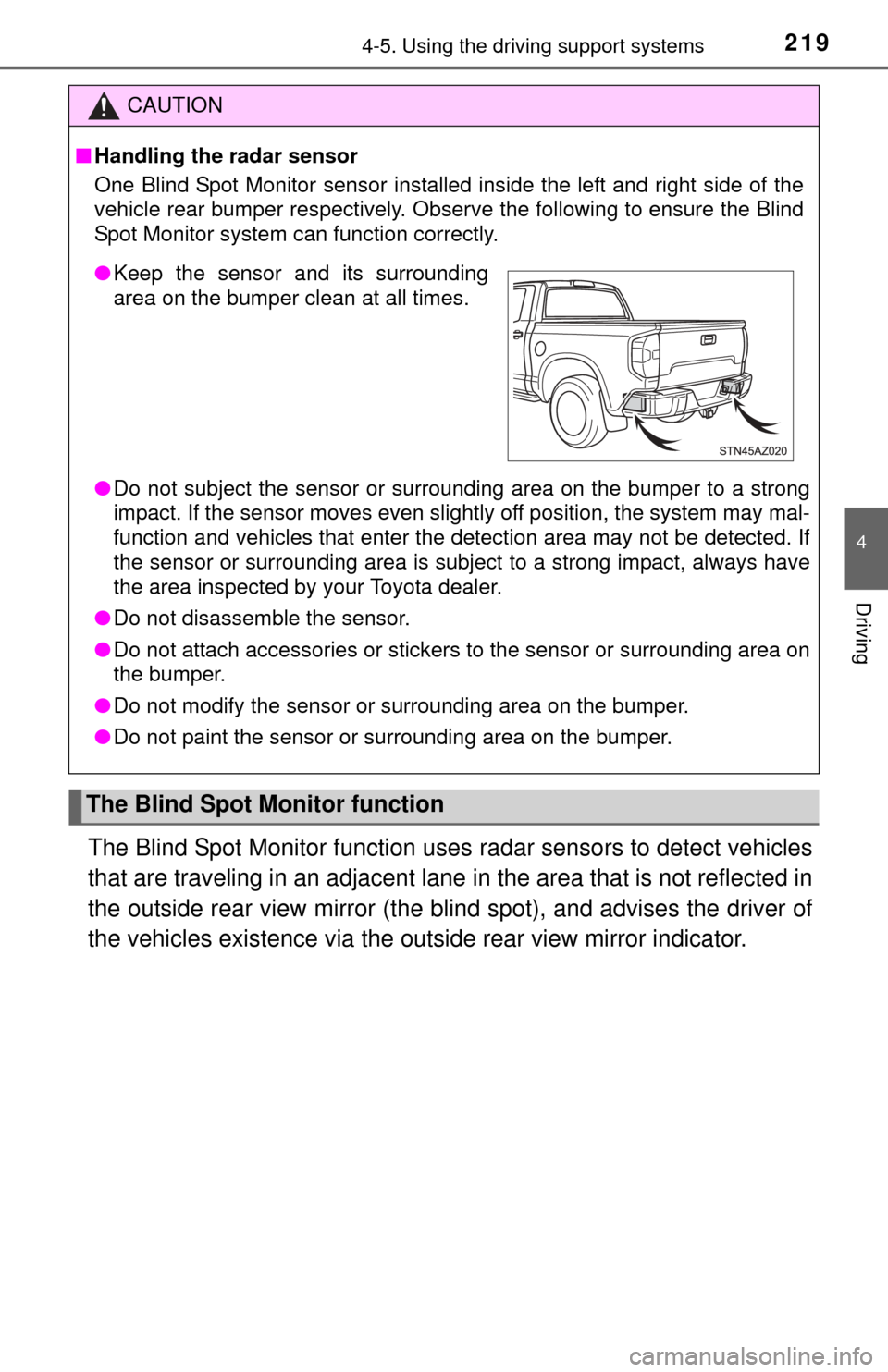
One Blind Spot Monitor sensor installed inside the left and right side of the
vehicle rear bumper respectively. Obse rve the following to ensure the Blind
Spot Monitor system can function correctly.
● Do not subject the sensor or surrounding area on the bumper to a strong
impact. If the sensor moves even slightly off position, the system may mal-
function and vehicles that enter the detection area may not be detected.\
If
the sensor or surrounding area is subj ect to a strong impact, always have
the area inspected by your Toyota dealer.
● Do not disassemble the sensor.
● Do not attach accessories or stickers to the sensor or surrounding area on
the bumper.
● Do not modify the sensor or surrounding area on the bumper.
● Do not paint the sensor or surrounding area on the bumper.
The Blind Spot Monitor function
●Keep the sensor and its surrounding
area on the bumper clean at all times.
Page 220 of 576
2204-5. Using the driving support systems
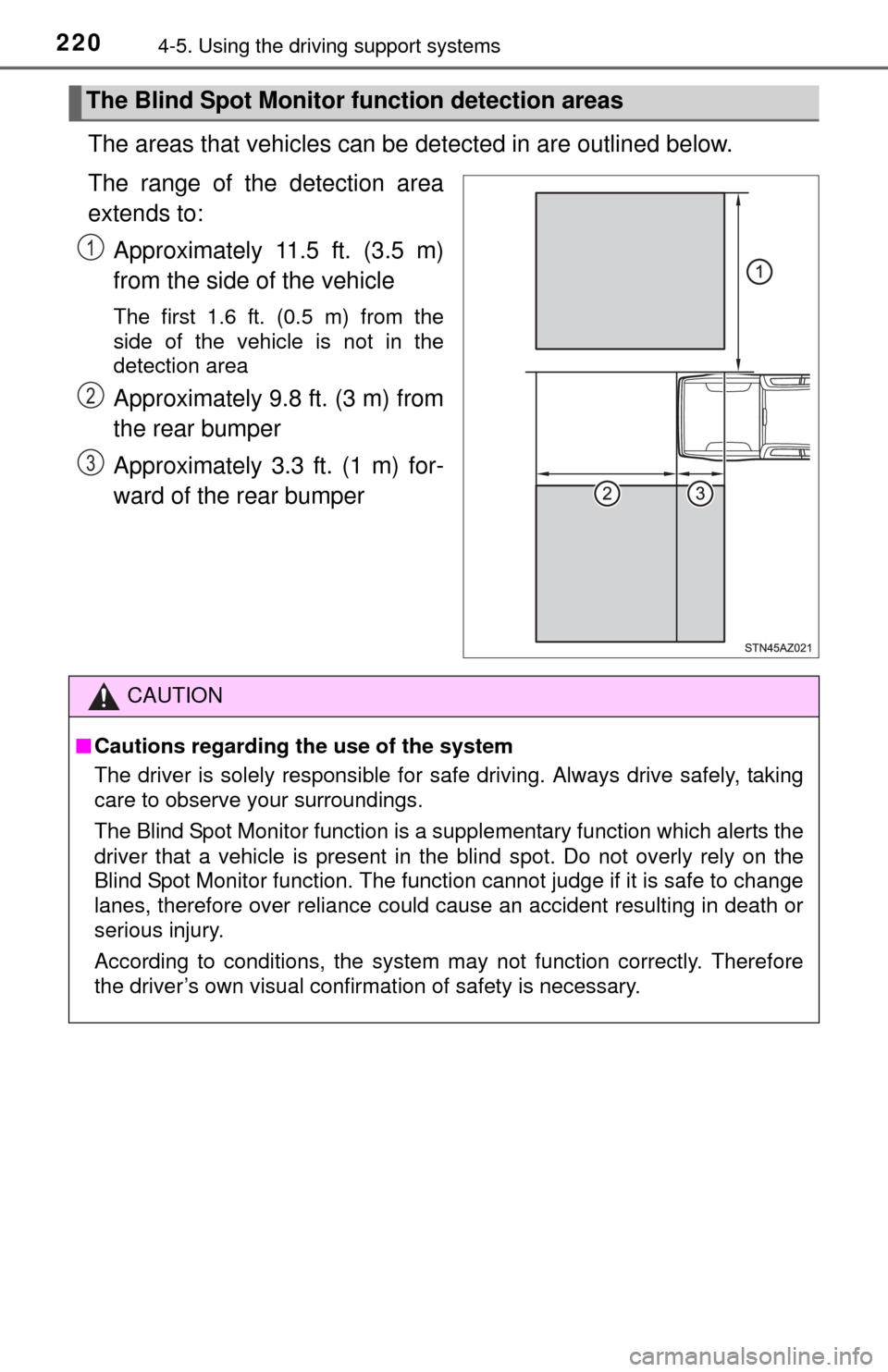
The areas that vehicles can be detected in are outlined below.
The range of the detection area
extends to: Approximately 11.5 ft. (3.5 m)
from the side of the vehicle
The first 1.6 ft. (0.5 m) from the
side of the vehicle is not in the
detection area
Approximately 9.8 ft. (3 m) from
the rear bumper
Approximately 3.3 ft. (1 m) for-
ward of the rear bumper
The Blind Spot Monitor function detection areas
1
2
3
CAUTION
■Cautions regarding the use of the system
The driver is solely responsible for safe driving. Always drive safely, taking
care to observe your surroundings.
The Blind Spot Monitor function is a supplementary function which alerts the
driver that a vehicle is present in the blind spot. Do not overly rely on the
Blind Spot Monitor function. The function cannot judge if it is safe to change
lanes, therefore over reliance could cause an accident resulting in death or
serious injury.
According to conditions, the system may not function correctly. Therefore
the driver’s own visual confirmation of safety is necessary.