2015 TOYOTA SIENNA AUX
[x] Cancel search: AUXPage 4 of 664

TABLE OF CONTENTS4
SIENNA_OM_01999-08001_(U)5-1. Basic Operations
Audio system types ........... 316
Audio system..................... 317
Steering wheel audio switches .......................... 320
AUX Port/USB Port ........... 322
Basic audio operations ...... 323
5-2. Setup Setup menu ....................... 325
General settings ................ 326
Audio settings.................... 328
Display settings ................. 329
Voice settings .................... 330
5-3. Using the Multimedia system
Selecting the audio source ............................. 331
List screen operation ......... 332
Optimal use of the audio system............................. 334
5-4. Using the radio Radio operation ................. 335 5-5. Playing an audio CD and
MP3/WMA/AAC discs
CD player operation........... 337
5-6. Using an external device Listening to an iPod ........... 343
Listening to a USB memory device........ 347
Using the AUX port ............ 352
5-7. Connecting Bluetooth
®
Preparations to use wireless
communication ................ 353
Registering a Bluetooth
®
audio player for the
first time ........................... 356
Registering a Bluetooth
®
phone for the
first time ........................... 357
Registering a Bluetooth
®
device .............................. 358
Connecting a Bluetooth
®
device .............................. 360
Displaying a Bluetooth
®
device details................... 362
Detailed Bluetooth
®
system settings................ 363
5Audio system
Page 5 of 664
5
1
9 8
7
6 4 3
2
SIENNA_OM_01999-08001_(U)
10
5
5-8. Bluetooth® Audio
Listening to Bluetooth®
Audio ............................... 364
5-9. Bluetooth
® phone
Using a Bluetooth®
Phone.............................. 366
Making a call ..................... 368
Receiving a call ................. 371
Speaking on the phone ..... 372
Bluetooth
® phone
message function ............ 375
Using the steering wheel switches ................ 379
Bluetooth
® phone
settings............................ 380
Contact/Call History Settings ........................... 381
What to do if... (Troubleshooting) ............ 390
5-10. Bluetooth
®
Bluetooth®......................... 394
5-11. Using the voice command system
Voice command system .... 400 6-1. Using the air conditioning
system and defogger
Front automatic air conditioning system ......... 404
Rear automatic air conditioning system ......... 413
Heated steering wheel/seat heaters .......... 416
• Heated steering wheel ............................. 417
• Seat heaters .................. 418
6-2. Using the interior lights Interior lights list................. 419• Personal/interior light
main switch ................... 420
• Personal/interior lights .............................. 420
• Rear ceiling lights .......... 421
6-3. Using the storage features List of storage features ...... 422• Glove boxes .................. 423
• Console box .................. 424
• Cup holders ................... 426
• Bottle holders ................ 428
• Door pockets ................. 429
• Auxiliary boxes .............. 430
Luggage compartment features ........................... 433
6Interior features
Page 22 of 664
22Pictorial index
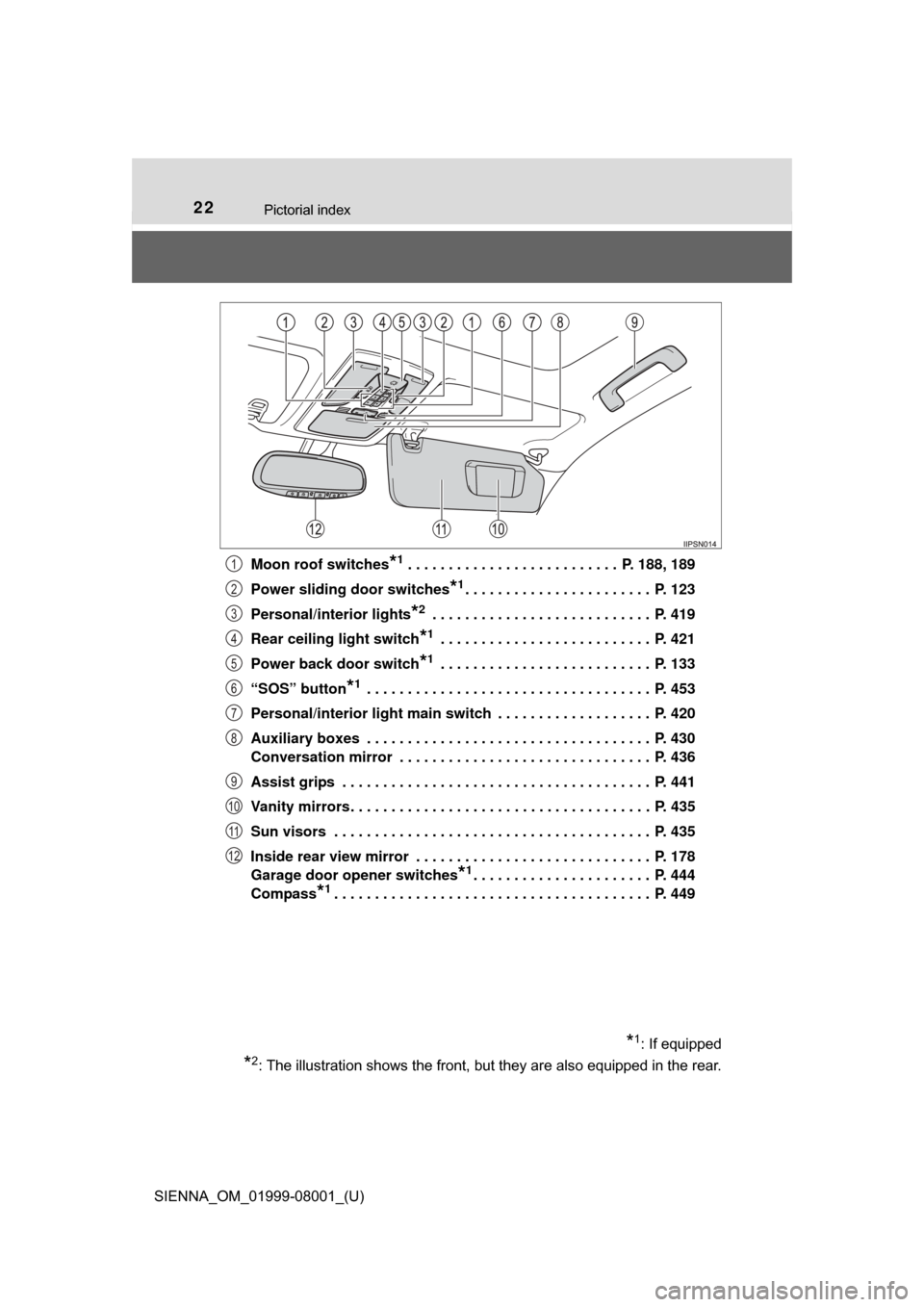
SIENNA_OM_01999-08001_(U)Moon roof switches
*1 . . . . . . . . . . . . . . . . . . . . . . . . . . P. 188, 189
Power sliding door switches
*1. . . . . . . . . . . . . . . . . . . . . . . P. 123
Personal/interior lights
*2 . . . . . . . . . . . . . . . . . . . . . . . . . . . P. 419
Rear ceiling light switch
*1 . . . . . . . . . . . . . . . . . . . . . . . . . . P. 421
Power back door switch
*1 . . . . . . . . . . . . . . . . . . . . . . . . . . P. 133
“SOS” button
*1 . . . . . . . . . . . . . . . . . . . . . . . . . . . . . . . . . . . P. 453
Personal/interior light main switch . . . . . . . . . . . . . . . . . . . P. 420
Auxiliary boxes . . . . . . . . . . . . . . . . . . . . . . . . . . . . . . . . . . . P. 430
Conversation mirror . . . . . . . . . . . . . . . . . . . . . . . . . . . . . . . P. 436
Assist grips . . . . . . . . . . . . . . . . . . . . . . . . . . . . . . . . . . . . . . P. 441
Vanity mirrors . . . . . . . . . . . . . . . . . . . . . . . . . . . . . . . . . . . . . P. 435
Sun visors . . . . . . . . . . . . . . . . . . . . . . . . . . . . . . . . . . . . . . . P. 435
Inside rear view mirror . . . . . . . . . . . . . . . . . . . . . . . . . . . . . P. 178
Garage door opener switches
*1. . . . . . . . . . . . . . . . . . . . . . P. 444
Compass
*1. . . . . . . . . . . . . . . . . . . . . . . . . . . . . . . . . . . . . . . P. 449
*1: If equipped
*2: The illustration shows the front, but they are also equipped in the rear.
1
2
3
4
5
6
7
8
9
10
11
12
Page 205 of 664
SIENNA_OM_01999-08001_(U)
2054-1. Before driving
4
Driving
WARNING
■Things that must not be carried in the luggage compartment
The following things may cause a fire if loaded in the luggage compart-
ment:
●Receptacles containing gasoline
●Aerosol cans
■Storage precautions
Observe the following precautions.
Failure to do so may prevent the pedals from being depressed properly,
may block the driver’s vision, or may result in items hitting the driver or
passengers, possibly causing an accident.
●Stow cargo and luggage in the luggage compartment whenever possi-
ble.
●Do not stack cargo and luggage in the luggage compartment higher
than the seatbacks.
●Do not place cargo or luggage in or on the following locations.
• Driver’s feet
• Front passenger or rear seats (when stacking items)
• Instrument panel
• Dashboard
• Auxiliary box or tray that has no lid
●Secure all items in the occupant compartment.
●When you fold down the rear seats, long items should not be placed
directly behind the front seats.
●Never allow anyone to ride in the luggage compartment. It is not
designed for passengers. They should ride in their seats with their seat
belts properly fastened. Otherwise, they are much more likely to suffer
death or serious bodily injury, in the event of sudden braking, sudden
swerving or an accident.
■Capacity and distribution
●Do not exceed the maximum axle weight rating or the total vehicle
weight rating.
●Even if the total load of occupant’s weight and the cargo load is less
than the total load capacity, do not apply the load unevenly.
Improper loading may cause deterioration of steering or braking con-
trol which may cause death or serious injury.
Page 314 of 664

314
SIENNA_OM_01999-08001_(U)
5-1. Basic OperationsAudio system types ........... 316
Audio system .................... 317
Steering wheel audio switches .......................... 320
AUX Port/USB Port ........... 322
Basic audio operations...... 323
5-2. Setup Setup menu....................... 325
General settings ................ 326
Audio settings ................... 328
Display settings ................. 329
Voice settings.................... 330
5-3. Using the Multimedia system
Selecting the audio source ............................. 331
List screen operation......... 332
Optimal use of the audio system ............................ 334
5-4. Using the radio Radio operation................. 335
5Audio system
Page 315 of 664
315
SIENNA_OM_01999-08001_(U)
5Audio system
5-5. Playing an audio CD and MP3/WMA/AAC discs
CD player operation .......... 337
5-6. Using an external device Listening to an iPod .......... 343
Listening to a USB memory device ....... 347
Using the AUX port ........... 352
5-7. Connecting Bluetooth
®
Preparations to use wireless
communication ................ 353
Registering a Bluetooth
®
audio player for the
first time .......................... 356
Registering a Bluetooth
®
phone for the
first time .......................... 357
Registering a Bluetooth
®
device.............................. 358
Connecting a Bluetooth
®
device.............................. 360
Displaying a Bluetooth
®
device details .................. 362
Detailed Bluetooth
®
system settings ............... 363 5-8. Bluetooth
® Audio
Listening to Bluetooth®
Audio............................... 364
5-9. Bluetooth
® phone
Using a Bluetooth®
Phone ............................. 366
Making a call ..................... 368
Receiving a call ................. 371
Speaking on the phone ..... 372
Bluetooth
® phone
message function ............ 375
Using the steering wheel switches ................ 379
Bluetooth
® phone
settings ........................... 380
Contact/Call History Settings ........................... 381
What to do if... (Troubleshooting) ............ 390
5-10. Bluetooth
®
Bluetooth®......................... 394
5-11. Using the voice command system
Voice command system .... 400
Page 322 of 664
322
SIENNA_OM_01999-08001_(U)
5-1. Basic Operations
AUX Por t/USB Por t
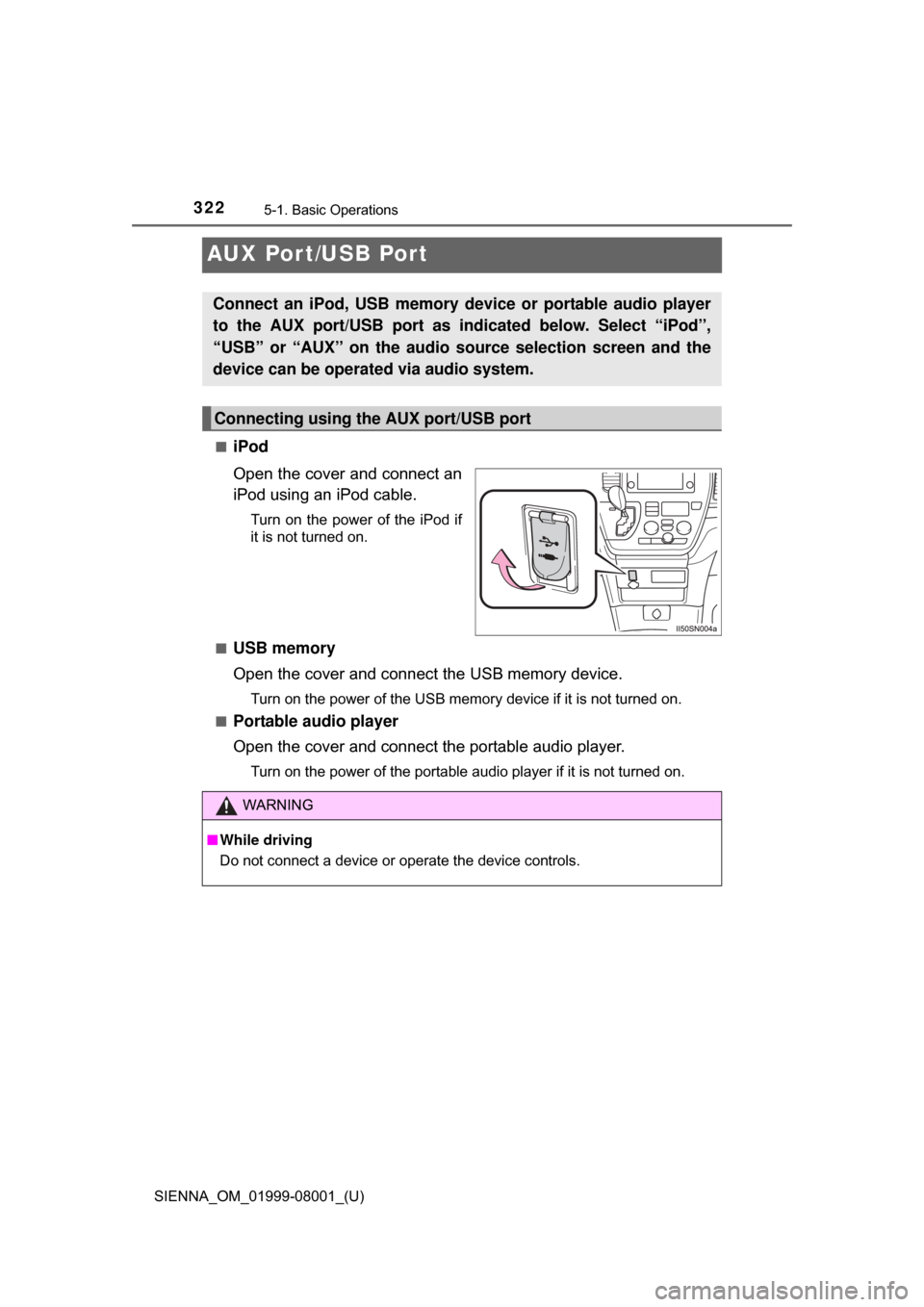
■iPod
Open the cover and connect an
iPod using an iPod cable.
Turn on the power of the iPod if
it is not turned on.
■
USB memory
Open the cover and connect the USB memory device.
Turn on the power of the USB memory device if it is not turned on.
■
Portable audio player
Open the cover and connect the portable audio player.
Turn on the power of the portable audio player if it is not turned on.
Connect an iPod, USB memory device or portable audio player
to the AUX port/USB port as indi cated below. Select “iPod”,
“USB” or “AUX” on the audio source selection screen and the
device can be operated via audio system.
Connecting using the AUX port/USB port
WARNING
■ While driving
Do not connect a device or operate the device controls.
Page 352 of 664
352
SIENNA_OM_01999-08001_(U)
5-6. Using an external device
Using the AUX port
P. 3 2 2
■Operating portable audio players connected to the audio system
The volume can be adjusted using the vehicle’s audio controls. All other
adjustments must be made on the portable audio player itself.
■ When using a portable audio player connected to the power outlet
Noise may occur during playback. Use the power source of the portable
audio player.
To use the AUX port, connect a portable player, press the
“AUDIO” button, then select “AUX ” to display the audio control
screen.
Connecting a portable audio player
WARNING
■ While driving
Do not connect a portable audio player or operate the device controls.