Page 244 of 664

244
SIENNA_OM_01999-08001_(U)
4-3. Operating the lights and wipers
■The Automatic High Beam can be operated when
The engine switch is in the “ON” position (vehicles without a smart key sys-
tem) or IGNITION ON mode (vehicles with a smart key system).
■ Camera sensor detection information
●High beam may not be automatically turned off in the following situations:
• When oncoming vehicles suddenly appear from a curve.
• When the vehicle is cut in front of by another.
● High beam may be turned off if an oncoming vehicle that is using fog lights
without using the headlights is detected.
● Houselights, streetlights, red traffic signals, and illuminated billboards or
signs may cause the high beam to turn off.
● The following factors may affect the amount of time taken to turn high beam
on or off:
• The brightness of headlights, fog lights, and tail lights of oncoming and
preceding vehicles
• Road conditions (wetness, ice, snow etc.)
• The number of passengers and amount of baggage
● High beam may be turned on or off when unexpected by the driver.
Page 245 of 664
SIENNA_OM_01999-08001_(U)
2454-3. Operating the lights and wipers
4
Driving
●In the situations below, the system may not be able to correctly detect the
surrounding brightness levels, and may flash or expose nearby pedestrians
to the high beam. Therefore, you should consider turning the high beam on
or off manually rather than relying on the Automatic High Beam system.
• In bad weather (rain, snow, fog, sandstorms etc.)
• The windshield is obscured by fog, mist, ice, dirt etc.
• The windshield is cracked or damaged.
• The camera sensor is deformed or dirty.
• Surrounding brightness levels are equal to those of headlights, tail lights
or fog lights.
• Vehicles ahead have headlights that are either switched off, dirty, are changing color, or are not aimed properly.
• When driving through an area of in termittently changing brightness and
darkness
• When frequently and repeatedly driving ascending/descending roads, or roads with rough, bumpy or uneven surfaces (such as stone-paved
roads, gravel tracks etc.)
• When frequently and repeatedly taking curves or driving on a winding road
• There is a highly reflective object ahead of the vehicle, such as a sign or a mirror.
• The vehicle’s headlights are damaged or dirty.
• The vehicle is lifting or tilting, due to a flat tire, a trailer being towed etc.
• The high beam and low beam are repeatedly being switched between in an abnormal manner.
• The driver believes that the high beam may be causing problems or dis- tress to other drivers or pedestrians nearby.
■ When the warning message is show n on the multi-information display
P. 554
■ Temporary lowering sensor sensitivity
The sensitivity of the sensor can be temporarily lowered.
To lower the sensitivity, push and hold on the inside rear view mirror for
15 to 20 seconds, and release. The indicator light on the inside rear view mir-
ror will flash to indicate that the sensitivity has been lowered.
When the engine switch is turned to the “LOCK” position (vehicles without a
smart key system) or turned off (vehicles with a smart key system), the sensi-
tivity will be returned to its normal level.
■ Customization
The Automatic High Beam can be turned off.
(Customizable features: P. 625)
Page 247 of 664
247
SIENNA_OM_01999-08001_(U)
4-3. Operating the lights and wipers
4
Driving
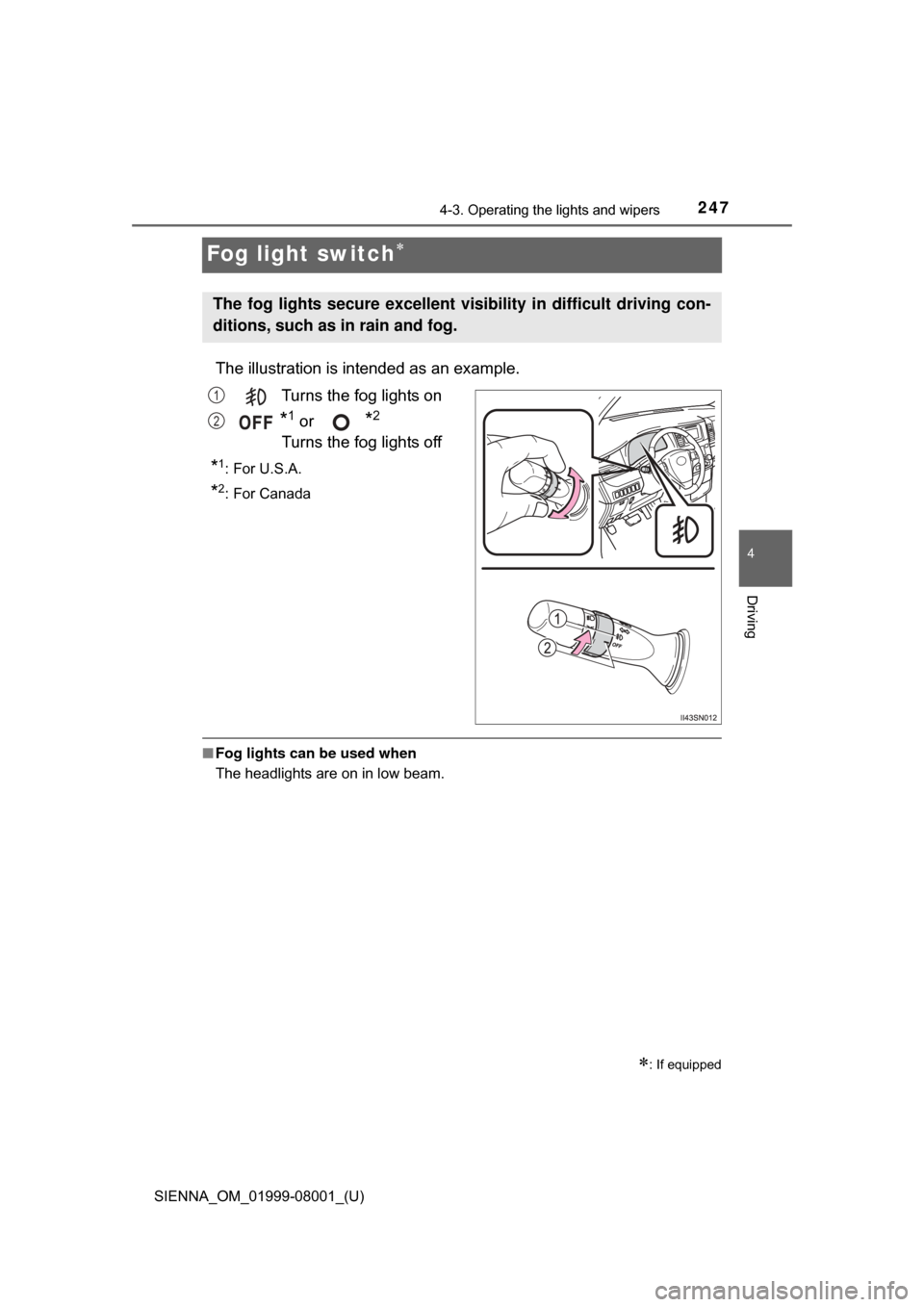
Fog light switch
The illustration is intended as an example.
Turns the fog lights on
*1 or *2
Turns the fog lights off
*1:For U.S.A.
*2: For Canada
■ Fog lights can be used when
The headlights are on in low beam.
: If equipped
The fog lights secure excellent visi bility in difficult driving con-
ditions, such as in rain and fog.
1
2
Page 403 of 664
403
SIENNA_OM_01999-08001_(U)
6Interior features
6-1. Using the air conditioning system and defogger
Front automatic air conditioning system ........ 404
Rear automatic air conditioning system ........ 413
Heated steering wheel/seat heaters .......... 416
• Heated steering wheel ............................ 417
• Seat heaters ................. 418
6-2. Using the interior lights Interior lights list ................ 419• Personal/interior light
main switch ................... 420
• Personal/interior lights ............................. 420
• Rear ceiling lights ......... 421 6-3. Using the storage features
List of storage features ..... 422• Glove boxes .................. 423
• Console box .................. 424
• Cup holders .................. 426
• Bottle holders ................ 428
• Door pockets................. 429
• Auxiliary boxes.............. 430
Luggage compartment features ........................... 433
6-4. Using the other interior features
Other interior features ....... 435 • Sun visors ..................... 435
• Vanity mirrors................ 435
• Clock ............................. 436
• Conversation mirror ...... 436
• Power outlets ................ 437
• Armrests ....................... 440
• Assist grips ................... 441
• Rear side sunshades .... 442
• Grocery bag hooks ....... 443
Garage door opener.......... 444
Compass ........................... 449
Safety Connect ................. 453
Page 417 of 664
SIENNA_OM_01999-08001_(U)
4176-1. Using the air conditioning system and defogger
6
Interior features
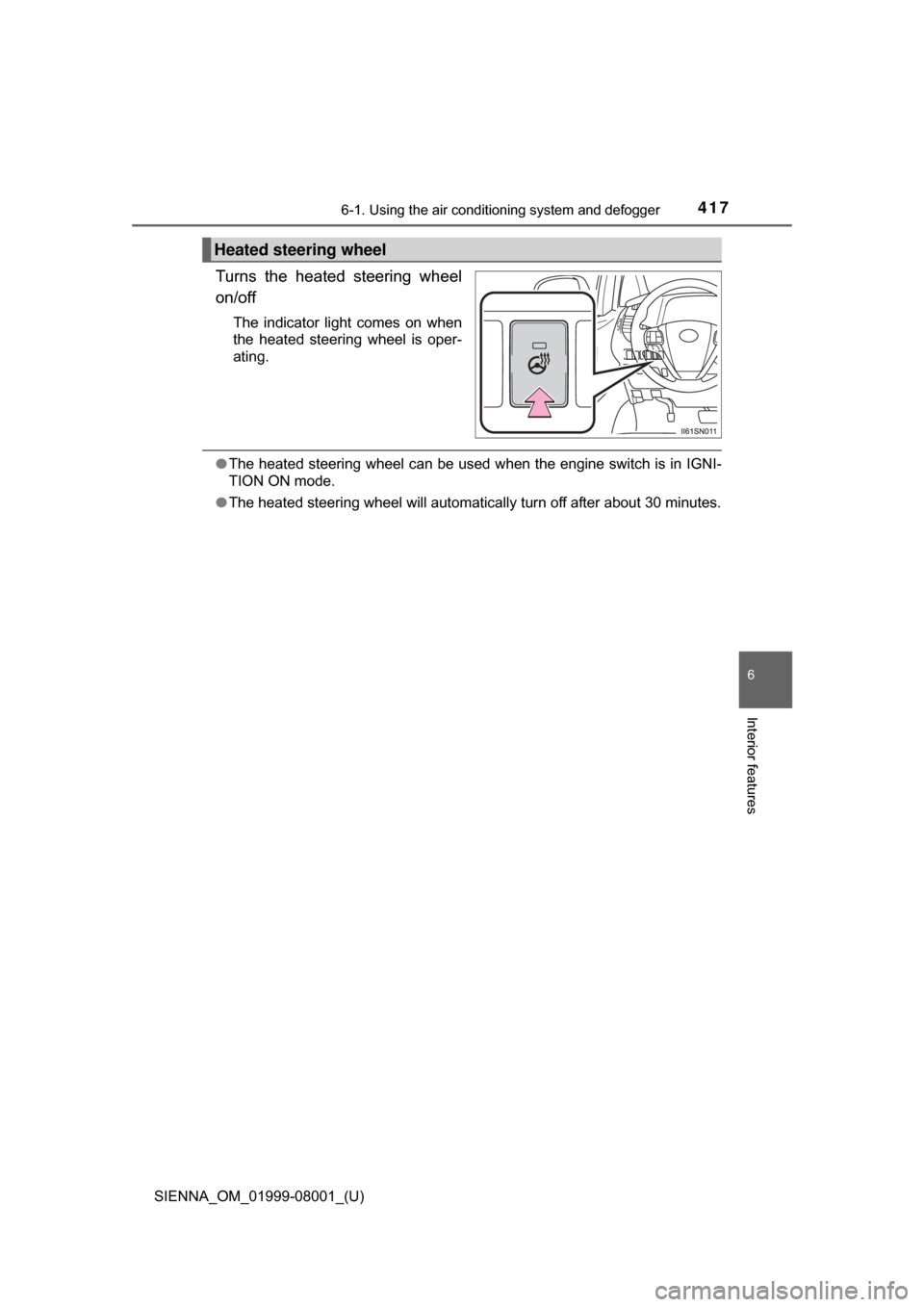
Turns the heated steering wheel
on/off
The indicator light comes on when
the heated steering wheel is oper-
ating.
●The heated steering wheel can be used when the engine switch is in IGNI-
TION ON mode.
● The heated steering wheel will automatically turn off after about 30 minutes.
Heated steering wheel
Page 418 of 664
4186-1. Using the air conditioning system and defogger
SIENNA_OM_01999-08001_(U)
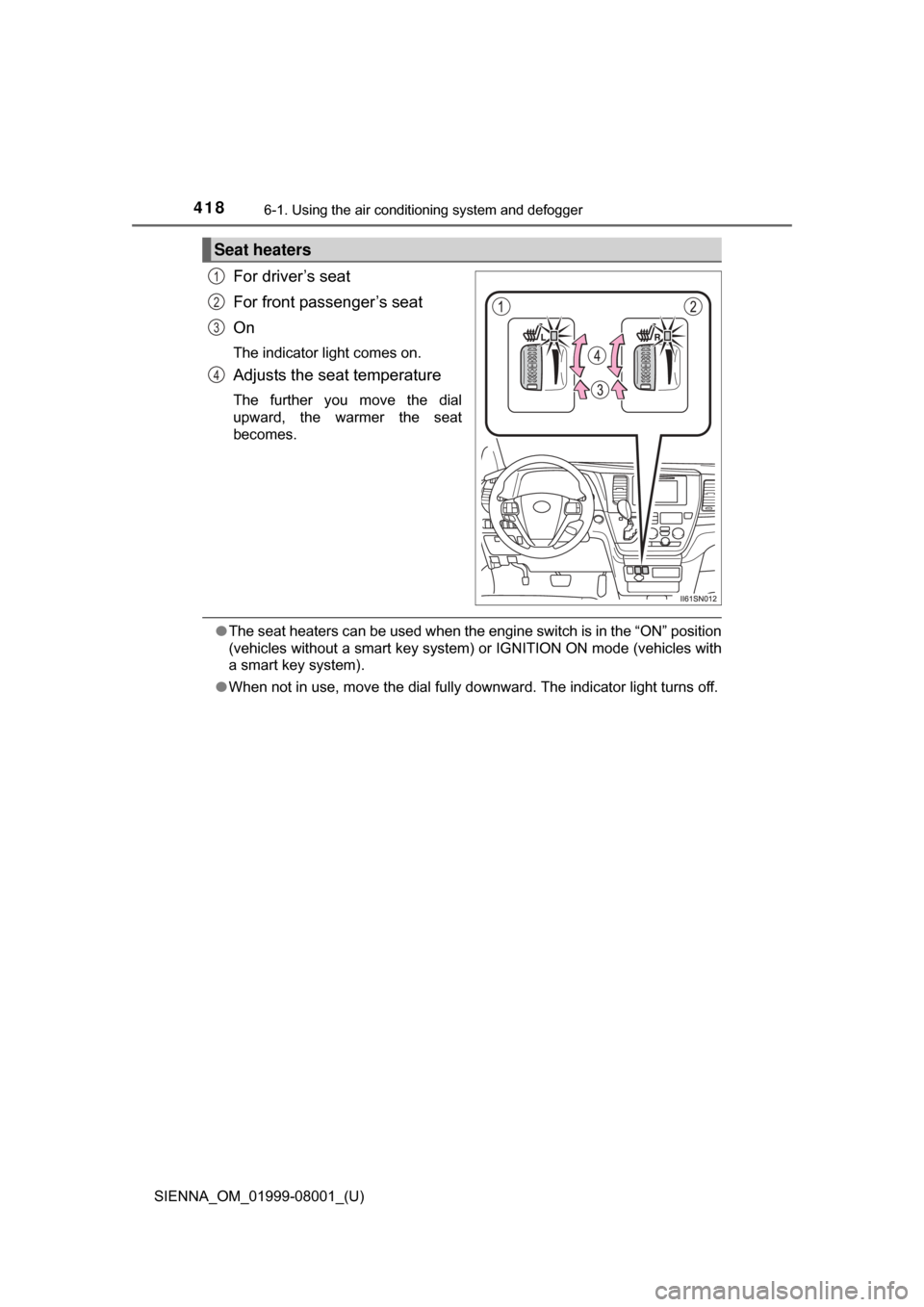
For driver’s seat
For front passenger’s seat
On
The indicator light comes on.
Adjusts the seat temperature
The further you move the dial
upward, the warmer the seat
becomes.
●The seat heaters can be used when the engine switch is in the “ON” position
(vehicles without a smart key system ) or IGNITION ON mode (vehicles with
a smart key system).
● When not in use, move the dial fully downward. The indicator light turns off.
Seat heaters
1
2
3
4
Page 510 of 664
510
SIENNA_OM_01999-08001_(U)
7-3. Do-it-yourself maintenance
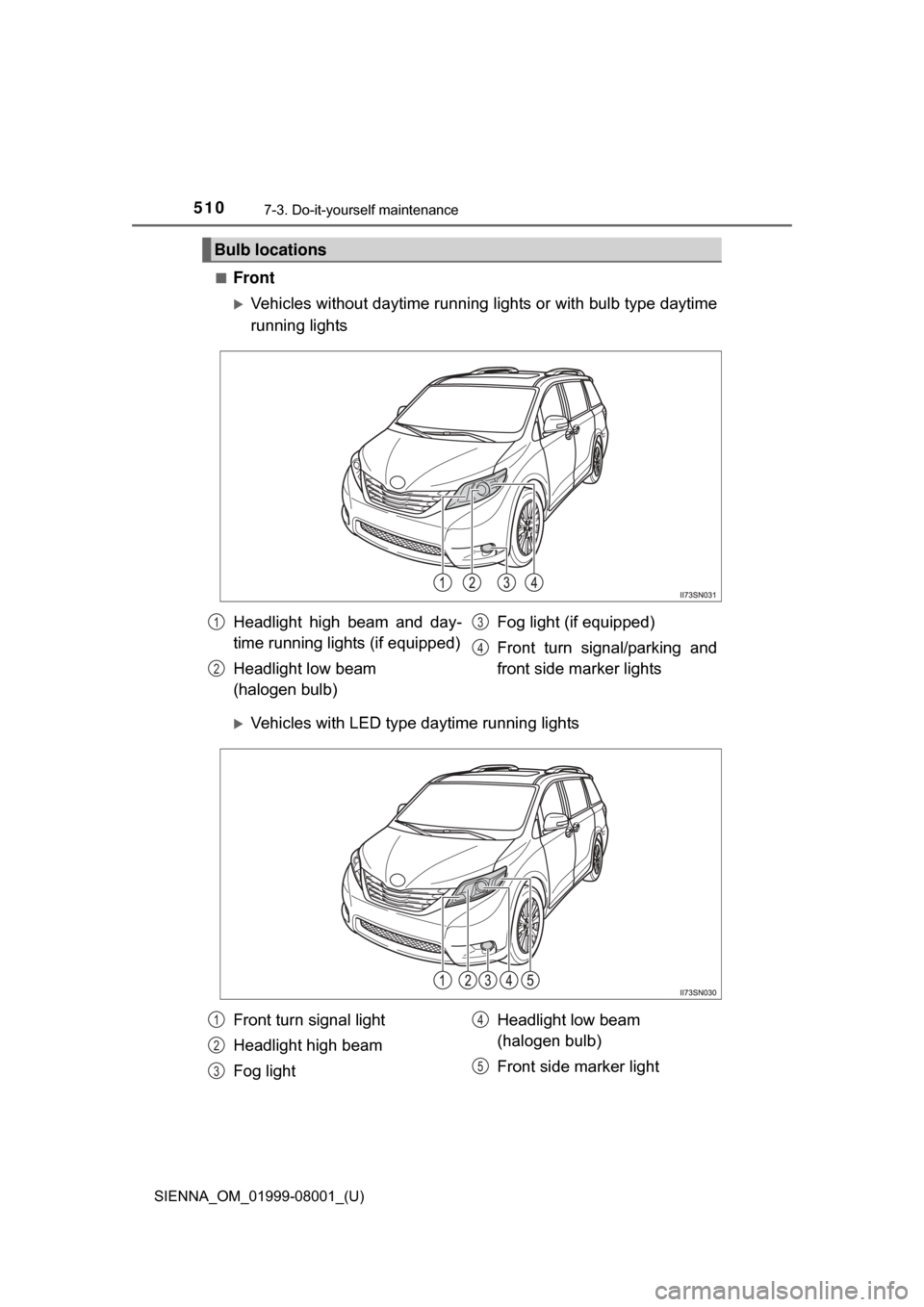
■Front
Vehicles without daytime running lights or with bulb type daytime
running lights
Vehicles with LED type daytime running lights
Bulb locations
Headlight high beam and day-
time running lights (if equipped)
Headlight low beam
(halogen bulb) Fog light (if equipped)
Front turn signal/parking and
front side marker lights1
2
3
4
Front turn signal light
Headlight high beam
Fog light
Headlight low beam
(halogen bulb)
Front side marker light1
2
3
4
5
Page 515 of 664
SIENNA_OM_01999-08001_(U)
5157-3. Do-it-yourself maintenance
7
Maintenance and care
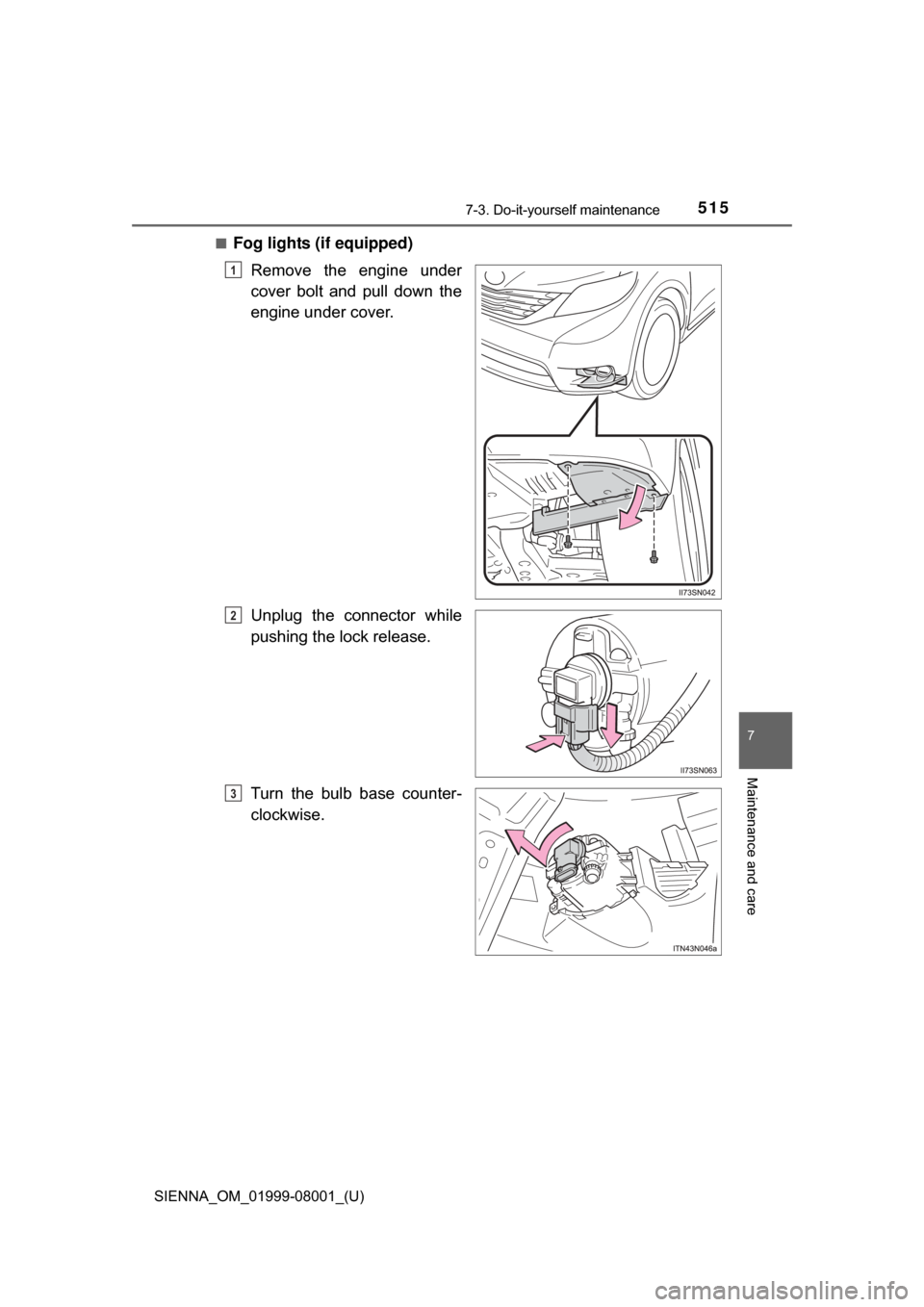
■Fog lights (if equipped)Remove the engine under
cover bolt and pull down the
engine under cover.
Unplug the connector while
pushing the lock release.
Turn the bulb base counter-
clockwise.
1
2
3