Page 246 of 354
246
SIENNA_Navi+MM_01999-08003_(U)
14.06.02 18:35
3. WHAT TO DO IF...
1. TROUBLESHOOTING
When using the hands-free system with a Bluetooth® device
If there is a problem with the hands-free system or a Bluetooth® device, first check
the table below.
SymptomLikely causeSolution
Page
Cellular
phoneThis
system
The hands-free sys-
tem or Bluetooth® de-
vice does not work.
The connected de-
vice may not be a
compatible
Bluetooth
® cellular
phone.
For a list of specific
devices which
operation has been
confirmed on this
system, check with
your Toyota dealer or
the following website:
http://www.toyota.com/
entune/
The Bluetooth® ver-
sion of the connect-
ed cellular phone
may be older than
the specified ver-
sion.Use a cellular phone
with Bluetooth® ver-
sion 2.0 or higher (rec-
ommended: Ver. 3.0
+EDR or higher).46
Page 248 of 354
248
3. WHAT TO DO IF...
SIENNA_Navi+MM_01999-08003_(U)
14.06.02 18:35
A Bluetooth® connec-
tion cannot be made.
Another Bluetooth®
device is already
connected.
Manually connect the
cellular phone you wish
to use to this system.
54
Bluetooth® function
is not enabled on
the cellular phone.Enable the Bluetooth®
function on the cellular
phone.
Automatic
Bluetooth® connec-
tion on this system
is set to off.
Set automatic
Bluetooth® connection
on this system to on
when the engine switch
is in following.
Vehicles without a
smart key system
The engine switch is
turned to the “ACC” or
“ON” position.
Vehicles with a
smart key system
The engine switch is
turned to ACCESSO-
RY or IGNITION ON
mode.
58
SymptomLikely causeSolution
Page
Cellular
phoneThis
system
Page 249 of 354
249
3. WHAT TO DO IF...
SIENNA_Navi+MM_01999-08003_(U)
14.06.02 18:35
PHONE
7
When making/receiving a call
“Unable to dial.
Please check your
phone.”
Bluetooth® function
is not enabled on
the cellular phone.Enable the Bluetooth®
function on the cellular
phone.
Old registration in-
formation remains
on either this sys-
tem or the cellular
phone.Delete the existing reg-
istration information
from both this system
and the cellular phone,
then register the cellu-
lar phone you wish to
connect to this system.
53
SymptomLikely causeSolution
Page
Cellular phoneThis
system
A call cannot be
made/received.Your vehicle is in a
“No Service” area.Move to where “No
Service” no longer ap-
pears on the display.
SymptomLikely causeSolution
Page
Cellular phoneThis
system
Page 251 of 354
251
3. WHAT TO DO IF...
SIENNA_Navi+MM_01999-08003_(U)
14.06.02 18:35
PHONE
7
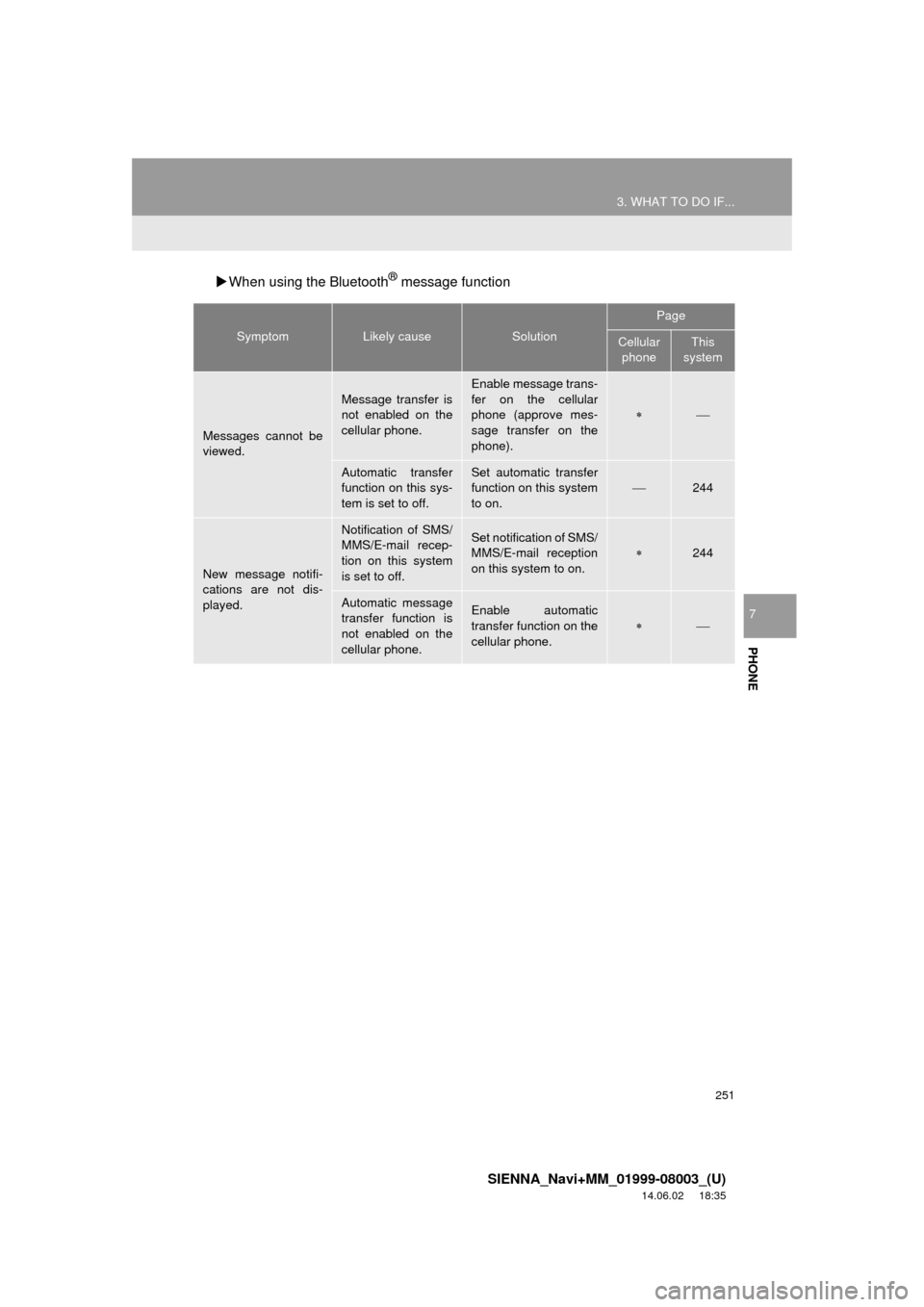
When using the Bluetooth® message function
SymptomLikely causeSolution
Page
Cellular
phoneThis
system
Messages cannot be
viewed.
Message transfer is
not enabled on the
cellular phone.
Enable message trans-
fer on the cellular
phone (approve mes-
sage transfer on the
phone).
Automatic transfer
function on this sys-
tem is set to off.Set automatic transfer
function on this system
to on.
244
New message notifi-
cations are not dis-
played.
Notification of SMS/
MMS/E-mail recep-
tion on this system
is set to off.Set notification of SMS/
MMS/E-mail reception
on this system to on.
244
Automatic message
transfer function is
not enabled on the
cellular phone.Enable automatic
transfer function on the
cellular phone.
Page 252 of 354
252
3. WHAT TO DO IF...
SIENNA_Navi+MM_01999-08003_(U)
14.06.02 18:35
In other situations
SymptomLikely causeSolution
Page
Cellular
phoneThis
system
The Bluetooth® con-
nection status is dis-
played at the top of
the screen each time
the engine switch is in
following.
Vehicles without
a smart key sys-
tem
The engine switch is
turned to the “ACC” or
“ON” position.
Vehicles with a
smart key system
The engine switch is
turned to ACCESSO-
RY or IGNITION ON
mode.
Connection confir-
mation display on
this system is set to
on.To turn off the display,
set connection confir-
mation display on this
system to off.
57
Page 253 of 354
253
3. WHAT TO DO IF...
SIENNA_Navi+MM_01999-08003_(U)
14.06.02 18:35
PHONE
7
: For details, refer to the owner’s manual that came with the cellular phone.
Even though all con-
ceivable measures
have been taken, the
symptom status does
not change.
The cellular phone
is not close enough
to this system.Bring the cellular
phone closer to this
system.
The cellular phone
is the most likely
cause of the symp-
tom.
Turn the cellular phone
off, remove and rein-
stall the battery pack,
and then restart the
cellular phone.
Enable the cellular
phone’s Bluetooth®
connection.
Stop the cellular
phone’s security soft-
ware and close all ap-
plications.
Before using an appli-
cation installed on the
cellular phone, careful-
ly check its source and
how its operation might
affect this system.
SymptomLikely causeSolution
Page
Cellular phoneThis
system
Page 327 of 354
327
1. Entune App Suite OVERVIEW
SIENNA_Navi+MM_01999-08003_(U)
14.06.02 18:35
Entune App Suite
9
Perform the following actions.
In order to use Entune App Suite, the fol-
lowing actions must first be performed:
User registration with a service contract
( P.327)
Download the Entune App Suite applica-
tion onto your cellular phone, and login to
the application. ( P.328)
Register the cellular phone that the
Entune App Suite application was down-
loaded to with the system. ( P.328)
Register a Bluetooth
® phone with the
hands-free system. ( P.44)
Download Entune App Suite applications
to the system. ( P.330)
1Perform user registration at
http://www.toyota.com/entune/
.
PREPARATION BEFORE
USING Entune App Suite
SETUP REQUIRED TO USE
Entune App Suite
1User registration
2Download the Entune App Suite
application to your cellular phone.
3Register the cellular phone to the
system.
4Download Entune App Suite
applications to the system.
USER REGISTRATION
Page 328 of 354

328
1. Entune App Suite OVERVIEW
SIENNA_Navi+MM_01999-08003_(U)
14.06.02 18:35
1Download the Entune App Suite appli-
cation to your cellular phone.
2Run the Entune App Suite application
on your cellular phone.
3Enter the information required into the
Entune App Suite application. Login to
the application.
1The actions on P.327 need to be per-
formed before Entune App Suite appli-
cations can be downloaded.
2Once your phone is running the Entune
App Suite application with a valid ac-
count logged in and is connected to the
system, an on-screen pop-up will be
displayed offering to begin download-
ing Entune App Suite applications to
the system. After download has start-
ed, see P.331 for more information.
REGISTERING THE Entune App
Suite APPLICATION
INFORMATION
●Applications can only be used when the
Entune App Suite application has been
downloaded to your cellular phone and
the application is running.
● Entune App Suite operational proce-
dures can also be confirmed by visiting
http://www.toyota.com/entune/
.
● In order to use applications, it is neces-
sary to run the Entune App Suite appli-
cation on your cellular phone.
● If an iPhone is connected via Bluetooth
®
and USB at the same time, system oper-
ation may become unstable. For known
phone compatibility information, refer to
http://www.toyota.com/entune/
.
● If an Entune App Suite application is
used while iPod audio is being played
back, system operation may become
unstable.
DOWNLOADING Entune App
Suite APPLICATIONS