Page 511 of 732
511
RAV4_OM_OM42A78U_(U)
6Maintenance and care
6-1. Maintenance and careCleaning and protecting the vehicle exterior .......... 512
Cleaning and protecting the vehicle interior ........... 516
6-2. Maintenance Maintenance requirements ................... 520
General maintenance........ 523
Emission inspection and maintenance (I/M)
programs......................... 527
6-3. Do-it-yourself maintenance Do-it-yourself service precautions ..................... 528
Hood ................................. 533
Positioning a floor jack ...... 535
Engine compartment ......... 537
Tires .................................. 551
Tire inflation pressure ....... 562
Wheels .............................. 565
Air conditioning filter.......... 568
Wireless remote control/electronic
key battery ...................... 570
Checking and replacing fuses ............................... 573
Light bulbs......................... 584
Page 547 of 732

RAV4_OM_OM42A78U_(U)
5476-3. Do-it-yourself maintenance
6
Maintenance and care
■After recharging/reconnecting the ba ttery (vehicles with a smart key sys-
tem)
The engine may not start. Follow the procedure below to initialize the system.
Shift the shift lever to P.
Open and close any of the doors.
Restart the engine.
● Unlocking the doors using the smart key system may not be possible imme-
diately after reconnecting the battery. If this happens, use the wireless
remote control or the mechanical key to lock/unlock the doors.
● Start the engine with the engine switch in ACCESSORY mode. The engine
may not start with the engine switch turned off. However, the engine will
operate normally from the second attempt.
● The engine switch mode is recorded by the vehicle. If the battery is recon-
nected, the vehicle will return the engine switch mode to the status it was in
before the battery was disconnected. Make sure to turn off the engine
before disconnect the battery. Take extra care when connecting the battery
if the engine switch mode prior to discharge is unknown.
If the engine will not start even after multiple attempts, contact your Toyota
dealer.
1
2
3
Page 570 of 732
570
RAV4_OM_OM42A78U_(U)
6-3. Do-it-yourself maintenance
Wireless remote control/electronic key
batter y
●Flathead screwdriver
● Small flathead screwdriver
● Lithium battery CR2016 (vehicles without a smart key system), or
CR2032 (vehicles with a smart key system)
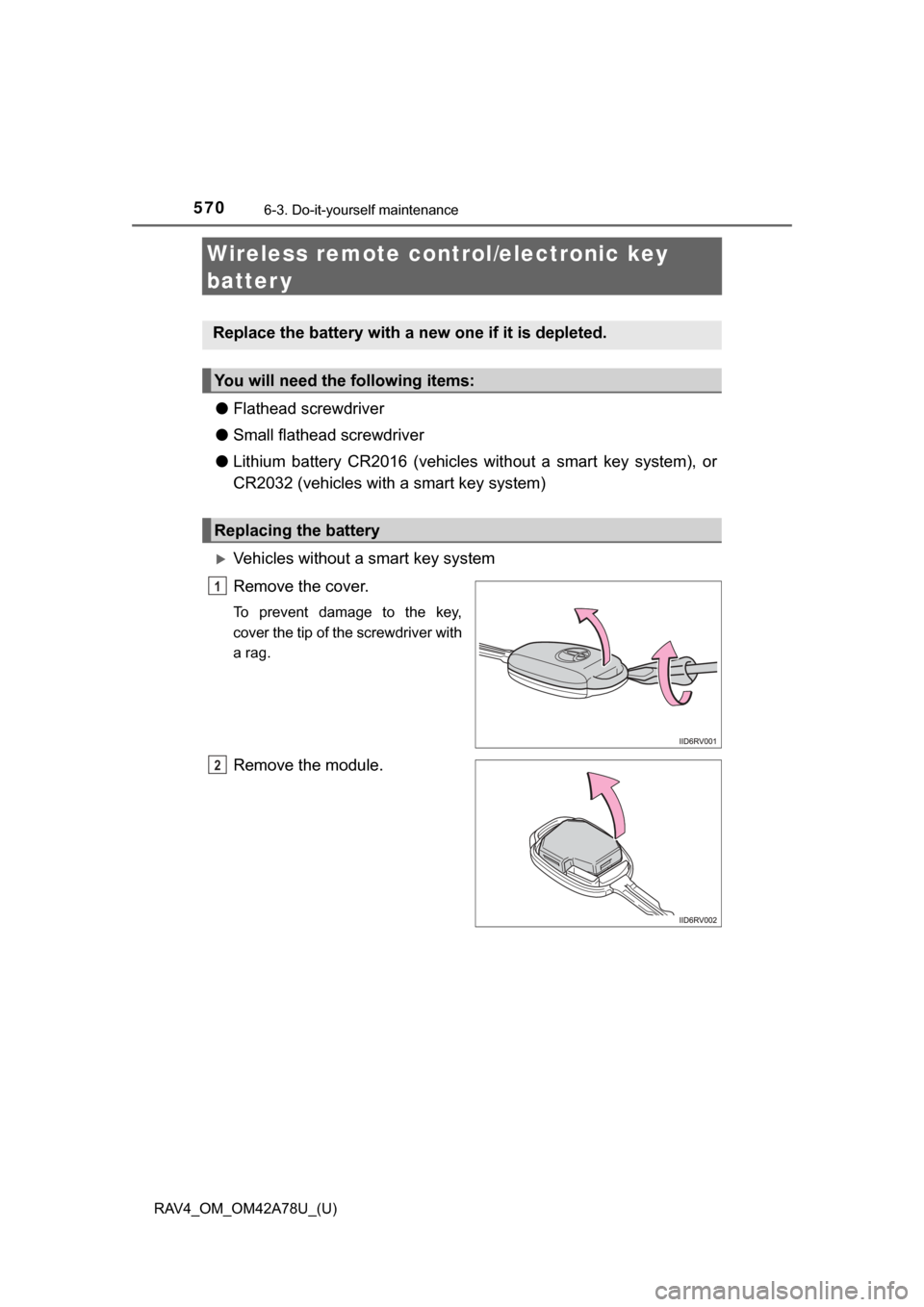
Vehicles without a smart key system
Remove the cover.
To prevent damage to the key,
cover the tip of the screwdriver with
a rag.
Remove the module.
Replace the battery with a new one if it is depleted.
You will need the following items:
Replacing the battery
1
2
Page 572 of 732
572
RAV4_OM_OM42A78U_(U)
6-3. Do-it-yourself maintenance
■Use a CR2016 (vehicles without a sm art key system), or CR2032 (vehi-
cles with a smart key system) lithium battery
● Batteries can be purchased at your Toyota dealer, local electrical appliance
shops or camera stores.
● Replace only with the same or equivalent type recommended by the manu-
facturer.
● Dispose of used batteries according to local laws.
■ If the key battery is depleted
The following symptoms may occur:
●The smart key system (if equipped) and wireless remote control will not
function properly.
● The operational range will be reduced.
CAUTION
■Removed battery and other parts
These parts are small and if swallowed by a child, they can cause choking.
Keep away from children. Failure to do so could result in death or serious
injury.
NOTICE
■For normal operation after replacing the battery
Observe the following precautions to prevent accidents:
● Always work with dry hands.
Moisture may cause the battery to rust.
● Do not touch or move any other component inside the remote control.
● Do not bend either of the battery terminals.
Page 576 of 732
576
RAV4_OM_OM42A78U_(U)
6-3. Do-it-yourself maintenance
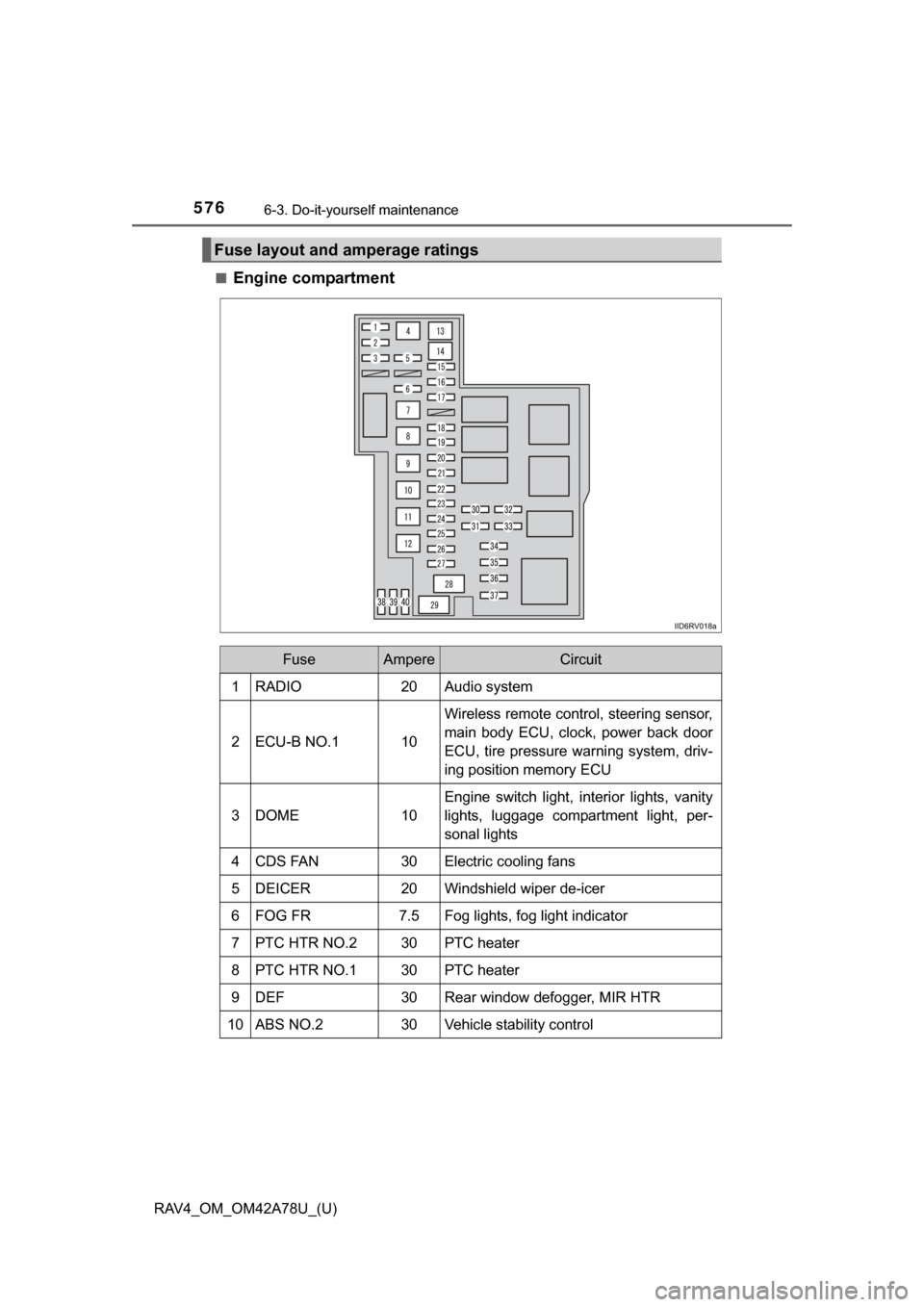
■Engine compartment
Fuse layout and amperage ratings
FuseAmpereCircuit
1RADIO20Audio system
2ECU-B NO.110
Wireless remote control, steering sensor,
main body ECU, clock, power back door
ECU, tire pressure warning system, driv-
ing position memory ECU
3DOME10
Engine switch light, interior lights, vanity
lights, luggage compartment light, per-
sonal lights
4CDS FAN30Electric cooling fans
5DEICER20Windshield wiper de-icer
6FOG FR7.5Fog lights, fog light indicator
7PTC HTR NO.230PTC heater
8PTC HTR NO.130PTC heater
9DEF30Rear window defogger, MIR HTR
10ABS NO.230Vehicle stability control
Page 580 of 732

580
RAV4_OM_OM42A78U_(U)
6-3. Do-it-yourself maintenance
18ACC7.5
Power outlets, audio system, outside rear
view mirrors, main body ECU, clock,
electric current sensor
19PA N E L7.5
VSC OFF switch, instrument cluster (indi-
cators and warning lights), BSM main
switch, all-wheel drive lock switch, wind-
shield wiper de-icer switch, multiport fuel
injection system/sequential multiport fuel
injection system, intuitive parking assist
ECU, seat heater switches, power out-
lets, power back door switches, air condi-
tioning system switches, rear window
defogger switch, audio system, cup
holder light, steering switches, driver
module switch
20TA I L10Parking lights, tail lights, license plate
lights, side marker lights, fog lights
21EPS-IG5Electric power steering
22ECU-IG NO.110
Dynamic Torque Control AWD system
ECU, steering sensor, instrument cluster
(indicators and warning lights), shift con-
trol switch
23ECU-IG NO.25
Main body ECU, wireless remote control,
shift lock system ECU, smart key system,
moon roof ECU, audio system, power
back door ECU, tire pressure warning
system, LDA system, Blind Spot Monitor
system
24HTR-IG7.5
Air conditioning system ECU, air condi-
tioning system switches, rear window
defogger switch
25S-HTR LH10Left-hand seat heater
26S-HTR RH10Right-hand seat heater
27IGN7.5
Fuel pump, multiport fuel injection sys-
tem/sequential multiport fuel injection
system, stop lights, steering lock system
ECU
FuseAmpereCircuit
Page 646 of 732
646
RAV4_OM_OM42A78U_(U)
7-2. Steps to take in an emergency
If the electronic key does not operate
properly (vehicles with a smar t key system)
Use the mechanical key
( P. 97) in order to perform the
following operations:
Locks all the doors
Unlocks the door
Turning the key rearward unlocks
the driver’s door. Turning the key
once again within 3 seconds
unlocks the other doors.
If communication between the electronic key and vehicle is
interrupted ( P. 107) or the electronic key cannot be used
because the battery is depleted, the smart key system and wire-
less remote control cannot be used. In such cases, the doors
can be opened and the engine ca n be started by following the
procedure below.
Locking and unlocking the doors
1
2
Page 651 of 732

6517-2. Steps to take in an emergency
RAV4_OM_OM42A78U_(U)
7
When trouble arises
■When recharging or replacing the ba ttery (vehicles with a smart key sys-
tem)
● In some cases, it may not be possible to unlock the doors using the smart
key system when the battery is discharged. Use the wireless remote control
or the mechanical key to lock or unlock the doors.
● The engine may not start on the first attempt after the battery has recharged
but will start normally after the second attempt. This is not a malfunction.
● The engine switch mode is memorized by the vehicle. When the battery is
reconnected, the system will return to the mode it was in before the battery
was discharged. Before disconnecting the battery, turn the engine switch off.
If you are unsure what mode the engine switch was in before the battery dis-
charged, be especially careful when reconnecting the battery.
■ When the battery is removed or discharged
●The power back door (if equipped) must be initialized. ( P. 128)
● The moon roof (if equipped) must be initialized. ( P. 160)
CAUTION
■Avoiding battery fires or explosions
Observe the following precautions to prevent accidentally igniting the flam-
mable gas that may be emitted from the battery:
● Make sure each jumper cable is connected to the correct terminal and that
it is not unintentionally in contact with any other than the intended terminal.
● Do not allow the other end of the jumper cable connected to the “+” termi-
nal to come into contact with any other parts or metal surfaces in the area,
such as brackets or unpainted metal.
● Do not allow the + and - clamps of the jumper cables to come into contact
with each other.
● Do not smoke, use matches, cigarette lighters or allow open flame near
the battery.