Page 5 of 728

1
2
3
4
5
6
7
5
LC200_OM_OM60L83U_(U)
3-6. Using the storage featuresList of storage features ....... 470
• Glove box.......................... 471
• Console box ...................... 472
• Overhead console............. 473
• Cup holders ...................... 474
• Bottle holders .................... 476
• Card holders ..................... 478
• Auxiliary boxes.................. 478
3-7. Other interior features Cool box .............................. 479
Sun visors ........................... 481
Vanity mirror........................ 482
Clock ................................... 483
Outside temperature display............................... 484
Ashtrays .............................. 486
Cigarette lighter................... 488
Power outlets ...................... 489
Heated steering wheel ........ 491
Seat heaters and ventilators ......................... 493
Armrest ............................... 495
Assist grips.......................... 496
Floor mats ........................... 497
Luggage compartment features ............................. 499
Garage door opener............ 501
Safety Connect ................... 508 4-1. Maintenance and care
Cleaning and protecting the vehicle exterior ........... 516
Cleaning and protecting the vehicle interior ............ 519
4-2. Maintenance Maintenance requirements .................... 522
General maintenance ......... 525
Emission inspection and maintenance (I/M)
programs .......................... 528
4-3. Do-it-yourself maintenance Do-it-yourself service precautions....................... 529
Hood ................................... 532
Engine compartment .......... 533
Tires ................................... 548
Tire inflation pressure ......... 557
Wheels ............................... 561
Air conditioning filter ........... 564
Electronic key battery ......... 567
Checking and replacing fuses ................. 570
Headlight aim ..................... 584
Light bulbs .......................... 586
4Maintenance and care
Page 340 of 728
340
LC200_OM_OM60L83U_(U)
3-1. Using the air conditioning system and defogger
Front air conditioning system
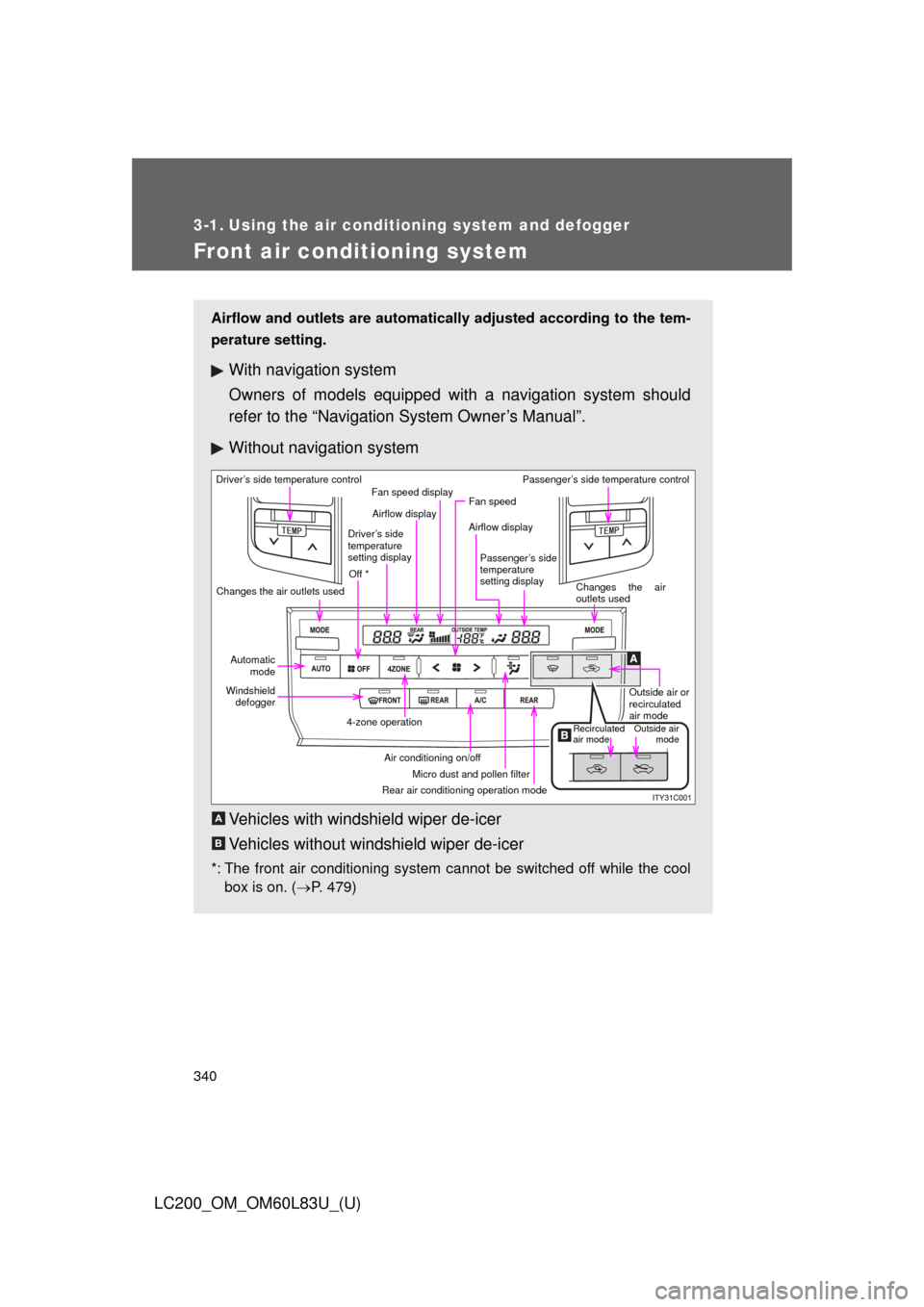
Airflow and outlets are automatically adjusted according to the tem-
perature setting.
With navigation system
Owners of models equipped with a navigation system should
refer to the “Navigation System Owner’s Manual”.
Without navig ation system
Vehicles with windshield wiper de-icer
Vehicles without windshield wiper de-icer
*: The front air conditioning system cannot be switched off while the cool box is on. ( P. 479)
Driver’s side temperature control
Changes the air outlets used Off *Airflow display
Fan speed display
Fan speed
Airflow display
Passenger’s side
temperature
setting display Passenger’s side temperature control
Changes the air
outlets usedOutside air or
recirculated
air mode
Outside airmode
Recirculated
air mode
Rear air conditioning operation mode Micro dust and pollen filter
Air conditioning on/off
4-zone operation
Windshield
defogger
Automatic
mode
Driver’s side
temperature
setting display
A
B
Page 346 of 728
346 3-1. Using the air conditioning system and defogger
LC200_OM_OM60L83U_(U)
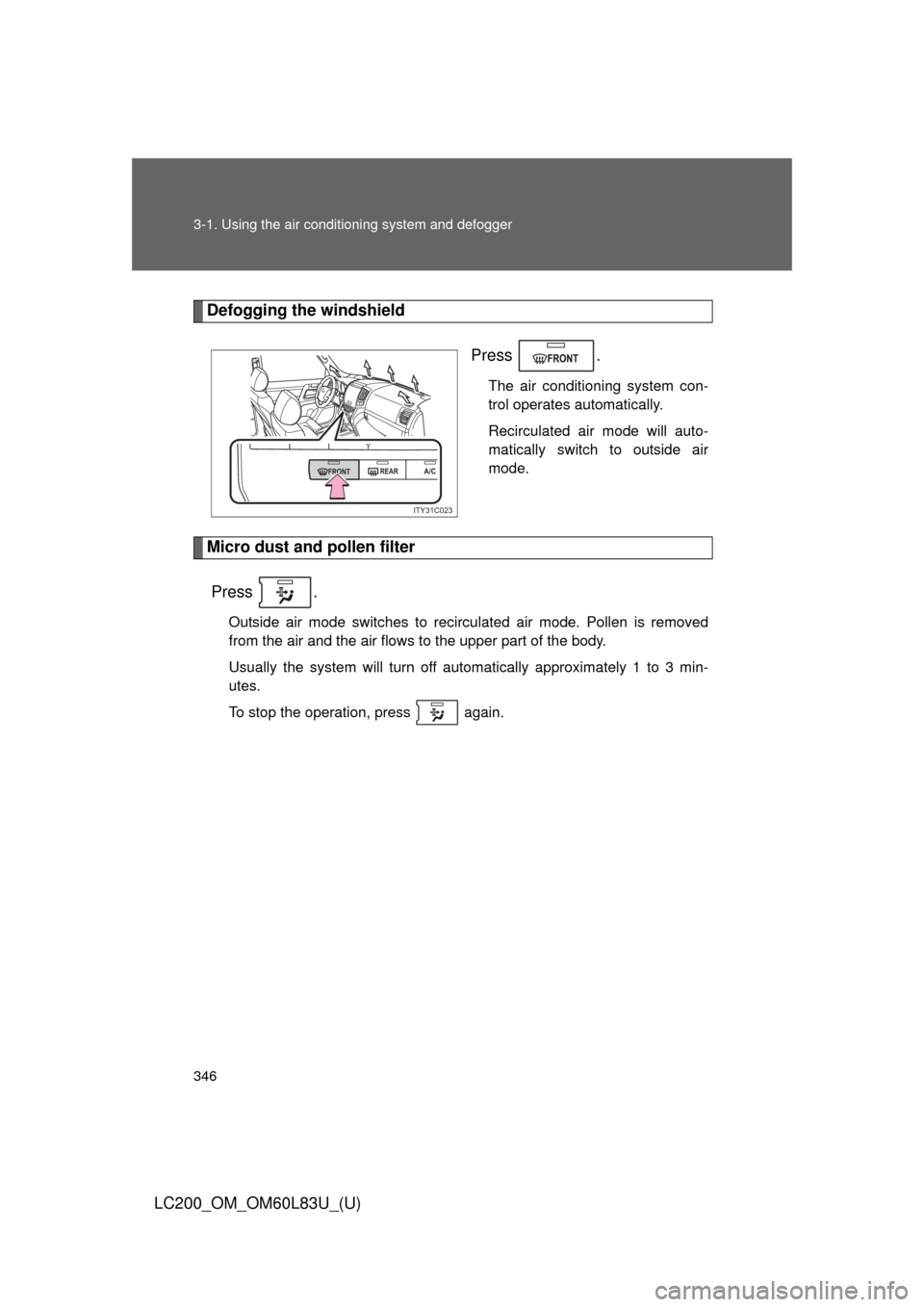
Defogging the windshield
Press .
The air conditioning system con-
trol operates automatically.
Recirculated air mode will auto-
matically switch to outside air
mode.
Micro dust and pollen filterPress .
Outside air mode switches to recirculated air mode. Pollen is removed
from the air and the air flows to the upper part of the body.
Usually the system will turn off automatically approximately 1 to 3 min-
utes.
To stop the operation, press again.
FRONT REARA/C
ITY31C023
Page 349 of 728
349
3-1. Using the air conditioning system
and defogger
3
Interior features
LC200_OM_OM60L83U_(U)
■When outside temperatur e approaches 32°F (0°C)
The air conditioning system may not operate even when is
pressed.
■ Micro dust and pollen filter
●In order to prevent the windows from fogging up when the outside air is
cold, the following may occur.
• Outside air mode does not switch to recirculated air mode.
• The air conditioning system operates automatically.
• The operation cancels after 1 minute.
● In rainy weather, the windows may fog up. Press .
■ Ventilation and air conditioning odors
●To let fresh air in, set the air conditioning system to the outside air mode.
● During use, various odors from inside and outside the vehicle may enter
into and accumulate in the air conditioning system. This may then cause
odor to be emitted from the vents.
● To reduce potential odors from occurring:
• It is recommended that the air conditioning system be set to outside air
mode prior to turning the vehicle off.
• The start timing of the blower may be delayed for a short period of time immediately after the air conditioning system is started in automatic
mode.
■ Air conditioning filter
P. 564
■ Customization that can be co nfigured at Toyota dealer
Settings (e.g. A/C Auto switch operation) can be changed.
(Customizable features P. 700)
Page 494 of 728

494 3-7. Other interior features
LC200_OM_OM60L83U_(U)
■The seat heaters and ventilators can be used when
The “ENGINE START STOP” switch is in IGNITION ON mode.
■ Replacing the air filters
Filters are installed in the seat ventilators. For replacement of the filters, con-
tact your Toyota dealer.
CAUTION
■Burns
●Use caution when seating the following persons in a seat with the seat
heater on to avoid the possibility of burns:
• Babies, small children, the elderly, the sick and the physically chal-
lenged
• Persons with sensitive skin
• Persons who are fatigued
• Persons who have taken alcohol or drugs that induce sleep (sleeping drugs, cold remedies, etc.)
● Do not cover the seat with anything when using the seat heater.
Using the seat heater with a blanket or cushion increases the temperature
of the seat and may lead to overheating.
● Do not use the seat heater more than necessary. Doing so may cause
minor burns or overheating.
NOTICE
■To prevent damage to the seat heaters and ventilators
Do not put heavy objects that have an uneven surface on the seat and do
not stick sharp objects (needles, nails, etc.) into the seat.
■ To prevent battery discharge
Turn the seat heaters and ventilators off and observe that the indicator light
is off when the engine is not running.
Page 515 of 728
Maintenance and care4
515
LC200_OM_OM60L83U_(U)
4-1. Maintenance and careCleaning and protecting the vehicle exterior ......... 516
Cleaning and protecting the vehicle interior .......... 519
4-2. Maintenance Maintenance requirements .................. 522
General maintenance....... 525
Emission inspection and maintenance (I/M)
programs........................ 528
4-3. Do-it-yourself maintenance Do-it-yourself service precautions .................... 529
Hood ................................ 532
Engine compartment ........ 533
Tires ................................. 548
Tire inflation pressure ...... 557
Wheels ............................. 561
Air conditioning filter......... 564
Electronic key battery....... 567
Checking and replacing fuses ............... 570
Headlight aim ................... 584
Light bulbs........................ 586
Page 531 of 728
531
4-3. Do-it-yourself maintenance
4
Maintenance and care
LC200_OM_OM60L83U_(U)
CAUTION
The engine compartment contains many mechanisms and fluids that may
move suddenly, become hot, or become electrically energized. To avoid death
or serious injury.
■
When working on the engine compartment
●Keep hands, clothing and tools away from the moving fan and engine
drive belt.
● Be careful not to touch the engine, inverter, radiator, exhaust manifold, etc.
right after driving as they may be hot. Oil and other fluids may also be hot.
● Do not leave anything that may burn easily, such as paper or rags, in the
engine compartment.
● Do not smoke, cause sparks or expose an open flame to fuel or the bat-
tery. Fuel and battery fumes are flammable.
● Be extremely cautious when working on the battery. It contains poisonous
and corrosive sulfuric acid.
■ When working near the electric cooling fan or radiator grille
Be sure the “ENGINE START STOP” switch is OFF.
With the “ENGINE START STOP” switch in IGNITION ON mode, the electric
cooling fan may automatically start to run if the air conditioning is on and/or if
the coolant temperature is high. ( P. 540)
■ When working on or under the vehicle
●Do not get under the vehicle with just the jack supporting it.
Always use automotive jack stands or other solid supports.
● Use eye protection to prevent flying or falling material, fluid spray, etc. from
getting in your eyes.
NOTICE
■If you remove the air cleaner filter
Driving with the air cleaner filter removed may cause excessive engine wear
due to dirt in the air.
Page 564 of 728
564
4-3. Do-it-yourself maintenance
LC200_OM_OM60L83U_(U)
Air conditioning filter
The air conditioning filter must be cleaned or changed regularly to
maintain air conditioning efficiency.
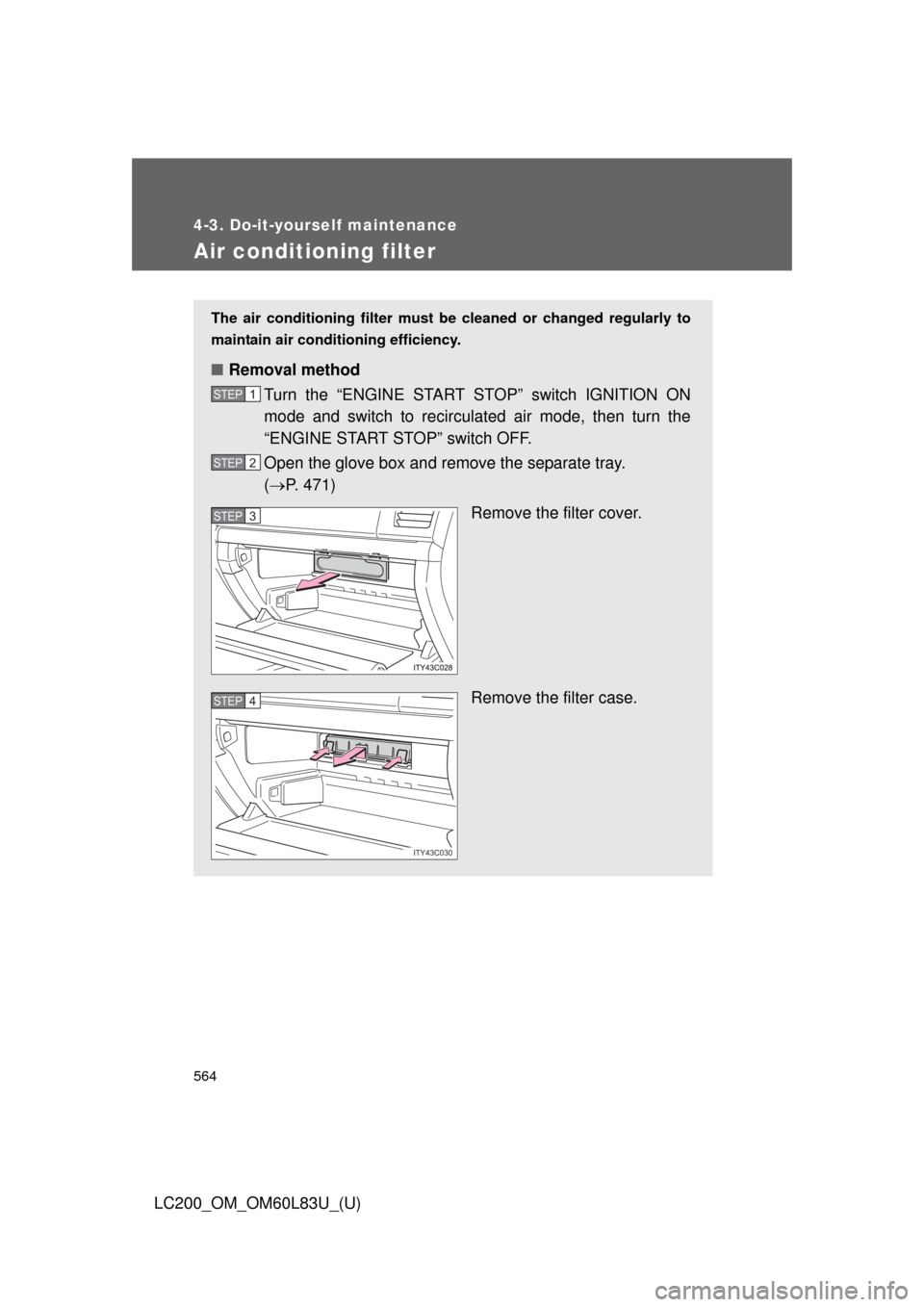
■ Removal method
Turn the “ENGINE START STOP” switch IGNITION ON
mode and switch to recirculated air mode, then turn the
“ENGINE START STOP” switch OFF.
Open the glove box and remove the separate tray.
( P. 471)
Remove the filter cover.
Remove the filter case.
STEP1
STEP2
STEP3
ITY43C030
STEP4