2015 TOYOTA LAND CRUISER USB
[x] Cancel search: USBPage 236 of 427
236
1. AUDIO/VIDEO SYSTEM OPERATION
L/C200_Navi_OM60M04U_(U)
14.05.28 15:38
8. USB MEMORY OPERATION
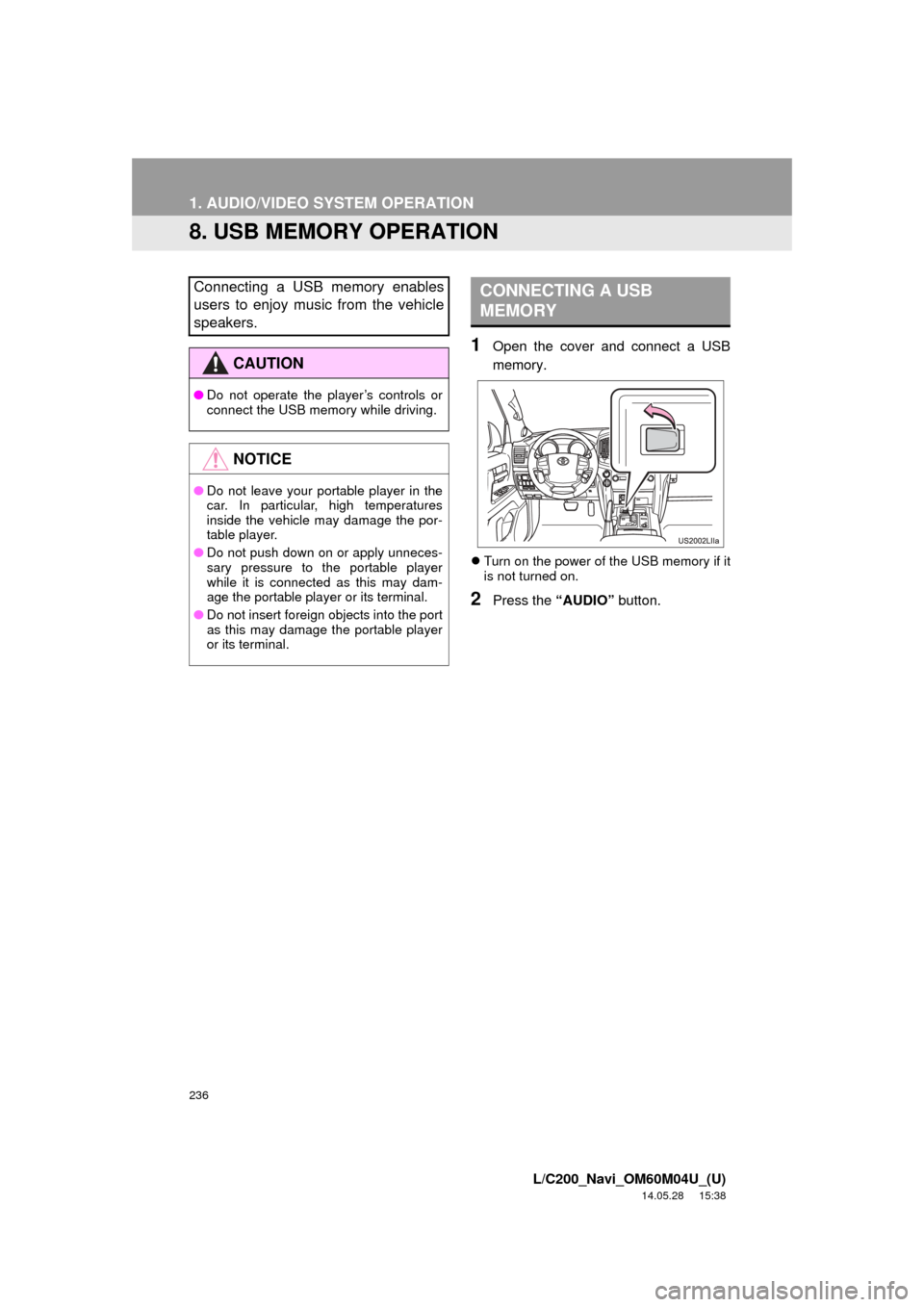
1Open the cover and connect a USB
memory.
Turn on the power of the USB memory if it
is not turned on.
2Press the “AUDIO” button.
Connecting a USB memory enables
users to enjoy music from the vehicle
speakers.
CAUTION
●Do not operate the player’s controls or
connect the USB memory while driving.
NOTICE
●Do not leave your portable player in the
car. In particular, high temperatures
inside the vehicle may damage the por-
table player.
● Do not push down on or apply unneces-
sary pressure to the portable player
while it is connected as this may dam-
age the portable player or its terminal.
● Do not insert foreign objects into the port
as this may damage the portable player
or its terminal.
CONNECTING A USB
MEMORY
Page 237 of 427
237
1. AUDIO/VIDEO SYSTEM OPERATION
5
AUDIO/VIDEO SYSTEM
L/C200_Navi_OM60M04U_(U)
14.05.28 15:38
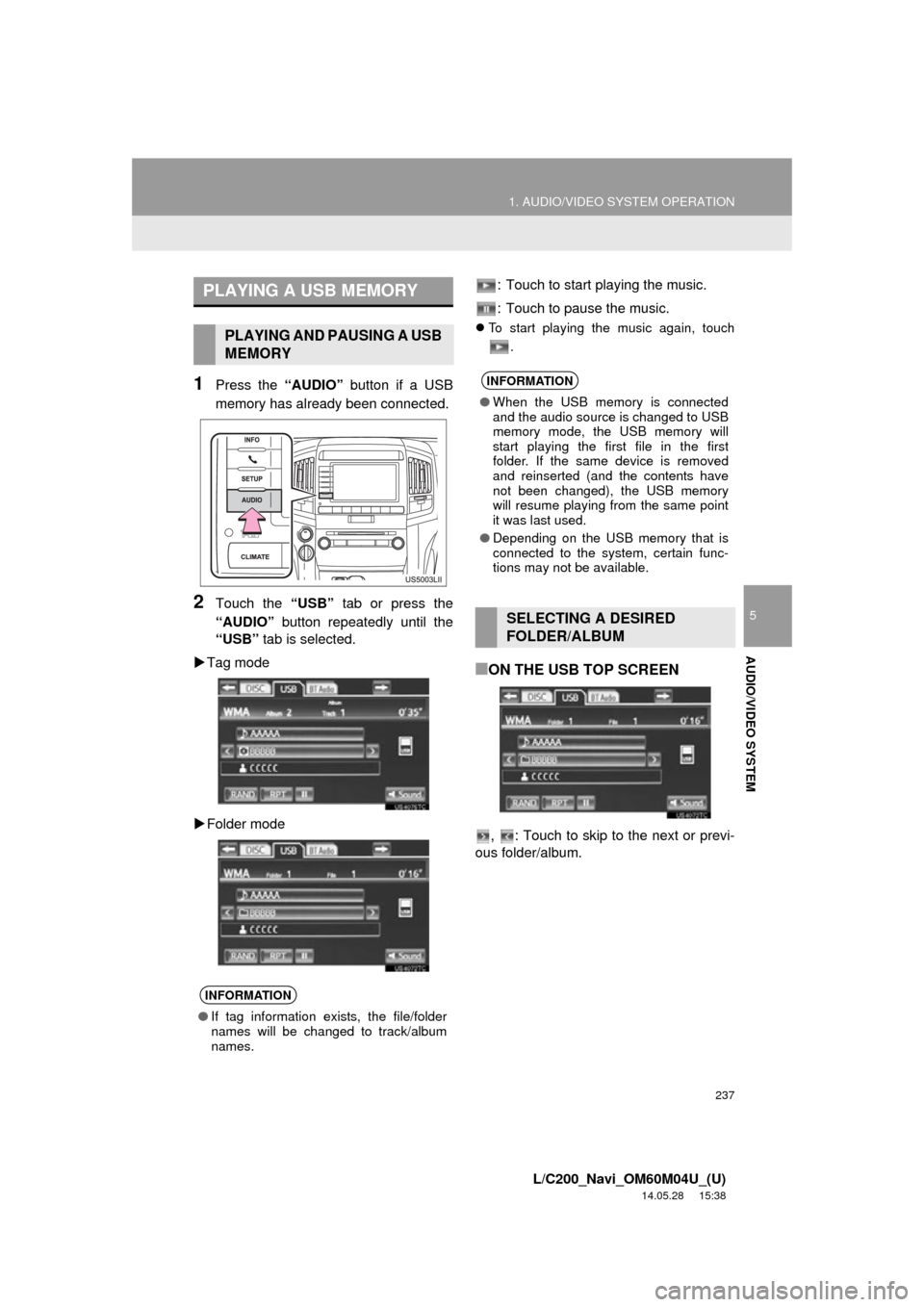
1Press the “AUDIO” button if a USB
memory has already been connected.
2Touch the “USB” tab or press the
“AUDIO” button repeatedly until the
“USB” tab is selected.
Tag mode
Folder mode : Touch to start playing the music.
: Touch to pause the music.
To start playing the music again, touch
.
■ON THE USB TOP SCREEN
, : Touch to skip to the next or previ-
ous folder/album.
PLAYING A USB MEMORY
PLAYING AND PAUSING A USB
MEMORY
INFORMATION
● If tag information exists, the file/folder
names will be changed to track/album
names.
INFORMATION
●When the USB memory is connected
and the audio source is changed to USB
memory mode, the USB memory will
start playing the first file in the first
folder. If the same device is removed
and reinserted (and the contents have
not been changed), the USB memory
will resume playing from the same point
it was last used.
● Depending on the USB memory that is
connected to the system, certain func-
tions may not be available.
SELECTING A DESIRED
FOLDER/ALBUM
Page 238 of 427

238
1. AUDIO/VIDEO SYSTEM OPERATION
L/C200_Navi_OM60M04U_(U)
14.05.28 15:38
1Touch the folder/album name screen
button.
2Touch the desired tab and select the
desired folder, artist or album.
Character screen buttons, “ABC”, “DEF”
etc., allow a direct jump to list entries that
begin with the same letter as the character
button.
Each time the same character screen but-
ton is touched, the list starting with the
subsequent character is displayed.
, : Touch to move the list up or down
by 5 folder/artist/album groups. If either of
these screen buttons is touched when the
top/bottom page of the lis t is displayed, the
last/first page is displayed.
“TUNE·SCROLL” knob: Turn the knob
clockwise or counterclockwise to quickly
scroll up or down the folder/artist/album
list.
, : If appears to the right of an item
name, the complete name is too long for
the screen. Touch to scroll to the end of
the name. Touch to move to the begin-
ning of the name.
■ON THE USB TOP SCREEN
“PRST·TRACK” button: Press the “” or
“” button of “PRST·TRACK” repeatedly
until the desired file/track number appears
on the screen. The player will start playing
the selected file/track from the beginning.
“TUNE·SCROLL” knob: Turn the knob
clockwise or counterclockwise to skip to
the desired file/track.
SELECTING A DESIRED
FOLDER, ARTIST OR ALBUMSELECTING A DESIRED FILE/
TRACK
Page 269 of 427

269
1. AUDIO/VIDEO SYSTEM OPERATION
5
AUDIO/VIDEO SYSTEM
L/C200_Navi_OM60M04U_(U)
14.05.28 15:38
1Connect a USB memory. (See “CON-
NECTING A USB MEMORY” on page
236.)
2Select USB mode on the source
screen to display the control screen.
1Press the button.
1Press the “” or “” button of “FOL/
CH” until the desired folder/album
number appears on the screen.
1Press the or button repeated-
ly until the desired file/track number
appears on the screen.
1Press the or button, or press
and hold the or button.
1Select BT-A mode on the source
screen to display the control screen.
PLAYING A USB MEMORY
When a different audio source is se-
lected at the front seats, USB mode
cannot be selected at the rear seats.
PLAYING AND PAUSING A USB
MEMORY
SELECTING A DESIRED
FOLDER OR ALBUM
SELECTING A DESIRED FILE
OR TRACK
FAST FORWARDING OR
REWINDING
INFORMATION
● Depending on the USB memory that is
connected to the system, certain
functions may not be available.
PLAYING Bluetooth® AUDIO
When a different audio source is se-
lected at the front seats, BT-A mode
cannot be selected at the rear seats.
Page 277 of 427

277
1. AUDIO/VIDEO SYSTEM OPERATION
5
AUDIO/VIDEO SYSTEM
L/C200_Navi_OM60M04U_(U)
14.05.28 15:38
If “Check DISC” appears on the display:
It indicates that the disc is dirty, damaged,
or it was inserted upside down. Clean the
disc or insert it correctly. If a disc which is
not playable is inserted, “Check DISC” will
also appear on the screen. For appropriate
discs for the player, see “AUDIO/VIDEO
SYSTEM OPERATING HINTS” on page
283.
If “Region code error” appears on the
display: It indicates that the DVD region
code is not set properly. Insert a disc with
a region code of “ALL” or “1”.
If “DISC error” appears on the display :
The following causes are possible.
• There is a problem inside the system. Eject the disc.
• The inside of the player unit may be too hot due to a very high ambient tempera-
ture. Eject the disc and allow the player
to cool down.
If “No music files found.” appears on
the display : It indicates that the iPod or
USB has no playable data.
If the malfunction is not rectified : Take
your vehicle to your Toyota dealer.
1Open the cover and connect audio/
video device.
The A/V input port is composed of 3 input
ports.
IF THE REAR SEAT
ENTERTAINMENT SYSTEM
MALFUNCTIONS
If the rear seat entertainment system
malfunctions, the system will display a
message.
These are described below.USING THE VIDEO MODE
USING THE PORT
ColorFunction
Ye l l o wVideo input port
WhiteLeft channel audio input port
RedRight channel audio input port
The rear seat entertainment system
plays videos and sound when audio-
video equipment is connected to the A/V
input port. For details, refer to the manu-
facturer’s instructions.
NOTICE
●When the A/V input port is not in use,
keep the A/V input port cover closed.
Inserting anything other than an appro-
priate plug may cause electrical failure
or a short circuit.
Page 282 of 427

282
1. AUDIO/VIDEO SYSTEM OPERATION
L/C200_Navi_OM60M04U_(U)
14.05.28 15:38
Bluetooth® audio player
Use the “” or “” switch to skip up or
down to a different track or album in either
direction.
To select a desired track : Quickly press
and release the “” or “” switch until the
desired track is selected. To return to the
beginning of the current track, press the
“” switch once quickly.
To select a desired album : Press and
hold the “” or “” switch until a beep is
heard to change to the next or the previous
album. Repeat it until the desired album is
selected.
USB memory/iPod
Use the “” or “” switch to skip up or
down to a different file or track in either
direction.
To select a desired file or track : Press
the “” or “” switch until the desired file
or track is selected. To return to the begin-
ning of the current file or track, press the
“” switch once quickly.
To select a desired folder or album
(USB memory only): Press and hold the
“” or “” switch until a beep is heard to
change to the next or the previous folder or
album. Repeat it until the desired folder or
album is selected.
“MODE” switch
Press the “MODE” switch to select an
audio mode. Each press changes the
mode sequentially if the desired mode is
ready to use.
To turn the audio/video system on, press
the “MODE” switch.
Press and hold the “MODE” switch to
mute/unmute or pause/resume the current
operation.
Page 285 of 427

285
1. AUDIO/VIDEO SYSTEM OPERATION
5
AUDIO/VIDEO SYSTEM
L/C200_Navi_OM60M04U_(U)
14.05.28 15:38
The following iPod, iPod nano, iPod
classic, iPod touch and iPhone devic-
es can be used with this system.
Made for
• iPod touch (4th generation)
• iPod touch (3rd generation)
• iPod touch (2nd generation)
• iPod touch (1st generation)
• iPod classic
• iPod with video
• iPod nano (6th generation)
• iPod nano (5th generation)
• iPod nano (4th generation)
• iPod nano (3rd generation)
• iPod nano (2nd generation)
• iPod nano (1st generation)
• iPhone 4
• iPhone 3GS
• iPhone 3G
• iPhone
Depending on differences between mod-
els or software versions etc., some models
might be incompatible with this system.
USB memory that can be used for MP3
and WMA playback:
• USB communication formats: USB 2.0
HS (480 Mbps) and FS (12 Mbps)
• File formats: FAT 16/32
• Correspondence class: Mass storage class
This DVD player is intended for use with
4.7 in. (12 cm) discs only.
Extremely high temperatures can keep the
DVD player from working. On hot days,
use the air conditioning system to cool the
inside of the vehicle before using the
player.
Bumpy roads or other vibrations may
make the DVD player skip.
If moisture gets into the DVD player, the
discs may not be able to be played.
Remove the discs from the player and
wait until it dries.
COMPATIBLE MODELS
USB MEMORY
CARING FOR YOUR DVD
PLAYER AND DISC
CAUTION
● DVD players use an invisible laser beam
which could cause hazardous radiation
exposure if directed outside the unit. Be
sure to operate the player correctly.
Page 288 of 427

288
1. AUDIO/VIDEO SYSTEM OPERATION
L/C200_Navi_OM60M04U_(U)
14.05.28 15:38
MP3 player: MP3 files are compatible with
the ID3 Tag Ver. 1.0, Ver. 1.1, Ver. 2.2 and
Ver. 2.3 formats. The unit cannot display
disc title, track title and artist name in
other formats.
USB memory: MP3 files are compatible
with the ID3 Tag Ver. 1.0, Ver. 1.1, Ver.
2.2, Ver. 2.3 and Ver. 2.4 formats. The unit
cannot display track title and artist name
in other formats.
WMA files can contain a WMA tag that is
used in the same way as an ID3 tag. WMA
tags carry information such as track title
and artist name.
The emphasis function is available only
when playing MP3/WMA files recorded at
32, 44.1 and 48 kHz.
MP3 files for MP3 player:
MPEG 1 LAYER 3 — 32, 44.1, 48 kHz
MPEG 2 LSF LAYER 3 — 16, 22.05, 24
kHz
MP3 files for USB memory:
MPEG 1 AUDIO LAYER 2, 3 — 32, 44.1,
48 kHz
MPEG 2 AUDIO LAYER 2, 3 — 16, 22.05,
24 kHz
WMA files for WMA player:
Ver. 7, 8, 9 (9.1/9.2) CBR — 32, 44.1, 48
kHz
WMA files for USB memory:
Ver. 7, 8, 9 (9.1/9.2) CBR — 32, 44.1, 48
kHz
The sound quality of MP3/WMA files gen-
erally improves with higher bit rates. In
order to achieve a reasonable level of
sound quality, discs recorded with a bit
rate of at least 128 kbps are recom-
mended.
MP3 files for MP3 player:
MPEG1 LAYER3 — 32 to 320 kbps
MPEG2 LSF LAYER3 — 8 to 160 kbps
MP3 files for USB memory:
MPEG 1 AUDIO LAYER 3 — 32 to 320
kbps
MPEG 2 AUDIO LAYER 3 — 8 to 160
kbps
WMA files for WMA player:
Ver. 7, 8 CBR — 48 to 192 kbps
Ver. 9 (9.1/9.2) CBR — 48 to 320 kbps
(VBR*)
WMA files for USB memory:
Ver. 9 (9.1/9.2) CBR — 48 to 320 kbps
(VBR*)
*: Variable Bit Rate
The MP3/WMA player does not play back
MP3/WMA files from discs recorded using
packet write data transfer (UDF format).
Discs should be record ed using “pre-mas-
tering” software rather than packet-write
software.
M3u playlists are not compatible with the
audio player.
MP3i (MP3 interactive) and MP3PRO for-
mats are not compatible with the audio
player.
The player is compatible with VBR (Vari-
able Bit Rate).
When playing back files recorded as VBR
(Variable Bit Rate) files, the play time will
not be correctly displayed if the fast for-
ward or reverse operations are used.
It is not possible to check folders that do
not include MP3/WMA files.
MP3/WMA files in folders up to 8 levels
deep can be played. However, the start of
playback may be delayed when using
discs containing numerous levels of fold-
ers. For this reason, we recommend creat-
ing discs with no more than 2 levels of
folders.
SAMPLING FREQUENCY
PLAYABLE BIT RATES