Page 280 of 712
2804-5. Using the driving support systems
HIGHLANDER_U (OM48E98U)
While driving on a road that has la ne markers, this system recognizes
the lane markers using a camera as a sensor to alert the driver when
the vehicle deviates from its lane.
If the system judges that the vehicle has deviated from its lane, it
alerts the driver using a buzzer and indications on the multi-informa-
tion display.
Camera sensor
LDA (Lane Depar ture Alert)
: If equipped
Summary of function
Page 282 of 712
2824-5. Using the driving support systems
HIGHLANDER_U (OM48E98U)
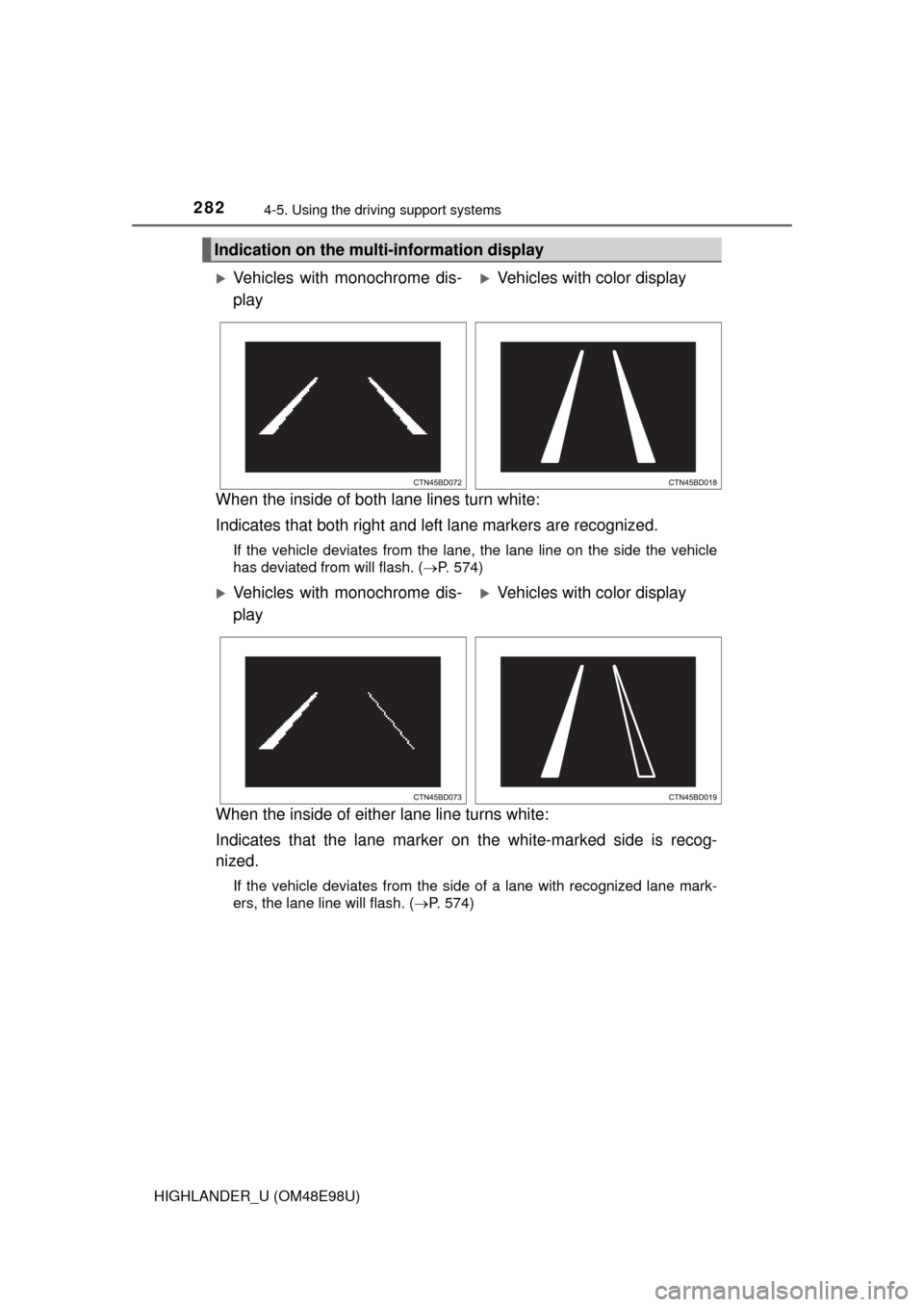
When the inside of both lane lines turn white:
Indicates that both right and left lane markers are recognized.
If the vehicle deviates from the lane, the lane line on the side the vehicle
has deviated from will flash. ( P. 574)
When the inside of either lane line turns white:
Indicates that the lane marker on the white-marked side is recog-
nized.
If the vehicle deviates from the side of a lane with recognized lane mark-
ers, the lane line will flash. ( P. 574)
Indication on the multi-information display
Vehicles with monochrome dis-
playVehicles with color display
Vehicles with monochrome dis-
playVehicles with color display
Page 283 of 712
2834-5. Using the driving support systems
4
Driving
HIGHLANDER_U (OM48E98U)
Vehicles with monochrome dis-
playVehicles with color display
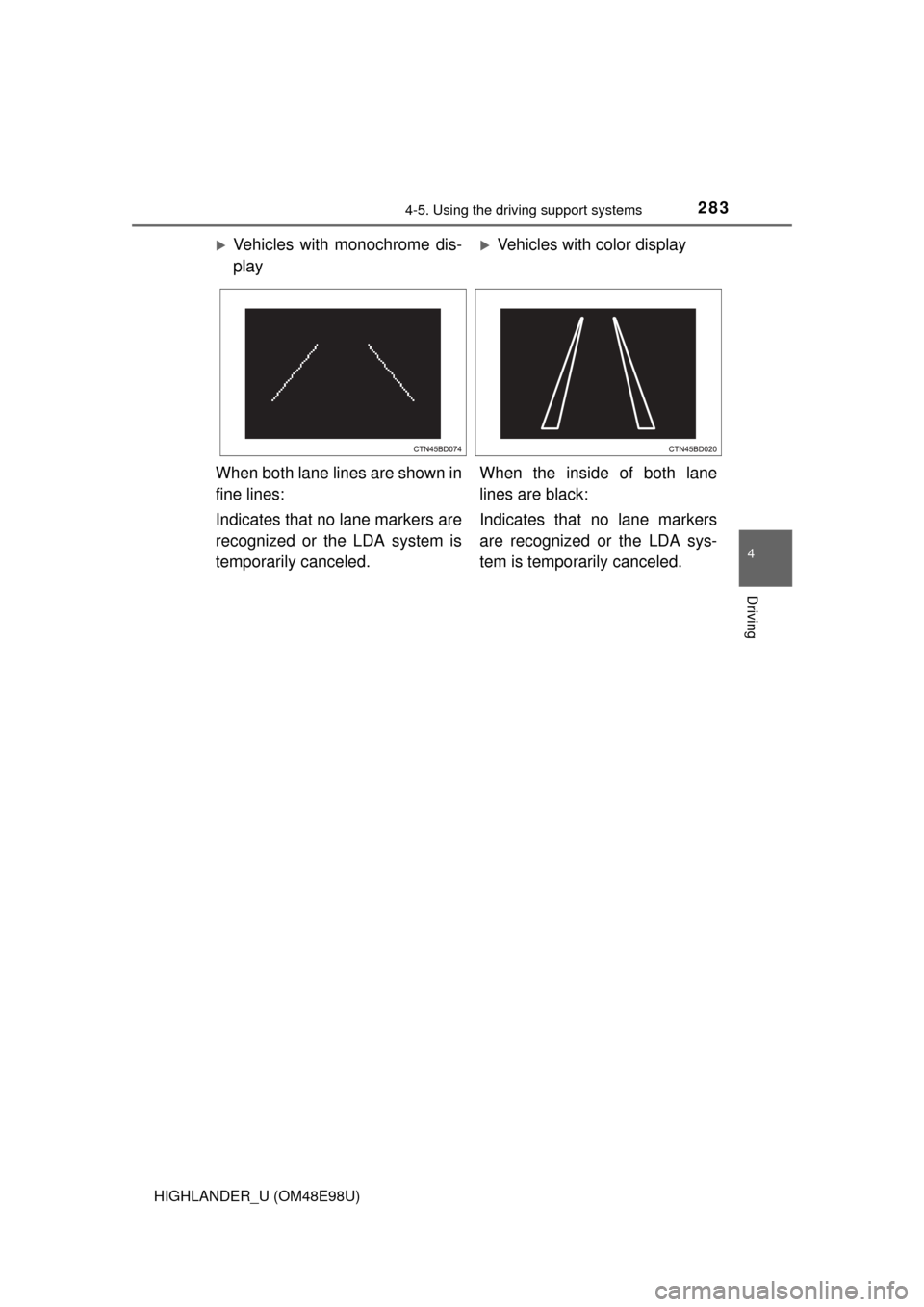
When both lane lines are shown in
fine lines:
Indicates that no lane markers are
recognized or the LDA system is
temporarily canceled. When the inside of both lane
lines are black:
Indicates that no lane markers
are recognized or the LDA sys-
tem is temporarily canceled.
Page 284 of 712

2844-5. Using the driving support systems
HIGHLANDER_U (OM48E98U)
■Temporary cancelation of the LDA system functions
If any of the following occurs, the LDA system functions will be temporarily
canceled. The functions will resume after the necessary operating conditions
have returned.
●The turn signal lever is operated.
● The vehicle speed deviates from the operating range of the LDA system
functions.
● When the lane lines cannot be recognized while driving.
● When the lane departure warning function is activated.
The lane departure warning function will not operate again for a several sec-
onds after it has been activated, even if the vehicle leaves the lane again.
■ The lane departure warning
Depending on the audio system sound level or air conditioning fan noise
while the audio system or air conditioning system is in use, it may be difficult
to hear the warning sound.
■ After the vehicle has been parked in the sun
The LDA system may not be available and a warning message ( P. 579) will
be displayed for a while after driving has started. When the temperature in the
cabin decreases and the temperature around the camera sensor ( P. 280)
becomes suitable for its operation, the functions will begin to operate.
■ If there are lane markers on only one side of the vehicle
The lane departure warning will not operate for the side on which lane mark-
ers could not be recognized.
Page 285 of 712

2854-5. Using the driving support systems
4
Driving
HIGHLANDER_U (OM48E98U)■
Conditions in which the function may not operate correctly
In the following situations, the camera sensor may be unable to recognize
lane markers causing the lane departure warning function to operate incor-
rectly. However, this does not indicate a malfunction.
●When driving through an area with no lane markers, such as a tollbooth, a
crossing or before a ticket checkpoint
● When driving on a sharp curve
● When lane markers are extremely narrow or extremely wide
● When the vehicle leans to one side an unusual amount due to a heavy load
or improper tire inflation pressure
● When the following distance between your vehicle and the vehicle ahead is
extremely short
● When the lane markers are yellow (These may be more difficult for the sys-
tem to recognize compared to white markers.)
● When the lane markers are broken, Botts’ dots (raised pavement markers)
or stones
● When the lane markers are on a curb etc.
● When lane markers are obscured or partially obscured by sand, dirt, etc.
● When there are shadows on the road running parallel with lane markers, or
if a shadow covers the lane markers
● When driving on a particularly bright road surface, such as concrete
● When driving on a road surface that is bright due to reflected light
● When driving in a location where the light level changes rapidly, such as the
entrance to or exit from a tunnel
● When sunlight or the headlights of oncoming vehicles are shining directly
into the camera lens
● When driving on roads that are branching or merging
● When driving on a road surface that is wet due to rain, previous rainfall,
standing water, etc.
● When the vehicle experiences strong up-and-down motion such as when
driving on an extremely rough road or on a seam in the pavement
● When headlight brightness at nighttime is reduced due to dirt on the lenses,
or when the headlights are misaligned
● When driving on winding roads or roads that are uneven
● When driving on rough or unpaved roads
■ When changing the tires
Depending on the tires used, sufficient performance may not be maintainable.
■ Warning messages for the LDA system
Warning messages are used to indicate a system malfunction or to inform t\
he
driver of the need for caution while driving. ( P. 578)
Page 286 of 712

2864-5. Using the driving support systems
HIGHLANDER_U (OM48E98U)
WARNING
■Before using the LDA system
Do not rely solely on the LDA system. The LDA system does not drive the
vehicle automatically, nor does it reduce the amount of care you need to
take. As such, the driver must always assume full responsibility for under-
standing his/her surroundings, for operating the steering wheel to correct
the driving line, and for driving safely.
Inappropriate or negligent driving could lead to an accident.
■ To avoid operating the LDA by mistake
Switch the LDA system off using the LDA switch when not in use.
■ Situations unsuitable for LDA system
Do not use the LDA system in any of the following situations.
Otherwise, the system may not function correctly and could result in an
accident.
● When driving with tire chains, a spare tire, or similar equipment
● When there are objects or structures along the roadside that might be mis-
interpreted as lane markers (such as guardrails, a curb, reflector posts,
etc.)
● When driving on snowy roads
● When pavement lane markers are difficult to see due to rain, snow, fog,
sand dust, etc.
● When there are visible lines on the pavement from road repairs, or if the
remains of old lane markers are still visible on the road
● When driving on a road with lane closures due to maintenance, or when
driving in a temporary lane
Page 293 of 712
2934-5. Using the driving support systems
4
Driving
HIGHLANDER_U (OM48E98U)
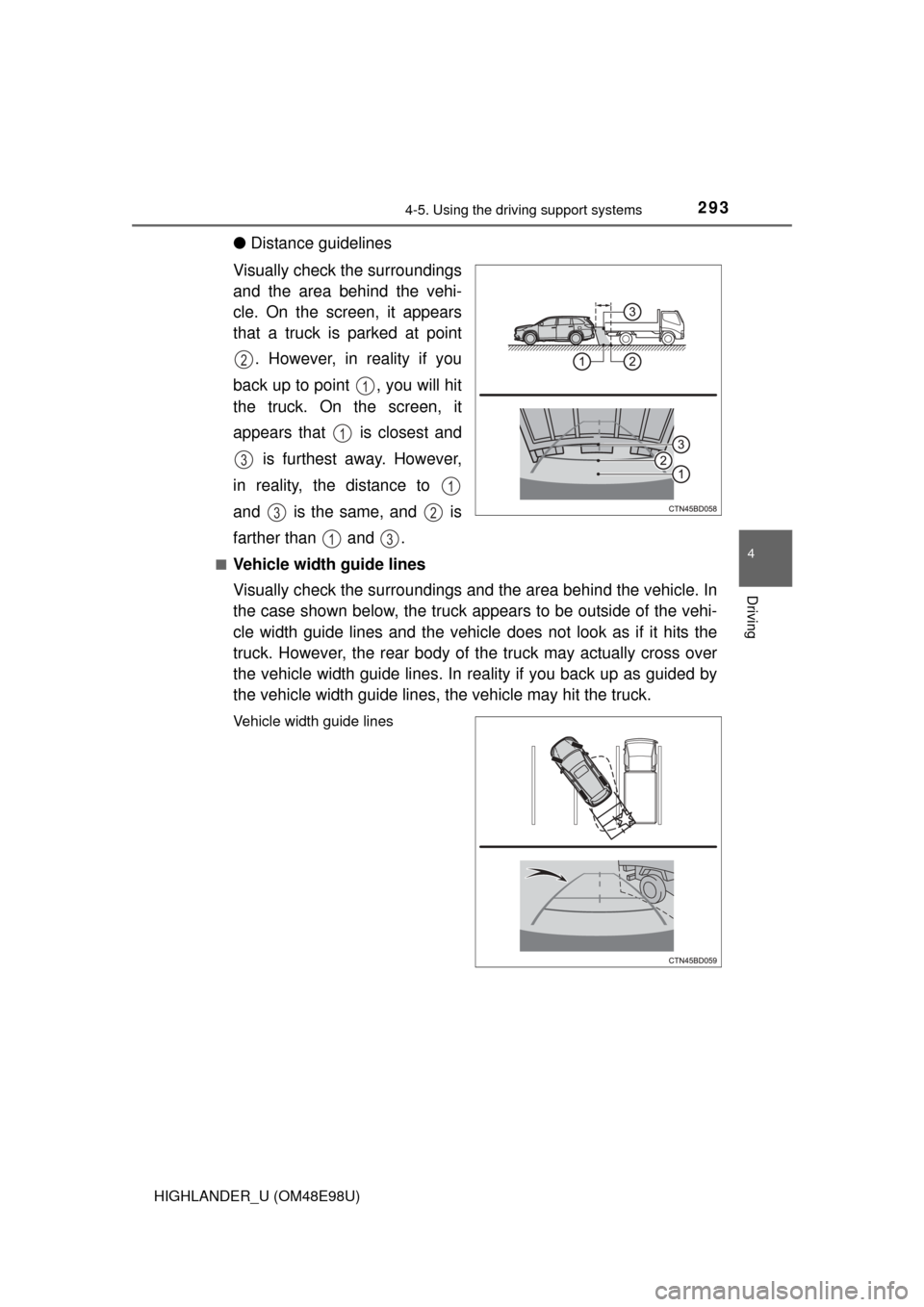
●Distance guidelines
Visually check the surroundings
and the area behind the vehi-
cle. On the screen, it appears
that a truck is parked at point . However, in reality if you
back up to point , you will hit
the truck. On the screen, it
appears that is closest and is furthest away. However,
in reality, the distance to
and is the same, and is
farther than and .
■Vehicle width guide lines
Visually check the surroundings and the area behind the vehicle. In
the case shown below, the truck appears to be outside of the vehi-
cle width guide lines and the vehicle does not look as if it hits the
truck. However, the rear body of the truck may actually cross over
the vehicle width guide lines. In re ality if you back up as guided by
the vehicle width guide lines, the vehicle may hit the truck.
Vehicle width guide lines
2
1
1
3
1
32
13
Page 296 of 712

2964-5. Using the driving support systems
HIGHLANDER_U (OM48E98U)
WARNING
●In low temperatures, the screen may darken or the image may become
faint. The image could distort when the vehicle is moving, or you may
become unable to see the image on the screen. Be sure to check direct
visually and with the mirrors all around the vehicle before proceeding.
● If the tire sizes are changed, the position of the fixed guide lines displayed
on the screen may change.
● The camera uses a special lens. The distances between objects and
pedestrians that appear in the image displayed on the screen will differ
from the actual distances. ( P. 291)
NOTICE
■How to use the camera
● The rear view monitor system may not operate properly in the following
cases.
• If the back of the vehicle is hit, the position and mounting angle of the
camera may change.
• As the camera has a water proof construction, do not detach, disassem- ble or modify it. This may cause incorrect operation.
• Do not strongly rub the camera lens. If the camera lens is scratched, it
cannot transmit a clear image.
• Do not allow organic solvent, car wax, window cleaner or glass coat to adhere to the camera. If this happens, wipe it off as soon as possible.
• If the temperature changes rapidly, such as when hot water is poured on the vehicle in cold weather, the system may not operate normally.
• When washing the vehicle, do not apply intensive bursts of water to the
camera or camera area. Doing so may result in the camera malfunc-
tioning.
• When the camera is used under fluorescent lights, sodium light or mer-
cury light etc., the lights and the illuminated areas may appear to flicker.
● Do not expose the camera to strong impact as this could cause a malfunc-
tion. If this happens, have the vehicle inspected by your Toyota dealer as
soon as possible.