Page 185 of 612
1854-3. Operating the lights and wipers
4
Driving
COROLLA_TMMMS_TMMC_U (OM12F00U)
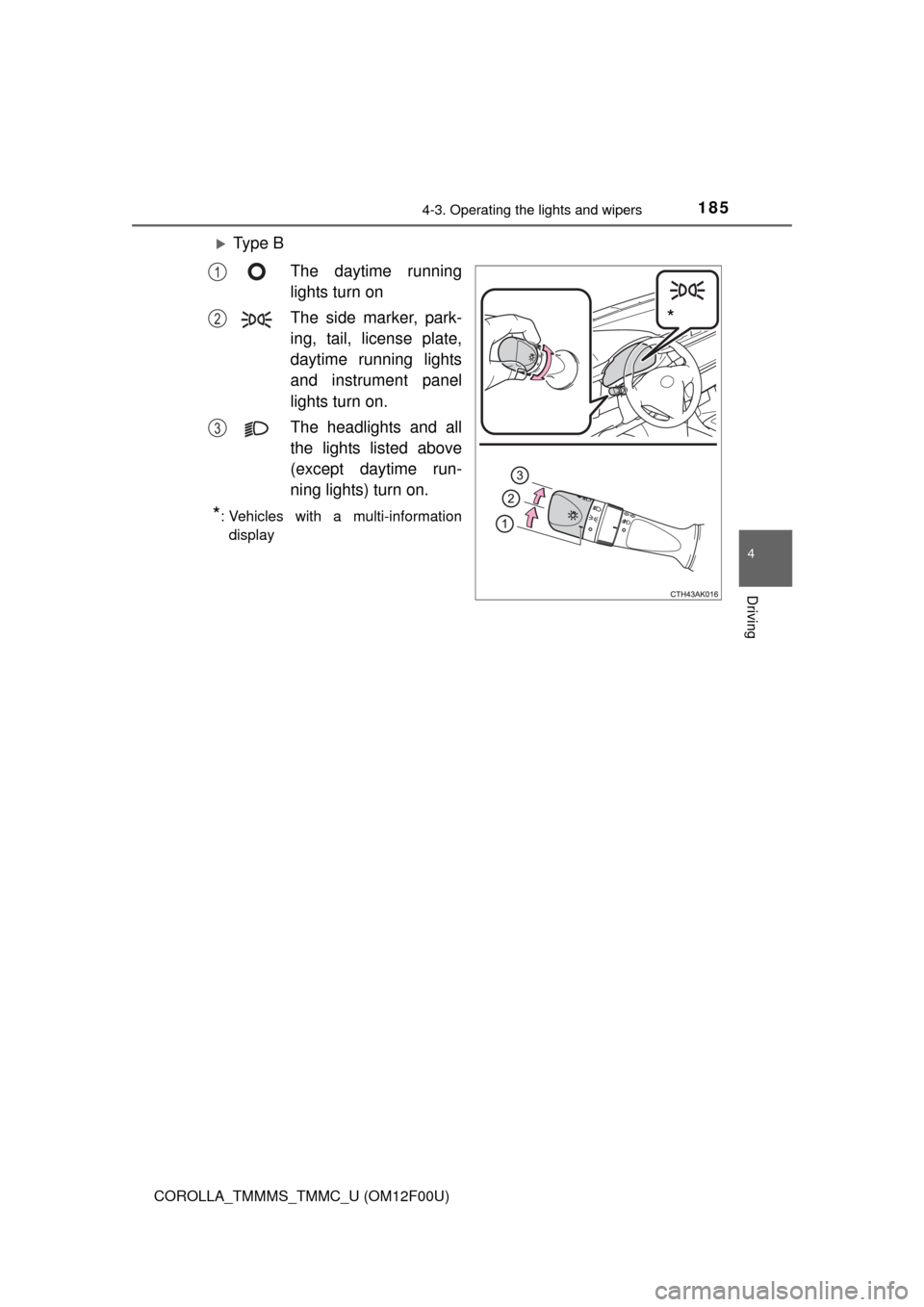
Ty p e BThe daytime running
lights turn on
The side marker, park-
ing, tail, license plate,
daytime running lights
and instrument panel
lights turn on.
The headlights and all
the lights listed above
(except daytime run-
ning lights) turn on.
*: Vehicles with a multi-informationdisplay
*
1
2
3
Page 186 of 612
1864-3. Operating the lights and wipers
COROLLA_TMMMS_TMMC_U (OM12F00U)
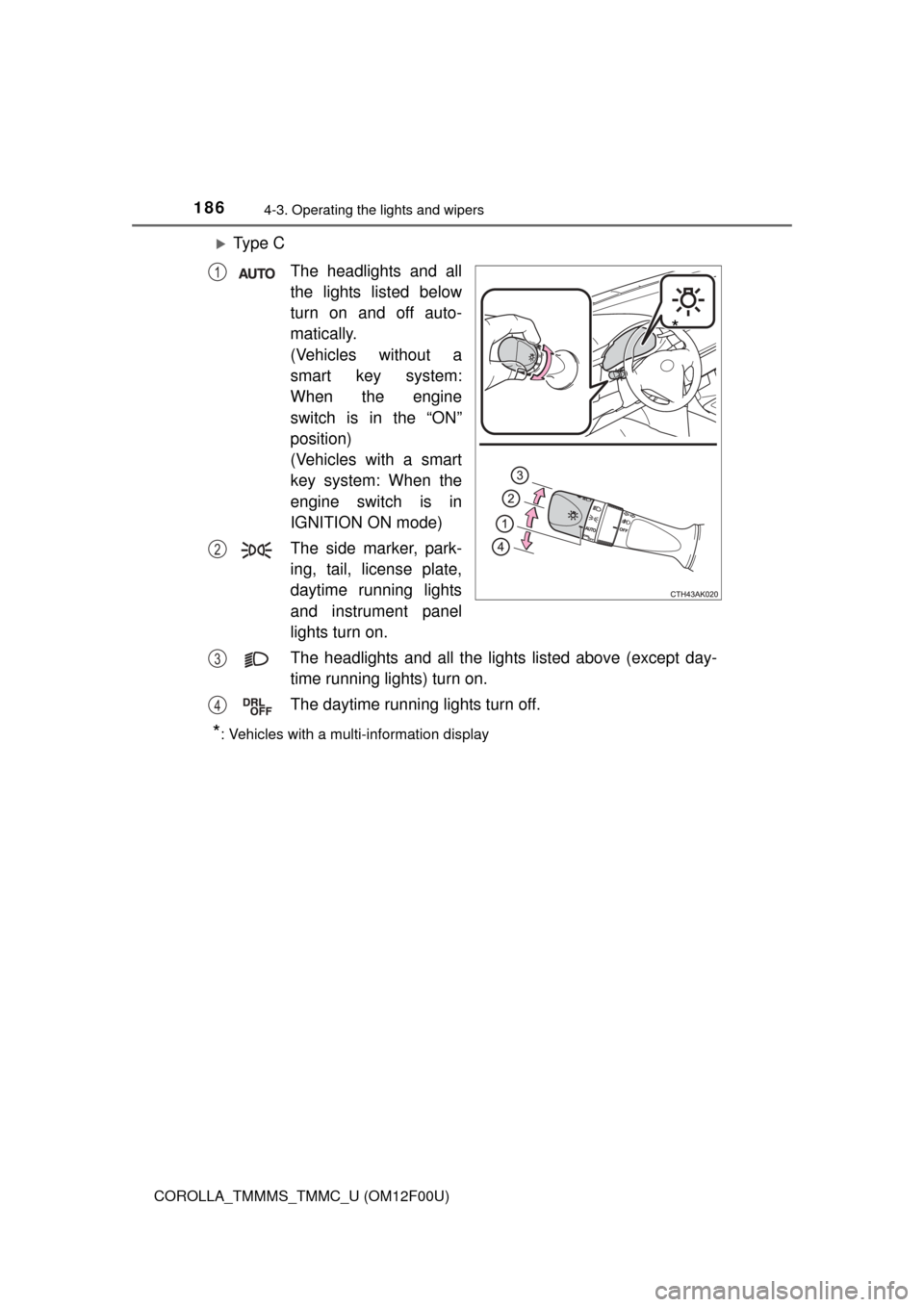
Ty p e CThe headlights and all
the lights listed below
turn on and off auto-
matically.
(Vehicles without a
smart key system:
When the engine
switch is in the “ON”
position)
(Vehicles with a smart
key system: When the
engine switch is in
IGNITION ON mode)
The side marker, park-
ing, tail, license plate,
daytime running lights
and instrument panel
lights turn on.
The headlights and all the lights listed above (except day-
time running lights) turn on.
The daytime running lights turn off.
*: Vehicles with a multi-information display
*
1
2
3
4
Page 187 of 612
1874-3. Operating the lights and wipers
4
Driving
COROLLA_TMMMS_TMMC_U (OM12F00U)
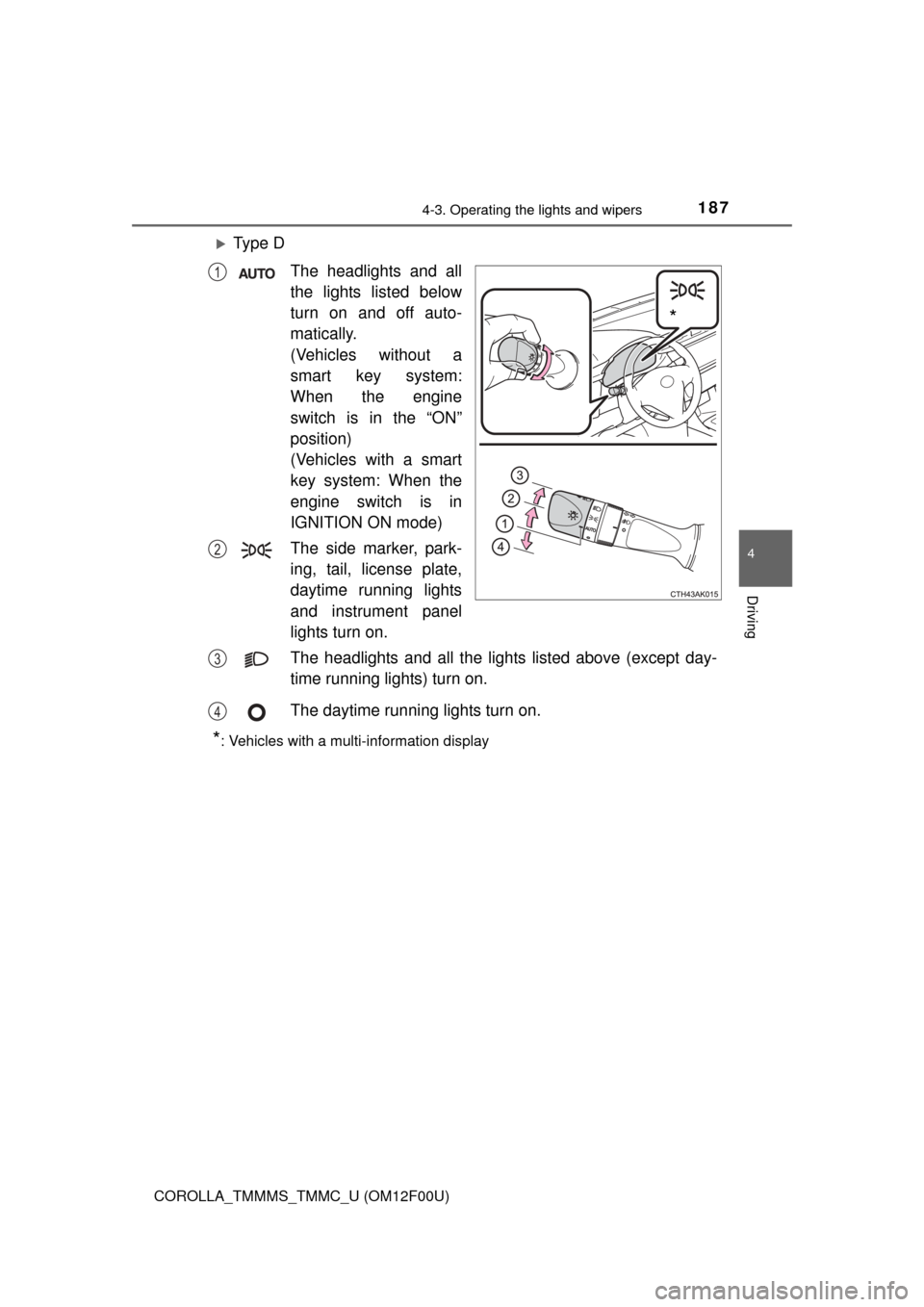
Ty p e DThe headlights and all
the lights listed below
turn on and off auto-
matically.
(Vehicles without a
smart key system:
When the engine
switch is in the “ON”
position)
(Vehicles with a smart
key system: When the
engine switch is in
IGNITION ON mode)
The side marker, park-
ing, tail, license plate,
daytime running lights
and instrument panel
lights turn on.
The headlights and all the lights listed above (except day-
time running lights) turn on.
The daytime running lights turn on.
*: Vehicles with a multi-information display
*
1
2
3
4
Page 199 of 612

1994-5. Using the driving support systems
4
Driving
COROLLA_TMMMS_TMMC_U (OM12F00U)
■Cruise control can be set when
Vehicles with an automatic transmission
● The shift lever is in the D or range 3.
● Vehicle speed is above approximately 25 mph (40 km/h).
Vehicles with a continuously variable transmission (without paddle shift
switches)
● The shift lever is in the D or S.
● Vehicle speed is above approximately 25 mph (40 km/h).
Vehicles with a continuously variable transmission (with paddle shift
switches)
● The shift lever is in the D or range 4 or higher of M has been selected.
● Range 4 or higher has been selected by using the paddle shift.
● Vehicle speed is above approximately 25 mph (40 km/h).
Vehicles with a manual transmission
Vehicle speed is above approximately 25 mph (40 km/h).
■ Accelerating after setting the vehicle speed
●The vehicle can be accelerated normally. After acceleration, the set speed
resumes.
● Even without canceling the cruise control, the set speed can be increased
by first accelerating the vehicle to the desired speed and then pushing the
lever down to set the new speed.
■ Automatic cruise co ntrol cancelation
Cruise control will stop maintaining the vehicle speed in any of the following
situations.
● Actual vehicle speed falls more than approximately 10 mph (16 km/h) below
the preset vehicle speed.
At this time, the memorized set speed is not retained.
● Actual vehicle speed is below approximately 25 mph (40 km/h).
● VSC is activated.
■ If the cruise control indicator light comes on in yellow (vehicles with a
drive monitor display)
Press the “ON-OFF” button once to deactivate the system, and then press
the button again to reactivate the system.
If the cruise control speed cannot be set or if the cruise control cancels imme-
diately after being activated, there may be a malfunction in the cruise control
system. Have the vehicle inspected by your Toyota dealer.
Page 200 of 612
2004-5. Using the driving support systems
COROLLA_TMMMS_TMMC_U (OM12F00U)■
If the warning message for the crui se control is shown on the multi-
information display (vehicles wi th a multi-information display)
Press the “ON-OFF” button once to deactivate the system, and then press
the button again to reactivate the system.
If the cruise control speed cannot be set or if the cruise control cancels imme-
diately after being activated, there may be a malfunction in the cruise control
system. Have the vehicle inspected by your Toyota dealer.
CAUTION
■ To avoid operating the cruise control by mistake
Switch the cruise control off using the “ON-OFF” button when not in use.
■ Situations unsuitable for cruise control
Do not use cruise control in any of the following situations.
Doing so may result in loss of control and could cause an accident resulting
in death or serious injury.
● In heavy traffic
● On roads with sharp bends
● On winding roads
● On slippery roads, such as those covered with rain, ice or snow
● On steep hills
Vehicle speed may exceed the set speed when driving down a steep hill.
● During emergency towing
Page 201 of 612
2014-5. Using the driving support systems
4
Driving
COROLLA_TMMMS_TMMC_U (OM12F00U)
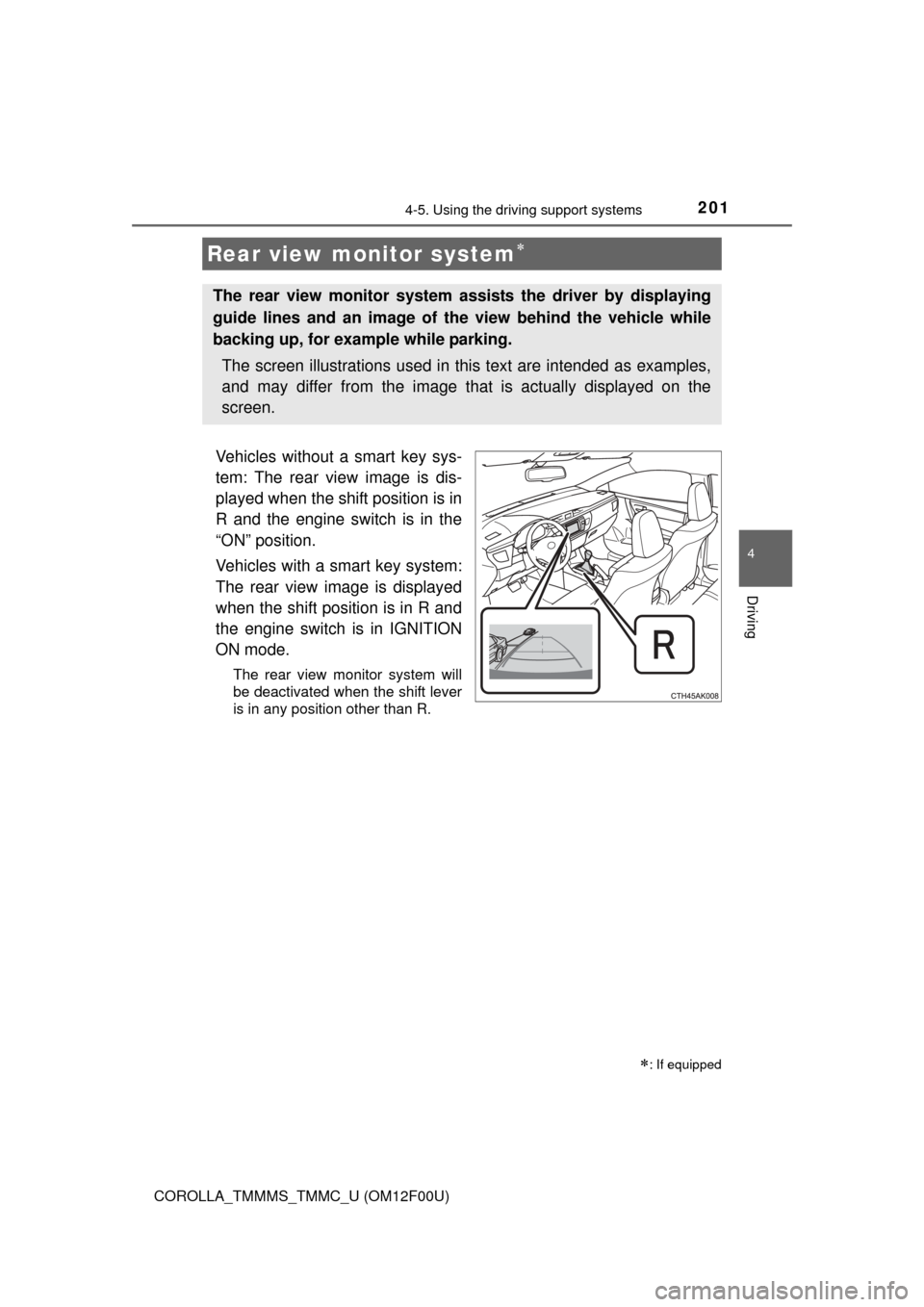
Vehicles without a smart key sys-
tem: The rear view image is dis-
played when the shift position is in
R and the engine switch is in the
“ON” position.
Vehicles with a smart key system:
The rear view image is displayed
when the shift position is in R and
the engine switch is in IGNITION
ON mode.
The rear view monitor system will
be deactivated when the shift lever
is in any position other than R.
Rear view monitor system
: If equipped
The rear view monitor system assists the driver by displaying
guide lines and an image of the view behind the vehicle while
backing up, for example while parking.
The screen illustrations used in this text are intended as examples,
and may differ from the image that is actually displayed on the
screen.
Page 202 of 612
2024-5. Using the driving support systems
COROLLA_TMMMS_TMMC_U (OM12F00U)■
Screen description
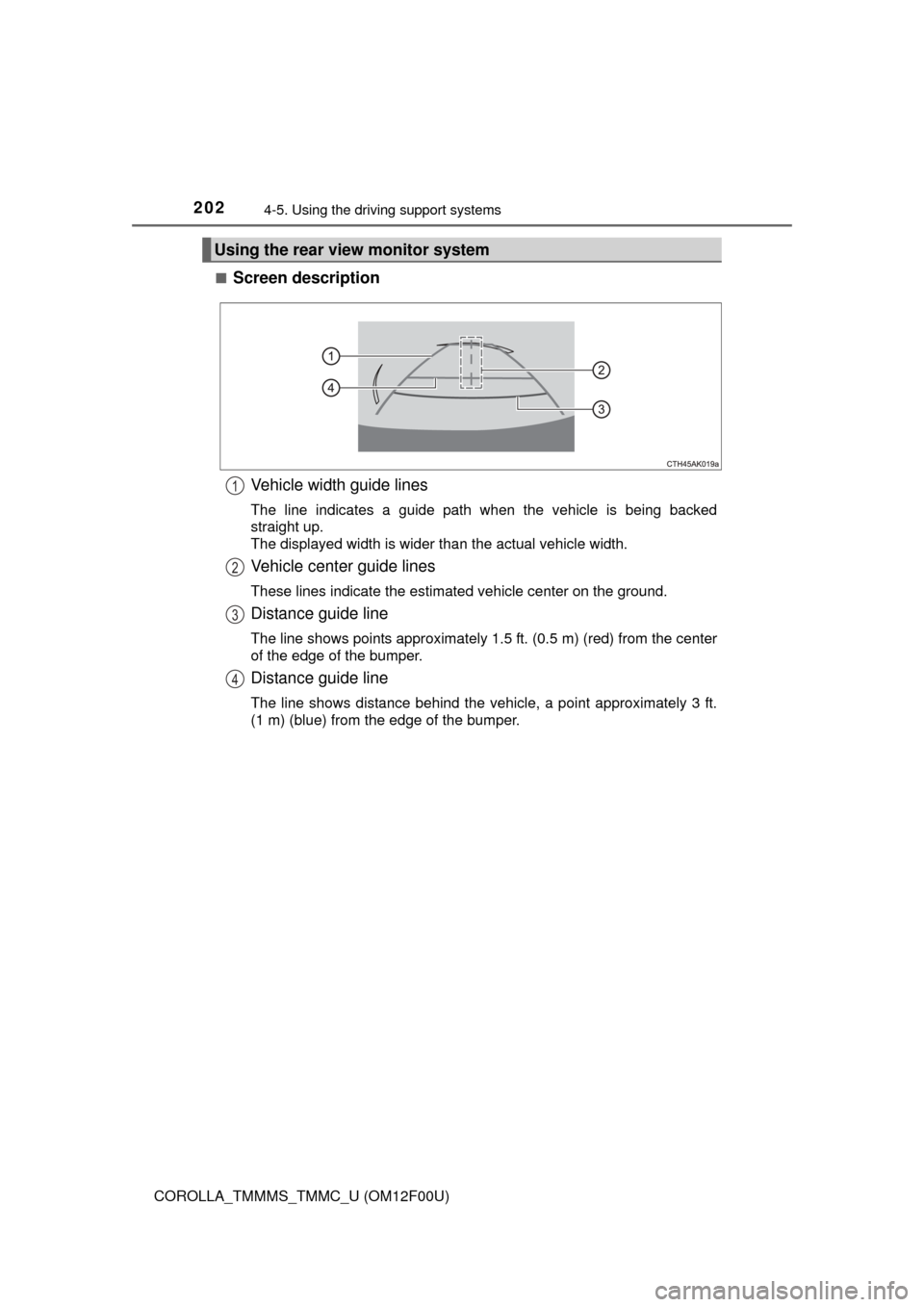
Vehicle width guide lines
The line indicates a guide path when the vehicle is being backed
straight up.
The displayed width is wider than the actual vehicle width.
Vehicle center guide lines
These lines indicate the estimated vehicle center on the ground.
Distance guide line
The line shows points approximately 1.5 ft. (0.5 m) (red) from the center
of the edge of the bumper.
Distance guide line
The line shows distance behind the vehicle, a point approximately 3 ft.
(1 m) (blue) from the edge of the bumper.
Using the rear view monitor system
1
2
3
4
Page 203 of 612
2034-5. Using the driving support systems
4
Driving
COROLLA_TMMMS_TMMC_U (OM12F00U)■
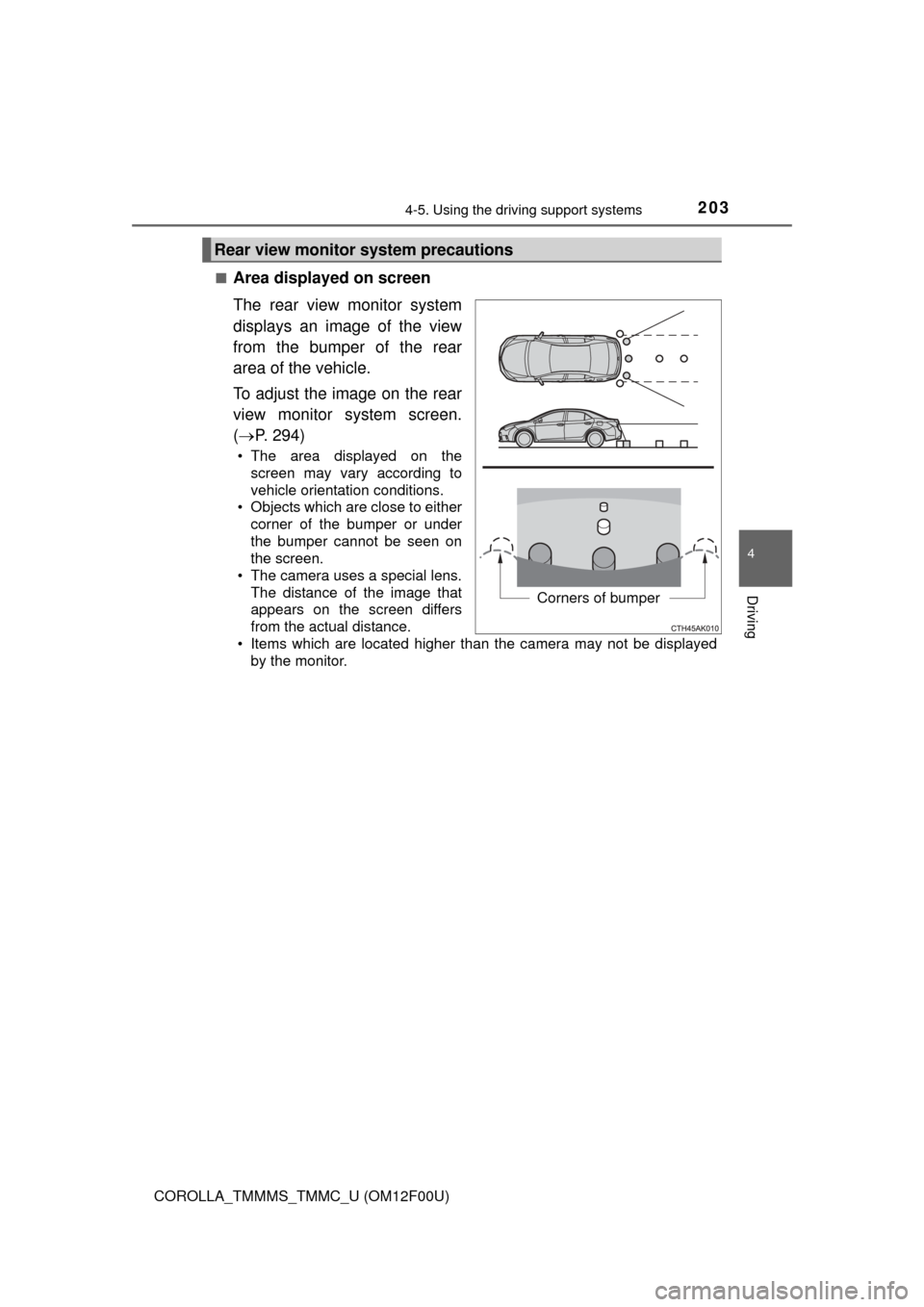
Area displayed on screen
The rear view monitor system
displays an image of the view
from the bumper of the rear
area of the vehicle.
To adjust the image on the rear
view monitor system screen.
(
P. 294)
• The area displayed on the
screen may vary according to
vehicle orientation conditions.
• Objects which are close to either corner of the bumper or under
the bumper cannot be seen on
the screen.
• The camera uses a special lens.
The distance of the image that
appears on the screen differs
from the actual distance.
• Items which are located higher than the camera may not be displayed by the monitor.
Rear view monitor system precautions
Corners of bumper