Page 75 of 612
752. Instrument cluster
2
Instrument cluster
COROLLA_TMMMS_TMMC_U (OM12F00U)
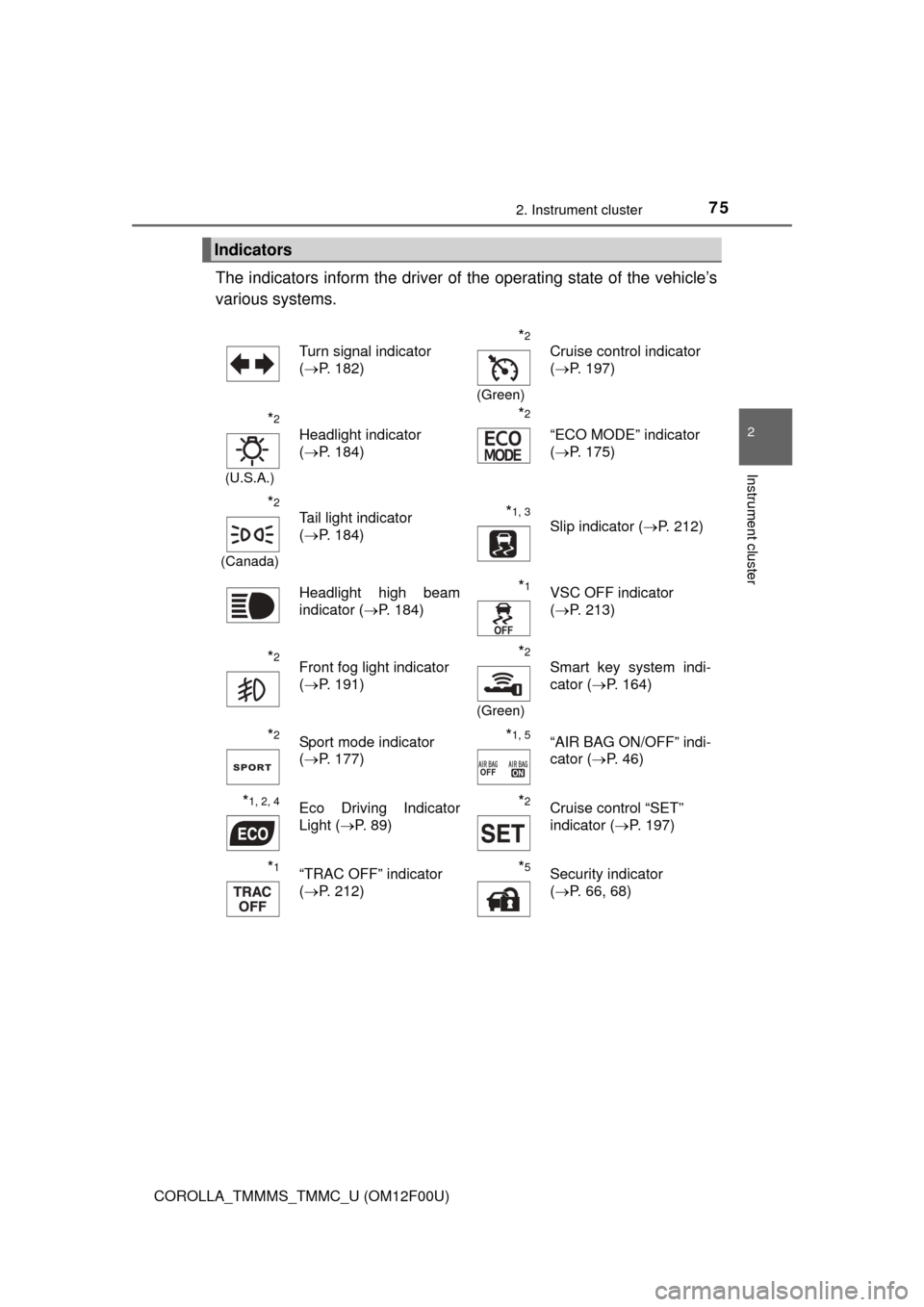
The indicators inform the driver of the operating state of the vehicle’s
various systems.
Indicators
Turn signal indicator
( P. 182)*2
(Green)
Cruise control indicator
(P. 197)
*2
(U.S.A.)
Headlight indicator
(P. 184)
*2
“ECO MODE” indicator
(P. 175)
*2
(Canada)
Tail light indicator
(P. 184) *1, 3 Slip indicator ( P. 212)
Headlight high beam
indicator ( P. 184)
*1VSC OFF indicator
(P. 213)
*2Front fog light indicator
(P. 191)*2
(Green)
Smart key system indi-
cator ( P. 164)
*2Sport mode indicator
(P. 177)*1, 5“AIR BAG ON/OFF” indi-
cator ( P. 46)
*1, 2, 4Eco Driving Indicator
Light (P. 89)*2Cruise control “SET”
indicator ( P. 197)
*1“TRAC OFF” indicator
(P. 212)*5Security indicator
(P. 66, 68)
Page 91 of 612
91
3
Operation of
each component
COROLLA_TMMMS_TMMC_U (OM12F00U) 3-1. Key information
Keys .................................... 92
3-2. Opening, closing and locking the doors
Doors .................................. 97
Trunk ................................. 106
Smart key system ............. 111
3-3. Adjusting the seats Front seats ........................ 120
Rear seats......................... 122
Head restraints.................. 124
3-4. Adjusting the steering wheel and mirrors
Steering wheel .................. 127
Inside rear view mirror ...... 129
Outside rear view mirrors ............................. 131
3-5. Opening and closing the windows
Power windows ................. 133
Moon roof .......................... 137
Page 100 of 612
1003-2. Opening, closing and locking the doors
COROLLA_TMMMS_TMMC_U (OM12F00U)
◆Door lock switchesLocks all the doors
Unlocks all the doors
◆Inside lock buttonsLocks the door
Unlocks the door
The front doors can be opened
by pulling the inside handle
even if the lock buttons are in
the lock position.
Move the inside lock button to the lock position.
Close the door.
Vehicles without a smart key system
The door cannot be locked if eit her of the front doors is open and
the key is in the engine switch.
Vehicles with a smart key system
The door cannot be locked if the engine switch is in ACCESSORY
or IGNITION ON mode, or the electr onic key is left inside the vehi-
cle. However, the key may not be detected correctly and the door
may be locked.
Unlocking and locking the doors from the inside
1
2
1
2
Locking the doors from the outside without a key
1
2
Page 104 of 612

1043-2. Opening, closing and locking the doors
COROLLA_TMMMS_TMMC_U (OM12F00U)
■Switching the door unlock functi on (vehicles with a smart key system)
It is possible to set which doors the entry function unlocks using the wireless
remote control.
Turn the engine switch off.
When the indicator light on the key surface is not on, press and hold ,
or for approximately 5 seconds while pressing and holding
.
The setting changes each time an operation is performed, as shown below.
(When changing the setting continuously, release the buttons, wait for at least
5 seconds, and repeat step .)
Vehicles with an alarm: To prevent un intended triggering of the alarm, unlock
the doors using the wireless remote control and open and close a door once
after the settings have been changed. (If a door is not opened within 60 sec-
onds after is pressed, the doors will be locked again and the alarm will
automatically be set.)
In case that the alarm is triggered, immediately stop the alarm. ( P. 6 8 )
1
2
2
Multi-information
display
(if equipped)
Unlocking functionBeep
Holding the driver’s door
handle unlocks only the
driver’s door.
Exterior: Beeps 3
times
Interior: Pings once
Holding the front passen-
ger’s door handle unlocks
all the doors.
Holding either front door
handle unlocks all the
doors.Exterior: Beeps
twice
Interior: Pings once
Page 105 of 612

1053-2. Opening, closing and locking the doors
3
Operation of each component
COROLLA_TMMMS_TMMC_U (OM12F00U)■
Conditions affecting the operation of the smart key system or wireless
remote control (with a wireless remote control function)
Vehicles without a smart key system
The wireless remote control function may not operate normally in the follow-
ing situations:
● When the wireless key battery is depleted
● Near a TV tower, radio station, electric power plant, airport or other facility
that generates strong radio waves
● When carrying a portable radio, cellular phone or other wireless communi-
cation devices
● When multiple wireless keys are in the vicinity
● When the wireless key is in contact with, or is covered by a metallic object
● When a wireless key (that emits radio waves) is being used nearby
● When the wireless key has been left near an electrical appliance such as a
personal computer
● If window tint with a metallic content or metallic objects are attached to the
rear window
Vehicles with a smart key system
P. 1 1 5
■ Customization
Settings (e.g. unlocking function using a key) can be changed.
(Customizable features: P. 570)
CAUTION
■To prevent an accident
Observe the following precautions while driving the vehicle.
Failure to do so may result in a door opening and an occupant falling out,
resulting in death or serious injury.
● Always use a seat belt.
● Always lock all the doors.
● Ensure that all doors are properly closed.
● Do not pull the inside handle of the doors while driving.
The doors may be opened and the passengers are thrown out of the vehi-
cle and it may result in serious injury or death.
Be especially careful for the front doors, as the doors may be opened
even if the inside lock buttons are in locked position.
● Set the rear door child-protector locks when children are seated in the rear
seats.
Page 112 of 612

1123-2. Opening, closing and locking the doors
COROLLA_TMMMS_TMMC_U (OM12F00U)■
Effective range (areas within whic h the electronic key is detected)
■ Alarms and warning indicators
Vehicles with a drive monitor display
A combination of exterior and interior alarms as well as warning lights are
used to prevent theft of the vehicle and unforeseeable accidents resulting
from erroneous operation. Take appropria te measures for the warning light
that comes on. ( P. 496)
Vehicles with a multi-information display
A combination of exterior and interior alarms as well as warning messages
shown on the multi-information display are used to prevent theft of the vehicle
and accidents resulting from erroneous operation. Take appropriate mea-
sures in response to any warning message on the multi-information display.
( P. 503)
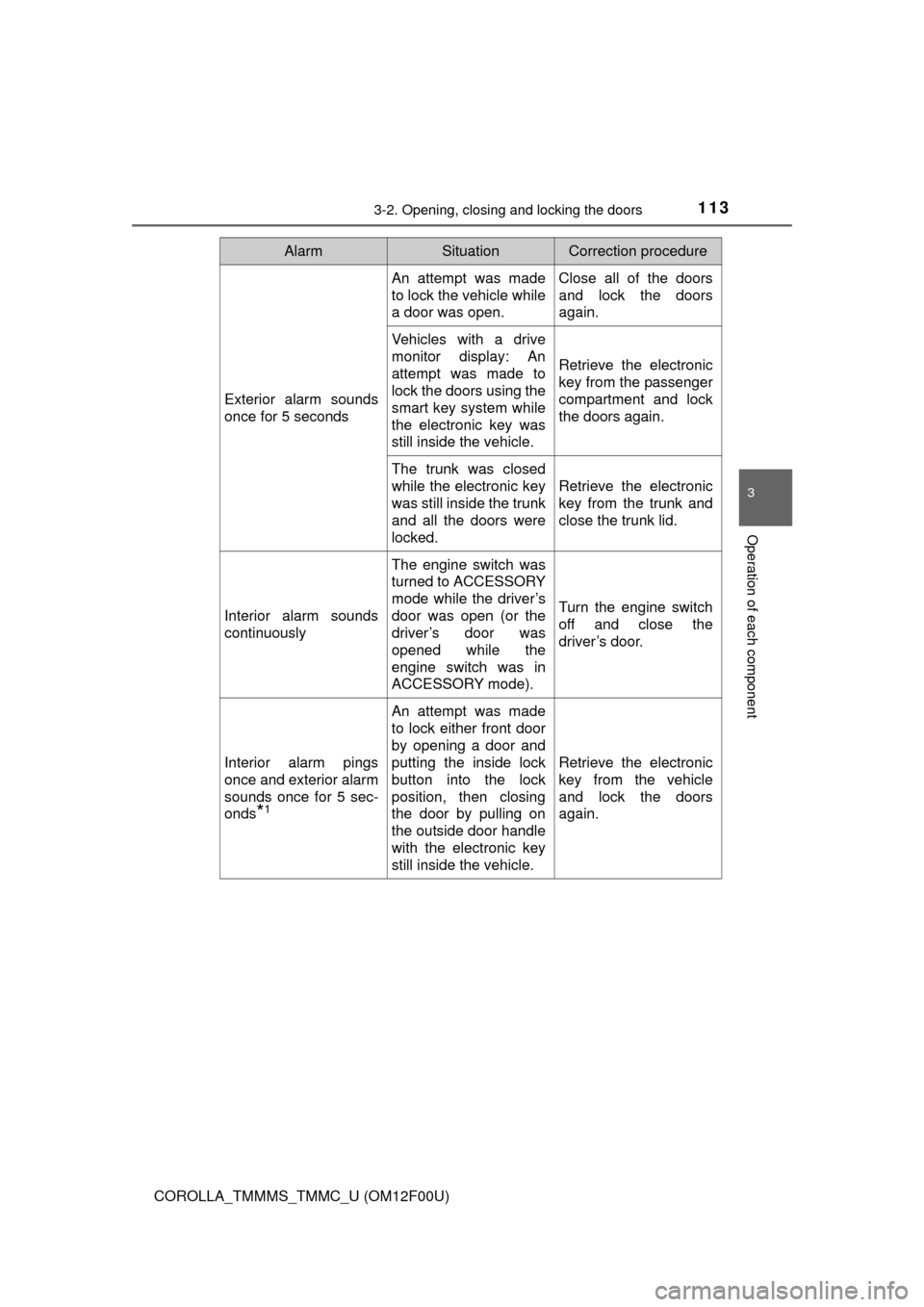
The following table describes circumstances and correction procedures when
only alarms are sounded.
When locking or unlocking the
doors
The system can be operated
when the electronic key is within
about 2.3 ft. (0.7 m) of either of
the outside front door handles.
(Only the doors detecting the key
can be operated.)
When starting the engine or changing engine switch modes
The system can be operated when the electronic key is inside the
vehicle.
When opening the trunk
The system can be operated when the electronic key is within
about 2.3 ft. (0.7 m) of the trunk release button.
Page 113 of 612
1133-2. Opening, closing and locking the doors
3
Operation of each component
COROLLA_TMMMS_TMMC_U (OM12F00U)
AlarmSituationCorrection procedure
Exterior alarm sounds
once for 5 seconds
An attempt was made
to lock the vehicle while
a door was open.Close all of the doors
and lock the doors
again.
Vehicles with a drive
monitor display: An
attempt was made to
lock the doors using the
smart key system while
the electronic key was
still inside the vehicle.
Retrieve the electronic
key from the passenger
compartment and lock
the doors again.
The trunk was closed
while the electronic key
was still inside the trunk
and all the doors were
locked.
Retrieve the electronic
key from the trunk and
close the trunk lid.
Interior alarm sounds
continuously
The engine switch was
turned to ACCESSORY
mode while the driver’s
door was open (or the
driver’s door was
opened while the
engine switch was in
ACCESSORY mode).
Turn the engine switch
off and close the
driver’s door.
Interior alarm pings
once and exterior alarm
sounds once for 5 sec-
onds
*1
An attempt was made
to lock either front door
by opening a door and
putting the inside lock
button into the lock
position, then closing
the door by pulling on
the outside door handle
with the electronic key
still inside the vehicle.
Retrieve the electronic
key from the vehicle
and lock the doors
again.
Page 120 of 612
120
COROLLA_TMMMS_TMMC_U (OM12F00U)
3-3. Adjusting the seats
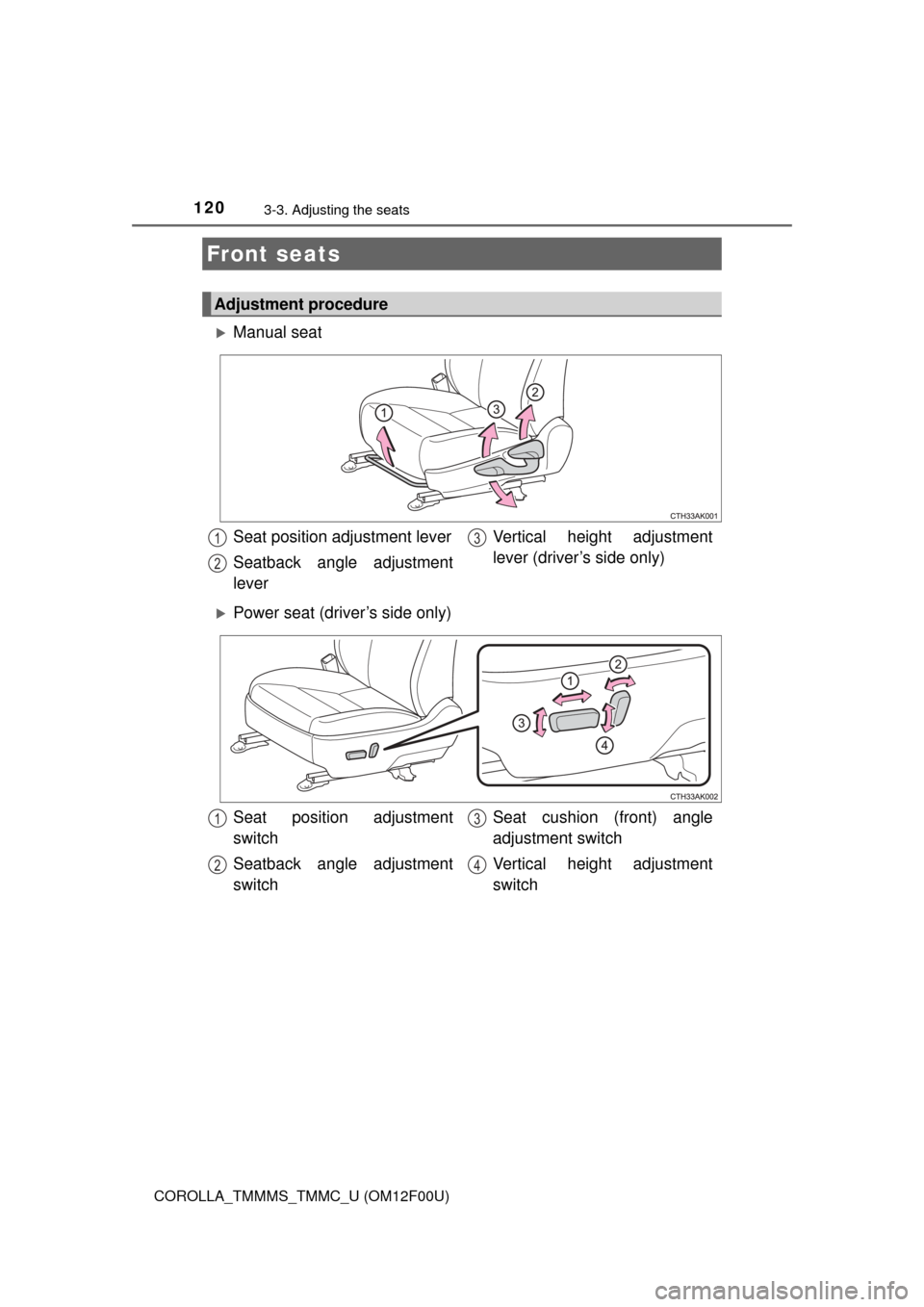
Manual seat
Power seat (driver’s side only)
Front seats
Adjustment procedure
Seat position adjustment lever
Seatback angle adjustment
lever Vertical height adjustment
lever (driver’s side only)1
2
3
Seat position adjustment
switch
Seatback angle adjustment
switchSeat cushion (front) angle
adjustment switch
Vertical height adjustment
switch1
2
3
4